2018 VAUXHALL MOKKA X driver information centre
[x] Cancel search: driver information centrePage 13 of 249

In brief111Central locking system ..........23
2 Power windows .....................33
3 Exterior mirrors .....................31
4 Light switch ......................... 115
5 Cruise control ...................... 152
Speed limiter ....................... 154
Forward collision alert .........155
6 Side air vents ...................... 131
7 Turn and lane-change
signals ................................. 122
Headlight flash ....................117
Low beam and high beam ..116
Buttons for Driver
Information Centre ................97
8 Instruments ........................... 84
9 Steering wheel controls .......77
10 Windscreen wiper,
windscreen washer system ...78
Rear window wiper, rear
window washer system .........80
11 Centre air vents ................... 131
12 Anti-theft alarm system
status LED ........................... 2913Info-Display ........................ 101
14 Controls for Info-Display
operation ............................. 101
15 Glovebox .............................. 59
16 Descent control system ......... 94
Fuel selector ......................... 86
Stop-start system ................138
17 Climate control system ........ 126
18 Electronic Stability Control
(ESC) .................................. 150
19 Control indicator for airbag
deactivation .......................... 93
20 Front storage ......................... 60
Power outlet .......................... 83
USB port, AUX input
21 Selector lever, manual
transmission ....................... 146
Selector lever, automatic
transmission ....................... 143
22 Parking brake ......................148
23 Hazard warning flashers ....121
24 Parking assist ..................... 158
Lane departure warning ......16525Ignition switch with
steering wheel lock ............135
Power button ....................... 135
26 Horn ..................................... 78
Driver airbag ........................ 48
27 Steering wheel adjustment ..77
28 Bonnet release lever ..........179
29 Front storage ......................... 60
Fuse box ............................ 192
Page 23 of 249

Keys, doors and windows21Extend the key and open the unit.
Replace the battery (battery type CR 2032), paying attention to the
installation position. Close the unit
and synchronise.
Radio remote control
synchronisation
After replacing the battery, unlock the
door with the key in the driver's door
lock. The radio remote control is
synchronised when the ignition is
switched on.
Fault
If the central locking system cannot
be operated with the radio remote
control, it may be due to the following:
● The range is exceeded.
● The battery voltage is too low.
● Frequent, repeated operation of the radio remote control while notin range, which will require re-
synchronisation.● Overload of the central locking system by operating at frequent
intervals, the power supply is
interrupted for a short time.
● Interference from higher-power radio waves from other sources.
Electronic key system
Enables a keyless operation of the
following functions:
● central locking system 3 23
● starting the engine 3 137
The electronic key simply needs to be on the driver's person.
Additionally, the electronic key
includes the functionality of the radio
remote control 3 20.
Handle with care, protect from
moisture and high temperatures and
avoid unnecessary operation.
Notice
Do not put the electronic key in the
load compartment or in front of the
Info-Display.
Replacing battery in electronic
key
Replace the battery as soon as the
system no longer operates properly
or the range is reduced. The need for battery replacement is indicated by a
message in the Driver Information
Centre 3 103.
Page 78 of 249

76Instruments and controlsInstruments and
controlsControls ....................................... 77
Steering wheel adjustment ........77
Steering wheel controls .............77
Heated steering wheel ...............77
Horn ........................................... 78
Windscreen wiper/washer .........78
Rear window wiper/washer .......80
Outside temperature ..................80
Clock ......................................... 81
Power outlets ............................. 83
Warning lights, gauges and indi‐ cators ........................................... 84
Speedometer ............................. 84
Odometer .................................. 84
Trip odometer ............................ 84
Tachometer ............................... 85
Fuel gauge ................................ 85
Fuel selector .............................. 86
Engine coolant temperature gauge ....................................... 87
Service display .......................... 87
Control indicators ......................88
Turn signal ................................. 91
Seat belt reminder .....................92Airbag and belt tensioners .........92
Airbag deactivation ....................93
Charging system .......................93
Malfunction indicator light ..........93
Brake and clutch system ...........93
Antilock brake system (ABS) .....93
Gear shifting .............................. 94
Descent control system .............94
Lane departure warning ............94
Electronic Stability Control off ...94
Electronic Stability Control and Traction Control system ...........94
Traction Control system off .......94
Preheating ................................. 94
Tyre pressure monitoring system ...................................... 95
Engine oil pressure ....................95
Low fuel ..................................... 95
Immobiliser ................................ 95
Exterior light .............................. 96
High beam ................................. 96
High beam assist .......................96
Adaptive forward lighting ...........96
Fog light ..................................... 96
Rear fog light ............................. 96
Cruise control ............................ 96
Vehicle detected ahead .............96
Speed limiter ............................. 96
Traffic sign assistant ..................97
Door open .................................. 97Information displays.....................97
Driver Information Centre ..........97
Info display .............................. 101
Vehicle messages ......................103
Warning chimes .......................104
Battery voltage ........................ 104
Vehicle personalisation ..............105
Telematics service .....................109
OnStar ..................................... 109
ERA GLONASS .......................113
Page 83 of 249

Instruments and controls81If outside temperature drops to
0.5 °C, a warning message is
displayed in the Driver Information
Centre.9 Warning
The road surface may already be
icy even though the display
indicates a few degrees above 0
°C.
Clock
Date and time are shown in the
Info-Display.
Info-Display 3 101.
Graphic-Info-Display Press MENU to open the respective
audio menu.
Select Time and Date .
Set Time
Select Set Time to enter the
respective submenu.
Select Auto Set at the bottom of the
screen. Activate either On - RDS or
Off (Manual) .
If Off (Manual) is selected, adjust
hours and minutes.
Repeatedly select 12-24 HR at the
bottom of the screen to choose a time mode.
If the 12-hour mode is selected, a
third column for AM and PM selection
is displayed. Select the desired
option.
Set Date
Select Set Date to enter the
respective submenu.
Select Auto Set at the bottom of the
screen. Activate either On - RDS or
Off (Manual) .
If Off (Manual) is selected, adjust the
date settings.
7'' Colour-Info-Display
Press ; and then select Settings.Select Time and Date to display the
respective submenu.
Set Time Format
To select the desired time format,
touch the screen buttons 12 h or 24 h .
Set Date Format
To select the desired date format,
select Set Date Format and choose
between the available options in the
submenu.
Auto Set
To choose whether time and date are
to be set automatically or manually,
select Auto Set .
Page 87 of 249
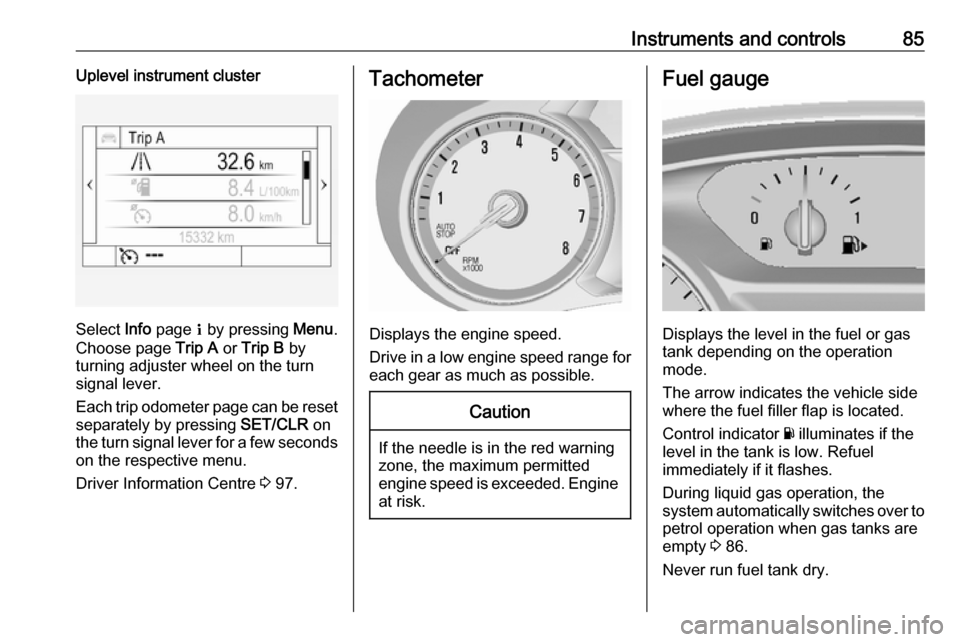
Instruments and controls85Uplevel instrument cluster
Select Info page Q by pressing Menu.
Choose page Trip A or Trip B by
turning adjuster wheel on the turn
signal lever.
Each trip odometer page can be reset separately by pressing SET/CLR on
the turn signal lever for a few seconds
on the respective menu.
Driver Information Centre 3 97.
Tachometer
Displays the engine speed.
Drive in a low engine speed range for each gear as much as possible.
Caution
If the needle is in the red warning
zone, the maximum permitted
engine speed is exceeded. Engine at risk.
Fuel gauge
Displays the level in the fuel or gas
tank depending on the operation mode.
The arrow indicates the vehicle side
where the fuel filler flap is located.
Control indicator Y illuminates if the
level in the tank is low. Refuel
immediately if it flashes.
During liquid gas operation, the
system automatically switches over to
petrol operation when gas tanks are
empty 3 86.
Never run fuel tank dry.
Page 88 of 249

86Instruments and controlsBecause of the fuel remaining in the
tank, the top-up quantity may be less
than the specified tank capacity.
Fuel selector
Press LPG to switch between petrol
and liquid gas operation. The LED in
the button shows the current
operating mode.
LED off:petrol operationLED
flashes:checking conditions for
fuel transition to liquid
gas operation.
Illuminates if conditions
are fulfilled.LED illu‐
minates:liquid gas operationLED
flashes
five
times
and
extin‐
guishes:liquid gas tank is empty
or failure in liquid gas
system. A message is
displayed in the Driver
Information Centre.
If the fuel tank is empty, the engine
will not start.
The selected fuel mode is stored and reactivated at the next ignition cycle if
conditions allow.
As soon as the liquid gas tanks are
empty, petrol operation is
automatically engaged until the
ignition is switched off.
When switching automatically
between petrol or gas operation, a
brief delay of engine tractive power
may be noticeable.
Every six months, run the petrol tank
down until control indicator Y
illuminates, then refuel. This helps
maintain fuel quality and system
function for petrol operation.
Fill the tank completely at regular
intervals to prevent corrosion in the
tank.
Fuel for liquid gas operation 3 168.
Faults and remedies
If gas mode is not possible, check the following:
● Is there enough liquid gas present?
● Is there enough petrol present for
starting?
Due to extreme temperatures in
combination with the gas
composition, it may take slightly
longer before the system switches
from petrol to gas mode.
In extreme situations, the system may
also switch back to petrol mode if the minimum requirements are not
fulfilled. If conditions allow, it may be possible to manually switch back to
liquid gas operation.
Seek the assistance of a workshop in
the event of all other faults.
Page 90 of 249
88Instruments and controlsThe remaining oil life duration menu
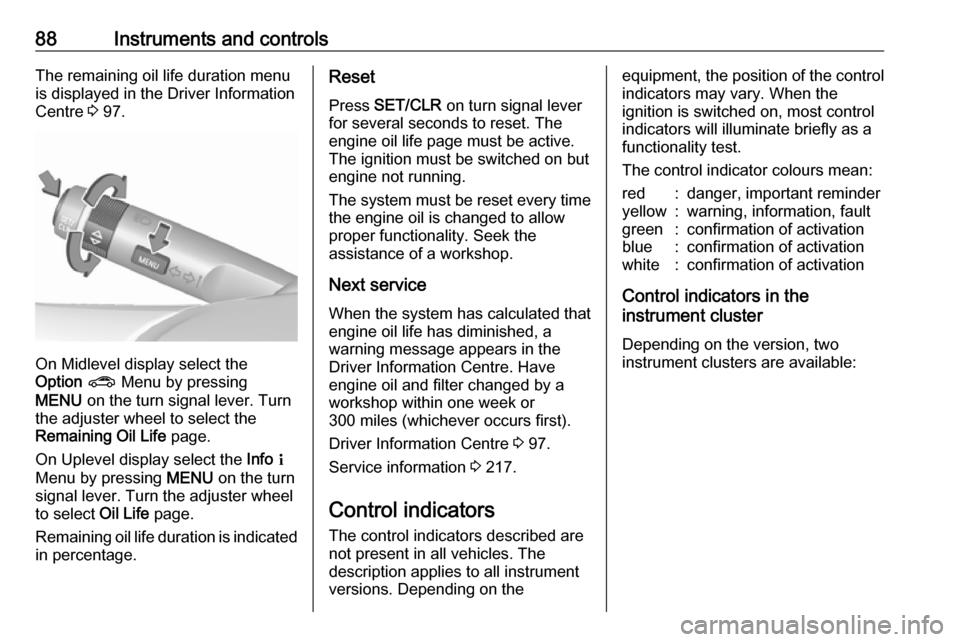
is displayed in the Driver Information Centre 3 97.
On Midlevel display select the
Option ? Menu by pressing
MENU on the turn signal lever. Turn
the adjuster wheel to select the
Remaining Oil Life page.
On Uplevel display select the Info Q
Menu by pressing MENU on the turn
signal lever. Turn the adjuster wheel
to select Oil Life page.
Remaining oil life duration is indicated
in percentage.
Reset
Press SET/CLR on turn signal lever
for several seconds to reset. The
engine oil life page must be active.
The ignition must be switched on but
engine not running.
The system must be reset every time
the engine oil is changed to allow
proper functionality. Seek the
assistance of a workshop.
Next service When the system has calculated that
engine oil life has diminished, a
warning message appears in the
Driver Information Centre. Have
engine oil and filter changed by a
workshop within one week or
300 miles (whichever occurs first).
Driver Information Centre 3 97.
Service information 3 217.
Control indicators
The control indicators described are
not present in all vehicles. The
description applies to all instrument
versions. Depending on theequipment, the position of the control indicators may vary. When the
ignition is switched on, most control
indicators will illuminate briefly as a
functionality test.
The control indicator colours mean:red:danger, important reminderyellow:warning, information, faultgreen:confirmation of activationblue:confirmation of activationwhite:confirmation of activation
Control indicators in the
instrument cluster
Depending on the version, two
instrument clusters are available:
Page 94 of 249

92Instruments and controlsIlluminates brieflyThe parking lights are switched on.
Flashes
A turn signal or the hazard warning flashers are activated.
Rapid flashing: failure of a turn signal
light or associated fuse, failure of turn
signal light on trailer.
Bulb replacement 3 185, Fuses
3 190.
Turn signals 3 122.
Seat belt reminder
Seat belt reminder on front seats
X for driver's seat illuminates or
flashes red in the instrument cluster.
k for front passenger seat illuminates
or flashes red in the centre console
when seat is occupied.
Illuminates
After the ignition has been switched on until the seat belt has been
fastened.Flashes
After having started the engine until
the seat belt has been fastened.
Seat belt status on rear seats
(vehicles with Midlevel display)
X illuminates or flashes white or grey
in the Driver Information Centre, after having started the engine.
Illuminates white
Seat belt is unfastened.
Illuminates grey
Seat belt has been fastened.
Flashes white or grey
Fastened seat belt has been
unfastened.
Fastening the seat belt 3 43.
Seat belt status on rear seats
(vehicles with Uplevel display)
X illuminates green or grey or flashes
yellow in the Driver Information
Centre, after having started the
engine.Illuminates grey
Seat belt is unfastened.
Illuminates green
Seat belt has been fastened.
Flashes yellow
Fastened seat belt has been
unfastened.
Fastening the seat belt 3 43.
Airbag and belt tensioners
v illuminates red.
When the ignition is switched on, the control indicator illuminates for a few
seconds. If it does not illuminate, does not go out after a few secondsor illuminates whilst driving, there is a
fault in the airbag system. Seek the
assistance of a workshop. The
airbags and belt pretensioners may
fail to trigger in the event of an
accident.
Deployment of the belt pretensioners
or airbags is indicated by continuous
illumination of v.