2018 VAUXHALL GRANDLAND X lock
[x] Cancel search: lockPage 148 of 263

146Driving and operating3. Release the fuel filler flap bypushing the flap 3 195.
4. Unscrew protective cap from the
filler neck.
5. Open AdBlue canister.
6. Mount one end of the hose on the
canister and screw the other end
on the filler neck.
7. Lift the canister until it is empty, or
until the flow from the canister has stopped. This can take up to five
minutes.
8. Place the canister on the ground to empty the hose, wait 15
seconds.
9. Unscrew the hose from the filler neck.
10. Mount the protective cap and turn
clockwise until it engages.
Notice
Dispose of AdBlue canister
according to environmental
requirements. Hose can be reused
after flushing with clear water before
AdBlue dries out.Automatic transmission
The automatic transmission permits
automatic gearshifting (automatic
mode) or manual gearshifting
(manual mode).
Manual shifting is possible in manual
mode by tapping the selector lever to + or - 3 148.
Transmission display
The mode or selected gear is shown
in the Driver Information Centre.
In automatic mode, the driving
programme is indicated by D.
Page 149 of 263

Driving and operating147In manual mode, M and the number
of the selected gear is indicated.
R indicates reverse gear.
N indicates neutral position.
P indicates park position.
Selector lever
Move the selector lever in the shifting
gate as shown in the illustration
above.
P:park position, wheels are locked, engage only when the vehicle is
stationary and the parking brake is appliedR:reverse gear, engage only when
the vehicle is stationaryN:neutralD:automatic modeM:manual mode<:upshift in manual mode]:downshift in manual mode
The selector lever is locked in P and
can only be moved when the ignition
is on and the brake pedal is applied.
The engine can only be started with
the lever in position P or N. When
position N is selected, press the brake
pedal or apply the parking brake
before starting.
Do not accelerate while engaging a
gear. Never depress the accelerator
pedal and brake pedal at the same
time.
When a gear is engaged, the vehicle
slowly begins to creep when the
brake is released.
Engine braking
To utilise the engine braking effect,
select a lower gear in good time when driving downhill, see manual mode.
Rocking the vehicle Rocking the vehicle is only
permissible if the vehicle is stuck in
sand, mud or snow. Move the selector
lever between D and R in a repeat
pattern. Do not race the engine and
avoid sudden acceleration.
Parking
Apply the parking brake and engage
P .
Page 152 of 263

150Driving and operatingWhen clutch slip is detected for a
specific time, the engine power will be
reduced. A warning is displayed in the Driver Information Centre. Release
the clutch.Caution
It is not advisable to drive with the hand resting on the selector lever.
Gear shift indication 3 96.
Stop-start system 3 139.
Brakes
The brake system comprises two
independent brake circuits.
If a brake circuit fails, the vehicle can
still be braked using the other brake
circuit. However, braking effect is
achieved only when the brake pedal
is depressed firmly. Considerably
more force is needed for this. The
braking distance is extended. Seek
the assistance of a workshop before
continuing the journey.
When the engine is not running, the
support of the brake servo unit
disappears once the brake pedal has been depressed once or twice.
Braking effect is not reduced, but
braking requires significantly greater
force. It is especially important to bear this in mind when being towed.
Control indicator m 3 95.
Antilock brake system
Antilock brake system (ABS)
prevents the wheels from locking.ABS starts to regulate brake pressure as soon as a wheel shows a tendency to lock. The vehicle remains
steerable, even during hard braking.
ABS control is made apparent
through a pulse in the brake pedal
and the noise of the regulation
process.
For optimum braking, keep the brake
pedal fully depressed throughout the
braking process, despite the fact that
the pedal is pulsating. Do not reduce
the pressure on the pedal.
After starting off, the system performs
a self-test which may be audible.
Control indicator u 3 95.
Adaptive brake light
During full braking, all three brake
lights flash for the duration of ABS
control.
Page 153 of 263

Driving and operating151Fault9Warning
If there is a fault in the ABS, the
wheels may be liable to lock due
to braking that is heavier than
normal. The advantages of ABS are no longer available. During
hard braking, the vehicle can no longer be steered and may
swerve.
Have the cause of the fault remedied
by a workshop.
Parking brake
9 Warning
Before leaving the vehicle, check
parking brake status. Control
indicator m must illuminate
constantly.
Electric parking brake
Applying when vehicle is stationary
9 Warning
Pull switch m for a minimum of
one second until control indicator
m illuminates constantly and
electric parking brake is applied
3 95. The electric parking brake
operates automatically with
adequate force.
Before leaving the vehicle, check
the electric parking brake status.
Control indicator m 3 95.
The electric parking brake can always
be activated, even if the ignition is off.
Do not operate electric parking brake
system too often without engine
running as this will discharge the vehicle battery.
Releasing
Switch on ignition. Keep foot brake
pedal depressed and then push
switch m.
Drive away function
Vehicles with manual transmission:
Depressing the clutch pedal and then
slightly releasing the clutch pedal and slightly depressing the accelerator
pedal releases the electric parking
brake automatically. This is not
possible when switch m is pulled at
the same time.
Vehicles with automatic transmission: Engaging D and then depressing the
accelerator pedal releases the
electric parking brake automatically.
This is not possible when switch m is
pulled at the same time.
Page 168 of 263
166Driving and operating9Warning
The driver accepts full
responsibility for the appropriate
following distance based on traffic, weather and visibility conditions.
Following distance must be
adjusted or the system switched
off when required by the prevailing
conditions.
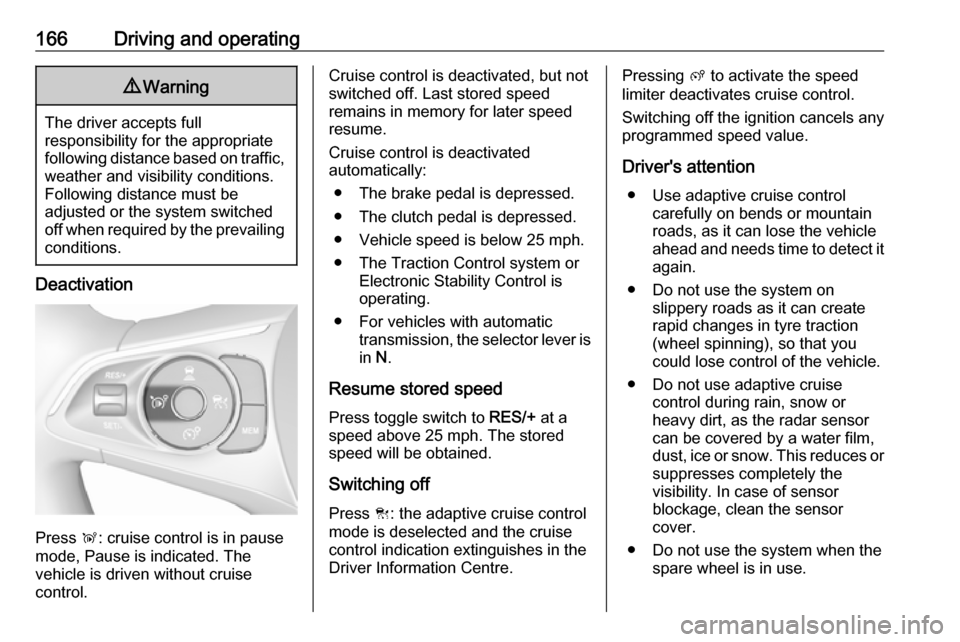
Deactivation
Press Ñ: cruise control is in pause
mode, Pause is indicated. The
vehicle is driven without cruise
control.
Cruise control is deactivated, but not
switched off. Last stored speed
remains in memory for later speed
resume.
Cruise control is deactivated
automatically:
● The brake pedal is depressed.
● The clutch pedal is depressed.
● Vehicle speed is below 25 mph.
● The Traction Control system or Electronic Stability Control is
operating.
● For vehicles with automatic transmission, the selector lever is
in N.
Resume stored speed
Press toggle switch to RES/+ at a
speed above 25 mph. The stored
speed will be obtained.
Switching off
Press C: the adaptive cruise control
mode is deselected and the cruise
control indication extinguishes in the
Driver Information Centre.Pressing ß to activate the speed
limiter deactivates cruise control.
Switching off the ignition cancels any
programmed speed value.
Driver's attention ● Use adaptive cruise control carefully on bends or mountainroads, as it can lose the vehicle
ahead and needs time to detect it again.
● Do not use the system on slippery roads as it can create
rapid changes in tyre traction
(wheel spinning), so that you
could lose control of the vehicle.
● Do not use adaptive cruise control during rain, snow or
heavy dirt, as the radar sensor
can be covered by a water film,
dust, ice or snow. This reduces or suppresses completely the
visibility. In case of sensor
blockage, clean the sensor
cover.
● Do not use the system when the spare wheel is in use.
Page 172 of 263

170Driving and operating8'' Colour-Info-Display: Adjust the
alert sensitivity in the settings of the
active emergency braking in the
vehicle personanlisation, 3 104.
The chosen setting will remain until it
is changed. The alert timing will vary
based on vehicle speed. The faster the vehicle speed, the farther awaythe alert will occur. Consider traffic
and weather conditions when
selecting the alert timing.
Deactivation The system can only be deactivated
by deactivating the active emergency
braking in the vehicle personalisation, 3 104.
General information9 Warning
Forward collision alert is just a
warning system and does not
apply the brakes. When
approaching a vehicle ahead too
rapidly, it may not provide you
enough time to avoid a collision.
The driver accepts full
responsibility for the appropriate
following distance based on traffic, weather and visibility conditions.
The complete attention of the
driver is always required while
driving. The driver must always be
ready to take action and apply the
brakes.
System limitations
Forward collision alert is designed to warn on vehicles only, but may reactalso to other objects.
In the following cases, Forward
collision alert may not detect a vehicle ahead or sensor performance is
limited:
● Driving on winding or hilly roads.● During nighttime driving.
● Weather limits visibility, such as fog, rain, or snow
● The sensor in the windscreen orthe radar unit behind the front
bumper are blocked by snow, ice,
slush, mud, dirt etc.
● The windscreen is damaged or affected by foreign items, e.g.
stickers.
Active emergency braking
Active emergency braking can help to reduce the damage and injury from
crashes with vehicles, pedestrians
and obstacles directly ahead, when a
collision can no longer be avoided
either by manual braking or by
steering. Before the active
emergency braking applies, the driver
is warned by the Forward collision
alert 3 169 or the Front pedestrian
protection alert 3 173.
The feature uses various inputs (e.g.
camera sensor, radar sensor, brake
pressure, vehicle speed) to calculate
the probability of a frontal collision.
Page 174 of 263

172Driving and operating9Warning
Emergency automatic braking is
an emergency crash preparation
feature and is not designed to
avoid crashes. Do not rely on the
system to brake the vehicle.
Emergency automatic braking will
not brake outside of its operating speed range and only responds to
detected vehicles and
pedestrians.
Forward looking brake assist
In addition to the brake preparation
system and emergency automatic
braking, the forward looking brake
assist function makes the brake assist more sensitive. Therefore, pressing
the brake pedal less strongly results
in immediate hard braking. This
function helps the driver brake
quicker and harder before the
imminent collision.
9 Warning
Active emergency braking is not
designed to apply hard
autonomous braking or to
automatically avoid a collision. It is designed to reduce the vehicle
speed before a collision. It may not
react to animals. After a sudden
lane change, the system needs a
certain time to detect the next
preceding vehicle.
The complete attention of the
driver is always required while
driving. The driver must always be
ready to take action and apply the brakes and steer to avoid
collisions.
The system is designed to work with
all occupants wearing their seat belts.
Intelligent Brake Assist
If the vehicle is equipped with radar
sensor Intelligent brake assist may
activate when the brake pedal is
applied quickly by providing a boost
to braking based on the speed of
approach and distance to a vehicle
ahead.
Minor brake pedal pulsations or pedal movement during this time is normal
and the brake pedal should continue
to be applied as needed. Intelligent
brake assist will automatically
disengage only when the brake pedal is released.9 Warning
Intelligent brake assist may
increase vehicle braking in
situations when it may not be
necessary. You could block the
flow of traffic. If this occurs, take
your foot off the brake pedal and
then apply the brakes as needed.
Forward collision alert
3 169
Front pedestrian protection
3 173.
Page 175 of 263

Driving and operating173DeactivationActive emergency braking can be
deactivated in the personalisation
menu 3 104. If deactivated a
message is displayed in the Driver
Information Centre.
System limitations In some cases, the active emergencybraking system may provide an
automatic braking in situations that
seem to be unnecessary, for instance
in parking garages, due to traffic signs
in a curve or due to vehicles in
another lane. This is normal
operation, the vehicle does not need service. Firmly apply the accelerator
pedal to override the automatic
braking if the situation and the
surroundings permit.
In the following cases, active
emergency braking performance is limited:
● Driving on winding or hilly roads.
● Detecting all vehicles, especially vehicles with a trailer, tractors,
muddy vehicles, etc.● Detecting a vehicle when weather limits visibility, such as in
fog, rain, or snow.
● During nighttime driving.
● Weather limits visibility, such as fog, rain, or snow.
● The sensor in the windscreen or the radar unit behind the front
bumper are blocked by snow, ice, slush, mud, dirt etc.
● The windscreen is damaged or affected by foreign items, e.g.
stickers.
Complete attention is always required
while driving, and you should be ready to take action and apply the
brakes and/or steer the vehicle to
avoid crashes.
Fault
In case the system requires a service, a message is displayed in the Driver
Information Centre.
If the system does not work as it
should do, vehicle messages are
displayed in the Driver Information
Centre.
Vehicle messages 3 103.Front pedestrian protection
Front pedestrian protection may help
to avoid or reduce the harm caused
by front-end crashes with nearby
pedestrians when driving in a forward gear.
The system uses the front camera in the windscreen and a radar unit in the front bumper to detect a pedestrian
directly ahead, in your path.
Front pedestrian protection can
detect and alert to pedestrians in a
forward gear at speeds between 3
mph and 37 mph. Additionally Front
pedestrian protection can provide a
boost to braking or automatically
brake the vehicle.
During nighttime driving, system
performance is limited.
Front pedestrian protection can be
set to Off, Alert, or Alert & Brake in
vehicle personalisation 3 104.