Page 3 of 255
Introduction.................................... 2
In brief ............................................ 6
Keys, doors and windows ............21
Seats, restraints ........................... 42
Storage ........................................ 64
Instruments and controls .............73
Lighting ...................................... 110
Climate control ........................... 119
Driving and operating .................131
Vehicle care ............................... 184
Service and maintenance ..........223
Technical data ........................... 227
Customer information ................240
Index .......................................... 248Contents
Page 13 of 255

In brief111Power windows .....................37
2 Exterior mirrors .....................34
3 Cruise control .....................151
Speed limiter ....................... 153
4 Turn and lane-change
signals, headlight flash,
low/high beam, high beam
assist ................................... 114
Exit lighting ......................... 117
Parking lights ...................... 115
Buttons for Driver
Information Centre ................95
5 Side air vents ...................... 128
6 Instruments .......................... 84
Driver Information Centre ...... 95
7 Buttons for Driver
Information Centre ................95
8 Windscreen wiper and
washer, rear wiper and
washer ................................. 75
9 Head-up display ....................99
10 Centre air vents .................. 128
11 Hazard warning flashers ....113
12 Info-Display .......................... 9713Centre air vent ......................97
14 Anti-theft alarm system
status LED ........................... 32
15 Central locking system ..........24
16 Glovebox .............................. 64
Fuse box ............................ 201
17 Controls for Info-Display
operation ............................... 97
18 Climate control system ........ 120
19 USB charging port ................ 78
20 Parking assist/Advanced
parking assist .....................160
Lane departure warning .....173
Eco button for stop-start
system ................................. 137
Electronic Stability Control
and Traction Control ..........149
21 Power outlet .......................... 78
22 Manual transmission ..........147
Automatic transmission ......144
23 Manual parking brake .........148
24 Power button ....................... 133
25 Ignition switch .....................13226Steering wheel adjustment ..74
27 Horn ..................................... 75
28 Bonnet release lever ..........186
29 Storage ................................. 64
Fuse box ............................ 201
30 Head-up display ....................99
31 Light switch ........................ 110
Headlight range
adjustment ......................... 112
Front/rear fog lights ............114
Instrument illumination .......116
Page 75 of 255

Instruments and controls73Instruments and
controlsControls ....................................... 74
Steering wheel adjustment ........74
Steering wheel controls .............74
Heated steering wheel ...............74
Horn ........................................... 75
Windscreen wiper/washer .........75
Rear window wiper/washer .......77
Outside temperature ..................77
Clock ......................................... 78
Power outlets ............................. 78
Inductive charging .....................79
Cigarette lighter ......................... 80
Ashtrays .................................... 80
Warning lights, gauges and indi‐
cators ........................................... 81
Instrument cluster ......................81
Speedometer ............................. 84
Odometer .................................. 85
Trip odometer ............................ 85
Tachometer ............................... 85
Fuel gauge ................................ 86
Fuel selector .............................. 86
Engine coolant temperature gauge ....................................... 87Engine oil level monitor.............88
Service display .......................... 88
Control indicators ......................89
Turn signal ................................. 89
Seat belt reminder .....................89
Airbag and belt tensioners .........90
Airbag deactivation ....................90
Charging system .......................90
Malfunction indicator light ..........90
Service vehicle soon .................91
Stop engine ............................... 91
System check ............................ 91
Brake and clutch system ...........91
Antilock brake system (ABS) .....91
Gear shifting .............................. 92
Lane departure warning ............92
Electronic Stability Control and Traction Control system ...........92
Electronic Stability Control and Traction Control system off ......92
Engine coolant temperature ......92
Preheating ................................. 93
Diesel particle filter ....................93
AdBlue ....................................... 93
Deflation detection system ........93
Engine oil pressure ....................93
Low fuel ..................................... 94
Autostop .................................... 94
Exterior light .............................. 94
High beam ................................. 94High beam assist.......................94
Low beam .................................. 94
Fog light ..................................... 94
Rear fog light ............................. 94
Rain sensor ............................... 94
Cruise control ............................ 94
Speed limiter ............................. 95
Traffic sign assistant ..................95
Door open .................................. 95
Information displays .....................95
Driver Information Centre ..........95
Info display ................................ 97
Head-up display ........................99
Vehicle messages ......................101
Warning chimes .......................101
Battery voltage ........................ 101
Vehicle personalisation ..............102
Telematics service .....................105
OnStar ..................................... 105
Page 76 of 255
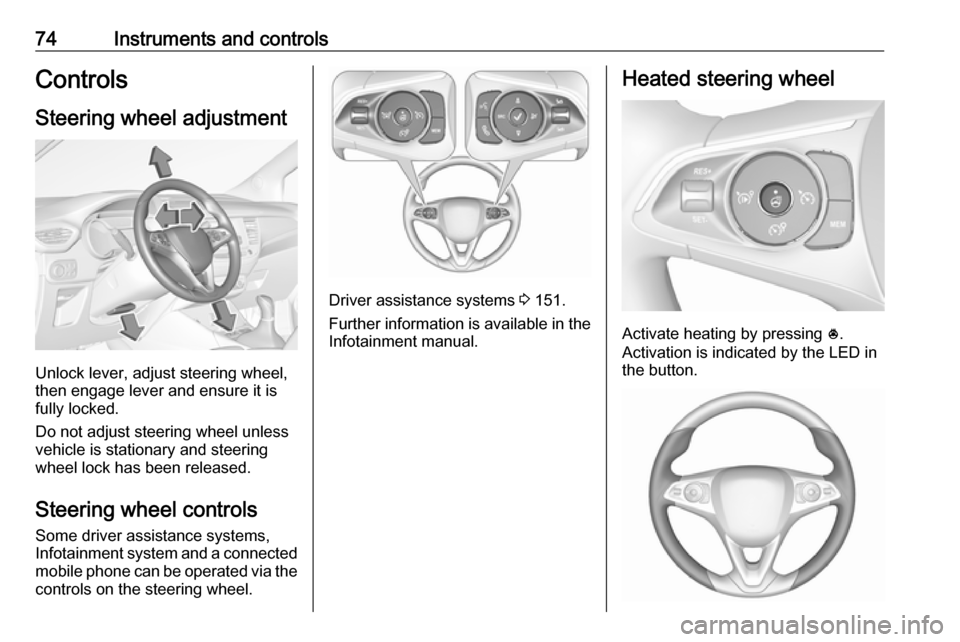
74Instruments and controlsControlsSteering wheel adjustment
Unlock lever, adjust steering wheel,
then engage lever and ensure it is
fully locked.
Do not adjust steering wheel unless
vehicle is stationary and steering
wheel lock has been released.
Steering wheel controls
Some driver assistance systems,
Infotainment system and a connected mobile phone can be operated via the
controls on the steering wheel.
Driver assistance systems 3 151.
Further information is available in the
Infotainment manual.
Heated steering wheel
Activate heating by pressing *.
Activation is indicated by the LED in
the button.
Page 77 of 255
Instruments and controls75The recommended grip areas of the
steering wheel are heated quicker
and to a higher temperature than the
other areas.
Heating is operational when the
engine is running and during an
Autostop.
Stop-start system 3 137.
Horn
Press j.
Windscreen wiper/washer
Windscreen wiper with adjustable
wiper intervalHI:fastLO:slowINT:interval wipingOFF:off
For a single wipe when the
windscreen wiper is off, press the
lever downwards to position 1x.
Do not use if the windscreen is frozen.
Switch off in car washes.
Adjustable wiper interval
Wiper lever in position INT.
Turn the adjuster wheel to adjust the
wiping frequency.
Page 78 of 255
76Instruments and controlsWindscreen wiper with rain
sensorHI:fastLO:slowAUTO:automatic wiping with rain
sensorOFF:off
In AUTO position, the rain sensor
detects the amount of water on the
windscreen and automatically
regulates the frequency of the
windscreen wiper.
For a single wipe when the
windscreen wiper is off, press the
lever downwards to position 1x.
Do not use if the windscreen is frozen.
Switch off in car washes.
Adjustable sensitivity of the rain
sensor
Wiper lever in position AUTO.
Turn the adjuster wheel to adjust the
sensitivity of the rain sensor.
Keep the sensor free from dust, dirt
and ice.
Control indicator < 3 75.
Windscreen washer
Page 79 of 255

Instruments and controls77Pull lever. Washer fluid is sprayed
onto the windscreen and the wiper
wipes a few times.
Washer fluid 3 188.
Rear window wiper/washer
Rear window wiper
Turn outer cap to activate the rear
window wiper:
OFF:offINT:intermittent operationON:continuous operation
Do not use if the rear window is
frozen.
Switch off in car washes.
The rear window wiper comes on
automatically when the windscreen
wiper is switched on and reverse gear
is engaged.
Activation or deactivation of this
function can be changed in the
Vehicle personalisation menu 3 102.
Rear window washer
Push lever.
Washer fluid is sprayed onto the rear
window and the wiper wipes a few
times.
The rear window washer system is
deactivated when the fluid level is
low.
Washer fluid 3 188.
Outside temperature A drop in temperature is indicated
immediately and a rise in temperature
after a time delay.
Illustration shows an example.
If outside temperature drops to 3 °C,
a warning message is displayed in the Driver Information Centre.
Page 80 of 255

78Instruments and controls9Warning
The road surface may already be
icy even though the display
indicates a few degrees above 0
°C.
Clock
Date and time are shown in the
Info-Display 3 97.
Setting date and time, see
Infotainment manual.
Power outlets
A 12 Volt power outlet is located in the
centre console.
Another power outlet is located in the console between the front seats.
Do not exceed the maximum power
consumption of 120 watts.
With ignition off, the power outlet is
deactivated. Additionally, the power outlet is deactivated in the event of
low vehicle battery voltage.
Electrical accessories that are
connected must comply with the
electromagnetic compatibility
requirements laid down in
DIN VDE 40 839.
Do not connect any current-delivering
accessories, e.g. electrical charging
devices or batteries.
Do not damage the outlets by using
unsuitable plugs.
Stop-start system 3 137.
USB charging port
One or two USB ports are located in
the centre console. Both USB ports
are prepared for charging devices.
When two USB ports are avilable, the
upper USB port can be used to
connect a phone for phone projection.