Page 108 of 632
1082. Instrument cluster
YARIS_HV_OM_Europe_OM52J66E
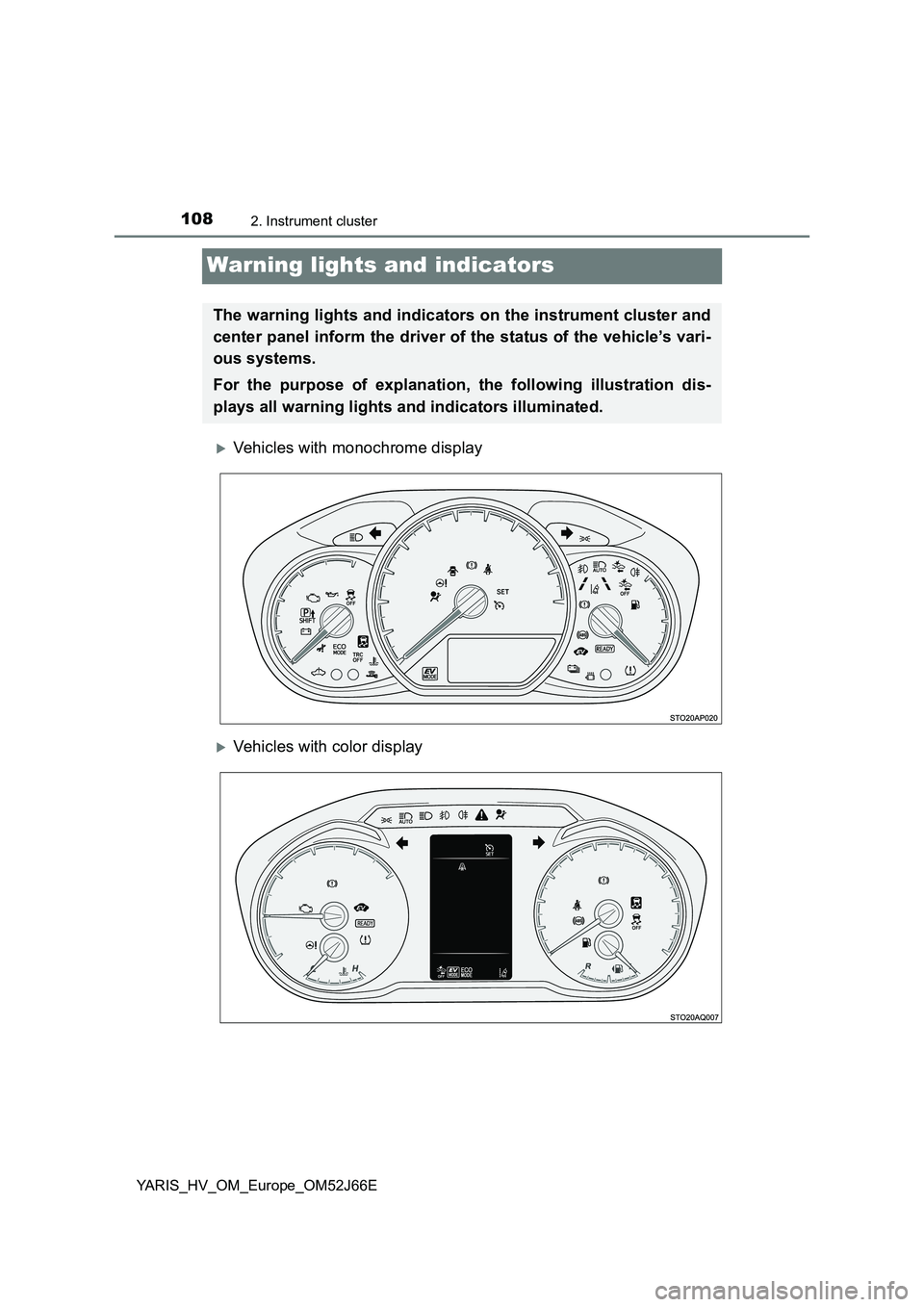
Warning lights and indicators
Vehicles with monochrome display
Vehicles with color display
The warning lights and indicators on the instrument cluster and
center panel inform the driver of the status of the vehicle’s vari-
ous systems.
For the purpose of explanation, the following illustration dis-
plays all warning lights and indicators illuminated.
Page 109 of 632

1092. Instrument cluster
2
Instrument cluster
YARIS_HV_OM_Europe_OM52J66E
Warning lights inform the driver of malfunctions in the indicated vehi-
cle’s systems.
Warning lights
*1
(Red)
Brake system warning
light ( P. 517)
*1
ABS warning light
( P. 519)
*1, 8Charging system
warning light ( P. 517)
*1Electric power steering
system warning light
( P. 519)
*9, 10Charging system
warning light ( P. 517)
*1, 2, 6PCS warning light
( P. 519)
*1, 8Low engine oil pressure
warning light ( P. 518)
*1, 3
Slip indicator (P. 520)
*9, 10
Low engine oil pressure
warning light ( P. 518)
*2, 8
(Yellow)
Automatic High Beam
indicator ( P. 520)
*1, 8High engine coolant
temperature warning
light ( P. 518)
*1
(Yellow)
Brake system warning
light ( P. 520)
*9, 10High engine coolant
temperature warning
light ( P. 518)
*2, 8
(Yellow)
Cruise control indicator
( P. 520)
*1, 8
Hybrid system warning
light ( P. 518)
*2, 8
(Yellow)
LDA indicator (P. 520)
*1
Malfunction indicator
lamp ( P. 518)
*2, 7, 8
(Yellow)
Lane marker indicators
( P. 520)
*1
SRS warning light
( P. 518)
*2, 4, 8
(Yellow)
Smart entry & start
system indicator
( P. 521, 529)
Page 110 of 632
1102. Instrument cluster
YARIS_HV_OM_Europe_OM52J66E
*1: These lights turn on when the power switch is turned to the “ON” position
(vehicles without a smart entry & start system) or ON mode (vehicles with
a smart entry & start system) to indicate that a system check is being per-
formed. They will turn off after the hybrid system on, or after a few sec-
onds. There may be a malfunction in a system if a light does not come on,
or if the lights do not turn off. Have the vehicle inspected by any authorized
Toyota retailer or Toyota authorized repairer, or any reliable repairer.
*2: If equipped
*3: The light turns on to indicate a malfunction.
*4: The light flashes in yellow to indicate a malfunction. The light flashes
quickly in green to indicate that the steering lock has not been released.
*5: The light illuminate on the center panel.
*6: The light flashes to indicate a malfunction.
*7: The lights turn on with LDA indicator to indicate a malfunction.
*8: Vehicles with monochrome display
*9: Vehicles with color display
*10: The light illuminates on the multi-information display.
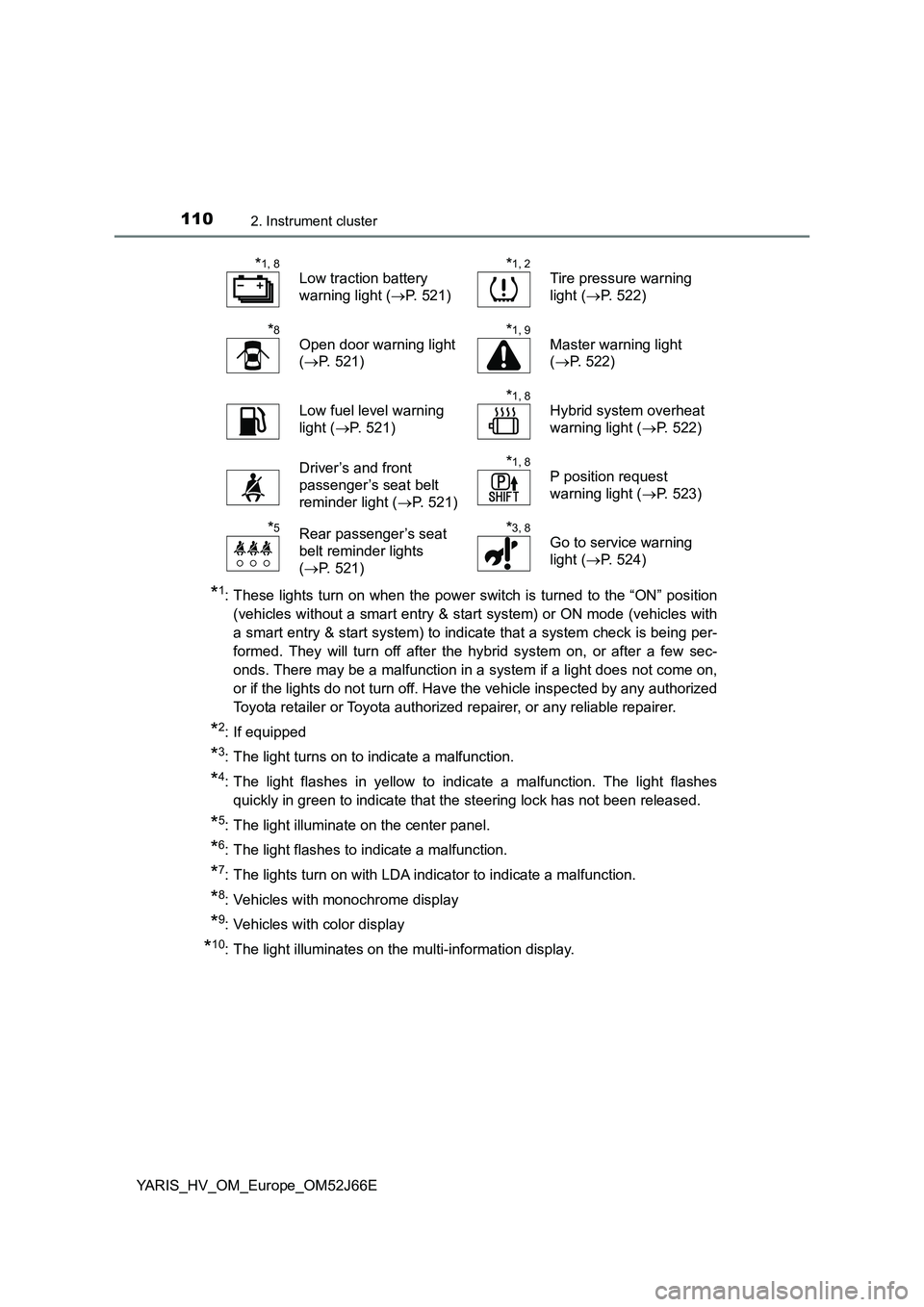
*1, 8
Low traction battery
warning light ( P. 521)
*1, 2
Tire pressure warning
light ( P. 522)
*8
Open door warning light
( P. 521)
*1, 9
Master warning light
( P. 522)
Low fuel level warning
light ( P. 521)
*1, 8
Hybrid system overheat
warning light ( P. 522)
Driver’s and front
passenger’s seat belt
reminder light ( P. 521)
*1, 8
P position request
warning light ( P. 523)
*5Rear passenger’s seat
belt reminder lights
( P. 521)
*3, 8
Go to service warning
light ( P. 524)
Page 111 of 632
1112. Instrument cluster
2
Instrument cluster
YARIS_HV_OM_Europe_OM52J66E
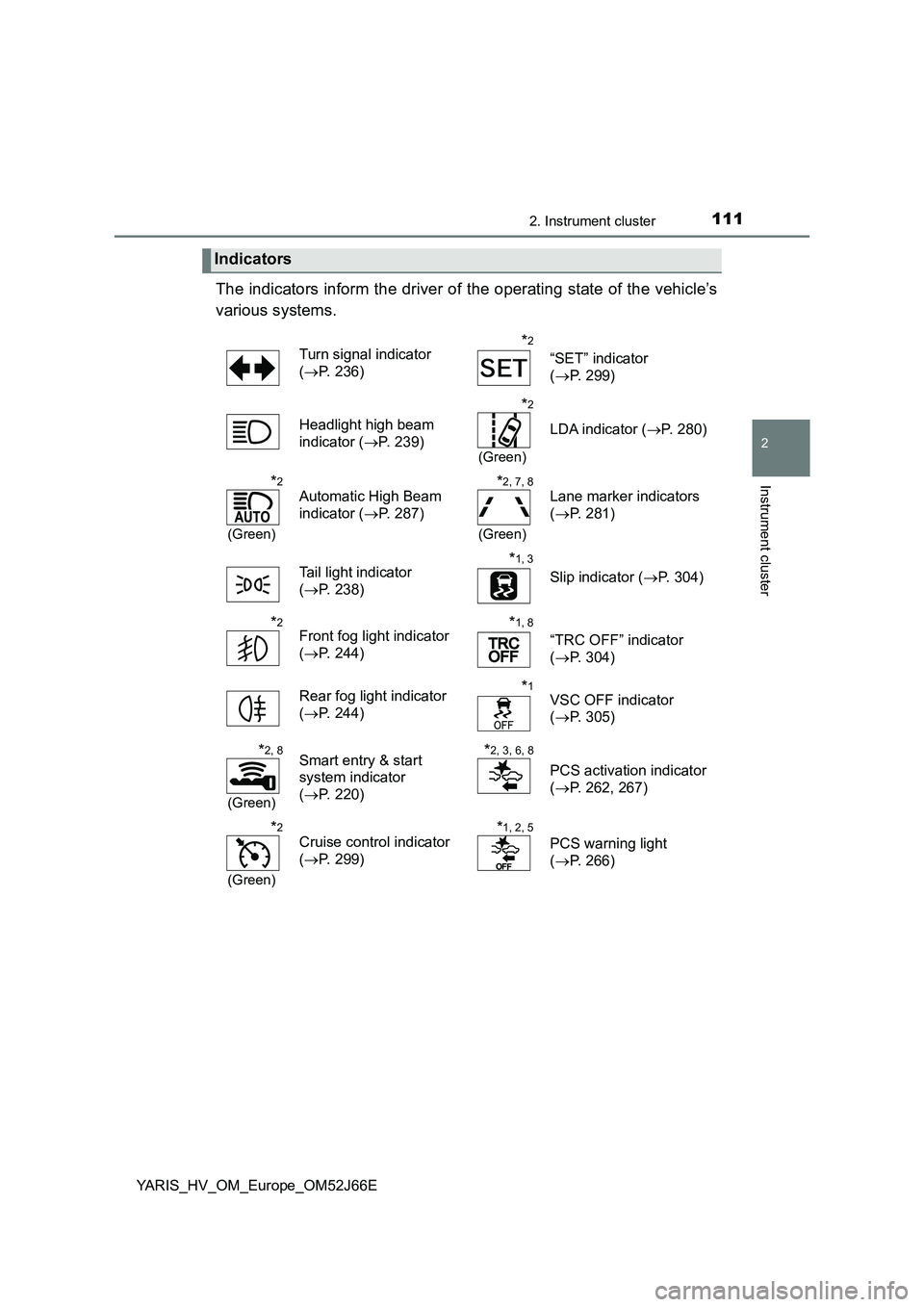
The indicators inform the driver of the operating state of the vehicle’s
various systems.
Indicators
Turn signal indicator
( P. 236)
*2
“SET” indicator
( P. 299)
Headlight high beam
indicator ( P. 239)
*2
(Green)
LDA indicator (P. 280)
*2
(Green)
Automatic High Beam
indicator ( P. 287)
*2, 7, 8
(Green)
Lane marker indicators
( P. 281)
Tail light indicator
( P. 238)
*1, 3
Slip indicator (P. 304)
*2Front fog light indicator
( P. 244)
*1, 8
“TRC OFF” indicator
( P. 304)
Rear fog light indicator
( P. 244)
*1VSC OFF indicator
( P. 305)
*2, 8
(Green)
Smart entry & start
system indicator
( P. 220)
*2, 3, 6, 8
PCS activation indicator
( P. 262, 267)
*2
(Green)
Cruise control indicator
( P. 299)
*1, 2, 5
PCS warning light
( P. 266)
Page 112 of 632
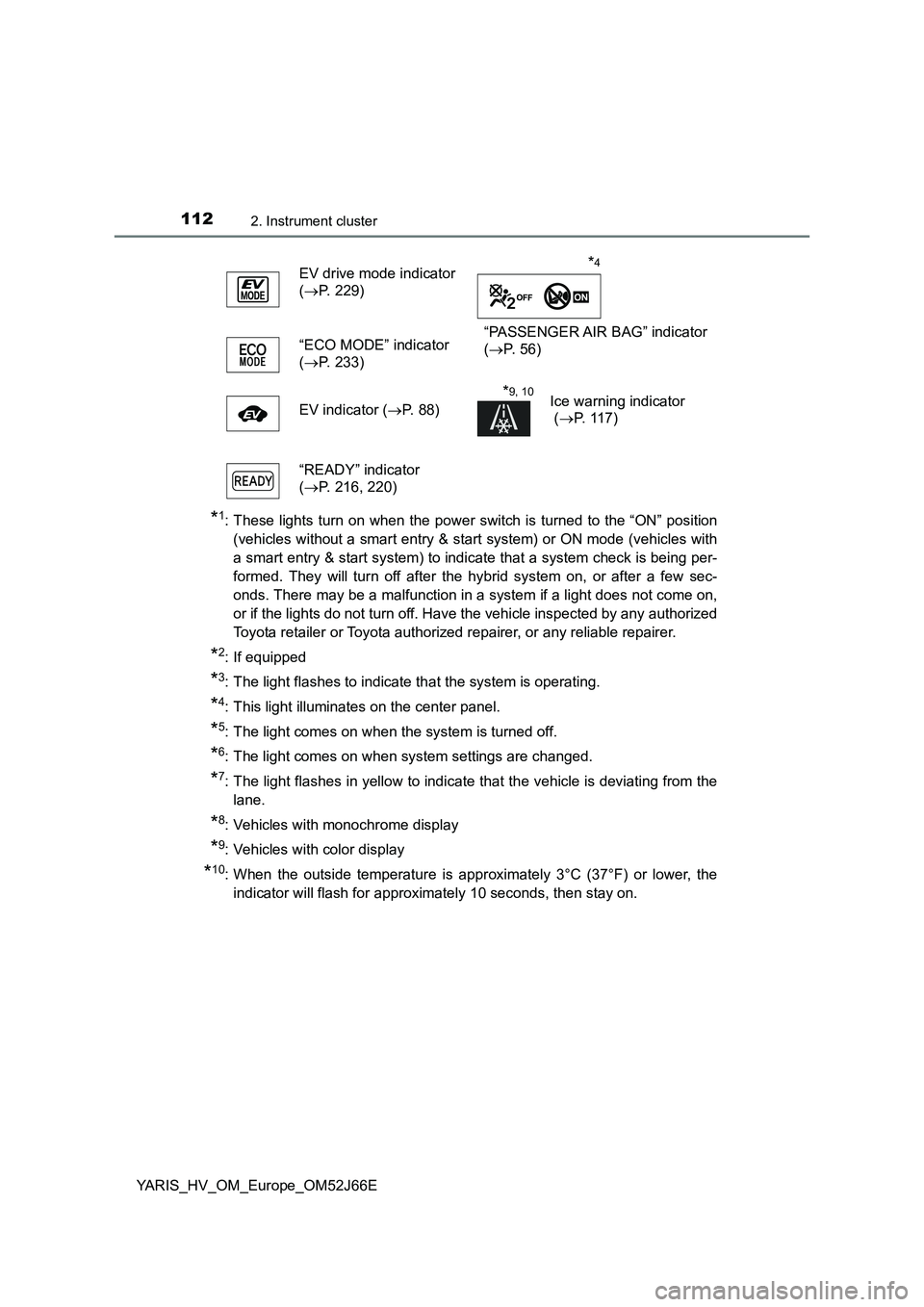
1122. Instrument cluster
YARIS_HV_OM_Europe_OM52J66E
*1: These lights turn on when the power switch is turned to the “ON” position
(vehicles without a smart entry & start system) or ON mode (vehicles with
a smart entry & start system) to indicate that a system check is being per-
formed. They will turn off after the hybrid system on, or after a few sec-
onds. There may be a malfunction in a system if a light does not come on,
or if the lights do not turn off. Have the vehicle inspected by any authorized
Toyota retailer or Toyota authorized repairer, or any reliable repairer.
*2: If equipped
*3: The light flashes to indicate that the system is operating.
*4: This light illuminates on the center panel.
*5: The light comes on when the system is turned off.
*6: The light comes on when system settings are changed.
*7: The light flashes in yellow to indicate that the vehicle is deviating from the
lane.
*8: Vehicles with monochrome display
*9: Vehicles with color display
*10: When the outside temperature is approximately 3°C (37°F) or lower, the
indicator will flash for approximately 10 seconds, then stay on.
EV drive mode indicator
( P. 229)
“PASSENGER AIR BAG” indicator
( P. 5 6 ) “ECO MODE” indicator
( P. 233)
EV indicator ( P. 88)
*9, 10Ice warning indicator
( P. 117)
“READY” indicator
( P. 216, 220)
*4
Page 113 of 632
1132. Instrument cluster
2
Instrument cluster
YARIS_HV_OM_Europe_OM52J66E
WARNING
■If a safety system warning light does not come on
Should a safety system light such as the ABS and SRS warning light not
come on when you start the hybrid system, this could mean that these sys-
tems are not available to help protect you in an accident, which could result
in death or serious injury. Have the vehicle inspected by any authorized
Toyota retailer or Toyota authorized repairer, or any reliable repairer imme-
diately if this occurs.
Page 116 of 632

1162. Instrument cluster
YARIS_HV_OM_Europe_OM52J66E
● By keeping the indicator needle within Eco area, more Eco-friendly driving
can be achieved.
● Charge area indicates regeneration* status. Regenerated energy will be
used to charge the hybrid battery (traction battery).
*: When used in this manual, “regeneration” refers to the conversion of
energy created by the movement of the vehicle into electrical energy.
■ Engine speed
On hybrid vehicles, engine speed is precisely controlled in order to help
improve fuel efficiency and reduce exhaust emissions, etc.
There are times when the engine speed that is displayed may differ even
when vehicle operation and driving conditions are the same.
■ Outside temperature display
● In the following situations, the correct outside temperature may not be dis-
played, or the display may take longer than normal to change.
• When stopped, or driving at low speeds (less than 25 km/h [16 mph])
• When the outside temperature has changed suddenly (at the entrance/
exit of a garage, tunnel, etc.)
● When “- -” or “E” is displayed, the system may be malfunctioning.
Take your vehicle to any authorized Toyota retailer or Toyota authorized
repairer, or any reliable repairer.
● The temperature range that can be displayed is from -40°C (-40°F) to 50°C
(122°F).
NOTICE
■ To prevent damage to the engine and its components
The engine may be overheating if the high engine coolant temperature
warning light flashes or comes on. In this case, immediately stop the vehicle
in a safe place, and check the engine after it has cooled completely.
( P. 5 8 1 )
Page 118 of 632

1182. Instrument cluster
YARIS_HV_OM_Europe_OM52J66E
Odometer and trip meter display:
Displays the following items.
Odometer:
Displays the total distance the vehicle has been driven.
Trip meter:
Displays the distance the vehicle has been driven since the meter was last
reset. Trip meters A and B can be used to record and display different dis-
tances independently.
Multi-information display
Presents the driver with a variety of driving-related data. ( P. 1 2 5 )
Displays warning messages in case of a malfunction. ( P. 531)
Engine coolant temperature gauge
Displays the engine coolant temperature.
Switches the items of the odome-
ter and trip meter display by
pressing the “TRIP” switch.
When the trip meter is displayed,
pressing and holding the “TRIP”
switch will reset the trip meter.
The brightness of the instrument cluster lights can be adjusted.
Display the instrument cluster light
control by pressing the “TRIP”
switch.
Then, press and hold the switch.
Adjust the brightness to the
desired level by pressing the
switch.
Changing the display
7
8
9
Instrument cluster light control