Page 112 of 632
1122. Instrument cluster
YARIS_HV_OM_Europe_OM52J66E
*1: These lights turn on when the power switch is turned to the “ON” position
(vehicles without a smart entry & start system) or ON mode (vehicles with
a smart entry & start system) to indicate that a system check is being per-
formed. They will turn off after the hybrid system on, or after a few sec-
onds. There may be a malfunction in a system if a light does not come on,
or if the lights do not turn off. Have the vehicle inspected by any authorized
Toyota retailer or Toyota authorized repairer, or any reliable repairer.
*2: If equipped
*3: The light flashes to indicate that the system is operating.
*4: This light illuminates on the center panel.
*5: The light comes on when the system is turned off.
*6: The light comes on when system settings are changed.
*7: The light flashes in yellow to indicate that the vehicle is deviating from the
lane.
*8: Vehicles with monochrome display
*9: Vehicles with color display
*10: When the outside temperature is approximately 3°C (37°F) or lower, the
indicator will flash for approximately 10 seconds, then stay on.
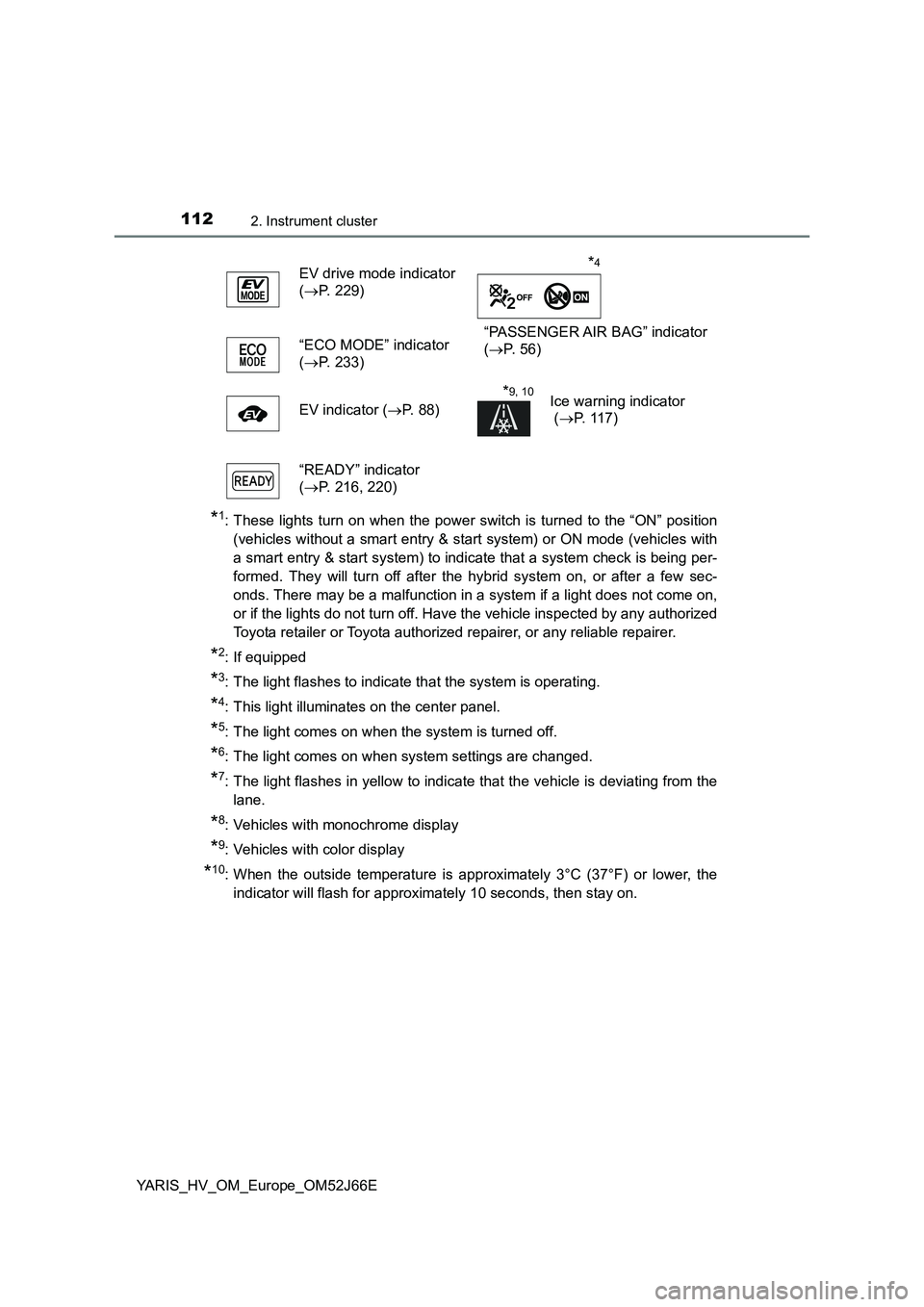
EV drive mode indicator
( P. 229)
“PASSENGER AIR BAG” indicator
( P. 5 6 ) “ECO MODE” indicator
( P. 233)
EV indicator ( P. 88)
*9, 10Ice warning indicator
( P. 117)
“READY” indicator
( P. 216, 220)
*4
Page 115 of 632
1152. Instrument cluster
2
Instrument cluster
YARIS_HV_OM_Europe_OM52J66E
The brightness of the instrument cluster lights (when the headlight
switch is on and the surrounding area is dark) can be adjusted.
Display the instrument cluster light
control by pressing the display
change button. ( P. 121)
Then, press and hold the button.
Adjust the brightness to the
desired level by pressing the but-
ton.
■ The meters and display illuminate when
Vehicles without a smart entry & start system
The power switch is in the “ON” position.
Vehicles with a smart entry & start system
The power switch is in ON mode.
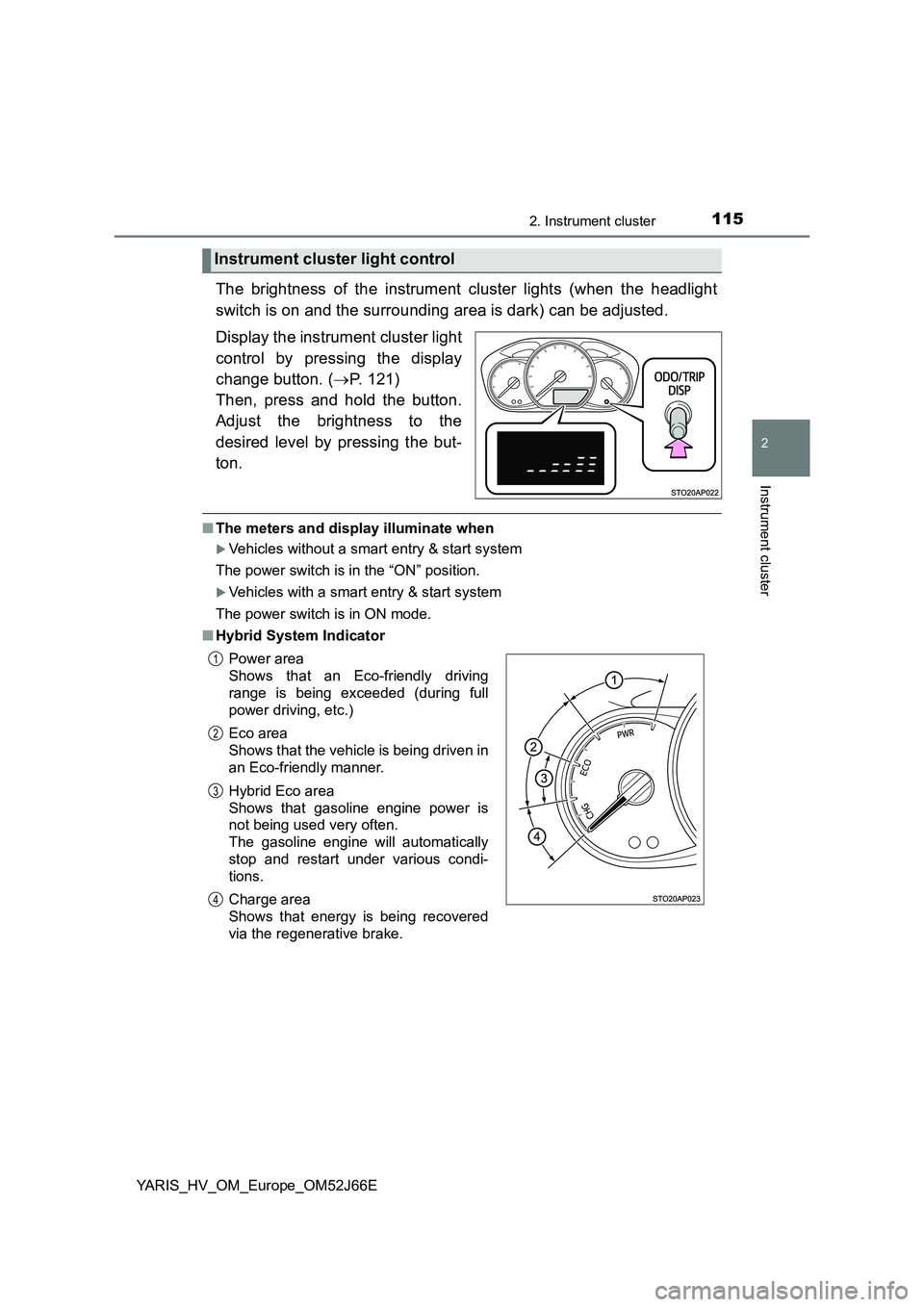
■ Hybrid System Indicator
Instrument cluster light control
Power area
Shows that an Eco-friendly driving
range is being exceeded (during full
power driving, etc.)
Eco area
Shows that the vehicle is being driven in
an Eco-friendly manner.
Hybrid Eco area
Shows that gasoline engine power is
not being used very often.
The gasoline engine will automatically
stop and restart under various condi-
tions.
Charge area
Shows that energy is being recovered
via the regenerative brake.
1
2
3
4
Page 118 of 632

1182. Instrument cluster
YARIS_HV_OM_Europe_OM52J66E
Odometer and trip meter display:
Displays the following items.
Odometer:
Displays the total distance the vehicle has been driven.
Trip meter:
Displays the distance the vehicle has been driven since the meter was last
reset. Trip meters A and B can be used to record and display different dis-
tances independently.
Multi-information display
Presents the driver with a variety of driving-related data. ( P. 1 2 5 )
Displays warning messages in case of a malfunction. ( P. 531)
Engine coolant temperature gauge
Displays the engine coolant temperature.
Switches the items of the odome-
ter and trip meter display by
pressing the “TRIP” switch.
When the trip meter is displayed,
pressing and holding the “TRIP”
switch will reset the trip meter.
The brightness of the instrument cluster lights can be adjusted.
Display the instrument cluster light
control by pressing the “TRIP”
switch.
Then, press and hold the switch.
Adjust the brightness to the
desired level by pressing the
switch.
Changing the display
7
8
9
Instrument cluster light control
Page 161 of 632
1613-2. Opening, closing and locking the doors
3
Operation of each component
YARIS_HV_OM_Europe_OM52J66E
■Operation signals (vehicles with an entry function or wireless remote
control)
The emergency flashers flash to indicate that the doors have been locked/
unlocked. (Locked: once; Unlocked: twice)
■ Open door warning buzzer
If a door or the back door is not fully closed, a buzzer will sound when the
vehicle speed reaches 5 km/h (3 mph).
Vehicles with color display only: T he open door(s) or back door is indicated
on the multi-information display.
■ Luggage compartment light
The luggage compartment lights turn on when the back door is opened.
WARNING
■ Caution while driving
● Keep the back door closed while driving.
If the back door is left open, it may hit near-by objects while driving or lug-
gage may be unexpectedly thrown out, causing an accident.
In addition, exhaust gases may enter the vehicle, causing death or a seri-
ous health hazard. Make sure to close the back door before driving.
● Before driving the vehicle, make sure that the back door is fully closed. If
the back door is not fully closed, it may open unexpectedly while driving,
causing an accident.
● Never let anyone sit in the luggage compartment. In the event of sudden
braking or a collision, they are susceptible to death or serious injury.
■ When children are in the vehicle
Observe the following precautions.
Failure to do so may result in death or serious injury.
● Do not allow children to play in the luggage compartment.
If a child is accidentally locked in the luggage compartment, they could
have heat exhaustion or other injuries.
● Do not allow a child to open or close the back door.
Doing so may cause the back door to move unexpectedly, or cause the
child’s hands, head, or neck to be caught by the closing back door.
Page 165 of 632
1653-2. Opening, closing and locking the doors
3
Operation of each component
YARIS_HV_OM_Europe_OM52J66E
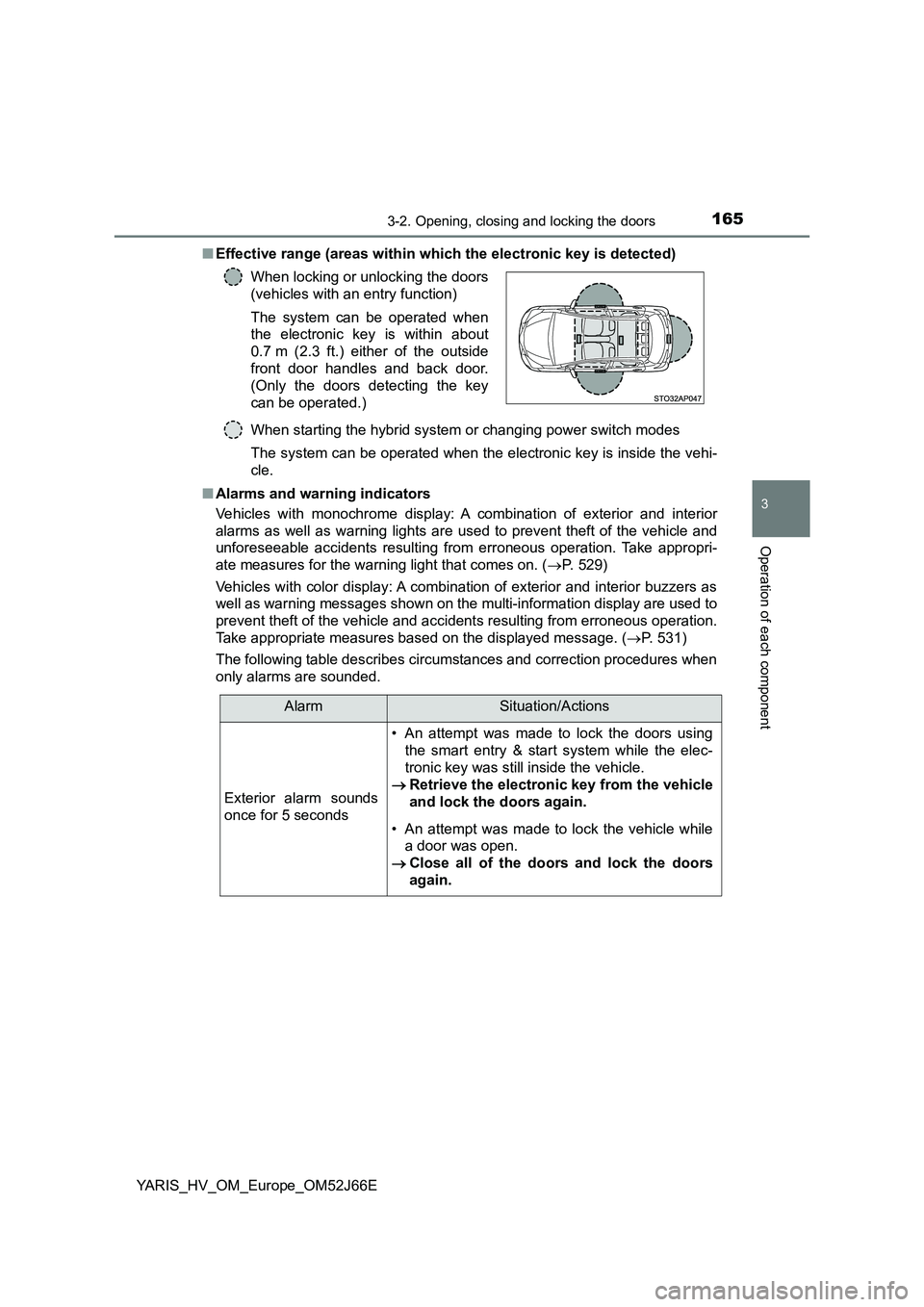
■ Effective range (areas within which the electronic key is detected)
When starting the hybrid system or changing power switch modes
The system can be operated when the electronic key is inside the vehi-
cle.
■ Alarms and warning indicators
Vehicles with monochrome display: A combination of exterior and interior
alarms as well as warning lights are used to prevent theft of the vehicle and
unforeseeable accidents resulting from erroneous operation. Take appropri-
ate measures for the warning light that comes on. ( P. 529)
Vehicles with color display: A combination of exterior and interior buzzers as
well as warning messages shown on the multi-information display are used to
prevent theft of the vehicle and accidents resulting from erroneous operation.
Take appropriate measures based on the displayed message. ( P. 531)
The following table describes circumstances and correction procedures when
only alarms are sounded.
When locking or unlocking the doors
(vehicles with an entry function)
The system can be operated when
the electronic key is within about
0.7 m (2.3 ft.) either of the outside
front door handles and back door.
(Only the doors detecting the key
can be operated.)
AlarmSituation/Actions
Exterior alarm sounds
once for 5 seconds
• An attempt was made to lock the doors using
the smart entry & start system while the elec-
tronic key was still inside the vehicle.
Retrieve the electronic key from the vehicle
and lock the doors again.
• An attempt was made to lock the vehicle while
a door was open.
Close all of the doors and lock the doors
again.
Page 193 of 632
193
3
3-4. Adjusting the steering wheel and mirrors
Operation of each component
YARIS_HV_OM_Europe_OM52J66E
Inside rear view mirror
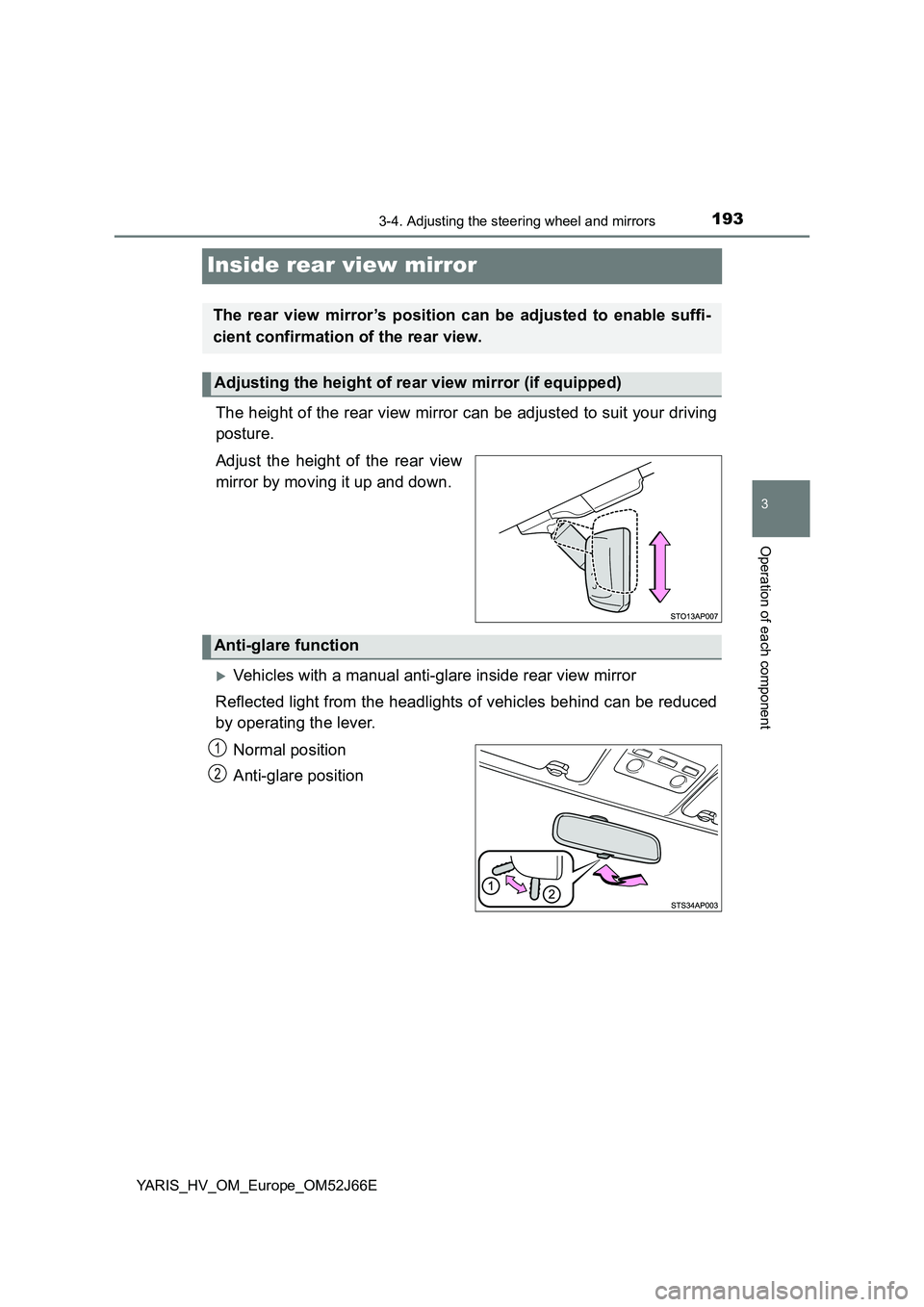
The height of the rear view mirror can be adjusted to suit your driving
posture.
Adjust the height of the rear view
mirror by moving it up and down.
Vehicles with a manual anti-glare inside rear view mirror
Reflected light from the headlights of vehicles behind can be reduced
by operating the lever.
Normal position
Anti-glare position
The rear view mirror’s position can be adjusted to enable suffi-
cient confirmation of the rear view.
Adjusting the height of rear view mirror (if equipped)
Anti-glare function
1
2
Page 194 of 632
1943-4. Adjusting the steering wheel and mirrors
YARIS_HV_OM_Europe_OM52J66E
Vehicles with an auto anti-glare inside rear view mirror
Responding to the level of brightness of the headlights of vehicles
behind, the reflected light is automatically reduced.
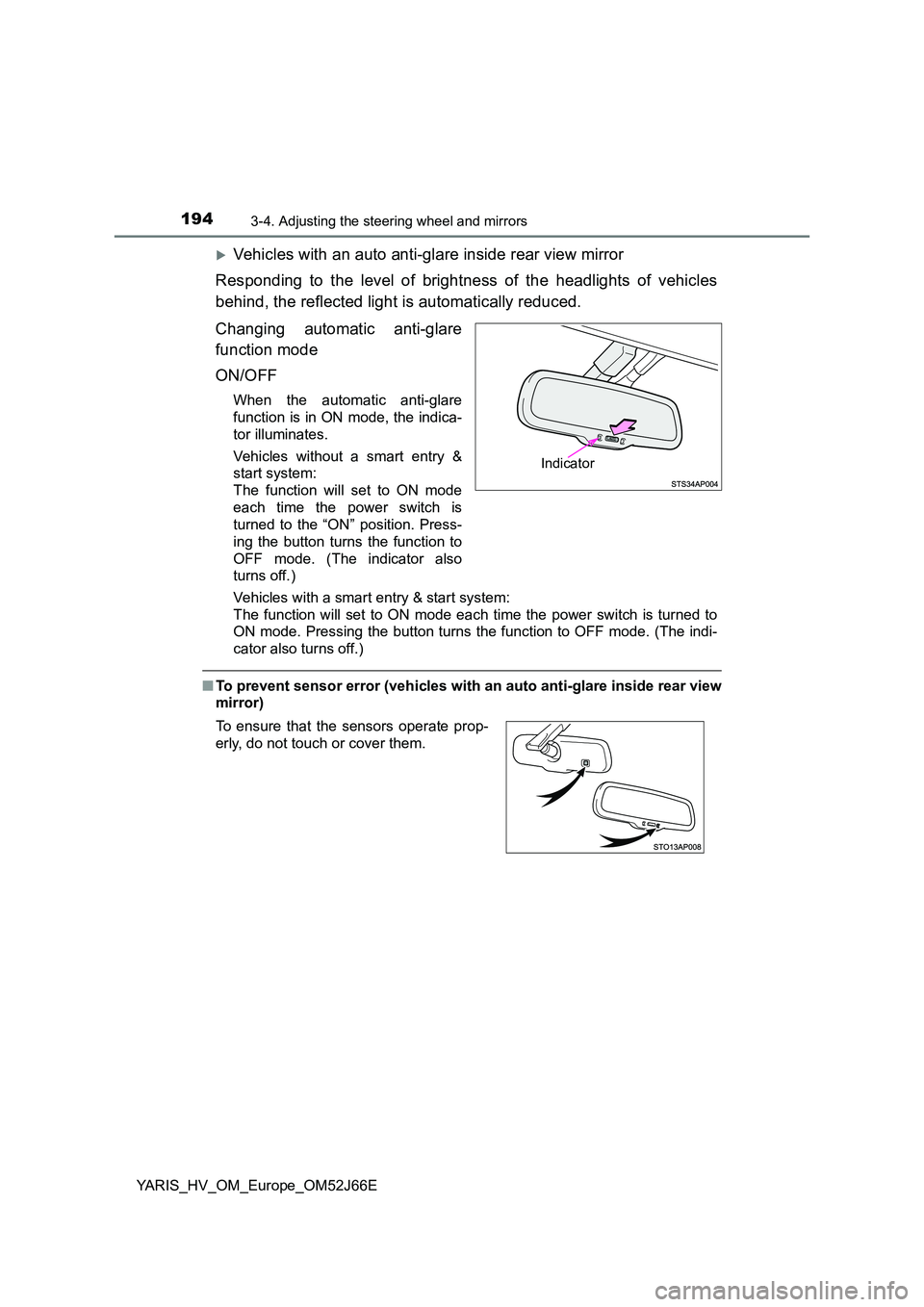
Changing automatic anti-glare
function mode
ON/OFF
When the automatic anti-glare
function is in ON mode, the indica-
tor illuminates.
Vehicles without a smart entry &
start system:
The function will set to ON mode
each time the power switch is
turned to the “ON” position. Press-
ing the button turns the function to
OFF mode. (The indicator also
turns off.)
Vehicles with a smart entry & start system:
The function will set to ON mode each time the power switch is turned to
ON mode. Pressing the button turns the function to OFF mode. (The indi-
cator also turns off.)
■ To prevent sensor error (vehicles with an auto anti-glare inside rear view
mirror)
Indicator
To ensure that the sensors operate prop-
erly, do not touch or cover them.
Page 203 of 632
203
4Driving
YARIS_HV_OM_Europe_OM52J66E
4-1. Before driving
Driving the vehicle ............. 204
Cargo and luggage ............ 213
Trailer towing ..................... 215
4-2. Driving procedures
Power (ignition) switch
(vehicles without a smart
entry & start system)........ 216
Power (ignition) switch
(vehicles with a smart
entry & start system)........ 220
EV drive mode ................... 229
Hybrid transmission ........... 232
Turn signal lever ................ 236
Parking brake .................... 237
4-3. Operating the lights
and wipers
Headlight switch ................ 238
Fog light switch .................. 244
Windshield wiper
and washer ...................... 246
Rear window wiper
and washer ...................... 250
4-4. Refueling
Opening the fuel tank
cap ................................... 252
4-5. Toyota Safety Sense
Toyota Safety Sense ......... 255
PCS (Pre-Crash Safety
system) ............................ 262
LDA (Lane Departure
Alert) ................................ 279
Automatic High Beam ........ 287
RSA (Road Sign Assist)..... 293
4-6. Using the driving support
systems
Cruise control..................... 299
Driving assist systems ....... 303
4-7. Driving tips
Hybrid vehicle driving
tips ................................... 310
Winter driving tips .............. 313