2018 TOYOTA RAV4 engine
[x] Cancel search: enginePage 21 of 52

Push MID control switches to view or change information in the following:
Drive information
Navigation system linked display (if equipped)
Audio system-linked display
Driving assist information (if equipped)
Warning messages
Settings display
19
OVERVIEW FEATURES & OPERATIONS TOYOTA SAFETY SENSE SAFETY & EMERGENCY FEATURES
Refer to the Owner’s Manual for more information.
NOTE: Designed for car accessories. Engine switch must be in the “ACC” or
“ON” position to be used.
Power outlets-12V DC & 120V AC
12V DC - Front12V DC - Rear
120V AC (if equipped)
Multi-Information Display (MID)
Enter/Set:
Press to enter/set,
press and hold to
reset
Return to previous screen
“” and “” Press to select an item/change
pages
Page 24 of 52

22
FEATURES & OPERATIONS
All-Wheel Drive Lock (AWD models)
Push the switch to ensure that the engine torque is applied to the four wheels.
NOTE: Should ONLY be used when wheel spinning occurs on loose or
unpaved surfaces.
Refer to the Owner’s Manual for more details.
Intuitive parking assist (if equipped)
If the sensors detect an obstacle, the buzzer and MID display informs the driver of
the approximate position and distance of the obstacle by illuminating continuously
(far) or blinking (near). Depending on your Entune™ Audio system, you can adjust
settings.
To turn system ON/OFF:
1) Press “
/”, “/” and “” of the meter control switches and select
from the Multi-Information Display (MID).
2) Select
and press “”. The system displays when the the system is
operational.
Refer to section Intuitive parking assist in the Owner’s Manual for more details.
Front
center sensor
Rear
center sensor Corner sensors
(front)Corner sensors
(front)
Corner sensors
(rear)Corner sensors
(rear)
Page 29 of 52

27
OVERVIEW FEATURES & OPERATIONS TOYOTA SAFETY SENSE SAFETY & EMERGENCY FEATURES
CHANGING THE PCS ALERT TIMING
FarMiddle
(default)Near
(1) Press “” switches and select from the Multi-Information Display (MID).
(2) Press “
” switches and select from the MID and then press “.”
(3) Select “Sensitivity” and then press “
.”
Each time “
” is pressed, the response to the PCS alert timing changes as shown
above. You can press “
” to go back to the menu.
Note: PCS is enabled each time the engine switch is turned to Ignition On.
The system can be disabled/enabled and the alert timing of the system can be
changed. (Alert timing only, brake operation remains the same).
Monocular camera sensor
Millimeter
wave radar
As part of the Pre-Collision System, this function is also designed to first provide an
alert and then automatic braking if needed.In certain conditions, the PCS system included with the TSS-P package may also
help to detect a pedestrian in front of your vehicle. With Toyota Safety Sense™ P,
PCS uses an in-vehicle camera and front-grill mounted millimeter-wave radar to
help detect a pedestrian in front of your vehicle in certain conditions. The in-vehicle
camera of PCS detects a potential pedestrian based on size, profile, and motion of
the detected pedestrian. However, a pedestrian may not be detected depending
on the conditions, including the surrounding brightness and the motion, posture,
size, and angle of the potential detected pedestrian, preventing the system from
operating or engaging. Refer to a Toyota Owner’s Manual for additional information.
THE PCS WITH PEDESTRIAN DETECTION FUNCTION
Page 30 of 52
28
TOYOTA SAFETY SENSE™
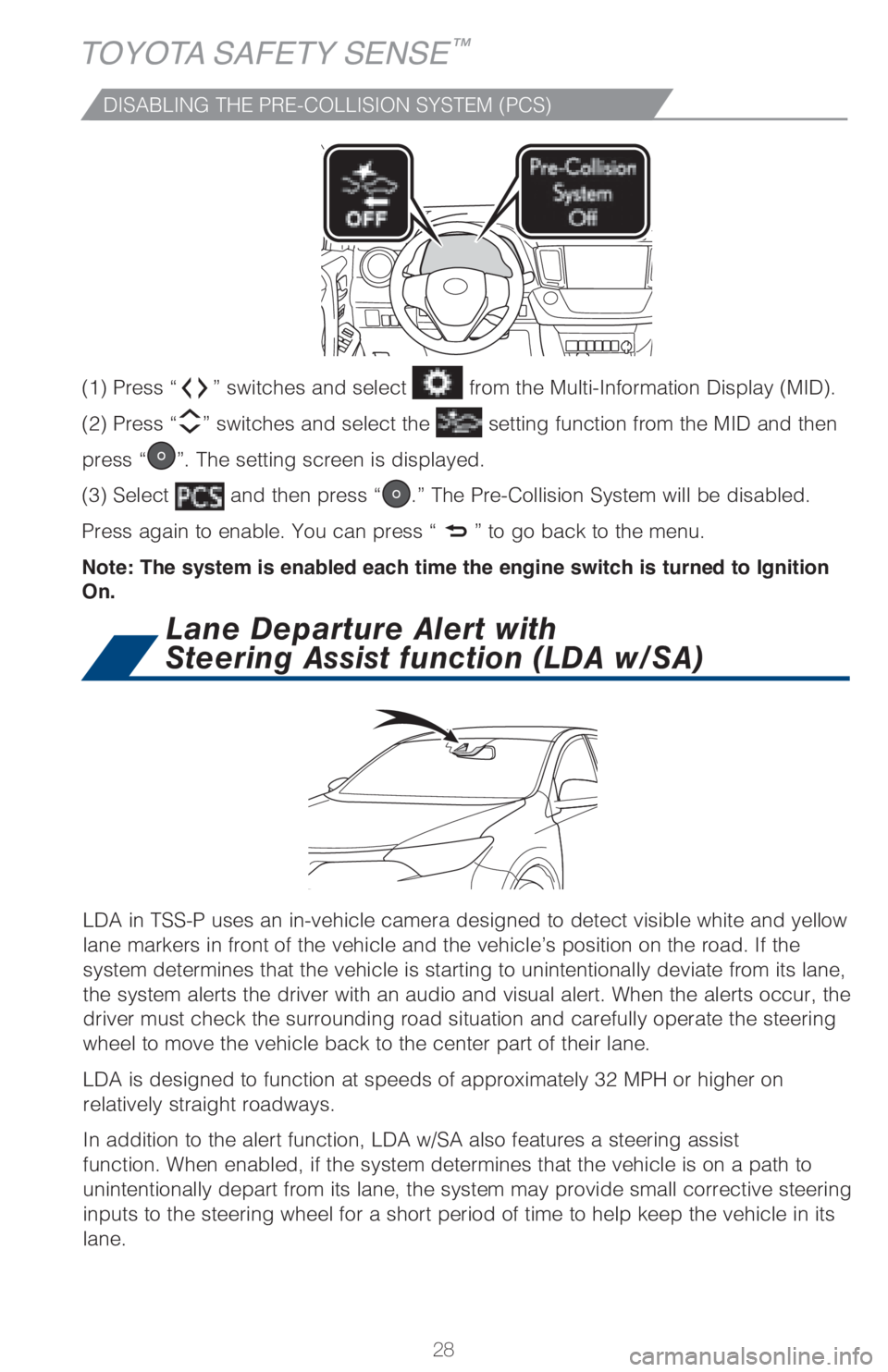
LDA in TSS-P uses an in-vehicle camera designed to detect visible white and yellow
lane markers in front of the vehicle and the vehicle’s position on the road. If the
system determines that the vehicle is starting to unintentionally deviate from its lane,
the system alerts the driver with an audio and visual alert. When the alerts occur, the
driver must check the surrounding road situation and carefully operate the steering
wheel to move the vehicle back to the center part of their lane.
LDA is designed to function at speeds of approximately 32 MPH or higher on
relatively straight roadways.
In addition to the alert function, LDA w/SA also features a steering assist
function. When enabled, if the system determines that the vehicle is on a path to
unintentionally depart from its lane, the system may provide small corrective steering
inputs to the steering wheel for a short period of time to help keep the vehicle in its
lane.
Lane Departure Alert with
Steering Assist function (LDA w/SA)
DISABLING THE PRE-COLLISION SYSTEM (PCS)
(1) Press “” switches and select from the Multi-Information Display (MID).
(2) Press “
” switches and select the setting function from the MID and then
press “
”. The setting screen is displayed.
(3) Select
and then press “.” The Pre-Collision System will be disabled.
Press again to enable. You can press “
” to go back to the menu.
Note: The system is enabled each time the engine switch is turned to Ignition
On.
Page 31 of 52

29
OVERVIEW FEATURES & OPERATIONS TOYOTA SAFETY SENSE SAFETY & EMERGENCY FEATURES
LDA FUNCTIONS
LDA function display
Lane
Lane Departure Alert (LDA)
indicator (flashes orange
when operating)
(2)
(1) Lane Departure Alert (LDA) indicator flashes orange when operating
The LDA function displays when the Multi-Information Display (MID) is
switched to the driving assist system information screen.
(1) The system displays solid white lines on the LDA indicator when visible lane
markers on the road are detected. A side flashes orange to alert the driver when the
vehicle deviates from its lane.
(2) The system displays outlines on the LDA indicator when lane markers on the
road are not detected or the function is temporarily cancelled.
Note: When operation conditions are no longer met, a function may be
temporarily canceled. However, when the operation conditions are met again,
operation of the function is automatically restored. For example, LDA may not
function on the side(s) where white/yellow lines are not detectable.
TURNING THE LDA SYSTEM ON/OFF
Press the LDA switch to turn the LDA system on. Depress again to turn it off.
Note: The system will continue in the last state it was in (ON or OFF) when the
engine is started again.
Refer to a Toyota Owner’s Manual for additional information on LDA operation,
settings adjustments, limitations, and precautions before attempting to use it.
Indicates steering
wheel assistance is
operating
Page 36 of 52

34
TOYOTA SAFETY SENSE™
Set/Decrease speed
Cancel1
Resume2 /Increase speed
SWITCHING TO CONSTANT SPEED (CRUISE) CONTROL MODE
SETTING CONSTANT SPEED (CRUISE) CONTROL
If you are already using DRCC “”, push button again to turn the system off
first, then push and hold button for at least 1.5 seconds to switch.
Note: When the engine is turned off, it will automatically default to DRCC.
1.5 seconds
Refer to a Toyota Owner’s Manual for additional information on DRCC operation,
settings adjustments, limitations, and precautions before attempting to use it.
1 The set speed may also be cancelled by depressing the brake pedal.2 The set speed may be resumed once vehicle speed exceeds 25 mph (40 km/h). (1) To adjust speed or cancel, see steps (2) and (3) of ADJUSTING DRCC SET
SPEED on page 32.
(1)
Indicators and set speedIndicators
Page 37 of 52

35
OVERVIEW FEATURES & OPERATIONS TOYOTA SAFETY SENSE SAFETY & EMERGENCY FEATURES
Automatic High Beams (AHB)
(1) With the engine switch in IGNITION ON mode and headlight switch turned to
“AUTO” position, push lever away from you.
The “
” indicator will come on when the headlights are turned on
automatically to indicate that the system is active.
(2) Pull the lever back toward you to turn the AHB system off.
The “
” will turn off and the “” turns on.
When all of these conditions are met, high beams will be automatically turned on
(after approximately 1 second):
• Vehicle speed is above approximately 21 mph (34 km/h).
• The area ahead of the vehicle is dark.
• There are no oncoming or preceding vehicles with headlights or tail lights
turned on.
• There are few street lights on the road ahead.
If any of these conditions occur, the system is designed to automatically turn off
high beams:
• Vehicle speed drops below approximately 17 mph (27 km/h).
• The area ahead of the vehicle is not dark.
• Oncoming or preceding vehicles have headlights or tail lights
turned on.
• There are many streetlights on the road ahead.
ACTIVATING THE AHB SYSTEM
CONDITIONS WHERE AHB WILL TURN ON/OFF AUTOMATICALLY
AHB is a safety system designed to help drivers see more of what’s ahead at
nighttime without dazzling other drivers. When enabled, AHB uses an in-vehicle
camera to help detect the headlights of oncoming vehicles and tail lights of
preceding vehicles, then automatically switches between high and low beams
as appropriate to provide the most light possible and enhance forward visibility.
By using high beams more frequently, the system may allow earlier detection of
pedestrians and obstacles.
Refer to a Toyota Owner’s Manual for additional information on AHB operation,
settings adjustments, limitations, and precautions before attempting to use it.
Page 41 of 52

39
OVERVIEW FEATURES & OPERATIONS TOYOTA SAFETY SENSE SAFETY & EMERGENCY FEATURES
Floor mat installation
There are two types of Toyota floor mats: carpeted and all-weather. Each vehicle
has model-specific floor mats. Installation is easy.
To keep your floor mat properly positioned, follow these steps:
• Only use Toyota floor mats designed for your specific model.
• Use only one floor mat at a time, using the retaining hooks to keep the mat in
place.
• Install floor mats right side up.
TRACTION CONTROL (TRAC)
VSC helps prevent loss of traction during cornering by reducing engine power, and
Traction Control helps maintain traction on loose gravel and wet, icy, or uneven
surfaces by applying brake force to the spinning wheel(s).
Toyota’s TRAC sensors are activated when one of the drive wheels starts to slip.
TRAC limits engine output and applies the brakes to the spinning wheel. This
transfers power to the wheels that still have traction to help keep you on track.
Always align the ¨ marks