Page 95 of 607

PRIUS v_OM_OM47B78U_(U)
932. Instrument cluster
2
Instrument cluster
■The meters and display illuminate when
The power switch is in ON mode.
■ Remaining hybrid battery (tract ion battery) charge display
The charge amount of the hybrid battery (traction battery) is automatically
controlled by the hybrid system. For this reason, even if electricity is recov-
ered via the regenerative braking, or electricity is generated via the gasoline
engine, the displayed hybrid battery (traction battery) charge amount may not
reach the highest level (level 8). However, this does not indicate a malfunc-
tion.
■ Engine speed
On hybrid vehicles, engine speed is precisely controlled in order to help
improve fuel efficiency and reduce exhaust emissions etc.
■ Brightness of the instrument panel light
If the headlight switch is turned to ON while the surrounding area is dark, the
instrument panel lights will dim.
■ When disconnecting and reconnect ing 12-volt battery terminals
The fuel consumption display and average vehicle speed will be reset.
NOTICE
■ To prevent damage to the engine and its components
The engine may be overheating if the high coolant temperature warning
light comes on or flashes. In this case, immediately stop the vehicle in a
safe place, and check the engine after it has cooled completely. ( P. 528)
■ The information display at low temperatures
Allow the interior of the vehicle to warm up before using the liquid crystal
information display. At extremely low temperatures, the information display
monitor may respond slowly, and display changes may be delayed.
Page 100 of 607
98
PRIUS v_OM_OM47B78U_(U)
2. Instrument cluster
These images are examples only, and may vary slightly from actual
conditions.
When the vehicle is charging
the hybrid battery (traction bat-
tery)
When there is no energy flow
Hybrid battery (traction battery)
status
Energy monitor
LowFull
Page 102 of 607
100
PRIUS v_OM_OM47B78U_(U)
2. Instrument cluster
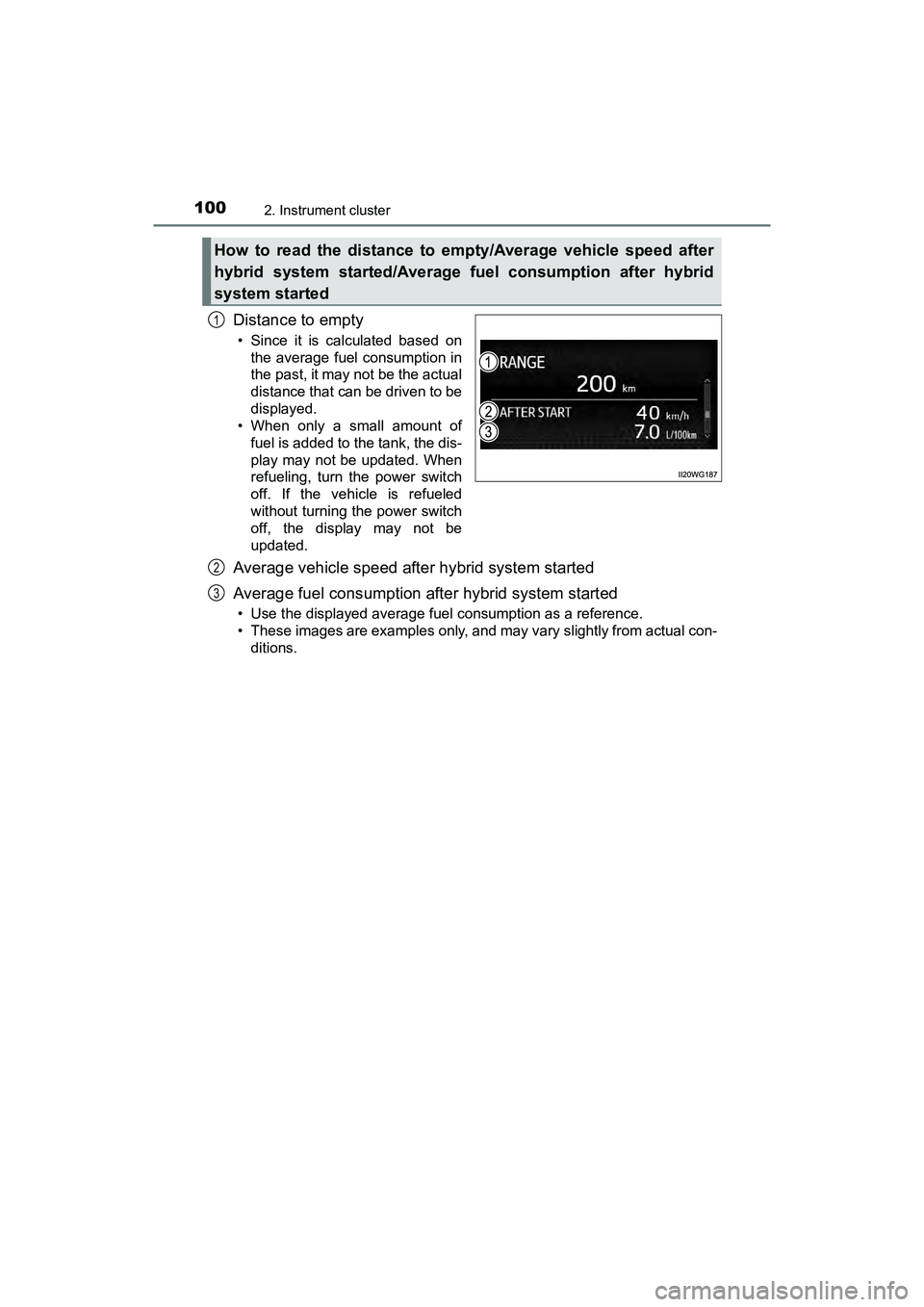
Distance to empty
• Since it is calculated based onthe average fuel consumption in
the past, it may not be the actual
distance that can be driven to be
displayed.
• When only a small amount of
fuel is added to the tank, the dis-
play may not be updated. When
refueling, turn the power switch
off. If the vehicle is refueled
without turning the power switch
off, the display may not be
updated.
Average vehicle speed after hybrid system started
Average fuel consumption after hybrid system started
• Use the displayed average fuel consumption as a reference.
• These images are examples only, and may vary slightly from actual con-ditions.
How to read the distance to empty/Average vehicle speed after
hybrid system started/Average fuel consumption after hybrid
system started
1
2
3
Page 103 of 607

PRIUS v_OM_OM47B78U_(U)
1012. Instrument cluster
2
Instrument cluster
■System check display
After turning the power switch to ON mode, opening image is displayed while
system operation is checked. When the system check is complete, the nor-
mal screen will return.
■ Pop-up display
When a system that supports pop-up displays, such as the air conditioning
system, is operated, a pop-up display will be temporarily displayed.
■ When disconnecting and reconnect ing 12-volt battery terminals
The fuel consumption display and average vehicle speed will be reset.
■ Liquid crystal display
Small spots or light spots may appear on the display. This phenomenon is
characteristic of liquid crystal displays, and there is no problem continuing to
use the display.
■ Hybrid System Indicator
Power area
Shows that an Eco-friendly drivi ng range is being exceeded (during full
power driving etc.)
● By keeping the indicator within Eco area, more Eco-friendly driving can be
achieved.
● Charge area indicates regeneration
* status. Regenerated energy will be
used to charge the hybrid battery (traction battery).
*: When used in this manual, “regeneration” refers to the conversion of
energy created by the movement of the vehicle into electrical energy. Charge area
Shows that energy is being recovered
via the regenerative brake.
Eco area
Shows that the vehicle is being driven in
an Eco-friendly manner.
Hybrid Eco area
Shows that gasoline engine power is
not being used very often.
The gasoline engine will automatically
stop and restart under various condi-
tions.
1
2
3
4
Page 108 of 607
106
PRIUS v_OM_OM47B78U_(U)
2. Instrument cluster
These images are examples only, and may vary slightly from actual
conditions.
When the vehicle is charging
the hybrid battery (traction bat-
tery)
When there is no energy flow
Hybrid battery (traction battery)
status
Audio system screen
LowFull
Page 113 of 607

PRIUS v_OM_OM47B78U_(U)
1113-1. Key information
3
Operation of each component
To take out the mechanical key,
press the release button and take
the key out.
After using the mechanical key,
store it in the electronic key. Carry
the mechanical key together with
the electronic key. If the electronic
key battery is depleted or the entry
function does not operate properly,
you will need the mechanical key.
(P. 521)
■ Panic mode
■ If you lose your mechanical keys
New genuine mechanical keys can be made by your Toyota dealer using
another mechanical key and the key number stamped on your key number
plate. Keep the plate in a safe place such as your wallet, not in the vehicle.
■ When riding in an aircraft
When bringing an electronic key onto an aircraft, make sure you do not press
any buttons on the electronic key while inside the aircraft cabin. If you are
carrying an electronic key in your bag etc., ensure that the buttons are not
likely to be pressed accidentally. Pressing a button may cause the electronic
key to emit radio waves that could inte rfere with the operation of the aircraft.
Using the mechanical key
Release button
When is pressed for longer than
about one second, an alarm will sound
intermittently and the vehicle lights will
flash to deter any person from trying to
break into or damage your vehicle.
To stop the alarm, press any button on the
electronic key.
Page 122 of 607
120
PRIUS v_OM_OM47B78U_(U)
3-2. Opening, closing and locking the doors
Lower the back door using the
back door handle, and make sure
to push the back door down from
the outside to close it.
Be careful not to pull the back door
sideways when closing the back
door with the handle.
■Luggage compartment light
The luggage compartment light turns on when the back door is opened with
the luggage compartment light switch on.
■ If the back door opener is inoperative
The back door can be unlocked from the inside.
When closing the back door
Off
On
When the power switch is turned off, the
light will go off automatically after 20
minutes.
Remove the cover.
To prevent damage, cover the tip of the
screwdriver with a rag.
Move the lever.1
2
1
2
Page 124 of 607

122
PRIUS v_OM_OM47B78U_(U)
3-2. Opening, closing and locking the doors
WARNING
■Operating the back door
Observe the following precautions.
Failure to do so may cause parts of the body to be caught, resulting in death
or serious injury.
●Remove any heavy loads, such as snow and ice, from the back door
before opening it. Failure to do so may cause the back door to suddenly
shut again after it is opened.
● When opening or closing the back door, thoroughly check to make sure
the surrounding area is safe.
● If anyone is in the vicinity, make sure they are safe and let them know that
the back door is about to open or close.
● Use caution when opening or closing the back door in windy weather as it
may move abruptly in strong wind.
● Do not pull on the back door damper stay to close the back door, and do
not hang on the back door damper stay.
Doing so may cause hands to be caught or the back door damper stay to
break, causing an accident.
● If a bicycle carrier or similar heavy object is attached to the back door, it
may suddenly shut closed again after being opened, causing someone’s
hands, head or neck to be caught and injured. When installing an acces-
sory part to the back door, using a genuine Toyota part is recommended.
●The back door may suddenly shut if it is
not opened fully. It is more difficult to
open or close the back door on an
incline than on a level surface, so
beware of the back door unexpectedly
opening or closing by itself. Make sure
that the back door is fully open and
secure before using the luggage com-
partment.
● When closing the back door, take extra
care to prevent your fingers etc. from
being caught.
● When closing the back door, make sure
to press it lightly on its outer surface. If
the back door handle is used to fully
close the back door, it may result in
hands or arms being caught.