2018 TOYOTA AURIS radio
[x] Cancel search: radioPage 323 of 592
323
UK AURIS_HV_HB_EE (OM12M49E)
5
Audio system
5-3. Using the radio
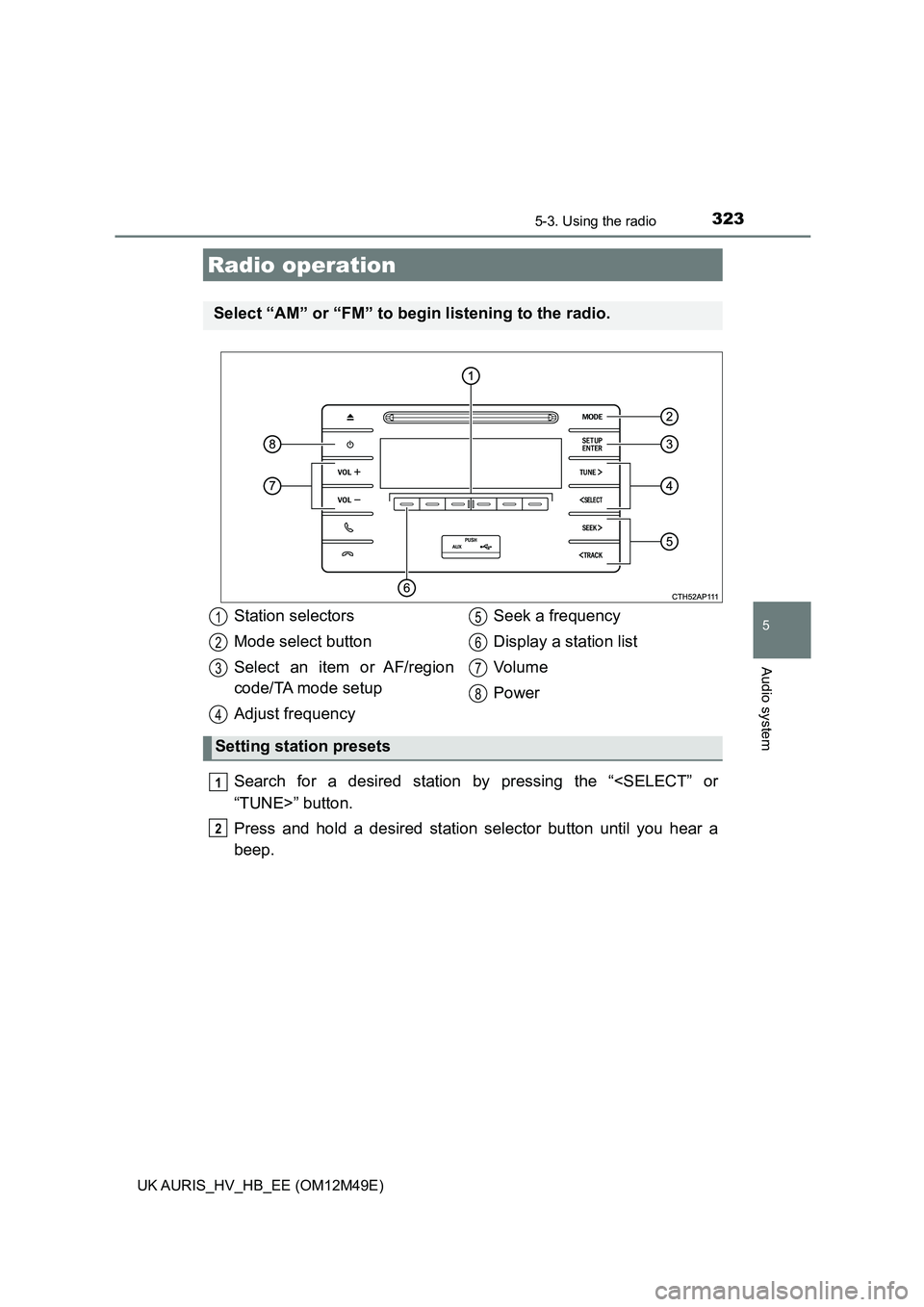
Search for a desired station by pressing the “
Press and hold a desired station selector button until you hear a
beep.
Radio operation
Select “AM” or “FM” to be gin listening to the radio.
Station selectors
Mode select button
Select an item or AF/region
code/TA mode setup
Adjust frequency
Seek a frequency
Display a station list
Vo l u m e
Power
Setting station presets
1
2
3
4
5
6
7
8
1
2
Page 324 of 592
3245-3. Using the radio
UK AURIS_HV_HB_EE (OM12M49E)
■Updating the station list
Press “List”.
The station list will be displayed.
Press “Update” to update the list.
“Updating” is displayed while the searching is in process, and then avail-
able stations will be listed on the display.
To cancel the updating process, press “Back”.
■Selecting a station from the station list
Press “List”.
The station list will be displayed.
Press the “
Press the “SETUP/ENTER” butt on to tune in the station.
To return to the previous display, press “Back”.
This feature allows your radio to receive RDS data.
■Listening to stations of the same network
Press the “SETUP/ENTER” button.
Press the “
press the “SETUP/ENTER” button.
Press the “
mode: “FM AF” or “Region code”.
Press the “SETUP/ENTER” button to select “On” or “Off”.
FM AF ON mode: The station among those of the same net-
work with strong reception is selected.
Region code ON mode: The statio n among those of the same net-
work with strong reception and broadcast-
ing the same program is selected.
Using the station list
RDS (Radio Data System)
1
2
1
2
3
1
2
3
4
Page 325 of 592
3255-3. Using the radio
UK AURIS_HV_HB_EE (OM12M49E)
5
Audio system
■Traffic information
Press the “SETUP/ENTER” button.
Press the “
press the “SETUP/ENTER” button.
Press the “
mode.
Press the “SETUP/ENTER” button to select “On” or “Off”.
TA mode: The system automatically switches to traffic information
when a broadcast with a traffic information signal is
received.
The station returns to the previous one when the traffic infor-
mation ends.
■ EON (Enhanced Other Network) system (for traffic announcement func-
tion)
If the RDS station (with EON data) you are listening to is not broadcasting a
traffic information program and the audio system is in the TA (traffic
announcement) mode, the radio will be switched automatically to a station
broadcasting a traffic information program in the EON AF list when traffic
information begins.
■ When the 12-volt battery is disconnected
Station presets are erased.
■ Reception sensitivity
● Maintaining perfect radio reception at all times is difficult due to the continu-
ally changing position of the antenna, differences in signal strength and sur-
rounding objects, such as trains, transmitters, etc.
● The radio antenna is mounted on the rear side of the roof.
1
2
3
4
Page 378 of 592

3785-10. Bluetooth®
UK AURIS_HV_HB_EE (OM12M49E)
WARNING
■While driving
Do not operate the portable audio player, cellular phone or connect a device
to the Bluetooth® system.
■ Caution regarding interference with electronic devices
● Your audio unit is fitted with Bluetooth® antennas. People with implantable
cardiac pacemakers, cardiac resynchronization therapy-pacemakers or
implantable cardioverter defibrillators should maintain a reasonable dis-
tance between themselves and the Bluetooth® antennas. The radio waves
may affect the operation of such devices.
● Before using Bluetooth® devices, users of any electrical medical device
other than implantable cardiac pacemakers, cardiac resynchronization
therapy-pacemakers or implantable cardioverter defibrillators should con-
sult the manufacturer of the device for information about its operation
under the influence of radio waves. Radio waves could have unexpected
effects on the operation of such medical devices.
NOTICE
■ When leaving the vehicle
Do not leave your portable audio player or cellular phone in the vehicle. The
inside of the vehicle may become hot, causing damage to the portable
audio player or cellular phone.
Page 443 of 592

4437-3. Do-it-yourself maintenance
UK AURIS_HV_HB_EE (OM12M49E)
7
Maintenance and care
■If the tread on snow tires wears down below 4 mm (0.16 in.)
The effectiveness of the tires as snow tires is lost.
■ Situations in which the tire pressure warning system may not operate
properly (vehicles with a tire pressure warning system)
● In the following cases, the tire pressure warning system may not operate
properly.
• If non-genuine Toyota wheels are used.
• A tire has been replaced with a tire that is not an OE (Original Equipment)
tire.
• A tire has been replaced with a tire that is not of the specified size.
• Tire chains etc. are equipped.
• An auxiliary-supported run-flat tire is equipped.
• If a window tint that affects the radio wave signals is installed.
• If there is a lot of snow or ice on the vehicle, particularly around the
wheels or wheel housings.
• If the tire inflation pressure is extremely higher than the specified level.
• If tires not equipped with tire pressure warning valves and transmitters
are used.
• If the ID code on the tire pressure warning valves and transmitters is not
registered in the tire pressure warning computer.
● Performance may be affected in the following situations.
• Near a TV tower, electric power plant, gas station, radio station, large dis-
play, airport or other facility that gener ates strong radio waves or electri-
cal noise.
• When carrying a portable radio, cellular phone, cordless phone or other
wireless communication device.
● When the vehicle is parked, the time taken for the warning to start or go off
could be extended.
● When tire inflation pressure declines rapidly for example when a tire has
burst, the warning may not function.
Page 576 of 592

576
UK AURIS_HV_HB_EE (OM12M49E)
What to do if... (Troubleshooting)
What to do if... (Troubleshooting)
●If you lose your keys or mechanical keys, new genuine keys or mechanical
keys can be made by any authorized Toyota dealer or repairer, or another
duly qualified and equipped professional. (P. 121)
●If you lose your keys or electronic keys, the risk of vehicle theft increases
significantly. Contact any authorized Toyota dealer or repairer, or another
duly qualified and equipped professional immediately. (P. 123)
●Is the key battery weak or depleted? (P. 459)
●Vehicles with a smart entry & start system:
Is the power switch in ON mode?
When locking the doors, turn the power switch off. (P. 213)
●Vehicles with a smart entry & start system:
Is the electronic key left inside the vehicle?
When locking the doors, make sure that you have the electronic key on
your person.
●The function may not operate properly due to the condition of the radio
wave. (P. 137, 157)
●Is the child-protector lock set?
The rear door cannot be opened from inside the vehicle when the lock is
set. Open the rear door from outside and then unlock the child-protector
lock. (P. 127)
If you have a problem, check the following before contacting any
authorized Toyota dealer or repairer, or another duly qualified
and equipped professional.
The doors cannot be locked, unlocked, opened or closed
You lose your keys
The doors cannot be locked or unlocked
The rear door cannot be opened
Page 579 of 592

579
UK AURIS_HV_HB_EE (OM12M49E)
Alphabetical index
Alphabetical index
A/C............................................. 380
Air conditioning filter.............. 457
ABS
(Anti-lock Brake System) ...... 305
Warning light ......................... 492
Air conditioning filter .............. 457
Air conditioning
system .................................... 380
Air conditioning filter.............. 457
Airbag manual on-off system ... 48
Airbags ....................................... 38
Airbag manual on-off
system .......... ........................ 48
Airbag operating conditions .... 44
Airbag precautions for
your child .............................. 40
Correct driving posture............ 32
Curtain shield airbag
operating conditions ............. 44
Curtain shield airbag
precautions ........................... 42
General airbag precautions..... 40
Locations of airbags ................ 38
Modification and
disposal of airbags................ 43
Side airbag operating
conditions ............................. 44
Side airbag precautions .......... 40
Side and curtain shield airbags
operating conditions ............. 44
Side and curtain shield airbags
precautions ........................... 40
SRS airbags ............................ 38
SRS warning light ................. 492
Alarm .......................................... 89
Warning buzzer............. 491, 498
Anchor brackets ........................ 60
Antennas
(push-button start) ................ 155
Antennas (smart entry &
start system) .......................... 134
Anti-lock Brake
System (ABS) ........................ 305
Warning light ......................... 492
Armrest ..................................... 408
Ashtrays ................................... 406
Assist grips .............................. 408
Audio input*............................ 320
Audio system*......................... 318
Audio input ............................ 320
AUX port/USB port................ 320
Bluetooth® audio................... 350
CD player .............................. 326
iPod....................................... 334
MP3/WMA disc ..................... 326
Optimal use........................... 321
Portable music player ........... 349
Radio .................................... 323
Steering wheel audio
switch ................................. 319
USB memory ........................ 342
Automatic headlight leveling
system .................................... 234
Automatic High Beam ............. 270
Automatic light control
system .................................... 229
AUX port*................................. 320
Auxiliary boxes ................ 398, 401
A
*: For vehicles with navigation/multimedia system, refer to “Navigation
and multimedia system Owner’s manual”.
Page 587 of 592

587Alphabetical index
UK AURIS_HV_HB_EE (OM12M49E)
Panoramic roof shade ............. 409
Parking assist sensors............ 284
Parking brake ........................... 228
Operation .............................. 228
Parking brake engaged
warning buzzer ................... 228
PCS (Pre-Crash Safety
system) ................................... 252
PCS (Pre-Crash Safety
system) switch ..... ............... 255
Warning light ......................... 493
Personal lights ......................... 392
Wattage................................. 563
Power control unit ..................... 75
Power control unit coolant ..... 430
Capacity ................................ 558
Checking ............................... 430
Preparing and checking
before winter ....................... 314
Power outlets ........................... 407
Power steering ......................... 306
Warning light ......................... 492
Power switch ............................ 211
Power windows ........................ 186
Jam protection function ......... 187
Operation .............................. 186
Window lock switch ............... 186
Pre-Crash Safety system
(PCS)....................................... 252
PCS (Pre-Crash Safety
system) switch ..... ............... 255
Warning light ......................... 493
Push-button start ..................... 155
Antenna location ................... 134
Starting the hybrid system .... 211
Radiator .................................... 432
Radio*...................................... 323
Rear fog light ........................... 235
Replacing light bulb .............. 467
Switch ................................... 235
Rear personal lights ................ 392
Wattage ................................ 563
Rear seat
Folding down ........................ 175
Rear turn signal lights............. 227
Replacing light bulbs............. 467
Turn signal lever ................... 227
Wattage ................................ 563
Rear view mirror
Inside rear view mirror .......... 181
Outside rear view mirrors...... 183
Rear view monitor system*
Rear window defogger ............ 384
Rear window wiper .................. 241
Refueling .................................. 243
Capacity ................................ 554
Fuel types ............................. 554
Opening the fuel tank cap ..... 245
Replacing
Electronic key battery ........... 459
Fuses .................................... 462
Light bulbs ............................ 467
Tires ...................................... 507
Road accident cautions ............ 79
Road Sign Assist (RSA) .......... 274
RSA (Road Sign Assist) .......... 274
PR
*: For vehicles with navigation/multimedia system, refer to “Navigation
and multimedia system Owner’s manual”.