2018 SUBARU WRX ESP
[x] Cancel search: ESPPage 185 of 578

(190,1)
北米Model "A1700BE-B" EDITED: 2017/ 10/ 11
Content Description Page
Fuel consumption screen Displays fuel consumption screen. 3-48
Triple meter screen Displays up to 3 optional items. 3-49
Prevention safety screen Displays the status of your vehicle. 3-49
Boost pressure screen Displays the boost pressure, etc. 3-50
Guidance screen Enters the setting screen 3-50
Clock/calendar screen Displays the clock/calendar.3-51
!Fuel consumption screen1) Average fuel consumption corresponding
to the driving distance of each trip meter
2) Current fuel consumption
3) Driving range on remaining fuelNOTEThe driving range on the remaining fuel
is only a guide. The indicated value may
differ from the actual driving range on
the remaining fuel, so you must im-
mediately fill the tank when the low fuel
warning light illuminates.
Instruments and controls/Multi-function display (color LCD)
3-48
Page 186 of 578

(191,1)
北米Model "A1700BE-B" EDITED: 2017/ 10/ 11
!Triple meter screenTriple meter screen (display example)From the following pieces of information,
you can select up to three items to be
displayed.
Item Details
Engine oil temperature (except
STI)Average vehicle speedAccelerator opening ratioItem Details
Vehicle postureAverage fuel consumption cor-
responding to the driving dis-
tance of the odometerBoost pressureJourney distance (the distance
that has been driven since the
ignition switch was turned to
the“ON”position)Average fuel consumption for
the entire driving distance from
when the ignition switch was
turned to the“ON”position
!Prevention safety screen1) Telltale screen
2) Steering angle
3) Vehicle posture
4) Running conditionFor functions that are operating, the
corresponding indicator will illuminate or
flash.NOTEThe vehicle posture indication may
differ from the actual vehicle posture.
–CONTINUED–
Instruments and controls/Multi-function display (color LCD)
3-49
3
Page 206 of 578

(211,1)
北米Model "A1700BE-B" EDITED: 2017/ 10/ 11
&Daytime running light system
WARNING
When the daytime running lights are
illuminated, the tail lights do not
illuminate. When it becomes dark
outside, turn the light switch to the
“
”position to illuminate the head-
lights and tail lights. This will im-
prove visibility and allow other dri-
vers to see your vehicle more easily.
The daytime running lights will automati-
cally illuminate when the following condi-
tions are fulfilled.
.The engine is running.
.The parking brake is fully released.
.The light control switch is in the“AUTO”
(if equipped),“
”or off position.
.For CVT models, the select lever is in a
position other than the“P”position.
NOTEWhen the light switch is in the“
”
position, the instrument panel illumina-
tion, front side marker lights, tail lights
and license plate lights are also illumi-
nated.
Steering Responsive Head-
light (SRH) (if equipped)1) The target area of illumination when SRH
is activated
2) The target area of illumination when SRH
is not activatedSRH is a function that automatically moves
the headlight beam to the left or right in
accordance with the steering angle and
vehicle speed. This function helps to
improve the visibility at night by illuminat-
ing the road ahead at corners and inter-
sections.NOTESRH only activates when the vehicle is
traveling forward at the speed of ap-
proximately 5 mph (8 km/h) and over.
&To turn on/off the SRHOperate the combination meter display
(color LCD) to turn on/off the SRH. For
details, refer to“SRH”F3-43.SRH OFF indicatorThe SRH OFF indicator on the combina-
tion meter turns off when SRH is turned on.
The SRH OFF indicator on the combina-
tion meter illuminates when SRH is turned
off.
If SRH is malfunctioning, a message
appears on the warning screen when the
ignition switch is in the“ON”position. It
indicates that SRH has been deactivated.
Contact a SUBARU dealer for an inspec-
tion.
–CONTINUED–
Instruments and controls/Steering Responsive Headlight (SRH)
3-69
3
Page 241 of 578

(250,1)
北米Model "A1700BE-B" EDITED: 2017/ 10/ 11
&Tips for operating the audio/
visual system
CAUTION
To avoid damage to the audio/visual
system:
.Be careful not to spill beverages
over the audio/visual system.
.Do not put anything other than an
appropriate disc into the disc
slot.NOTEThe use of a cell phone inside or near
the vehicle may cause a noise from the
speakers of the audio/visual system
which you are listening to. However,
this does not indicate a malfunction.
!Radio
Usually, a problem with radio reception
does not mean there is a problem with the
radio—it is just the normal result of
conditions outside the vehicle.
For example, nearby buildings and terrain
can interfere with FM reception. Power
lines or phone wires can interfere with AM
signals. And of course, radio signals have
a limited range. The farther the vehicle isfrom a station, the weaker its signal will be.
In addition, reception conditions change
constantly as the vehicle moves.
Here, some common reception problems
that probably do not indicate a problem
with the radio are described.
!FM
Fading and drifting stations: Generally, the
effective range of FM is about 25 miles (40
km). Once outside this range, you may
notice fading and drifting, which increase
with the distance from the radio transmit-
ter. They are often accompanied by
distortion.
Multi-path: FM signals are reflective, mak-
ing it possible for 2 signals to reach the
vehicle’s antenna at the same time. If this
happens, the signals will cancel each other
out, causing a momentary flutter or loss of
reception.
Static and fluttering: These occur when
signals are blocked by buildings, trees or
other large objects. Increasing the bass
level may reduce static and fluttering.
Station swapping: If the FM signal being
listened to is interrupted or weakened, and
there is another strong station nearby on
the FM band, the radio may tune in the
second station until the original signal can
be picked up again.!AM
Fading: AM broadcasts are reflected by
the upper atmosphere—especially at
night. These reflected signals can interfere
with those received directly from the radio
station, causing the radio station to sound
alternately strong and weak.
Station interference: When a reflected
signal and a signal received directly from
a radio station are very nearly the same
frequency, they can interfere with each
other, making it difficult to hear the broad-
cast.
Static: AM is easily affected by external
sources of electrical noise, such as high
tension power lines, lightening or electrical
motors. This results in static.
!SiriusXM (if equipped)
.Cargo loaded on the roof luggage
carrier, especially metal objects, may
adversely affect the reception of SiriusXM
Satellite Radio.
.Alternation or modifications carried out
without appropriate authorization may in-
validate the user’s right to operate the
equipment.
Audio/Audio set
5-6
Page 243 of 578

(252,1)
北米Model "A1700BE-B" EDITED: 2017/ 10/ 11
Low quality discsLabeled discs
CAUTION
.Do not use special shaped, trans-
parent/translucent, low quality or
labeled discs such as those
shown in the illustrations. The
use of such discs may damage
the player, or it may be impossi-
ble to eject the disc.
.This system is not designed for
use of Dual Discs. Do not use
Dual Discs because they may
cause damage to the player.
.Do not use discs with a protection
ring. The use of such discs may
damage the player, or it may be
impossible to eject the disc.
.Do not use printable discs. The
use of such discs may damage
the player, or it may be impossi-
ble to eject the disc.
1) Correct
2) Wrong.Handle discs carefully, especially when
inserting them. Hold them on the edge and
do not bend them. Avoid getting finger-
prints on them, particularly on the shiny
side.
.Dirt, scratches, warping, pin holes or
other disc damage could cause the player
to skip or to repeat a section of a track. (To
see a pin hole, hold the disc up to the light.)
.Remove discs from the players when
not in use. Store them in their plastic cases
away from moisture, heat and direct sun-
light.
Audio/Audio set
5-8
Page 244 of 578

(253,1)
北米Model "A1700BE-B" EDITED: 2017/ 10/ 11
To clean a disc: Wipe it with a soft, lint-
free cloth that has been dampened with
water. Wipe in a straight line from the
center to the edge of the disc (not in
circles). Dry it with another soft, lint-free
cloth. Do not use a conventional record
cleaner or anti-static device.
!CD-R/RW discs
.CD-R/CD-RW discs that have not been
subject to the“finalizing process”(a
process that allows discs to be played on
a conventional CD player) cannot be
played.
.It may not be possible to play CD-R/CD-
RW discs recorded on a music CD
recorder or a personal computer because
of disc characteristics, scratches or dirt on
the disc, or dirt, condensation, etc. on thelens of the unit.
.It may not be possible to play discs
recorded on a personal computer depend-
ing on the application settings and the
environment. Record with the correct
format. (For details, contact the appropri-
ate application manufacturers of the appli-
cations.)
.CD-R/CD-RW discs may be damaged
by direct exposure to sunlight, high tem-
peratures or other storage conditions. The
unit may be unable to play some damaged
discs.
.If you insert a CD-RW disc into the
player, playback will begin more slowly
than with a conventional CD or CD-R disc.
.Recordings on CD-R/CD-RW cannot
be played using the DDCD (Double Den-
sity CD) system.
!USB memory device
.USB communication formats: USB
1.1/2.0 HS (480 Mbps) and FS (12 Mbps)
.File formats: FAT 16/32
.Correspondence class: Mass storage
class
!iPod
The following iPod, iPod nano, iPod
classic, iPod touch and iPhone devices
can be used with this system.Made for
.iPod touch (5th generation)*
.iPod touch (4th generation)
.iPod touch (3rd generation)
.iPod touch (2nd generation)
.iPod touch (1st generation)
.iPod classic
.iPod nano (7th generation)*
.iPod nano (6th generation)*
.iPod nano (5th generation)
.iPod nano (4th generation)
.iPod nano (3rd generation)
.iPod nano (2nd generation)*
.iPod nano (1st generation)*
.iPhone 5s*
.iPhone 5c*
.iPhone 5*
.iPhone 4s
.iPhone 4
.iPhone 3GS
.iPhone 3G
.iPhone
*: iPod video not supportedDepending on differences between mod-
els or software versions etc., some models
might be incompatible with this system.
–CONTINUED–
Audio/Audio set
5-9
5
Page 245 of 578

(254,1)
北米Model "A1700BE-B" EDITED: 2017/ 10/ 11
!File information
Compatible compressed files (Audio)
Item USB DISC
Compatible
file formatMP3/WMA/AAC
Folders in the
deviceMaximum
512Maximum
255
Files in the
deviceMaximum
8000Maximum
512
Files per
folderMaximum
255—
Corresponding sampling frequency
(Audio)
File type Frequency (kHz)
MP3 files:
MPEG 1 LAYER 332/44.1/48
MP3 files:
MPEG 2 LSF LAYER 316/22.05/24
WMA files:
Ver. 7, 8, 9 (9.1/9.2)32/48/64/80/96/128/
160/192
AAC files:
MPEG4/AAC-LC48/44.1/32/24/22.05/
16/12/11.025/8
Corresponding bit rates (Audio)
File type Bit rate (kbps)
MP3 files:
MPEG 1 LAYER 332 - 320
MP3 files:
MPEG 2 LSF LAYER 38 - 160
WMA files: Ver. 7, 8 CBR 48 - 192
WMA files:
Ver. 9 (9.1/9.2)CBR 32 - 192
AAC files:
MPEG4/AAC-LC16 - 320
(Variable Bit Rate (VBR) compatible)
.MP3 (MPEG Audio Layer 3), WMA
(Windows Media Audio) and AAC (Ad-
vanced Audio Coding) are audio compres-
sion standards.
.This system can play MP3/WMA/AAC
files on CD-R, CD-RW discs, USB mem-
ory, and Bluetooth device.
.This system can play disc recordings
compatible with ISO 9660 level 1 and level
2 and with the Romeo and Joliet file
system.
.When naming an MP3/WMA/AAC file,
add an appropriate file extension (.mp3/
.wma/.m4a).
.This system plays back files with .mp3/
.wma/.m4a file extensions as MP3/WMA/
AAC files respectively. To prevent noiseand playback errors, use the appropriate
file extension.
.This system can play only the first
session when using multi-session compa-
tible CDs.
.MP3 files are compatible with the ID3
Tag Ver. 1.0, Ver. 1.1, Ver. 2.2 and Ver. 2.3
formats. This system cannot display disc
title, track title and artist name in other
formats.
.WMA/AAC files can contain a WMA/
AAC tag that is used in the same way as an
ID3 tag. WMA/AAC tags carry information
such as track title and artist name.
.The emphasis function is available only
when playing MP3/WMA files recorded at
32, 44.1 and 48 kHz.
.This system can play back AAC files
encoded by iTunes.
.The sound quality of MP3/WMA files
generally improves with higher bit rates. In
order to achieve a reasonable level of
sound quality, discs recorded with a bit rate
of at least 128 kbps are recommended.
.The MP3/WMA player does not play
back MP3/WMA files from discs recorded
using packet write data transfer (UDF
format). Discs should be recorded using
“pre-mastering”software rather than pack-
etwrite software.
.M3u playlists are not compatible with
Audio/Audio set
5-10
Page 249 of 578
(258,1)
北米Model "A1700BE-B" EDITED: 2017/ 10/ 11
&Basic information before use
WARNING
When the vehicle is stopped with the
engine running, always apply the
parking brake for safety. Failure to
do so may result in loss of control of
your vehicle and cause an accident
or serious injury.
CAUTION
.To prevent damaging the screen,
touch the screen keys with your
finger lightly.
.Wipe off fingerprints using a
glass cleaning cloth. Do not use
chemical cleaners to clean the
screen, as they may damage the
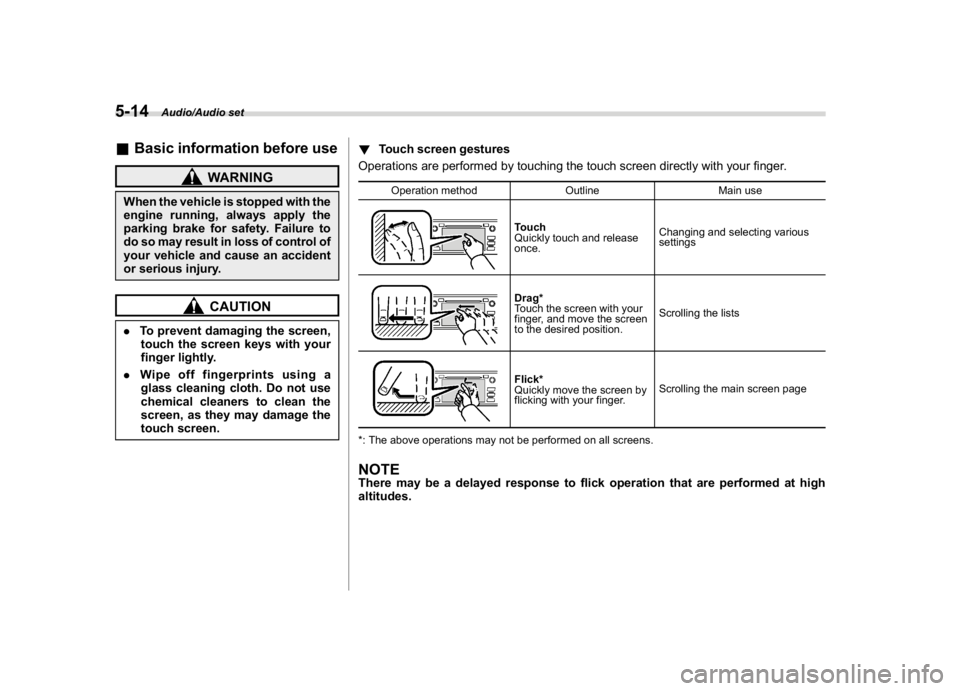
touch screen.!Touch screen gestures
Operations are performed by touching the touch screen directly with your finger.
Operation method Outline Main use
Touch
Quickly touch and release
once.Changing and selecting various
settingsDrag*
Touch the screen with your
finger, and move the screen
to the desired position.Scrolling the listsFlick*
Quickly move the screen by
flicking with your finger.Scrolling the main screen page
*: The above operations may not be performed on all screens.
NOTEThere may be a delayed response to flick operation that are performed at high
altitudes.
Audio/Audio set
5-14