2018 SUBARU WRX tow
[x] Cancel search: towPage 279 of 578

(288,1)
北米Model "A1700BE-B" EDITED: 2017/ 10/ 11
Audio panel
No. Function&1
Turn to adjust volume.
Press to turn the audio system on/off.
&2
Press to display the sound setting
screen. Refer to“
Unit settings”F5-18.
&3
Press to display the station operation
screen.
Press to select an audio mode.
&4
Turn to display the next/previous con-
tent item.
Press to select an audio source. Refer
to“
Selecting an audio source”F5-17.
&5
Press to display the next/previous con-
tent item.
NOTE.For safety reasons, certain func-
tions are not available while your
vehicle is in motion.
.In order to maximize signal recep-
tion, performance and precision of the
smartphone, please ensure the smart-
phone is placed as close to the system
as possible, while ensuring it is stowed
and secure while driving.
.When the ignition switch is in the
“ACC”or“ON”position, the battery of
the connected iPhone/iPod touch is
charged.
.iPhone/iPod touch may not be re-
cognized when the ignition switch is in
the“ACC”or“ON”position. In this
case, remove the iPhone/iPod touch
and reconnect it.
.The accuracy of the displayed in-
formation or the signal reception per-
formance depends on the smartphone
or the connected device, and it’s wire-
less connection.
.Since the aha application uses sig-
nals from GPS satellites and wireless
communication lines, it may not work
properly in the following locations.
–In a tunnel
–In underground parking lots
Audio/Audio set
5-44
Page 304 of 578
(313,1)
北米Model "A1700BE-B" EDITED: 2017/ 10/ 11
Hands-free phone systemThe hands-free system enables calls to be
made and received without having to take
your hands off the steering wheel.
This system supports Bluetooth. Bluetooth
is a wireless data system that enables cell
phones to be used without being con-
nected by a cable or placed in a cradle.
The operating procedure of the phone is
explained here.
WARNING
.While driving, do not use a cell
phone or connect the Bluetooth
phone. Doing so may result in
loss of control of your vehicle
and cause an accident or serious
injury.
.Your audio unit is fitted with
Bluetooth antennas. People with
implantable cardiac pacemakers,
cardiac resynchronization ther-
apy-pacemakers or implantable
cardioverter defibrillators should
maintain a reasonable distance
between themselves and the
Bluetooth antennas. The radio
waves may affect the operation
of such devices..Before using Bluetooth devices,
users of any electrical medical
device other than implantable
cardiac pacemakers, cardiac re-
synchronization therapy-pace-
makers or implantable cardiover-
ter defibrillators should consult
the manufacturer of the device
for information about its opera-
tion under the influence of radio
waves. Radio waves could have
unexpected effects on the opera-
tion of such medical devices.
CAUTION
Do not leave your cell phone in the
vehicle. The temperature inside may
rise to a level that could damage the
phone.NOTE.If your cell phone does not support
Bluetooth, this system cannot function.
.In the following conditions, the sys-
tem may not function:
–The cell phone is turned off.
–The current position is outside
the communication area.
–The cell phone is not connected.
–The cell phone has a low battery..When using the hands free function
and other Bluetooth functions at the
same time, the following problems may
occur:
–The Bluetooth connection may
be cut.
–Noise may be heard when playing
back voice with the Bluetooth func-
tion.
.The other party’s voice will be heard
from the front speakers. The audio/
visual system will be muted during
phone calls or when hands-free voice
commands are used.
.Talk alternately with the other party
on the phone. If both parties speak at
the same time, the other party may not
hear what has been said. (This is not a
malfunction.)
.Keep call volume down. Otherwise,
the other party’s voice may be audible
outside the vehicle and voice echo may
increase. When talking on the phone,
speak clearly towards the microphone.
.The other party may not hear you
clearly when:
–Driving on an unpaved road.
(Making excessive traffic noise.)
–Driving at high speeds.
–The moonroof or windows are
open.
–The air conditioning vents are
–CONTINUED–
Audio/Hands-free phone system
5-69
5
Page 305 of 578

(314,1)
北米Model "A1700BE-B" EDITED: 2017/ 10/ 11
pointed towards the microphone.
–The sound of the air conditioning
fan is loud.
–There is a negative effect on
sound quality due to the phone
and/or network being used.
.When another phone is connected,
the following registered data cannot be
read:
–Contact data
–Call history data
–All phone settings
.When selling or disposing of the
vehicle, initialize the data. Refer to
“Unit settings”F5-18.
.Once initialized, the data and set-
tings will be erased. Take extra caution
when initializing the data.
.The voice command system sup-
ports phone commands, so dialing a
phone number using your voice is
possible. Refer to“Voice command
system”F5-79.
.The images shown in this Owner’s
Manual are sample images. The actual
images may vary depending on the
market and specifications of your ve-
hicle.
&Control screenPHONE (Menu) screenPHONE (Dialpad) screenNo. Function
&1
Open the“Incoming Calls”screen.
Refer to“
By incoming calls”F5-72.
&2
Open the“Outgoing Calls”screen.
Refer to“
By outgoing calls”F5-73.
&3
Open the“Contacts”screen. Refer to
“By contacts list”F5-73.
&4
Open the dialpad screen. Refer to“
By
Dialpad”F5-74.
&5
Open the phone volume settings
screen. Refer to“
Phone volume set-
tings”F5-77.
&6
Use to make a phone call. You cannot
press this key until you open the
dialpad screen and enter a phone
number.
&7
Open the“BT Devices Connection”
screen. Refer to“
Setting Bluetooth
details”F5-67.
&8
Enter the phone number that you want
to call.
&9
Switch the screen to the phone (menu)
screen.
NOTEWhen the cell phone is not registered
and the Bluetooth setting is off, a
message is displayed instead of menu
items.
Audio/Hands-free phone system
5-70
Page 315 of 578
(324,1)
北米Model "A1700BE-B" EDITED: 2017/ 10/ 11
Action Function
PressStart the voice com-
mand system.
Press and holdCancel voice recogni-
tion.
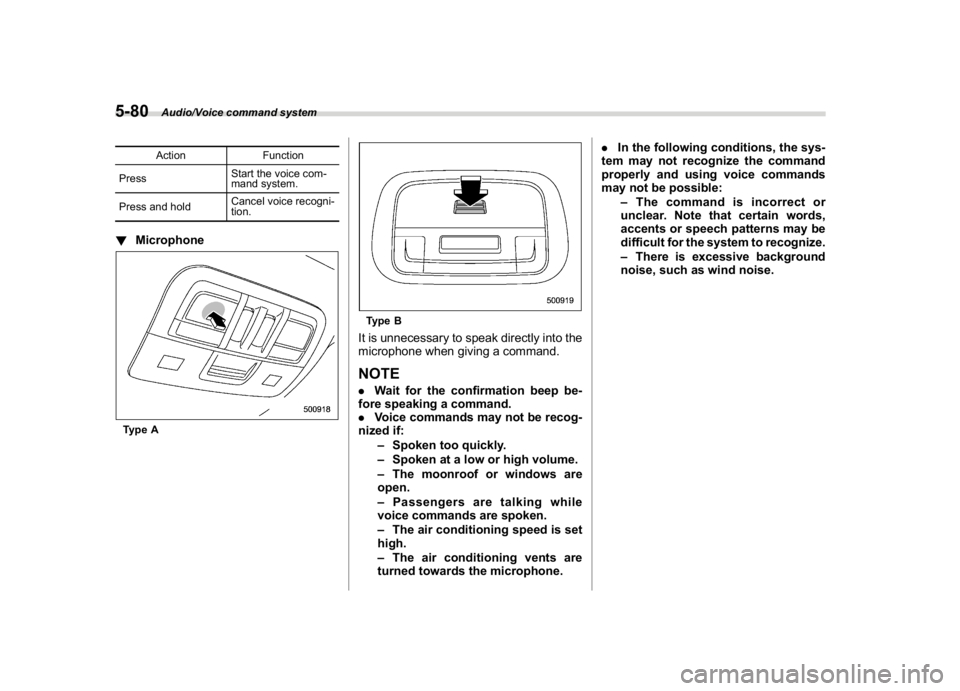
!MicrophoneType A
Type BIt is unnecessary to speak directly into the
microphone when giving a command.NOTE.Wait for the confirmation beep be-
fore speaking a command.
.Voice commands may not be recog-
nized if:
–Spoken too quickly.
–Spoken at a low or high volume.
–The moonroof or windows are
open.
–Passengers are talking while
voice commands are spoken.
–The air conditioning speed is set
high.
–The air conditioning vents are
turned towards the microphone..In the following conditions, the sys-
tem may not recognize the command
properly and using voice commands
may not be possible:
–The command is incorrect or
unclear. Note that certain words,
accents or speech patterns may be
difficult for the system to recognize.
–There is excessive background
noise, such as wind noise.
Audio/Voice command system
5-80
Page 331 of 578

(342,1)
北米Model "A1700BE-B" EDITED: 2017/ 10/ 11
&Sun visor extension plate
(models with the EyeSight
system)With the sun visor positioned over the side
window, you can use the sun visor exten-
sion plate to prevent glare through the gap
between the sun visor and center pillar. To
use the extension plate, pull it toward the
rear of the vehicle. When you have
finished using it, stow it by pushing it
toward the front of the vehicle.
CAUTION
Do not pull out the extension plate
with the sun visor positioned over
the windshield. The extension plate
would obstruct your view of the rear
view mirror.
&Vanity mirror with light
CAUTION
Keep the vanity mirror cover closed
while the vehicle is being driven to
avoid being temporarily blinded by
the glare of bright light.To use the vanity mirror, swing down the
sun visor and open the vanity mirror cover.
The light beside the vanity mirror illumi-
nates when the mirror cover is opened.NOTEDo not use the vanity mirror light for a
long period of time while the engine is
not running. Doing so can cause bat-
tery discharge.
Interior equipment/Sun visors
6-4
Page 333 of 578

(344,1)
北米Model "A1700BE-B" EDITED: 2017/ 10/ 11
Cup holders
CAUTION
Take care to avoid spills. Beverages,
if hot, might burn you and/or your
passengers. Spilled beverages may
also damage upholstery, carpets or
audio equipment.&Front passenger’s cup holder
CAUTION
Do not pick up a cup from the cup
holder or put a cup in the holder
while driving. Doing so can distract
you and lead to an accident.!Except STI
Type AType BA dual cup holder is built into the center
console.!STI
The dual cup holder is built into the center
console near the parking brake lever.To access the cup holder, pull the lid
toward the rear.
Interior equipment/Cup holders
6-6
Page 334 of 578
(345,1)
北米Model "A1700BE-B" EDITED: 2017/ 10/ 11
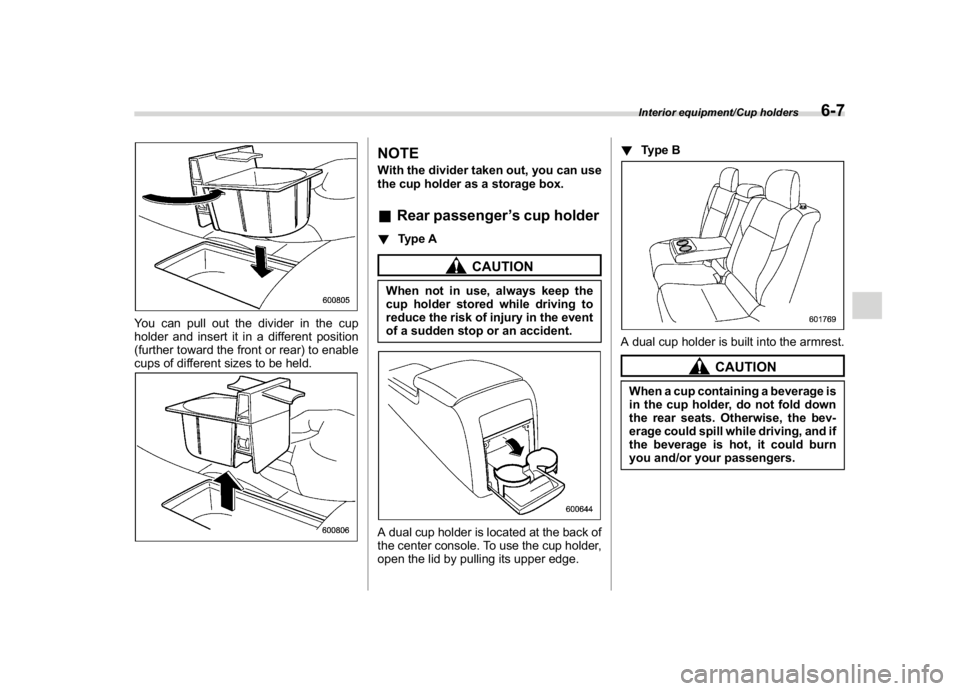
You can pull out the divider in the cup
holder and insert it in a different position
(further toward the front or rear) to enable
cups of different sizes to be held.
NOTEWith the divider taken out, you can use
the cup holder as a storage box.&Rear passenger’s cup holder!Type A
CAUTION
When not in use, always keep the
cup holder stored while driving to
reduce the risk of injury in the event
of a sudden stop or an accident.A dual cup holder is located at the back of
the center console. To use the cup holder,
open the lid by pulling its upper edge.!Type B
A dual cup holder is built into the armrest.
CAUTION
When a cup containing a beverage is
in the cup holder, do not fold down
the rear seats. Otherwise, the bev-
erage could spill while driving, and if
the beverage is hot, it could burn
you and/or your passengers.Interior equipment/Cup holders
6-7
6
Page 348 of 578

(359,1)
北米Model "A1700BE-B" EDITED: 2017/ 10/ 11
WARNING
Because the range of the image
captured by the camera is limited,
always check the traffic around the
vehicle directly with your eyes when
driving the vehicle.NOTE.The range of the displayed image
may differ depending on the vehicle
status or the road surface status.
.Because the Front View Monitor
system uses a specially designed lens,
the sense of distance in the displayed
image is different from the actual dis-
tance.
.The camera image may be difficult to
view in the following situations. This is
not a malfunction.
–Dark place (at night)
–High or low temperature around
the lens
–Water contacts lens or in high
humidity (rainy weather)
–There is foreign materials (such
as mud) around the camera
–Sunlight or headlight beam di-
rectly shines towards the camera
lens
.Under an artificial light such as afluorescent lamp, sodium-vapor lamp
or mercury lamp, the lighted portion
may look like it is flickering (flicker
phenomenon).
.While the display has cooled down,
the image may leave traces or become
darker than usual, causing a difficulty
in viewing the screen. Always check the
traffic around the vehicle directly with
your eyes while driving the vehicle.
.The following incidents should not
be deemed a malfunction.
–The camera lens may become
foggy when the humidity is high on
a rainy day.
–The light from a vehicle or build-
ing located ahead may be reflected
towards the camera image while
driving at night.
–In a dark place or while driving at
night, the camera image may be
adjusted to make noises less visi-
ble. Therefore, the image may look
like a monochromatic image or the
image colors may differ from the
actual colors. The camera image
may be deteriorated in regard to
sharpness at the center and four
corners of the screen. This is not a
malfunction.
&Guiding line1) Guiding line
2) Warning messageThe guiding line that indicates the width
and the front end of your vehicle is
displayed on the display.&Handling of camera
CAUTION
Observe the following instructions.
Otherwise, the system may malfunc-
tion.
.Do not apply any strong impact to
the camera such as banging it or
hitting it with an object. The
mounting angle may change.
–CONTINUED–
Interior equipment/Front View Monitor
6-21
6