2018 SUBARU WRX fuel
[x] Cancel search: fuelPage 171 of 578
(176,1)
北米Model "A1700BE-B" EDITED: 2017/ 10/ 11
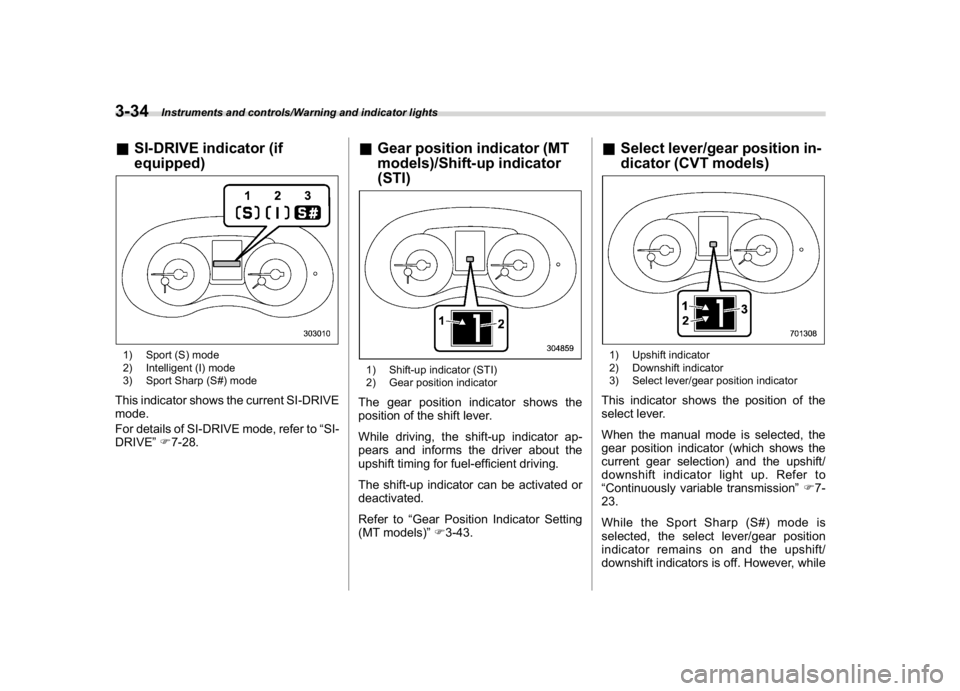
&SI-DRIVE indicator (if
equipped)1) Sport (S) mode
2) Intelligent (I) mode
3) Sport Sharp (S#) modeThis indicator shows the current SI-DRIVE
mode.
For details of SI-DRIVE mode, refer to“SI-
DRIVE”F7-28.
&Gear position indicator (MT
models)/Shift-up indicator
(STI)1) Shift-up indicator (STI)
2) Gear position indicatorThe gear position indicator shows the
position of the shift lever.
While driving, the shift-up indicator ap-
pears and informs the driver about the
upshift timing for fuel-efficient driving.
The shift-up indicator can be activated or
deactivated.
Refer to“Gear Position Indicator Setting
(MT models)”F3-43.
&Select lever/gear position in-
dicator (CVT models)1) Upshift indicator
2) Downshift indicator
3) Select lever/gear position indicatorThis indicator shows the position of the
select lever.
When the manual mode is selected, the
gear position indicator (which shows the
current gear selection) and the upshift/
downshift indicator light up. Refer to
“Continuously variable transmission”F7-
23.
While the Sport Sharp (S#) mode is
selected, the select lever/gear position
indicator remains on and the upshift/
downshift indicators is off. However, while
Instruments and controls/Warning and indicator lights
3-34
Page 181 of 578

(186,1)
北米Model "A1700BE-B" EDITED: 2017/ 10/ 11
!Sonar Audible Alarm
The Reverse Automatic Braking system is
equipped with a function that emits a
warning sound when the system operates.
The function can be activated or deacti-
vated. Select“On”to set the warning
sound to active. Select“Off”to set the
warning sound to inactive.
!Default Settings
Select“Ye s”to use the menu screen to
restore customized settings to the factory
default settings. Select“No”to return to the
previous screen without restoring to the
factory default settings.
Multi-function display (color
LCD)
WARNING
Always pay adequate attention to
safe driving when operating the
multi-function display while the ve-
hicle is in motion. When operation of
the multi-function display is disturb-
ing your awareness and ability to
concentrate on driving, stop the
vehicle in a safe place before per-
forming operations on the screen.
Also, do not concentrate on the
display while driving. Doing so may
cause you to look away from the
road and could result in an accident.
The multi-function display has the follow-
ing functions.
Description Page
Displays useful messages,
such as warning information,
etc.3-46
Displays basic screens (e.g.
fuel consumption screen, etc.)3-47
Sets and adjusts maintenance
notification3-59
Registers driving history 3-60
Sets and customizes car op-
eration3-61
Reverse Automatic Braking
system (if equipped)7-66
Also, use the multi-function display to set
and initialize the multi-function display
itself.NOTE.Illustrations show the display for
U.S.-spec. models as an example. For
models other than U.S.-spec. models,
elements in the illustrations (such as
the display indication and measure-
ment unit) may be different than the
ones for U.S.-spec. models.
.When the vehicle is in motion,
certain functions and selections may
not be available.
.The images shown in this Owner’s
Manual are sample images. The actual
images may vary depending on the
Instruments and controls/Multi-function display (color LCD)
3-44
Page 185 of 578

(190,1)
北米Model "A1700BE-B" EDITED: 2017/ 10/ 11
Content Description Page
Fuel consumption screen Displays fuel consumption screen. 3-48
Triple meter screen Displays up to 3 optional items. 3-49
Prevention safety screen Displays the status of your vehicle. 3-49
Boost pressure screen Displays the boost pressure, etc. 3-50
Guidance screen Enters the setting screen 3-50
Clock/calendar screen Displays the clock/calendar.3-51
!Fuel consumption screen1) Average fuel consumption corresponding
to the driving distance of each trip meter
2) Current fuel consumption
3) Driving range on remaining fuelNOTEThe driving range on the remaining fuel
is only a guide. The indicated value may
differ from the actual driving range on
the remaining fuel, so you must im-
mediately fill the tank when the low fuel
warning light illuminates.
Instruments and controls/Multi-function display (color LCD)
3-48
Page 186 of 578

(191,1)
北米Model "A1700BE-B" EDITED: 2017/ 10/ 11
!Triple meter screenTriple meter screen (display example)From the following pieces of information,
you can select up to three items to be
displayed.
Item Details
Engine oil temperature (except
STI)Average vehicle speedAccelerator opening ratioItem Details
Vehicle postureAverage fuel consumption cor-
responding to the driving dis-
tance of the odometerBoost pressureJourney distance (the distance
that has been driven since the
ignition switch was turned to
the“ON”position)Average fuel consumption for
the entire driving distance from
when the ignition switch was
turned to the“ON”position
!Prevention safety screen1) Telltale screen
2) Steering angle
3) Vehicle posture
4) Running conditionFor functions that are operating, the
corresponding indicator will illuminate or
flash.NOTEThe vehicle posture indication may
differ from the actual vehicle posture.
–CONTINUED–
Instruments and controls/Multi-function display (color LCD)
3-49
3
Page 191 of 578

(196,1)
北米Model "A1700BE-B" EDITED: 2017/ 10/ 11
Top menu Menu option Description Page
Car Setting
Keyless Buzzer Volume Set the audible signal volume. 0 (OFF) to 7 3-61
Hazard Warning Flasher Set the hazard warning flasher. On or Off 3-61
Defogger Set and customize the operation of the defogger. 15 minutes or Continuous 3-61
Interior Light Set and customize the interior light off delay timer. 10, 20, 30 seconds or Off 3-61
Auto Light Sensor
*1
Set and customize the sensitivity of the auto light
sensor.Low, Mid, High or Max 3-61
Keyless Access Setting
Driver’s Door Unlock
*1
Set and customize the keyless access function. Driver’s Door Only, All 3-62
Welcome Lighting Set the leaving time and approaching time. 30, 60, 90 seconds or Off 3-62
Go Back Return to top menu.—
Initialize
Reset to Defaults Reset all settings to the default settings. Yes or No 3-62
Lifetime Fuel Cons Reset Clear logged lifetime fuel consumption data. Yes or No 3-62
Go Back Return to the top menu.—
Go Back
—Return to the top menu.—
*1: If equipped
Instruments and controls/Multi-function display (color LCD)
3-54
Page 199 of 578

(204,1)
北米Model "A1700BE-B" EDITED: 2017/ 10/ 11
“Auto Light Sensor”item in step 1.
!Keyless Access setting
1. Select“Keyless Access Setting”from
the 2nd menu in the setting screen. Refer
to“Setting screen”F3-52.
2. Select“Driver’s Door Unlock”.3. Select the preferred setting by using
the control switches.
4. Select“Set”to exit settings. Select“Go
Back”to return to the previous screen
without applying the setting changes.!Welcome lighting setting
You can change the setting for the period
of time in which the exterior remain on by
the welcome lighting function.
1. Select“Welcome Lighting”from the
2nd menu in the setting screen. Refer to
“Setting screen”F3-52.
2. Select“Leaving time set”to change
the setting when leaving the vehicle.
Select“Approaching time set”to change
the setting when approaching.
3. Select the preferred setting by using
the control switches.
4. Select“Set”to exit settings. Select“Go
Back”to return to the previous screen
without applying the setting changes.!Initialize
You can initialize the items that have been
set to your preference.
!Reset to factory default settings
1. Select“Reset to Defaults”from the
2nd menu in the setting screen. Refer to
“Setting screen”F3-52.
2. Select“Set”to exit settings. Select“Go
Back”to return to the previous screen
without resetting.
!Lifetime fuel consumption reset-
ting
1. Select“Lifetime Fuel Cons Reset”
from the 2nd menu in the setting screen.
Refer to“Setting screen”F3-52.
Instruments and controls/Multi-function display (color LCD)
3-62
Page 209 of 578

(214,1)
北米Model "A1700BE-B" EDITED: 2017/ 10/ 11
Fog light switch (if equipped)1) Headlight switch
2) Fog light switchThe front fog lights will turn on when the
fog light switch is placed in the“
”position
while the headlights are on (e.g., the
headlight switch is in the“
”position.)
To turn off the front fog lights, turn the
switch back down to the“”position.
Front fog light indicator lightThe indicator light on the combination
meter will illuminate when the front fog
lights are illuminated.
Wiper and washer
WARNING
In freezing weather, do not use the
windshield washer until the wind-
shield is sufficiently warmed by the
defroster.
Otherwise the washer fluid can
freeze on the windshield, blocking
your view.
CAUTION
.Do not operate the washer con-
tinuously for more than 10 sec-
onds, or when the washer fluid
tank is empty. This may cause
overheating of the washer motor.
Check the washer fluid level fre-
quently, such as at fuel stops.
.Do not operate the wipers when
the windshield is dry. This may
scratch the glass, damage the
blade rubbers and might cause
the wiper motor to fail. Before
operating the wiper on a dry
windshield, always use the wind-
shield washer.
.In freezing weather, be sure that
Instruments and controls/Fog light switch
3-72
Page 350 of 578

(363,1)
北米Model "A1700BE-B" EDITED: 2017/ 10/ 11
Fuel..........................................................................7-3
Fuel requirements.................................................. 7-3
Fuel filler lid and cap............................................. 7-5
State emission testing (U.S.only).........................7-7
Preparing to drive...................................................7-8
Starting and stopping theengine..........................7-9
General precautions when starting/stopping
engine................................................................. 7-9
Models without push-button start systems............7-10
Models with push-button start systems ................. 7-11
Remote engine start system (dealer option)...........7-14
Manual transmission............................................7-16
Shifting speeds.....................................................7-17
Driving tips...........................................................7-18
Driver’s Control Center Differential
(C.DIFF/DCCD) (STI)...........................................7-18
To change mode of driver’s control center
differential..........................................................7-19
Auto mode............................................................7-20
Manual mode........................................................7-21
Temporary release................................................7-22
Continuously variable transmission....................7-23
Select lever...........................................................7-24
Selection of manual mode.....................................7-25
Shift lock function.................................................7-27
Driving tips...........................................................7-28
SI-DRIVE (if equipped)..........................................7-28
Intelligent (I) mode................................................7-28
Sport (S) mode.....................................................7-29
Sport Sharp (S#) mode..........................................7-29SI-DRIVE switch....................................................7-30
Limited slip differential (LSD)(STI).....................7-31
Power steering......................................................7-31
STI .......................................................................7-31
Except STI............................................................7-32
Braking..................................................................7-33
Braking tips..........................................................7-33
Brake system.......................................................7-33
Disc brake pad wear warning indicators................7-34
High performance brake system (STI)...................7-34
Red caliper with sports brake pad (if equipped) .... 7-34
ABS (Anti-lock BrakeSystem).............................7-35
ABS self-check.....................................................7-35
ABS warning light.................................................7-35
Electronic Brake Force Distribution (EBD)
system................................................................7-36
Steps to take if EBD system malfunctions .............7-36
Vehicle Dynamics Controlsystem......................7-37
Vehicle Dynamics Control system monitor ............7-39
Vehicle Dynamics Control OFF switch...................7-39
Tire pressure monitoring system (TPMS)
(U.S.-spec. models)...........................................7-40
Parking your vehicle............................................7-42
Parking brake (models without electronic parking
brake system)....................................................7-42
Electronic parking brake (models with electronic
parking brake system).......................................7-43
Parking tips..........................................................7-45
Auto Vehicle Holdfunction..................................7-46
To turn on/off the Auto Vehicle Hold function........7-47
To operate the Auto Vehicle Hold function ............7-48
Starting and operating
7