2018 SUBARU WRX lock
[x] Cancel search: lockPage 218 of 578

(223,1)
北米Model "A1700BE-B" EDITED: 2017/ 10/ 11
the device during the“cycling”process
to prevent possible overheating.
Proceed with“Programming a New
HomeLink Button”step 4 to complete.
!Using HomeLink
To operate, simply press and release the
programmed HomeLink button. Activation
will now occur for the trained device (i.e.
garage door opener, gate operator, secur-
ity system, entry door lock, home/office
lighting, etc.). For convenience, the hand-
held remote of the device may also be
used at any time.
!Erasing HomeLink Buttons
To erase programming from the three
buttons (individual buttons cannot be
erased but can be“reprogrammed”as
outlined below), follow the step noted:
Press and hold the two outer HomeLink
buttons for at least 10 seconds. The LED
indicator will change from continuously lit
to rapidly flashing. Release both buttons.
Do not hold for longer than 20 seconds.
HomeLink is now ready to be programmed
at any time beginning with“Programming a
New HomeLink Button”- step 1.!Reprogramming a Single
HomeLink Button
To program a previously trained button,
follow these steps:
1. Press and hold the desired HomeLink
button. DO NOT release the button.
2. The indicator light will begin to slowly
flash orange after 20 seconds. The
HomeLink button can be released at this
point. Proceed with“Programming a New
HomeLink Button”- step 3.
3. If you do not complete the program-
ming of a new device to the button, it will
revert to the previously stored program-
ming.
!Garage Door Two-Way Commu-
nication
HomeLink has the capability of commu-
nicating with your garage door opener.
HomeLink can receive and display“clos-
ing”or“opening”status messages from
compatible garage door opener systems.
At any time, HomeLink can also recall and
display the last recorded status commu-
nicated by the garage door opener to
indicate your garage door being“closed”
or“opened”.
HomeLink has the capability of receiving
this communication from the garage door
opener at a range up to 820 feet (250 m).Range may be reduced by obstacles such
as houses or trees. You may have to slow
your vehicle speed to successfully receive
the garage door opener communication.
!Programming Two-Way Commu-
nication
1) Status IndicatorsWithin five seconds after programming a
new HomeLink button, both of HomeLink’s
garage door status indicators will flash
rapidly green indicating that the garage
door two-way communication has been
enabled. If your garage door status in-
dicators flashed, two-way communication
programming is complete.
If the garage door status indicators do not
flash, additional HomeLink information
and programming videos can be found
–CONTINUED–
Instruments and controls/Mirrors
3-81
3
Page 221 of 578
(226,1)
北米Model "A1700BE-B" EDITED: 2017/ 10/ 11
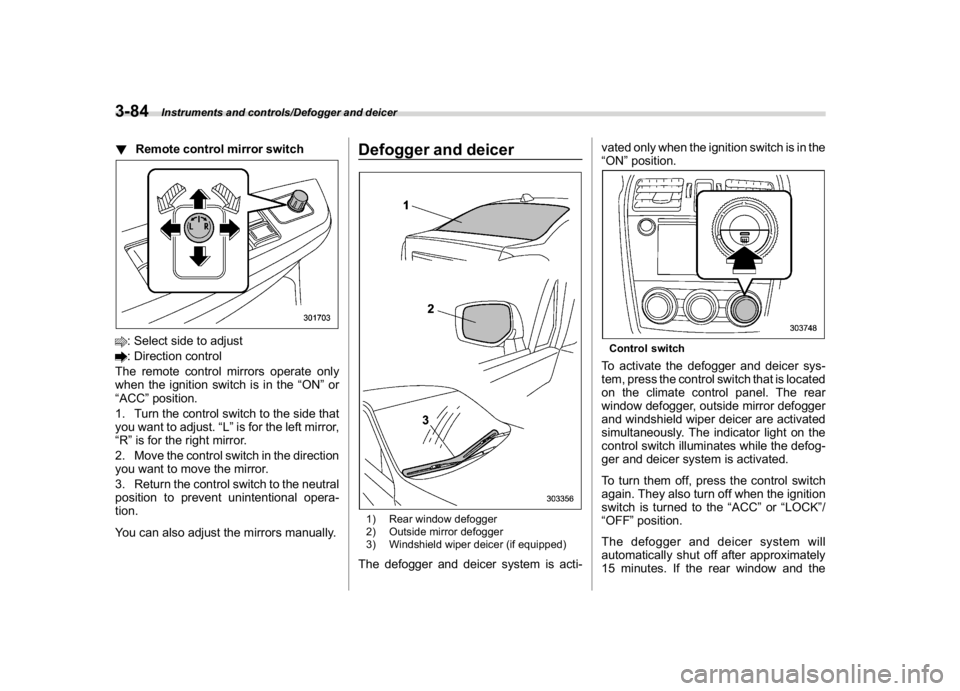
!Remote control mirror switch: Select side to adjust: Direction control
The remote control mirrors operate only
when the ignition switch is in the“ON”or
“ACC”position.
1. Turn the control switch to the side that
you want to adjust.“L”is for the left mirror,
“R”is for the right mirror.
2. Move the control switch in the direction
you want to move the mirror.
3. Return the control switch to the neutral
position to prevent unintentional opera-
tion.
You can also adjust the mirrors manually.
Defogger and deicer1) Rear window defogger
2) Outside mirror defogger
3) Windshield wiper deicer (if equipped)The defogger and deicer system is acti-vated only when the ignition switch is in the
“ON”position.
Control switchTo activate the defogger and deicer sys-
tem, press the control switch that is located
on the climate control panel. The rear
window defogger, outside mirror defogger
and windshield wiper deicer are activated
simultaneously. The indicator light on the
control switch illuminates while the defog-
ger and deicer system is activated.
To turn them off, press the control switch
again. They also turn off when the ignition
switch is turned to the“ACC”or“LOCK”/
“OFF”position.
The defogger and deicer system will
automatically shut off after approximately
15 minutes. If the rear window and the
Instruments and controls/Defogger and deicer
3-84
Page 222 of 578

(227,1)
北米Model "A1700BE-B" EDITED: 2017/ 10/ 11
outside mirrors have been cleared and the
windshield wiper blade rubbers have been
deiced completely before that time, press
the control switch to turn them off. If
defrosting, defogging or deicing is not
complete, you have to press the control
switch to turn them on again.
It is possible for the defogger and deicer
system to be set to continuous operation
mode by a SUBARU dealer. Consult your
SUBARU dealer for details. Also, you can
change the setting using the multi-function
display (color LCD). For details, refer to
“Defogger setting”F3-61.
If the battery voltage drops below the
permissible level, continuous operation of
the defogger and deicer system is can-
celed and the system stops operating.
CAUTION
.To prevent the battery from being
discharged, do not operate the
defogger and deicer system con-
tinuously for any longer than
necessary.
.Do not use sharp instruments or
window cleaner containing abra-
sives to clean the inner surface of
the rear window. They may da-
mage the conductors printed onthe window.
NOTE.Turn on the defogger and deicer
system if the wipers are frozen to the
windshield.
.If the windshield is covered with
snow, remove the snow so that the
windshield wiper deicer works effec-
tively.
.While the defogger and deicer sys-
tem is in the continuous operation
mode:
–If the vehicle speed remains at 9
mph (15 km/h) or lower for 15
minutes, the windshield wiper dei-
cer system automatically stops op-
erating. However, the rear window
defogger system and outside mirror
defogger system maintain continu-
ous operation in this condition.
–If the vehicle battery voltage
drops below the permissible level,
continuous operation of the defog-
ger system and deicer system is
canceled and the system stops
operating.
Tilt/telescopic steering wheel
WARNING
.Do not adjust the steering wheel
tilt/telescopic position while driv-
ing. This may cause loss of
vehicle control and result in per-
sonal injury.
.If the lever cannot be raised to the
fixed position, adjust the steering
wheel again. It is dangerous to
drive without locking the steering
wheel. This may cause loss of
vehicle control and result in per-
sonal injury.
–CONTINUED–
Instruments and controls/Tilt/telescopic steering wheel
3-85
3
Page 223 of 578

(228,1)
北米Model "A1700BE-B" EDITED: 2017/ 10/ 11
1) Tilt adjustment
2) Telescopic adjustment1. Adjust the seat position. Refer to“Front
seats”F1-2.
2. Pull the tilt/telescopic lock lever down.
3. Move the steering wheel to the desired
level.
4. Pull the lever up to lock the steering
wheel in place.
5. Make sure that the steering wheel is
securely locked by moving it up and down,
and forward and backward.
Horn1) Horn markTo sound the horn, push the horn pad.
Instruments and controls/Horn
3-86
Page 230 of 578

(237,1)
北米Model "A1700BE-B" EDITED: 2017/ 10/ 11
both side windows to prevent fogging.)(Heat-def):Windshield defroster outlets,
foot outlets and both side outlets of the
instrument panel (Refer to“Defrosting”
F4-9.)(Defrost):Windshield defroster outletsand both side outlets of the instrument
panel (Refer to“Defrosting”F4-9.)
NOTEWhen the“
”or“
”mode is se-
lected, the air conditioner compressor
operates automatically regardless of
the position of the air conditioner
button to defrost the windshield more
quickly. However the indicator on the
air conditioner button will not illumi-
nate. At the same time, the air inlet
selection is automatically set to the
outside air mode. After defrosting the
windshield by pressing the defroster
button“
”, pressing the button again
returns the system to the setting that
had been selected before the defroster
was activated.
&Temperature controlTurn the temperature control dial to set the
preferred interior temperature. With the
dial set to your preferred temperature, the
system automatically adjusts the tempera-
ture of air supplied from the outlets so that
the preferred temperature is achieved and
maintained.
If the dial is turned fully counterclockwise,
the system provides maximum cooling
performance. If the dial is turned fully
clockwise, the system provides maximumheating performance.
NOTEThe controllable temperature range
may vary depending on the regional
specifications of the vehicle.
!“DUAL”mode (type B)1) Driver’s side temperature
2) Front passenger’s side temperatureYou can change the setting of the driver’s
side and front passenger’s side tempera-
ture independently by selecting the
“DUAL”mode.
Perform either of the following procedures
to select the“DUAL”mode.
.Press the“DUAL”button
.Turn the passenger’s side temperature
–CONTINUED–
Climate control/Manual climate control operation
4-7
4
Page 234 of 578

(241,1)
北米Model "A1700BE-B" EDITED: 2017/ 10/ 11
&Replacing a cabin air filter1. Remove the glove box.NOTEWe recommend that you take measures
to protect the center console with
masking tape first, so that you avoid
scratching the center console with the
glove box.
(1) Open the glove box.
(2) Remove the damper shaft from the
glove box.
1) Stopper(3) Push both sides of the glove box
inside to unlock the stoppers and then
pull down the glove box as far as it will
go.(4) Pull out the glove box horizontallyand remove the hinge portion. When
doing this, be careful not to damage
the hinge.
2. Remove the cabin air filter according to
the following procedure in order to prevent
dust on the air cleaner from falling to the
inside of its housing.
(1) Push in the four stoppers to unlock,
and then slowly pull out the filter 4 in
(10 cm) from the housing.
(2) Completely pull out the filter by
gently tilting the front side of the filter
downward.
–CONTINUED–
Climate control/Air filtration system
4-11
4
Page 241 of 578

(250,1)
北米Model "A1700BE-B" EDITED: 2017/ 10/ 11
&Tips for operating the audio/
visual system
CAUTION
To avoid damage to the audio/visual
system:
.Be careful not to spill beverages
over the audio/visual system.
.Do not put anything other than an
appropriate disc into the disc
slot.NOTEThe use of a cell phone inside or near
the vehicle may cause a noise from the
speakers of the audio/visual system
which you are listening to. However,
this does not indicate a malfunction.
!Radio
Usually, a problem with radio reception
does not mean there is a problem with the
radio—it is just the normal result of
conditions outside the vehicle.
For example, nearby buildings and terrain
can interfere with FM reception. Power
lines or phone wires can interfere with AM
signals. And of course, radio signals have
a limited range. The farther the vehicle isfrom a station, the weaker its signal will be.
In addition, reception conditions change
constantly as the vehicle moves.
Here, some common reception problems
that probably do not indicate a problem
with the radio are described.
!FM
Fading and drifting stations: Generally, the
effective range of FM is about 25 miles (40
km). Once outside this range, you may
notice fading and drifting, which increase
with the distance from the radio transmit-
ter. They are often accompanied by
distortion.
Multi-path: FM signals are reflective, mak-
ing it possible for 2 signals to reach the
vehicle’s antenna at the same time. If this
happens, the signals will cancel each other
out, causing a momentary flutter or loss of
reception.
Static and fluttering: These occur when
signals are blocked by buildings, trees or
other large objects. Increasing the bass
level may reduce static and fluttering.
Station swapping: If the FM signal being
listened to is interrupted or weakened, and
there is another strong station nearby on
the FM band, the radio may tune in the
second station until the original signal can
be picked up again.!AM
Fading: AM broadcasts are reflected by
the upper atmosphere—especially at
night. These reflected signals can interfere
with those received directly from the radio
station, causing the radio station to sound
alternately strong and weak.
Station interference: When a reflected
signal and a signal received directly from
a radio station are very nearly the same
frequency, they can interfere with each
other, making it difficult to hear the broad-
cast.
Static: AM is easily affected by external
sources of electrical noise, such as high
tension power lines, lightening or electrical
motors. This results in static.
!SiriusXM (if equipped)
.Cargo loaded on the roof luggage
carrier, especially metal objects, may
adversely affect the reception of SiriusXM
Satellite Radio.
.Alternation or modifications carried out
without appropriate authorization may in-
validate the user’s right to operate the
equipment.
Audio/Audio set
5-6
Page 273 of 578

(282,1)
北米Model "A1700BE-B" EDITED: 2017/ 10/ 11
!How to subscribe to SiriusXM Sa-
tellite Radio
To listen to a satellite radio broadcast in the
vehicle, a subscription to the SiriusXM
Satellite Radio service is necessary.
A SiriusXM Satellite Radio is a tuner
designed exclusively to receive broad-
casts provided under a separate subscrip-
tion.
!How to subscribe
It is necessary to enter into a separate
service agreement with SiriusXM Satellite
Radio in order to receive satellite broad-
cast programming in the vehicle. Addi-
tional activation and service subscription
fees apply that are not included in the
purchase price of the vehicle and digital
satellite tuner.
For complete information on subscription
rates and terms, or to subscribe to
SiriusXM Satellite Radio:
.U.S. customers:
Refer to www.siriusxm.com or call
1-866-635-2349
.Canadian customers:
Refer to www.siriusxm.ca or call
1-877-209-0079
WARNING
.SiriusXM Satellite Radio Services
—Legal Disclaimers and Warn-
ings
–Fees and Taxes—Subscrip-
tion fee, taxes, one time acti-
vation fee, and other fees may
apply. Subscription fee is con-
sumer only. All fees and pro-
gramming subject to change.
Subscriptions subject to Cus-
tomer Agreement available at
www.siriusxm.com (U.S.) or
www.siriusxm.ca (Canada).
SiriusXM U.S. satellite and
data services are available
only in the contiguous USA
and DC. SiriusXM satellite
service is also available in
Canada: see
www.siriusxm.ca.
Explicit Language Notice—
Channels with frequent expli-
cit language are indicated with
an“XL”preceding the chan-
nel name. Channel blocking is
available for SiriusXM Satel-
lite Radio receivers by notify-
ing SiriusXM at:.U.S. customers:
Visit www.siriusxm.com or call
1-866-635-2349
.Canadian customers:
Visit www.siriusxm.ca or call
1-877-209-0079
CAUTION
.It is prohibited to copy, decom-
pile, disassemble, reverse engi-
neer, hack, manipulate or other-
wise make available any technol-
ogy or software incorporated in
receivers compatible with the
SiriusXM Satellite Radio System
or that support the XM website,
the Online Service or any of its
content. Furthermore, the
AMBE
®voice compression soft-
ware included in this product is
protected by intellectual property
rights including patent rights,
copyrights, and trade secrets of
Digital Voice Systems, Inc.
.Note: this applies to SiriusXM
Satellite Radio receivers only
and not XM Ready devices.
Audio/Audio set
5-38