Page 183 of 568
183
2-1. Driving procedures
2
When driving
BRZ_U (A4450BE-A)
■
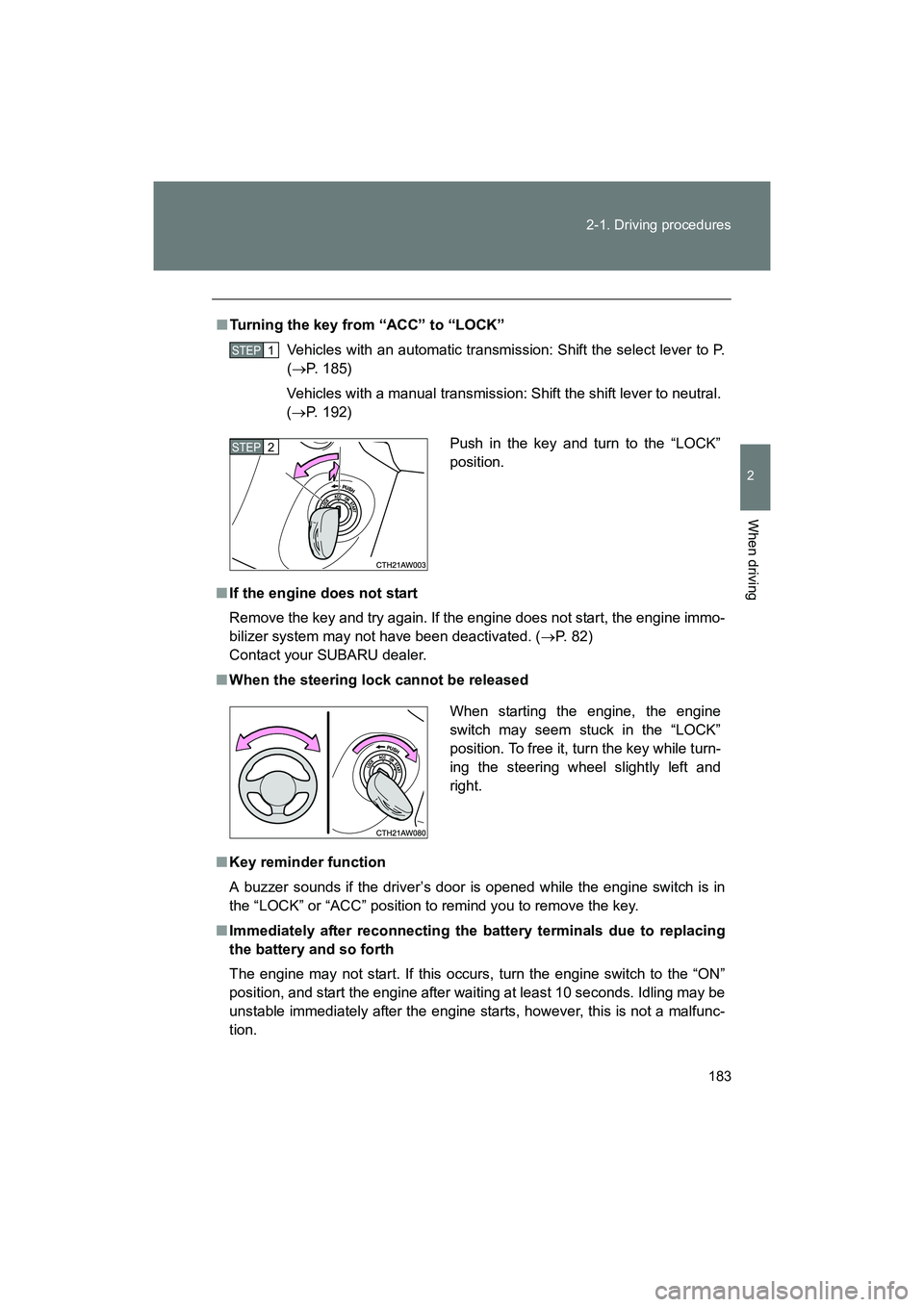
Turning the key from “ACC” to “LOCK”
Vehicles with an automatic transmission: Shift the select lever to P.
(→ P. 185)
Vehicles with a manual transmission: Shift the shift lever to neutral.
( → P. 192)
■ If the engine does not start
Remove the key and try again. If the engine does not start, the engine immo-
bilizer system may not have been deactivated. ( →P. 82)
Contact your SUBARU dealer.
■ When the steering lock cannot be released
■ Key reminder function
A buzzer sounds if the driver’s door is opened while the engine switch is in
the “LOCK” or “ACC” position to remind you to remove the key.
■ Immediately after reconnecting the battery terminals due to replacing
the battery and so forth
The engine may not start. If this occurs, turn the engine switch to the “ON”
position, and start the engine after waiting at least 10 seconds. Idling may be
unstable immediately after the engine starts, however, this is not a malfunc-
tion.
STEP 1
Push in the key and turn to the “LOCK”
position.STEP 2
When starting the engine, the engine
switch may seem stuck in the “LOCK”
position. To free it, turn the key while turn-
ing the steering wheel slightly left and
right.
Page 198 of 568
198
2-1. Driving procedures
BRZ_U (A4450BE-A)
Hor n
■After adjusting the steering wheel
Make sure that the steering wheel is securely locked.
The horn may not sound if the steering wheel is not securely locked.
(→ P. 67)
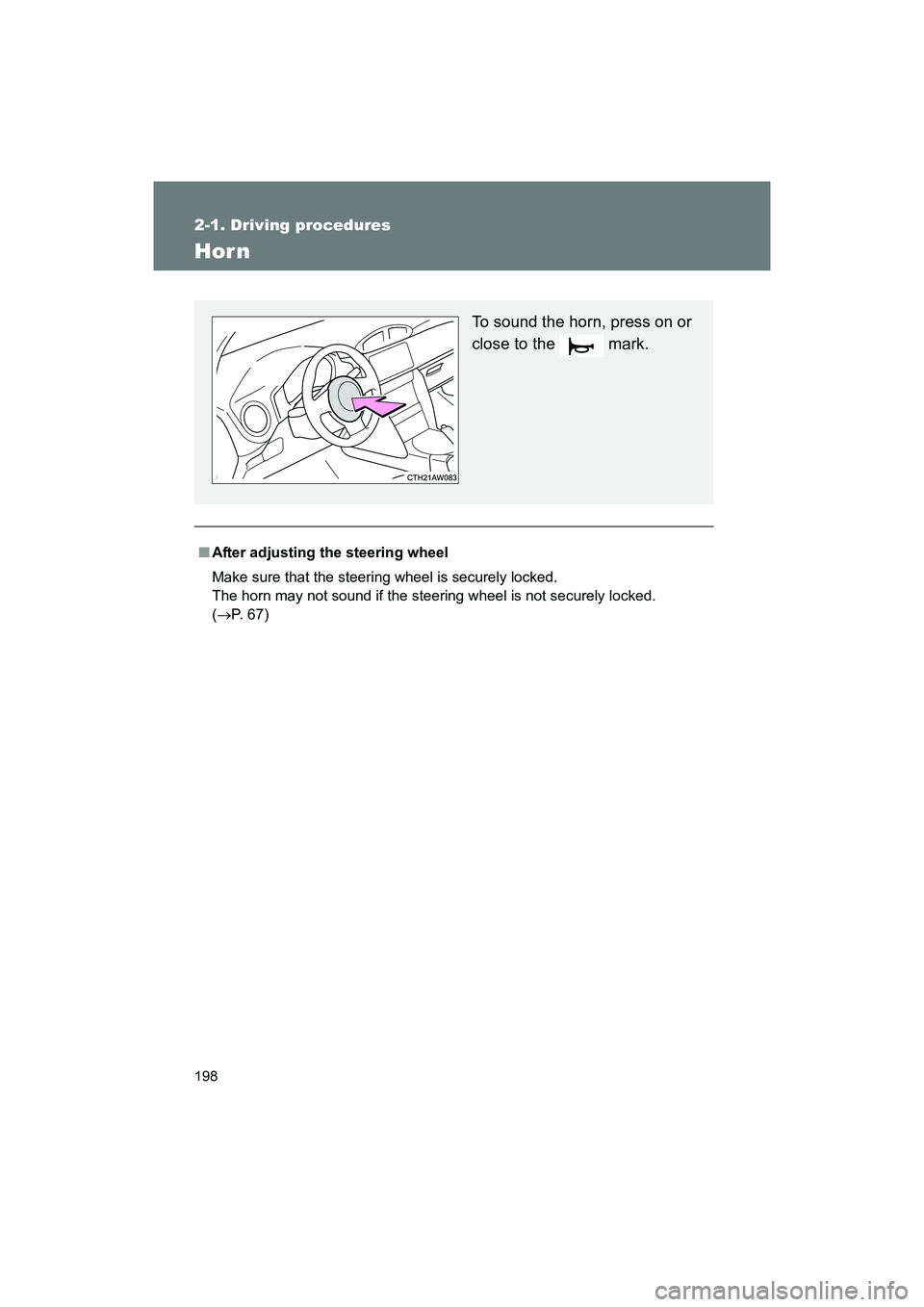
To sound the horn, press on or
close to the mark.
Page 208 of 568
208 2-2. Instrument cluster
BRZ_U (A4450BE-A)
■Warning lights
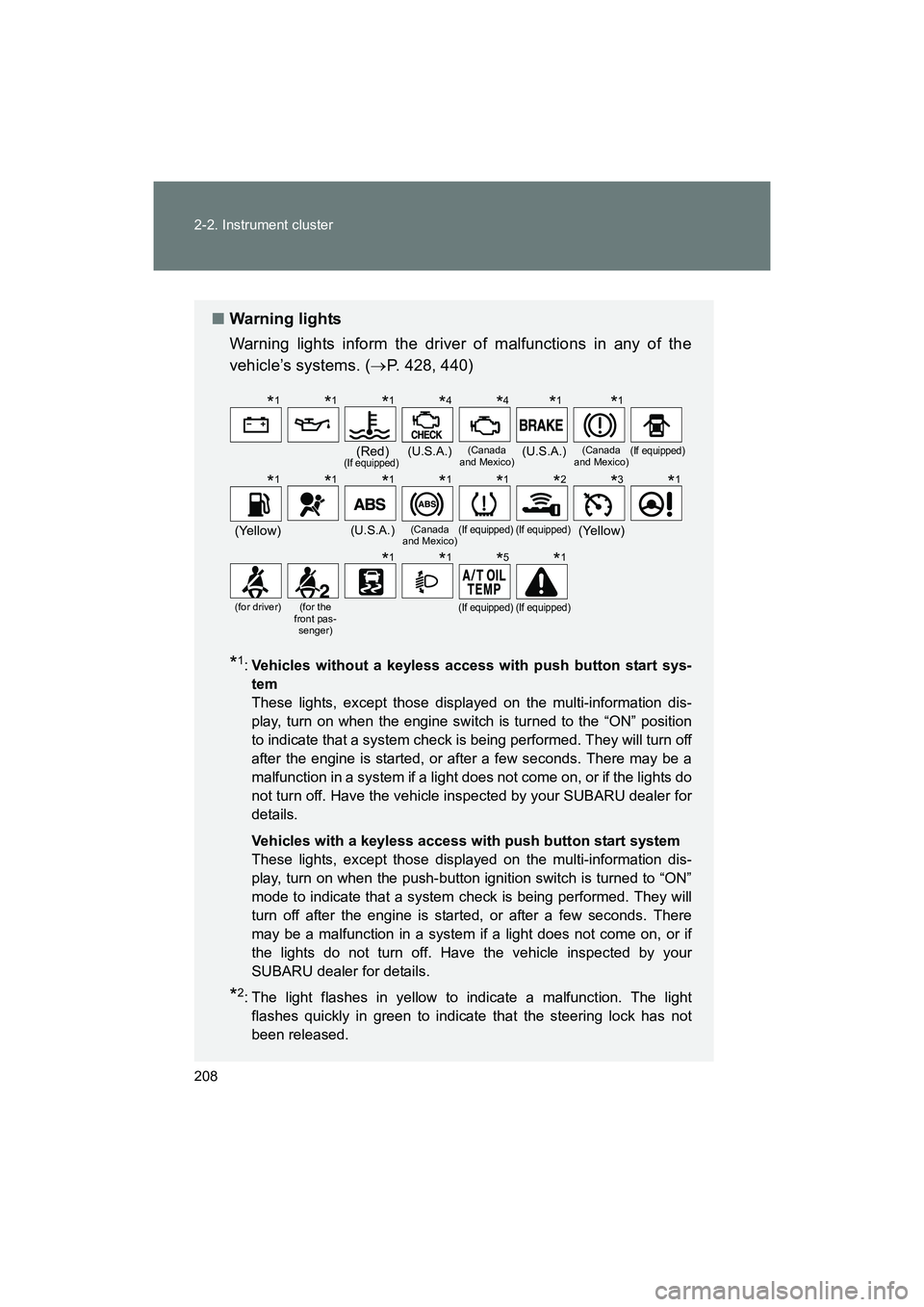
Warning lights inform the driver of malfunctions in any of the
vehicle’s systems. ( →P. 428, 440)
*1:Vehicles without a keyless access with push button start sys-
tem
These lights, except those displayed on the multi-information dis-
play, turn on when the engine switch is turned to the “ON” position
to indicate that a system check is being performed. They will turn off
after the engine is started, or after a few seconds. There may be a
malfunction in a system if a light does not come on, or if the lights do
not turn off. Have the vehicle inspected by your SUBARU dealer for
details.
Vehicles with a keyless access with push button start system
These lights, except those displayed on the multi-information dis-
play, turn on when the push-button ignition switch is turned to “ON”
mode to indicate that a system check is being performed. They will
turn off after the engine is started, or after a few seconds. There
may be a malfunction in a system if a light does not come on, or if
the lights do not turn off. Have the vehicle inspected by your
SUBARU dealer for details.
*2: The light flashes in yellow to indicate a malfunction. The light flashes quickly in green to indicate that the steering lock has not
been released.
(Red)(If equipped)(U.S.A.)(Canada
and Mexico)(U.S.A.)(Canada
and Mexico)(If equipped)
(Yellow)(U.S.A.)(Canada
and Mexico)(If equipped)(If equipped)(Yellow)
(for driver)(for the
front pas- senger)(If equipped)(If equipped)
*1*1*1*4*4*1*1
*1*1*1*1*1*2*3*1
*1*1*5*1
Page 224 of 568
224 2-2. Instrument cluster
BRZ_U (A4450BE-A)
Exclusive content for BRZ ( )■ G-force
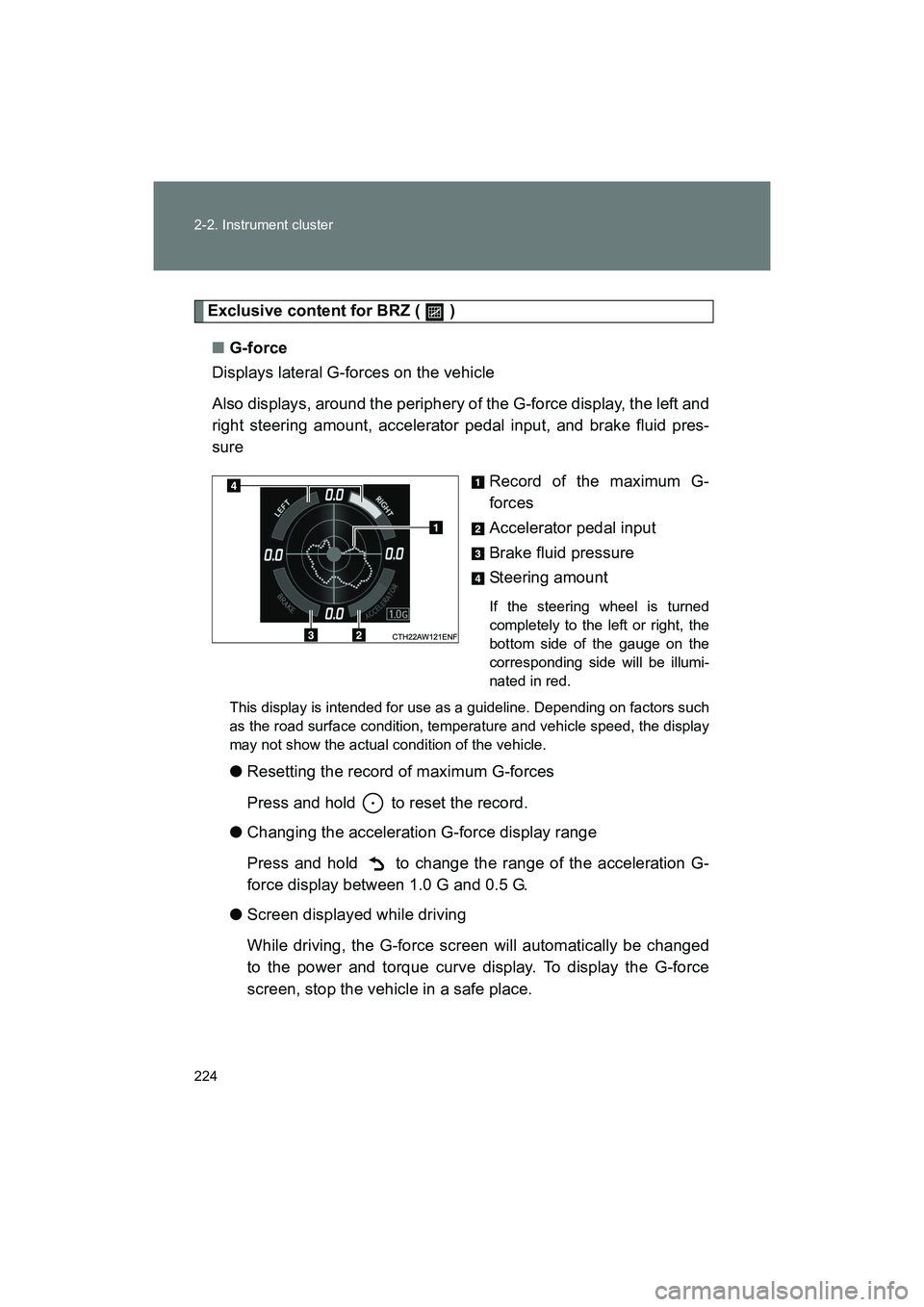
Displays lateral G-forces on the vehicle
Also displays, around the periphery of the G-force display, the left and
right steering amount, accelerator pedal input, and brake fluid pres-
sure
Record of the maximum G-
forces
Accelerator pedal input
Brake fluid pressure
Steering amount
If the steering wheel is turned
completely to the left or right, the
bottom side of the gauge on the
corresponding side will be illumi-
nated in red.
This display is intended for use as a guideline. Depending on factors such
as the road surface condition, temperature and vehicle speed, the display
may not show the actual condition of the vehicle.
● Resetting the record of maximum G-forces
Press and hold to reset the record.
● Changing the acceleration G-force display range
Press and hold to change the range of the acceleration G-
force display between 1.0 G and 0.5 G.
● Screen displayed while driving
While driving, the G-force screen will automatically be changed
to the power and torque curve display. To display the G-force
screen, stop the vehicle in a safe place.
Page 228 of 568
228 2-2. Instrument cluster
BRZ_U (A4450BE-A)
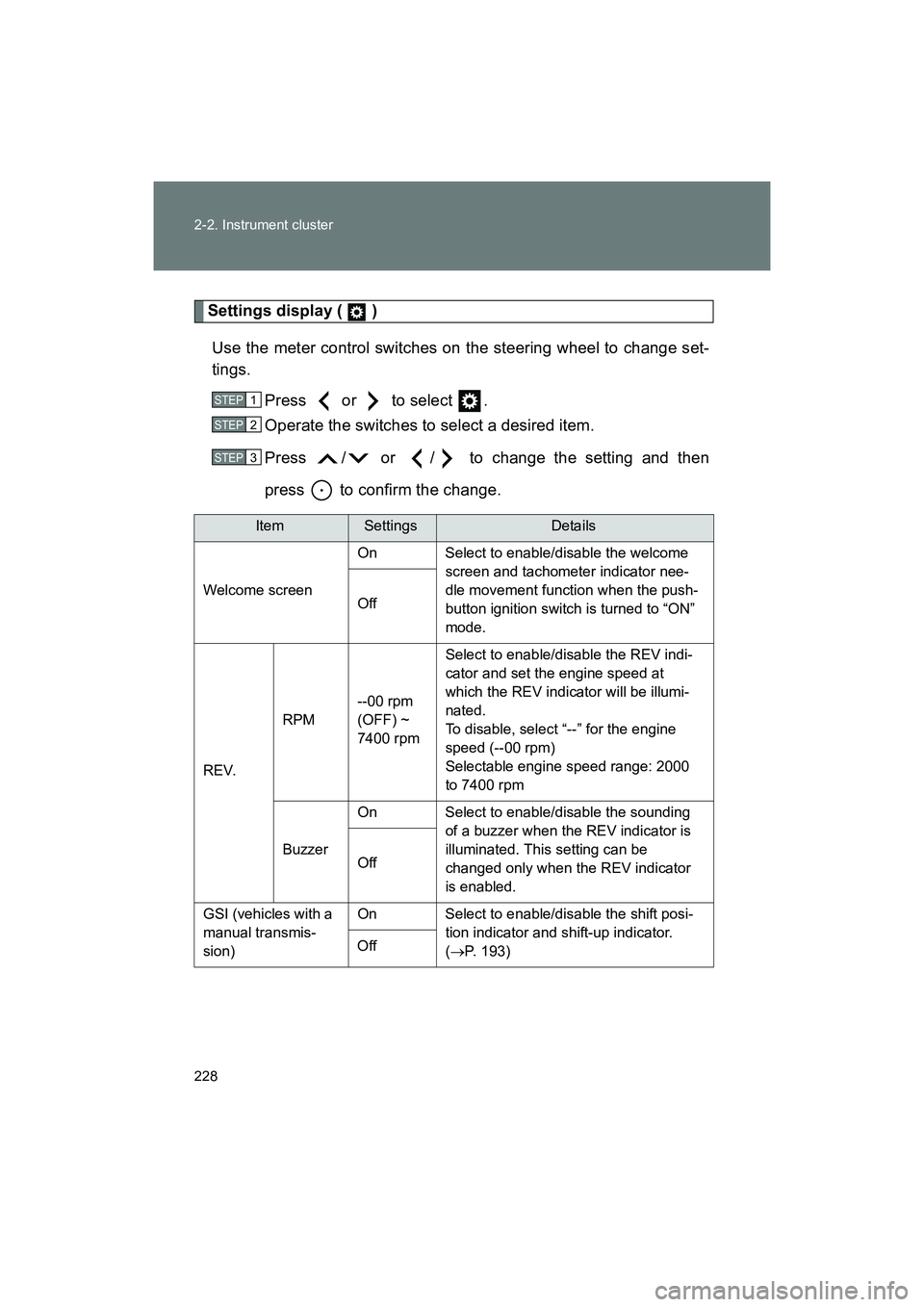
Settings display ( )Use the meter control switches on the steering wheel to change set-
tings. Press or to select .
Operate the switches to select a desired item.
Press / or / to change the setting and then
press to confirm the change.
ItemSettingsDetails
Welcome screen On Select to enable/disable the welcome
screen and tachometer indicator nee-
dle movement function when the push-
button ignition switch is turned to “ON”
mode.
Off
REV. RPM
--00 rpm
(OFF) ~
7400 rpm Select to enable/disable the REV indi-
cator and set the engine speed at
which the REV indicator will be illumi-
nated.
To disable, select “--” for the engine
speed (--00 rpm)
Selectable engine speed range: 2000
to 7400 rpm
Buzzer On Select to enable/disable the sounding
of a buzzer when the REV indicator is
illuminated. This setting can be
changed only when the REV indicator
is enabled.
Off
GSI (vehicles with a
manual transmis-
sion) On Select to enable/disable the shift posi-
tion indicator and shift-up indicator.
(→ P. 193)
Off
STEP 1
STEP 2
STEP 3
Page 231 of 568
231
2-2. Instrument cluster
2
When driving
BRZ_U (A4450BE-A)
■
G-force display
● Depending on the vehicle usage conditions , the brake fluid pressure dis-
play may not reach its maximum reading even though the brake pedal is
fully depressed.
● If a battery terminal is disconnected and reconnected, the steering
amount display may be disabled temporarily. After driving the vehicle for
a while, the display will be enabled.
■ Suspension of the settings display
● The settings cannot be changed while driving. When changing settings,
park the vehicle in a safe place.
● If a warning message is displayed, operation of the settings display will
be suspended.
■ Using the stopwatch
If the engine is stopped while the stopwatch is operating, the stopwatch will
stop and the time up to that point will be recorded.
■ Outside temperature display
● In the following situations, the correct outside temperature may not be
displayed.
• When the vehicle is very hot, such as when under the sun.
• When the vehicle is idling or being driven at low speeds such as in a
traffic jam or when the engine is stopped and then restarted immedi-
ately afterward.
• When the actual outside temperature is outside of the indicator range.
● If “ − − ” is displayed for approximately 1 minute or more or if the outside
temperature is not displayed, the system may be malfunctioning. Have
the vehicle inspected by your SUBARU dealer.
■ Liquid crystal display
Small spots or light spots may appear on the display. This phenomenon is
characteristic of liquid crystal displays, and there is no problem continuing to
use the display.
Page 257 of 568
257
2-4. Using other driving systems
2
When driving
BRZ_U (A4450BE-A)
Driving assist systems
To help enhance driving safety and performance, the following sys-
tems operate automatically in response to various driving situations.
Be aware, however, that these systems are supplementary and
should not be relied upon too heavily when operating the vehicle.
■ ABS (Anti-lock Brake System)
Helps to prevent wheel lock when the brakes are applied suddenly, or if
the brakes are applied while driving on a slippery road surface
■Brake assist
Generates an increased level of braking force after the brake pedal is
depressed when the system detects a panic stop situation
■Vehicle stability control (VSC)
Helps the driver to control skidding when swerving suddenly or turning
on slippery road surfaces
■TRAC (Traction Control)
Helps to maintain drive power and pr event the drive wheels from spin-
ning when starting the vehicle or accelerating on slippery roads.
The TRAC system is also equipped with the brake LSD function.
■ Hill start assist
→P. 264
■ Electric power steering
Employs an electric motor to reduce the amount of effort needed to turn
the steering wheel
Page 261 of 568
261
2-4. Using other driving systems
2
When driving
BRZ_U (A4450BE-A)
■
Automatic reactivation of TRAC and Vehicle stability control (VSC) sys-
tems
After turning the TRAC and Vehicle stability control (VSC) systems off, the
systems will be automatically reactivated in the following situations:
● Vehicles without a keyless access with push button start system: When
the engine switch is turned to “LOCK” position
● Vehicles with a keyless access with push button start system: When the
push-button ignition switch is turned off
● If only the TRAC system is turned off, the TRAC will turn on when vehicle
speed is more than approximately 31 mph (50 km/h).
If both the TRAC and Vehicle stability control (VSC) systems are turned
off, automatic reactivation will not occur when vehicle speed increases.
■ Automatic deactivation of “TRACK” mode
Vehicles without a keyless access with push button start system
When the engine switch is turned to “LOCK” position after driving in
“TRACK” mode, the mode is automatically deactivated.
Vehicles with a keyless access with push button start system
When the push-button ignition switch is turned off after driving in “TRACK”
mode, the mode is automatically deactivated.
■ Sounds and vibrations caused by the ABS, brake assist, TRAC and
Vehicle stability control (VSC) systems
● A sound may be heard from the engi ne compartment when the brake
pedal is depressed repeatedly, when the engine is started or just after the
vehicle begins to move. This sound does not indicate that a malfunction
has occurred in any of these systems.
● Any of the following conditions may occur when the above systems are
operating. None of these indicates that a malfunction has occurred.
• Vibrations may be felt through the vehicle body and steering.
• A motor sound may be heard after the vehicle comes to a stop.
• The brake pedal may pulsate slightly after the ABS is activated.
• The brake pedal may move down slightly after the ABS is activated.