Page 141 of 256
Applies to Infotainment Columbus, Amundsen, Bolero : if you would like to
connect the device in the phone menu, the external device must be paired and
connected before establishing a connection
Page 143 of 256
Navigation
Introductory information
Navigation - function sequence
Applies to Infotainment Amundsen.
Route guidance is started as follows.
Page 144 of 256
During the update process, the Infotainment system can be used without re-
striction.
Main menu
Fig. 160
Navigation: main menu
Page 148 of 256
Fig. 170
List of searched for car parks: in the navigation data / online
The Infotainment allows you to find petrol stations, restaurants or car parks
quickly in the navigation data as well as online.
Page 152 of 256
Image with GPS coordinatesFig. 174
Image with GPS coordinates
Infotainment enables guidance to the GPS coordinate data stored in the im-age.
Page 154 of 256
POIs display
The Infotainment system offers the possibility of displaying POI symbols on
the map on the Infotainment screen.
Page 159 of 256
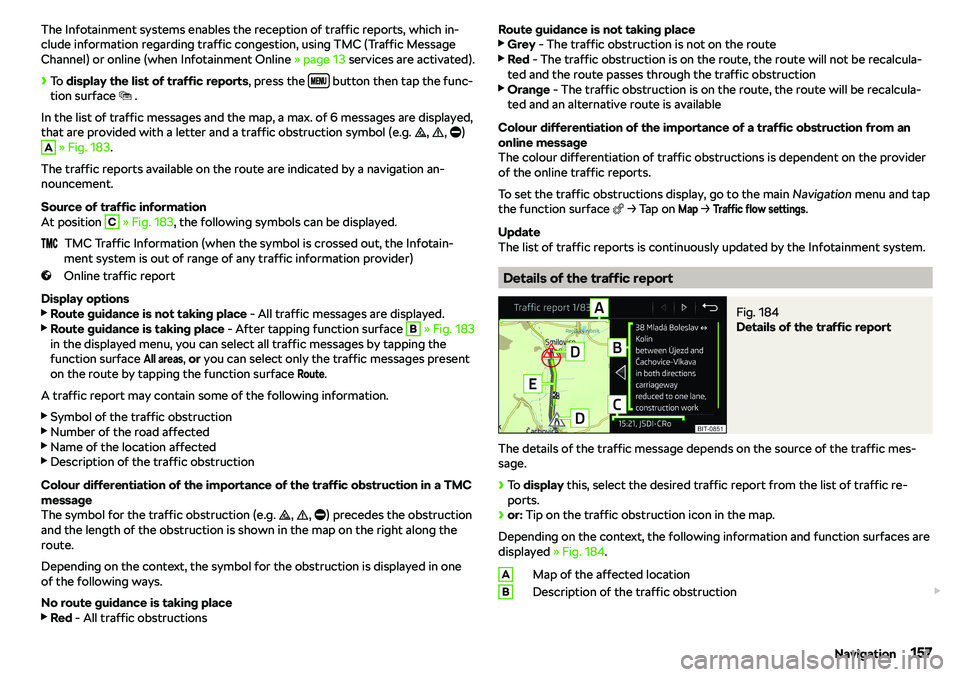
The Infotainment systems enables the reception of traffic reports, which in-
clude information regarding traffic congestion, using TMC (Traffic Message
Channel) or online (when Infotainment Online
Page 176 of 256
Deactivation
On vehicles with Version 1, the system can be deactivated by moving out of
reverse gear.
For vehicles with variant 2, the system is automatically deactivated by press-
ing the ' button or at a speed above 15 km/h (the ' symbol in the button
goes out).
Displaying an error
If a warning signal sounds for 3 seconds after activating the system and there
is no obstacle close to your car, this indicates a system fault. The fault is also
indicated by the symbol ' flashing in the button. Seek help from a specialist
garage.
Note
The system can only be activated with the 'button at a speed of below 15
km/h.
Automatic system activation when moving forward
Fig. 203
Infotainment screen: Display
with automatic activation