2018 Seat Ateca instrument panel
[x] Cancel search: instrument panelPage 48 of 348

The essentials
Warning lamps On the in s
trument
panelFig. 51
Instrument panel, on dash panel. Red warning lamps
Central warning lamp: additional
information on the instrument pan-
el display–
Parking brake on.›››
page
186
Do not continue driving!
The brake fluid level is too low or
there is a fault in the brake system.››› page
188
Lit up or flashing: Do not continue driving!
Fault in the steering.››› page
200
Driver or passenger has not fas-
tened seat belt.›››
page
79
Use the foot brake!›››
page
222 Yellow warning lamps
Central warning lamp: additional
information on the instrument pan-
el display–
46
Page 49 of 348

The essentials
Front brake pads worn.›››
page
188
it lights up:
Fault in the ESC, or dis-
connection caused by the system.››› page
189
flashes: ESC or ASR activated.
ASR manually deactivated.›››
page
189ESC in Sport mode.
ABS faulty or does not work.
Rear fog light switched on.›››
page
144
lights up or flashes:
fault in the
emission control system.››› page
204
it lights up:
pre-heating of diesel
engine.
››› page
205
flashes: fault in the diesel engine
management.
fault in the petrol engine manage-
ment.›››
page
205
lights up or flashes:
fault in the
steering system.››› page
200
Tyre pressure too low, or fault in
the tyre pressure monitoring sys-
tem.›››
page
311
Fuel tank almost empty.›››
page
118
Fault in airbag system and seat
belt tensioners.›››
page
89
Lane Assist is switched on, but not
active.›››
page
230 Other warning lamps
Left or right turn signal.›››
page
145
Hazard warning lights on.››› page
149
Trailer turn signals.›››
page
273
it lights up green:
Auto Hold activa-
ted.››› page
211
it lights up green:
Press the brake
pedal!
It blinks in green: the selector lever
locking button has not engaged.››› page
193
it lights up green:
cruise control ac-
tivated or speed limiter switched
on and active.
››› page
212
it blinks in green: the speed set by
the speed limiter has been excee-
ded.
it lights up green:
Lane Assist is
switched on and active.››› page
230
Main beam on or flasher on.›››
page
145
››› in Warning and control lamps on
page 119
››› page 119 On the instrument panel display
Fig. 52
On the instrument panel display: door
open.
Do not continue driving!
With the corresponding indi-
cation: door(s), rear lid or bon-
net open or not properly
closed.››› page
125
››› page
137
››› page
298
» 47
Page 50 of 348
The essentials
Ignition: Do not carry on
driving! Engine coolant level
too low, coolant temperature
too high
››› page
302
Flashing: Fault in the engine
coolant system.
Do not continue driving!
Engine oil pressure too low. If
the warning lamp flashes,
stop driving, even if the oil
level is correct. Do not even
run the engine at idle speed!
››› page
300
Fault in the battery.›››
page
305
Driving light totally or partially
faulty.›››
page
106
Fault in the cornering light
system.››› page
148
Diesel particulate filter
blocked›››
page
205
Level of windscreen washer
fluid too low.›››
page
153
Flashing: Fault in the oil level
detection. Control manually.
›››
page
300
Ignition: Insufficient engine
oil.
Fault in the gearbox.›››
page
200
Light Assist on.›››
page
146
it lights up white:
Hill Descent
Control (HDC) is active.
it lights up grey: Hill Descent
Control (HDC) is not active.
The system is switched on, but
is not adjusting.
››› page
210
Immobiliser active.›››
page
133
Service interval display›››
page 43
Mobile telephone is connec-
ted via Bluetooth to the origi-
nal telephone device.
›››
Booklet
Audio or
navigation
system
Mobile telephone battery
charge meter. Available only
for devices pre-installed in fac-
tory.
Freezing warning. The outside
temperature is lower than
+4°C (+39°F).›››
page 41
Start-Stop system activated.›››
page
208
Start-Stop system unavailable.
Low consumption driving sta-
tus›››
page
116
›››
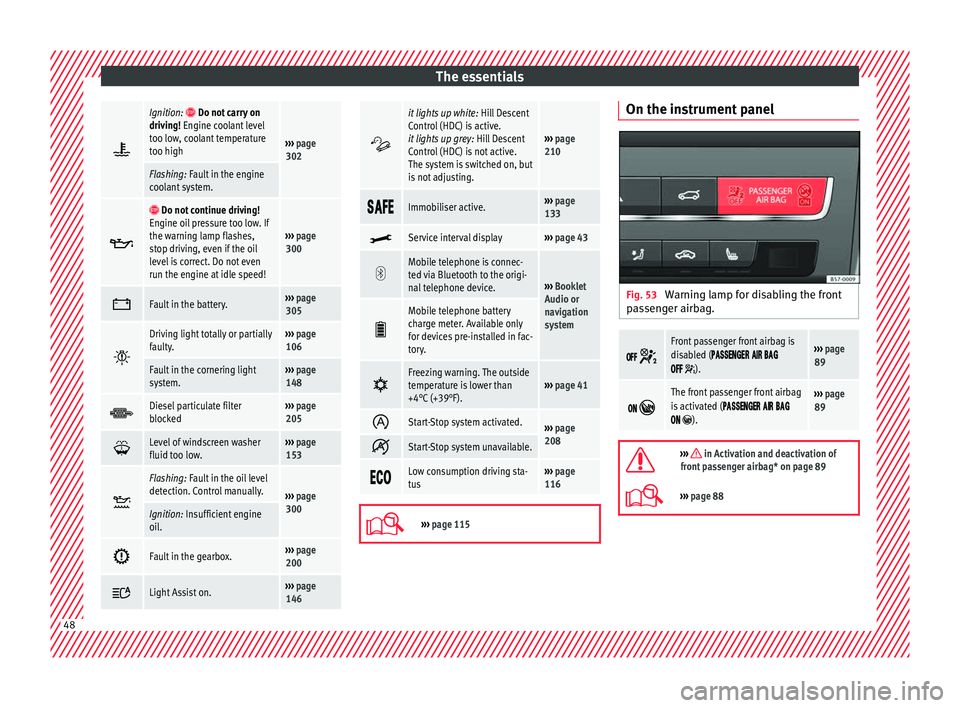
page 115 On the instrument panel
Fig. 53
Warning lamp for disabling the front
p a
s
senger airbag.
Front passenger front airbag is
disabled (
).
››› page
89
The front passenger front airbag
is activated (
).
››› page
89
››› in Activation and deactivation of
front passenger airbag* on page 89
››› page 88 48
Page 63 of 348

The essentials
Emergencies F u
se
s
Fuse location Fig. 66
Left-hand drive: fuse box cover on
the driv
er-side dash panel. Right-hand
drive: fuse box behind the glove compart-
ment. Fig. 67
In the engine compartment: fuse box
co v
er. Underneath the instrument panel (left-hand
driv
e)
The f u
se box is located behind the storage
compartment ››› Fig. 66 .
Behind the glove compartment (right-hand
drive)
The fuse box is located behind the glove
compartment ››› Fig. 66 . To be able to ac-
cess the fuse box ›››
page 103.
In the engine compartment
Press the locking tabs to release the fuse box
cover ››› Fig. 67.
Identifying fuses situated below the dash
panel by colours
ColourAmp rating
Black1
ColourAmp rating
Purple3
Light brown5
Brown7.5
Red10
Blue15
Yellow20
White or transparent25
Green30
Orange40
››› in Introduction on page 102
›››
page 102 61
Page 81 of 348

Seat belts
Seat belts
Wh y
w
ear a seat belt
Number of seats Your vehicle has
five se
ats, two in the front
and three in the rear. Each seat is equipped
with a three-point seat belt.
In some versions, your vehicle is approved
only for four seats. Two front seats and two
rear seats. WARNING
● Never tr an
sport more than the permitted
amount of people in your vehicle.
● Every vehicle occupant must properly fas-
ten and we
ar the seat belt belonging to his or
her seat. Children must be protected with an
appropriate child restraint system. Seat belt control lamp*
Fig. 89
Instrument panel: right rear seat oc-
c upied and c
orr
esponding seat belt fastened
display. The control lamp illuminates to remind the
driv
er t
o f
asten his seat belt.
Before starting the vehicle: – Fasten your seat belt securely.
– Instruct your passengers to fasten their
seat belts
properly before driving off.
– Protect children by using a child seat ac-
cordin
g to the child's height and weight.
When the ignition is switched on, the control
lamp in the instrument panel lights up (de-
pending on the model version) if the driver or
passenger have not fastened their seat belts.
An audible warning signal will sound for a
few seconds if the seat belts are not fastened
as the vehicle drives off and reaches a speed of more than approximately 25 km/h
(15 mph) or if the seat
belts are unfastened
while the vehicle is in motion. The warning
light will also flash .
The lamp goes out when the driver and
passenger seat belts are fastened with the ig-
nition switched on.
Rear seat belts fastened display*
Depending on the model version, when the
ignition is switched on, the seat belt status
display ››› Fig. 89 on the instrument panel in-
forms the driver whether the passengers in
the rear seats have fastened their seat belts.
The symbol indicates that the passenger in
this seat has fastened “his or her” seat belt.
When a seat belt in the rear seats is fastened
or unfastened, the seat belt status is dis-
played for approximately 30 seconds. The in-
dication can be hidden by pressing the 0.0/SET button on the dash panel.
The se at
belt
status flashes for a maximum of
30 seconds when a seat belt in the rear seats
is unfastened while the vehicle is in motion.
An audible warning will also be heard if the
vehicle is travelling at over 25 km/h
(15 mph).
79
Technical data
Advice
Operation
Emergencies
Safety
Page 106 of 348

Emergencies
● Undo the openin g limit
er ›
›› Fig. 103 A in
tw o s
t
eps: first, unlock the limiter by pulling
back on it (arrow 1 ) and then move it gently
t o the right
(arr
ow 2 ). Remove the guide
when the c o
v
er is in the normal opening po-
sition (30°).
● Free the side pivots B to release the cover
t o its
sec
ond opening position (60°).
Follow the same procedure in reverse order to
return the glove compartment to its normal
position. CAUTION
● Alw a
ys carefully remove the fuse box cov-
ers and refit them correctly to avoid problems
with your vehicle.
● Protect the fuse boxes when open to avoid
the entry of
dust or humidity. Dirt and humid-
ity inside fuse boxes can cause damage to
the electrical system. Engine compartment fuses
Fig. 104
In the engine compartment: fuse box
c o
v
er. To open the engine compartment fuse box
● Open the bonnet › ›
›
page 298.
● Press the locking tabs to release the fuse
box c
over ››› Fig. 104.
● Then lift the cover out.
● To fit the cover, place it on the fuse box.
Pu
sh the locking tabs down until they click
audibly into place.
Fuse placement Read the additional information carefully
› ›
›
page 61
Only replace fuses with a fuse of the same
amperage (same colour and markings) and
size.
Fuses in the vehicle interior
No.Consumers/Amps
1Adblue (SCR)30
5Gateway5
6Automatic gearbox lever5
7Air conditioning and heating con-
trol panel, back window heating,
auxiliary heating.10
8
Diagnosis, handbrake switch,
light switch, reverse light, interior
lighting, driving mode, lit-up door
sill
10
9Steering column5
10Radio display7.5
11Left lights40
12Radio20
14Air conditioner fan40
15Steering column release10
16Connectivity Box.7.5
17Instrument panel7.5
18Rear camera7.5
19Kessy7.5
214x4 Haldex Control Unit15
22Trailer15 104
Page 115 of 348

Controls and displays
Operation
C ontr
o
ls and displays
General instrument panel Door release lever
Centr
al
locking switch . . . . . . . . . . . .128
Control for the electric adjustment
of the ext
erior mirrors . . . . . . . . . . . . . 155
Air outlets . . . . . . . . . . . . . . . . . . . . . . . . 174
Control lever for:
– Turn s ign
als and main beam
headlights . . . . . . . . . . . . . . . . . . . . . 145
– Lane Ass i
st . . . . . . . . . . . . . . . . . . . . . 230
– Main beam a
ssist . . . . . . . . . . . . . . . 146
– Cruise c
ontrol system (CCS) . . . . .212
Depending on equipment fitted:
– Lev er f
or cruise control . . . . . . . . . .212
Steering wheel with horn and – Driver airbag . . . . . . . . . . . . . . . . . . . 21
– On-boar d c
omputer controls . . . .36
– Contro
ls for radio, telephone,
navigation and speech dialogue
system ›››
Booklet Radio
– Paddle levers for tiptronic gear-
shift (automatic gearbox) . . . . . . .195
Instrument panel . . . . . . . . . . . . . . . . . 114
1 2
3
4
5
6
7
8 Control lever for:
– Wind
s
creen wipers and washer . .153
– Wipe and wa
sh system . . . . . . . . . . 153
– On-board c
omputer . . . . . . . . . . . . . 36
Depending on equipment fitted: ra-
dio or disp
lay for Easy Connect
(navigation, radio, TV/video) . . . . . .120
Depending on the equipment, but-
tons
for:
– Start-Stop system . . . . . . . . . . . . . . . 208
– Park a
ssist system . . . . . . . . . . . . . . 262
– Hazard w
arning lights . . . . . . . . . .149
– Tyr
e pressure switch . . . . . . . . . . . .313
– Airbag off di
splay . . . . . . . . . . . . . . . 88
Depending on the equipment,
glov e c
ompartment with: . . . . . . . . .161
– CD pl a
yer* and/or SD card*
››› Booklet Radio
Front passenger airbag . . . . . . . . . . .21
Front passenger airbag switch . . . .88
Passenger seat heating control . . . .158
Depending on the equipment, con-
tro l
s for:
– Heating and ventilation system or
manual air conditioner . . . . . . . . . .54, 53
– Autom atic
air conditioner . . . . . . .51
Depending on the equipment:
– USB/A UX-IN inp
ut . . . . . . . . . . . . . . 123
9
10
11
12
13
14
15
16
17 –
Light er/po
w
er socket . . . . . . . . . . . 162
– Connectivity
Box/Wireless Charg-
er* . . . . . . . . . . . . . . . . . . . . . . . . . . . . . 123
– Storag
e compartment
Gear lever for: – Manual gearbox . . . . . . . . . . . . . . . . 192
– Automatic
gearbox . . . . . . . . . . . . . 193
Rotating control(Driving Experience
button) f
or driving modes . . . . . . . . .242
Auto Hold switch . . . . . . . . . . . . . . . . . 211
Electronic parking brake switch . . .186
Starter button (Keyless Access lock-
ing and ignition sys
tem) . . . . . . . . . . 183
Driver's seat heating control . . . . . .158
Ignition lock (vehicles without Key-
les
s Access) . . . . . . . . . . . . . . . . . . . . . . 181
Steering column adjustment lev-
er . . . . . . . . . . . . . . . . . . . . . . . . . . . . . . . . 20
Knee airbag . . . . . . . . . . . . . . . . . . . . . . 23
Bonnet lock release . . . . . . . . . . . . . . .299
Headlight range control . . . . . . . . . . .151
Headlight switch . . . . . . . . . . . . . . . . . 144
Electric windows . . . . . . . . . . . . . . . . . 139 Note
● Some of the equipment li
sted in this sec-
tion is only fitted on certain models or are op-
tional extras. » 18
19
20
21
22
23
24
25
26
27
28
29
30
113
Technical data
Advice
Operation
Emergencies
Safety
Page 116 of 348

Operation
●
A separ at
e Instructions Manual is enclosed
if the vehicle is equipped with a factory-fitted
radio, CD player, AUX IN connection or navi-
gation system. ●
The arran g
ement of switches and controls
on right-hand drive models* may be slightly
different from the layout shown in ›››
page 112. However, the symbols used to
identif y
the controls are the same. Instruments and warning/control lamps
Ins trument
s
View of instrument panel Fig. 119
Instrument panel, on dash panel. Details of the instruments
››
›
Fig. 119: Rev counter (with the engine ru nning, in
hundreds of revolutions per minute).
1 The beginning of the red zone of the rev
c
ou
nt
er indicates the maximum speed in
any gear after running-in and with the
114