2018 Seat Arona radio
[x] Cancel search: radioPage 230 of 316
Operation
● in the c a
se of
special constructions to the
side of the vehicle, e.g., high or irregular di-
viders.
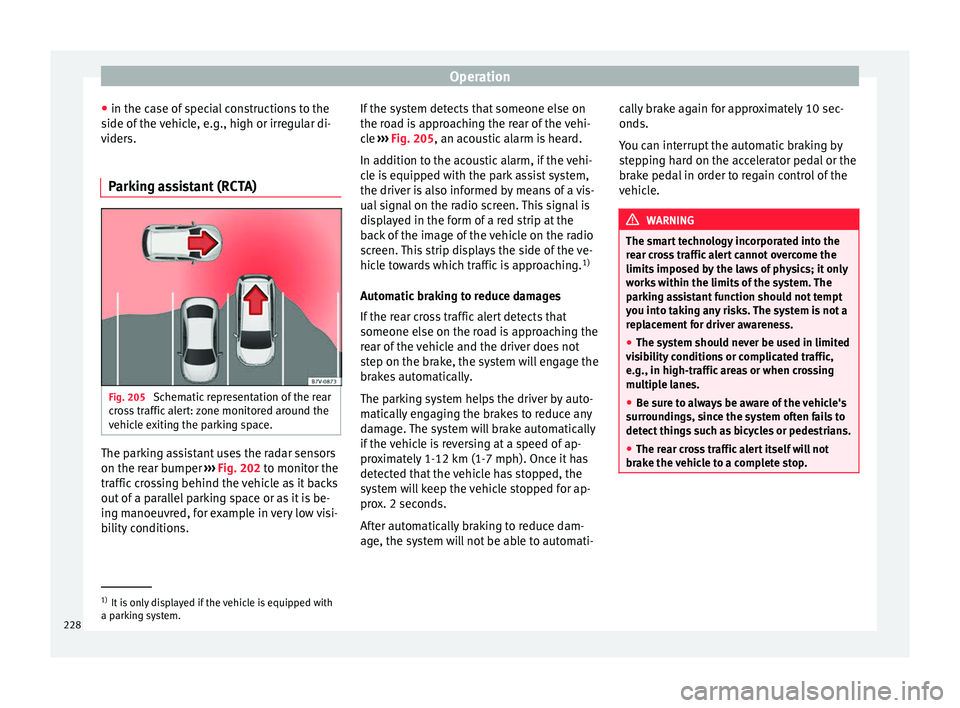
Parking assistant (RCTA) Fig. 205
Schematic representation of the rear
c r
o
ss traffic alert: zone monitored around the
vehicle exiting the parking space. The parking assistant uses the radar sensors
on the r
e
ar b
umper ››› Fig. 202 to monitor the
traffic crossing behind the vehicle as it backs
out of a parallel parking space or as it is be-
ing manoeuvred, for example in very low visi-
bility conditions. If the system detects that someone else on
the roa
d is approaching the rear of the vehi-
cle ››› Fig. 205, an acoustic alarm is heard.
In addition to the acoustic alarm, if the vehi-
cle is equipped with the park assist system,
the driver is also informed by means of a vis-
ual signal on the radio screen. This signal is
displayed in the form of a red strip at the
back of the image of the vehicle on the radio
screen. This strip displays the side of the ve-
hicle towards which traffic is approaching. 1)
Automatic braking to reduce damages
If the rear cross traffic alert detects that
someone else on the road is approaching the
rear of the vehicle and the driver does not
step on the brake, the system will engage the
brakes automatically.
The parking system helps the driver by auto-
matically engaging the brakes to reduce any
damage. The system will brake automatically
if the vehicle is reversing at a speed of ap-
proximately 1-12 km (1-7 mph). Once it has
detected that the vehicle has stopped, the
system will keep the vehicle stopped for ap-
prox. 2 seconds.
After automatically braking to reduce dam-
age, the system will not be able to automati- cally brake again for approximately 10 sec-
onds.
You c
an interrupt the automatic braking by
stepping hard on the accelerator pedal or the
brake pedal in order to regain control of the
vehicle. WARNING
The smart technology incorporated into the
re ar c
ross traffic alert cannot overcome the
limits imposed by the laws of physics; it only
works within the limits of the system. The
parking assistant function should not tempt
you into taking any risks. The system is not a
replacement for driver awareness.
● The system should never be used in limited
vis
ibility conditions or complicated traffic,
e.g., in high-traffic areas or when crossing
multiple lanes.
● Be sure to always be aware of the vehicle's
surrou
ndings, since the system often fails to
detect things such as bicycles or pedestrians.
● The rear cross traffic alert itself will not
brake the
vehicle to a complete stop. 1)
It is only displayed if the vehicle is equipped with
a park in
g system.
228
Page 234 of 316

Operation
making a calculation of tiredness. This is
c on
s
tantly compared with the current driving
behaviour. If the system detects that the driv-
er is tired, an audible warning is given with a
sound and an optic warning is shown with a
symbol and complementary message on the
instrument panel display ››› Fig. 208. The
message on the instrument panel display is
shown for approximately 5 seconds, and de-
pending on the case, is repeated. The system
stores the last message displayed.
The message on the instrument panel display
can be switched off by pressing the button on the windscreen wiper lever or the
b
utt
on on the multi function steering
wheel
›
›
› page 37.
The message can be recalled to the instru-
ment panel display using the multifunction
display ›››
page 37.
Conditions of operation
Driving behaviour is only calculated on
speeds above about 65 km/h (40 mph) up to
around 200 km/h (125 mph).
Switching on and off
Fatigue detection can be activated or deacti-
vated in the Easy Connect system with the button and the
S
ET
TINGS function button
› ›
›
page 34. A mark indicates that the ad-
justment has been activated. System limitations
The Fatigue detection h
as certain limitations
inherent to the system. The following condi-
tions can limit the Fatigue detection or pre-
vent it from functioning.
● At speeds below 65 km/h (40 mph)
● At speeds above 200 km/h (125 mph)
● When cornering
● On roads in poor condition
● In unfavourable weather conditions
● When a sporty driving style is employed
● In the event of a serious distraction to the
driver
Fatigue det
ection will be restored when the
vehicle is stopped for more than 15 minutes,
when the ignition is switched off or when the
driver has unbuckled their seat belt and
opened the door.
In the event of slow driving during a long pe-
riod of time (below 65 km/h, 40 mph) the
system automatically re-establishes the tired-
ness calculation. When driving at a faster
speed the driving behaviour will be recalcula-
ted. Park Assist*
Introduction The Park Assist system is an additional func-
tion of P
arkPi
lot ››› page 240 and helps the
driver to:
● find a suitable parking space,
● select a parking mode,
● park driving in reverse in suitable perpen-
dicul
ar and parallel spaces,
● park driving forwards in suitable perpen-
dicu l
ar spaces,
● exit a parking space driving forwards from
a paral
lel space.
In vehicles with a Park Assist system and fac-
tory radio the front, rear and side areas are
represented, and the position of obstacles is
shown relative to the vehicle.
The Park Assist system is subject to certain
limitations inherent to the system and its use
requires special attention by the driver ››› .
WARNING
The technology used in the park assist sys-
tem in v
olves a series of limitations inherent
in the actual system and in the use of ultra-
sonic sensors. The use of Park Assist should
never tempt you to take any risk that may 232
Page 246 of 316

Operation
● Sw it
c
h off the ignition and switch it on
again.
● OR: accelerate above 10 km/h (6 mph) be-
for
e reducing speed below this number
again.
● OR: place the selector lever in position P
and then mov
e it from this position.
● OR: switch on and off the automatic activa-
tion in the Ea
sy Connect system menu.
The automatic activation with parking aid
miniature indication can be switched on and
off from the Easy Connect system menu
››› page 34:
● Switch the ignition on.
● Select: button > Settings
> Parking
and manoeuvring .
● Select the Automatic activation op-
tion. When the f
u
nction button check box is
activated , the function is on.
If the system has been activated automatical-
ly, an audible sound warning will only be giv-
en when obstacles in front are at a distance
of less than 50 cm. CAUTION
The automatic connection of the Parking Aid
only w
orks when you are driving slowly. If
driving style is not adapted to the circum-
stances, an accident and serious injury or
damage may be caused. Segments of the visual indication
Fig. 218
Parking Aid display on the Easy Con-
nect sy
s
tem screen. The distance of separation from the obstacle
c
an be e
s
timated using the segments around
the vehicle.
The optical indication of the segments works
as follows:
a white segment is dis-
played when the obstacle is not within
the vehicle's trajectory or the direction
of travel is in the opposite direction to
its location, and it is more than 30 cm
from the vehicle.
obstacles located in the
vehicle's trajectory and which are more
than 30 cm away from the vehicle are
displayed in yellow.
White segments:
Yellow segments: obstacles that are less than
30 cm aw
ay from the vehicle are dis-
played in red.
Moreover, with the SEAT Media System
Plus/Navi System radios, a yellow trail indi-
cates the vehicle's expected journey based
on the steering wheel angle.
Whenever the obstacle is located in the vehi-
cle’s direction of travel, the corresponding
audible warning will sound.
As the vehicle approaches an obstacle, the
segments are displayed closer to the vehicle.
When the penultimate segment is displayed,
this means that the vehicle has reached the
collision zone. In the collision zone, the ob-
stacles are represented in red, including
those out of the path. Do not continue to
move forward (or backward) ››› in General
inf orm
ation on p
age 240, ››› in General in-
f orm
ation on p
age 240 !
Adjusting the display and audible
warning
s The settings for the display and audible
w
arnin
g
s are controlled via the Easy Con-
nect*.
Automatic activation
on – activates the Automatic activa-
tion option ››› page 243.
Red segments:
244
Page 261 of 316

Care and maintenance
Advice
C ar
e and m
aintenance
Accessories and modifications to the vehicle
Accessories, replacement of parts and
modifications Your vehicle is designed to offer a high
s
t
and
ard of active and passive safety.
Before purchasing accessories and parts,
and before making technical changes to your
vehicle, we recommend that you consult your
Technical Service.
SEAT dealerships will be happy to provide
you with the latest information about the
use, legal requirements and recommenda-
tions from the manufacturer regarding acces-
sories and spare parts.
We recommend you use only SEAT Approved
Accessories ®
and SEAT Approved Spare
Parts ®
. This way, SEAT can guarantee that
the product in question is suitable, reliable
and safe. SEAT Technical Services have the
necessary experience and facilities to ensure
that parts are correctly and professionally in-
stalled. Despite a continuous observation of the mar-
ket, S
EAT is not able to assess the reliability,
safety and suitability of parts that SEAT has
not approved . For this reason, SEAT cannot
assume responsibility for any non-genuine
parts used, even if these parts have been ap-
proved by an official testing agency or are
covered by an official approval certificate.
Any retro-fitted equipment which has a direct
impact on the driver's control of the vehicle,
such as a cruise control system or electroni-
cally-controlled suspension, must be ap-
proved by SEAT for use in your vehicle and
bear the e mark (the European Union's au-
thorisation symbol).
If any additional electrical devices are fitted
which do not serve to control the vehicle it-
self, such as refrigerator boxes, laptops or
ventilator fans, they must bear the CE mark
(European Union manufacturer conformity
declaration). WARNING
Accessories, for example telephone holders
or cup ho l
ders, should never be fitted on the
covers, or within the working range, of the
airbags. Otherwise, there is a danger of in-
jury if the airbag is triggered in an accident. Technical modifications
Modifications must always be carried out ac-
cor
din
g to our specifications. Unauthorised
modifications to the electronic components
or software in the vehicle may cause malfunc-
tions. Due to the way the electronic compo-
nents are linked together in networks, other
indirect systems may be affected by the
faults. This can seriously impair safety, lead
to excessive wear of components, and also
invalidate your vehicle registration docu-
ments.
SEAT Technical Services cannot be held liable
for any damage caused by modifications
and/or work incorrectly performed. For this
reason, we recommend having all work per-
formed by a SEAT Technical Service using
SEAT ®
Original Spare Parts. WARNING
Any type of work or modification performed
incorr ectly
on your vehicle can lead to mal-
functions and can cause accidents. Radio transmitters and office equip-
ment
Radio transmitters (fixed installation)
An
y
r
etrofit installations of radio transmitters
in the vehicle require prior approval. SEAT
generally authorises in-vehicle installations »
259
Technical data
Advice
Operation
Emergencies
Safety
Page 262 of 316

Advice
of approved types of radio transmitters provi-
ded th at:
● The aeri al
is installed correctly.
● The aerial is installed on the exterior of the
vehicl
e (and shielded cables are used togeth-
er with non-reflective aerial trimming).
● The effective transmitting power does not
exc
eed 10 Watts at the aerial base.
A SEAT Official Service and specialised work-
shop will be able to inform you about options
for installing and operating radio transmitters
with a higher transmitting power.
Mobile radio transmitters
Commercial mobile telephones or radio
equipment might interfere with the electron-
ics of your vehicle and cause malfunctions.
This may be due to:
● No external aerial.
● External aerial incorrectly installed.
● Transmitting power more than 10 W.
You mus
t, therefore, do not operate portable
mobile telephones or radio equipment inside
the vehicle without a properly installed exter-
nal aerial ››› .
Pl e
a
se note also that the maximum range of
the equipment can only be achieved with an
external aerial. Business equipment
Retrofit
installation of business or private
equipment in the vehicle is permitted, provi-
ded the equipment cannot interfere with the
driver's immediate control of the vehicle and
that any such equipment carries the mark.
Any retrofit equipment that could influence
the driver's control of the vehicle must have a
type approval for your vehicle and must carry
the e mark. WARNING
Mobile telephones or radio equipment which
is oper
ated inside the vehicle without a prop-
erly installed external aerial can create exces-
sive magnetic fields that could cause a health
hazard. Note
● The pos t
erior fitting of electric and elec-
tronic equipment in this vehicle affects its li-
cence and could lead to the withdrawal of the
vehicle registration document under certain
circumstances.
● Please use the mobile telephone/radio op-
erating in
structions. Care and cleaning
Gener a
l
notes Vehicle maintenance
Re
gu
lar care and washing help to maintain
the value of the vehicle. This may also be one
of the requirements for acknowledging war-
ranty claims in the event of bodywork corro-
sion or paint defects.
The best way to protect your vehicle against
the harmful effects of the environment is
through correct maintenance and frequent
washing. The longer substances such as in-
sect remains, bird droppings, resinous tree
sap, road dirt, industrial deposits, tar, soot or
road salt and other aggressive materials re-
main on the vehicle, the more damage they
do to the paintwork. High temperatures, for
instance in strong sunlight, further intensify
the corrosive effect.
After winter, a period when salt is put on the
roads, it is important to have the underside
of the vehicle washed thoroughly.
Products for vehicle maintenance
Car-care products are available in your Tech-
nical Services. Keep the product instructions
until you have used them up.
260
Page 263 of 316

Care and maintenance
WARNING
● Car -c
are products can be toxic. Because of
this, they must always be kept closed in their
original container. Keep them out of the reach
of children. Failure to comply could result in
poisoning.
● Always read and observe the instructions
and warning
s on the package before using
car-care products. Improper use could cause
health problems or damage the vehicle. The
use of certain products may produce noxious
vapours; they should be used in well ventila-
ted areas.
● Never use fuel, turpentine, engine oil, nail
varnish r
emover or other volatile fluids.
These are toxic and highly flammable. Risk of
fire and explosion.
● Before washing your vehicle, or carrying
out any
maintenance, switch the engine off,
apply the handbrake firmly and remove the
key from the ignition. CAUTION
Never attempt to remove dirt, mud or dust if
the sur f
ace of the vehicle is dry. Never use a
dry cloth or sponge for cleaning purposes.
This could damage the paintwork or the win-
dows of your vehicle. Soak dirt, mud or dust
with plenty of water. For the sake of the environment
● When pur c
hasing car care products, try to
select ones that are not harmful to the envi-
ronment.
● The waste from car-care products should
not be dis
posed of with ordinary household
waste. Observe the disposal information on
the package. Care of the vehicle exterior
Autom atic
car wash tunnel The vehicle paintwork is so durable that the
v
ehic
l
e can normally be washed without
problems in an automatic car wash tunnel.
However, the paintwork wear depends to a
large extent on the kind of the car wash tun-
nel, the brushes used, its water filtering and
the type of cleaning and preservative prod-
ucts.
Before going through a car wash, be sure to
take the usual precautions (close the win-
dows and rear-view mirrors). There is nothing
to note apart from that.
If the vehicle has special accessories such as
spoilers or a roof rack or two-way radio aerial,
etc., it is advisable to consult the car wash
tunnel operator first. After washing, the brake
s could take some
time to respond as the brake discs and pads
could be wet, or even frozen in winter. “Dry”
the brakes by braking several times. WARNING
Water, ice and salt on the brake system can
reduc e br
aking effectiveness. Risk of acci-
dent. Hand-washing
Vehicle washing
– First soften the dirt and rinse it off with wa-
ter
.
– C
lean your vehicle from top to bottom with
a soft s
ponge, a glove or a brush. Use very
light pressure.
– Rinse the sponge or glove often with clean
water
.
– Special car shampoo should only be used
for v
ery stubborn dirt.
– Leave the wheels, sill panels etc. until last,
usin
g a different sponge or glove.
– Rinse the vehicle thoroughly with water.
– Dry the vehicle surface gently with a cha-
mois l
eather.
– In cold temperature, dry the rubber seals
and their sur
faces to prevent them from »
261
Technical data
Advice
Operation
Emergencies
Safety
Page 268 of 316

Advice
have the engine cleaned. On commissioning
thi s
w
ork, ensure that all surfaces, seams,
joints and components in the engine com-
partment are given anti-corrosion treatment. WARNING
● When work in
g in the engine compartment,
always observe the safety warnings
››› page 273.
● Before opening the bonnet, switch the en-
gine off, app
ly the handbrake firmly and al-
ways remove the key from the ignition.
● Allow the engine to cool before you clean
the engine comp
artment.
● Do not clean, for example, the vehicle un-
derbody, wheel ar
ches or wheel trims without
protecting your hands and arms. You may cut
yourself on sharp-edged metal parts. Failure
to comply could result in injury.
● Moisture, ice and salt on the brake system
may
affect braking effectiveness. Risk of acci-
dent. Directly after washing, avoid sudden
and sharp braking.
● Never touch the radiator fan. It is tempera-
ture-c
ontrolled and could start automatically,
even when the key is removed from the igni-
tion! For the sake of the environment
Fuel, grease and oil deposits can be removed
when the engine i s
washed. The polluted wa-
ter must be cleaned in an oil separator. For
this reason, engine washing should be car- ried out only by a specialised workshop or a
petro
l
station. Caring for the vehicle interior
Scr een f
or the radio/Easy Connect*
and control panel* The display can be cleaned with a soft cloth
and a prof
e
ssionally available “LCD cleaner”.
Moisten the cloth with a small amount of the
cleaning fluid.
The Easy Connect control panel* should first
be cleaned with a brush so that no dirt goes
into the device or between the keys and
housing. Next, we recommend cleaning the
Easy Connect control panel* using a cloth
dampened with water and washing-up liquid. CAUTION
● To av oid s
cratching the screen, do not wipe
the display with a dry cloth.
● To avoid damage, ensure that no liquid
goes
into the Easy Connect control panel*. Cleaning plastic parts and the dash
p
anel –
Use a clean, damp cloth to clean plastic
par ts
and the dash panel. –
If this
does not provide satisfactory results,
use a special solvent-free plastic cleaning
product. WARNING
Never clean the dash panel and the airbag
modul e s
urface with cleaners containing sol-
vents. Solvents cause the surface to become
porous. If the airbag triggered, plastic parts
could become detached and cause injuries. CAUTION
Cleaning products which contain solvents will
dam ag
e the material. Cleaning wooden trim*
–
Clean the wooden trim with a water-mois-
tened c
l
ean cloth.
– If this does not provide satisfactory results,
use a gen
tle soap solution. CAUTION
Cleaning products which contain solvents will
dam ag
e the material. Cleaning textile covers and trim parts
Textile covers and trim parts (e.g. seats, door
trim) shou
l
d be c
leaned regularly with a
266
Page 305 of 316

Index
Cleaning . . . . . . . . . . . . . . . . . . . . . . . . . . . . . . . . 260 adhe
s
ive sheets . . . . . . . . . . . . . . . . . . . . . . . . 262
alcantara . . . . . . . . . . . . . . . . . . . . . . . . . . . . . . 268
alloy wheel rims . . . . . . . . . . . . . . . . . . . . . . . . 265
chrome parts . . . . . . . . . . . . . . . . . . . . . . . . . . . 264
Easy Connect control panel . . . . . . . . . . . . . . . 266
engine compartment . . . . . . . . . . . . . . . . . . . . 265
fabrics . . . . . . . . . . . . . . . . . . . . . . . . . . . . . . . . 266
high pressure cleaners . . . . . . . . . . . . . . . . . . . 262
leather . . . . . . . . . . . . . . . . . . . . . . . . . . . . . . . . 267
plastic parts . . . . . . . . . . . . . . . . . . . . . . 263, 266
radio screen . . . . . . . . . . . . . . . . . . . . . . . . . . . 266
rubber seals . . . . . . . . . . . . . . . . . . . . . . . . . . . 264
seat belts . . . . . . . . . . . . . . . . . . . . . . . . . . . . . 268
steel wheel rims . . . . . . . . . . . . . . . . . . . . . . . . 265
washing the vehicle . . . . . . . . . . . . . . . . . . . . . 261
windows and exterior mirrors . . . . . . . . . . . . . 263
windscreen wiper blades . . . . . . . . . . . . . . . . . 264
wooden trim . . . . . . . . . . . . . . . . . . . . . . . . . . . 266
Climatronic . . . . . . . . . . . . . . . . . . . . . . . . . . . . . . . 51 adjusting the temperature . . . . . . . . . . . . . . . . 172
automatic mode . . . . . . . . . . . . . . . . . . . . . . . . 172
controls . . . . . . . . . . . . . . . . . . . . . . . . . . . . . . . 171
fan regulation . . . . . . . . . . . . . . . . . . . . . . . . . . 172
general notes . . . . . . . . . . . . . . . . . . . . . . . . . . 164
windscreen defrost . . . . . . . . . . . . . . . . . . . . . . 172
Close . . . . . . . . . . . . . . . . . . . . . . . . . . . . . . . . . . . 130
Closing . . . . . . . . . . . . . . . . . . . . . . . . . . . . . . . . . 130 bonnet . . . . . . . . . . . . . . . . . . . . . . . . . . . . . . . . 274
windows . . . . . . . . . . . . . . . . . . . . . . . . . . . . . . 141
Clutch (warning lamp) . . . . . . . . . . . . . . . . . . . . . 194
Coming Home . . . . . . . . . . . . . . . . . . . . . . . . . . . . 146
Coming Home Function . . . . . . . . . . . . . . . . . . . . 146
Connectivity Box . . . . . . . . . . . . . . . . . . . . . . . . . . 129
Contact key . . . . . . . . . . . . . . . . . . . . . . . . . . . . . . 173 Control and warning lamps . . . . . . . . . . . . . . . . . 121
adaptiv e cruise control . . . . . . . . . . . . . . . . . . . 216
airbags . . . . . . . . . . . . . . . . . . . . . . . . . . . . . . . . 90
airbag system . . . . . . . . . . . . . . . . . . . . . . . . . . . 91
alternator . . . . . . . . . . . . . . . . . . . . . . . . . . . . . 282
Anti-lock brake system (ABS) . . . . . . . . . . . . . . 185
applying the brake . . . . . . . . . . . . . . . . . . . . . . 216
ASR . . . . . . . . . . . . . . . . . . . . . . . . . . . . . . . . . . 182
audible warning signal . . . . . . . . . . . . . . . . . . 121
blind spot detector (BSD) . . . . . . . . . . . . . . . . 224
braking system . . . . . . . . . . . . . . . . . . . . . . . . . 179
coolant . . . . . . . . . . . . . . . . . . . . . . . . . . . . . . . 278
cruise control system (CCS) . . . . . . . . . . . . . . . 206
depress the brake . . . . . . . . . . . . . . . . . . . . . . . 210
diesel particulate filter . . . . . . . . . . . . . . . . . . . 200
EDL . . . . . . . . . . . . . . . . . . . . . . . . . . . . . . . . . . 184
emission control . . . . . . . . . . . . . . . . . . . . . . . . 201
engine management . . . . . . . . . . . . . . . . . . . . 201
engine oil . . . . . . . . . . . . . . . . . . . . . . . . . . . . . 276
engine pre-heating/fault system . . . . . . . . . . . 201
ESC . . . . . . . . . . . . . . . . . . . . . . . . . . . . . . . . . . 181
gear change . . . . . . . . . . . . . . . . . . . . . . . . . . . 194
instrument panel . . . . . . . . . . . . . . . . . . . . . 47, 49
instrument panel display . . . . . . . . . . . . . . . . . . 48
lights . . . . . . . . . . . . . . . . . . . . . . . . . . . . . . . . . 143
parking assistant (RCTA) . . . . . . . . . . . . . . . . . 224
seat belt . . . . . . . . . . . . . . . . . . . . . . . . . . . . . . . 81
speed limiter . . . . . . . . . . . . . . . . . . . . . . . . . . . 207
Start-Stop . . . . . . . . . . . . . . . . . . . . . . . . . . . . . 203
steering column lock . . . . . . . . . . . . . . . . . . . . 196
tyres . . . . . . . . . . . . . . . . . . . . . . . . . . . . . . . . . . 287
Controls and displays general instrument panel . . . . . . . . . . . . . . . . . 115
Controls for the windows . . . . . . . . . . . . . . . 18, 141
Controls on the steering wheel without voice control . . . . . . . . . . . . . . . . . . . . 127
with voice control . . . . . . . . . . . . . . . . . . . . . . . 125 Coolant
check ing level . . . . . . . . . . . . . . . . . . . . . . . . . . 279
Coolant level control lamp . . . . . . . . . . . . . . . . . . . . . . . . . . . 278
Coolant temperature control lamp . . . . . . . . . . . . . . . . . . . . . . . . . . . 278
safety instructions . . . . . . . . . . . . . . . . . . . . . . 279
Cooling coolant temperature gauge . . . . . . . . . . . . . . . 120
Cooling system checking coolant . . . . . . . . . . . . . . . . . . 278, 279
topping up coolant . . . . . . . . . . . . . . . . . 278, 279
Correct sitting position . . . . . . . . . . . . . . . . . . . . . 76 driver . . . . . . . . . . . . . . . . . . . . . . . . . . . . . . . . . . 76
front passenger . . . . . . . . . . . . . . . . . . . . . . . . . 77
rear seat passengers . . . . . . . . . . . . . . . . . . . . . 78
Cruise control . . . . . . . . . . . . . . . . . . . . . . . . . . . . . 45 control and warning lamps . . . . . . . . . . . . . . . 206
operation . . . . . . . . . . . . . . . . . . . . . . . . . . . . . . 206
Cruise control system . . . . . . . . . . . . . . . . . . . . . . 205
Current . . . . . . . . . . . . . . . . . . . . . . . . . . . . . . . . . 157
D Dangers in not using the seat belt . . . . . . . . . . . . 83
Dash panel . . . . . . . . . . . . . . . . . . . . . . . . . . . . . . . 47
Data label . . . . . . . . . . . . . . . . . . . . . . . . . . . . . . . 291
Deactivating the front passenger front airbag . . . 22
Deactivation of front airbag . . . . . . . . . . . . . . . . . . 90
Detachable ball assembling . . . . . . . . . . . . . . . . . . . . . . . . . . . . 251
checking attachment . . . . . . . . . . . . . . . . . . . . 252
placing in standby position . . . . . . . . . . . . . . . 250
removing . . . . . . . . . . . . . . . . . . . . . . . . . 252, 253
standby position . . . . . . . . . . . . . . . . . . . . . . . . 250
Diesel diesel particulate filter . . . . . . . . . . . . . . . . . . . 200
refuelling . . . . . . . . . . . . . . . . . . . . . . . . . . . . . . 270
303