2018 Seat Alhambra wheel
[x] Cancel search: wheelPage 31 of 324
The essentials
■ Aut oho
l
d
■ Service
■ Info
■ Reset
■ Default setting
Using the menus on the instrument
panel Fig. 44
Windscreen wiper lever: buttons to
ac c
e
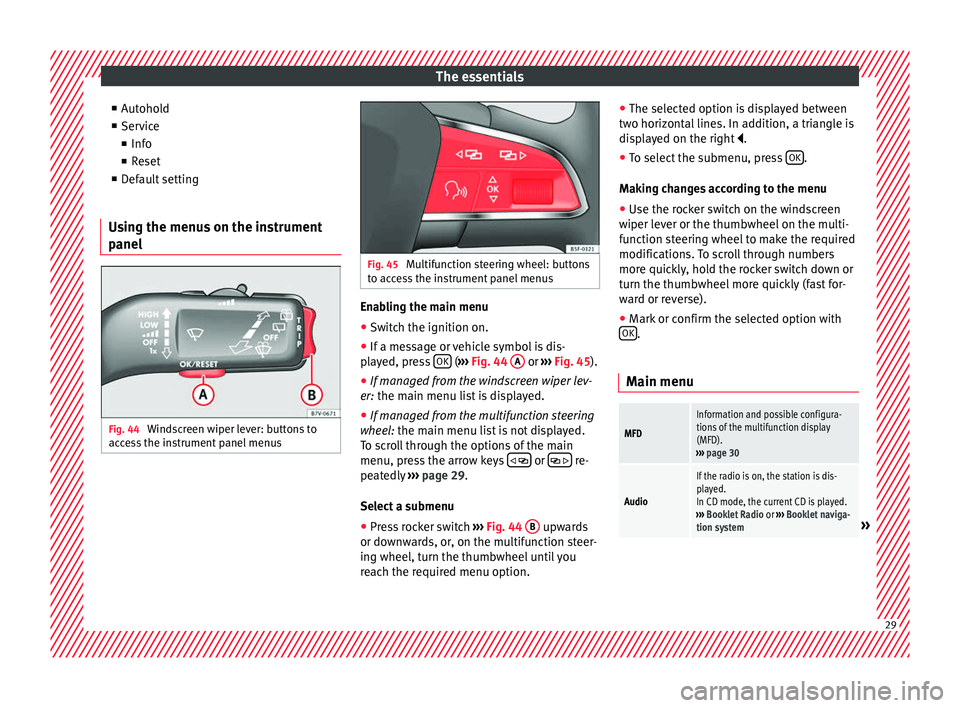
ss the instrument panel menus Fig. 45
Multifunction steering wheel: buttons
to ac c
ess the instrument panel menus Enabling the main menu
● Switch the ignition on.
● If a message or vehicle symbol is dis-
p l
a
yed, press OK (
››
› Fig. 44 A or
››
› Fig. 45 ).
● If managed from the windscreen wiper lev-
er: the main menu lis
t is displayed.
● If managed from the multifunction steering
wheel:
the main menu list is not displayed.
To scroll through the options of the main
menu, press the arrow keys or
re-
pe at
edly
››› page 29.
Select a submenu ● Press rocker switch ›››
Fig. 44 B upwards
or do wn
w
ards, or, on the multifunction steer-
ing wheel, turn the thumbwheel until you
reach the required menu option. ●
The selected option i
s displayed between
two horizontal lines. In addition, a triangle is
displayed on the right .
● To select the submenu, press OK .
M ak
in
g changes according to the menu
● Use the rocker switch on the windscreen
wiper lev
er or the thumbwheel on the multi-
function steering wheel to make the required
modifications. To scroll through numbers
more quickly, hold the rocker switch down or
turn the thumbwheel more quickly (fast for-
ward or reverse).
● Mark or confirm the selected option with
OK .
Main menu
MFD
Information and possible configura-
tions of the multifunction display
(MFD).
››› page 30
Audio
If the radio is on, the station is dis-
played.
In CD mode, the current CD is played.
››› Booklet Radio or ››› Booklet naviga-
tion system
» 29
Page 33 of 324

The essentialsSpeed warn-
ing at --- km/hIf the stored speed is exceeded (be-
tween 30 - 250 km/h, or 18 -
155 mph), an audible warning is given
together with a visual warning.
Changing between display modes
● In vehicles without multifunction steering
whee l:
press the lever.
● Vehicles with a multifunction steering
wheel:
press the button or .
Storing a speed for the speed warning
● Select the display Speed warning at
--- km/h .
● Pr e
ss OK to store the current speed and
sw it
c
h off the warning.
● In addition, set the required speed by
pres
sing the rocker switch on the windscreen
wiper lever or using the or buttons on
the multifunction steering wheel during the
subsequent 5 seconds. Next, press OK again
or w ait
a f
ew seconds. The speed is stored
and the warning activated.
● To switch off , pres
s OK . The stored speed is
del et
ed.
M
anually erasing memory 1 or 2
● Select the memory that you wish to erase.
● Hold down OK for approximately 2 sec-
ond s. P
er
sonalising the displays
It is
possible to select which of the displays
in the multifunction display you wish to see
on the instrument panel in the settings
menu. The units of measurement can also be
modified ››› page 31.
Configuration Menu
Multifunc-
tion display
dataConfiguration of the multifunction dis-
play data that you wish to see on the in-
strument panel display ››› page 30.
Compass
Changing the magnetic region and cali-
bration of the compass. To calibrate the
compass, please follow the instructions
given on the instrument panel display.
ConvenienceChanging vehicle convenience functions
››› page 32.
Lights & vis-
ibilityConfiguration of vehicle lighting
››› page 32.
Time
Changing the hours and minutes of the
instrument panel clock and the naviga-
tion system. The time can be set here
and the choice can be made between
the 24-hour and 12-hour display. The S
in the upper part of the display indicates
that the clock is set to summer time.
Winter tyres
Changing the visual and audible speed
warnings. This function should only be
used when the vehicle is fitted with win-
ter tyres, which are not designed for
travel at high speeds.
LanguageChanging the language of the display
texts and the navigation system.
UnitsChanging the units of measurement for
the temperature, consumption and dis-
tance.
Second
speedSwitching second speed display on and
off.
ServiceCheck the service notifications or reset
the service intervals to zero.
Factory set-
tingsSome functions of the Configuration
menu will be reset to the factory value.
BackThe main menu is displayed again. 31
Page 39 of 324

The essentials
● Tak
e the c
over off by passing it over the
gear selector lever ››› .
M anua
l
release of the selector lever
● Press the release lever ›››
Fig. 50 in the di-
rection of the arrow and hold it in this posi-
tion.
● Press the lock button ›››
Fig. 49 1 on the
g e
ar sel
ector lever knob and place the gear
selector lever in the N position. WARNING
Never move the gear selector lever from the
pos ition P whi
le the electronic parking brake
is deactivated. Otherwise, the vehicle may
accidentally move off on hills or steep slopes
causing serious accidents. CAUTION
If the vehicle is moved on its wheels with the
engine s t
opped and the selector lever in posi-
tion N for a prolonged period of time and at high speed, for example for towing, then the
autom
atic
gearbox will be damaged. Air conditioning
Ho w doe
s
the air conditioning work?Fig. 51
Detailed view of the centre console: El
ectronic
manual air conditioning controls; Climatronic controls. » 37
Page 47 of 324

The essentials
Action in the event of a punc-
t ur
e
Wh
at to do first The SEAT Alhambra is equipped as standard
with anti-p
u
ncture technology tyres (Conti-
Seal). In the event of a puncture or air leak of
up to 5 mm, the tyre seals the hole with a
protective layer inside the tread.
The inclusion of this technology means that
there is no type of spare wheel included in
the vehicle's equipment.
● Park the vehicle on a horizontal surface
and in a saf e p
lace as far away from traffic as
possible.
● Apply the handbrake.
● Switch on the hazard warning lights.
● Manual gearbox: select the 1s
t gear.
● Automatic gearbox: Move the sel
ector lever
to position P.
● If you are towing a trailer, unhitch it from
your v
ehicle.
● Keep the vehicle tool kit ready*
›››
page 83.
● Observe the applicable legislation for each
countr
y (reflective vest, warning triangles,
etc.). ●
All
occupants should leave the vehicle and
wait in a safe place (for instance behind the
roadside crash barrier). WARNING
● Alw a
ys observe the above steps and pro-
tect yourself and other road users.
● If you change the wheel on a slope, block
the wheel on the oppo
site side of the car with
a stone or similar to prevent the vehicle from
moving. Repairing a tyre with the anti-punc-
t
ur
e k
it* Fig. 62
Standard representation: contents of
the anti-p u
nct
ure kit. The anti-puncture kit is located under the
floor p
anel
in the lug
gage compartment. Sealing the tyre
● Unscrew the tyre valve cap and insert. Use
the ›››
Fig. 62 1 tool to remove the insert.
Pl ac
e it
on a clean surface.
● Shake the tyre sealant bottle vigorously
›››
Fig. 62 10 .
● Screw the inflator tube ››
›
Fig. 62 3 into
the se al
ant
bottle. The bottle's seal will break
automatically.
● Remove the lid from the filling tube
›››
Fig. 62 3 and screw the open end of the
t ube int
o the ty
re valve.
● With the tyre sealant bottle upside down,
fill
the tyre with the contents of the sealant
bottle.
● Remove the bottle from the valve.
● Place the insert back into the tyre valve us-
ing the too
l ››› Fig. 62 1 .
Infl atin
g the ty
re
● Screw the compressor tyre inflator tube
›››
Fig. 62 5 into the tyre valve.
● Check that the air bleed screw is closed
› ›
›
Fig. 62 7 .
● Start the engine and leave it running.
● Insert the connector ››
›
Fig. 62 9 into the
v ehic
l
e's 12-volt socket ›››
page 174.
● Turn the air compressor on with the ON/OFF
swit c
h ››› Fig. 62 8 .
» 45
Page 48 of 324

The essentials
● Keep the air c
ompr
essor running until it
reaches 2.0 to 2.5 bar
(29-36 psi/200-250 kPa). A maximum of 8
minutes.
● Disconnect the air compressor.
● If it does not reach the pressure indicated,
uns
crew the tyre inflator tube from the valve.
● Move the vehicle 10m so that the sealant is
distrib
uted throughout the tyre.
● Screw the compressor tyre inflator into the
valve.
● R
epeat the inflation process.
● If the indicated pressure still cannot be
reac
hed, the tyre is too badly damaged. Stop
and request assistance from an authorised
technician.
● Disconnect the air compressor. Unscrew
the tyre infl
ator tube from the tyre valve.
● When the tyre pressure is between 2.5 and
2.0 bars, c
ontinue driving without exceeding
80 km/h (50 mph).
● Check the pressure again after 10 minutes
›››
page 87.
››› in TMS (Tyre Mobility System)* on
page 86
››› page 86 Changing a wheel
V ehic
l
e tool kit* Fig. 63
Underneath the floor panel of the lug-
g ag
e c
ompartment: vehicle tool kit. Adapter for anti-theft bolt
T
o
w
ing eye, removable
Box spanner for wheel bolts
Crank handle for jack
Jack
Screwdriver with hexagon socket in the
handle
Hook for pulling off wheel trims or wheel
bolt caps.
1 2
3
4
5
6
7
››› in Location on page 83
›››
page 83 Full hubcaps*
Fig. 64
Removing the full hubcap Removing the full hubcap
● Take the wheel brace and the wire hook
fr om the
v
ehicle tool kit ›››
page 83.
● Hook the wire through one of the grooves
on the hubcap.
● In
sert the wheel brace onto the wire hook
›››
Fig. 64 and pull the hub cap in the direc-
tion shown by the arrow. 46
Page 49 of 324

The essentials
Fitting hubcaps
B ef
or
e mounting the full trim, the anti-theft
wheel lock must be threaded into position
››› Fig. 67 2 or
3 . Otherwise it will not be
po s
s
ible to mount the full hubcap.
● Press the trim against the wheel so that the
spac
e for the valve fits over the tyre valve
››› Fig. 67 1 . Make sure that the hubcap is
c orr
ectly
fitted all the way around the wheel.
Wheel bolt caps Fig. 65
Clip for removing the wheel bolt caps Removal
● Fit the plastic clip (vehicle tools) over the
c ap u
nti
l it clicks into place ››› Fig. 65.
● Remove the cap with the plastic clip.
The caps
protect the wheel bolts and should
be remounted after changing the tyre. The anti-theft wheel
locking bolt has a spe-
cial cap. This only fits on anti-theft locking
bolts and is not for use with standard wheel
bolts.
Loosening the wheel bolts Fig. 66
Changing a wheel: Slacken the wheel
bo lts. Fig. 67
Changing a wheel: tyre valve 1 and
pos ition of
anti-theft wheel locking bolt 2 or
3 .
Only use the tool supplied with the vehicle to
loo
sen the wheel
bo
lts.
Loosen the wheel bolts only about one turn
before raising the vehicle with the jack.
If the wheel bolt is very tight, you may be
able to loosen it by pushing down on the end
of the wheel brace carefully with your foot.
Hold on to the vehicle for support and take
care not to slip.
Loosening wheel bolts
● Fit the wheel brace as far as it will go over
the wheel bolt
››› Fig. 66.
● Hold the wheel brace at the end and rotate
the bolt ap
proximately one turn anticlockwise
››› .
» 47
Page 50 of 324

The essentials
Loosening anti-theft wheel bolts
F or wheel
s
with full trim, the anti-theft wheel
lock must be threaded into position ››› Fig. 67
2 or
3 . Otherwise it will not be possible to
mou nt
the entir
e hubcap.
● Take the adapter for anti-theft wheel bolts
out of the
vehicle tool kit.
● Insert the adapter onto the anti-theft wheel
bolt.
● Fit
the wheel brace onto the adapter as far
as po
ssible.
● Hold the wheel brace at the end and rotate
the bolt ap
proximately one turn anticlockwise
››› .
Impor t
ant
information about wheel bolts
The wheel rims and bolts have been de-
signed to be fitted to factory options. If differ-
ent rims are fitted, the correct wheel bolts
with the right length and correctly shaped
bolt heads must be used. This ensures that
wheels are fitted securely and that the brake
system functions correctly.
In some circumstances, wheel bolts from the
same model vehicle should not be used.
Wheel bolt tightening torque
The prescribed tightening torque for wheel
bolts for steel and alloy wheels is 140 Nm.
Have the tightening torque of the wheel bolts checked as soon as possible with a reliable
torque wr
ench.
If wheel bolts are rusty and it is difficult to
tighten them, the threads should be replaced
and cleaned before checking the tightening
torque.
Never grease or lubricate wheel bolts or the
wheel hub threads. Although they have been
tightened to the prescribed torque, they
could come loose while driving. WARNING
If the wheel bolts are not fitted correctly they
cou l
d be released while driving leading to
loss of vehicle control and serious damage.
● Only use wheel bolts which correspond to
the wheel rims in que
stion.
● Never use different wheel bolts.
● The bolts and threads should be clean, free
of oil
and grease and easy to thread.
● To loosen and tighten the wheel bolts, al-
way
s use the wheel brace supplied with the
vehicle.
● Loosen the wheel bolts only about one turn
before r
aising the vehicle with the jack.
● Never grease or lubricate wheel bolts or the
wheel hub thre
ads. Although they have been
tightened to the prescribed torque, they
could come loose while driving.
● Never loosen the bolted joints of wheel
rims with bo
lted ring trims. ●
If the wheel bo
lts are not tightened to the
correct torque, they may come loose while
driving, and the bolts and rims may come
out. If the tightening torque is too high, the
wheel bolts and threads can be damaged. Raising the vehicle with the jack
Fig. 68
Jack position points. Fig. 69
Jack mounted on the left rear part of
the v
ehic
le 48
Page 51 of 324

The essentials
The jack may be applied only at the jacking
points sho
wn (m
arks on chassis) ››› Fig. 68.
The mark indicates the jacking points below
the vehicle. The jacking points are on the ribs
behind the front edges ››› Fig. 69. Always the
relevant jacking point for the wheel to be
changed ››› .
R ai
se the
vehicle using only the designated
jacking points.
For your own safety and that of other passen-
gers, the following points should be ob-
served in the order given:
Select a suitable flat and firm surface for
raising the vehicle.
Switch off the engine, engage a gear
(manual gearbox) or place the selector
lever in position P ›››
page 193 and
turn on the electronic parking brake
››› page 188.
Block the wheel diagonally opposite the
wheel being changed with folding wheel
chocks* or other suitable objects.
When towing a trailer: unhook the trailer
from the towing vehicle and park it cor-
rectly.
Loosen the wheel bolts on the wheel to
be changed ››› page 47.
Look below the vehicle for the jacking
point ››› Fig. 68 closest to the tyre which
has to be changed.
1.
2.
3.
4.
5.
6. Raise the jack with the handle until it
can be inser
ted below the jacking point.
Ensure that the foot of the jack is firmly
on the ground and that it is placed im-
mediately below the lifting point on the
vehicle ››› Fig. 69.
Straighten the jack and continue raising
it using the handle until the claw holds
the vertical reinforcement beneath the
vehicle ››› Fig. 69.
Raise the vehicle until the wheel is clear
of the ground. WARNING
If the vehicle is not correctly raised, it could
fa l
l off the jack causing serious injury. Please
observe the following rules to minimise the
risk of injury:
● You should only use a jack approved by
SEAT f
or your vehicle. Other jacks, even those
approved for other SEAT models, might slip
out of place.
● The ground should be firm and flat. If the
ground i
s sloped or soft then the vehicle
could slip and fall off the jack. If necessary,
support the jack on a wide solid base.
● If the ground is slippery, such as tiles,
plac
e a non-slip surface (a floor mat, for in-
stance) beneath the jack to avoid slipping.
● Only fit the jack at the prescribed jacking
points. The c
law of the jack should grip the
reinforcement nerve on the underbody
››› Fig. 69. 7.
8.
9.
10.
●
You shou l
d never place a body limb such as
an arm or leg under a raised vehicle that is
solely supported by the jack.
● If you have to work underneath the vehicle,
you mus
t use suitable stands additionally to
support the vehicle, there is a risk of acci-
dent!.
● Never raise the vehicle if it is tilting to one
side or the engine i
s running.
● Never start the engine when the vehicle is
raised.
The vehicle may come loose from the
jack due to the engine vibrations. Removing and fitting the wheel
Fig. 70
Changing a wheel: loosen wheel bolts
w ith the soc
k
et at the end of the wheel brace Removing the wheel
● Slacken the wheel bolts ››
›
page 47.
● Raise the vehicle ›››
page 48. » 49