Page 114 of 226
2.20
Regenerative braking system
When braking, the regenerative brak-
ing system can convert the energy pro-
duced by the vehicle deceleration into
electric energy.
This will recharge the 400V traction bat-
tery and gain greater vehicle range.Operating faults
– © lights up on the instrument
panel, alongside the message
“Check braking system”: braking as-
sistance is available at all times.
Under these conditions, the feel of
applying the brake pedal may be dif-
ferent.
You are recommended to apply
strong continuous pressure to the
pedal.
Please see an authorised dealer.
–
û lights up on the instrument
panel, alongside the message
“Braking system fault”: this indi-
cates a fault in the braking system.
Please call an authorised dealer.
DRIVER CORRECTION DEVICES, AIDS (5/5)
The û warning light re-
quires you to stop immedi-
ately, for your own safety,
as soon as traffic conditions allow.
Switch off the engine and do not
restart it. Contact an Authorised
Dealer.
Page 118 of 226
2.24
CRUISE CONTROL (1/4)
The cruise control function helps you to
maintain your driving speed at a speed
that you choose, called the cruising
speed.
This cruising speed may be set at any
speed above 20 mph (30 km/h).
The cruise control function
is in no way linked to the
braking system.
This function is an addi-
tional driving aid. The func-
tion does not take the place
of the driver. Therefore, it
can under no circumstances replace
the driver’s responsibility to respect
speed limits and to be vigilant (the
driver must always be ready to
brake). Cruise control must not be
used in heavy traffic, on winding or
slippery roads (black ice, aquaplan-
ing, gravel) and during bad weather
(fog, rain, side winds etc.).
There is a risk of accidents.
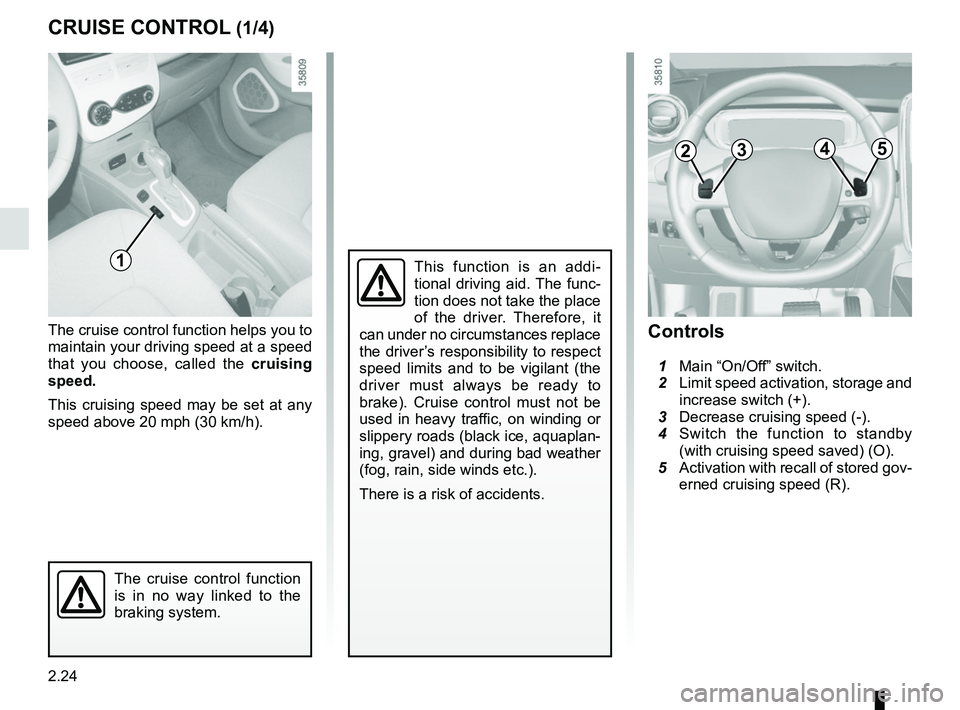
Controls
1 Main “On/Off” switch.
2 Limit speed activation, storage and
increase switch (+).
3 Decrease cruising speed (-).
4 Switch the function to standby
(with cruising speed saved) (O).
5 Activation with recall of stored gov-
erned cruising speed (R).
2354
1
Page 120 of 226

2.26
CRUISE CONTROL (3/4)
The cruise control function
is in no way linked to the
braking system.
Adjusting the cruising speed
The cruising speed may be changed by
pressing the following repeatedly:
– switch 2 (+) to increase the speed,
– switch 3 (-) to decrease the speed.
Exceeding the cruising speed
The cruising speed may be exceeded
at any time by depressing the accelera-
tor pedal. While it is being exceeded,
the cruising speed flashes on the in-
strument panel.
Then, release the accelerator: after a
few seconds, the vehicle will automati-
cally return to its set cruising speed.
Cruising speed cannot be
maintained
When driving down a steep gradient,
the system is unable to maintain the
cruising speed: the stored speed will
flash on the instrument panel informa-
tion display to inform you of this situ-
ation.
2354
Putting the function on
standby
The function is set to standby if you:
– use the switch 4 (O);
– the brake pedal;
– move to neutral position;
– ECO mode switch.
In all four cases, the cruising speed
remains stored and the message
“Memorised” appears on the instrument
panel.
Standby is confirmed when the warn-
ing light
Ï on the green back-
ground goes out and the warning light
comes on.
The cruise control switches to
standby each time the ECO
mode is activated or deactivated.
Please refer to the information on
“Ecodriving” in Section 2.
Page 121 of 226
2.27
CRUISE CONTROL (4/4)
When the cruise control function is
put on standby, pressing switch 2
(+) reactivates the cruise control
function without taking into account
the stored speed: it is the speed at
which the vehicle is moving that is
taken into account.Putting the cruise control
on standby or switching it
off does not cause a rapid
reduction in speed: you
must brake by depressing the brake
pedal.
NB: if the speed previously stored is
much higher than the current speed,
the vehicle will accelerate more rapidly
to reach this threshold.
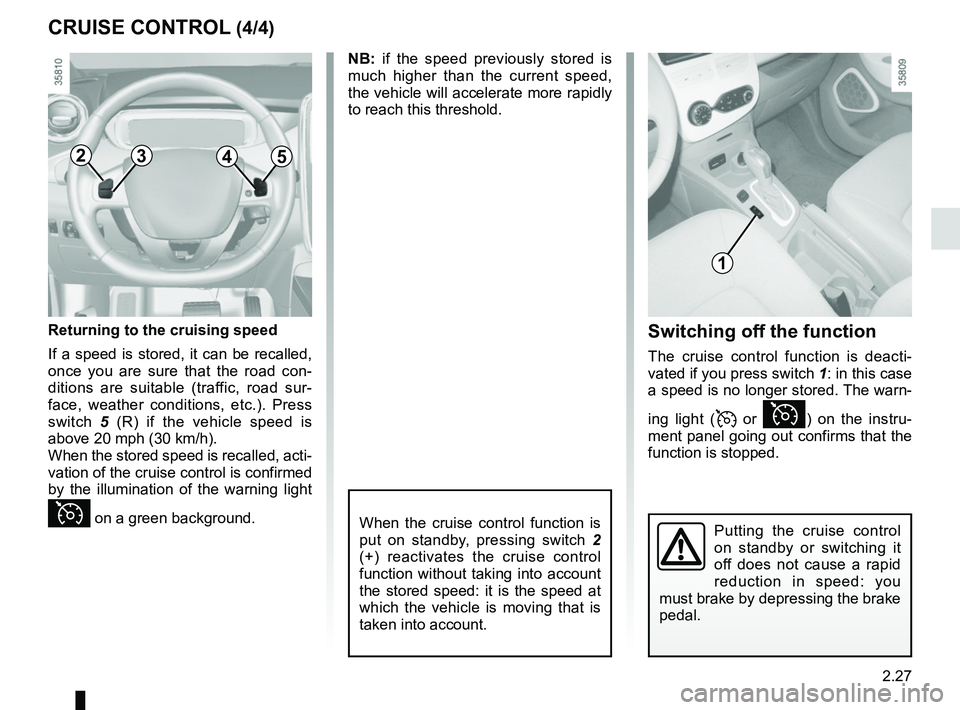
Switching off the function
The cruise control function is deacti-
vated if you press switch 1: in this case
a speed is no longer stored. The warn-
ing light (
or Ï) on the instru-
ment panel going out confirms that the
function is stopped.
2354
1
Returning to the cruising speed
If a speed is stored, it can be recalled,
once you are sure that the road con-
ditions are suitable (traffic, road sur-
face, weather conditions, etc.). Press
switch 5 (R) if the vehicle speed is
above 20 mph (30 km/h).
When the stored speed is recalled, acti-
vation of the cruise control is confirmed
by the illumination of the warning light
Ï on a green background.
Page 155 of 226
3.29
Do not place any objects,
especially heavy or hard
objects, on the parcel shelf.
These may pose a risk to
the vehicle occupants if the driver
has to brake suddenly or if the vehi-
cle is involved in an accident.
Rear parcel shelf
To remove:
– lower the rear headrests;
– unhook both straps 1;
– lift the shelf 2 upwards to unclip;
REAR PARCEL SHELF
Maximum weight on rear parcel
shelf: 2 kg, evenly distributed.
1
2
– push the shelf 2 inwards and turn it;
– pull the shelf towards you.
To refit, proceed in the reverse order to
removal.
Page 156 of 226
3.30
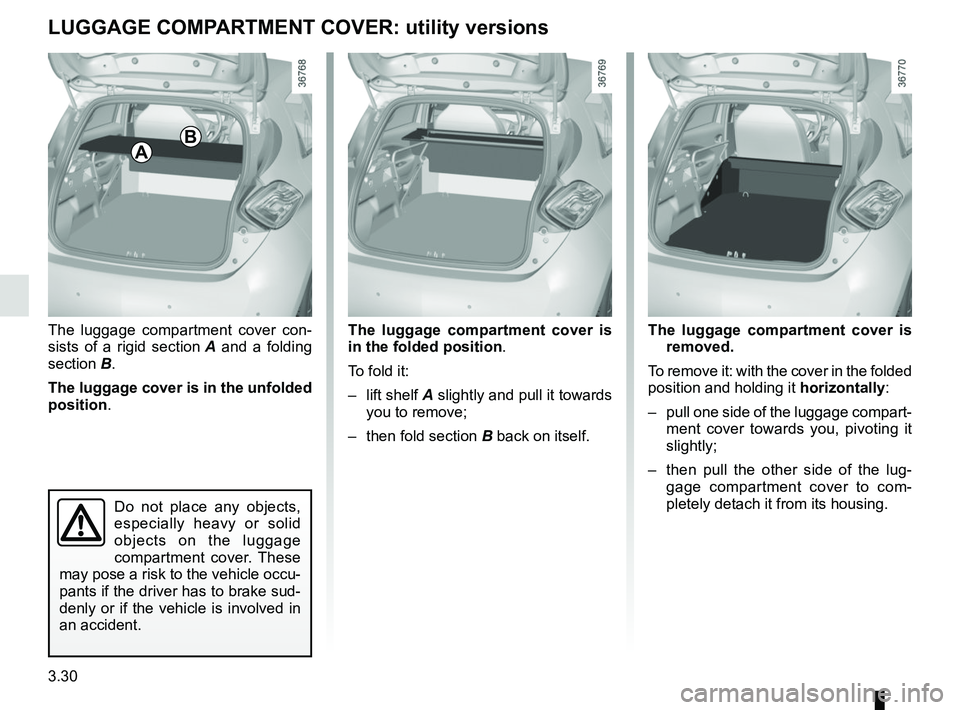
The luggage compartment cover con-
sists of a rigid section A and a folding
section B.
The luggage cover is in the unfolded
position . The luggage compartment cover is
removed.
To remove it: with the cover in the folded
position and holding it horizontally:
– pull one side of the luggage compart- ment cover towards you, pivoting it
slightly;
– then pull the other side of the lug- gage compartment cover to com-
pletely detach it from its housing.
LUGGAGE COMPARTMENT COVER: utility versions
Do not place any objects,
especially heavy or solid
objects on the luggage
compartment cover. These
may pose a risk to the vehicle occu-
pants if the driver has to brake sud-
denly or if the vehicle is involved in
an accident.
The luggage compartment cover is
in the folded position .
To fold it:
– lift shelf A slightly and pull it towards
you to remove;
– then fold section B back on itself.
AB
Page 158 of 226
3.32
TRANSPORTING OBJECTS IN THE LUGGAGE COMPARTMENT
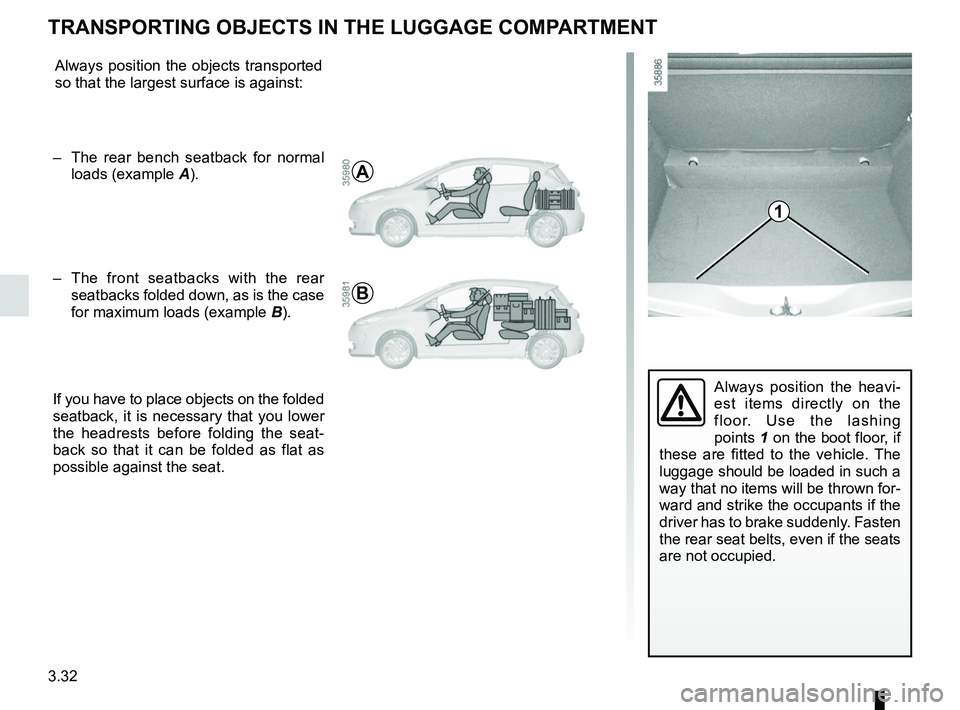
Always position the heavi-
est items directly on the
floor. Use the lashing
points 1 on the boot floor, if
these are fitted to the vehicle. The
luggage should be loaded in such a
way that no items will be thrown for-
ward and strike the occupants if the
driver has to brake suddenly. Fasten
the rear seat belts, even if the seats
are not occupied.
1
Always position the objects transported
so that the largest surface is against:
– The rear bench seatback for normal loads (example A).
– The front seatbacks with the rear
seatbacks folded down, as is the case
for maximum loads (example B).
If you have to place objects on the folded
seatback, it is necessary that you lower
the headrests before folding the seat-
back so that it can be folded as flat as
possible against the seat.
A
B
Page 161 of 226

4.1
Section 4: Maintenance
Bonnet . . . . . . . . . . . . . . . . . . . . . . . . . . . . . . . . . . . . \
. . . . . . . . . . . . . . . . . . . . . . . . . . . . . . . . . . . . 4.2
Levels . . . . . . . . . . . . . . . . . . . . . . . . . . . . . . . . . . . .\
. . . . . . . . . . . . . . . . . . . . . . . . . . . . . . . . . . . . 4.4Coolant . . . . . . . . . . . . . . . . . . . . . . . . . . . . . . . . . . . . \
. . . . . . . . . . . . . . . . . . . . . . . . . . . . . . 4.4
Brake fluid . . . . . . . . . . . . . . . . . . . . . . . . . . . . . . . . . . . .\
. . . . . . . . . . . . . . . . . . . . . . . . . . . 4.5
windscreen washer reservoir . . . . . . . . . . . . . . . . . . . . . . . . . . . . . . . . . . . . \
. . . . . . . . . . . . . 4.5
Secondary 12V battery . . . . . . . . . . . . . . . . . . . . . . . . . . . . . . . . . . . .\
. . . . . . . . . . . . . . . . . . . . . . . 4.6
Tyre Pressure . . . . . . . . . . . . . . . . . . . . . . . . . . . . . . . . . . . .\
. . . . . . . . . . . . . . . . . . . . . . . . . . . . . . 4.8
Bodywork maintenance . . . . . . . . . . . . . . . . . . . . . . . . . . . . . . . . . . . . \
. . . . . . . . . . . . . . . . . . . . . . . 4.9
Interior trim maintenance . . . . . . . . . . . . . . . . . . . . . . . . . . . . . . . . . . . . \
. . . . . . . . . . . . . . . . . . . . . . 4.12