Page 82 of 364
1.76
DISPLAYS AND INDICATORS (5/6)
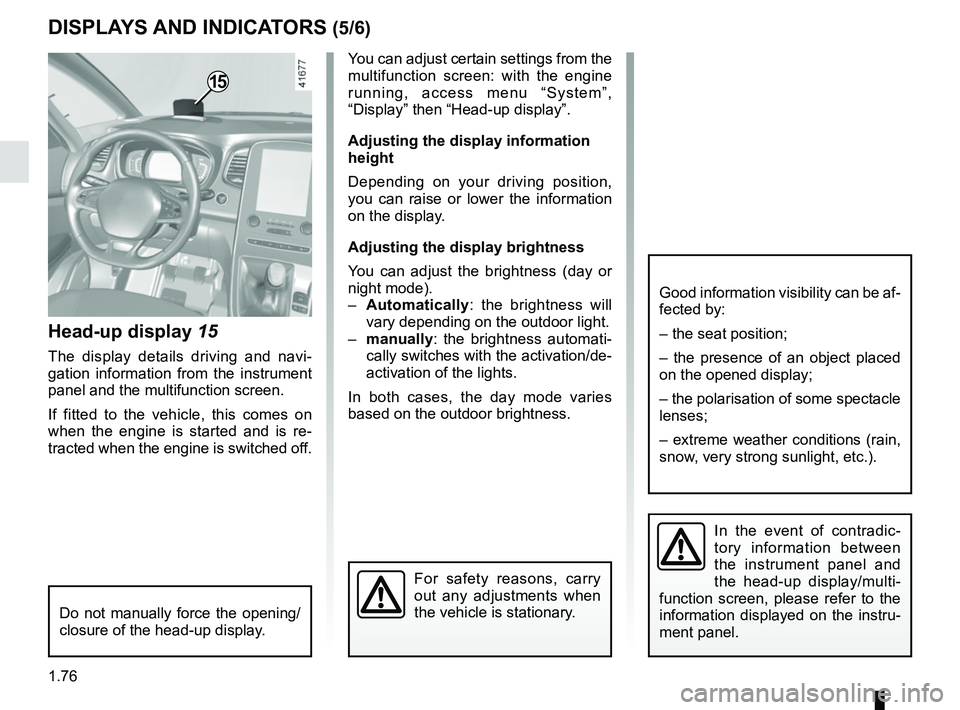
Head-up display 15
The display details driving and navi-
gation information from the instrument
panel and the multifunction screen.
If fitted to the vehicle, this comes on
when the engine is started and is re-
tracted when the engine is switched off.
15
You can adjust certain settings from the
multifunction screen: with the engine
running, access menu “System”,
“Display” then “Head-up display”.
Adjusting the display information
height
Depending on your driving position,
you can raise or lower the information
on the display.
Adjusting the display brightness
You can adjust the brightness (day or
night mode).
– Automatically : the brightness will
vary depending on the outdoor light.
– manually: the brightness automati-
cally switches with the activation/de-
activation of the lights.
In both cases, the day mode varies
based on the outdoor brightness.
Good information visibility can be af-
fected by:
– the seat position;
– the presence of an object placed
on the opened display;
– the polarisation of some spectacle
lenses;
– extreme weather conditions (rain,
snow, very strong sunlight, etc.).
In the event of contradic-
tory information between
the instrument panel and
the head-up display/multi-
function screen, please refer to the
information displayed on the instru-
ment panel.
Do not manually force the opening/
closure of the head-up display.
For safety reasons, carry
out any adjustments when
the vehicle is stationary.
Page 92 of 364

1.86
TRIP COMPUTER AND WARNING SYSTEM: operating fault messages
These appear with the © warning light and mean that you should drive very carefully to an author\
ised dealer as
soon as possible. If you fail to follow this recommendation, you risk da\
maging your vehicle.
They disappear when the display selection key is pressed or after severa\
l seconds and are stored in the computer log. The
© warning light stays on. Examples of operating fault messages are given \
in the following pages.
Examples of messages Interpreting the display selected
“Clean diesel filter” Indicates the presence of water in the diesel filter; contact an approve\
d Dealer
as soon as possible.
“Check lighting” Indicates a fault in the headlights.
“Check vehicle” Indicates a fault in one of the pedal sensors, battery management system\
or oil
level sensor.
“Check airbag” Indicates a fault in the restraint system in addition to the seat belts.\
In the event
of an accident, it is possible that they may not be triggered.
“Check anti- pollution system” Indicates a fault in the vehicle’s particle filter system.
Page 107 of 364
1.101
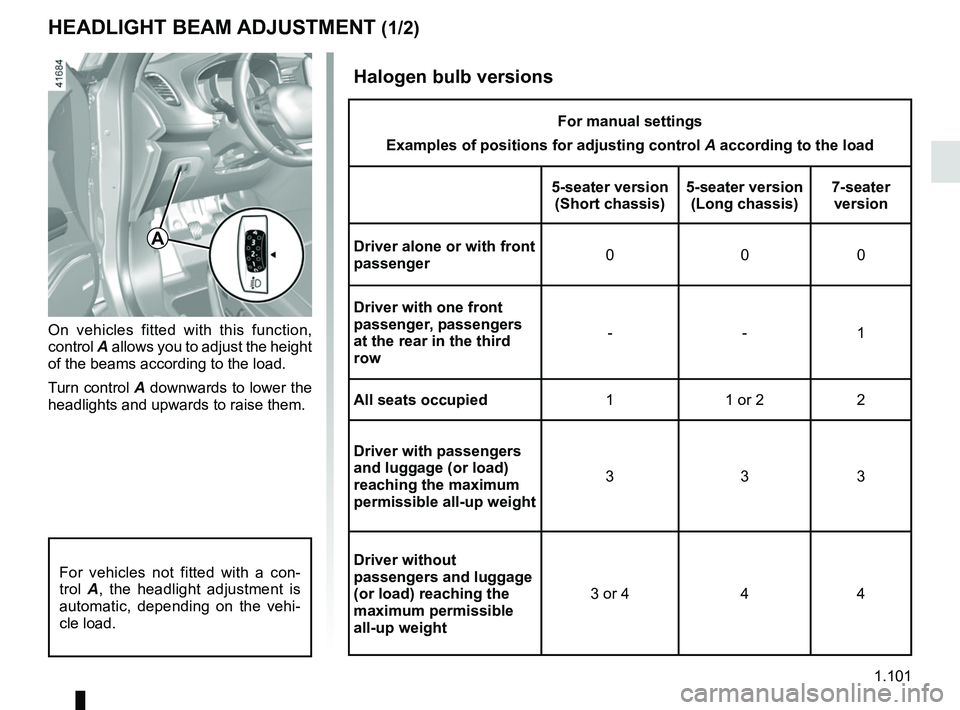
HEADLIGHT BEAM ADJUSTMENT (1/2)
On vehicles fitted with this function,
control A allows you to adjust the height
of the beams according to the load.
Turn control A downwards to lower the
headlights and upwards to raise them.
A
For vehicles not fitted with a con-
trol A, the headlight adjustment is
automatic, depending on the vehi-
cle load.
Halogen bulb versions
For manual settings
Examples of positions for adjusting control A according to the load
5-seater version (Short chassis) 5-seater version
(Long chassis) 7-seater
version
Driver alone or with front
passenger 000
Driver with one front
passenger, passengers
at the rear in the third
row --1
All seats occupied 1 1 or 2 2
Driver with passengers
and luggage (or load)
reaching the maximum
permissible all-up weight 333
Driver without
passengers and luggage
(or load) reaching the
maximum permissible
all-up weight 3 or 4 4 4
Page 108 of 364
1.102
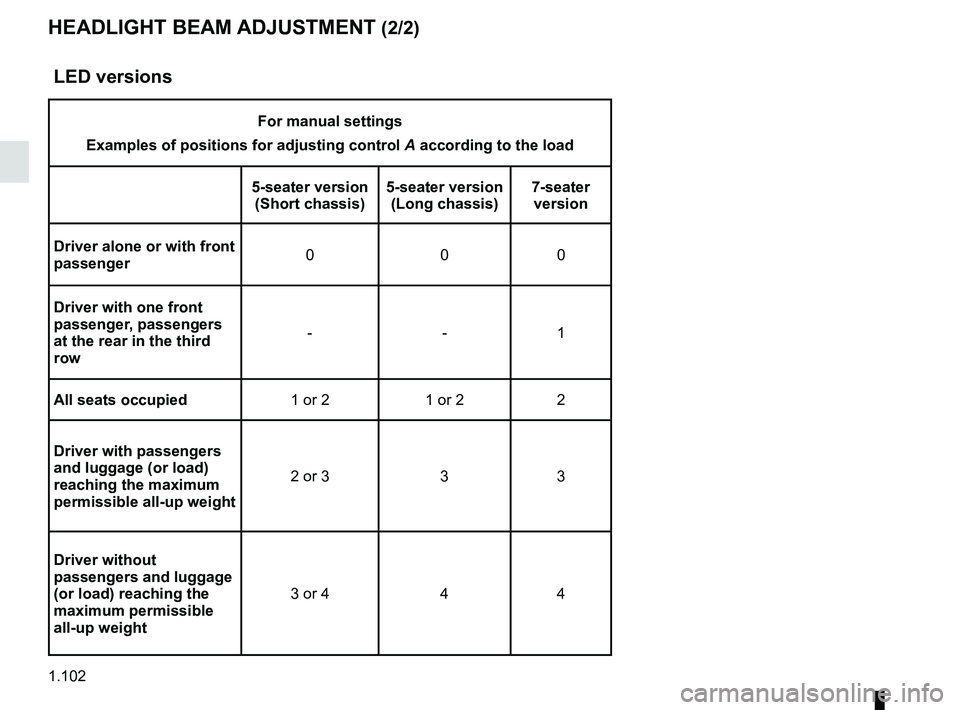
HEADLIGHT BEAM ADJUSTMENT (2/2)
LED versions
For manual settings
Examples of positions for adjusting control A according to the load
5-seater version (Short chassis) 5-seater version
(Long chassis) 7-seater
version
Driver alone or with front
passenger 000
Driver with one front
passenger, passengers
at the rear in the third
row --1
All seats occupied 1 or 2 1 or 2 2
Driver with passengers
and luggage (or load)
reaching the maximum
permissible all-up weight 2 or 3 3 3
Driver without
passengers and luggage
(or load) reaching the
maximum permissible
all-up weight 3 or 4 4 4
Page 130 of 364

2.10
FUNCTION STOP AND START (3/4)
Conditions preventing the
standby of the engine
Certain conditions prevent the system
from using the engine standby function,
including when:
for vehicles equipped with a
RENAULT card:
– the driver’s door is not closed;
– the driver’s seatbelt is not fastened.
for all vehicles:
– reverse gear is engaged;
– the bonnet is not locked;
– the outdoor temperature is too low or too high (less than around 5°C or
higher than around 35°C);
– one of the two batteries is not suffi- ciently charged;
– the difference between the vehicle interior temperature and the auto-
matic climate control instruction is
too high;
– parking distance control is in opera- tion; – for vehicles with automatic gear-
boxes, the gradient is steeper than
approximately 12%;
– the “Clear View” function is activated (please see “Automatic climate con-
trol” in Section 3);
– the engine temperature is too low;
– the emission control system is being regenerated;
– ...
Warning light
is displayed on the
instrument panel. This notifies you that
engine standby is not available.
Deactivate the Stop and
Start function for any opera-
tion performed in the engine
compartment.
Special case for vehicles with
a RENAULT card
With the engine on standby (traffic jam,
traffic lights, etc.), if the driver unfas-
tens the seat belt and opens the driv-
er’s door, or gets out of the seat, the
ignition is switched off.
The assisted parking brake is applied
automatically.
To restart and reactivate the Stop and
Start system, start the engine (please
refer to the information on “Starting,
stopping the engine” in Section 2).
Special case of vehicles with
a key
With the engine on standby (traffic
jam, traffic lights, etc.), if you get out of
the vehicle, a beep warns you that the
engine is on standby and has not been
stopped.
Page 134 of 364
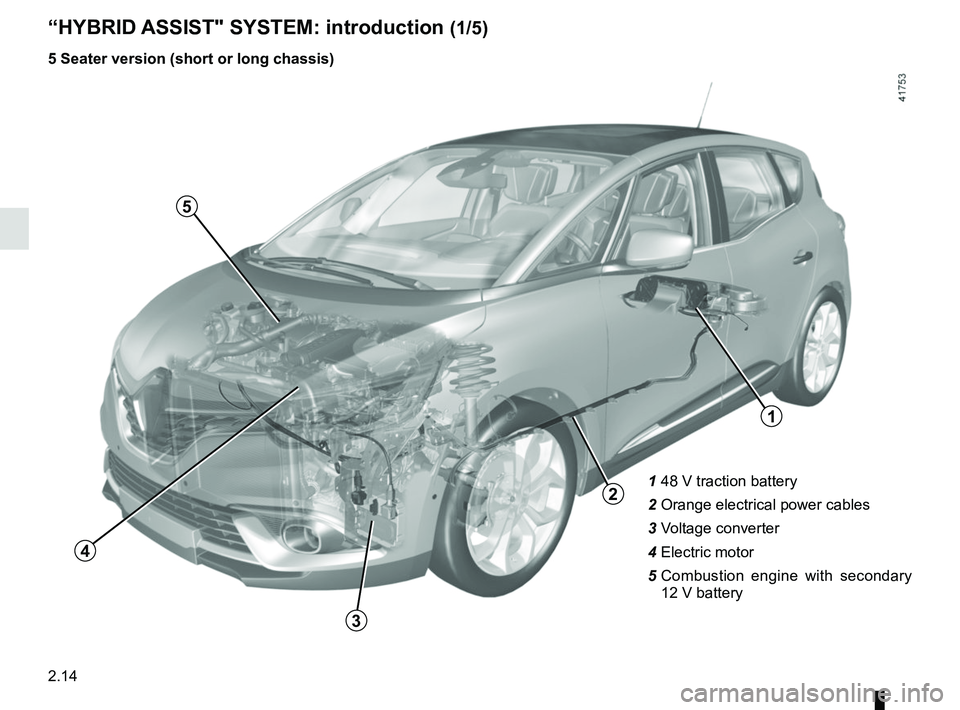
2.14
1 48 V traction battery
2 Orange electrical power cables
3 Voltage converter
4 Electric motor
5 Combustion engine with secondary
12 V battery
“HYBRID ASSIST" SYSTEM: introduction (1/5)
1
3
4
2
5
5 Seater version (short or long chassis)
Page 135 of 364
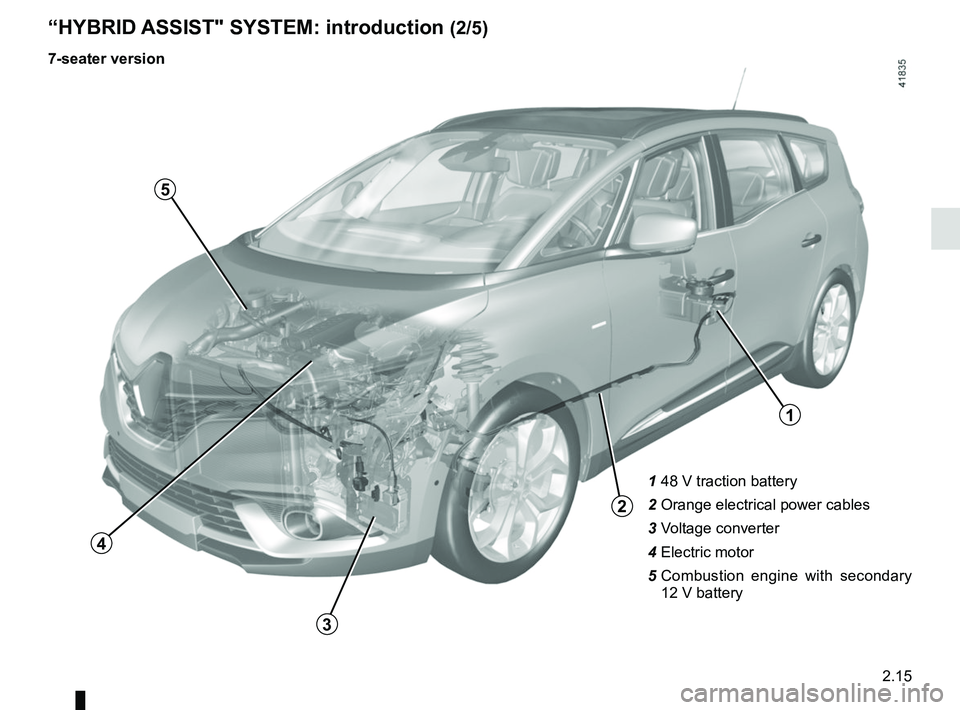
2.15
1 48 V traction battery
2 Orange electrical power cables
3 Voltage converter
4 Electric motor
5 Combustion engine with secondary
12 V battery
“HYBRID ASSIST" SYSTEM: introduction (2/5)
7-seater version
1
2
3
4
5
Page 139 of 364
2.19
“HYBRID ASSIST” SYSTEM: important recommendations
Please read these instructions carefully. Failure to follow these instructions may lead to a risk of fire, serious injury
or electric shocks.
In the event of an accident or impact
Never touch the “48 volt” components or orange cables which are ex\
posed and visible inside or outside the vehicle.
Risk of electric shock.
In the event of serious damage to the 48 V traction battery, leaks may occur:
– never touch any liquids (fluids etc.) coming from the 48 V traction ba\
ttery;
– in the event of contact with the body, wash the affected area with plenty of water and consult a doctor as soon as possibl\
e.
In the event of fire
In the event of fire, make everyone evacuate the vehicle immediately and\
contact the emergency services, informing them that
this is an electric vehicle.
Only use extinguishing agents ABC or BC that are permitted for use with electrical fires. Do not use w\
ater or other extinguish-
ing agents.
In the event of damage to the electrical circuit, please call an authori\
sed dealer.
Washing the vehicle
Never wash the engine compartment, the “48 volt” components and th\
e orange cables with a high pressure washer.
This risks damaging the electric circuit.
Never wash the luggage compartment or the rear bench seat with a water j\
et or high pressure washer.
This risks damaging the electric circuit.
Risk of fire if water leaks into the 48 volt traction battery.