Page 23 of 348
1.17
OPENING AND CLOSING THE DOORS (1/3)
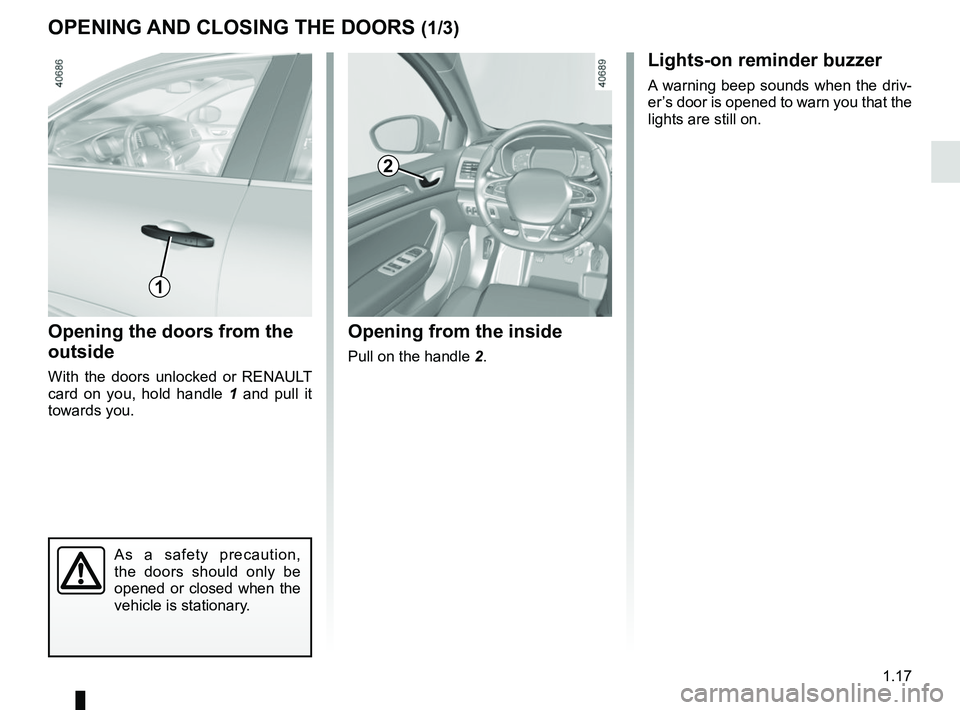
Opening the doors from the
outside
With the doors unlocked or RENAULT
card on you, hold handle 1 and pull it
towards you.
Opening from the inside
Pull on the handle 2.
2
As a safety precaution,
the doors should only be
opened or closed when the
vehicle is stationary.
1
Lights-on reminder buzzer
A warning beep sounds when the driv-
er’s door is opened to warn you that the
lights are still on.
Page 27 of 348

1.21
To raise the headrest
Pull the headrest upwards to the de-
sired height. Check that the bonnet is
correctly locked.
To lower the headrest
Press button 2 and guide the headrest
down to the desired height. Check that
the bonnet is correctly locked.
To adjust the angle of the
headrest
If your vehicle is thus equipped, move
the A section towards or away from you
to the required position
To remove the headrest
Raise the headrest to its highest po-
sition (tilt the seatback backwards if
necessary). Press button 2 and lift the
headrest to release it.
To refit the headrest
Check that the headrest rods are
clean 1. The rod with a notch should be
inserted into the slot 3 fitted with a lock-
ing button 2 . Insert the headrest rods
into the holes (tilt the seatback back-
wards if necessary). Press the 2 button
and push in the headrest as far as it will
go, then adjust it to the desired height.
Check that each rod 1 on the seatback
is securely locked.
FRONT HEADRESTS
The headrest is an impor-
tant safety component:
ensure that it is in place and
in the correct position. The
distance between your head and the
headrest and the distance between
the head and section A should be
as small as possible.
23
1
A
Page 61 of 348

1.55
AUDIBLE AND VISUAL SIGNALS
Horn
Press the steering wheel boss A to ac-
tivate the horn.
Headlight flasher
Pull stalk 1 towards you to flash the
headlights.
éHazard warning lights
Press switch 2. This switch ac-
tivates all four direction indicators and
the side indicator lights simultaneously.
It must only be used in an emergency to
warn drivers of other vehicles that you
have had to stop in an area where stop-
ping is prohibited or unexpected or that
you are obliged to drive under special
conditions.
Depending on the vehicle, the hazard
warning lights may come on automati-
cally under heavy deceleration. You can
switch them off by pressing switch 2.
Direction indicators
Move stalk 1 parallel to the steering
wheel and in the direction you are going
to turn it.
One-touch mode
When driving, it is possible that the
steering wheel may not be turned suf-
ficiently to return the stalk automatically
to its starting position.
In this case, briefly turn stalk 1 to the in-
termediate position, then release it: the
stalk returns to its original point and the
indicator light flashes three times.
2
A
1
Page 83 of 348

Examples of selectionsInterpreting the display selected
On-board computer")
1.77
The display of information shown below DEPENDS ON THE VEHICLE EQUIPMENT \
AND COUNTRY.
TRIP COMPUTER: trip settings (4/5)
Examples of selectionsInterpreting the display selected
On-board computer with distance before
next service message (cntd.)
d) Mileage before service or oil change.Mileage before service
With the ignition on, the engine not running and the display
selected “Service Intervals”, press button OK for about 5 sec-
onds to display the mileage before the next service, then press
button 2 to view the mileage before the next oil change (distance
or time remaining before the next service). When the distance
value approaches its limit, there are several possible scenarios:
– range less than 930 miles (1,500 km) or one month: the
message “Service due in” is displayed accompanied by the
nearest term (distance or time);
– range equal to 0 km/miles or service date reached: the
message “Service required” is displayed accompanied by
warning light
©.
The vehicle requires an oil change as soon as possible.
Service Intervals
Oil change in
30 000 Kms / 24 mo
Service due in
300 Kms / 24 days
Service required
Depending on the vehicle, the mileage before an oil change varies accord\
ing to the driving style (frequent driving at low speed ,
door-to-door journeys, extensive use at idling speed, towing a trailer, etc.). The distance remaining until the next oil change can
therefore decrease more quickly in some cases than the actual distance t\
ravelled.
Resetting: to reset the mileage before a service, press and hold button 2 for approximately 10 seconds until the display shows
the range permanently.
Note: If a service is performed without changing the engine oil, only the mi\
leage before the next service should be reset. In the
event of an oil change, both the distance before the next service and th\
e next oil change should be reset.
Page 96 of 348

1.90
áMain beam headlights
With the dipped beam
headlights lit, push stalk 1. This indica-
tor light on the instrument panel comes
on.
To return to the dipped headlight posi-
tion, pull the stalk 1 towards you again.
EXTERIOR LIGHTING AND SIGNALS (1/6)
šSide lights
Turn ring 3 until the symbol is
opposite mark 2. This indicator light on
the instrument panel comes on.
kDipped beam
headlights
Manual operation
Turn ring 3 until the symbol is opposite
mark 2 . This indicator light on the in-
strument panel comes on.
Automatic operation
Turn the ring 3 until the AUTO symbol
is opposite the mark 2: with the engine
running, the dipped beam headlights
switch on or off automatically depend-
ing on the brightness of the light out-
side, without any action on stalk 1.
Before driving at night:
check that the electrical
equipment is operating cor-
rectly. As a general precau-
tion, check that the lights are not
obscured (by dirt, mud, snow or ob-
jects being transported).
1
3
2
When driving on the left in a left-
hand drive vehicle (or vice versa),
drivers must readjust their lights
throughout their stay (see “Adjusting
headlight beams” in Section 1).
1
In mode AUTO, with the main beam
headlights on, you can still return to
dipped beam by pulling stalk 1 to-
wards you.
Page 98 of 348
1.92
3
2
EXTERIOR LIGHTING AND SIGNALS (3/6)
1
5
6
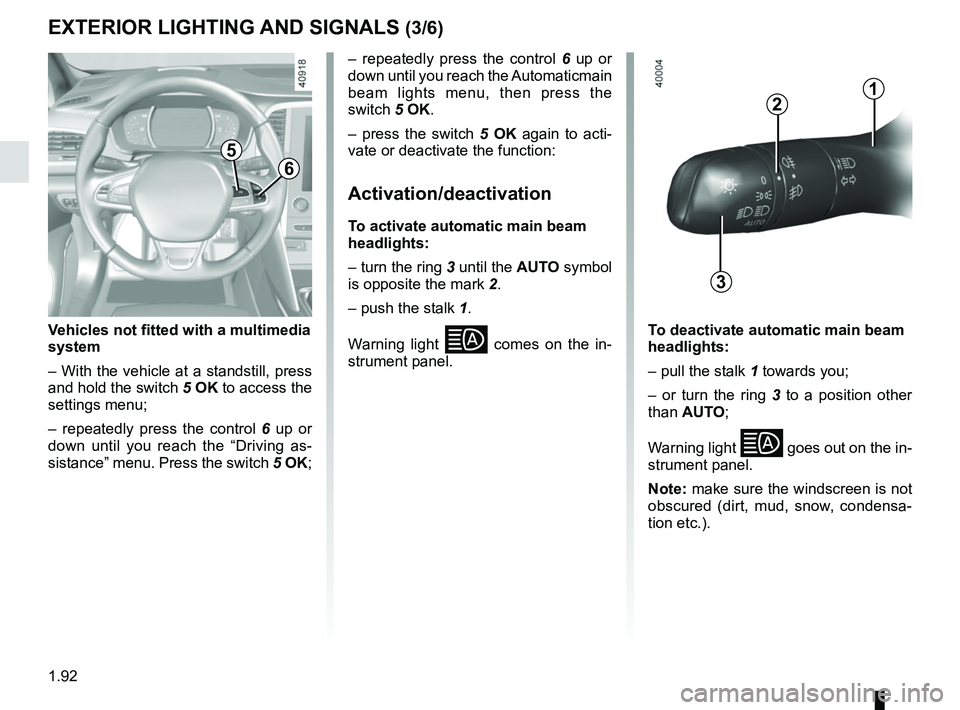
Vehicles not fitted with a multimedia
system
– With the vehicle at a standstill, press
and hold the switch 5 OK to access the
settings menu;
– repeatedly press the control 6 up or
down until you reach the “Driving as-
sistance” menu. Press the switch 5 OK; – repeatedly press the control
6 up or
down until you reach the Automaticmain
beam lights menu, then press the
switch 5 OK.
– press the switch 5 OK again to acti-
vate or deactivate the function:
Activation/deactivation
To activate automatic main beam
headlights:
– turn the ring 3 until the AUTO symbol
is opposite the mark 2.
– push the stalk 1.
Warning light
comes on the in-
strument panel. To deactivate automatic main beam
headlights:
– pull the stalk 1 towards you;
– or turn the ring 3 to a position other
than AUTO;
Warning light
goes out on the in-
strument panel.
Note: make sure the windscreen is not
obscured (dirt, mud, snow, condensa-
tion etc.).
Page 100 of 348

1.94
“See-me-home lighting”
function
This function allows you to briefly switch
on the dipped beam headlights (to pro-
vide light when opening a gate, etc.).
With the engine and lights switched
off and the ring 3 in position 0 or AUTO,
pull the stalk 1 towards you: the dipped
beam headlights come on for approxi-
mately thirty seconds. To increase this
duration, you may pull the stalk up to
four times (total time restricted to two
minutes). The message “Follow-me
home for _ _ _” along with the time the
lights will be on for is displayed on the
instrument panel to confirm this action.
You can then lock your vehicle.
To switch off the lights before they go
out automatically, turn ring 3 to any po-
sition, then return it to the AUTO posi-
tion .
EXTERIOR LIGHTING AND SIGNALS (5/6)
Welcome and goodbye
function
(depending on the vehicle)
Once the function is activated, the day-
time running lights and the rear side
light light up automatically upon detect-
ing the RENAULT card or when the ve-
hicle is unlocked.
They switch off automatically:
– approximately one minute after li- ghting up;
– when starting the engine based on the position of the lighting stalk;
or
– upon locking the vehicle. Welcome lighting under the door
mirrors
With the function activated, the lights
located under the door mirrors come
on automatically upon detection of the
RENAULT card, upon unlocking the
vehicle or when opening a door.
They switch off automatically:
– approximately one minute after li-
ghting up;
– upon starting the engine;
or
– upon locking the vehicle.
Activating/deactivating the function
From the multimedia screen, select
“Vehicle”, “User settings”, “External
welcome”. Choose “ ON" or “OFF" to
activate or deactivate the function.
Page 107 of 348
1.101
WINDSCREEN WASH, WIPE (6/6)
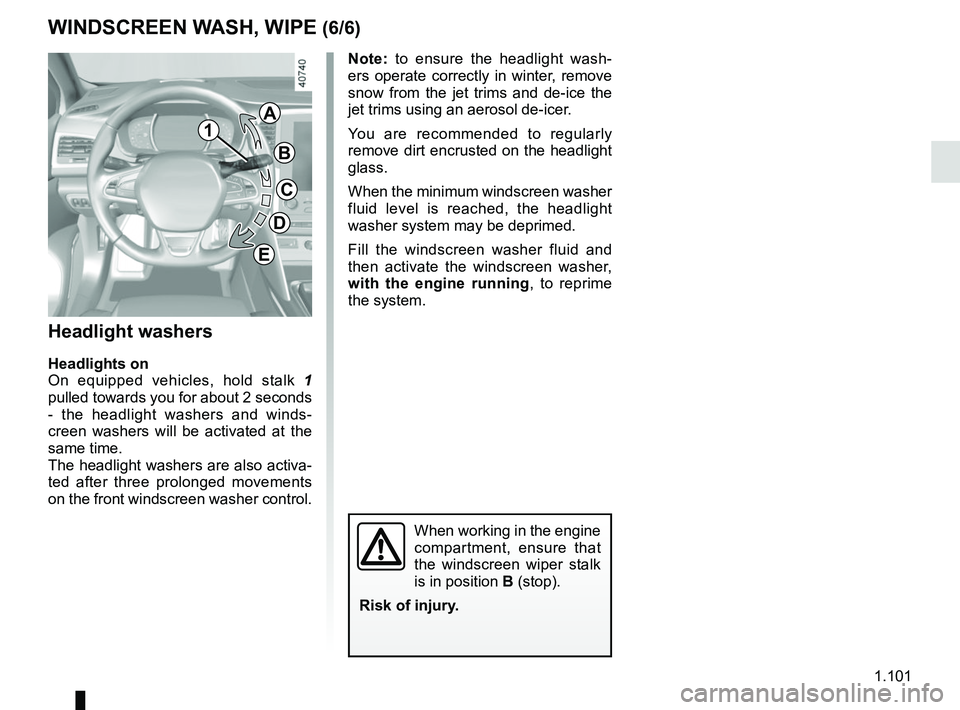
Headlight washers
Headlights on
On equipped vehicles, hold stalk 1
pulled towards you for about 2 seconds
- the headlight washers and winds-
creen washers will be activated at the
same time.
The headlight washers are also activa-
ted after three prolonged movements
on the front windscreen washer control.
When working in the engine
compartment, ensure that
the windscreen wiper stalk
is in position B (stop).
Risk of injury.
1
A
B
C
D
E
Note: to ensure the headlight wash-
ers operate correctly in winter, remove
snow from the jet trims and de-ice the
jet trims using an aerosol de-icer.
You are recommended to regularly
remove dirt encrusted on the headlight
glass.
When the minimum windscreen washer
fluid level is reached, the headlight
washer system may be deprimed.
Fill the windscreen washer fluid and
then activate the windscreen washer,
with the engine running , to reprime
the system.