Page 144 of 290
2.28
LANE DEPARTURE WARNING (2/3)Conditions for non-activation
of alerts
– Indicators activated or having been activated less than approximately
four seconds prior to departing from
the lane;
– Very fast lane departure;
– Driving continuously on a line;
– ...
Operating faults
In the event of a malfunction, a mes-
sage “LANE DEPARTURE CHECK” is
displayed on the instrument panel ac-
companied by the warning light
©.
Consult an approved dealer.
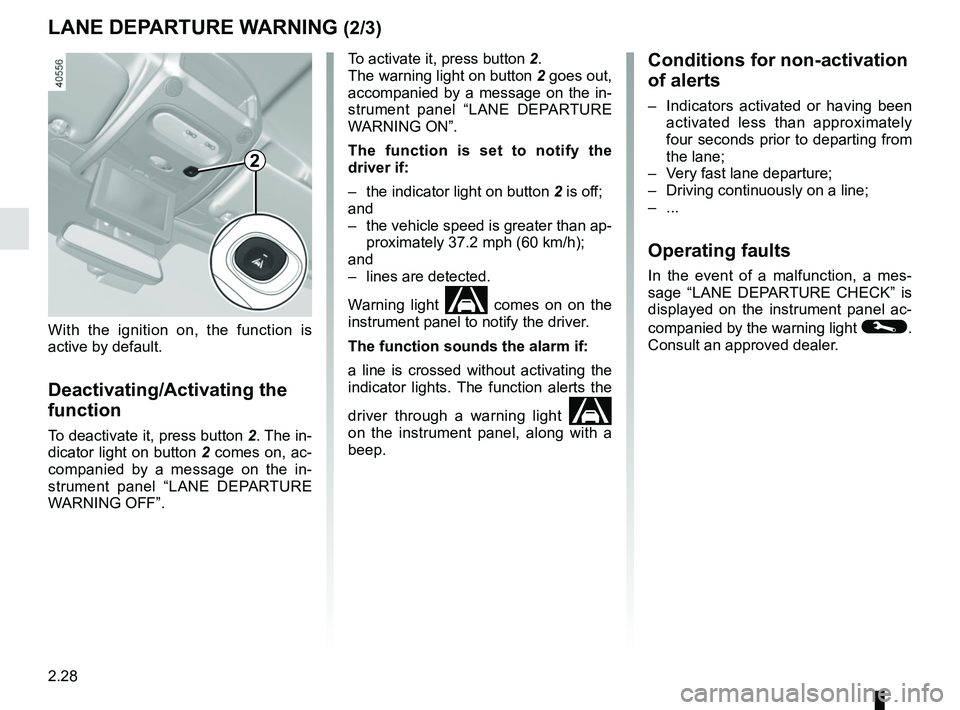
To activate it, press button 2.
The warning light on button
2 goes out,
accompanied by a message on the in-
strument panel “LANE DEPARTURE
WARNING ON”.
The function is set to notify the
driver if:
– the indicator light on button 2 is off;
and
– the vehicle speed is greater than ap- proximately 37.2 mph (60 km/h);
and
– lines are detected.
Warning light
comes on on the
instrument panel to notify the driver.
The function sounds the alarm if:
a line is crossed without activating the
indicator lights. The function alerts the
driver through a warning light
on the instrument panel, along with a
beep.
2
With the ignition on, the function is
active by default.
Deactivating/Activating the
function
To deactivate it, press button 2. The in-
dicator light on button 2 comes on, ac-
companied by a message on the in-
strument panel “LANE DEPARTURE
WARNING OFF”.
Page 145 of 290

2.29
This function is an additional driving aid. This function is not under any circumstances intended to replace the due\
care
and attention of the driver, who should at all times be in control of the vehicle.
System servicing/repairs
– In the event of an impact, the camera alignment may be changed, and its \
operation may consequently be affected. Deactivate the function, then consult an authorised dealer.
– Any work in the area where the camera is located (repairs, replacements\
, windscreen modifications etc.) must be carried out by a qualified professional.
Only an authorised dealer is qualified to service the system.
In the event of system disturbance
Some conditions can disturb or damage the operation of the system, such \
as:
– a complex environment (tunnel etc.);
– poor weather conditions (snow, hail, black ice etc.);
– poor visibility (night, fog etc.);
– road markings which are worn, lacking in contrast or very widely spaced \
from one another (lines partially erased etc);
– being dazzled (glaring sun, lights of vehicles travelling in the opposi\
te direction etc.);
– the road is narrow, winding or undulating (tight bends etc.);
– closely following a vehicle travelling in the same lane.
Risk of false alarms or absence of warnings
LANE DEPARTURE WARNING (3/3)
Page 155 of 290
2.39
Prolonged deactivation of the
system
You can deactivate the system perma-
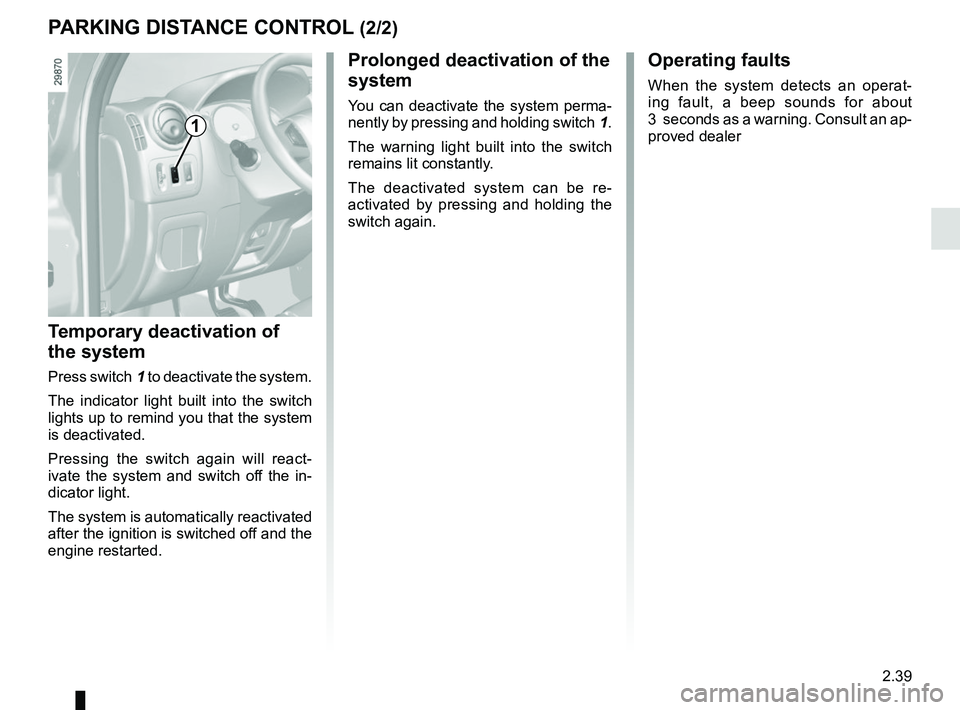
nently by pressing and holding switch 1.
The warning light built into the switch
remains lit constantly.
The deactivated system can be re-
activated by pressing and holding the
switch again.
Temporary deactivation of
the system
Press switch 1 to deactivate the system.
The indicator light built into the switch
lights up to remind you that the system
is deactivated.
Pressing the switch again will react-
ivate the system and switch off the in-
dicator light.
The system is automatically reactivated
after the ignition is switched off and the
engine restarted.
Operating faults
When the system detects an operat-
ing fault, a beep sounds for about
3 seconds as a warning. Consult an ap-
proved dealer
PARKING DISTANCE CONTROL (2/2)
1
Page 163 of 290
2.47
SEQUENTIAL GEARBOX (3/5)
Operation in semiautomatic
mode (manual)
This mode can be activated at any time
when driving by pushing the lever to the
left. The mode is switched without shift-
ing up a gear.
You can initiate gear changes using the
selector lever.
To shift up a gear, push the selector
lever forwards; the accelerator pedal
does not have to be lifted.
To shift down a gear, push the selector
lever backwards; the accelerator pedal
does not have to be lifted. The system will not tolerate a series
of up or down changes that cause the
engine to underrev or overrev.
By pushing the lever forwards twice
you can move up two gears at a time
(except if underrevving). By pushing
the lever backwards twice you can
move down two gears at a time (unless
this causes overrevving).
When decelerating with the foot off
the pedal, the gears will automatically
drop to the low engine speed limit to
avoid stalling. First gear automatically
shifts below a certain speed limit. You
can stop the vehicle at red lights or
junctions etc. by depressing the brake
pedal; there is no need to change to
neutral (N).
The vehicle will move off again:
– either slowly, if you release the brake
without accelerating (e.g. when in a
traffic jam);
– or quickly, if you release the brake and accelerate.
Note: neutral may only be selected
when the vehicle is being driven or is
stationary when the brake pedal is
depressed (if you forget, warning
light 5 will come on) .
Push the gear selector lever to the right
to engage neutral.
If the engine speed is too high or too
low, the system will choose the opti-
mum gear.
Semiautomatic mode can be deacti-
vated and reactivated at any time when
the engine is running by pushing the
lever to the left.
Page 220 of 290
5.6
TYRE INFLATION KIT (2/6)
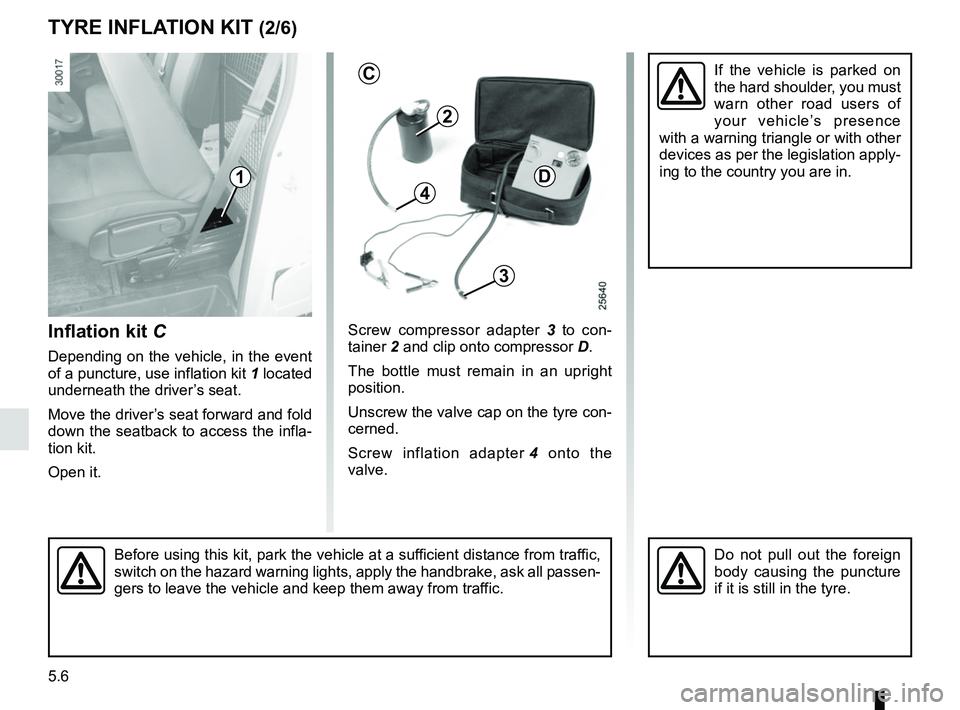
Inflation kit C
Depending on the vehicle, in the event
of a puncture, use inflation kit 1 located
underneath the driver’s seat.
Move the driver’s seat forward and fold
down the seatback to access the infla-
tion kit.
Open it. Screw compressor adapter
3 to con-
tainer 2 and clip onto compressor D.
The bottle must remain in an upright
position.
Unscrew the valve cap on the tyre con-
cerned.
Screw inflation adapter 4 onto the
valve.
Before using this kit, park the vehicle at a sufficient distance from traffic,
switch on the hazard warning lights, apply the handbrake, ask all passen\
-
gers to leave the vehicle and keep them away from traffic.Do not pull out the foreign
body causing the puncture
if it is still in the tyre.
2
D
3
41
If the vehicle is parked on
the hard shoulder, you must
warn other road users of
your vehicle’s presence
with a warning triangle or with other
devices as per the legislation apply-
ing to the country you are in.C
Page 223 of 290
5.9
TYRE INFLATION KIT (5/6)
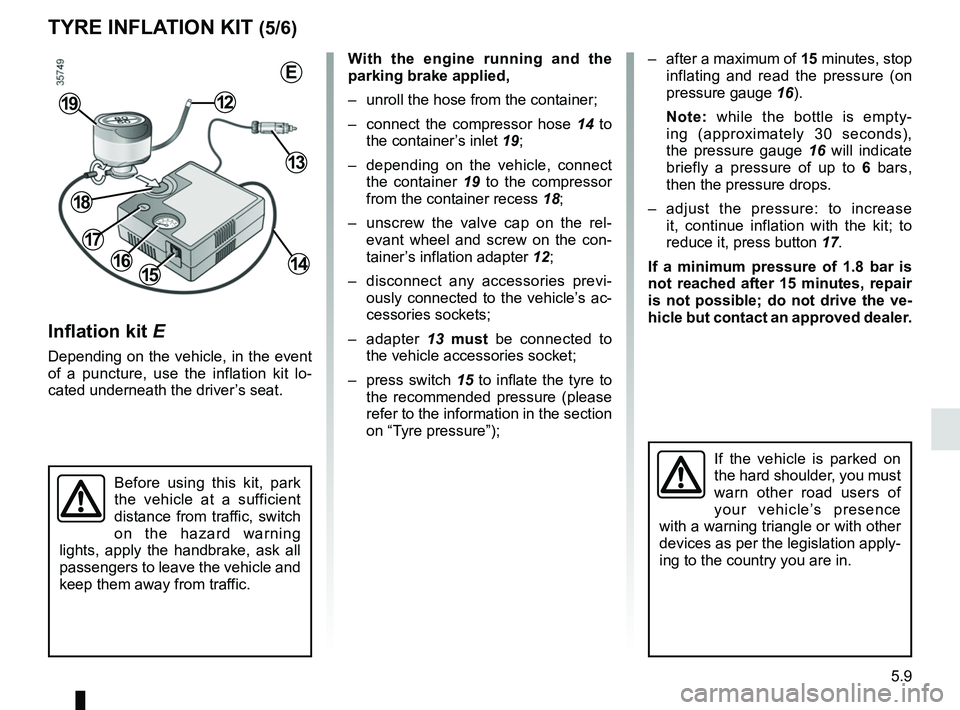
Inflation kit E
Depending on the vehicle, in the event
of a puncture, use the inflation kit lo-
cated underneath the driver’s seat.
Before using this kit, park
the vehicle at a sufficient
distance from traffic, switch
on the hazard warning
lights, apply the handbrake, ask all
passengers to leave the vehicle and
keep them away from traffic.
If the vehicle is parked on
the hard shoulder, you must
warn other road users of
your vehicle’s presence
with a warning triangle or with other
devices as per the legislation apply-
ing to the country you are in.
With the engine running and the
parking brake applied,
– unroll the hose from the container;
– connect the compressor hose 14 to the container’s inlet 19;
– depending on the vehicle, connect the container 19 to the compressor
from the container recess 18;
– unscrew the valve cap on the rel- evant wheel and screw on the con-
tainer’s inflation adapter 12;
– disconnect any accessories previ- ously connected to the vehicle’s ac-
cessories sockets;
– adapter 13 must be connected to
the vehicle accessories socket;
– press switch 15 to inflate the tyre to
the recommended pressure (please
refer to the information in the section
on “Tyre pressure”);
1516
1219
– after a maximum of 15 minutes, stop inflating and read the pressure (on
pressure gauge 16).
Note: while the bottle is empty-
ing (approximately 30 seconds),
the pressure gauge 16 will indicate
briefly a pressure of up to 6 bars,
then the pressure drops.
– adjust the pressure: to increase it, continue inflation with the kit; to
reduce it, press button 17.
If a minimum pressure of 1.8 bar is
not reached after 15 minutes, repair
is not possible; do not drive the ve-
hicle but contact an approved dealer.
13
14
18
17
E
Page 227 of 290
5.13
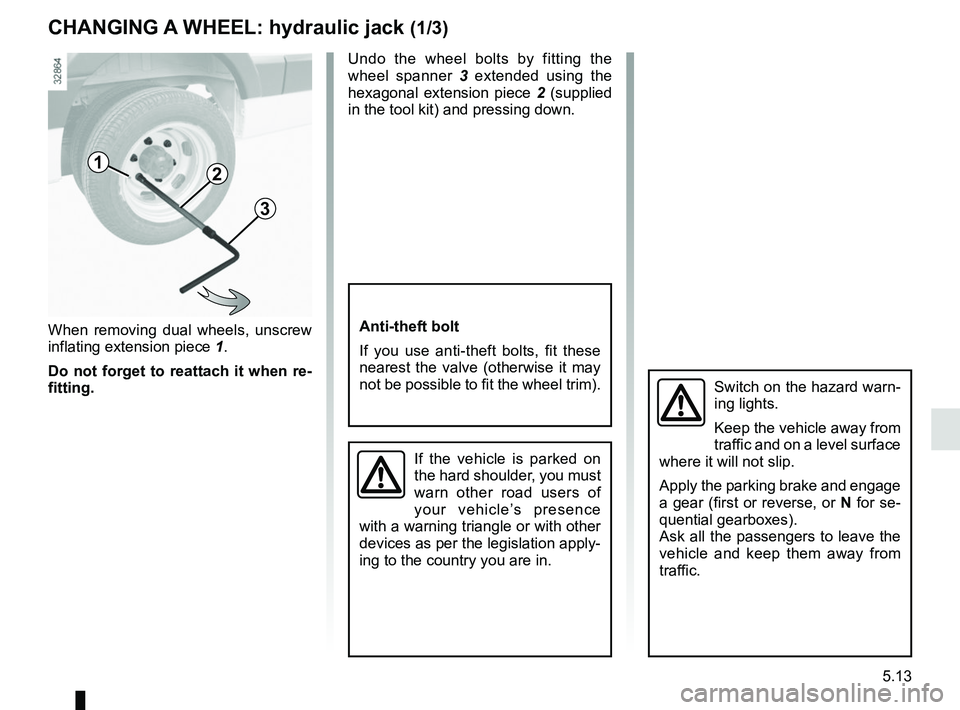
When removing dual wheels, unscrew
inflating extension piece 1.
Do not forget to reattach it when re-
fitting. Undo the wheel bolts by fitting the
wheel spanner
3 extended using the
hexagonal extension piece 2 (supplied
in the tool kit) and pressing down.
1
CHANGING A WHEEL: hydraulic jack (1/3)
Switch on the hazard warn-
ing lights.
Keep the vehicle away from
traffic and on a level surface
where it will not slip.
Apply the parking brake and engage
a gear (first or reverse, or N for se-
quential gearboxes).
Ask all the passengers to leave the
vehicle and keep them away from
traffic.
If the vehicle is parked on
the hard shoulder, you must
warn other road users of
your vehicle’s presence
with a warning triangle or with other
devices as per the legislation apply-
ing to the country you are in.
Anti-theft bolt
If you use anti-theft bolts, fit these
nearest the valve (otherwise it may
not be possible to fit the wheel trim).
2
3
Page 230 of 290
5.16
CHANGING A WHEEL: jack (1/2)
2
If the vehicle is parked on
the hard shoulder, you must
warn other road users of
your vehicle’s presence
with a warning triangle or with other
devices as per the legislation ap-
plying to the country you are in.
Switch on the hazard war-
ning lights.
Keep the vehicle away from
traffic and on a level surface
where it will not slip.
Apply the parking brake and engage
a gear (first or reverse, or N for se-
quential gearboxes).
Ask all the passengers to leave the
vehicle and keep them away from
traffic.
To prevent any risk of injury
or damage to the vehi-
cle, raise the jack until the
wheel you are replacing is
a maximum of 3 centimetres off the
ground.
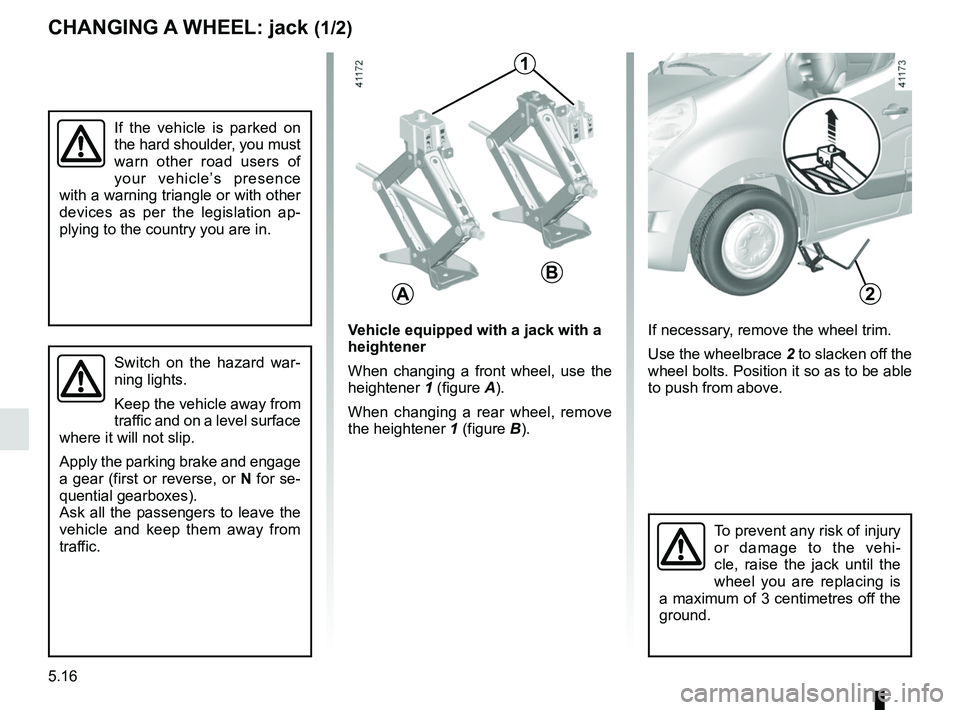
If necessary, remove the wheel trim.
Use the wheelbrace 2 to slacken off the
wheel bolts. Position it so as to be able
to push from above.Vehicle equipped with a jack with a
heightener
When changing a front wheel, use the
heightener 1 (figure A).
When changing a rear wheel, remove
the heightener 1 (figure B).
A
B
1