Page 149 of 332

2.45
ACTIVE EMERGENCY BRAKING (7/11)
System B (continued)
Detection of vehicles
Operation
When driving (speed between about
4.34 and 99.2 mph (7 and 160 km/h)), if
there is a risk of collision with the vehi-
cle in front, the system:
– warns you of a collision risk:
The indicator 4 is displayed in red
on the instrument panel and accom-
panied by a beep.
If the driver depresses the brake
pedal and the system still detects a
risk of collision, the brake force is in-
creased.
– triggers braking:
if the driver fails to react following the alert and collision becomes im-
minent.
4
You can interrupt braking at any
point by:
– tapping the accelerator pedal;
or
– turning the steering wheel in an avoidance manoeuvre.
Special features
When the vehicle speed:
– is less than 27.9 mph (45 km/h) ap-
proximately, the warning and brak-
ing are activated at the same time;
– is between about 27.9 mph
(45 km/h) and 48 mph (80 km/h)
approximately, the warning is acti-
vated. Braking will only be triggered if
the vehicle preceding you is moving.
Braking is not activated for stationary
vehicles;
– is between about 48 mph (80 km/h)
and 99.2 mph (160 km/h) , the warn-
ing and braking are only triggered if
the vehicle preceding you is moving.
The warning and braking are not ac-
tivated for stationary vehicles;
– is above 99.2 mph (160 km/h), the
system is not active.
Page 156 of 332

2.52
2
65
Adjustment
Vehicles fitted with a navigation
system
From the multifunction screen 2, select
“Vehicle”, “Driving assistance”, “Lane
departure warning settings”.
– Volume: adjust the alert volume to one of five levels;
– sensitivity: adjust the sensitivity level for line detection. To do this select:
– “Low” line detected upon cross-
ing;
– “Average” line detected on ap-
proach;
– “high” line detected nearby.
Vehicles not fitted with a navigation
system
– With the vehicle at a standstill, press and hold the switch 5 OK to access
the settings menu;
– repeatedly press the control 6 up or
down until you reach the “Driving as-
sistance” menu. Press the switch 5
OK;
– repeatedly press control 6 up or
down until you reach the “Lane de-
parture warning settings” menu, then
press the switch 5 OK.
– Volume: adjust the alert volume to one of three levels;
– sensitivity: adjust the sensitivity level for line detection. To do this select:
– “Low” line detected upon cross-
ing;
– “Average” line detected on ap-
proach;
– “high” line detected nearby.
Operating faults
In the event of a malfunction, a mes-
sage “Lane departure warning check” is
displayed on the instrument panel, and
the visibility indicators for the left and
right lines disappear from the instru-
ment panel.
Consult an approved dealer.
LANE DEPARTURE WARNING (3/3)
Conditions for non-activation
of alerts
– Direction indicators activated for less than around 2 seconds prior to de-
parting from the lane;
– very fast lane departure;
– driving continuously on a line;
– on bends, the function allows for slightly cutting the bend;
– hazard warning lights activated;
– ...
Page 161 of 332
2.57
1
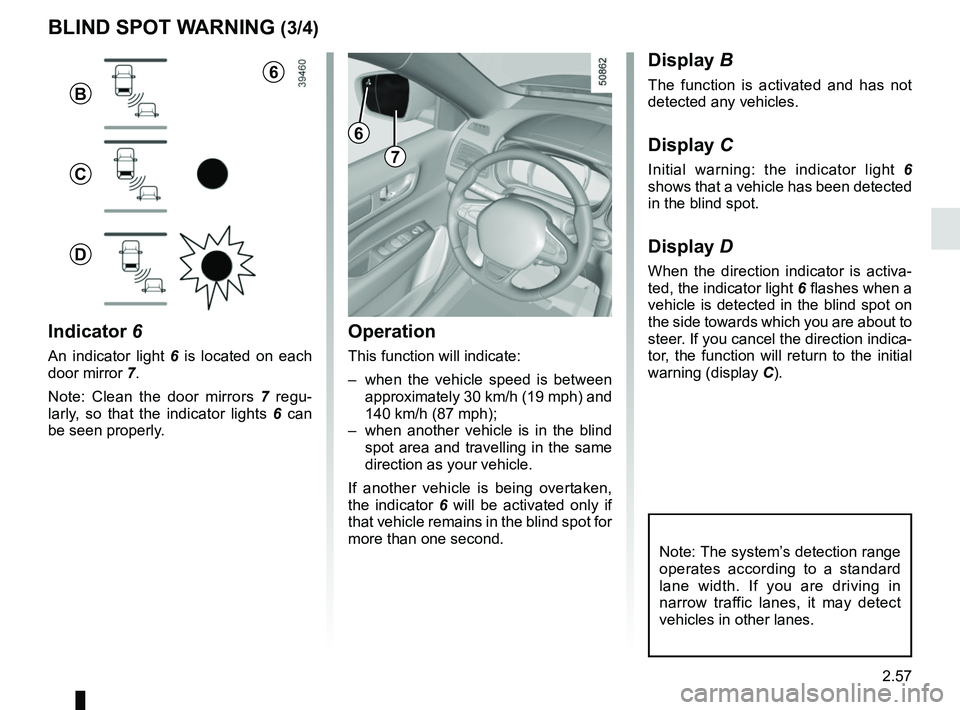
BLIND SPOT WARNING (3/4)
Operation
This function will indicate:
– when the vehicle speed is between approximately 30 km/h (19 mph) and
140 km/h (87 mph);
– when another vehicle is in the blind spot area and travelling in the same
direction as your vehicle.
If another vehicle is being overtaken,
the indicator 6 will be activated only if
that vehicle remains in the blind spot for
more than one second.
Indicator 6
An indicator light 6 is located on each
door mirror 7.
Note: Clean the door mirrors 7 regu-
larly, so that the indicator lights 6 can
be seen properly.
Display B
The function is activated and has not
detected any vehicles.
Display C
Initial warning: the indicator light 6
shows that a vehicle has been detected
in the blind spot.
Display D
When the direction indicator is activa-
ted, the indicator light 6 flashes when a
vehicle is detected in the blind spot on
the side towards which you are about to
steer. If you cancel the direction indica-
tor, the function will return to the initial
warning (display C).
7
6
B
C
D
Note: The system’s detection range
operates according to a standard
lane width. If you are driving in
narrow traffic lanes, it may detect
vehicles in other lanes.
6
Page 163 of 332

2.59
Operating principle
The system detects speed limit signs
on the side of the road and displays the
speed limit.
It mainly uses information taken from
the camera 1, attached to the wind-
screen behind the rear-view mirror.
Note: make sure the windscreen is not
obscured (dirt, mud, snow, condensa-
tion etc.).
For vehicles which are equipped with it,
the system also uses information from
the navigation system.
Once the speed limiter is activated, you
can adjust the speed limiter indication
displayed by the system.
In the event of exceeding the speed
limit, the sign display is modified (the
characters change to red or the circle
around the sign flashes) no notify you.
OVERSPEED ALERT (1/3)
The overspeed alert with signage panel
recognition notifies the driver that they
are exceeding the speed limit for the
section of road on which they are cur-
rently travelling. For vehicles equipped with a navigation
system and if the vehicle is travelling in
a country where the speed units differ
from those of the vehicle, the system
displays the speed limit sign in the unit
of the country, alongside the speed limit
converted to the unit used by the vehi-
cle’s instrument panel.
For countries where the speed limit is
reduced during rainy weather on some
types of roads, on vehicles equipped
with a navigation system, the system
can modify the limited speed after a few
seconds of wiping the windscreen.
Special situations
The system does not take into account
exceptional speed limit measures, such
as peak pollution days.
1
Page 171 of 332
2.67
CRUISE CONTROL FUNCTION (3/4)
Exceeding the cruising speed
The cruising speed may be exceeded
at any time by depressing the accelera-
tor pedal. While overtaking, the cruis-
ing speed flashes red on the instrument
panel.
Then, release the accelerator: after a
few seconds, the vehicle will automati-
cally return to its set cruising speed.
Cruising speed cannot be
maintained
If driving up or down a steep gradi-
ent, the system is unable to maintain
the cruising speed: the stored speed is
flashes red on the instrument panel to
inform you of this situation.
Adjusting the cruising speed
The cruising speed can be changed by
pressing the switch 2 repeatedly:
– side a (+) to increase the speed;
– side b (-) to reduce the speed.
The cruise control function
is in no way linked to the
braking system.
2
a
b
Page 175 of 332

2.71
Driving
Once a cruising speed is memorised
and the cruise control function is active,
you may lift your foot off the accelera-
tor pedal.
If a following distance is stored and a
vehicle travelling slower than yours is
detected by the system in your lane,
your vehicle will brake (with the brake
lights on) and adapt its speed to that of
the vehicle in front, respecting the fol-
lowing distance selected previously.
Overtaking
If your speed is lower than the cruise
control and you wish to perform an
overtaking manoeuvre, activating the
direction indicator will provide acceler-
ation enabling the overtaking manoeu-
vre.
Please note that you must
keep your feet close to the
pedals in order to react in
an emergency.
ADAPTIVE CRUISE CONTROL (3/8)
Adjusting the cruising speed
The cruising speed can be changed by
pressing the switch 2 repeatedly:
– side a (+) to increase the speed;
– side b (-) to reduce the speed.
Varying the following
distance
You can vary the following distance
from the vehicle in front at any time by
pressing switch 6 repeatedly.
Horizontal following bars will be dis-
played on the instrument panel, indicat-
ing the following distance selected:
– one bar for a short distance (cor- responding to a following time of
around one second);
– two bars for a medium distance;
– three bars for a long distance (cor- responding to a following time of
around two seconds).
Choosing the distance should depend
on the traffic, the laws in your country,
and on the weather conditions.
If a vehicle is detected by the system in
your lane, an outline A of a vehicle will
appear above the following bars.
6
A
2
a
b
Page 181 of 332

2.77
PARKING DISTANCE CONTROL (1/5)
Operating principle
Ultrasonic sensors in the rear bumper
measure the distance between the ve-
hicle and an obstacle.
This measurement is indicated by
beeps which become more frequent the
closer you come to the obstacle, until
they become a continuous beep when
the vehicle is approximately 20 to
30 centimetres from the obstacle.
The system detects obstacles to the
front, the rear and the sides of the ve-
hicle.
The parking distance control system
is only activated when the vehicle is
driven at a speed below approximately
6 mph (10 km/h).
This function is an addi-
tional aid that indicates the
distance between the vehi-
cle and an obstacle whilst
reversing, using sound signals.
Under no circumstances should it
replace the driver’s care or respon-
sibility whilst reversing.
The driver should always look out
for sudden hazards during driv-
ing: always ensure that there are
no moving obstacles (such as a
child, animal, pram or bicycle, etc.)
or small, narrow objects such as
stones or posts in your path when
manoeuvring.
Special features
Ensure that the ultrasonic sensors indi-
cated by arrows 1 are not obscured (by
dirt, mud, snow, etc.).
1
Page 182 of 332
2.78
Operation
Most objects located less near the
front, rear and sides of the vehicle are
detected.
Depending on the distance of the ob-
stacle, the frequency of the beep will
be higher while approaching it, and will
become a solid beep around 20 cm for
obstacles to the sides, and 30 cm for
obstacles to the front or rear. Green,
orange and red zones will be displayed
on the display C.
PARKING DISTANCE CONTROL (2/5)
C
AB
2
Note: the display 2 shows the vehicle
surroundings and emits beeps.
It is necessary to travel a few metres
before the side detection is activated.
If all areas have a grey background, the
whole area around the vehicle is being
monitored:
– A: analysis of the vehicle surround-
ings in progress;
– B: analysis of the vehicle surround-
ings carried out

