Page 272 of 332
5.8
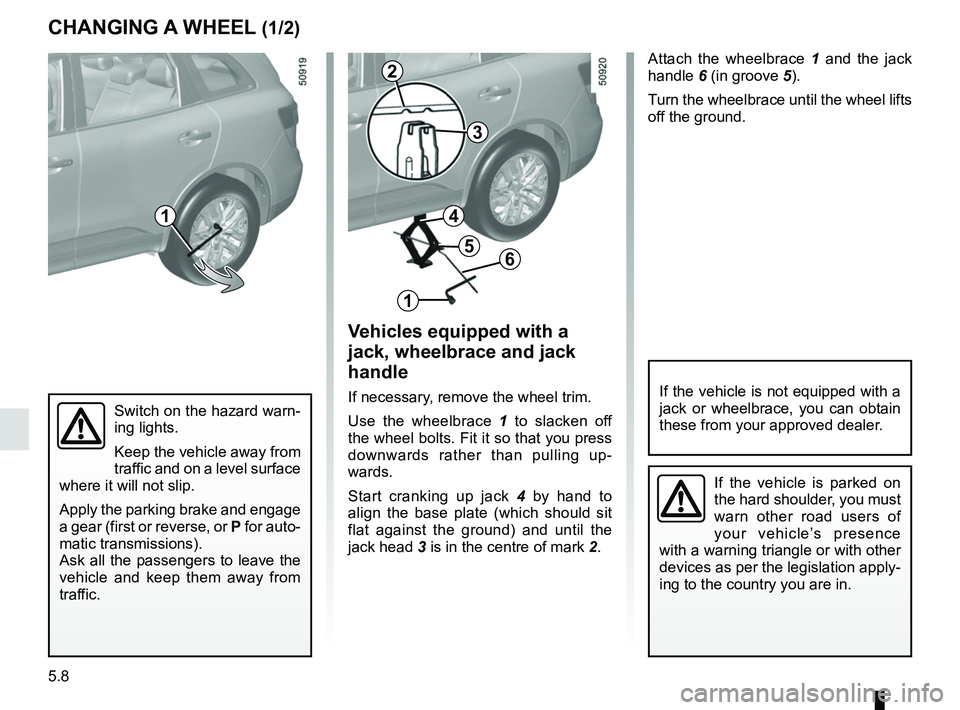
Attach the wheelbrace 1 and the jack
handle 6 (in groove 5).
Turn the wheelbrace until the wheel lifts
off the ground.
Switch on the hazard warn-
ing lights.
Keep the vehicle away from
traffic and on a level surface
where it will not slip.
Apply the parking brake and engage
a gear (first or reverse, or P for auto-
matic transmissions).
Ask all the passengers to leave the
vehicle and keep them away from
traffic.
CHANGING A WHEEL (1/2)
Vehicles equipped with a
jack, wheelbrace and jack
handle
If necessary, remove the wheel trim.
Use the wheelbrace 1 to slacken off
the wheel bolts. Fit it so that you press
downwards rather than pulling up-
wards.
Start cranking up jack 4 by hand to
align the base plate (which should sit
flat against the ground) and until the
jack head 3 is in the centre of mark 2.If the vehicle is not equipped with a
jack or wheelbrace, you can obtain
these from your approved dealer.
If the vehicle is parked on
the hard shoulder, you must
warn other road users of
your vehicle’s presence
with a warning triangle or with other
devices as per the legislation apply-
ing to the country you are in.
1
2
3
1
6
4
5
Page 280 of 332
5.16
REAR AND SIDE LIGHTS: changing bulbs (1/3)
Side lights and brake lights 1
Consult an approved Dealer.
1
Direction indicators 2
Consult an approved Dealer.
2
Page 282 of 332
5.18
Halogen number plate
lights 7
– Unclip the light 7 (using a tool such
as a flat-blade screwdriver).
– remove the light cover to gain access to the bulb.
Bulb type: W5W.
LED number plate light 7
Consult an approved dealer.
REAR AND SIDE LIGHTS: changing bulbs (3/3)
The bulbs are under pres-
sure and can break when
replaced.
Risk of injury.
Side indicator lights 8
Consult an authorised dealer.
8
High level brake light 5
Consult an approved dealer.
Rear fog lights 6
Consult an approved dealer.
5
7
6
Page 289 of 332

Allocation of fuses
(the presence of certain fuses depends on the vehicle equipment level)\
Symbol Allocation Symbol AllocationSymbol Allocation
BLOWER Ventilation VDCVehicle dynami")
5.25
FUSES (3/3)
Allocation of fuses
(the presence of certain fuses depends on the vehicle equipment level)\
Symbol Allocation Symbol AllocationSymbol Allocation
BLOWER Ventilation VDCVehicle dynamic
control H/MIRR Heated door mirrors
TURN
HAZARD Hazard lamp
STOP LAMP Stop lamp HEATER
SEAT Heater seat
2ND
POWER
SOCKET 2nd power socket
POWER
DR LOCK2 Power door lock EC AUTO
ACC Air conditioner control
unit
REAR
WIPER Rear wiper CIGAR
LIGHTER Cigar lighter REAR
VIEW Rear view mirror
POWER
DR LOCK Power door lock HEAT
STEER
WHEEL Heat steering wheel
WASH
MTR Washer motor
ELEC B, B2 Electrical equipment RR DEFElectrically defrosted
rear window GEAR BOX
OIL PUMP Gear box oil pump
IMOB Immobilizer BOSE Bose amp BCM Body control module
AUDIO Audio ACC RADIOAccessory socket,
radio POWER
WINDOW Power window
ABS/EPS Anti lock brake system JUNCTION
MODULE Junction module SEAT BELT
WARNING Seat belt warning
module
MEDIA Multimedia equipment AIR CON Air condition control
unitSTRG
WHEEL ANGLE Steering wheel angle
sensor
Page 292 of 332

5.28
ACCESSORIES
Electrical and electronic accessories
Before installing this type of accessory (particularly for transmitters\
/receivers: frequency bandwidth, power level, po-
sition of the aerial, etc.), make sure it is compatible with your vehic\
le. You can get advice from an authorised dealer.
Connect accessories with a maximum power of 120 Watts only. Fire hazard. When several accessory sockets are
used at the same time, the total power of the connected accessories must\
not exceed 180 watts.
No work may be carried out on the vehicle’s electrical or radio circuits, except by authorised dealers: an incorre\
ctly connecte d
system may result in damage being caused to the electrical equipment and\
/or the components connected to it.
If the vehicle is fitted with any aftermarket electrical equipment, make\
sure that the installation is correctly protected by a fuse.
Establish the rating and position of this fuse.
Using the diagnostic socket
The use of electronic accessories on the diagnostic socket may cause ser\
ious disturbance to the vehicle’s electronic systems.
For your safety we recommend that you use only electronic accessories ap\
proved by the manufacturer, consult an Approved
Dealer. Serious accident risk.
Use of transmitting/receiving devices (telephones, CB equipment etc.).\
Telephones and CB equipment with integrated aerials may cause interferenc\
e to the electronic systems originally fitted to the
vehicle: it is advisable only to use equipment with an external aerial. \
Furthermore, we remind you of the need to conform
to the legislation in force concerning the use of such equipment.
Fitting aftermarket accessories
If you wish to install accessories on the vehicle: please contact an aut\
horised dealer. Also, to ensure the correct operation o f
your vehicle, and to avoid any risk to your safety, we recommend that you use only accessories specifically designed for y\
our
vehicle, which are the only accessories for which the manufacturer will \
provide a warranty.
If you are using an anti-theft device, only attach it to the brake pedal\
.
Obstructions to the driver
On the driver’s side, only use mats suitable for the vehicle, attached with the pre-fi\
tted components, and check the fitting re gu-
larly. Do not lay one mat on top of another. There is a risk of wedging the pedals.
Page 295 of 332
5.31
TOWING: breakdown recovery (1/4)
Do not remove the key from
the ignition when the vehi-
cle is being towed.
Before towing, put the gearbox in neu-
tral, unlock the steering column and re-
lease the parking brake.
For vehicles fitted with an automa-
tic gearbox, if it is not possible to put
the gear lever into position N, please
consult an authorised dealer.
Steering column unlocking
Insert the key into the ignition or, de-
pending on the vehicle, having the
RENAULT card on you, press the
engine start button for approximately
2 seconds.
Reposition the lever to neutral (position
N for vehicles fitted with an automatic
gearbox).
The steering column unlocks, the ac-
cessory functions are powered: you
can use the vehicle’s lights (direction
indicators, brake lights, etc.). At night
the vehicle must have its lights on.
Depending on the vehicle, once you
have finished towing, press the engine
start button twice (risk of running down
the battery). The speed specified by current legisla-
tion for towing must always be obser-
ved. If your vehicle is the towing vehi-
cle, do not exceed the maximum towing
weight for your vehicle (refer to the in-
formation on “Weights” in Section 6).
Towing a vehicle with an
automatic gearbox
Transport the vehicle on a trailer or tow
it with the front wheels off the ground.
In exceptional circumstances, you may
tow it with all four wheels on the ground,
only in a forward gear, with the gear in
neutral position
N over a maximum dis-
tance of 50 miles (80 km) and not ex-
ceeding a speed of 15 mph (25 km/h).
Page 296 of 332
5.32
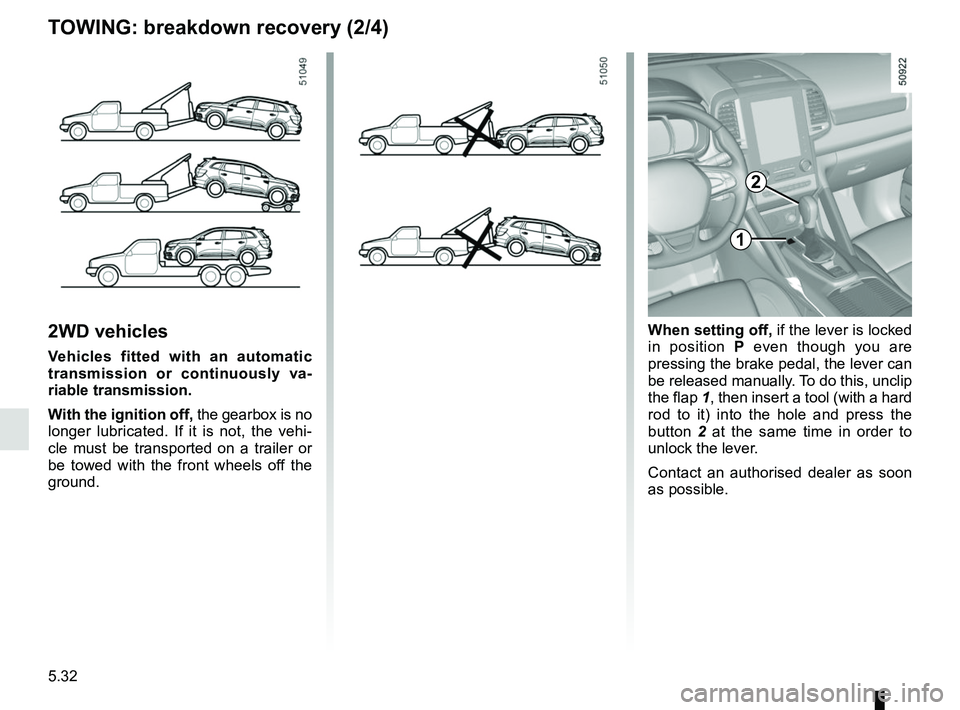
2WD vehicles
Vehicles fitted with an automatic
transmission or continuously va-
riable transmission.
With the ignition off, the gearbox is no
longer lubricated. If it is not, the vehi-
cle must be transported on a trailer or
be towed with the front wheels off the
ground.
1
2
When setting off, if the lever is locked
in position P even though you are
pressing the brake pedal, the lever can
be released manually. To do this, unclip
the flap 1, then insert a tool (with a hard
rod to it) into the hole and press the
button 2 at the same time in order to
unlock the lever.
Contact an authorised dealer as soon
as possible.
TOWING: breakdown recovery (2/4)
Page 298 of 332
5.34
TOWING: breakdown recovery (4/4)
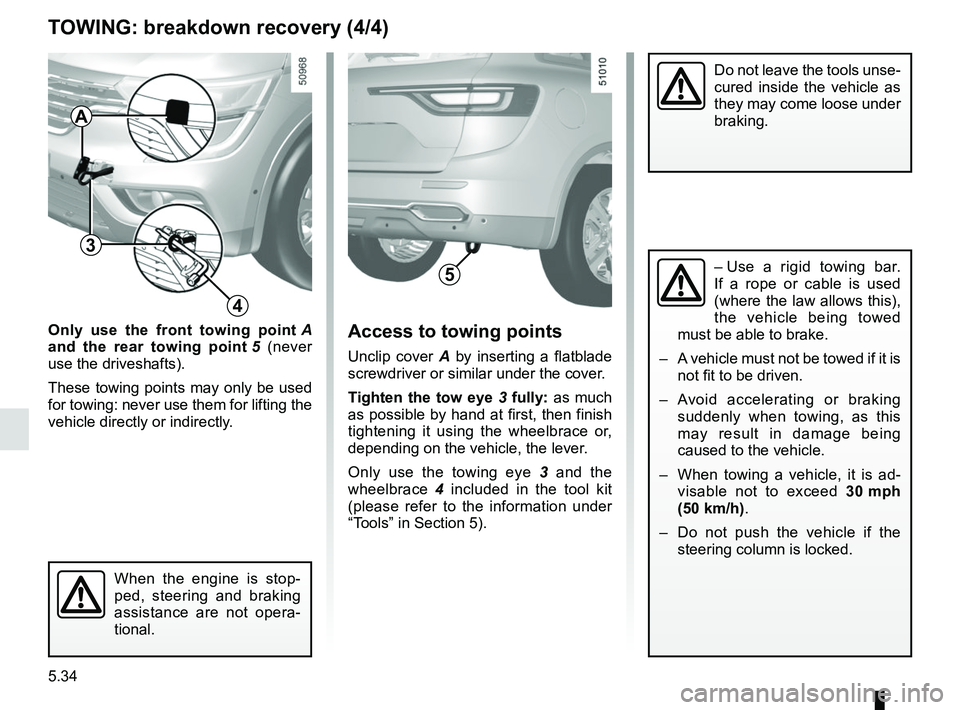
Only use the front towing point A
and the rear towing point 5 (never
use the driveshafts).
These towing points may only be used
for towing: never use them for lifting the
vehicle directly or indirectly.Access to towing points
Unclip cover A by inserting a flatblade
screwdriver or similar under the cover.
Tighten the tow eye 3 fully: as much
as possible by hand at first, then finish
tightening it using the wheelbrace or,
depending on the vehicle, the lever.
Only use the towing eye 3 and the
wheelbrace 4 included in the tool kit
(please refer to the information under
“Tools” in Section 5).
When the engine is stop-
ped, steering and braking
assistance are not opera-
tional.
Do not leave the tools unse-
cured inside the vehicle as
they may come loose under
braking.
– Use a rigid towing bar.
If a rope or cable is used
(where the law allows this),
the vehicle being towed
must be able to brake.
– A vehicle must not be towed if it is not fit to be driven.
– Avoid accelerating or braking suddenly when towing, as this
may result in damage being
caused to the vehicle.
– When towing a vehicle, it is ad- visable not to exceed 30 mph
(50 km/h).
– Do not push the vehicle if the steering column is locked.
3
4
A
5