Page 145 of 332

2.41
8
7
System A (continued)
For vehicle not fitted with a
navigation system
– With the vehicle at a standstill, press and hold the switch 7 OK to access
the settings menu,
– repeatedly press the control 8 up or
down until you reach the “Driving as-
sistance” menu. Press the switch 7
OK;
– repeatedly press control 8up or down
until you reach the “Active braking”
menu, then press the switch 7 OK.
ACTIVE EMERGENCY BRAKING (3/11)
Operating faults
When the system detects an operating
fault, the
warning light lights up
on the instrument panel, with the mes-
sage “Active braking disconnected”.
There are two possibilities:
– the system is temporarily disrupted (for example: radar obscured by
dirt, mud, snow etc.). In this case,
park the vehicle and switch off the
engine. Clean the detection zone of
the radar. When you next start the
engine, the warning light and the
message go out
– if this is not the case, this may arise from another cause; contact an
Approved Dealer.
Consult an approved dealer.
Press the switch 7
OK again to activate
or deactivate the function:= function activated
< function deactivated
The warning light
is displayed on
the instrument panel when the system
is deactivated. This system is reacti-
vated each time the ignition is switched
on.
Conditions for non-activation
of the system
The system cannot be activated:
– when the gear lever is in neutral;
– when the parking brake is activated;
– while cornering.
– For 4-wheel drive vehicles, when Electronic Stability Programme
(ESC) with understeer and trac-
tion control are deactivated (please
see “Electronic Stability Programme
(ESC) with understeer and trac-
tion control” above). Warning light
comes on.The system A only detects vehicles
driving in the same direction of traf-
fic. The system cannot detect mo-
torcycles because of the difficulty in
forecasting their trajectory.
Page 148 of 332
2.44
ACTIVE EMERGENCY BRAKING (6/11)
System B
Operating principle
Using information from the radar-cam-
era, the system calculates the distance
which separates it from the vehicle in
front and the surrounding pedestrians.
It notifies the driver if there is a risk of
head-on collision. The driver can then
brake the vehicle to limit the damage
arising from a collision.
Note: make sure the windscreen is not
obscured (dirt, mud, snow, condensa-
tion etc.).
This function is an addi-
tional driving aid. This func-
tion is not under any circum-
stances intended to replace
the due care and attention of the
driver, who should at all times be
in control of the vehicle.This system applies maximum
braking to the vehicle
For safety reasons, always wear
your seat belt when travelling in
your vehicle and make sure that it
is loaded so that no items can be
thrown forward and hit the occu-
pants.
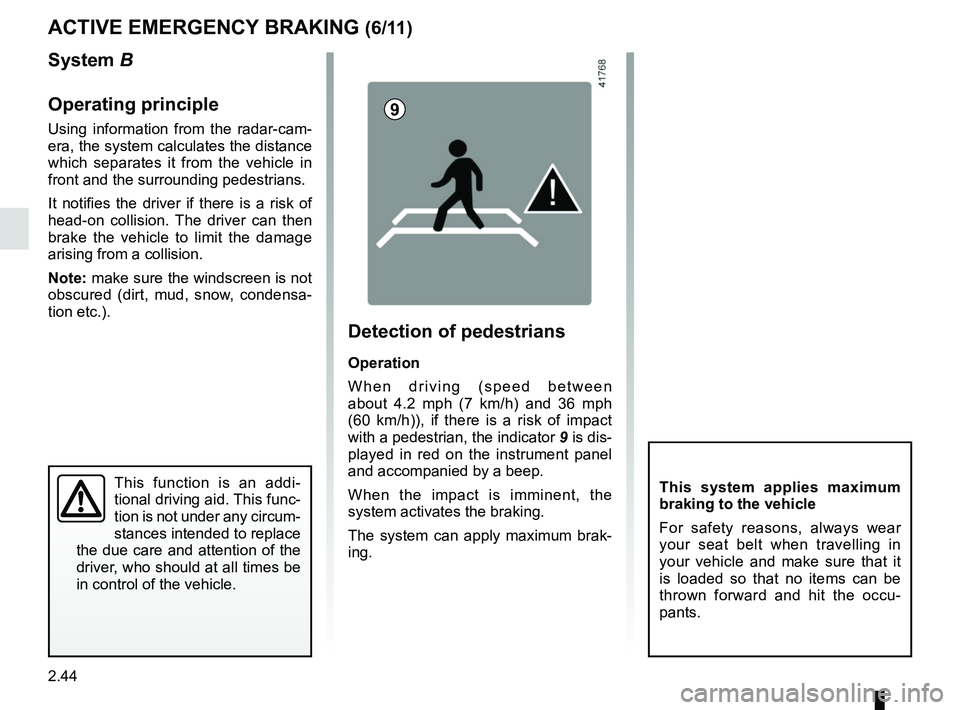
9
Detection of pedestrians
Operation
When driving (speed between
about 4.2 mph (7 km/h) and 36 mph
(60 km/h)), if there is a risk of impact
with a pedestrian, the indicator 9 is dis-
played in red on the instrument panel
and accompanied by a beep.
When the impact is imminent, the
system activates the braking.
The system can apply maximum brak-
ing.
Page 149 of 332

2.45
ACTIVE EMERGENCY BRAKING (7/11)
System B (continued)
Detection of vehicles
Operation
When driving (speed between about
4.34 and 99.2 mph (7 and 160 km/h)), if
there is a risk of collision with the vehi-
cle in front, the system:
– warns you of a collision risk:
The indicator 4 is displayed in red
on the instrument panel and accom-
panied by a beep.
If the driver depresses the brake
pedal and the system still detects a
risk of collision, the brake force is in-
creased.
– triggers braking:
if the driver fails to react following the alert and collision becomes im-
minent.
4
You can interrupt braking at any
point by:
– tapping the accelerator pedal;
or
– turning the steering wheel in an avoidance manoeuvre.
Special features
When the vehicle speed:
– is less than 27.9 mph (45 km/h) ap-
proximately, the warning and brak-
ing are activated at the same time;
– is between about 27.9 mph
(45 km/h) and 48 mph (80 km/h)
approximately, the warning is acti-
vated. Braking will only be triggered if
the vehicle preceding you is moving.
Braking is not activated for stationary
vehicles;
– is between about 48 mph (80 km/h)
and 99.2 mph (160 km/h) , the warn-
ing and braking are only triggered if
the vehicle preceding you is moving.
The warning and braking are not ac-
tivated for stationary vehicles;
– is above 99.2 mph (160 km/h), the
system is not active.
Page 150 of 332
2.46
ACTIVE EMERGENCY BRAKING (8/11)
System B (continued)
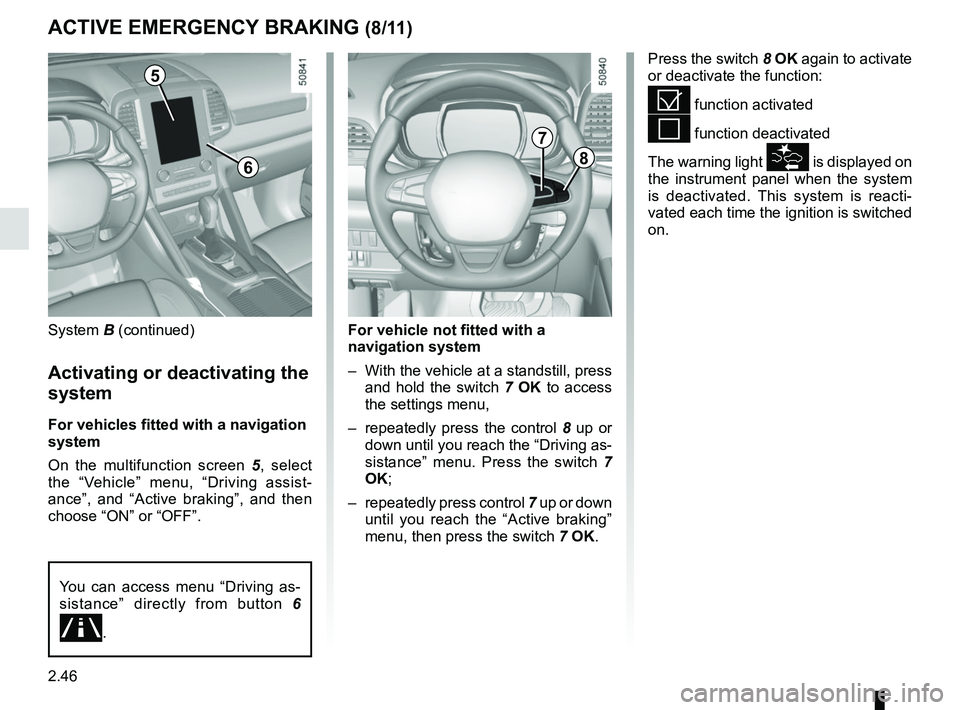
Activating or deactivating the
system
For vehicles fitted with a navigation
system
On the multifunction screen 5, select
the “Vehicle” menu, “Driving assist-
ance”, and “Active braking”, and then
choose “ON” or “OFF”.
Press the switch 8 OK again to activate
or deactivate the function:
= function activated
< function deactivated
The warning light
is displayed on
the instrument panel when the system
is deactivated. This system is reacti-
vated each time the ignition is switched
on.
5
8
7
For vehicle not fitted with a
navigation system
– With the vehicle at a standstill, press and hold the switch 7 OK to access
the settings menu,
– repeatedly press the control 8 up or
down until you reach the “Driving as-
sistance” menu. Press the switch 7
OK;
– repeatedly press control 7 up or down
until you reach the “Active braking”
menu, then press the switch 7 OK.
You can access menu “Driving as-
sistance” directly from button 6
\b.
6
Page 151 of 332
2.47
ACTIVE EMERGENCY BRAKING (9/11)
System B (continued)
Conditions for non-activation
of the system
The system cannot be activated:
– when the gear lever is in neutral;
– when the parking brake is activated;
– while cornering.
As a general rule, if the driver shows
signs of attention (action on the steering
wheel, pedals etc.), the system delays
its operation or does not activate.
Operating faults
When the system detects an operating
fault, the
warning light lights up
on the instrument panel, with the mes-
sage “Active braking disconnected”.
Consult an approved dealer.
Temporarily not available
When the system detects a tempo-
rary unavailability, the
warning
light lights up on the instrument panel
accompanied by the message “Active
braking: sensor blind” or, depending on
the vehicle, “Radar-camera: no visibil-
ity”.
The possible causes are:
– the system is temporarily blinded (glare from the sun, dipped beam
headlights, bad weather conditions
etc.). The system will be operational
again when visibility conditions are
better.
– The system is temporarily disrupted (for example: windscreen obscured
by dirt, ice, snow etc.). In this case,
park the vehicle and switch off the
engine. Clean the windscreen. When
you next start the engine, the warn-
ing light and the message go out.
– If this is not the case, this may arise from another cause; contact an
Approved Dealer.
Page 155 of 332
2.51
LANE DEPARTURE WARNING (2/3)
Activation/deactivation
Vehicles fitted with a navigation
system
From the multifunction screen 2: select
“Vehicle”, “Driving assistance”, “Lane
departure warning” then choose “ON”
or “OFF”.
Operation
With the function activated, the grey
visibility indicators 4 for the left and
right lines are displayed on the instru-
ment panel.
The function is set to notify the
driver if:
– the vehicle speed is greater than ap- proximately 45 mph (70 km/h);
and
– lines are detected and the visibility indicators 4 are green.
The function triggers an alert if a line
is crossed without the direction indica-
tors being activated. The function alerts
the driver through a beep and the indi-
cator the line crossed switches to red
on the instrument panel.
You can access menu “Driving as-
sistance” directly from button 1
\b.
2
4
1
Vehicles not fitted with a navigation
system
Press the switch 3.
3
Page 156 of 332

2.52
2
65
Adjustment
Vehicles fitted with a navigation
system
From the multifunction screen 2, select
“Vehicle”, “Driving assistance”, “Lane
departure warning settings”.
– Volume: adjust the alert volume to one of five levels;
– sensitivity: adjust the sensitivity level for line detection. To do this select:
– “Low” line detected upon cross-
ing;
– “Average” line detected on ap-
proach;
– “high” line detected nearby.
Vehicles not fitted with a navigation
system
– With the vehicle at a standstill, press and hold the switch 5 OK to access
the settings menu;
– repeatedly press the control 6 up or
down until you reach the “Driving as-
sistance” menu. Press the switch 5
OK;
– repeatedly press control 6 up or
down until you reach the “Lane de-
parture warning settings” menu, then
press the switch 5 OK.
– Volume: adjust the alert volume to one of three levels;
– sensitivity: adjust the sensitivity level for line detection. To do this select:
– “Low” line detected upon cross-
ing;
– “Average” line detected on ap-
proach;
– “high” line detected nearby.
Operating faults
In the event of a malfunction, a mes-
sage “Lane departure warning check” is
displayed on the instrument panel, and
the visibility indicators for the left and
right lines disappear from the instru-
ment panel.
Consult an approved dealer.
LANE DEPARTURE WARNING (3/3)
Conditions for non-activation
of alerts
– Direction indicators activated for less than around 2 seconds prior to de-
parting from the lane;
– very fast lane departure;
– driving continuously on a line;
– on bends, the function allows for slightly cutting the bend;
– hazard warning lights activated;
– ...
Page 158 of 332
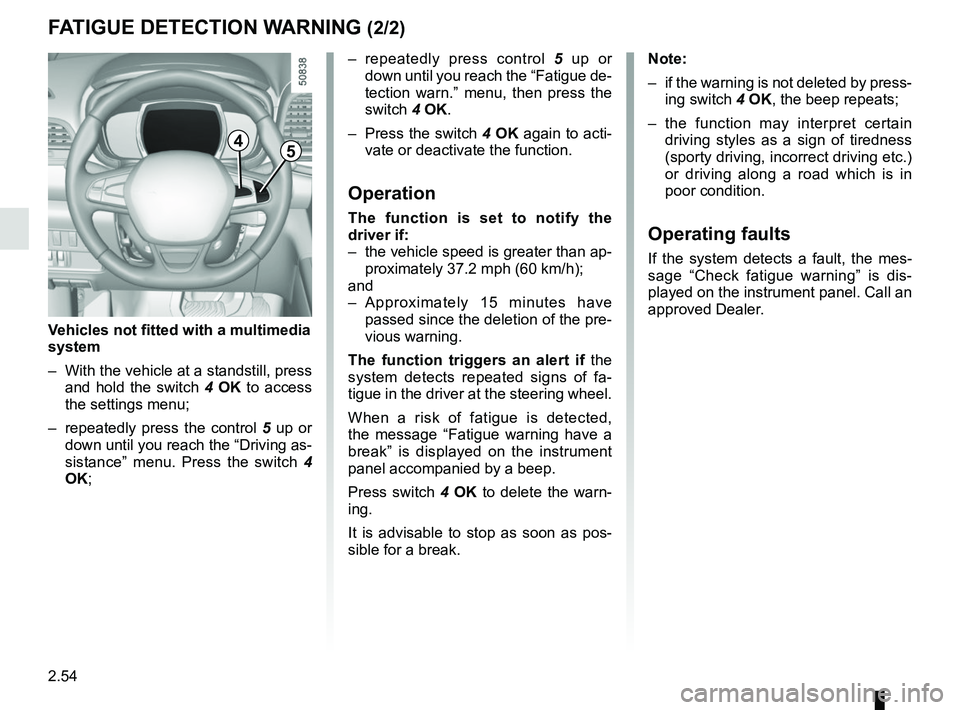
2.54
– repeatedly press control 5 up or
down until you reach the “Fatigue de-
tection warn.” menu, then press the
switch 4 OK.
– Press the switch 4 OK again to acti-
vate or deactivate the function.
Operation
The function is set to notify the
driver if:
– the vehicle speed is greater than ap- proximately 37.2 mph (60 km/h);
and
– Approximately 15 minutes have passed since the deletion of the pre-
vious warning.
The function triggers an alert if the
system detects repeated signs of fa-
tigue in the driver at the steering wheel.
When a risk of fatigue is detected,
the message “Fatigue warning have a
break” is displayed on the instrument
panel accompanied by a beep.
Press switch 4 OK to delete the warn-
ing.
It is advisable to stop as soon as pos-
sible for a break.
FATIGUE DETECTION WARNING (2/2)
Note:
– if the warning is not deleted by press- ing switch 4 OK, the beep repeats;
– the function may interpret certain driving styles as a sign of tiredness
(sporty driving, incorrect driving etc.)
or driving along a road which is in
poor condition.
Operating faults
If the system detects a fault, the mes-
sage “Check fatigue warning” is dis-
played on the instrument panel. Call an
approved Dealer.
4
Vehicles not fitted with a multimedia
system
– With the vehicle at a standstill, press and hold the switch 4 OK to access
the settings menu;
– repeatedly press the control 5 up or
down until you reach the “Driving as-
sistance” menu. Press the switch 4
OK;
5
