Page 72 of 230

1.66
Ú12V battery charge warning
light
If it comes on when you are driving, it
indicates that the circuit is overcharged
or has discharged. Stop and consult an
approved Dealer as soon as possible.
Instrument panel A
In some cases, the appearance of a
warning light is accompanied by a mes-
sage.
WARNING LIGHTS (1/3)
If no lights or sounds are apparent, this indicates a fault in the instr\
ument
panel. This indicates that it is essential to stop immediately (as soon as
traffic conditions allow). Ensure that the vehicle is correctly immobilised\
and contact an approved Dealer.
A
Warning light ® re-
quires you to stop immedi-
ately, for your own safety,
as soon as traffic conditions
allow. Switch off the engine and do
not restart it. Contact an approved
Dealer.
The presence and operation of the warning lights DEPEND ON THE EQUIPMENT\
AND COUNTRY.
The © warning light means
you should drive very carefully to
an approved Dealer as soon as pos-
sible. If you fail to follow this recom-
mendation, you risk damaging your
vehicle.
áMain beam headlight tell-tale
light
kDipped beam headlight tell-
tale
gFront fog light tell-tale light
Rear fog light tell-tale
cLeft-hand direction indicator
tell-tale light
bRight-hand direction indica-
tor tell-tale light
Vehicle ready for driving
warning light
This comes on when the engine is
started.
Charging cord plugged in
warning light
This comes on when the charging cord
is plugged into the vehicle.
Page 84 of 230
1.78
Information messagesThese can help in the vehicle starting phase, or give information about \
a selection or a driving status.
Examples of information messages are given in the following pages.Examples of messages Interpretation of messages
“CHARGE REMAIN 02:10” Indicates the time remaining before a full charge.
“NO MESSAGE AVAILABLE” No warning is stored.
“BRAKE THE VEHICLE” Follow these instructions: risk of damage to the motor.
“BOILER STOPPED” Indicates a halt to the additional heating due to lack of fuel in the ta\
nk.
“PERFORMANCE LIMITED” Indicates deterioration of vehicle performance.
“BATT CHARGE IMPOSSIBLE” Indicates that the charging is prohibited by your battery rental organis\
ation. Rectify
the situation.
“AUTO LIGHTS DEACTIVATED” Indicates that the automatic lights function is deactivated.
TRIP COMPUTER AND WARNING SYSTEM: information messages
Page 102 of 230
2.2
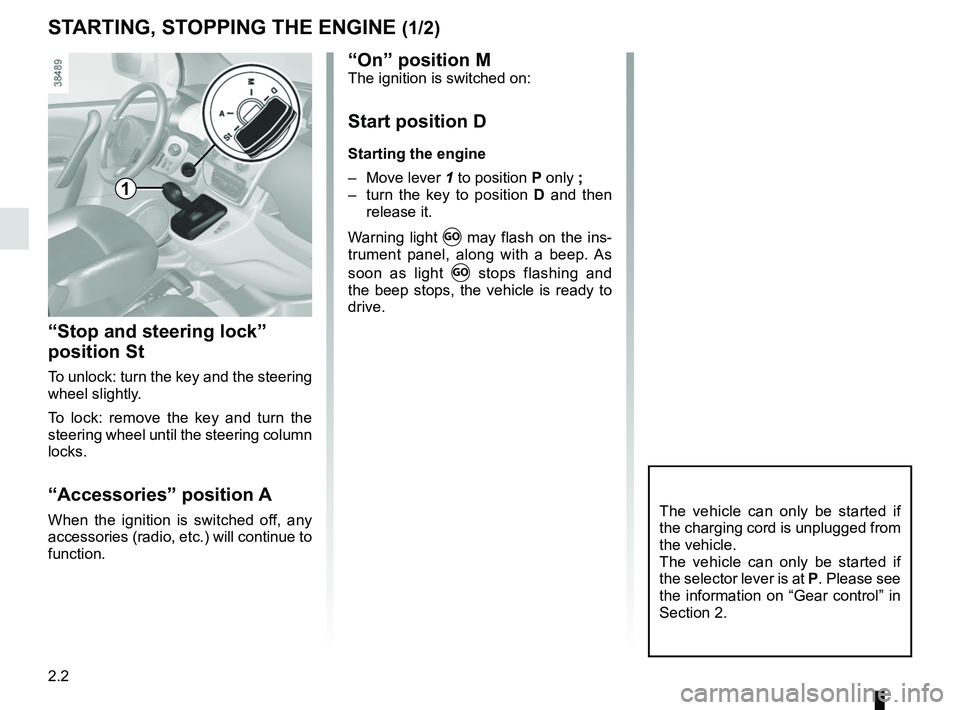
STARTING, STOPPING THE ENGINE (1/2)
“Stop and steering lock”
position St
To unlock: turn the key and the steering
wheel slightly.
To lock: remove the key and turn the
steering wheel until the steering column
locks.
“Accessories” position A
When the ignition is switched off, any
accessories (radio, etc.) will continue to
function.The vehicle can only be started if
the charging cord is unplugged from
the vehicle.
The vehicle can only be started if
the selector lever is at P. Please see
the information on “Gear control” in
Section 2.
1
“On” position MThe ignition is switched on:
Start position D
Starting the engine
– Move lever 1 to position P only ;
– turn the key to position D and then
release it.
Warning light
Ṑ may flash on the ins-
trument panel, along with a beep. As
soon as light
Ṑ stops flashing and
the beep stops, the vehicle is ready to
drive.
Page 104 of 230

2.4
GEAR CONTROL (1/2)
Operates similar to an automatic gear-
box.
Selector lever 1
The display A on instrument panel indi-
cates the gear lever position as 3.
P : Park
R : Reverse
N : Neutral
D : Forward
Operation
Keeping your foot on the brake pedal
and with the selector lever 1 in position
P, turn the ignition.
Start the motor.
To move out of position P, you must de-
press the brake pedal before pressing
unlocking button 2.
With your foot on the brake pedal
(warning light
c in display A goes
out), move the lever out of position P.
Only engage D or R when the vehi-
cle is stopped, with your foot on the
brake and the accelerator pedal re-
leased.
1
Driving
Put lever 1 in position D.
Hill start
For hill starts, especially after a maxi-
mum traction battery charge and for the
first few miles, we recommend using
the handbrake.
While driving, press the accelerator
pedal to achieve the desired speed.
Reverse
Put lever 1 in position R.
The reversing lights will come on as
soon as reverse gear is selected (with
the ignition on).
32
A
The vehicle can only start if the gear
selector is in position P.
The vehicle can only be started if
the charging cord is unplugged from
the vehicle.
Page 136 of 230

3.8
AIR CONDITIONING, HEATING: programming (1/2)
Adjusting the programming
This function enables the electric net-
work (and the not the traction battery)
to be used under certain conditions, in
order to obtain a comfortable tempera-
ture prior to using the vehicle.
It triggers the heating in cold weather
and the air conditioning in warm
weather.
1
Operating conditions
– The ignition must be switched off;
– the battery must be charged more than 90% for the function to be trig-
gered;
– the vehicle has to be plugged into the mains;
and
– control 1 must be in position
ṗ
at A to program the air condition-
ing or at B to program the heating or
ventilation.
3
It is recommended to position con-
trol 3 in the air recirculation position
and air distribution control 2 in po-
sition:
–
i in cold weather;
–
G in high temperatures.
These settings make it possible to
reach a comfortable temperature in
the passenger compartment.
AB
2
Note: depending on the power of the
charging terminal, a slight reduction in
the charge level is possible when the
function is activated.
Page 137 of 230

3.9
AIR CONDITIONING, HEATING: programming (2/2)
Activating the function
– With the ignition on, position the con-trol 1 in one of the
ṗ positions;
– turn off the ignition. The “COMFORT” message and the programmed time
are displayed on the instrument
panel for a few seconds;
– wait approximately one minute before charging your vehicle;
– plug in your vehicle to a power supply (refer to the information on “Electric
vehicle: charging” in section 1).
The function switches on during the
hour preceding the programmed time in
order to reach a comfortable tempera-
ture.
Automatically switching off the
function
– About 10 minutes after the pro- grammed time;
– if the charging socket is discon- nected;
– if control 1 is not in one of the
ṗ
positions.
4
5
C
D
Setting the start time for the
function
– To programme the start time, use buttons C and D to navigate through
the menu until message COMFORT
PROG appears.
– hold down button D on stalk 5 - the
hours flash;
– press button C to adjust them; – hold down button
D on stalk 5 - the
minutes flash;
– press button C to adjust them;
– confirm by pressing button D on
stalk 5.
The message “COMFORT PROG” and
the programmed time are displayed on
the instrument panel 4.
Page 156 of 230
4.2
BONNET (1/2)
1
Do not do any work under
the bonnet when the vehicle
is charging or when the igni-
tion is switched on.
To open the bonnet, pull the handle 1.Unlocking the bonnet catch
To open, push tab 2 to the left as you
open the bonnet.
Opening the bonnetLift the bonnet, helping it up, and it will
rest in position with the help of struts.
Do not press down on the
bonnet: there is a risk that
the bonnet may accidentally
close.
When working in the engine
compartment, ensure that
the windscreen wiper stalk
is in the park position.
Risk of injury.
2
Please note when work-
ing close to the engine that
it may be hot. The engine
cooling fan may also start
at any moment. The
warning
light in the engine compartment re-
minds you of this.
Risk of injury.
Page 158 of 230

4.4
Replacement intervals
Refer to the Maintenance Document for
your vehicle.
LEVELS (1/2)
CoolantWith the engine switched off and on
level ground, the level when cold must
be between the “MINI” and “MAXI”
marks on the coolant reservoir 1 and 2.
Top this level up when cold before it
reaches the MIN mark. Checking intervals
Check the coolant level regularly
(very severe damage is likely to be
caused to the engine if it runs out of
coolant).
If the level needs to be topped up, only
use products approved by our Technical
Department which ensure:
– protection against freezing;
– anticorrosion protection of the cool-
ing system.
No operations should be
carried out on the cooling
circuit when the engine is
hot.
Risk of burns.
Consult your approved dealer at
once if you notice an abnormal or
repeated drop in any of the fluid
levels.
12
Do not do any work under
the bonnet when the vehicle
is charging or when the igni-
tion is switched on.
Please note when work-
ing close to the engine that
it may be hot. The engine
cooling fan may also start
at any moment. The
label
in the engine compartment reminds
you of this.
Risk of injury.