Page 30 of 230
1.24
Opening the doors to the maximum
position
For each door, pull handle 8 to release
the door check strap. Open the door as
far as possible.
Closing manually from the outside
First close the small door and then
close the large door.
Position each door so that it is almost
closed and then slam shut.Rear hinged doors
Opening from the outside
Unlock the door and pull handle 7. For
information on unlocking the doors,
refer to the information on the “Key,
radio frequency remote control: use” in
Section 1.
OPENING AND CLOSING THE DOORS (3/4)
If the vehicle is parked
on the hard shoulder with
the tailgate open, the rear
lights may be obscured.
You should make other road-users
aware of your vehicle by using a
warning triangle or other equipment
specified by the road traffic regula-
tions of the country concerned.
Do not leave the hinged
rear doors open in case of
strong winds. Risk of injury.
7
8
Page 33 of 230
1.27
CENTRAL DOOR LOCKING, UNLOCKING (2/2)
2
Manual control
Using the key
Lock or unlock the driver’s door by in-
serting the key 3 fully into lock 2, and
turning the key.
For more information on the remote
controls, refer to the information on the
“Key, radio frequency remote control:
use” in Section 1.
Locking the doors manually
Turn screw 4 with the door open (using the end of the key) and close the door.
This means that the doors are then
locked from the outside.
The doors may then only be opened
from inside the vehicle or with the key
for the front doors.
Sliding side door (fuel filler cap
side)
To prevent the door striking the fuel
filler nozzle, a mechanical system locks
it when the fuel filler flap is open.
When the fuel tank has been filled, re-
place the cap in its housing and close
the flap. The door can now be used.
4
3
Page 69 of 230

1.63
21 Gear lever.
22 Remote control/location for radio,
navigation system.
23 Cruise control/speed limiter con-
trols.
24 Bonnet release control.
25 Controls for:
– Vertical headlight adjustment;
– Parking distance control.
26 Controls for:
– Cruise control/speed limiter;
– Activating/deactivating the pe-destrian horn;
– additional heating.
1 Stalk for:
– direction indicator lights;
– exterior lights;
– front fog lights;
– rear fog lights.
2 – Horn,
– location for driver’s air bag.
3 Instrument panel.
4 Stalk for:
– windscreen wipers;
– windscreen washer;
– trip computer and warning system.
5 Ignition switch.
6 Multimedia display or touchscreen:
– seat belt reminder warning light;
– airbag deactivation warning light;
– navigation;
– clock;
– exterior temperature.
7 Centre air vent.
8 Controls for ventilation, heating
and de-icing. 9 Windscreen demister outlet.
10 Location for passenger air bag.
11 Speaker.
12 Side air vent.
13 Side window demister outlet.
14 Glove box.
15 Storage space or accessories
socket.
16 Hazard warning lights switch.
17 Central door locking/unlocking
switch.
18 ECO mode switch.
19 Cigarette lighter or accessories
socket.
20 Handbrake.
DRIVING POSITION, LEFT-HAND DRIVER (2/2)
The equipment fitted, described below, DEPENDS ON THE VERSION AND COUNTRY.
Page 71 of 230

1.65
DRIVING POSITION: RIGHT-HAND DRIVE (2/2)
20 Location for radio, navigation
system.
21 Gearstick
22 Handbrake.
23 ECO mode switch.
24 Cigarette lighter or accessories
socket.
25 Door electric locking/unlocking
switch.
26 Hazard warning lights switch.
27 Storage space or accessories
socket.
28 Glovebox.
29 Bonnet release control.
10 – Horn.
– Location for driver’s air bag.
11 Instrument panel.
12 Stalk for:
– windscreen wipers;
– windscreen washer;
– trip computer and warning system.
13 Ignition switch.
14 Cruise control/speed limiter main
control.
15 Additional heating switch.
16 Activation/deactivation control for
the horn.
17 Parking distance control switch.
18 Headlight adjustment control.
19 Cruise control/speed limiter con-
trols.
1 Side window demister outlet.
2 Side air vent.
3 Speaker.
4 Location for passenger air bag.
5 Windscreen demister outlet.
6 Controls for ventilation, heating
and de-icing.
7 Centre air vent.
8 Multimedia display or touchscreen:
– seat belt reminder warning light;
– airbag deactivation warning light;
– navigation;
– clock;
– exterior temperature.
9 Stalk for:
– direction indicator lights,
– exterior lights;
– front fog lights;
–
rear fog lights.
The equipment fitted, described below, DEPENDS ON THE VERSION AND COUNTRY.
Page 87 of 230

1.81
With the ignition on, the time and, de-
pending on the vehicle, exterior tem-
perature are displayed.
Setting the time
Resetting the clock A
(depending on vehicle)
Display the “Clock” page on the instru-
ment panel by pressing one of the but-
tons on stalk 1.
CLOCK AND EXTERIOR TEMPERATURE
Exterior temperature
indicator
As ice formation is related
to climatic exposure, local
air humidity and temperature, the
external temperature alone is not
sufficient to detect ice.
If the electrical supply is cut (battery
disconnected, broken supply wire,
etc.), the clock will lose its time set-
ting. The time must then be set.
A
1
For safety reasons, carry
out any adjustments when
the vehicle is not being
driven.
After two seconds, the hours and min-
utes start flashing.
Press and hold the bottom button to
enter the hour setting mode.
When only the hours flash, press the
top button to scroll through them.
Press and hold the bottom button to
enter the minute setting mode.
When only the minutes flash, press the
top button to scroll through them.
Confirm by pressing and holding the
bottom button on stalk 1.
Vehicles equipped with a navigation
system, radio, etc.
Refer to the equipment instructions for
the special features.Exterior temperature
On equipped vehicles, the exterior tem-
perature is displayed at A. If it is be-
tween -3°C and +3°C, the °C charac-
ters flash (signalling a risk of ice).
Page 102 of 230
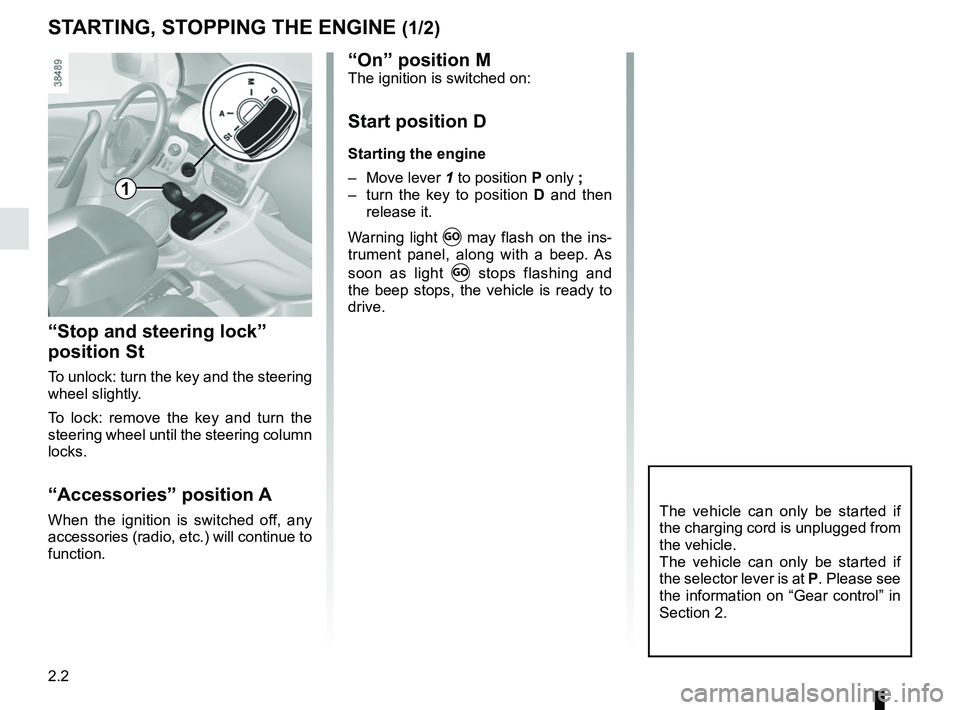
2.2
STARTING, STOPPING THE ENGINE (1/2)
“Stop and steering lock”
position St
To unlock: turn the key and the steering
wheel slightly.
To lock: remove the key and turn the
steering wheel until the steering column
locks.
“Accessories” position A
When the ignition is switched off, any
accessories (radio, etc.) will continue to
function.The vehicle can only be started if
the charging cord is unplugged from
the vehicle.
The vehicle can only be started if
the selector lever is at P. Please see
the information on “Gear control” in
Section 2.
1
“On” position MThe ignition is switched on:
Start position D
Starting the engine
– Move lever 1 to position P only ;
– turn the key to position D and then
release it.
Warning light
Ṑ may flash on the ins-
trument panel, along with a beep. As
soon as light
Ṑ stops flashing and
the beep stops, the vehicle is ready to
drive.
Page 142 of 230
3.14
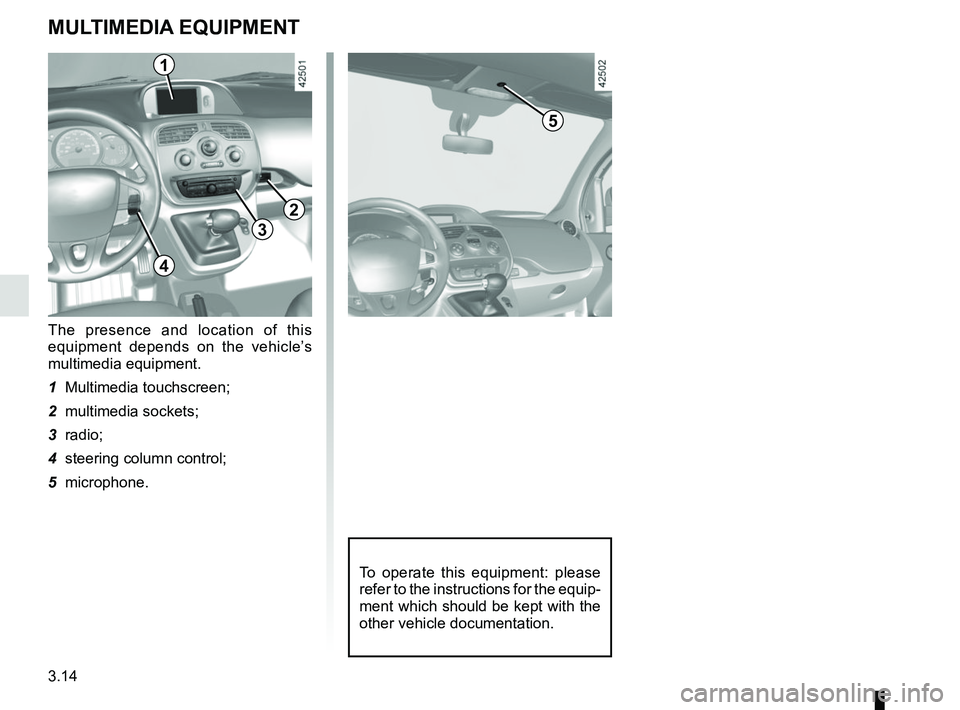
MULTIMEDIA EQUIPMENT
The presence and location of this
equipment depends on the vehicle’s
multimedia equipment.
1 Multimedia touchscreen;
2 multimedia sockets;
3 radio;
4 steering column control;
5 microphone.
To operate this equipment: please
refer to the instructions for the equip-
ment which should be kept with the
other vehicle documentation.
1
3
2
4
5
Page 160 of 230
4.6
Maintenance/replacement
Refer to the Maintenance Document for
your vehicle.
Never open the battery cover 1.
The charge status of the 12V battery
can decrease, especially if you use
your vehicle:
– when the exterior temperature drops;
– after extended use of energy-con-suming devices (radio etc.) with the
engine switched off.
12 VOLT BATTERY (1/2)
1
For your own safety and for
the proper operation of the
vehicle’s electrical equip-
ment (lights, windscreen
wipers, ABS, etc.), any interven-
tion on the secondary 12 V battery
(removal, disconnection, etc.) must
categorically be performed by a
specialist professional.
Risk of serious burns or electric
shocks.
Respect categorically the replace-
ment intervals (without exceeding
them) as stated in the maintenance
document.
The battery is a specific type.
Please ensure it is replaced with the
same type.
Contact an Authorised Dealer.