Page 194 of 310

3.12
Manual use
Pressing the button 9 allows air recir-
culation to be forced. In this case, the
integrated warning light comes on and
the indicator D goes out.
Prolonged use of this position may lead
to odours, caused by non-renewal of
air, and the formation of condensation
on the windows.
We therefore advise you to return to au-
tomatic mode as soon as air recircula-
tion is no longer needed, by pressing
button 9.Stopping the system
To stop the system, press the button 1
OFF (the integrated warning light
comes on) or, depending on the ve-
hicle, reduce the fan speed down to
a minimum by pressing the button 6
marked by OFF as many times as is
necessary.
To start, press the switch 7.
Recycling
This function is managed automati-
cally (operation is confirmed by warn-
ing light D), but you can also activate
it manually.
Note:
– during recirculation, air is taken from the passenger compartment and
is recycled, with no air being taken
from outside the vehicle;
– air recirculation allows the external atmosphere to be cut off (when driv-
ing in polluted areas, etc.);
– lowering the passenger compart- ment temperature as quickly as pos-
sible.
AUTOMATIC CLIMATE CONTROL (6/6)
The demisting/de-icing will still take
priority over the air recirculation.
179
D
6
Page 197 of 310
3.15
OUTSIDE AIR QUALITY AND DEODORISATION FUNCTION
With the air conditioning switched
on, from the screen A, select Menu,
Vehicle, Take care.
Outside air quality
The air quality is given using a graph on
the multifunction screen.
Three colours indicate the air quality
level (from the cleanest to the most
polluted):
1 (blue)
2 (light grey)
3 (grey)
A
Deodorisation function
This reduces unpleasant odours in the
passenger compartment.
Deodorization cycle
– ON: helps to reduce the unpleasant odour more quickly in the passenger
compartment,
– OFF: stop the function.
Note:
The function is on a timer. It stops auto-
matically after a few minutes.
Take care
On
Deodorization cycle
Please refer to the multimedia in-
structions for further information.
Page 200 of 310
3.18
Note: for vehicles fitted with a naviga-
tion system, you can use the multifunc-
tion screen to deactivate/activate the
courtesy lights which come on when
the doors or boot are opened. To do
this, please refer to “Vehicle settings
customisation menu” in Section 1.Map reading lights
Press switch 1 to get:
– permanent lighting;
– immediate switching off.
When the doors or boot are un-
locked and opened, the reading and
footwell lights come on temporarily.
INTERIOR LIGHTING (1/2)
With the doors properly shut, lock-
ing or starting the engine makes the
interior lights and the courtesy lights
go out.
1
1
Page 201 of 310
3.19
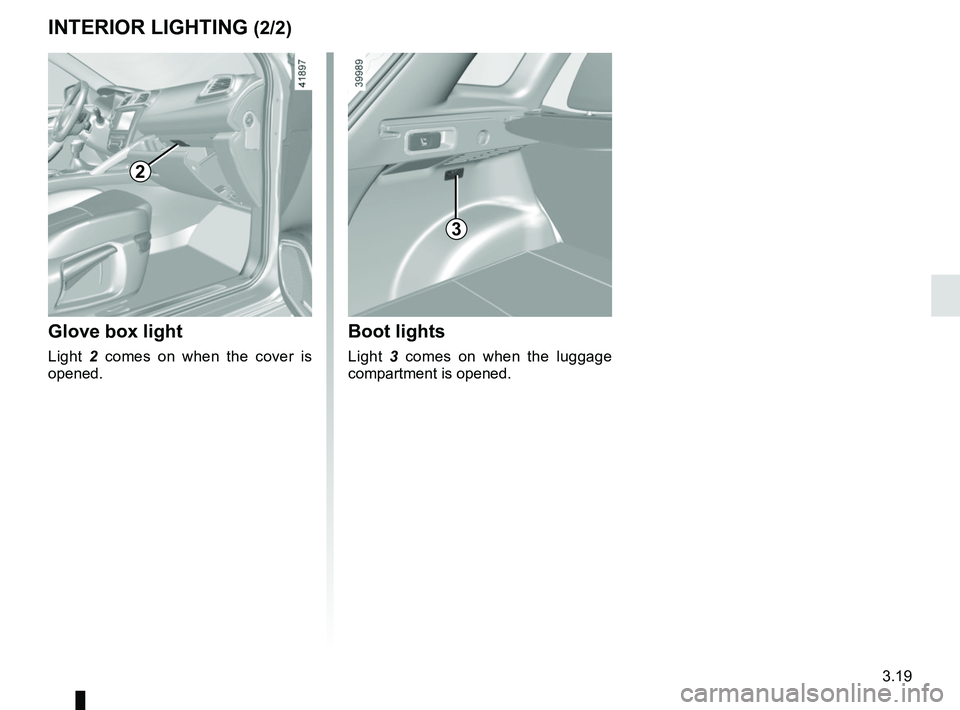
Glove box light
Light 2 comes on when the cover is
opened.
2
3
Boot lights
Light 3 comes on when the luggage
compartment is opened.
INTERIOR LIGHTING (2/2)
Page 207 of 310
3.25
Ashtray 1
To open, lift the cover. To empty, pull the
ashtray towards you and it will be re-
leased from its housing.
Accessories sockets 2
They are provided for connecting ac-
cessories approved by our Technical
Department.
ASHTRAY, CIGARETTE LIGHTER, ACCESSORIES SOCKET
If your vehicle is not fitted with a
cigar lighter and an ashtray, these
can be obtained from an approved
Dealer.
2
12
Connect accessories with
a maximum power of
120 watts (12 V) only.
When several accessory
sockets are used at the same time,
the total power of the connected
accessories must not exceed
180 watts.
Fire hazard.
Page 216 of 310
3.34
Permissible nose weight, maxi-
mum permissible towing weight,
braked and unbraked: refer to
the information on “Weights” in
Section 6.
Choice and fitting of towing
equipment
Maximum weight of towing equip-
ment: 32 kg
For fitting and conditions of use,
refer to the equipment’s fitting in-
structions.
Please keep these instructions with
the rest of the vehicle documenta-
tion.
TRANSPORTING OBJECTS towbar
A
Maximum dimension A: 1029 mm.
If the towbar ball obscures the regis-
tration plate or the rear fog lights, it
should be removed when not in use.
In all cases, comply with local leg-
islation.
Page 224 of 310
4.2
Opening the bonnet
Lift the bonnet up and release the stay 4
from its holder 5. For your own safety, it
is very important to fit the stay into its
retainer 3.
To open, press the control 1.
BONNET (1/2)
Unlocking the bonnet catch
To open, raise the bonnet slightly, then
lift the paddle 2 at the centre point of
the bonnet.
2
When working in the engine
compartment, ensure that
the windscreen wiper stalk
is in the park position.
Risk of injury.Before performing any
action in the engine com-
partment, the ignition must
be switched off (please see
the information on “Starting, stop-
ping the engine” in Section 2).
3
4
5
1
Please note when work-
ing close to the engine that
it may be hot. The engine
cooling fan may also start
at any moment. The
warning
light in the engine compartment re-
minds you of this.
Risk of injury.
Page 225 of 310
4.3
BONNET (2/2)
Closing the bonnet
Before closing the bonnet, make sure
that nothing has been left in the engine
compartment.
To close the bonnet, replace the stay 4
in its holder 5 . Hold the middle of the
bonnet and guide it down to one foot
(30 cm) above the closed position, then
release. It will latch automatically under
its own weight.
After carrying out any work
in the engine compart-
ment, check that nothing
has been left behind (cloth,
tools, etc.).
These may damage the engine or
cause a fire.
Ensure that the bonnet is
properly locked.
Check that nothing is pre-
venting the catch from lock-
ing (gravel, cloth, etc.).
In the event of even a slight
impact involving the radia-
tor grille or bonnet, have
the bonnet lock checked by
an approved dealer as soon as pos-
sible.
4
5