2018 RENAULT CAPTUR steering wheel
[x] Cancel search: steering wheelPage 69 of 258

1.63
Power Assisted Steering
Never drive with an inadequately
charged battery.
Variable power assisted
steering
The variable power assisted steering
system is equipped with an electronic
control system which alters the level of
assistance to suit the vehicle speed.
Steering is made easier during parking
manoeuvres (for added comfort) whilst
the force needed to steer increases
progressively as the speed rises (for
enhanced safety at high speeds).
Adjusting the steering wheel
height and depth
Pull lever 1 and place the steering
wheel in the required position; push the
lever beyond the point of resistance to
lock the steering wheel in place.
Make sure that the steering wheel is
correctly locked.
For safety reasons, only
adjust the steering wheel
when the vehicle is station-
ary.
STEERING WHEEL/POWER-ASSISTED STEERING
1
Never switch off the igni-
tion when travelling down-
hill, and avoid doing so in
normal driving (assistance
is not provided).
With the engine switched off, or if
there is a system fault, it is still pos-
sible to turn the steering wheel. The
force required will be greater.
Never leave the steering wheel at
full lock while stationary.
Page 75 of 258

1.69
EXTERIOR LIGHTING AND SIGNALS (3/3)
fRear fog light
Turn the centre ring 4 on
the stalk until the symbol is opposite
mark 5, then release it.
Depending on the vehicle, the stalk re-
turns to the initial position or stays in
position.
Operation of the fog lights depends on
the exterior lighting selected, and an in-
dicator light will light up on the instru-
ment panel.
To avoid inconveniencing other road
users, remember to switch off the rear
fog light when it is no longer needed.
Cornering lights
Whenever the dipped beam headlights
are on and under certain conditions (at
speed, the steering wheel at an angle,
in forward gear, the indicator lights on,
etc.), when taking a corner one of the
front fog lights will come on to light the
inside of the bend.
Turning off the fog lights
There are two possibilities:
– manually, depending on the vehi- cle, turn the ring 4 again to bring the
mark 5 opposite the symbol for the
fog light that you want to switch off,
or bring the ring 4 into position -. The
corresponding indicator light will go
out on the instrument panel;
– the lights will go out automati- cally when the engine is switched
off or the vehicle is locked, and the
fog lights when the driver’s door is
opened.
The front and rear fog lights switch off
when the exterior lights are switched
off.
415
gFront fog lights
Turn the centre ring 4 on the
stalk 1 until the symbol is opposite
mark 5, then release it.
Operation of the fog lights depends on
the exterior lighting position selected,
and an indicator light will light up on the
instrument panel.
When driving in fog or snow, or when transporting objects which are higher than the roof, the headl\
ights do not come on au-
tomatically.
Switching on the fog lights remains the responsibility of the driver: th\
e indicator lights on the instrument panel inform you
whether the fog lights are lit (indicator light on) or not (indicator\
light not on).
Page 76 of 258

1.70
éHazard warning lights
Press switch 2.
This switch activates all four direction
indicators and the side indicator lights
simultaneously. It must only be used in
an emergency to warn drivers of other
vehicles that you have had to stop in
an area where stopping is prohibited or
unexpected, or that you are obliged to
drive under special conditions.
Depending on the vehicle, the hazard
warning lights may come on auto-
matically under heavy deceleration.
You can switch them off by pressing
switch 2 once.
Direction indicators
Move stalk 1 parallel to the steering
wheel and in the direction you are going
to turn it.
One-touch mode
When driving, it is possible that the
steering wheel may not be turned suf-
ficiently to return the stalk automatically
to its starting position.
In this case, move the stick 1 to half-
way, then release it: it will return to its
initial position and the indicator light
flashes three times.
Horn
Press steering wheel boss A.
Headlight flasher
Pull stalk 1 towards you to flash the
headlights.
AUDIBLE AND VISUAL SIGNALS
A
1
2
Page 87 of 258

2.3
Hands-free RENAULT card
The RENAULT card must be inserted
in card reader 2 or in detection zone 3.
To start, depress the brake or clutch
pedal and press button 1. If a gear
is engaged, the vehicle may only be
started by depressing the clutch pedal.
Starting with the boot open in
hands-free mode
In this case, the RENAULT card must
not be located in the luggage compart-
ment.
Remote control RENAULT
card
When you get into the vehicle, insert
the RENAULT card integrated key,
pointing towards you, fully into the card
reader 2.
To start, press button 1. If a gear is en-
gaged, depress the clutch pedal to start
the vehicle.
STARTING, STOPPING THE ENGINE (1/3)
3
Special features
vehicles with an automatic gearbox
The lever should be in position P.
All vehicles
– If one of the starting conditions is not met, the message “Press brake
+ START” or “PRESS CLUTCH +
START” or “SELECT PARK” is dis-
played and, depending on the vehi-
cle, flashes on the instrument panel;
– in some cases, it will be necessary to move the steering wheel whilst
pressing the start button 1 to help
unlock the steering column; the mes-
sage “TURN STEERINGWHEEL +
START” will warn you of this;
– in the event of starting the engine in very low exterior temperatures
(lower than -10°C): hold down the
clutch pedal until the engine starts.
12
Page 108 of 258

2.24
DRIVING CORRECTION DEVICES AND AIDS (2/5)
Electronic stability program
(ESC) with understeer control
and traction control
Electronic stability control ESC
This system helps you to keep control
of the vehicle in critical driving condi-
tions (avoiding an obstacle, loss of grip
on a bend, etc.).
Operating principle
A sensor in the steering wheel detects
the direction selected by the driver.
Other sensors throughout the vehicle
measure the actual direction.
The system compares driver input to
the actual trajectory of the vehicle and
corrects the trajectory if necessary by
controlling the braking of certain wheels
and/or engine power. In the event that
the system is engaged, indicator light
flashes on the instrument panel.Understeer control
This system optimises the action of the
ESC in the case of pronounced under-
steer (loss of front axle road holding).
Traction control
This system helps to limit wheelspin of
the drive wheels and to control the ve-
hicle when pulling away accelerating or
decelerating.
Operating principle
Using the wheel sensors, the system
measures and compares the speed of
the drive wheels at all times and slows
down their over-rotation. If a wheel is
starting to slip, the system brakes au-
tomatically until the drive supplied be-
comes compatible with the level of grip
under the wheel again.
The system also adjusts the engine
speed to the grip available under the
wheels, independently of the pressure
exerted on the accelerator pedal.
These functions are an ad-
ditional aid in the event of
critical driving conditions,
enabling the vehicle behav-
iour to be adapted to suit the driving
conditions.
However, the functions do not take
the place of the driver. They do
not increase the vehicle’s limits
and should not encourage you
to drive more quickly. Therefore,
they can under no circumstances
replace the vigilance or responsibil-
ity of the driver when manoeuvring
the vehicle (the driver must always
be ready for sudden incidents which
may occur when driving).
Operating faults
When the system detects an operat-
ing fault, the
© and warn-
ing lights come on and, depending on
the vehicle, the message “Check ESC”
appears on the instrument panel. In
this case, the ESC and traction control
system are deactivated.
Consult an approved dealer.
Page 127 of 258

2.43
REVERSING CAMERA (2/2)
The screen shows a reverse image.
The frames are a representation
projected onto flat ground; this in-
formation must not be taken into
account when superimposed on a
vertical object or an object on the
ground.
Objects which appear on the edge
of the screen may be deformed.
In very bright light (snow, vehicle in
sunshine etc.), the camera vision
may be adversely affected.
If the boot is open or poorly closed,
the message “BOOT OPEN” ap-
pears and, depending on the vehi-
cle, the camera display disappears.
3
C
B
A
4
Static guide line 4:
The fixed clearance gauge comprises
coloured markers A, B and C , indicat-
ing the distance behind the vehicle:
– A (red) approximately 30 centime-
tres from the vehicle;
– B (yellow) approximately 70 centi-
metres from the vehicle;
– C (green) approximately 150 centi-
metres from the vehicle.
This gauge remains fixed and indicates
the vehicle trajectory if the wheels are
in line with the vehicle.
Dynamic gauge 3 (depending on the
vehicle)
This is shown in blue on screen 2. It in-
dicates the vehicle trajectory according
to the position of the steering wheel.
Page 128 of 258
2.44
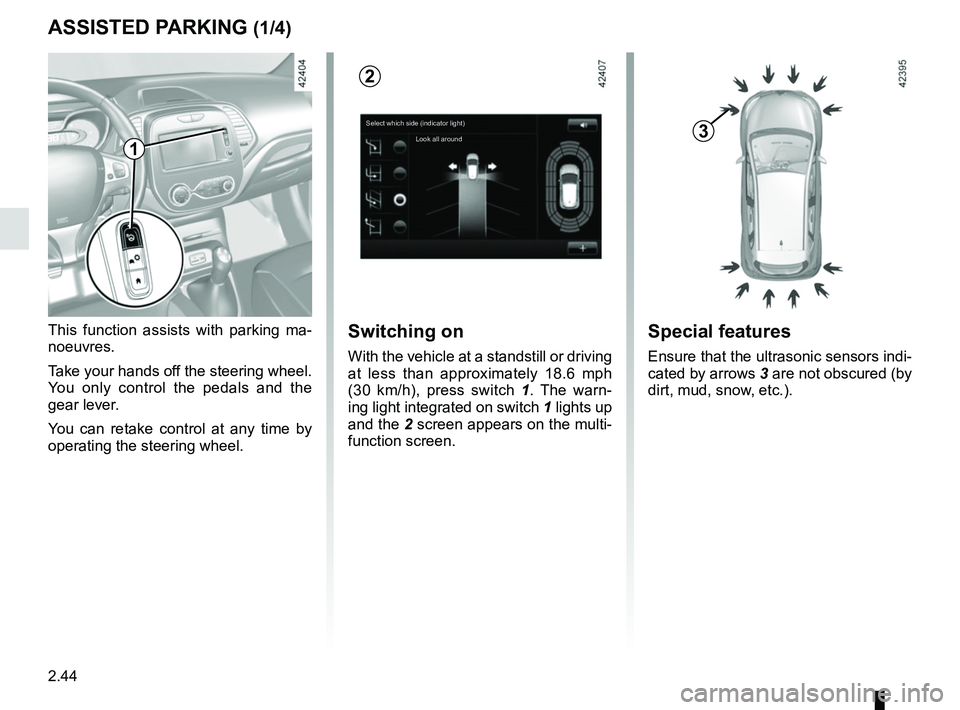
ASSISTED PARKING (1/4)
This function assists with parking ma-
noeuvres.
Take your hands off the steering wheel.
You only control the pedals and the
gear lever.
You can retake control at any time by
operating the steering wheel.Switching on
With the vehicle at a standstill or driving
at less than approximately 18.6 mph
(30 km/h), press switch 1. The warn-
ing light integrated on switch 1 lights up
and the 2 screen appears on the multi-
function screen.
1
2
Special features
Ensure that the ultrasonic sensors indi-
cated by arrows 3 are not obscured (by
dirt, mud, snow, etc.).
3Select which side (indicator light)
Look all around
Page 129 of 258

2.45
ASSISTED PARKING (2/4)
Choice of manoeuvre
The system can perform four types of
manoeuvres:
– parallel parking;
– perpendicular parking;
– angle parking;
– moving out of a parallel parking space.
From the multifunction screen, select
the manoeuvre to be performed.
Note: when starting the vehicle, or after
having successfully completed parallel
parking using the system, the default
manoeuvre proposed by the system is
assistance in exiting a parallel parking
space. In other cases, the default ma-
noeuvre can be set from the multifunc-
tion screen.
Operation
Parking
As long as the vehicle speed is less
than 20 mph (30 km/h), the system
looks for available parking spaces on
both sides of the vehicle.
Once a space has been found, it is dis-
played on the multifunction screen, in-
dicated by a small letter “P”. So that
the vehicle can detect a space, drive
slowly, with the indicators activated on
the same side as the space, until the
message “Stop” is displayed, along
with a beep.
The space is then indicated on the mul-
tifunction screen by a capital “P”.
– Stop the vehicle;
– select reverse gear.
The
indicator light lights up
on the instrument panel and a beep
sounds;
– release the steering wheel;
– follow the system instructions pro- vided on the multifunction screen. Your speed should not exceed around
4 mph (7 km/h).
Once the warning light
on the
instrument panel goes off and a beep
sounds, the manoeuvre has been com-
pleted.