Page 467 of 529
Display
After pressing the “Display” button on the touchscreen, the
following settings will be available:
Setting NameSelectable Options
Display Mode DayNight Auto
NOTE:
When Day or Night is selected for the Display Mode, the usage of the Parade Mode feature will cause the radio to
activate the Display Brightness Day control even though the headlights are on. Display Brightness With Headlights ON +–
NOTE:
To make changes to the �Display Brightness with Headlights ON� setting, the headlights must be on and the interior
dimmer switch must not be in the �party�or�parade� positions.
Display Brightness With Headlights OFF +–
NOTE:
To make changes to the �Display Brightness with Headlights OFF� setting, the headlights must be off and the interior
dimmer switch must not be in the �party�or�parade� positions.
Set Theme Pre-configured Themes
10
MULTIMEDIA 465
Page 472 of 529
Setting NameSelectable Options
Rain Sensing Auto Wipers — If Equipped On
Off
NOTE:
When the “Rain Sensing Auto Wipers” feature is selected, the system will automatically activate the windshield wip-
ers if it senses moisture on the windshield. Hill Start Assist — If Equipped On
Off
Lights
After pressing the “Lights” button on the touchscreen, the
following settings will be available:
Setting Name Selectable Options
Headlight Off Delay +–
NOTE:
When the “Headlight Off Delay” feature is selected, the driver can choose to have the headlights remain on for 0, 30,
60, or 90 seconds when exiting the vehicle.
470 MULTIMEDIA
Page 473 of 529

Setting NameSelectable Options
Headlight Illumination On Ap- proach +–
NOTE:
When the “Headlight Illumination On Approach” feature is selected, the headlights will activate and remain on for 0,
30, 60, or 90 seconds when the doors are unlocked with the key fob. Headlights With Wipers — If Equipped
NOTE:
When the “Headlights With Wipers” feature is selected, and the headlight switch is in the AUTO position, the head-
lights will turn on approximately ten seconds after the wipers are turned on. The headlights will also turn off when
the wipers are turned off if they were turned on by this feature.
Auto Dim High Beams — If Equipped
NOTE:
When the “Auto Dim High Beams” feature is selected, the high beam headlights will deactivate automatically under
certain conditions.
Flash Lights With Lock
NOTE:
When the “Flash Lights With Lock” feature is selected, the exterior lamps will flash when the doors are locked or un-
locked with the key fob. This feature may be selected with or without the sound horn on lock feature selected.
10
MULTIMEDIA 471
Page 474 of 529
Doors & Locks
After pressing the “Doors & Locks” button on the touch-
screen, the following settings will be available:
Setting NameSelectable Options
Auto Door Locks
NOTE:
When the “Auto Door Locks” feature is selected, all doors will lock automatically when the vehicle reaches a speed of
15 mph (24 km/h). Auto Unlock On Exit
NOTE:
When the “Auto Unlock On Exit” feature is selected, all doors will unlock when the vehicle is stopped and the trans-
mission is in the PARK or NEUTRAL position and the driver’s door is opened.Flash Lights With Lock
NOTE:
When the “Flash Lights With Lock” feature is selected, the front and rear turn signals will flash when the doors are
locked or unlocked with the key fob. This feature may be selected with or without the “Sound Horn With Lock” fea-
ture selected.Sound Horn With Lock Off1st Press 2nd Press
472 MULTIMEDIA
Page 477 of 529
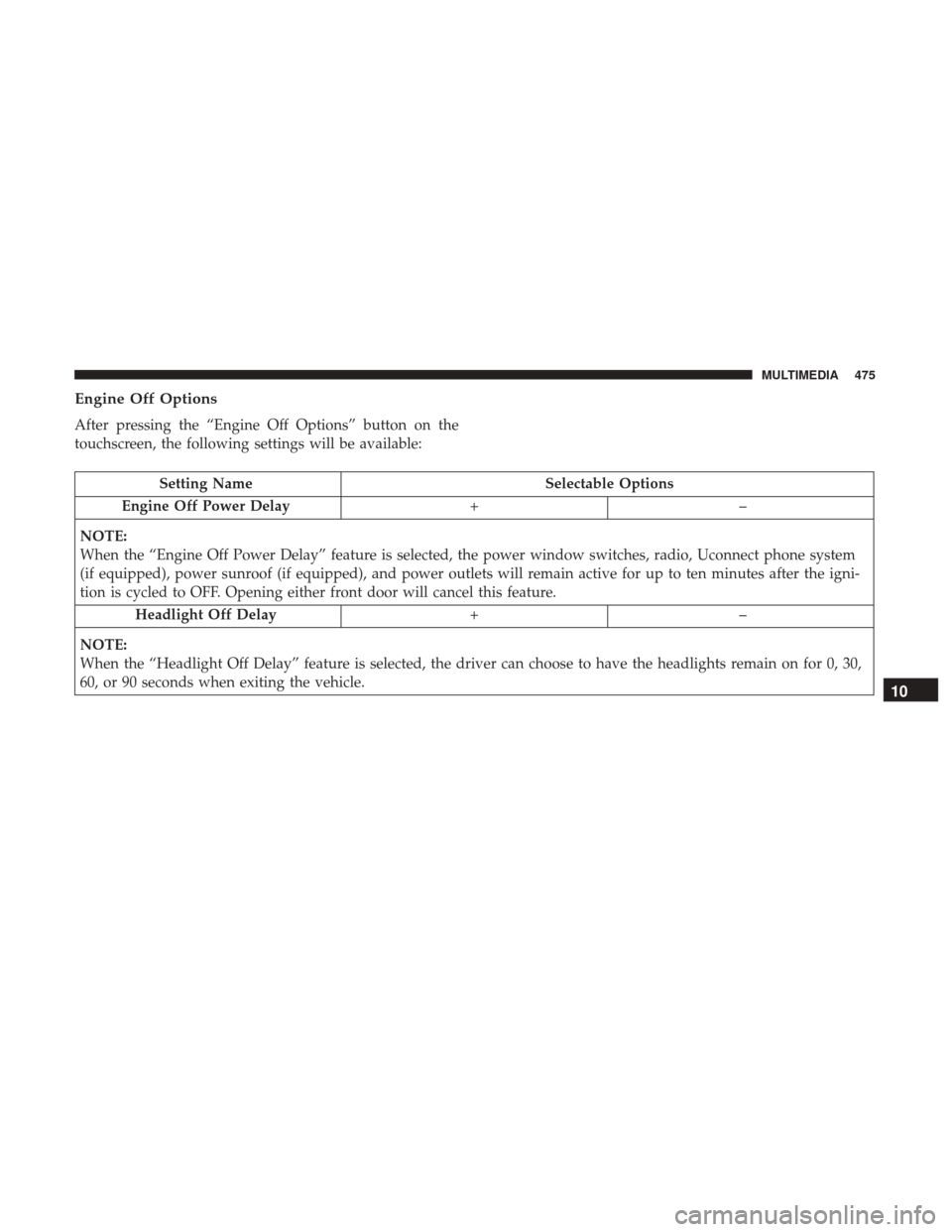
Engine Off Options
After pressing the “Engine Off Options” button on the
touchscreen, the following settings will be available:
Setting NameSelectable Options
Engine Off Power Delay +–
NOTE:
When the “Engine Off Power Delay” feature is selected, the power window switches, radio, Uconnect phone system
(if equipped), power sunroof (if equipped), and power outlets will remain active for up to ten minutes after the igni-
tion is cycled to OFF. Opening either front door will cancel this feature. Headlight Off Delay +–
NOTE:
When the “Headlight Off Delay” feature is selected, the driver can choose to have the headlights remain on for 0, 30,
60, or 90 seconds when exiting the vehicle.
10
MULTIMEDIA 475
Page 478 of 529
Air Suspension — If Equipped
After pressing the “Suspension” button on the touchscreen,
the following settings will be available:
Setting NameSelectable Options
Sound Horn With Lower
NOTE:
When the “Sound Horn With Lower” feature is selected, a short horn sound will occur when the key fob remote
lower button is pushed. Flash Lights With Lower
NOTE:
When the “Flash Lights With Lower” feature is selected, the front and rear turn signals will flash when the key fob
remote lower button is pressed twice. This feature may be selected with or without the Sound Horn on Lower feature
selected.Suspension Display Messages AllWarning
Automatic Aero Mode (1500 Model Only)
NOTE:
When the “Automatic Aero Mode” feature is selected, the Ride Height will automatically be adjusted depending on
the vehicle speed.
476 MULTIMEDIA
Page 500 of 529
Send & Go
Vehicle Finder
Stolen Vehicle Assistance
Remote Vehicle Start**
Remote Horn & Lights
Roadside Assistance Call
Vehicle Health Reports**
Vehicle Health Alert**
Performance Pages Plus**
**If vehicle is equipped.
Register (4C NAV)
To unlock the full potential of SiriusXM Guardian in your
vehicle, you must activate your SiriusXM Guardian ser-
vices.
1. Press the Apps icon on the bottom of your in-vehicletouchscreen.
2. Select the Activate Services icon from your list of apps. 3. Select “Customer Care” to speak with a SiriusXM
Guardian Customer Care agent who will activate ser-
vices in your vehicle, or select “Enter Email” to activate
on the web.
For further information:
• U.S. residents visit: siriusxm.com/guardian
• Canadian residents visit: siriusxm.com/guardian/ca
Mobile App (4C NAV)
You’re only a few steps away from using remote com-
mands and playing your favorite music in your car.
Mobile App
498 MULTIMEDIA
Page 501 of 529

To use the Uconnect App:
•Download the Uconnect App to your mobile device.
• Press the Info button on the navigation bar at the bottom
of the app for Vehicle Info.
• Press the Remote button on the navigation bar at the
bottom of the app to Lock/Unlock, Remote Start, and
activate your horn and lights remotely.
• Press the Location button on the navigation bar at the
bottom of the app to bring up a map to locate your
vehicle or send a location to your vehicle’s navigation
system.
• Press the Settings button in the upper left corner of the
app to bring up app settings and access the Assist Call
Centers.
NOTE: For further information please visit DriveUcon-
nect.com(U.S. Residents) or DriveUconnect.ca (Canadian
Residents).
SiriusXM Travel Link (4C NAV)
Need to find a gas station, view local movie listings, check
a sports score or the 5 - day weather forecast? SiriusXM
Travel Link is a suite of services that brings a wealth of
information right to your Uconnect 4C NAV system. Push the VR button
. After the beep, say one of the
following commands:
• Show fuel prices
• Show 5 - day weather forecast
• Show extended weather
TIP: Traffic alerts are not accessible with Voice Command.
SiriusXM Travel Link
10
MULTIMEDIA 499