Page 436 of 700

Before Plowing
•Check the hydraulic system for leaks and proper fluid
level.
• Check the mounting bolts and nuts for proper tightness.
• Check the runners and cutting edge for excessive wear.
The cutting edge should be ¼ to ½ in (6 cm to 1.2 cm)
above ground in snow plowing position.
• Check that snowplow lighting is connected and func-
tioning properly.
Snowplow Prep Package Model Availability
For Information about snowplow applications visit
www.ramtrucks.com or refer to the current Body Builders
Guide.
1. The maximum number of occupants in the truck should
not exceed two.
2. The total GVWR or the Front GAWR or the Rear GAWR should never be exceeded.
3. Cargo capacity will be reduced by the addition of options or passengers, etc. The loaded vehicle weight, including the snowplow sys-
tem, all aftermarket accessories, driver, passengers, op-
tions, and cargo, must not exceed either the Gross Vehicle
Weight (GVWR) or Gross Axle Weight (GAWR) ratings.
These weights are specified on the Safety Compliance
Certification Label on the driver’s side door opening.
NOTE:
Detach the snowplow when transporting passen-
gers.
Vehicle front end wheel alignment was set to specifications
at the factory without consideration for the weight of the
plow. Front end toe-in should be checked and reset if
necessary at the beginning and end of the snowplow
season. This will help prevent uneven tire wear.
The blade should be lowered whenever the vehicle is
parked.
Maintain and operate your vehicle and snowplow equip-
ment following the recommendations provided by the
specific snowplow manufacturer.
434 STARTING AND OPERATING
Page 438 of 700
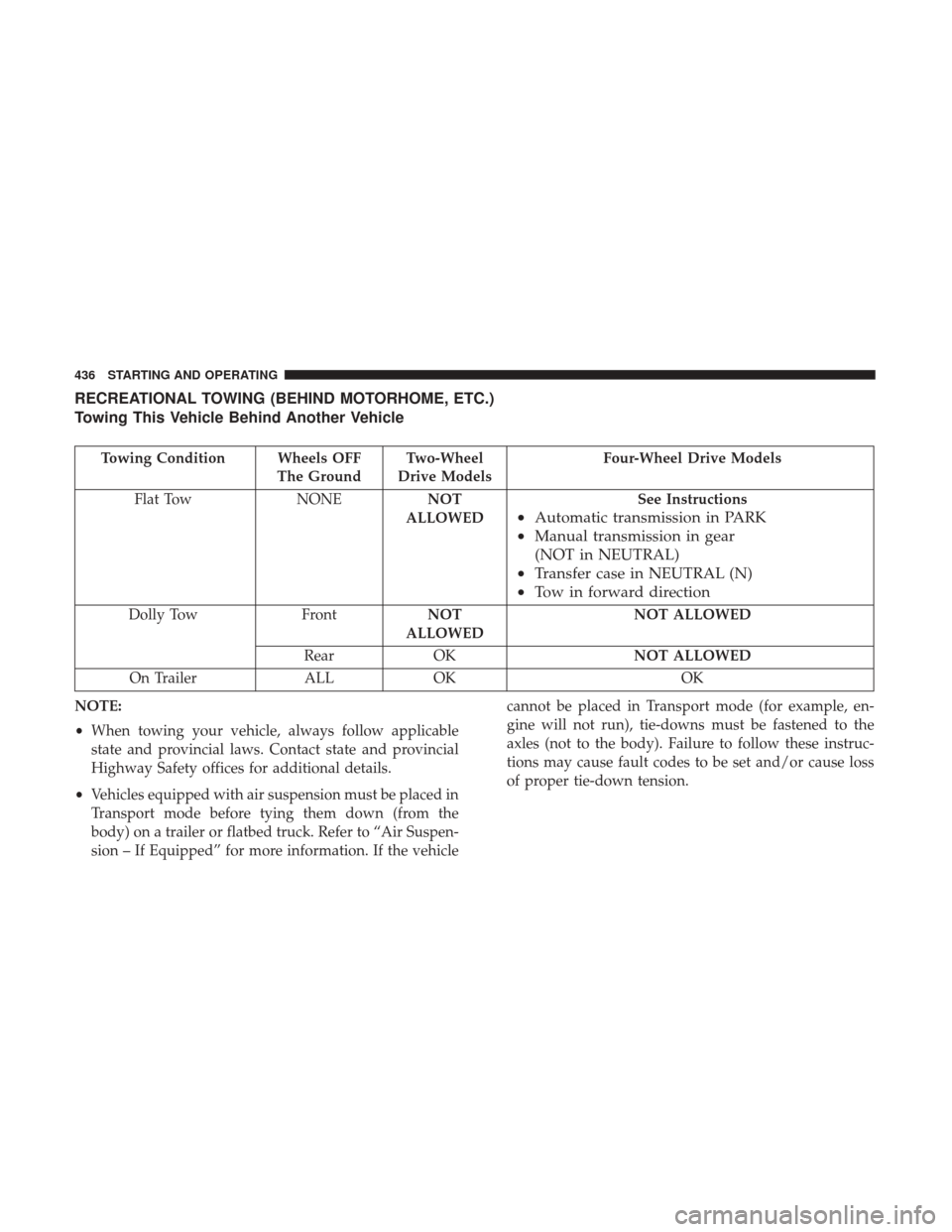
RECREATIONAL TOWING (BEHIND MOTORHOME, ETC.)
Towing This Vehicle Behind Another Vehicle
Towing Condition Wheels OFFThe GroundTwo-Wheel
Drive Models Four-Wheel Drive Models
Flat Tow NONENOT
ALLOWED See Instructions
•
Automatic transmission in PARK
• Manual transmission in gear
(NOT in NEUTRAL)
• Transfer case in NEUTRAL (N)
• Tow in forward direction
Dolly Tow FrontNOT
ALLOWED NOT ALLOWED
Rear OK NOT ALLOWED
On Trailer ALLOK OK
NOTE:
• When towing your vehicle, always follow applicable
state and provincial laws. Contact state and provincial
Highway Safety offices for additional details.
• Vehicles equipped with air suspension must be placed in
Transport mode before tying them down (from the
body) on a trailer or flatbed truck. Refer to “Air Suspen-
sion – If Equipped” for more information. If the vehicle cannot be placed in Transport mode (for example, en-
gine will not run), tie-downs must be fastened to the
axles (not to the body). Failure to follow these instruc-
tions may cause fault codes to be set and/or cause loss
of proper tie-down tension.
436 STARTING AND OPERATING
Page 512 of 700

WARNING!(Continued)
injure someone. Do not spin your vehicle’s wheels
faster than 30 mph (48 km/h) or for longer than 30
seconds continuously without stopping when you are
stuck and do not let anyone near a spinning wheel, no
matter what the speed.
CAUTION!
•Racing the engine or spinning the wheels may lead
to transmission overheating and failure. Allow the
engine to idle with the transmission in NEUTRAL
for at least one minute after every five rocking-
motion cycles. This will minimize overheating and
reduce the risk of clutch or transmission failure
during prolonged efforts to free a stuck vehicle.
• When “rocking” a stuck vehicle by shifting between
DRIVE/2nd gear and REVERSE, do not spin the
wheels faster than 15 mph (24 km/h), or drivetrain
damage may result.
(Continued)
CAUTION! (Continued)
•Revving the engine or spinning the wheels too fast
may lead to transmission overheating and failure. It
can also damage the tires. Do not spin the wheels
above 30 mph (48 km/h) while in gear (no transmis-
sion shifting occurring).
TOWING A DISABLED VEHICLE
This section describes procedures for towing a disabled
vehicle using a commercial towing service. If the transmis-
sion and drivetrain are operable, disabled vehicles may
also be towed as described under “Recreational Towing” in
the “Starting And Operating” section.
NOTE: Vehicles equipped with air suspension must be
placed in Transport mode, before tying them down (from
the body) on a trailer or flatbed truck. Refer to �Air
Suspension� in�Starting And Operating� for more informa-
tion. If the vehicle cannot be placed in Transport mode (for
example, engine will not run), tie-downs must be fastened
to the axles (not to the body). Failure to follow these
instructions may cause fault codes to be set and/or cause
loss of proper tie-down tension.
510 IN CASE OF EMERGENCY
Page 627 of 700
Setting NameSelectable Options
Auto Entry/Exit Suspension OnOff
NOTE:
When the “Auto Entry/Exit Suspension” feature is selected, the vehicle automatically lowers from ride height posi-
tion when vehicle shifted to park for easy entry/exit. Display Suspension Messages AllWarning Only
Automatic Aero Mode (1500 Model Only) On
Off
NOTE:
When the “Automatic Aero Mode” feature is selected, the Ride Height will automatically be adjusted depending on
the vehicle speed. Tire Jack Mode OnOff
NOTE:
When this feature is selected the air suspension system is disabled to prevent auto leveling of the suspension, while
the vehicle is on a jack changing a tire. Transport Mode OnOff
NOTE:
When the “Transport Mode” feature is selected, the air suspension system is disabled to assist with flat bed towing.
10
MULTIMEDIA 625
Page 641 of 700
Setting NameSelectable Options
Rain Sensing Auto Wipers — If Equipped On
Off
NOTE:
When the “Rain Sensing Auto Wipers” feature is selected, the system will automatically activate the windshield wip-
ers if it senses moisture on the windshield. Hill Start Assist — If Equipped On
Off
Setting Name Selectable Options
Two Or Four Corner Air Suspension Modes — If Equipped Tire Jack Mode Transport Mode Wheel Alignment
ModeProtection Mode
NOTE:
There are four air suspension modes designed to protect the system in unique situations. Tire Jack Mode is selected to
assist in changing a spare tire. Transport Mode is selected to assist when the vehicle is being flat bed towed. Wheel
Alignment Mode is selected before performing a wheel alignment, refer to your authorized dealer for information.
Protection Mode will automatically be selected to “protect” the air suspension system when the payload has been ex-
ceeded or load leveling cannot be achieved.
10
MULTIMEDIA 639
Page 648 of 700
Setting NameSelectable Options
Flash Lights With Lower
NOTE:
When the “Flash Lights With Lower” feature is selected, the front and rear turn signals will flash when the key fob
remote lower button is pressed twice. This feature may be selected with or without the Sound Horn on Lower feature
selected. Suspension Display Messages AllWarning
Automatic Aero Mode (1500 Model Only)
NOTE:
When the “Automatic Aero Mode” feature is selected, the Ride Height will automatically be adjusted depending on
the vehicle speed.
Tire Jack Mode
NOTE:
When the “Tire Jack Mode” feature is selected, the air suspension system is disabled to assist with changing a spare
tire.Transport Mode
NOTE:
When the “Transport Mode” feature is selected, the air suspension system lowers and then disables to assist with flat
bed towing.
646 MULTIMEDIA


