2018 Peugeot 308 USB
[x] Cancel search: USBPage 295 of 324
21
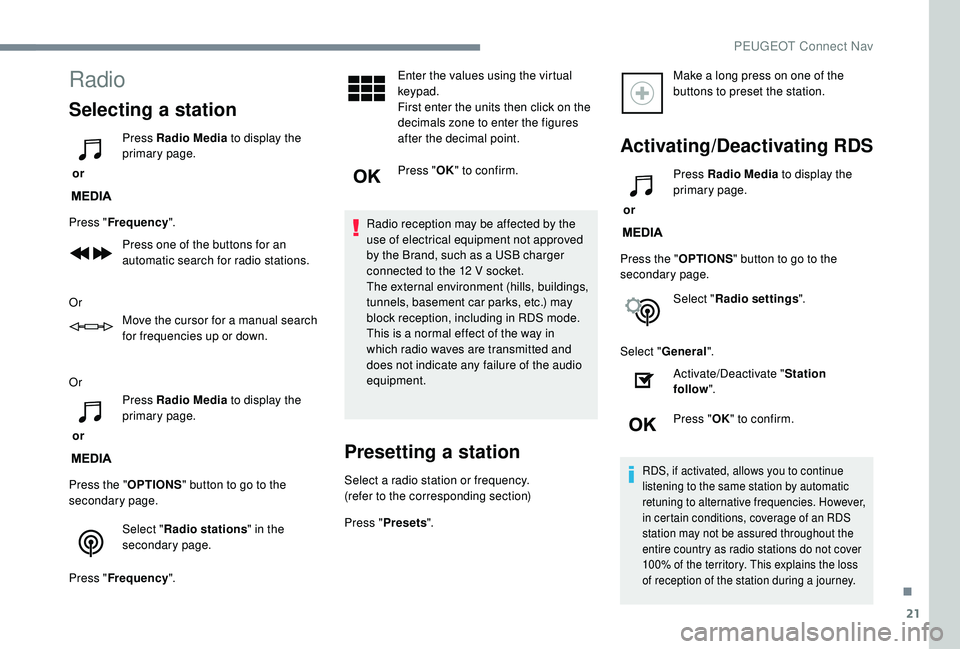
Radio
Selecting a station
or Press Radio Media
to display the
primary page.
Press " Frequency ".
Press one of the buttons for an
automatic search for radio stations.
Or Move the cursor for a manual search
for frequencies up or down.
Or
or Press Radio Media
to display the
primary page.
Press the " OPTIONS" button to go to the
secondary page.
Select "Radio stations " in the
secondary page.
Press " Frequency ". Enter the values using the virtual
keypad.
First enter the units then click on the
decimals zone to enter the figures
after the decimal point.
Press "
OK" to confirm.
Radio reception may be affected by the
use of electrical equipment not approved
by the Brand, such as a USB charger
connected to the 12
V socket.
The external environment (hills, buildings,
tunnels, basement car parks, etc.) may
block reception, including in RDS mode.
This is a normal effect of the way in
which radio waves are transmitted and
does not indicate any failure of the audio
equipment.
Presetting a station
Select a radio station or frequency.
(refer to the corresponding section)
Press " Presets ". Make a long press on one of the
buttons to preset the station.
Activating/Deactivating RDS
or
Press Radio Media
to display the
primary page.
Press the " OPTIONS" button to go to the
secondary page.
Select "Radio settings ".
Select " General ".
Activate/Deactivate " Station
follow ".
Press " OK" to confirm.
RDS, if activated, allows you to continue
listening to the same station by automatic
retuning to alternative frequencies. However,
in certain conditions, coverage of an RDS
station may not be assured throughout the
entire country as radio stations do not cover
100% of the territory. This explains the loss
of reception of the station during a journey.
.
PEUGEOT Connect Nav
Page 297 of 324
23
Select "Radio settings ".
Select " General ".
Activate/Deactivate " Station
follow ".
Press " OK".
If "DAB-FM tracking" is activated, there
is a difference of a few seconds when the
system switches to FM analogue radio
with sometimes a variation in volume.
Once the digital signal quality is restored,
the system automatically changes back
to " DA B ".
If the "DAB" station being listened to is
not available on FM (" DAB- FM" option
greyed out), or "DAB-FM tracking" is not
activated, the sound will cut out while the
digital signal is too weak.Media
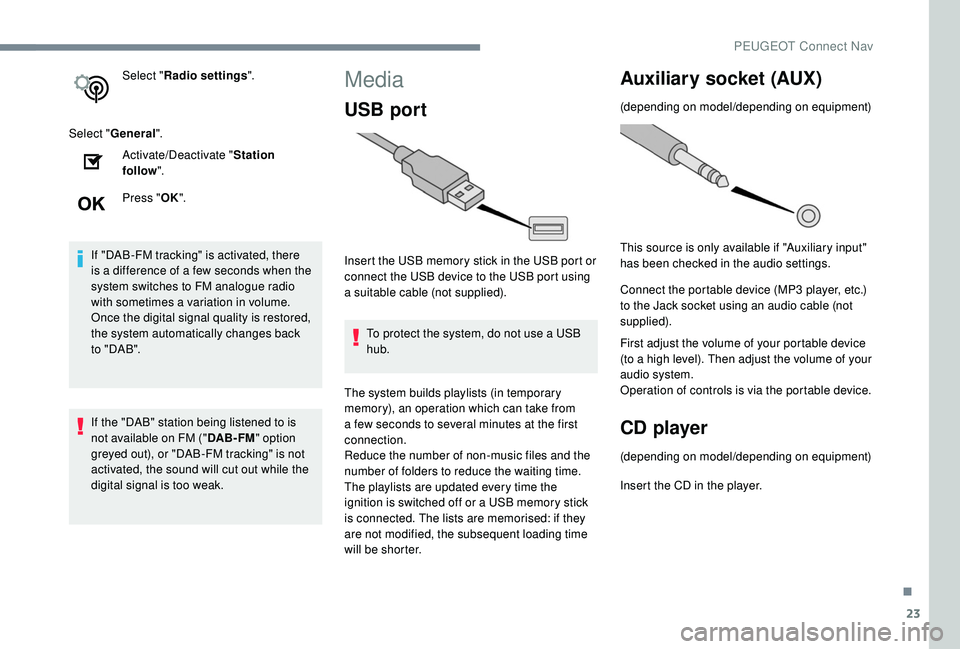
USB port
Insert the USB memory stick in the USB port or
connect the USB device to the USB port using
a suitable cable (not supplied).
To protect the system, do not use a USB
hub.
The system builds playlists (in temporary
memory), an operation which can take from
a few seconds to several minutes at the first
connection.
Reduce the number of non-music files and the
number of folders to reduce the waiting time.
The playlists are updated every time the
ignition is switched off or a USB memory stick
is connected. The lists are memorised: if they
are not modified, the subsequent loading time
will be shorter.
Auxiliary socket (AUX)
(depending on model/depending on equipment)
This source is only available if "Auxiliary input"
has been checked in the audio settings.
Connect the portable device (MP3 player, etc.)
to the Jack socket using an audio cable (not
supplied).
First adjust the volume of your portable device
(to a high level). Then adjust the volume of your
audio system.
Operation of controls is via the portable device.
CD player
(depending on model/depending on equipment)
Insert the CD in the player.
.
PEUGEOT Connect Nav
Page 298 of 324
24
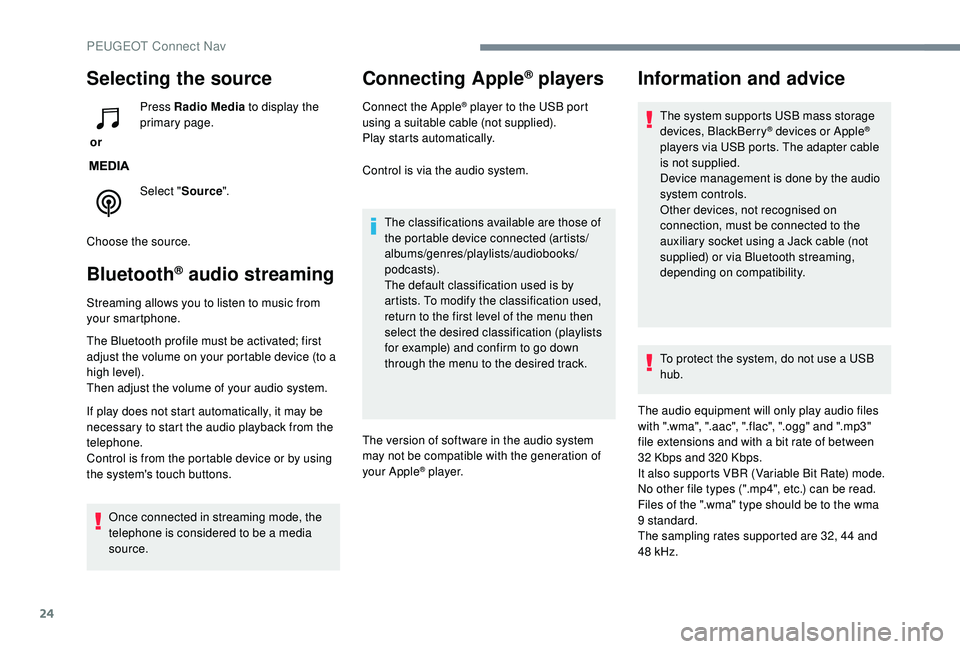
Selecting the source
or Press Radio Media
to display the
primary page.
Select " Source".
Choose the source.
Bluetooth® audio streaming
Streaming allows you to listen to music from
your smartphone.
The Bluetooth profile must be activated; first
adjust the volume on your portable device (to a
high level).
Then adjust the volume of your audio system.
If play does not start automatically, it may be
necessary to start the audio playback from the
telephone.
Control is from the portable device or by using
the system's touch buttons. Once connected in streaming mode, the
telephone is considered to be a media
source.
Connecting Apple® players
Connect the Apple® player to the USB port
using a suitable cable (not supplied).
Play starts automatically.
Control is via the audio system.
The classifications available are those of
the portable device connected (artists/
albums/genres/playlists/audiobooks/
podcasts).
The default classification used is by
artists. To modify the classification used,
return to the first level of the menu then
select the desired classification (playlists
for example) and confirm to go down
through the menu to the desired track.
The version of software in the audio system
may not be compatible with the generation of
your Apple
® p l aye r.
Information and advice
The system supports USB mass storage
devices, BlackBerry® devices or Apple®
players via USB ports. The adapter cable
is not supplied.
Device management is done by the audio
system controls.
Other devices, not recognised on
connection, must be connected to the
auxiliary socket using a Jack cable (not
supplied) or via Bluetooth streaming,
depending on compatibility.
To protect the system, do not use a USB
hub.
The audio equipment will only play audio files
with ".wma", ".aac", ".flac", ".ogg" and ".mp3"
file extensions and with a bit rate of between
32
Kbps and 320
Kbps.
It also supports VBR (Variable Bit Rate) mode.
No other file types (".mp4", etc.) can be read.
Files of the ".wma" type should be to the wma
9 standard.
The sampling rates supported are 32, 44 and
48
kHz.
PEUGEOT Connect Nav
Page 299 of 324
25
It is advisable to restrict file names to 20
characters, without using special characters
(e.g. " "?.; ù) so as to avoid any reading or
display problems.
Use only USB memory sticks in FAT32 format
(File Allocation Table).It is recommended that the original USB
cable for the portable device be used.
In order to be able to play a burned CDR or
CDRW, select standards ISO 9660 level 1, 2 or
Joliet if possible when burning the CD.
If the disc is burned in another format, it may
not be played correctly.
It is recommended that the same burning
standard is always used on an individual disc,
with the lowest speed possible (4x maximum)
for the best acoustic quality.
In the particular case of a multi-session CD, the
Joliet standard is recommended.Telephone
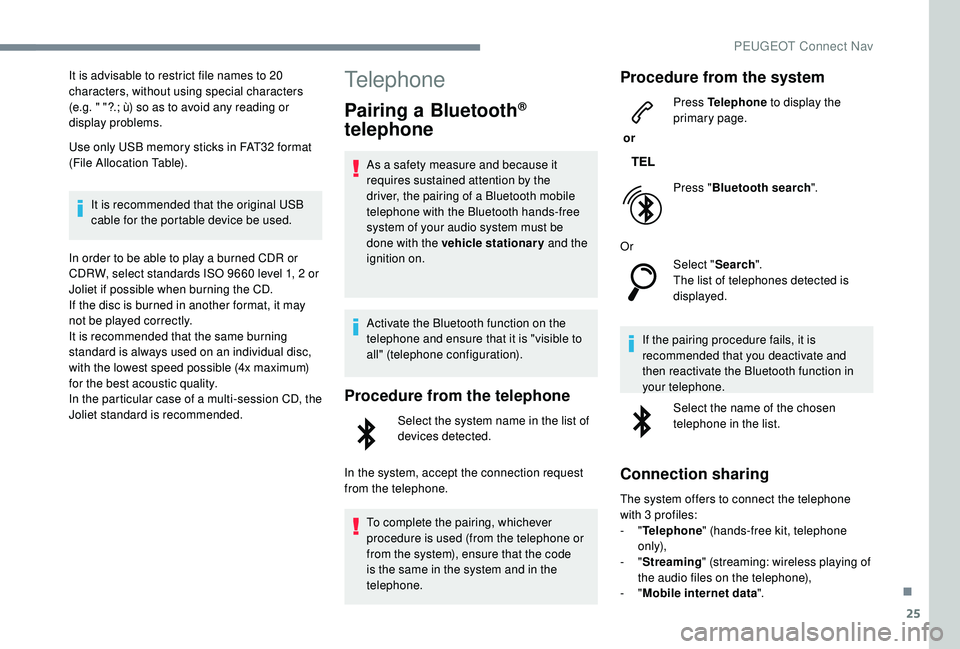
Pairing a Bluetooth®
telephone
As a safety measure and because it
requires sustained attention by the
driver, the pairing of a Bluetooth mobile
telephone with the Bluetooth hands-free
system of your audio system must be
done with the vehicle stationary and the
ignition on.
Activate the Bluetooth function on the
telephone and ensure that it is "visible to
all" (telephone configuration).
Procedure from the telephone
Select the system name in the list of
devices detected.
In the system, accept the connection request
from the telephone. To complete the pairing, whichever
procedure is used (from the telephone or
from the system), ensure that the code
is the same in the system and in the
telephone.
Procedure from the system
or Press Telephone
to display the
primary page.
Press " Bluetooth search ".
Or Select "Search".
The list of telephones detected is
displayed.
If the pairing procedure fails, it is
recommended that you deactivate and
then reactivate the Bluetooth function in
your telephone. Select the name of the chosen
telephone in the list.
Connection sharing
The system offers to connect the telephone
with 3 profiles:
-
"Telephone " (hands-free kit, telephone
only),
-
"Streaming " (streaming: wireless playing of
the audio files on the telephone),
-
"Mobile internet data ".
.
PEUGEOT Connect Nav
Page 304 of 324
30
Profile settings
As a safety measure and because it
requires the sustained attention of the
driver, changes to settings must only be
done with the vehicle stationary.
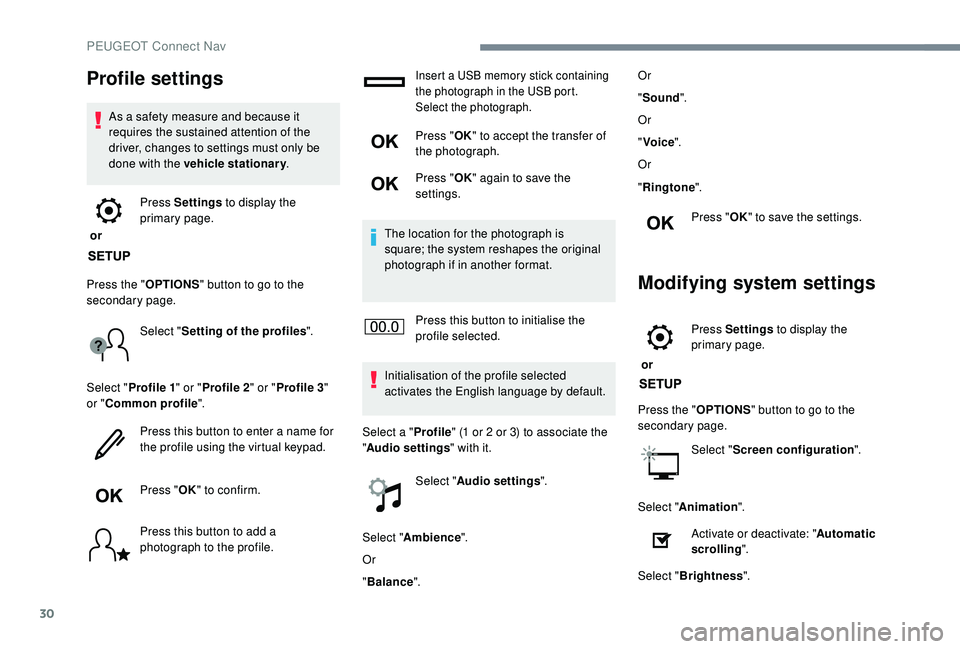
or Press Settings
to display the
primary page.
Press the " OPTIONS" button to go to the
secondary page.
Select "Setting of the profiles ".
Select " Profile 1 " or "Profile 2 " or "Profile 3 "
or " Common profile ".
Press this button to enter a name for
the profile using the virtual keypad.
Press " OK" to confirm.
Press this button to add a
photograph to the profile.
Insert a USB memory stick containing
the photograph in the USB port.
Select the photograph.
Press " OK" to accept the transfer of
the photograph.
Press " OK" again to save the
settings.
The location for the photograph is
square; the system reshapes the original
photograph if in another format.
Press this button to initialise the
profile selected.
Initialisation of the profile selected
activates the English language by default.
Select a " Profile" (1 or 2 or 3) to associate the
" Audio settings " with it.
Select " Audio settings ".
Select " Ambience ".
Or
" Balance ". Or
"
Sound ".
Or
" Voice ".
Or
" Ringtone ".
Press " OK" to save the settings.
Modifying system settings
or Press Settings
to display the
primary page.
Press the " OPTIONS" button to go to the
secondary page.
Select "Screen configuration ".
Select " Animation ".
Activate or deactivate: " Automatic
scrolling ".
Select " Brightness ".
PEUGEOT Connect Nav
Page 309 of 324
35
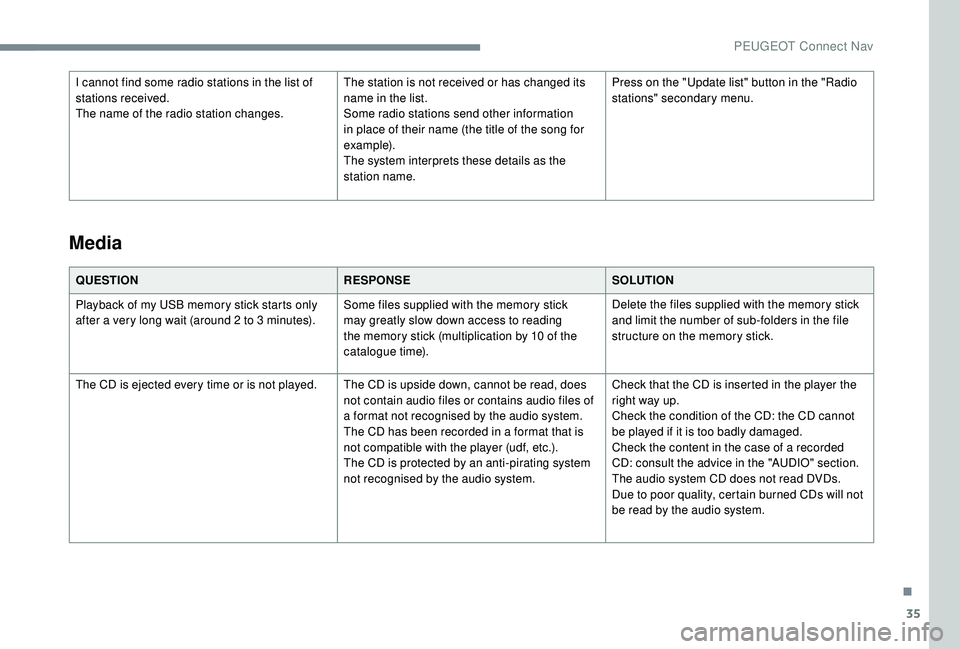
I cannot find some radio stations in the list of
stations received.
The name of the radio station changes.The station is not received or has changed its
name in the list.
Some radio stations send other information
in place of their name (the title of the song for
example).
The system interprets these details as the
station name.Press on the "Update list" button in the "Radio
stations" secondary menu.
QUESTION RESPONSESOLUTION
Playback of my USB memory stick starts only
after a very long wait (around 2 to 3
minutes).Some files supplied with the memory stick
may greatly slow down access to reading
the memory stick (multiplication by 10 of the
catalogue time). Delete the files supplied with the memory stick
and limit the number of sub-folders in the file
structure on the memory stick.
The CD is ejected every time or is not played. The CD is upside down, cannot be read, does not contain audio files or contains audio files of
a format not recognised by the audio system.
The CD has been recorded in a format that is
not compatible with the player (udf, etc.).
The CD is protected by an anti-pirating system
not recognised by the audio system.Check that the CD is inserted in the player the
right way up.
Check the condition of the CD: the CD cannot
be played if it is too badly damaged.
Check the content in the case of a recorded
CD: consult the advice in the "AUDIO" section.
The audio system CD does not read DVDs.
Due to poor quality, certain burned CDs will not
be read by the audio system.
Media
.
PEUGEOT Connect Nav
Page 310 of 324
36
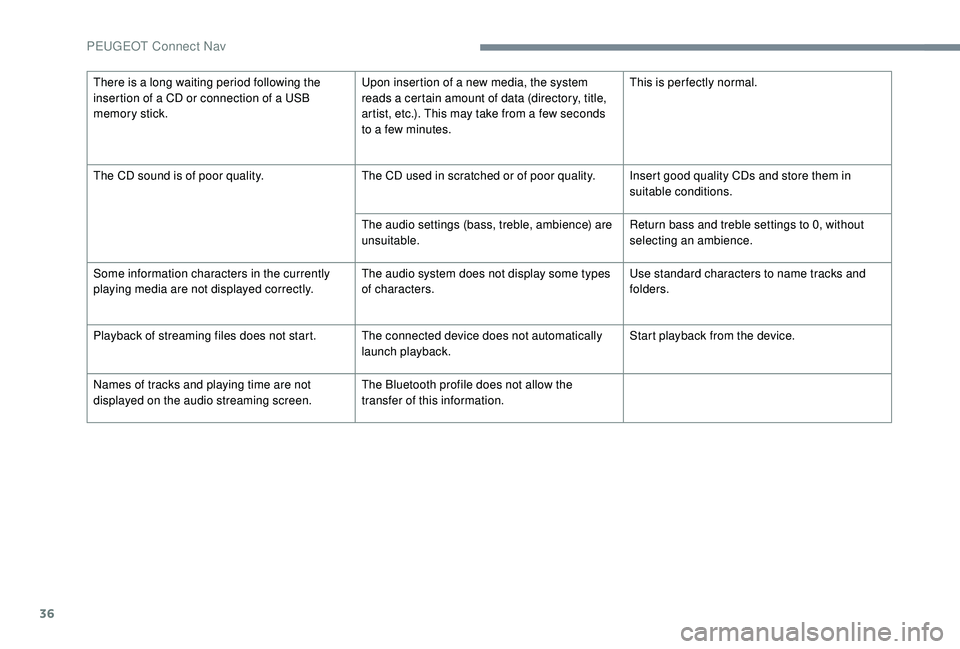
There is a long waiting period following the
insertion of a CD or connection of a USB
memory stick.Upon insertion of a new media, the system
reads a certain amount of data (directory, title,
artist, etc.). This may take from a few seconds
to a few minutes.This is per fectly normal.
The CD sound is of poor quality. The CD used in scratched or of poor quality. Insert good quality CDs and store them in
suitable conditions.
The audio settings (bass, treble, ambience) are
unsuitable. Return bass and treble settings to 0, without
selecting an ambience.
Some information characters in the currently
playing media are not displayed correctly. The audio system does not display some types
of characters.Use standard characters to name tracks and
folders.
Playback of streaming files does not start. The connected device does not automatically launch playback.Start playback from the device.
Names of tracks and playing time are not
displayed on the audio streaming screen. The Bluetooth profile does not allow the
transfer of this information.
PEUGEOT Connect Nav
Page 316 of 324

238
Player, Apple® .......................................9 , 10, 24
Player, MP3 CD ............................... ................23
Player, USB
............................................. 7, 9, 23
Port, USB
.................................... 58, 60, 7, 9, 23
Pre-heater, Diesel
........................................... 17
Pressures, tyres
.................... 188, 197, 205, 233
Pre-tensioning seat belts
................................ 91
Priming pump
................................................ 2
20
Priming the fuel system
................................ 220
Profiles
...................................................... 16, 30
Protecting children
...................
93, 95 -96, 99, 101, 102, 104, 105, 107
Puncture
........................................ 19 4, 19 6, 20 0
RRadio ......................................... 4-5, 6, 9, 21, 24
Radio, digital (Digital Audio Broadcasting – DAB)
............................6, 8, 22
Range, AdBlue
.......................................... 25 -26
RDS
................
........................................ 7, 2 1 - 2 2
Rear screen, demisting
..............................70 -71
Recharging the battery
..........................216,217
Recirculation, air
....................................... 67- 6 9
Reduction of electrical load
..........................181
Regeneration of the particle filter
.................187
Reinitialisation of the under- inflation detection system
...........................167
Reinitialising the remote control
............... 45
-46
Reminder, key in ignition
...............................11
2
Remote control
.......................................... 39-44
Removing a wheel
........................202, 204,205
Removing the mat
........................................... 59
Replacing bulbs
..................... 20
5,206, 209,210
Replacing fuses
..................................... 211,213
Replacing the air filter
............................ 18
6,187
Replacing the oil filter
................................... 18
7
Replacing the passenger compartment filter ...............................18 6,187
Reservoir, headlamp wash
........................... 18
6
Reservoir, screenwash
.................................18 6
Resetting the service indicator
.................23 -24
Resetting the trip recorder
.........................27-2 8
Reversing camera
...............................
..........15 8
Reversing lamp
...................................... 209,210
Roof bars
....................................................... 182
Running out of fuel (Diesel)
..........................220
SSafety, children ...3, 95 -96, 99, 101, 104, 105, 107Saturation of the particle filter (Diesel) ......... 18 7
SCR (Selective Catalytic Reduction) ............188
Screen, cold climate
...............................17
3 ,174
Screen, instrument panel
..........................28-29
Screen, monochrome
...............................30-32
Screen, multifunction (with audio system)
...................................... 30 -32, 4
Screen menu map
........................................... 12
Screenwash
.................................................... 81
Screenwash, rear
............................................ 81
Seat, rear bench
....................................... 56-58
Seat belts
..................................... 11, 9 0 - 91, 10 0
Seats, electric
........................................... 52-53
Seats, front
...............................
..................51- 5 3
Seats, heated
.................................................. 53
Seats, rear
................................................. 56-58
Selector, gear
......................................... 12 2,126
Serial number, vehicle
..................................233
Service indicator
............................................. 23
Servicing
..................................................... 6
, 23
Settings, equipment
............................30-34, 36
Settings, system
........................................ 16, 30
Sidelamps
............................... 7
6, 206, 208,210
Side repeater
................................................ 208Ski flap
..............................
..............................
61
Snow chains
..........................................
1 6 7, 17 3
Socket, 12 V accessory .....................
58, 60, 62
Socket, 220 V ..................................................
60
Socket, 230 V
...............................
...................
58
Socket, auxiliary
...................................... 8
, 9, 23
Socket, Jack
......................................
58, 8, 9, 23
Sockets, audio
................................................ 60
Spe
ed limiter
..................................
13
0, 132,13 5
Speed limit recognition
.......................... 13
1,132
Spotlamps, door mirror
...................................
79
Starting a Diesel engine
............................... 17
2
Starting the engine
................................. 11
0 ,111
Starting the vehicle
..................
1
2 -14 , 1 8 -1 9 , 112 ,113 , 11 9 ,12 6
Starting using another battery ..............
113 , 2 15
Station, radio ............................... ......4, 6, 21-22
Stay, bonnet
..................................................183
Steering mounted controls, audio
........ 2
-3, 3, 3
Stop & Start .................................
20, 30, 66, 70, 128, 130, 171, 183, 186, 215, 217
Stopping the vehicle ................
12 -14 , 1 8 -1 9 , 112 ,113 , 11 9 ,12 6
Storage
...................................................... 58-62
Storage wells
.................................................. 62
Storing driving positions
................................. 53
S
towing rings
.................................................. 62
Sunshine sensor
............................................. 65
Switching off the engine
.........................11 0 ,111
Synchronising the remote control
.............45-46
Alphabetical index