2018 PEUGEOT 3008 wiper
[x] Cancel search: wiperPage 4 of 360
2
.
.
Head-up digital screen 8
W arning and indicator lamps 1 1
Indicators
29
Manual test
3
5
Distance recorders
3
6
Lighting dimmer
3
6
Ambient lighting
3
6
Trip computer
3
7
Monochrome screen C
3
8
Touch screen
4
0
Remote control
4
8
K
eyless Entry and Starting
5
0
Back-up procedures
5
4
Central locking
5
7
Anti-intrusion security
5
8
Alarm
5
8
Doors
60
Boot
6
1
Hands-free tailgate
62
E
lectric windows
6
5
Panoramic opening sunroof
6
7Driving position
7
0
Front seats
7
1
Steering wheel adjustment
7
6
Mirrors
76
R
ear seats
7
8
i- Cockpit Amplify function
8
0
Heating and Ventilation
8
1
Manual air conditioning 8 4
Semi-automatic mono-zone air conditioning 8 4
Automatic dual-zone air conditioning
8
6
Recirculation of the interior air
9
0
Front demist – defrost
9
0
Heated windscreen
9
1
Rear screen demist – defrost
9
1
Programmable heating
9
2
Front fittings
9
6
Courtesy lamps
1
02
Interior ambient lighting
1
03
Rear fittings
1
04
Boot fittings
1
05Exterior lighting control stalk
1
09
Direction indicators
1
11
Headlamp adjustment
1
12
Automatic illumination of headlamps
1
12
Automatic headlamp dipping
1
14
Cornering lighting
1
16
Wiper control stalk
1
17
Automatic windscreen wipers 1 19
General safety recommendations
1
21
Hazard warning lamps
1
22
H or n
12
2
Emergency or assistance call
1
22
Electronic stability control (ESC)
1
24
Advanced Grip Control
1
27
Hill Assist Descent Control
1
28
Seat belts
1
29
Airbags
133
Child seats
1
37
Deactivating the front passenger airbag
1
38
ISOFIX mountings and child seats
1
43
i-Size child seats
1
46
Child lock
1
49
InstrumentsAccess
Over view
Ease of use and comfort
Lighting and visibility
Safety
Eco-driving
Instruments and controls 4
Contents
Page 5 of 360
3
bit.ly/helpPSA
.
.
Driving recommendations 151
Anti-theft protection 1 52
Starting / Switching off the engine
with the key
1
52
Starting / Switching off the engine
with
K
eyless Entry and Starting
1
54
Electric parking brake
1
57
Manual gearbox
1
60
Automatic gearbox
1
61
Hill start assist
1
65
Dynamic pack
1
66
Gear shift indicator
1
67
Stop & Start
1
67
Under-inflation detection
1
70
Memorising speeds
1
72
Recognition of speed limit signs and recommendation
172
Speed limiter
1
76
Cruise control
1
78
Adaptive cruise control
1
80
Distance alert and Active Safety Brake
1
89
Fatigue detection system
1
92
Lane Departure Warning System
1
94
Active Lane Departure Warning System
1
95
Blind Spot Monitoring System
2
00
Parking sensors
2
02
Visiopark 1 – Visiopark 2
2
04
Park Assist
2
09Fuel
216
Misfuel prevention (Diesel) 2 16
Compatibility of fuels
2
18
Towing device
2
19
Towbar with quickly detachable towball
2
20
Load reduction mode
2
23
Energy economy mode
2
23
Very cold climate screen
2
24
Snow chains
2
25
Fitting roof bars
2
25
Bonnet
226
Engine compartment
2
28
Checking levels
2
29
Checks
231
AdBlue
® (BlueHDi engines) 2 34
Warning triangle
2
37
Running out of fuel (Diesel)
2
37
Tool kit
2
38
Temporary puncture repair kit
2
40
Spare wheel
2
43
Changing a bulb
2
47
Changing a wiper blade
2
52
Changing a fuse
2
53
12 V battery
2
57
Towing the vehicle
2
61Engine technical data and towed loads
2
63
Petrol engines and towed loads
2
64
Diesel engines and towed loads
2
65
Dimensions
2
68
Identification markings
2
69
Driving
Practical information
In the event of a breakdown Technical data
Alphabetical index
Audio equipment and telematics
PEUGEOT Connect Nav
PEUGEOT Connect Radio
Bluetooth audio system
Access to additional videos
.
Contents
Page 7 of 360

5
Steering mounted controlsSide switch panelCentral switch panel
1.
External lighting / Direction indicators
control stalk
2. Wiper / Screenwash / Trip computer
control stalk
3. Audio system setting controls
4. Instrument panel display mode selection
wheel
5. Voice synthesis control
Volume adjustment
6. Speed limiter / Cruise control / Adaptive
cruise control with Stop function controls 1.
Headlamp beam height adjustment wheel
2. Programmable heating operation
indicator lamp
3. Hands-free tailgate opening / closing
4. Deactivation of Stop & Start
5. Deactivation of the interior volumetric and
anti-tilt monitoring
6. Heated windscreen
7. Electric child lock 1.
Hazard warning lamps switch
2. Bluetooth audio system controls
or
Touch screen controls with PEUGEOT
Connect Radio or PEUGEOT Connect
Nav
i- Cockpit Amplify function
3. Manual air conditioning system controls
or
Semi-automatic or automatic air
conditioning system controls
4. Rear screen demist / defrost control
5. Central locking control
6. Heated seats controls
.
Over view
Page 26 of 360
24
Warning / indicator lampStateCause Action / Observations
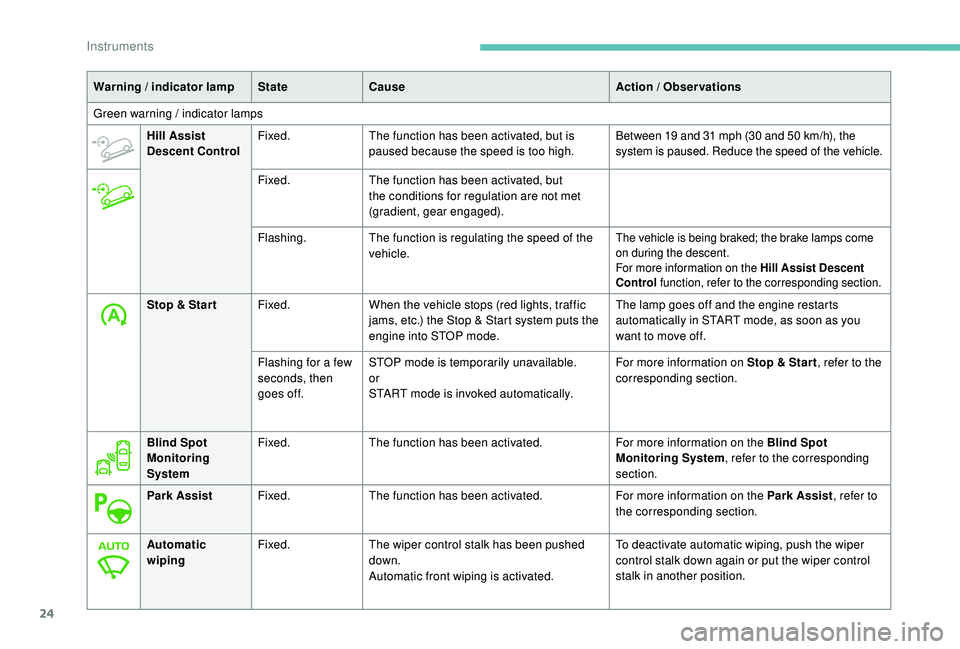
Green warning / indicator lamps Hill Assist
Descent Control Fixed.
The function has been activated, but is
paused because the speed is too high.
Between 19 and 31 mph (30 and 50 km/h), the
s ystem is paused. Reduce the speed of the vehicle.
Fixed. The function has been activated, but
the conditions for regulation are not met
(gradient, gear engaged).
Flashing. The function is regulating the speed of the
vehicle.
The vehicle is being braked; the brake lamps come
on during the descent.
For more information on the Hill Assist Descent
Control function, refer to the corresponding section.
Stop & Star t Fixed.When the vehicle stops (red lights, traffic
jams, etc.) the Stop & Start system puts the
engine into STOP mode. The lamp goes off and the engine restarts
automatically in START mode, as soon as you
want to move off.
Flashing for a few
seconds, then
goes off. STOP mode is temporarily unavailable.
or
START mode is invoked automatically. For more information on Stop & Star t
, refer to the
corresponding section.
Blind Spot
Monitoring
System Fixed.
The function has been activated. For more information on the Blind Spot
Monitoring System, refer to the corresponding
section.
Park Assist Fixed.The function has been activated. For more information on the Park Assist, refer to
the corresponding section.
Automatic
wiping Fixed.
The wiper control stalk has been pushed
down.
Automatic front wiping is activated. To deactivate automatic wiping, push the wiper
control stalk down again or put the wiper control
stalk in another position.
Instruments
Page 39 of 360
37
or F
Sel
ect the Settings
menu in the
upper bar of the touch screen.
F
P
ress the "Brightness " button.
F
A
djust the brightness by pressing the
arrows or moving the cursor.
F
C
onfirm to save and quit.
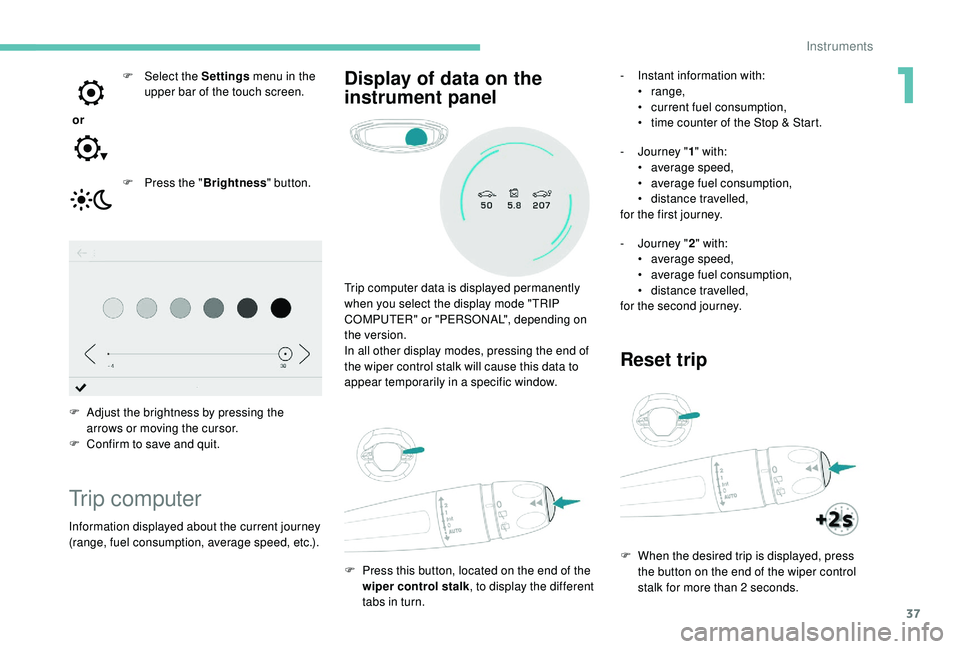
Trip computer
Information displayed about the current journey
(range, fuel consumption, average speed, etc.). Trip computer data is displayed permanently
when you select the display mode "TRIP
COMPUTER" or "PERSONAL", depending on
the version.
In all other display modes, pressing the end of
the wiper control stalk will cause this data to
appear temporarily in a specific window.
F
P
ress this button, located on the end of the
wiper control stalk , to display the different
tabs in turn.
Display of data on the
instrument panel- Instant information with: • range,
•
c
urrent fuel consumption,
•
t
ime counter of the Stop & Start.
-
J
ourney " 1" with:
•
a
verage speed,
•
a
verage fuel consumption,
•
d
istance travelled,
for the first journey.
-
J
ourney " 2" with:
•
a
verage speed,
•
a
verage fuel consumption,
•
d
istance travelled,
for the second journey.
Reset trip
F When the desired trip is displayed, press the button on the end of the wiper control
stalk for more than 2
seconds.
1
Instruments
Page 42 of 360

40
Touch screen
Define the vehicle parameters
This menu allows the activation or deactivation
of the following equipment, depending on
version:
-
"
Access to the vehicle" :
•
"
Remote control action".
For more information on the Remote control
and driver door selective unlocking in
particular, refer to the "Access" section.
-
"
Comfort" :
•
"
Rear wipe in reverse gear".
For more information on the Wipers ,
refer to the "Lighting and visibility"
section.
•
"
Parking assistance".
For more information on Parking
assistance , refer to the "Driving"
section.
•
"
Fatigue Detection System".
For more information on the Fatigue
detection system , refer to the "Driving"
section.
-
"
Driving assistance" :
•
"
Auto. emergency braking".
For more information on the Active
Safety Brake , refer to the "Driving"
section.
•
"
Speed recommendation".
For more information on Speed limit
recognition , refer to the "Driving"
section. •
"
Tyre inflation".
For more information on Under-
inflation detection and reinitialisation in
particular, refer to the "Driving" section.
Choice of language
This menu allows selection of the language
used by the screen and the instrument panel.
Display configuration
This menu gives access to the following
settings:
-
"
Choice of units",
-
"
Date and time adjustment",
-
"
Display parameters",
-
"Brightness".
Adjusting the date and time
F
P
ress the " 7" or " 8" button to display the
"Display configuration" menu, then press
OK.
F
P
ress the " 5" or " 6" button to select the
"Date and time adjustment" button, then
press OK.
F
P
ress the " 7" or " 8" button to select the
setting to modify. Confirm by pressing OK,
then modify the setting and confirm again to
save the modification.
F
A
djust the settings one by one, confirming
with the OK button. F
P
ress the "
5" or " 6" button, then the OK
button to select the OK box and confirm or
the Back button to cancel.
As a safety measure, the driver must only
carry out operations that require sustained
attention when stationary.
This system gives access to:
-
t
he permanent display of the time and
the exterior temperature (a blue symbol
appears when there is a risk of ice),
-
t
he heating/air conditioning controls,
-
m
enus for adjusting settings for vehicle
functions and systems,
-
a
udio system and telephone controls and
the display of associated information,
-
t
he display of visual parking aids (visual
parking sensor information, Park Assist,
e t c .),
-
I
nternet ser vices and the display of
associated information.
and, depending on equipment, allows:
-
a
ccess to the navigation system controls
and the display of associated information.
Instruments
Page 45 of 360

43
Vehicle / Driving menu
"Vehicle settings" tab
PEUGEOT Connect Nav
FamiliesFunctions
"Driving lighting" -
"
Directional headlamps": activation / deactivation of cornering lighting.
"Vehicle access" -
"
Remote control action: Unlock driver's door": activation / deactivation of
selective unlocking of the driver's door.
-
"
Unlock boot only": activation / deactivation of selective unlocking at the
tailgate.
-
"
Motorised tailgate": activation / deactivation of motorised operation of
the tailgate.
-
"
Hands-Free Tailgate Access": activation / deactivation of the hands-free
tailgate access system.
"Comfort lighting" -
"
Rear wiper in reverse": activation / deactivation of the rear wiper on with
reverse gear.
-
"
Mirror adaptation in reverse": activation / deactivation of the automatic
door mirror tilt when engaging reverse gear.
-
"
Guide-me-home lighting": activation / deactivation of automatic guide-
me-home lighting.
-
"
Welcome lighting": activation / deactivation of exterior welcome lighting.
-
"
Ambient lighting": activation / deactivation of ambient lighting and
adjustment of brightness.
"Security" -
"
Collision risk alert": activation / deactivation of the collision risk alert and
automatic emergency braking.
-
"
Recommended speed display": activation / deactivation of speed limit
sign recognition.
-
"
Fatigue Detection System": activation / deactivation of the driver fatigue
detection system.
1
Instruments
Page 46 of 360
44
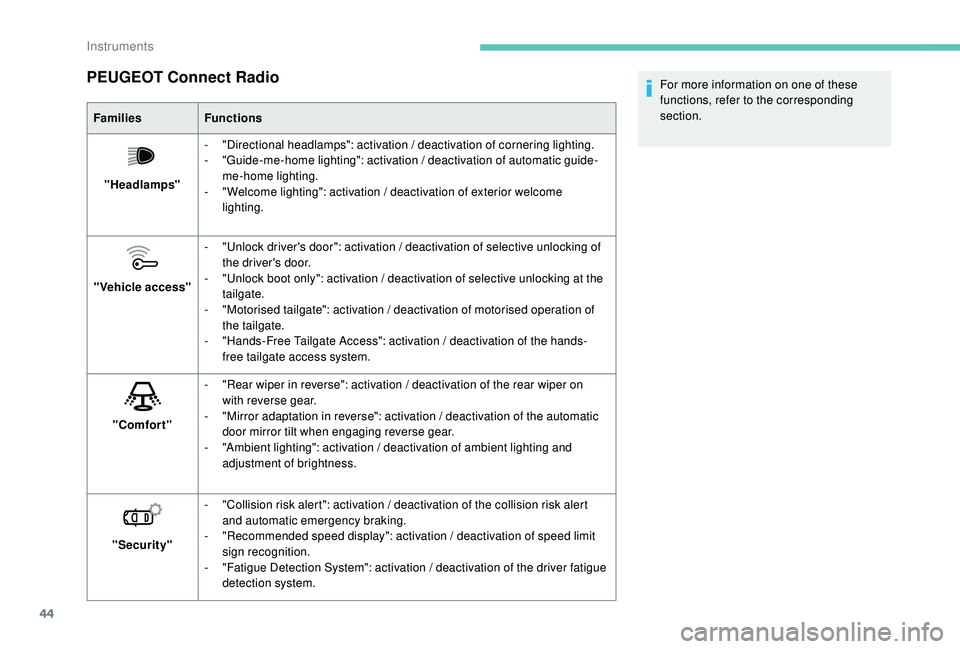
PEUGEOT Connect Radio
FamiliesFunctions
"Headlamps" -
"
Directional headlamps": activation / deactivation of cornering lighting.
-
"
Guide-me-home lighting": activation / deactivation of automatic guide-
me-home lighting.
-
"
Welcome lighting": activation / deactivation of exterior welcome
lighting.
"Vehicle access" -
"
Unlock driver's door": activation / deactivation of selective unlocking of
the driver's door.
-
"
Unlock boot only": activation / deactivation of selective unlocking at the
tailgate.
-
"
Motorised tailgate": activation / deactivation of motorised operation of
the tailgate.
-
"
Hands-Free Tailgate Access": activation / deactivation of the hands-
free tailgate access system.
"Comfort" -
"
Rear wiper in reverse": activation / deactivation of the rear wiper on
with reverse gear.
-
"
Mirror adaptation in reverse": activation / deactivation of the automatic
door mirror tilt when engaging reverse gear.
-
"
Ambient lighting": activation / deactivation of ambient lighting and
adjustment of brightness.
"Security" -
"
Collision risk alert": activation / deactivation of the collision risk alert
and automatic emergency braking.
-
"
Recommended speed display": activation / deactivation of speed limit
sign recognition.
-
"
Fatigue Detection System": activation / deactivation of the driver fatigue
detection system. For more information on one of these
functions, refer to the corresponding
section.
Instruments