2018 PEUGEOT 3008 lock
[x] Cancel search: lockPage 163 of 360
161
F Raise the trigger under the knob and move the gear lever to the left then for wards.
Only engage reverse gear when the
vehicle is stationary with the engine at
idle.
As a safety precaution and to facilitate
starting of the engine, always select
neutral and depress the clutch pedal.
Engaging 5th or 6th gear
F Move the lever fully to the right to engage 5th
or 6th g e a r.
Failure to follow this advice may cause
permanent damage to the gearbox
(engagement of 3
rd or 4th gear by mistake).
Automatic gearbox
( E AT 6 / E AT 8)
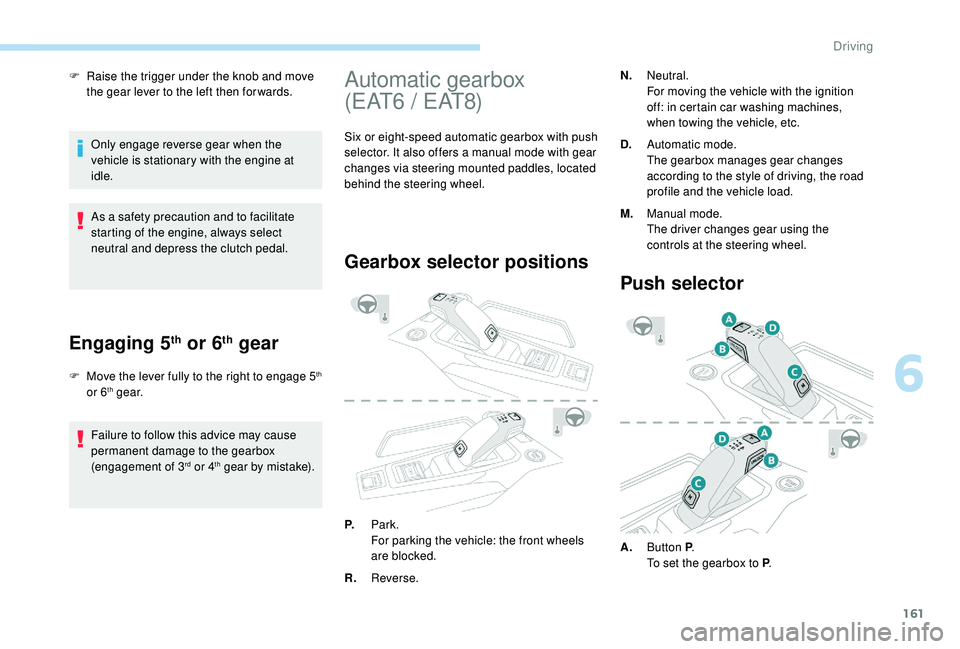
Six or eight-speed automatic gearbox with push
selector. It also offers a manual mode with gear
changes via steering mounted paddles, located
behind the steering wheel.
Gearbox selector positions
N. Neutral.
For moving the vehicle with the ignition
off: in certain car washing machines,
when towing the vehicle, etc.
D. Automatic mode.
The gearbox manages gear changes
according to the style of driving, the road
profile and the vehicle load.
M. Manual mode.
The driver changes gear using the
controls at the steering wheel.
P. Park.
For parking the vehicle: the front wheels
are blocked.
R. Reverse.
Push selector
A.Button P .
To set the gearbox to P .
6
Driving
Page 164 of 360
162
SPORT
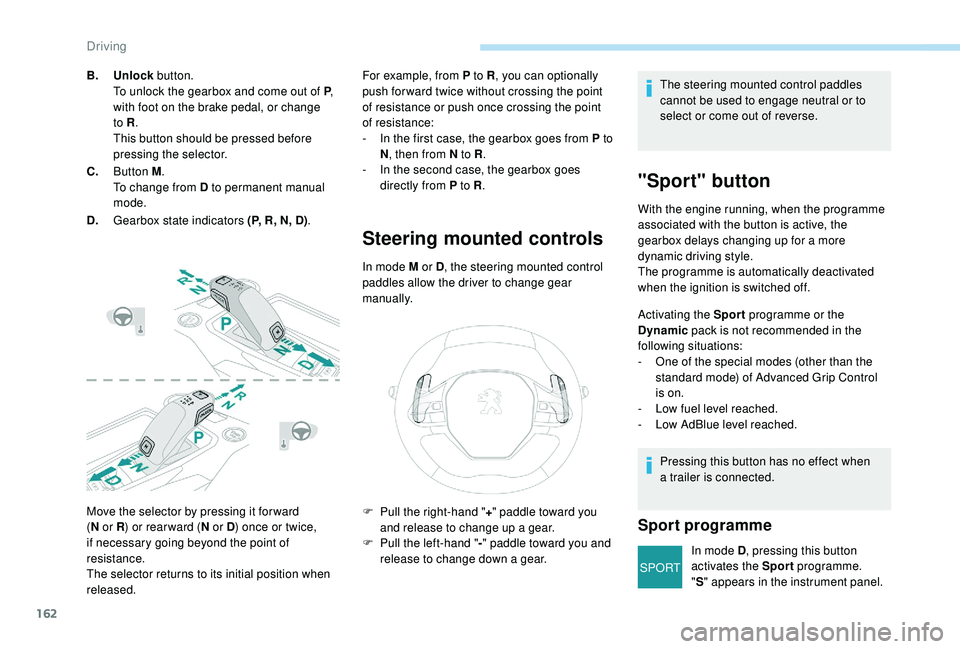
Move the selector by pressing it for ward
(N
or R ) or rear ward ( N or D) once or twice,
if necessary going beyond the point of
resistance.
The selector returns to its initial position when
released. For example, from P to R
, you can optionally
push for ward twice without crossing the point
of resistance or push once crossing the point
of resistance:
-
I
n the first case, the gearbox goes from P to
N , then from N to R .
-
I
n the second case, the gearbox goes
directly from P to R .
Steering mounted controls
In mode M or D, the steering mounted control
paddles allow the driver to change gear
manually.
B.
Unlock button.
To unlock the gearbox and come out of P ,
with foot on the brake pedal, or change
to R .
This button should be pressed before
pressing the selector.
C. Button M .
To change from D to permanent manual
mode.
D. Gearbox state indicators (P, R, N, D) . The steering mounted control paddles
cannot be used to engage neutral or to
select or come out of reverse.
"Sport" button
With the engine running, when the programme
associated with the button is active, the
gearbox delays changing up for a more
dynamic driving style.
The programme is automatically deactivated
when the ignition is switched off.
Activating the Sport
programme or the
Dynamic pack is not recommended in the
following situations:
-
O
ne of the special modes (other than the
standard mode) of Advanced Grip Control
is on.
-
L
ow fuel level reached.
-
L
ow AdBlue level reached.
Pressing this button has no effect when
a trailer is connected.
Sport programme
In mode D , pressing this button
activates the Sport programme.
" S " appears in the instrument panel.
F
P
ull the right-hand "
+" paddle toward you
and release to change up a gear.
F
P
ull the left-hand "
-"
paddle toward
you and
release to change down a gear.
Driving
Page 165 of 360
163
SPORT
Dynamic pack
The orange indicator lamp in the
button is on while the Dynamic pack
is activated.
Displays in the instrument
panel
If the driver's door is opened with the
ignition on, a message is displayed asking
you to put the gearbox into mode P .
The state of the gearbox is displayed in
the instrument panel for a few moments
after switching off the ignition.
Operation
You can activate or deactivate the function:
- b y pressing this button,
or
-
v
ia the i-Cockpit Amplify function, by
modifying the setting for an ambience in the
touch screen.
For more information on the Dynamic Pack
and the i-Cockpit Amplify function, refer to
the corresponding section.
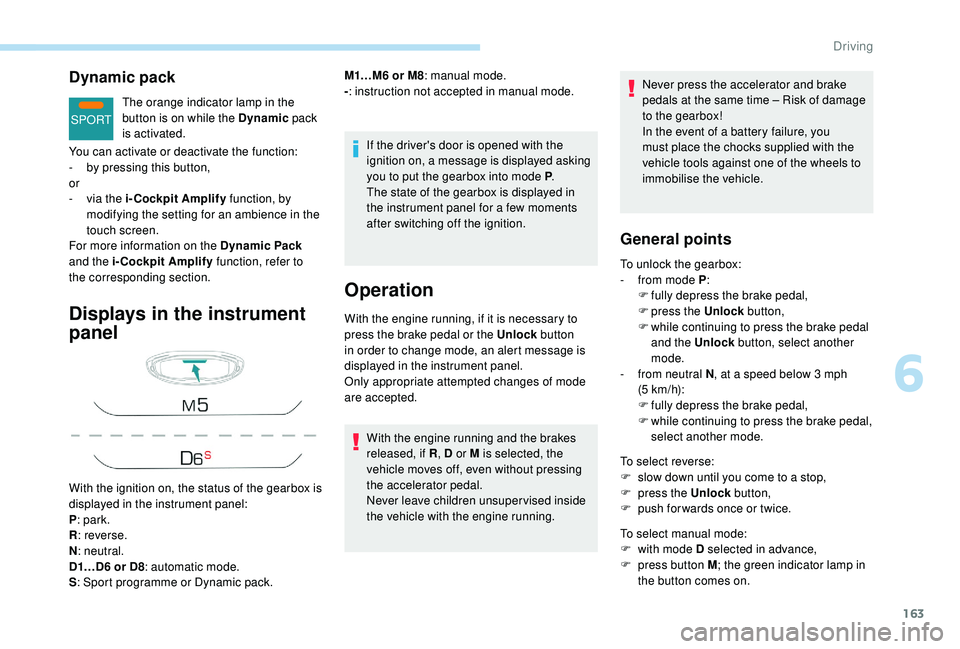
With the ignition on, the status of the gearbox is
displayed in the instrument panel:
P : park.
R : reverse.
N : neutral.
D1…D6 or D8 : automatic mode.
S : Sport programme or Dynamic pack. M1…M6 or M8
: manual mode.
- : instruction not accepted in manual mode.
With the engine running, if it is necessary to
press the brake pedal or the Unlock button
in order to change mode, an alert message is
displayed in the instrument panel.
Only appropriate attempted changes of mode
are accepted.
With the engine running and the brakes
released, if R , D or M is selected, the
vehicle moves off, even without pressing
the accelerator pedal.
Never leave children unsuper vised inside
the vehicle with the engine running. Never press the accelerator and brake
pedals at the same time
– Risk of damage
to the gearbox!
In the event of a battery failure, you
must place the chocks supplied with the
vehicle tools against one of the wheels to
immobilise the vehicle.
General points
To unlock the gearbox:
- f rom mode P :
F
f
ully depress the brake pedal,
F
press the Unlock button,
F
w
hile continuing to press the brake pedal
and the Unlock button, select another
mode.
-
f
rom neutral N , at a speed below 3
mph
(5
km/h):
F
f
ully depress the brake pedal,
F
w
hile continuing to press the brake pedal,
select another mode.
To select reverse:
F
s
low down until you come to a stop,
F
p
ress the Unlock button,
F
p
ush forwards once or twice.
To select manual mode:
F
w
ith mode D selected in advance,
F
p
ress button M ; the green indicator lamp in
the button comes on.
6
Driving
Page 166 of 360
164
To switch off the ignition, the vehicle must be
stationary.
To put the vehicle in free-wheeling mode,
engine off:
F
w
ith the vehicle stationary, engine running,
select N ,
F
s
witch off the engine,
F
w
ithin five seconds, switch the ignition on
again,
F
w
ith your foot on the brake pedal, push the
selector for wards or backwards once to
confirm N and manually release the electric
parking brake,
F
s
witch off the ignition.
If you exceed the time limit of five seconds,
the gearbox engages mode P ; you must then
restart the procedure.
If you open the driver's door when mode
N is engaged, an audible signal will
sound. It will stop when you close the
driver's door again.
Special aspects of automatic
mode
The gearbox selects the gear that offers
optimum per formance, taking account of the
exterior temperature, the profile of the road, the
load on the vehicle and the style of driving.
For maximum acceleration without touching
the selector, press the accelerator fully down
(kick-down). The gearbox changes down
automatically or holds the gear selected until
the maximum engine speed is reached.
When braking, the gearbox changes down
automatically to provide effective engine
braking.
The steering mounted controls allow the driver
to temporarily select a gear, if the road and
engine speed permit.
Special aspects of manual mode
The change from one gear to another takes
place only if the road speed and engine speed
permit.
If the engine speed is too high or too low, the
gear selected flashes for a few seconds, then
the gear actually engaged is displayed.
Moving off
From mode P :
F P ress the brake pedal firmly.
F
S
tart the engine.
F
M
aintaining pressure on the brake pedal,
press the Unlock button.
F
P
ush once or twice rear ward to select the
automatic mode D , or for ward to engage
reverse R .
From neutral N :
F
P
ress the brake pedal firmly.
F
S
tart the engine.
F
M
aintaining pressure on the brake pedal,
push rear ward to select the automatic
mode
D, or for ward, while pressing the
Unlock
button to engage reverse R .
Then, from P or N :
F
R
elease the brake pedal.
F
A
ccelerate progressively to automatically
release the electric parking brake.
F
W
ith the parking brake released, the vehicle
then moves off.
To quit manual mode:
F
p
ush for wards once to go back to D
.
or
F
p
ress button M ; the indicator lamp in the
button goes off.
Driving
Page 167 of 360
165
In severe wintry conditions (temperature
below -23°C), it is recommended that the
engine be allowed to run for a few minutes
before moving off, to ensure the correct
operation and durability of the engine and
gearbox.
Stopping the vehicle
Whatever the state of the gearbox when the
ignition is switched off, mode P is engaged
automatically, with the exception of N, in
which case mode P
will be engaged after a
delay of 5
seconds (allowing the change to
free-wheel).
Check that mode P has been engaged and
that the electric parking brake was applied
automatically; if not, apply it manually.
The corresponding indicator lamps
for the selector panel and the
electric parking brake control lever
must be on, as well as the ones in
the instrument panel.
Operating faults
Malfunction of the gearbox
This is signalled by the illumination
of this warning lamp, accompanied
by the display of a message and an
audible signal, when the ignition is
switched on.
Malfunction of the selector
In the event of a minor fault In the event of a serious fault
Stop as soon as it is safe to do so, away
from the traffic, and call a PEUGEOT
dealer or a qualified workshop.
When the ignition is switched off, the
gearbox goes into mode P automatically.
The gearbox switches to back-up mode: drive
mode
D is locked in third gear, the steering-
mounted control paddles are inoperative,
mode M is no longer available. You may feel a
pronounced jolt when engaging reverse. This
does not present any risk for the gearbox.
Do not drive faster than 62 mph (100 km/h),
keeping to the speed limit.
Go to a PEUGEOT dealer or a qualified
workshop.
You are alerted by this warning
lamp lighting up, accompanied by
the display of a message and an
audible signal.
In certain cases, the selector lamps may not
come on, but the state of the gearbox is still
displayed in the instrument panel. You are alerted by the illumination of
this warning lamp.
Hill start assist
System which keeps your vehicle immobilised
temporarily (approximately 2
seconds) when
starting on a gradient, the time it takes to
move your foot from the brake pedal to the
accelerator pedal.
This system only operates when:
-
t
he vehicle has been brought to a complete
stop, with your foot on the brake pedal,
-
c
ertain slope conditions are met,
-
w
ith the driver's door closed.
Drive cautiously and go to a PEUGEOT or a
qualified workshop.
6
Driving
Page 211 of 360
209
180° view
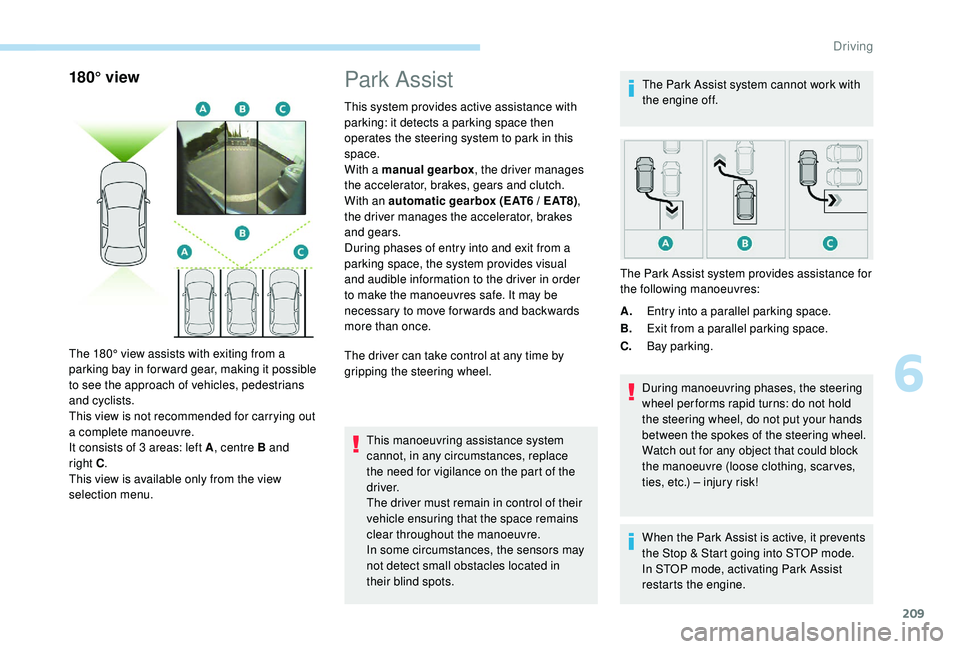
The 180° view assists with exiting from a
parking bay in forward gear, making it possible
to see the approach of vehicles, pedestrians
and cyclists.
This view is not recommended for carrying out
a complete manoeuvre.
It consists of 3 areas: left A, centre B and
right
C.
This view is available only from the view
selection menu.
Park Assist
This system provides active assistance with
parking: it detects a parking space then
operates the steering system to park in this
space.
With a manual gearbox , the driver manages
the accelerator, brakes, gears and clutch.
With an automatic gearbox (EAT6 / EAT8) ,
the driver manages the accelerator, brakes
and gears.
During phases of entry into and exit from a
parking space, the system provides visual
and audible information to the driver in order
to make the manoeuvres safe. It may be
necessary to move for wards and backwards
more than once.
The driver can take control at any time by
gripping the steering wheel.
This manoeuvring assistance system
cannot, in any circumstances, replace
the need for vigilance on the part of the
driver.
The driver must remain in control of their
vehicle ensuring that the space remains
clear throughout the manoeuvre.
In some circumstances, the sensors may
not detect small obstacles located in
their blind spots. The Park Assist system cannot work with
the engine off.
A. Entry into a parallel parking space.
B. Exit from a parallel parking space.
C. Bay parking.
During manoeuvring phases, the steering
wheel per forms rapid turns: do not hold
the steering wheel, do not put your hands
between the spokes of the steering wheel.
Watch out for any object that could block
the manoeuvre (loose clothing, scar ves,
ties, etc.) – injury risk!
When the Park Assist is active, it prevents
the Stop & Start going into STOP mode.
In STOP mode, activating Park Assist
restarts the engine.
The Park Assist system provides assistance for
the following manoeuvres:
6
Driving
Page 218 of 360
216
Fuel
Fuel tank capacity: approximately 53 litres.
R eser ve level: 6 litres.
Low fuel level
When the low fuel level is reached
in the fuel tank, this warning lamp
comes on in the instrument panel,
accompanied by the display of a
message and an audible signal.
When it first comes on, about
6
litres of fuel is left in the tank.
If your vehicle is fitted with Stop & Start,
never refuel with the engine in STOP
mode; you must switch off the ignition
using the key, or the START/STOP button
if your vehicle has
K
eyless Entry and
Starting.
Refuelling
If you have put in the wrong fuel for your
vehicle, you must have the fuel tank
drained and filled with the correct fuel
before starting the engine. Once you have finished refuelling:
F
R
efit the filler cap.
F
T
urn it to the right.
F
C
lose the fuel filler flap.Misfuel prevention (Diesel)
(Depending on the country of sale.)
Mechanical device which prevents filling the
tank of a Diesel vehicle with petrol. It avoids
the risk of engine damage that can result from
filling with the wrong fuel.
Until sufficient fuel is added, this warning lamp
appears every time the ignition is switched on,
accompanied by the display of a message and
an audible signal. When driving, this message
and audible signal are repeated with increasing
frequency as the fuel level drops towards 0
.
Refuel as soon as possible to avoid running out
of fuel.
For more information on Running out of fuel
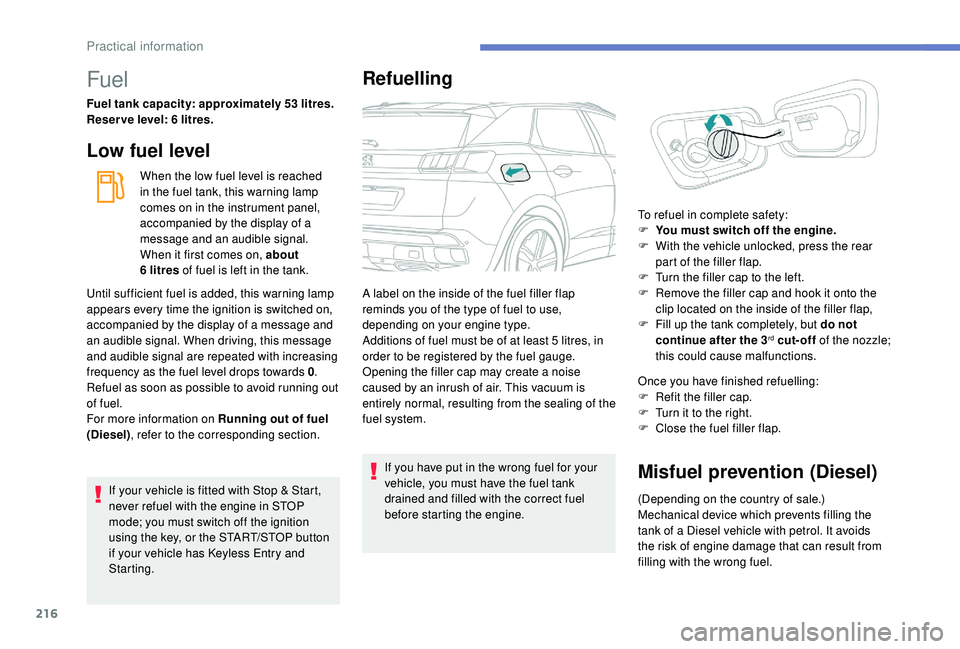
(Diesel) , refer to the corresponding section. A label on the inside of the fuel filler flap
reminds you of the type of fuel to use,
depending on your engine type.
Additions of fuel must be of at least 5
litres, in
order to be registered by the fuel gauge.
Opening the filler cap may create a noise
caused by an inrush of air. This vacuum is
entirely normal, resulting from the sealing of the
fuel system. To refuel in complete safety:
F
Y
ou must switch off the engine.
F
W
ith the vehicle unlocked, press the rear
part of the filler flap.
F
T
urn the filler cap to the left.
F
R
emove the filler cap and hook it onto the
clip located on the inside of the filler flap,
F
F
ill up the tank completely, but do not
continue after the 3
rd cut-off of the nozzle;
this could cause malfunctions.
Practical information
Page 222 of 360
220
Towbar with quickly
detachable towball
No tools are required to install or remove the
towball on this genuine towbar system.
Presentation
Trailers with LED lamps are not
compatible with the wiring harness of this
device.To know the Technical data
, and, in
particular, the towable weights for your
vehicle, refer to the corresponding
section.
To ensure complete safety while driving
with a Towbar system , refer to the
corresponding section.
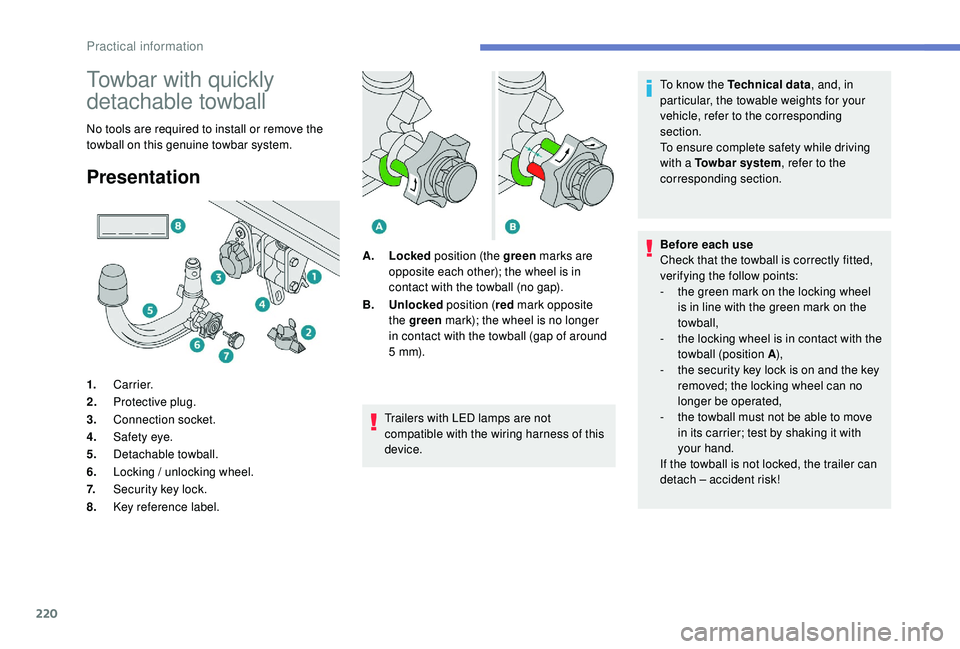
Before each use
Check that the towball is correctly fitted,
verifying the follow points:
-
t
he green mark on the locking wheel
is in line with the green mark on the
towball,
-
t
he locking wheel is in contact with the
towball (position A ),
-
t
he security key lock is on and the key
removed; the locking wheel can no
longer be operated,
- t he towball must not be able to move
in its carrier; test by shaking it with
your hand.
If the towball is not locked, the trailer can
detach
– accident risk!
1.
Carrier.
2. Protective plug.
3. Connection socket.
4. Safety eye.
5. Detachable towball.
6. Locking / unlocking wheel.
7. Security key lock.
8. Key reference label. A.
Locked position (the green marks are
opposite each other); the wheel is in
contact with the towball (no gap).
B. Unlocked position (red mark opposite
the green mark); the wheel is no longer
in contact with the towball (gap of around
5
m m).
Practical information