2018 OPEL AMPERA E Seat
[x] Cancel search: SeatPage 79 of 267

Instruments and controls77Total vehicle range
Displays the total vehicle range.
Driving economically 3 147.
Service display If it is time for service, a message is
displayed in the Driver Information
Centre.
The first warning is displayed
400 km before service is due and the
second warning 80 km before the
service is due. The message appears every time the vehicle is switched on.
The message can be dismissed or
reset. Reset after service only.
Driver Information Centre 3 82.
Control indicators
The control indicators described are
not present in all vehicles. The
description applies to all instrument
versions. Depending on the
equipment, the position of the control indicators may vary. When the vehicle
is switched on, most control indicators
will illuminate briefly as a functionality test.
The control indicator colours mean:red:danger, important reminderyellow:warning, information, faultgreen:confirmation of activationblue:confirmation of activationwhite:confirmation of activation,
system ready
Control indicators 3 72.
Turn signal
O illuminates or flashes green.
Illuminates briefly The parking lights are switched on.
Flashes
A turn signal or the hazard warning
flashers are activated.
Rapid flashing: failure of a turn signal
light or associated fuse.
Bulb replacement 3 219.
Fuses 3 222.
Turn signals 3 101.
Seat belt reminder Seat belt reminder on front seats
X for driver's seat illuminates or
flashes red in the instrument cluster.
Page 80 of 267

78Instruments and controlsk for front passenger seat illuminates
or flashes red in the overhead
console, when seat is occupied.
Illuminates
After the vehicle has been switched on until the seat belt has been
fastened.
Flashes
After having started the propulsion system for a certain time until the seat belt has been fastened.
Fastening the seat belt 3 43.
Airbag and belt tensioners
v illuminates red.
When the vehicle is switched on, the
control indicator illuminates for
several seconds. If it does not
illuminate, does not go out after
four seconds or illuminates whilst
driving, there is a fault in the airbag
system.
Seek the assistance of a workshop.
The airbags and belt pretensioners
may fail to trigger in the event of an
accident.If there is a problem with the airbag
system, a Driver Information Centre
message may also come on.
Deployment of the belt pretensioners
or airbags is indicated by continuous
illumination of v.9 Warning
Have the cause of the fault
remedied immediately by a
workshop.
Belt pretensioners 3 42.
Airbag system 3 45.
Driver Information Centre 3 82.
Airbag deactivation
V illuminates yellow.
The front passenger airbag is
activated.
* illuminates yellow.
The front passenger airbag is
deactivated.
Airbag deactivation 3 49.
Charging system
p illuminates red.
Illuminates when the vehicle is
switched on and extinguishes shortly
after the propulsion system starts.
Page 92 of 267

90Instruments and controlsSome important messages may
appear additionally in the Info display.
Some messages only pop-up for a few seconds.
Warning chimes When starting the propulsion
system or whilst driving
Only one warning chime will sound at a time.
The warning chime regarding not
fastened seat belts has priority over
any other warning chime.
● If seat belt is not fastened.
● If a door or the tailgate is not fully
closed when starting off.
● If a certain speed is exceeded with parking brake applied.
● If approaching a vehicle ahead too rapidly.
● If a programmed speed or speed
limit is exceeded.
● If a warning message appears in the Driver Information Centre.
● If the electronic key is not in the passenger compartment.● If the parking assist detects an object.
● If an unintended lane change occurs.
● If safety function of the power tailgate detects obstacles in the
moving area.
When the vehicle is parked and /
or the driver's door is opened
● With exterior lights on.
Battery voltage When the voltage of the 12 V vehicle
battery is running low, a warning
message will appear in the Driver
Information Centre.
1. Switch off any electrical consumers which are not requiredfor a safe drive, e.g. seat heating,
heated rear window or other main consumers.
2. Charge the 12 V vehicle battery by
driving continuously for a while or
by using a charging device.The warning message will disappear
after the vehicle has been started
twice without a voltage drop.
If the 12 V vehicle battery cannot be
recharged, have the cause of the fault
remedied by a workshop.
Page 93 of 267

Instruments and controls91Vehicle personalisation
The vehicle's behaviour can be
personalised by changing the settings in the Info display.
Depending on vehicle equipment and
country-specific regulations some of
the functions described below may
not be available.
Some functions are only displayed or
active when the vehicle is on.
Personal settings
Touch p and then touch 1.
The following settings can be
selected by touching the icon or the
button on the touch screen:
● Time and date
● Language
● Radio settings
● Vehicle settings
● Devices
● Device Remote Access
● Apple CarPlay
● Android Auto
● KeyPass
● USB Auto Launch
● Wi-Fi
● Display Settings
● Rear camera
● Return to factory settings
● Audible touch feedback
● Text scroll
● Software information
In the corresponding submenus, the
following settings can be changed:
Time and date
Clock 3 68.Language
Selection of the desired language.
System settings 3 116.
Radio settings
Volume settings 3 115.
Vehicle settings ● Climate and air quality
Auto fan speed : Modifies the
level of the cabin airflow of the
climate control in automatic
mode.
Auto heated seats : Automatically
activates the seat heating.
Auto demist : Supports
windscreen dehumidification by
automatically selecting the
necessary settings and
automatic air conditioning mode.
● Comfort and convenience
Chime volume : Changes the
volume of warning chimes.
Personalisation by driver :
Activates or deactivates the
personalisation function.
Auto wipe in reverse gear :
Activates or deactivates
Page 94 of 267

92Instruments and controlsautomatic switching on of the
rear window wiper when reverse
gear is engaged.
● Collision / detection systems
Pedestrian safety signal :
Activates or deactivates
pedestrian safety alert. Even if
pedestrian safety signal is
deactivated, it is automatically
activated while this menu is not
accessible such as OnStar
calling, camera projection, Apple
CarPlay and Android Auto, non-
auto dismiss pop-up, etc.
Forward Collision System : This
allows the feature’s notification to
be customised. This feature will
turn on or off the Forward
Collision Alert and Active
Emergency Braking. The Off
setting disables all Forward
Collision Alert and Active
Emergency Braking functions.
With the Alert and Brake setting,
both Forward Collision Alert and
Active Emergency Braking are
available. The Alert setting
disables Active EmergencyBraking. Select Off, Alert , or Alert
and Brake .
Front pedestrian detection : This
allows the feature’s notification to be customised. This feature may
help avoid or reduce the harm
caused by front-end crashes with
nearby pedestrians. Select Off,
Alert , or Alert and Brake .
Rear Cross Traffic Alert :
Activates or deactivates rear
cross traffic alert.
Lane Change Alert : Activates or
deactivates lane change alert.
● Lighting
Vehicle locator lights : Activates
or deactivates the entry lighting.
Exit lighting : Activates or
deactivates and changes the duration of exit lighting.
● Power door locks
Auto door lock : Activates or
deactivates the automatic door
locking function after switching on the vehicle.
Unlocked door anti lockout :
Activates or deactivates the doorlocking function while a door is
open.
Delayed door lock : Activates or
deactivates the delayed door locking function. This feature
delays the actual locking of the
doors until all doors are closed. It just can be toggled when Auto
door lock is deactivated.
● Remote lock / unlock / start
Remote unlock light feedback :
Activates or deactivates the
hazard warning flasher feedback
whilst unlocking.
Remote lock feedback : Changes
what kind of feedback is given
when locking the vehicle.
Remote door unlock : Changes
the configuration to unlock only
the driver's door or the whole
vehicle whilst unlocking.
Relock remotely unlocked doors :
Activates or deactivates the
automatic relock function after
unlocking without opening the vehicle.
Remote start auto heat seats :
Activates or deactivates
Page 95 of 267

Instruments and controls93automatically the heated seats
when using remote start.
Passive door unlock : Changes
the configuration to unlock only
the driver's door or the whole
vehicle whilst unlocking.
Relock remotely unlocked doors :
Activates or deactivates the
passive locking function. This
feature locks the vehicle
automatically after several
seconds if all doors have been
closed and an electronic key has been removed from the vehicle.
Remote start auto heat seats :
Activates or deactivates automatically the heated seats
when using remote start.
Passive door unlock : Changes
the configuration to unlock only
the driver's door or the whole
vehicle whilst unlocking.
Passive door lock : Activates or
deactivates the passive locking
function. This feature locks the
vehicle automatically after
several seconds if all doors have
been closed and an electronickey has been removed from the
vehicle.
Remote left in vehicle alert :
Activates or deactivates the
warning chime when the
electronic key remains in the
vehicle.
Devices
External devices 3 125.
Device remote access
Smartphone remote function 3 26.
Apple CarPlay
Using smartphone applications
3 131.
Android Auto
Using smartphone applications
3 131.
KeyPass
Smartphone remote function 3 26.
USB Auto Launch
External devices 3 125.
Wi-Fi
System settings 3 116.Display Settings
System settings 3 116.
Rear camera
Symbols : Activates or deactivates the
symbols.
Guidelines : Activates or deactivates
the guiding lines.
Return to factory settings
Reset vehicle settings : Resets all
settings to the default settings.
Clear all private data : Deletes all
private information from the vehicle.
Restore radio settings : Resets all
radio settings to the default settings.
System settings 3 116.
Audible touch feedback
Usage 3 109.
Text scroll
System settings 3 116.
Software information
System settings 3 116.
Page 102 of 267

100Lighting50 km/h. High beam is switched off ata speed below 35 km/h, but high
beam assist remains active.
The green control indicator f
illuminates continuously when the
high beam assist is activated, the blue
one 7 illuminates when high beam is
on.
Control indicator f 3 81, 7 3 81.
Pushing indicator lever once switches
on manual high beam without high beam assist.
High beam assist switches
automatically to low beam when:
● Driving in urban areas.
● Reverse parking function is active.
● Rear fog light is switched on.
If there are no restrictions detected, the system switches back to high
beam.
Deactivation
If high beam assist is active and high
beam is on, press f once or pull
indicator lever once to deactivate high beam assist.If high beam assist is active and high
beam is off, press f once to
deactivate high beam assist.
Pushing the indicator lever to activate
manual high beam will also
deactivate high beam assist.
Headlight flash in conjunction with high beam assist
Headlight flash by pulling indicator
lever once will not deactivate high beam assist when high beam is off.
Headlight flash by pulling indicator
lever once deactivates high beam
assist when high beam is on.
Fault in headlight system
When the system detects a failure in
the headlight system, it selects a
preset position to avoid dazzling of
oncoming traffic. A warning is
displayed in the Driver Information
Centre.
Headlight flash
To activate the headlight flash, pull
lever.
Pulling lever deactivates high beam.Headlight range adjustment
Manual headlight range
adjustment
To adapt headlight range to the
vehicle load to prevent dazzling: turn
thumb wheel ? to required position.
0:front seats occupied1:all seats occupied2:all seats occupied and load
compartment laden3:driver's seat occupied and load
compartment laden
Page 144 of 267
142Climate control●manual air recirculation 4
● Heated seats +/q 3 41
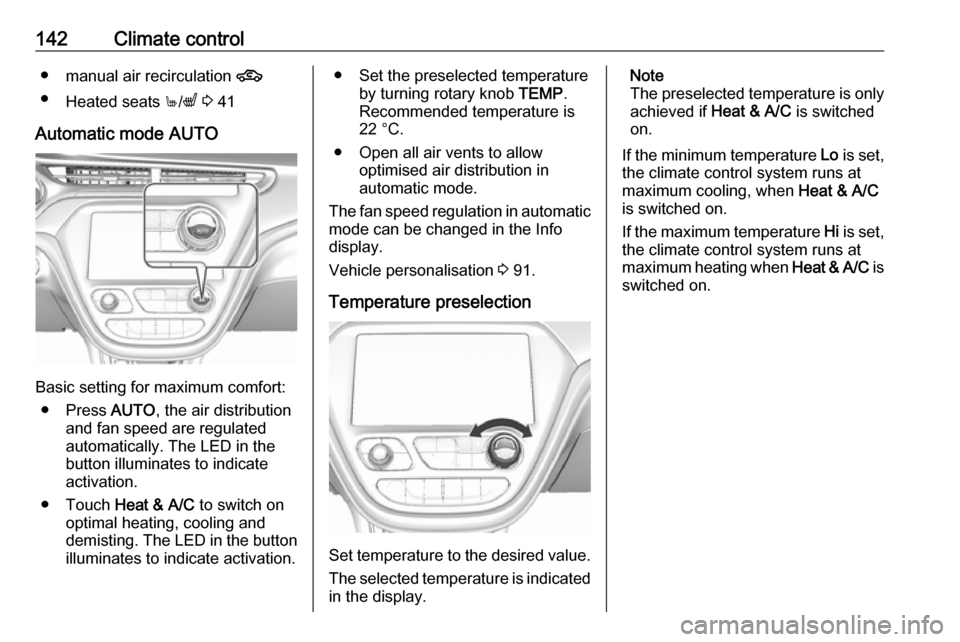
Automatic mode AUTO
Basic setting for maximum comfort: ● Press AUTO, the air distribution
and fan speed are regulated
automatically. The LED in the
button illuminates to indicate
activation.
● Touch Heat & A/C to switch on
optimal heating, cooling and
demisting. The LED in the button illuminates to indicate activation.
● Set the preselected temperature by turning rotary knob TEMP.
Recommended temperature is
22 °C.
● Open all air vents to allow optimised air distribution in
automatic mode.
The fan speed regulation in automatic mode can be changed in the Info
display.
Vehicle personalisation 3 91.
Temperature preselection
Set temperature to the desired value.
The selected temperature is indicated in the display.
Note
The preselected temperature is only achieved if Heat & A/C is switched
on.
If the minimum temperature Lo is set,
the climate control system runs at maximum cooling, when Heat & A/C
is switched on.
If the maximum temperature Hi is set,
the climate control system runs at maximum heating when Heat & A/C is
switched on.