Page 8 of 354
Table of
ContentsIllustrated table of contents
Safety—Seats, seat belts and supplemental restraint system
Instruments and controls
Pre-driving checks and adjustments
Display screen, heater, air conditioner, audio and phone systems
Starting and driving
In case of emergency
Appearance and care
Do-it-yourself
Maintenance and schedules
Technical and consumer information
Index
0
1
2
3
4
5
6
7
8
9
10
11
Page 15 of 354
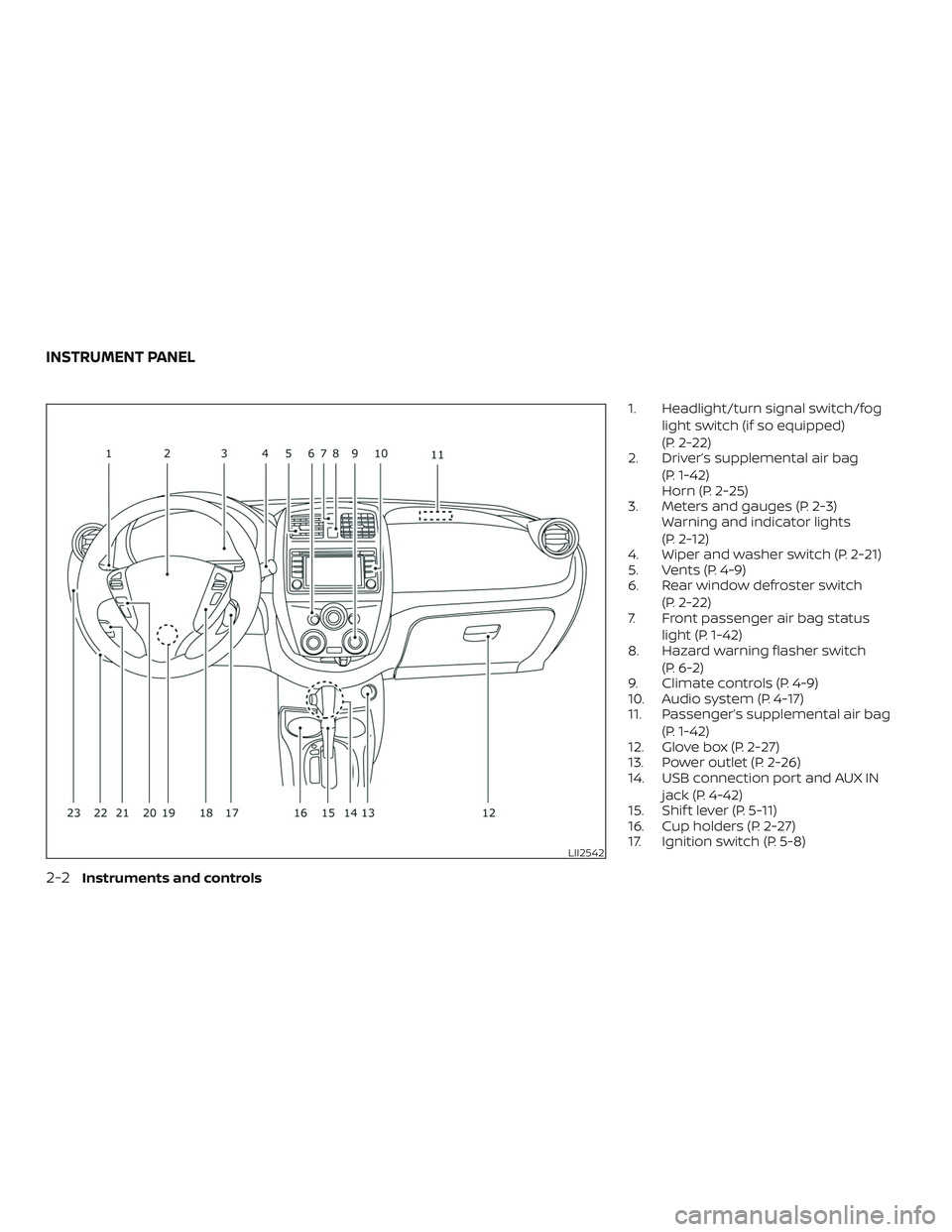
1. Headlight/turn signal switch/fog
light switch (if so equipped)
(P. 2-22)
2. Driver’s supplemental air bag
(P. 1-42)
Horn (P. 2-25)
3. Meters and gauges (P. 2-3)
Warning and indicator lights
(P. 2-12)
4. Wiper and washer switch (P. 2-21)
5. Vents (P. 4-9)
6. Rear window defroster switch
(P. 2-22)
7. Front passenger air bag status
light (P. 1-42)
8. Hazard warning flasher switch
(P. 6-2)
9. Climate controls (P. 4-9)
10. Audio system (P. 4-17)
11. Passenger’s supplemental air bag
(P. 1-42)
12. Glove box (P. 2-27)
13. Power outlet (P. 2-26)
14. USB connection port and AUX IN
jack (P. 4-42)
15. Shif t lever (P. 5-11)
16. Cup holders (P. 2-27)
17. Ignition switch (P. 5-8)
LII2542
INSTRUMENT PANEL
0-6Illustrated table of contents
Page 16 of 354
18. Cruise control switches (if so
equipped) (P. 5-19)
19. Tilt steering (P. 3-15)
20. Audio control switches (P. 4-48)
Bluetooth® Hands-Free Phone
System switches (P. 4-50)
21. Vehicle Dynamic Control (VDC) OFF
switch (P. 2-25)
21. Fuel-filler door release lever (P. 3-13)
Hood release lever (P. 3-10)
23. Electronic outside rearview mirror
control switch (P. 3-17)
Refer to the page number indicated in
parentheses for operating details.
Illustrated table of contents0-7
Page 83 of 354
1. Headlight/turn signal switch/fog
light switch (if so equipped)
(P. 2-22)
2. Driver’s supplemental air bag
(P. 1-42)
Horn (P. 2-25)
3. Meters and gauges (P. 2-3)
Warning and indicator lights
(P. 2-12)
4. Wiper and washer switch (P. 2-21)
5. Vents (P. 4-9)
6. Rear window defroster switch
(P. 2-22)
7. Front passenger air bag status
light (P. 1-42)
8. Hazard warning flasher switch
(P. 6-2)
9. Climate controls (P. 4-9)
10. Audio system (P. 4-17)
11. Passenger’s supplemental air bag
(P. 1-42)
12. Glove box (P. 2-27)
13. Power outlet (P. 2-26)
14. USB connection port and AUX IN
jack (P. 4-42)
15. Shif t lever (P. 5-11)
16. Cup holders (P. 2-27)
17. Ignition switch (P. 5-8)
LII2542
INSTRUMENT PANEL
2-2Instruments and controls
Page 84 of 354
18. Cruise control switches
(if so equipped) (P. 5-19)
19. Tilt steering (P. 3-15)
20. Audio control switches (P. 4-48)
Bluetooth® Hands-Free Phone
System switches (P. 4-50)
21. Vehicle Dynamic Control (VDC) OFF
switch (P. 2-25)
21. Fuel-filler door release lever (P. 3-13)
Hood release lever (P. 3-10)
23. Electronic outside rearview mirror
control switch (P. 3-17)
Refer to the page number indicated in
parentheses for operating details.
1. Tachometer
2. Speedometer
3. Fuel gauge
4. Odometer
Twin trip odometer
Trip computer5. Continuously Variable Transmission
(CVT) position indicator
6. Instrument brightness control
knob
7. Change/reset button
Type A (if so equipped)
LIC3131
METERS AND GAUGES
Instruments and controls2-3
Page 121 of 354
WARNING
∙ Radio waves could adversely affect
electric medical equipment. Those
who use a pacemaker should contact
the electric medical equipment
manufacturer for the possible influ-
ences before use.
∙ The remote keyless entry key fob
transmits radio waves when the but-
tons are pressed. The FAA advises ra-
dio waves may affect aircraf t naviga-
tion and communication systems. Do
not operate the remote keyless entry
key fob while on an airplane. Make
sure the buttons are not operated un-
intentionally when the unit is stored
for a flight.
It is possible to lock/unlock all doors, turn
the interior lights on, and activate the panic
alarm by using the key fob from outside the
vehicle.
Be sure to remove the key from the ve-
hicle before locking the doors.
The key fob can operate at a distance of
approximately 33 f t (10 m) from the vehicle.
The effective distance depends on the
conditions around the vehicle.As many as four key fobs can be used with
one vehicle. For information concerning
the purchase and use of additional key
fobs, it is recommended that you visit a
NISSAN dealer.
The key fob will not function when:
∙ The battery is discharged.
∙ The distance between the vehicle and
the key fob is over 33 f t (10 m).
The panic alarm will not activate when
the key is in the ignition switch.
CAUTION
Listed below are conditions or occur-
rences which will damage the key fob:
∙ Do not allow the key fob, which con-
tains electrical components, to come
into contact with water or salt water.
This could affect the system function.
∙ Do not drop the key fob.
∙ Do not strike the key fob sharply
against another object.
∙ Do not change or modif y the key fob.
∙ Wetting may damage the key fob. If
the key fob gets wet, immediately
wipe until it is completely dry.∙ Do not place the key fob for an ex-
tended period in an area where tem-
peratures exceed 140°F (60°C).
∙ Do not attach the key fob with a key
holder that contains a magnet.
∙ Do not place the key fob near equip-
ment that produces a magnetic field,
such as a TV, audio equipment and
personal computers.
If a key fob is lost or stolen, NISSAN rec-
ommends erasing the ID code of that
key fob. This will prevent the key fob
from unauthorized use to unlock the
vehicle. For information regarding the
erasing procedure, it is recommended
that you visit a NISSAN dealer.
REMOTE KEYLESS ENTRY SYSTEM (if
so equipped)
3-6Pre-driving checks and adjustments
Page 135 of 354

4 Display screen, heater, air conditioner,
audio and phone systems
RearView Monitor (if so equipped)...............4-2
RearView Monitor system operation..........4-3
How to read the displayed lines...............4-3
Difference between predicted and
actual distances..............................4-4
Adjusting the screen.........................4-6
RearView Monitor system limitations.........4-7
System maintenance.........................4-8
Vents............................................4-9
Heater and air conditioner (manual).............4-9
Controls.....................................4-10
Heater operation.............................4-11
Air conditioner operation....................4-13
Air flow charts...............................4-14
Servicing air conditioner........................4-17
Audio system...................................4-17
Radio........................................4-17
FM radio reception..........................4-17
AM radio reception..........................4-18
Satellite radio reception (if so equipped).....4-18
Audio operation precautions................4-19
FM/AM radio with compact disc (CD)
player (Type A) (if so equipped)...............4-27FM/AM radio with compact disc (CD)
player (Type B) (if so equipped)...............4-31
FM/AM/SAT radio with compact disc
(CD) player (if so equipped)..................4-36
USB (Universal Serial Bus) connection
port (if so equipped).........................4-42
iPod®* player operation (if so equipped)......4-44
Bluetooth® streaming audio
(if so equipped)..............................4-46
CD care and cleaning........................4-47
Steering wheel switch for audio control......4-48
Antenna.....................................4-49
Car phone or CB radio..........................4-49
Bluetooth® Hands-Free Phone System
(Type A) (if so equipped)........................4-50
Regulatory Information......................4-52
Using the system............................4-52
Control buttons.............................4-55
Getting started..............................
4-55
List of voice commands.....................4-57
Voice Adaptation (VA) mode.................4-62
Manual control..............................4-63
Troubleshooting guide......................4-64
Page 137 of 354
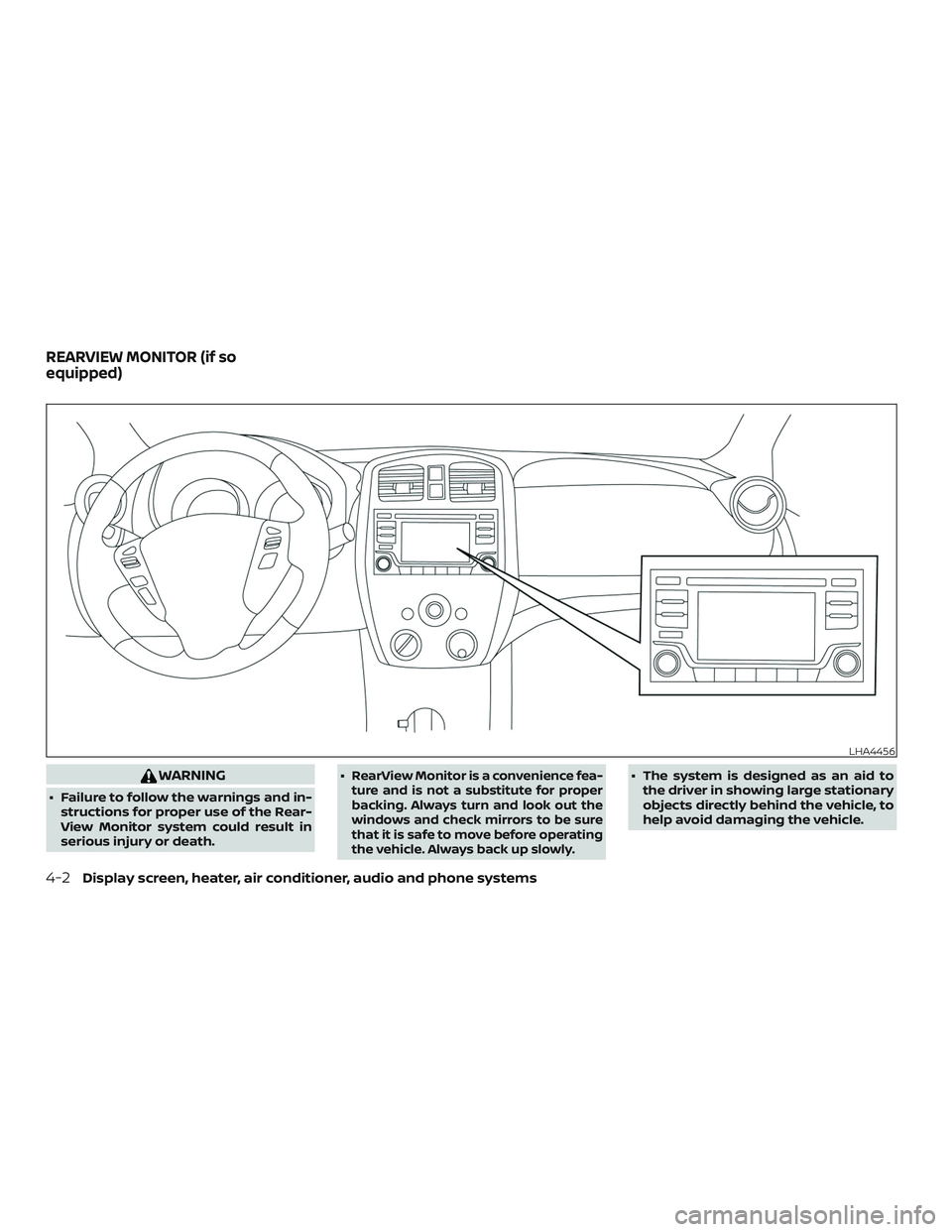
WARNING
∙ Failure to follow the warnings and in-
structions for proper use of the Rear-
View Monitor system could result in
serious injury or death.∙
RearView Monitor is a convenience fea-
ture and is not a substitute for proper
backing. Always turn and look out the
windows and check mirrors to be sure
that it is safe to move before operating
the vehicle. Always back up slowly.∙ The system is designed as an aid to
the driver in showing large stationary
objects directly behind the vehicle, to
help avoid damaging the vehicle.
LHA4456
REARVIEW MONITOR (if so
equipped)
4-2Display screen, heater, air conditioner, audio and phone systems