2018 NISSAN VERSA warning lights
[x] Cancel search: warning lightsPage 99 of 354

tion properly. For additional information, re-
fer to “Supplemental Restraint System
(SRS)” in the “Safety—Seats, seat belts and
supplemental restraint system” section of
this manual.
WARNING
If the supplemental air bag warning
light is on, it could mean that the front
air bag, side air bag, curtain air bag
and/or pretensioner systems will not
operate in an accident. To help avoid
injury to yourself or others, have your
vehicle checked as soon as possible. It is
recommended that you visit a NISSAN
dealer for this service.
INDICATOR LIGHTS
This vehicle has various indicator lights
that may illuminate to indicate a system
status. For additional information, refer to
the specific light in this section.
Continuously Variable
Transmission (CVT)
position indicator light
When the ignition switch is placed in the ON
position, this indicator light shows the shif t
lever position. For additional information,refer to “Driving the vehicle” in the “Starting
and driving” section of this manual.
Cruise main switch
indicator light (if so
equipped)
The light comes on when the cruise control
main switch is pushed. The light goes out
when the main switch is pushed again.
When the cruise main switch indicator light
comes on, the cruise control system is op-
erational. For additional information, refer
to “Cruise control” in the “Starting and driv-
ing” section of this manual.
Front fog light indicator
light (if so equipped)
The front fog light indicator light illumi-
nates when the front fog lights are on. For
additional information, refer to “Fog light
switch” in this section.
Front passenger air bag
status light
The front passenger air bag status light will
be lit and the passenger front air bag will be
off depending on how the front passenger
seat is being used.For additional information, refer to “Front
passenger air bag and status light” in the
“Safety — Seats, seat belts and supplemen-
tal restraint system” section of this manual.
High beam indicator light
(blue)
This blue light comes on when the head-
light high beams are on and goes out when
the low beams are selected.
The high beam indicator light also comes
on when the passing signal is activated.
Malfunction Indicator Light
(MIL)
If this indicator light comes on steady or
blinks while the engine is running, it may
indicate a potential emission control mal-
function.
The MIL may also come on steady if the
fuel-filler cap is loose or missing, or if the
vehicle runs out of fuel. Check to make sure
the fuel-filler cap is installed and closed
tightly, and that the vehicle has at least
3 gallons (11.4 liters) of fuel in the fuel tank.
Af ter a few driving trips, the
light
should turn off if no other potential emis-
sion control system malfunction exists.
2-18Instruments and controls
Page 100 of 354

If this indicator light comes on steady for
20 seconds and then blinks for 10 seconds
when the engine is not running, it indicates
that the vehicle is not ready for an emission
control system inspection/maintenance
test. For additional information, refer to
“Readiness for Inspection/Maintenance
(I/M) test” in the “Technical and consumer
information” section of this manual.
Operation
The MIL will come on in one of two ways:
∙ MIL on steady — An emission control
system malfunction has been de-
tected. Check the fuel-filler cap if the
LOOSE FUEL CAP warning appears in
the trip computer. If the fuel-filler cap is
loose or missing, tighten or install the
cap and continue to drive the vehicle.
The
light should turn off af ter a
few driving trips. If the
light does
not turn off af ter a few driving trips, have
the vehicle inspected. It is recom-
mended that you visit a NISSAN dealer
for this service. You do not need to have
your vehicle towed to the dealer.∙ MIL blinking — An engine misfire has
been detected which may damage the
emission control system. To reduce or
avoid emission control system dam-
age:
– do not drive at speeds above
45 mph (72 km/h).
– avoid hard acceleration or decelera-
tion.
– avoid steep uphill grades.
– if possible, reduce the amount of
cargo being hauled or towed.
The MIL may stop blinking and come on
steady. Have the vehicle inspected. It is rec-
ommended that you visit a NISSAN dealer
for this service. You do not need to have
your vehicle towed to the dealer.CAUTION
Continued vehicle operation without
having the emission control system
checked and repaired as necessary
could lead to poor driveability, reduced
fuel economy, and possible damage to
the emission control system.
Overdrive OFF indicator
light (if so equipped)
The overdrive OFF indicator light illumi-
nates when the overdrive OFF mode is se-
lected.
For additional information, refer to “Driving
the vehicle” in the “Starting and driving” sec-
tion of this manual.
Side light and headlight
indicator light (green) (if so
equipped)
The side light and headlight indicator light
illuminates when the side light or head-
lights are on (not including daytime run-
ning or signature lights). If the headlight
switch is in the AUTO position, the side light
and headlight indicator light will illuminate
when the headlights turn on. For additional
information, refer to “Headlight and turn
signal switch” in this section.
Slip indicator light
This indicator will blink when the VDC sys-
tem is operating, thus alerting the driver to
the fact that the road surface is slippery
and the vehicle is nearing its traction limits.
Instruments and controls2-19
Page 101 of 354

You may feel or hear the system working;
this is normal.
The light will blink for a few seconds af ter
the VDC system stops limiting wheel spin.
The
indicator light also comes on
when you place the ignition switch in the
ON position. The light will turn off af ter ap-
proximately 2 seconds if the system is op-
erational. If the light does not come on
have the system checked. It is recom-
mended that you visit a NISSAN dealer for
this service.
Turn signal/hazard
indicator lights
The appropriate light flashes when the turn
signal switch is activated.
Both lights flash when the hazard switch is
turned on.
Vehicle Dynamic Control
(VDC) OFF indicator light
This indicator light comes on when the
VDC OFF switch is pushed to the OFF posi-
tion. This indicates the VDC system has
been turned off.
Push the VDC OFF switch again or restart
the engine and the system will operatenormally. For additional information, refer
to “Vehicle Dynamic Control (VDC) system”
in the “Starting and driving” section of this
manual.
The VDC indicator light also comes on
when you place the ignition switch in the
ON position. The light will turn off af ter
about 2 seconds if the system is opera-
tional. If the light stays on or comes on
along with the
indicator light while
you are driving, have the VDC system
checked. It is recommended that you visit a
NISSAN dealer for this service.
While the VDC system is operating, you
might feel a slight vibration or hear the sys-
tem working when starting the vehicle or
accelerating, but this is normal.
AUDIBLE REMINDERS
Brake pad wear warning
The disc brake pads have audible wear
warnings. When a disc brake pad requires
replacement, it makes a high pitched
scraping sound when the vehicle is in mo-
tion, whether or not the brake pedal is de-
pressed. Have the brakes checked as soon
as possible if the warning sound is heard. It
is recommended that you visit a NISSAN
dealer for this service.
Key reminder chime
A chime sounds if the driver’s door is
opened while the key is lef t in the ignition
switch. Remove the key and take it with you
when leaving the vehicle.
Light reminder chime
With the ignition switch placed in the OFF
position, a chime sounds when the driver’s
door is opened if the headlights or parking
lights are on.
Turn the headlight control switch off or to
AUTO before leaving the vehicle.
Parking brake reminder chime
A chime sounds if the parking brake is set
and the vehicle is driven. The chime will
stop if the parking brake is released or the
vehicle speed returns to zero.
2-20Instruments and controls
Page 106 of 354
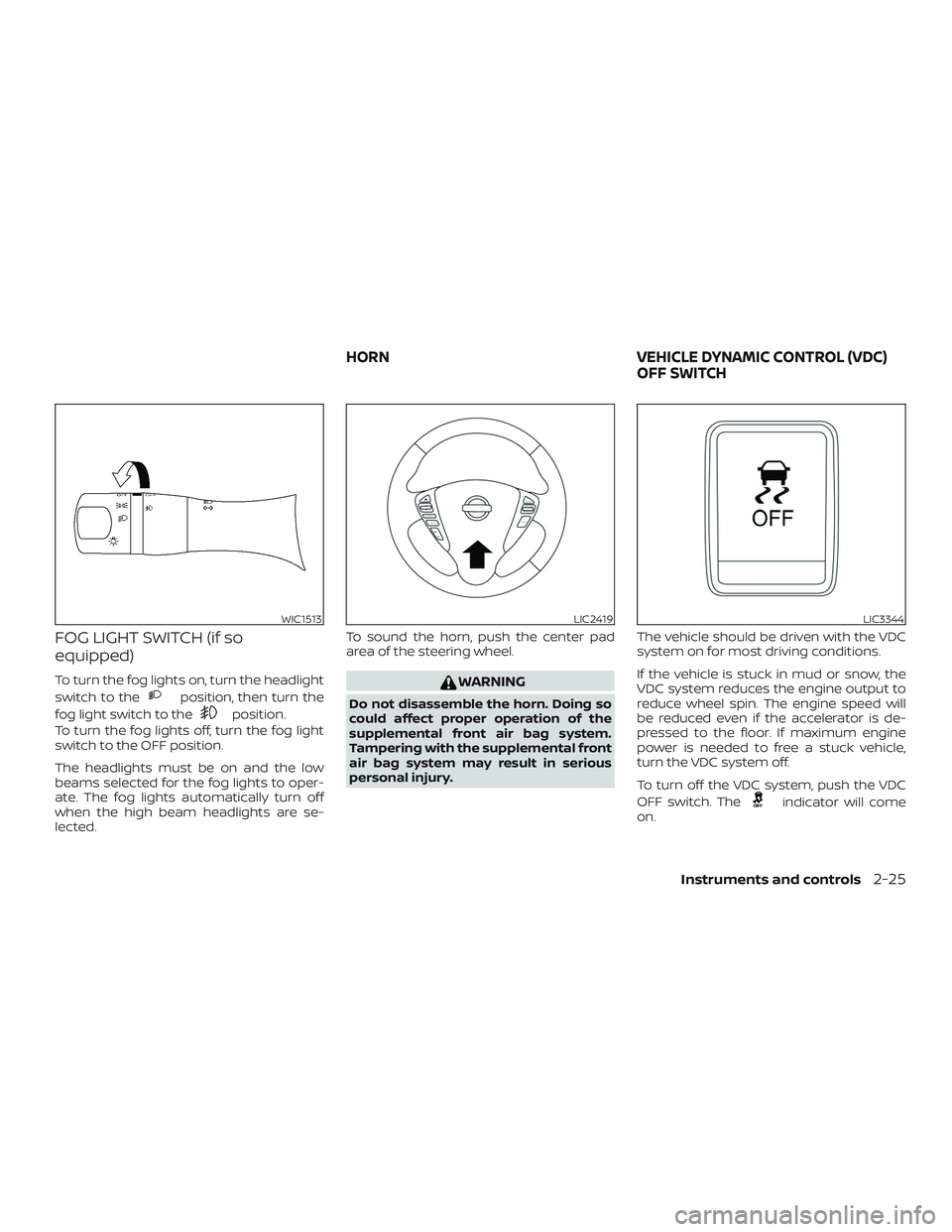
FOG LIGHT SWITCH (if so
equipped)
To turn the fog lights on, turn the headlight
switch to the
position, then turn the
fog light switch to the
position.
To turn the fog lights off, turn the fog light
switch to the OFF position.
The headlights must be on and the low
beams selected for the fog lights to oper-
ate. The fog lights automatically turn off
when the high beam headlights are se-
lected.To sound the horn, push the center pad
area of the steering wheel.
WARNING
Do not disassemble the horn. Doing so
could affect proper operation of the
supplemental front air bag system.
Tampering with the supplemental front
air bag system may result in serious
personal injury.The vehicle should be driven with the VDC
system on for most driving conditions.
If the vehicle is stuck in mud or snow, the
VDC system reduces the engine output to
reduce wheel spin. The engine speed will
be reduced even if the accelerator is de-
pressed to the floor. If maximum engine
power is needed to free a stuck vehicle,
turn the VDC system off.
To turn off the VDC system, push the VDC
OFF switch. The
indicator will come
on.
WIC1513LIC2419LIC3344
HORN VEHICLE DYNAMIC CONTROL (VDC)
OFF SWITCH
Instruments and controls2-25
Page 121 of 354
WARNING
∙ Radio waves could adversely affect
electric medical equipment. Those
who use a pacemaker should contact
the electric medical equipment
manufacturer for the possible influ-
ences before use.
∙ The remote keyless entry key fob
transmits radio waves when the but-
tons are pressed. The FAA advises ra-
dio waves may affect aircraf t naviga-
tion and communication systems. Do
not operate the remote keyless entry
key fob while on an airplane. Make
sure the buttons are not operated un-
intentionally when the unit is stored
for a flight.
It is possible to lock/unlock all doors, turn
the interior lights on, and activate the panic
alarm by using the key fob from outside the
vehicle.
Be sure to remove the key from the ve-
hicle before locking the doors.
The key fob can operate at a distance of
approximately 33 f t (10 m) from the vehicle.
The effective distance depends on the
conditions around the vehicle.As many as four key fobs can be used with
one vehicle. For information concerning
the purchase and use of additional key
fobs, it is recommended that you visit a
NISSAN dealer.
The key fob will not function when:
∙ The battery is discharged.
∙ The distance between the vehicle and
the key fob is over 33 f t (10 m).
The panic alarm will not activate when
the key is in the ignition switch.
CAUTION
Listed below are conditions or occur-
rences which will damage the key fob:
∙ Do not allow the key fob, which con-
tains electrical components, to come
into contact with water or salt water.
This could affect the system function.
∙ Do not drop the key fob.
∙ Do not strike the key fob sharply
against another object.
∙ Do not change or modif y the key fob.
∙ Wetting may damage the key fob. If
the key fob gets wet, immediately
wipe until it is completely dry.∙ Do not place the key fob for an ex-
tended period in an area where tem-
peratures exceed 140°F (60°C).
∙ Do not attach the key fob with a key
holder that contains a magnet.
∙ Do not place the key fob near equip-
ment that produces a magnetic field,
such as a TV, audio equipment and
personal computers.
If a key fob is lost or stolen, NISSAN rec-
ommends erasing the ID code of that
key fob. This will prevent the key fob
from unauthorized use to unlock the
vehicle. For information regarding the
erasing procedure, it is recommended
that you visit a NISSAN dealer.
REMOTE KEYLESS ENTRY SYSTEM (if
so equipped)
3-6Pre-driving checks and adjustments
Page 122 of 354
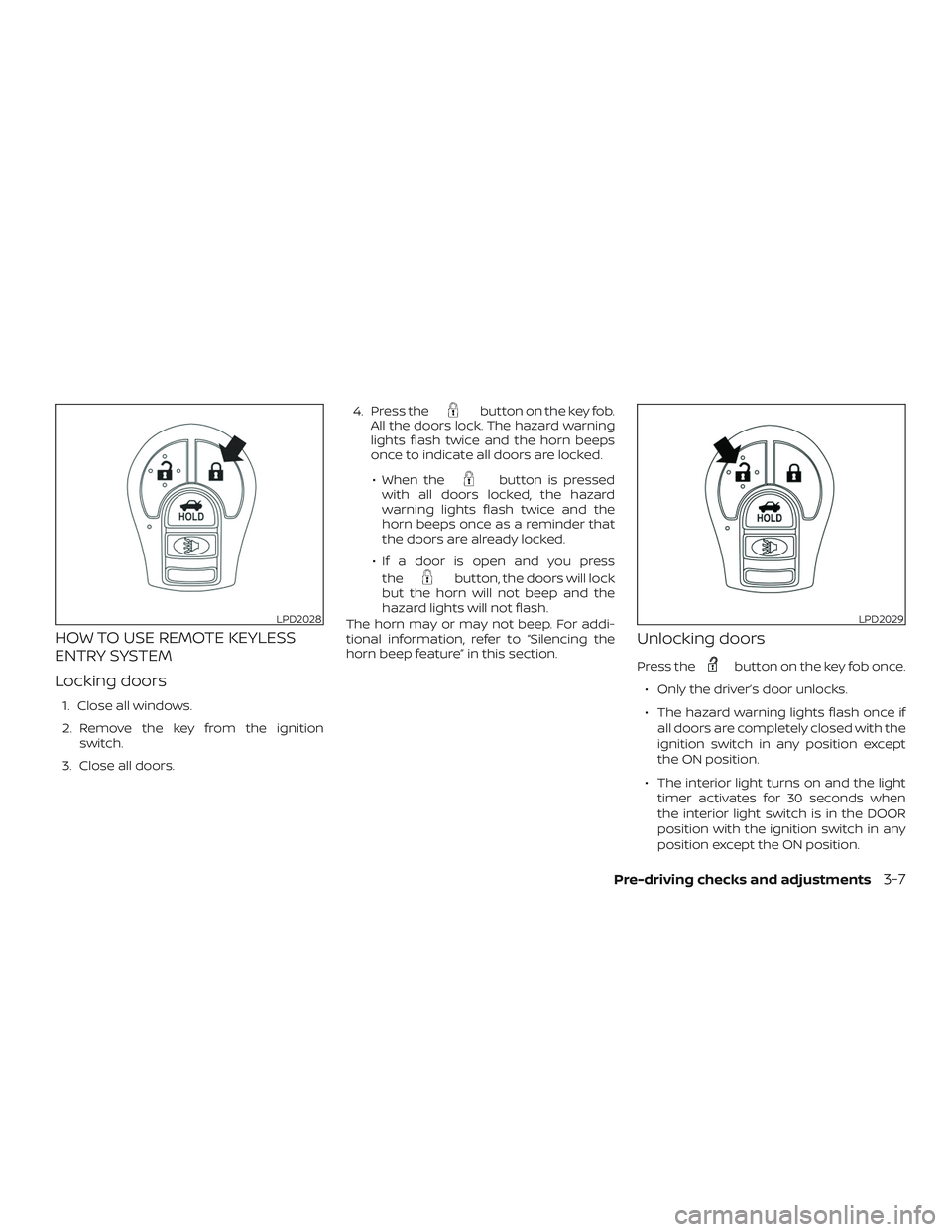
HOW TO USE REMOTE KEYLESS
ENTRY SYSTEM
Locking doors
1. Close all windows.
2. Remove the key from the ignition
switch.
3. Close all doors.4. Press the
button on the key fob.
All the doors lock. The hazard warning
lights flash twice and the horn beeps
once to indicate all doors are locked.
∙ When the
button is pressed
with all doors locked, the hazard
warning lights flash twice and the
horn beeps once as a reminder that
the doors are already locked.
∙ If a door is open and you press
the
button, the doors will lock
but the horn will not beep and the
hazard lights will not flash.
The horn may or may not beep. For addi-
tional information, refer to “Silencing the
horn beep feature” in this section.
Unlocking doors
Press thebutton on the key fob once.
∙ Only the driver’s door unlocks.
∙ The hazard warning lights flash once if
all doors are completely closed with the
ignition switch in any position except
the ON position.
∙ The interior light turns on and the light
timer activates for 30 seconds when
the interior light switch is in the DOOR
position with the ignition switch in any
position except the ON position.
LPD2028LPD2029
Pre-driving checks and adjustments3-7
Page 123 of 354

Press thebutton on the key fob again
within five seconds.
∙ All doors unlock.
∙ The hazard warning lights flash once if
all doors are completely closed.
The interior lights can be turned off without
waiting a period of time by inserting the key
into the ignition switch and placing the ig-
nition switch in the ON or START position,
locking the doors with the key fob, power
door lock switch or pushing the interior
light switch to the off position.
Auto relock
When thebutton on the key fob is
pressed, all doors will lock automatically
within 1 minute unless one of the following
operations is performed:
∙ Any door is opened.
∙ A key is inserted into the ignition switch
and the switch is cycled from OFF to ON.
∙ Press the
button.
Releasing the trunk lid
Press thebutton on the key fob for
longer than 0.5 seconds to open the trunk
lid. The trunk release button on the key fob
will not operate when the ignition switch is
placed in the ON position.
Using the panic alarm
If you are near your vehicle and feel threat-
ened, you may activate the panic alarm to
call attention by pressing and holding
the
button on the key fob forlonger
than 0.5 seconds.
The panic alarm and headlights will stay on
for a period of time.
The panic alarm stops when:
∙ It has run for a period of time.
∙ Any button is pressed on the key fob.
LPD2030LPD2031
3-8Pre-driving checks and adjustments
Page 124 of 354
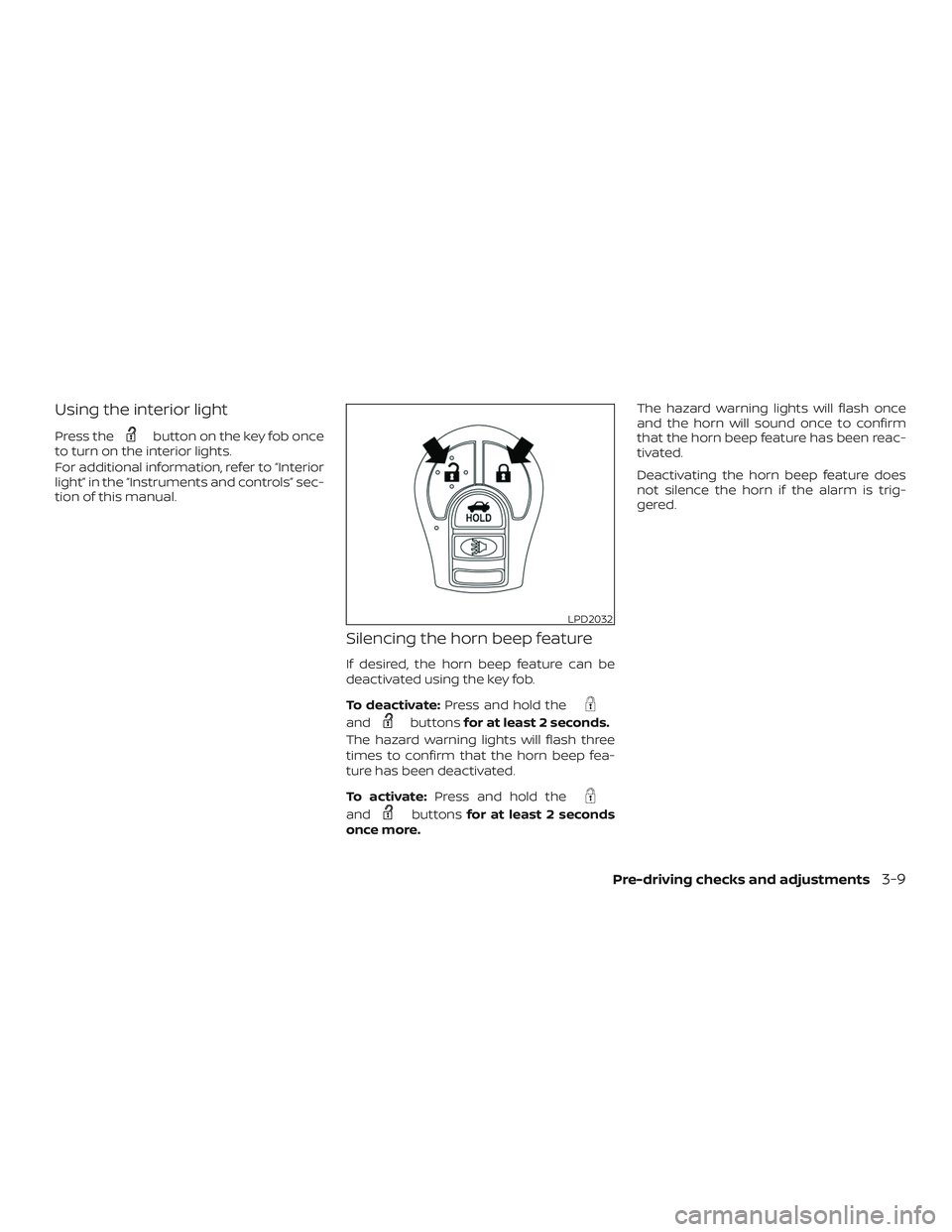
Using the interior light
Press thebutton on the key fob once
to turn on the interior lights.
For additional information, refer to “Interior
light” in the “Instruments and controls” sec-
tion of this manual.
Silencing the horn beep feature
If desired, the horn beep feature can be
deactivated using the key fob.
To deactivate:Press and hold the
andbuttonsfor at least 2 seconds.
The hazard warning lights will flash three
times to confirm that the horn beep fea-
ture has been deactivated.
To activate:Press and hold the
andbuttonsfor at least 2 seconds
once more.The hazard warning lights will flash once
and the horn will sound once to confirm
that the horn beep feature has been reac-
tivated.
Deactivating the horn beep feature does
not silence the horn if the alarm is trig-
gered.
LPD2032
Pre-driving checks and adjustments3-9