2018 NISSAN VERSA ad blue
[x] Cancel search: ad bluePage 161 of 354
∙ When not in use for extended periods of
time, store the cable in a clean, dust free
environment at room temperature and
without direct sun exposure.
∙ Do not use the cable for any other pur-
poses other than its intended use in the
vehicle.
*iPod® is a trademark of Apple Inc., regis-
tered in the U.S. and other countries.
Bluetooth® streaming audio (if so
equipped)
∙ Some Bluetooth® audio devices may
not be recognized by the in-vehicle au-
dio system.
∙ It is necessary to set up the wireless
connection between a compatible
Bluetooth® audio device and the in-
vehicle Bluetooth® module before using
the Bluetooth® audio.∙ Operating procedure of the Bluetooth®
audio will vary depending on the de-
vices. Make sure how to operate your
audio device before using it with this
system.
∙ The Bluetooth® audio may be stopped
under the following conditions:
∙ Receiving a call on the Hands-Free
Phone System.
∙ Checking the connection to the
hands-free phone.
∙ Do not place the Bluetooth® audio de-
vice in an area surrounded by metal or
far away from the in-vehicle Bluetooth®
module to prevent tone quality degra-
dation and wireless connection disrup-
tion.
∙ While an audio device is connected
through the Bluetooth® wireless con-
nection, the battery power of the device
may discharge quicker than usual.∙ This system supports the Bluetooth®
Audio Distribution Profile (A2DP, AVRCP).
BLUETOOTH® is a
trademark owned
by Bluetooth SIG,
Inc. and licensed
to Visteon.
4-26
Display screen, heater, air conditioner, audio and phone systems
Page 168 of 354

How to use the SETUP button
To select and/or adjust several functions,
features and modes that are available for
your vehicle:
1. Press the SETUP button.
2. Turn the TUNE/MENU knob until the de-
sired item is selected on the menu list
and then press the ENTER button.
Menu itemResult
Audio Selecting this item allows user to adjust various audio settings.
Bass Adjusts the bass to the desired level.
Treble Adjusts the treble to the desired level.
Balance Adjusts the balance to the desired level. Balance adjusts the sound level between the lef t and right speakers.
Fade Adjusts the fade to the desired level. Fade adjusts the sound level between the front and rear speakers.
AUX Vol. Controls the volume level of incoming sound when an auxiliary device is connected to the system. Available options
are LOW, MID, and HIGH.
Clock Selecting this item allows user to adjust various clock settings.
Set Time Allows user to set time manually.
ON/OFF Switches clock display on or off.
Format 12h:24h Allows user to change time format between 12 hour and 24 hour.
Bluetooth For additional information, refer to “Bluetooth® Hands-Free Phone System (Type A)” in this section.
Language Allows user to change system language.
List of Languages Available language are Spanish, Portuguese, English, and French.
Scroll Direction Allows user to change the scrolling direction used by the TUNE/MENU knob.
Clockwise Select up or down and press ENTER button.
Display screen, heater, air conditioner, audio and phone systems4-33
Page 172 of 354

5. SCAN button
6.
SEEK/CAT buttons
7. iPod MENU button
8.
BACK button
9. ENTER/SETTING/CLOCK button and
TUNE/SCROLL control knob
10. Station select (1–6) buttons
11. VOL (volume) knob /
(power) but-
ton
12. DISP button
13. MEDIA button
14. XM button*
15. FM•AM button*No satellite radio reception is available
when the XM button is pressed to access
satellite radio stations unless optional sat-
ellite receiver and antenna are installed
and an SiriusXM® Satellite Radio service
subscription is active. Satellite radio is not
available in Alaska, Hawaii or Guam.
Audio main operation
(power) button / VOL (volume)
control knob
Place the ignition switch in the ACC or ON
position and press the
(power) but-
ton while the system is off to call up the
mode (radio, CD, AUX, Bluetooth® audio,
USB or iPod®) that was playing immediately
before the system was turned off.To turn the system off, press the
(power) button.
Turn the VOL (volume) control knob to ad-
just the volume.
This vehicle may be equipped with Speed
Sensitive Volume. When this feature is ac-
tive, the audio volume changes as the driv-
ing speed changes.
ENTER/SETTING button
Press the ENTER/SETTING button to show
the Settings screen on the display. Turn the
TUNE/SCROLL knob to navigate the op-
tions and then press the ENTER/SETTING
button to make a selection.
Display screen, heater, air conditioner, audio and phone systems4-37
Page 173 of 354

Audio
Bluetooth Takes you to the Bluetooth menu.
Bass Adjusts the bass to the desired level.
Treble Adjusts the treble to the desired level.
Balance Adjusts the balance to the desired level. Balance adjusts the sound level between the lef t and
right speakers.
Fade Adjusts the fade to the desired level. Fade adjusts the sound level between the front and rear
speakers.
Brightness Adjust to brightness to adjust the appearance of the display screen.
Contrast Adjust the contrast to adjust the appearance of the display screen.
Clock Adjust Allows the user to set time manually.
On-Screen Clock Toggles ON or OFF the clock display on the upper right corner of the display screen.
RDS Display Toggles ON or OFF the RDS information displayed on the screen while the radio is playing.
Speed Sens Vol. (Speed Sensitive Volume) Adjusts the speed sensitive volume function, which increases the volume of the audio system as
the speed of the vehicle increases. Set to “OFF” to disable the feature. The higher the setting, the
more the volume increases in relation to vehicle speed.
AUX Vol. Choose a setting from 0 to +3 to control the boost of incoming auxiliary device volume. A setting
of 0 provides no additional boost in volume. A setting of +3 provides the greatest boost in volume.
Language Select Select the desired language for the system from the available options.
Bass, treble, balance and fade can also be adjusted by pressing the ENTER/SETTING button and turning the TUNE/SCROLL control knob
to select the item to adjust. When the desired item is shown on the display, turn the tuning to adjust and then press the ENTER/SETTING
button until the display returns to the main audio screen. If the button is not pressed for approximately 10 seconds, the radio or CD display
will automatically reappear.
4-38Display screen, heater, air conditioner, audio and phone systems
Page 176 of 354
TUNE/SCROLL knob (MP3/WMA CD only)
If a MP3/WMA CD with multiple folders is
playing, turn the TUNE/SCROLL knob to
change folders. Turn the knob to the lef t to
skip back a folder. Turn the knob to the right
to skip ahead a folder.
RPT (repeat) button
When the RPT button is pressed while a
compact disc is playing, the play pattern
can be changed as follows:
CD:
1 Track Repeat←→OFF
CD with MP3 or WMA:
1 Folder Repeat→1 Track Repeat→OFF
1 Track Repeat: the current track will be
repeated.
1 Folder Repeat: the current folder will be
repeated.
OFF: No repeat play pattern is applied. The
indicator on the display will turn off.
The current play pattern of the CD is dis-
played on the screen unless no pattern is
applied.RDM (random) button
When the RDM button is pressed while a
compact disc is playing, the play pattern
can be changed as follows:
CD:
1 Disc Random←→OFF
CD with MP3 or WMA:
1 Disc Random→1 Folder Random→OFF
1 Disc Random: all tracks on the disc will be
played randomly.
1 Folder Random: all tracks in the current
folder will be played randomly.
OFF: No random play pattern is applied. The
indicator on the display will turn off.
The current play pattern of the CD is dis-
played on the screen unless no pattern is
applied.EJECT button
When the
button is pressed with a
compact disc loaded, the compact disc will
eject and the last source will be played.
When the
button is pressed twice
with a compact disc loaded, the compact
disc will be ejected further for easier CD
removal. If the disc is not removed within
20 seconds, the disc will reload.
Additional features
For additional information, refer to “iPod®
player operation” in this section.
For additional information, refer to “USB
(Universal Serial Bus) connection port” in
this section.
For additional information, refer to
“Bluetooth® streaming audio” in this sec-
tion.
Display screen, heater, air conditioner, audio and phone systems4-41
Page 181 of 354
(RDM) RANDOM
When the RDM button is pressed while a
track is being played, the play pattern can
be changed as follows:
Shuffle Off→Track Shuffle→Album Shuffle
→Shuffle Off
Track Shuffle: the tracks in the current list
will be played randomly.
Album Shuffle: the albums in the current list
will be played randomly.
Shuffle Off: no random play pattern is ap-
plied.
BACK button
When the
BACK button is pressed, it
returns to the previous menu.
BLUETOOTH® STREAMING AUDIO
(if so equipped)
If you have a compatible Bluetooth® audio
device that is capable of playing audio files,
the device can be connected to the vehi-
cle’s audio system so that the audio files on
the device play through the vehicle’s
speakers. For additional information, refer
to “FM/AM/SAT radio with compact disc
(CD) player” in this section.NOTE:
For additional information, refer to the
cellular phone Owner’s Manual.
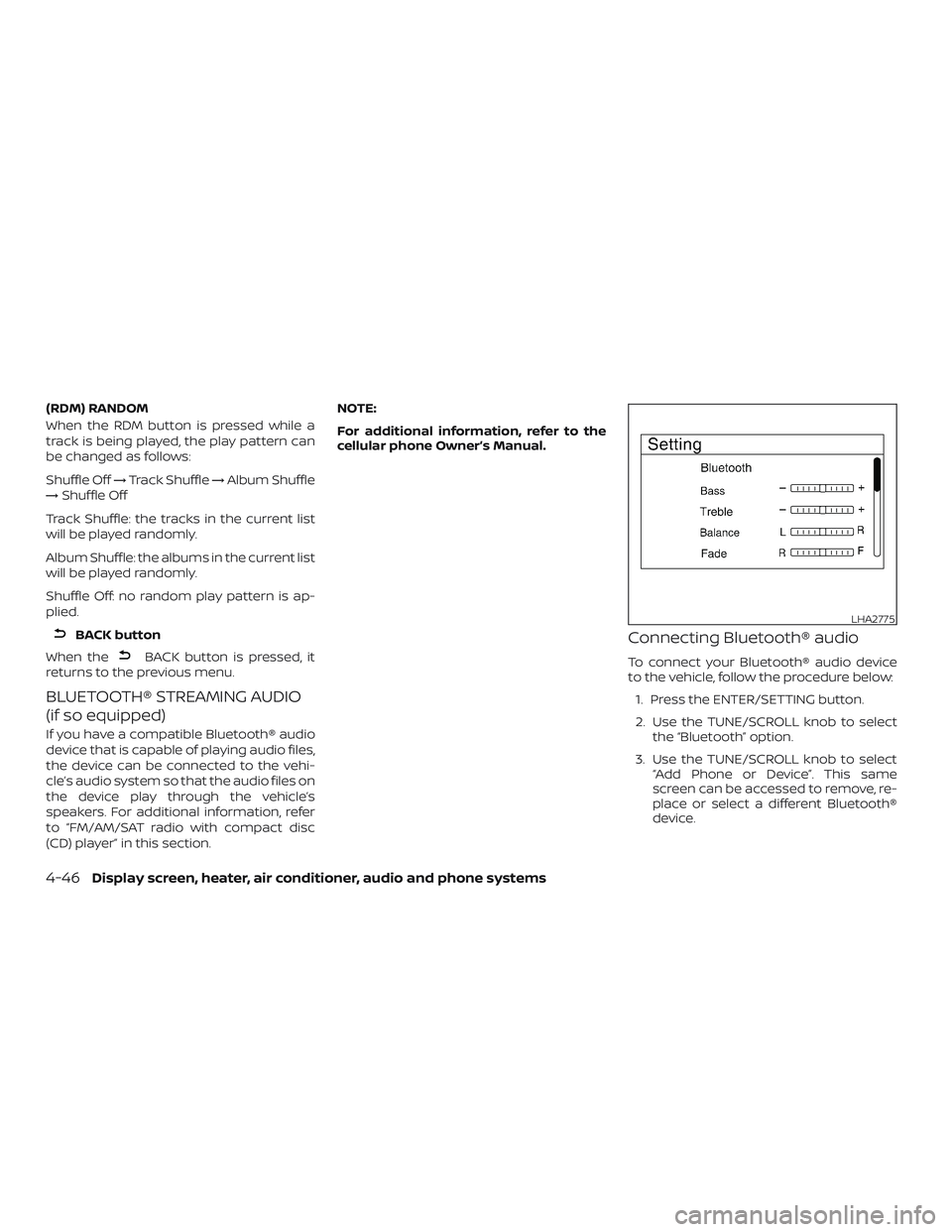
Connecting Bluetooth® audio
To connect your Bluetooth® audio device
to the vehicle, follow the procedure below:
1. Press the ENTER/SETTING button.
2. Use the TUNE/SCROLL knob to select
the “Bluetooth” option.
3. Use the TUNE/SCROLL knob to select
“Add Phone or Device”. This same
screen can be accessed to remove, re-
place or select a different Bluetooth®
device.
LHA2775
4-46Display screen, heater, air conditioner, audio and phone systems
Page 182 of 354
4. The system acknowledges the com-
mand and asks you to initiate connect-
ing from the phone handset. The con-
necting procedure of the cellular
phone varies according to each cellular
phone model. For additional informa-
tion, refer to the cellular phone Owner’s
Manual.
Audio main operation
To switch to the Bluetooth® audio mode,
press the MEDIA button repeatedly until the
Bluetooth® audio mode is displayed on the
screen with the following information
listed:
∙ Album
∙ Song
∙ Artist
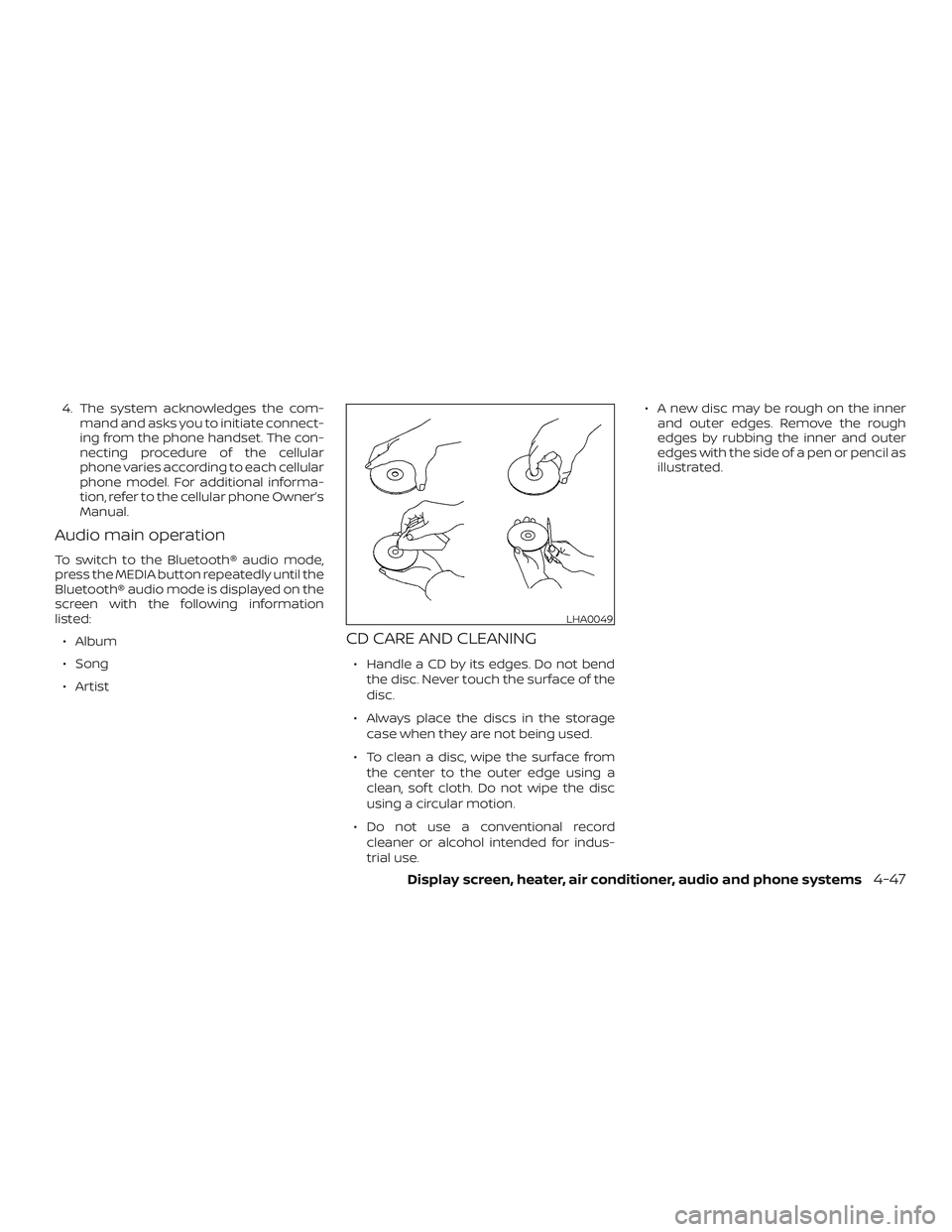
CD CARE AND CLEANING
∙ Handle a CD by its edges. Do not bend
the disc. Never touch the surface of the
disc.
∙ Always place the discs in the storage
case when they are not being used.
∙ To clean a disc, wipe the surface from
the center to the outer edge using a
clean, sof t cloth. Do not wipe the disc
using a circular motion.
∙ Do not use a conventional record
cleaner or alcohol intended for indus-
trial use.∙ A new disc may be rough on the inner
and outer edges. Remove the rough
edges by rubbing the inner and outer
edges with the side of a pen or pencil as
illustrated.
LHA0049
Display screen, heater, air conditioner, audio and phone systems4-47
Page 183 of 354
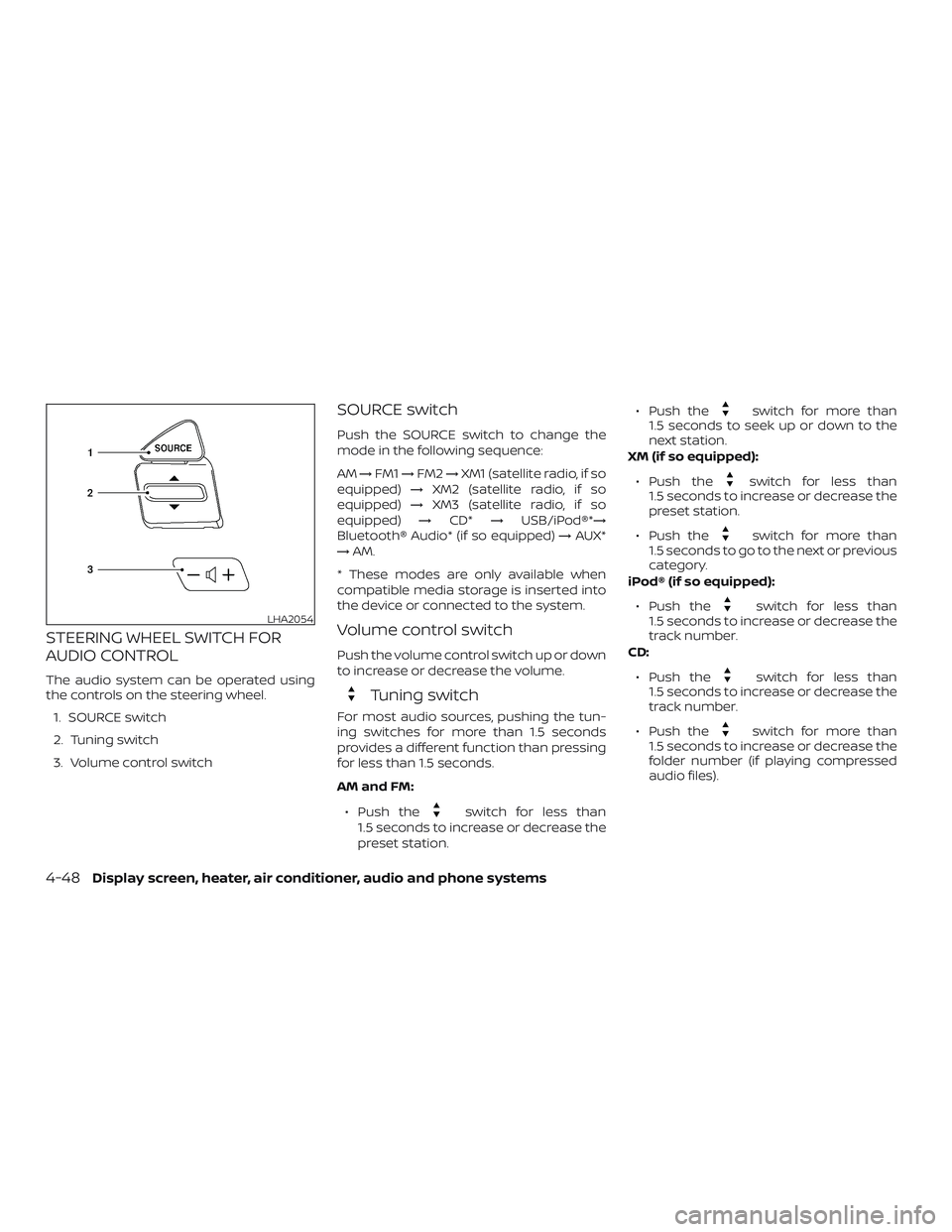
STEERING WHEEL SWITCH FOR
AUDIO CONTROL
The audio system can be operated using
the controls on the steering wheel.
1. SOURCE switch
2. Tuning switch
3. Volume control switch
SOURCE switch
Push the SOURCE switch to change the
mode in the following sequence:
AM→FM1→FM2→XM1 (satellite radio, if so
equipped)→XM2 (satellite radio, if so
equipped)→XM3 (satellite radio, if so
equipped)→CD*→USB/iPod®*→
Bluetooth® Audio* (if so equipped)→AUX*
→AM.
* These modes are only available when
compatible media storage is inserted into
the device or connected to the system.
Volume control switch
Push the volume control switch up or down
to increase or decrease the volume.
Tuning switch
For most audio sources, pushing the tun-
ing switches for more than 1.5 seconds
provides a different function than pressing
for less than 1.5 seconds.
AM and FM:
∙ Push the
switch for less than
1.5 seconds to increase or decrease the
preset station.∙ Push the
switch for more than
1.5 seconds to seek up or down to the
next station.
XM (if so equipped):
∙ Push the
switch for less than
1.5 seconds to increase or decrease the
preset station.
∙ Push the
switch for more than
1.5 seconds to go to the next or previous
category.
iPod® (if so equipped):
∙ Push the
switch for less than
1.5 seconds to increase or decrease the
track number.
CD:
∙ Push the
switch for less than
1.5 seconds to increase or decrease the
track number.
∙ Push the
switch for more than
1.5 seconds to increase or decrease the
folder number (if playing compressed
audio files).
LHA2054
4-48Display screen, heater, air conditioner, audio and phone systems