Page 98 of 507
1. Headlight/fog light (if soequipped)/turn signal switch
(P. 2-41)
2. Steering wheel switch for trip
computer (if so equipped)/vehicle
information display (if so
equipped) (P. 2-9, P.2-23)
Audio control (P. 4-34)
3. Driver’s supplemental air bag
(P. 1-51)
Horn (P. 2-47)
4. Meters and gauges (P. 2-3) Warning and indicators lights
(P. 2-13)
5. Cruise control main/set switches
(P. 5-45)
Intelligent Cruise Control (ICC)
switches (if so equipped) (P. 5-47)
Bluetooth® Hands-Free Phone
System (P. 4-79, 4-91)
6. Wiper and washer switch (P. 2-39)
7. Vents (P. 4-17)
8. Hazard warning flasher switch
(P. 6-2)
9. Front passenger air bag status
light (P. 1-44)
10. Audio system (P. 4-34)
LII2498
INSTRUMENT PANEL
2-2Instruments and controls
Page 99 of 507

11. Front passenger supplemental airbag (P. 1-44)
12. Glove box (P. 2-50)
13. Shif t lever (P. 5-17)
14. Climate controls (P. 4-23, 4-31)
15. Ignition switch (if so equipped)
(P. 5-9)
Push-button ignition switch
(if so equipped) (P. 5-11)
16. Tilt/Telescopic steering (P. 3-30)
17. Hood release (P. 3-25) Fuel filler door release (P. 3-27)
18. ECO mode switch (if so equipped)
(P. 5-26)
Vehicle Dynamic Control (VDC) OFF
switch (P. 2-48)
SPORT mode switch
(if so equipped) (P. 5-26)
19. Instrument brightness control
(P. 2-41)
Power mirror switch (P. 3-32)
Trunk release (P. 3-26)
* Refer to the separate NissanConnect®
Owner’s Manual (if so equipped).
Refer to the page number indicated in
parentheses for operating details.
1. Tachometer
2. Coolant temperature gauge
3. Warning and indicator lights
4. Fuel gauge
5. Speedometer 6. Odometer
Twin trip odometer
Trip computer
Fuel Economy
ECO mode indicator (if so equipped)
Outside temperature display
Type A (if so equipped)
LIC3415
METERS AND GAUGES
Instruments and controls2-3
Page 100 of 507
1. TachometerWarning and indicator lights
2. Vehicle information display Odometer
Twin trip odometer
Outside temperature display 3. Speedometer
Warning and indicator lights
4. Fuel gauge
5. Engine coolant temperature gauge
SPEEDOMETER AND ODOMETER
This vehicle is equipped with a speedom-
eter and odometer. The speedometer is
located on the right side the meter cluster.
The odometer is located within the vehicle
information display (TypeA—ifso
equipped) or the trip computer (Type B —
if so equipped) to the lef t of the speedom-
eter.
Type B (if so equipped)
LIC3416
2-4Instruments and controls
Page 102 of 507

Resetting the trip odometer
Press the
button on the steering
wheel for more than 1 second to reset the
currently displayed trip odometer to zero.
LOOSE FUEL CAP warning
message
For vehicles without a vehicle informa-
tion display: Push the reset button
�Afor
more than 1 second to reset the LOOSE
FUEL CAP warning message in the trip
computer
�Baf ter the fuel cap has been
tightened. For additional information, refer
to “Fuel-filler cap” in the “Pre-driving checks
and adjustments” section of this manual.
For vehicles with a vehicle information
display: For additional information, refer to
“Vehicle information display warnings and
indicators” in the section.
Check tire pressure warning
message (if so equipped)
The CHECK TIRE PRES (pressure) warning
message is displayed when the low tire
pressure warning light is illuminated and
low tire pressure is detected. Check and
adjust the tire pressure to the recom-
mended COLD tire pressure shown on the
Tire and Loading Information label. The
CHECK TIRE PRES warning message turns
off when the low tire pressure warning light
turns off.
LPD2124LIC2678
2-6Instruments and controls
Page 103 of 507

The low tire pressure warning light remains
illuminated until the tires are inflated to the
recommended COLD tire pressure. The
CHECK TIRE PRES warning message is dis-
played each time the ignition switch is
placed in the ON position as long as the low
tire pressure warning light remains illumi-
nated. For additional information, refer to
“Low tire pressure warning light” in the “In-
struments and controls” section, “Tire Pres-
sure Monitoring System (TPMS)” in the
“Starting and driving” section, and “Wheels
and tires” in the “Do-it-yourself ” section of
this manual.
TACHOMETER
The tachometer indicates engine speed in
revolutions per minute (rpm).
Do not rev the engine into the red zone
�1.
CAUTION
When engine speed approaches the red
zone, shif t to a higher gear or reduce
engine speed. Operating the engine in
the red zone may cause serious engine
damage.
ENGINE COOLANT TEMPERATURE
GAUGE
NOTE:
The ignition switch must be placed in the
ON position for the gauge to give a read-
ing.
The gauge indicates the engine coolant
temperature. The engine coolant tempera-
ture is within the normal range when the
reading is within the zone
�Ashown in the
illustration.
LIC2219
Type A (if so equipped)
LIC2414
Instruments and controls2-7
Page 105 of 507
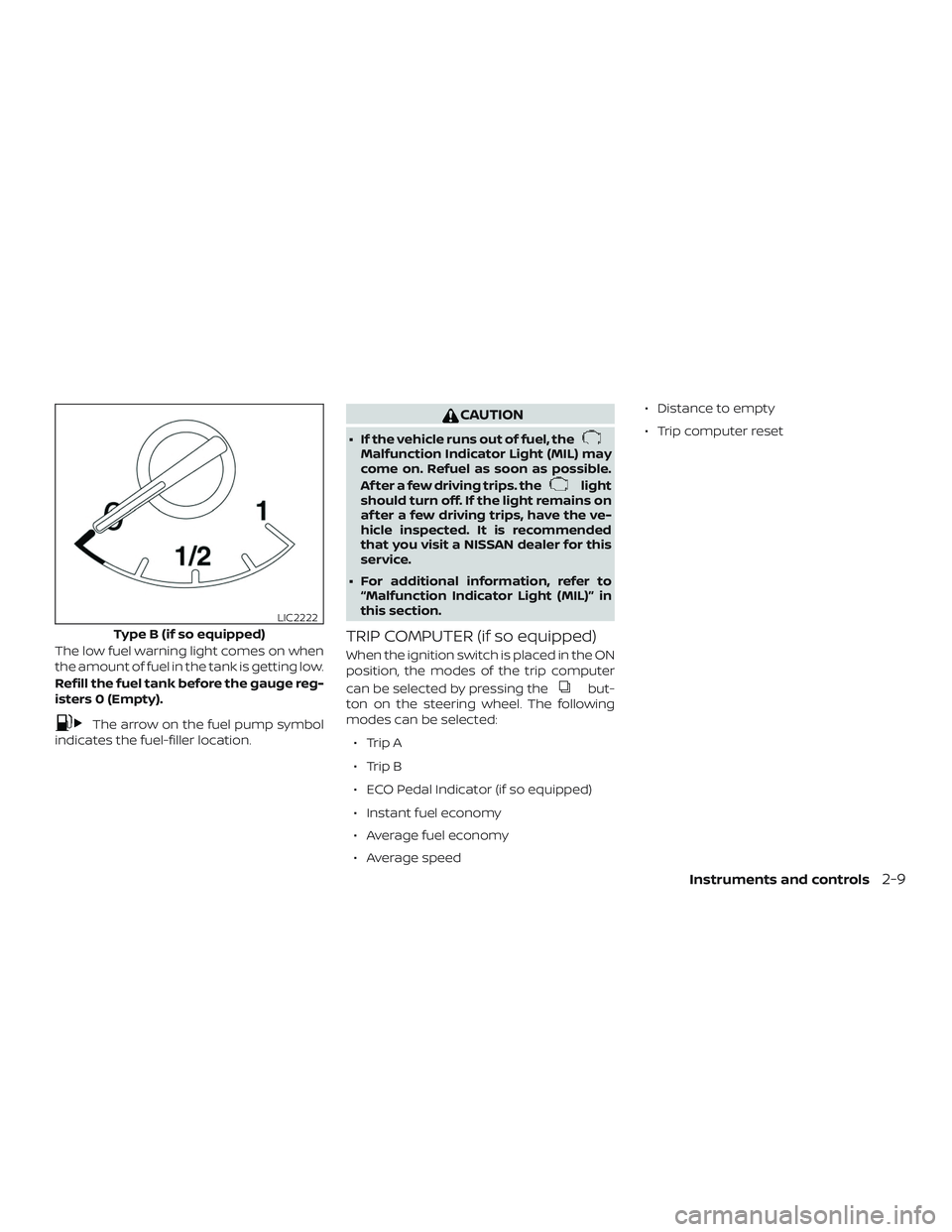
The low fuel warning light comes on when
the amount of fuel in the tank is getting low.
Refill the fuel tank before the gauge reg-
isters 0 (Empty).
The arrow on the fuel pump symbol
indicates the fuel-filler location.
CAUTION
∙ If the vehicle runs out of fuel, theMalfunction Indicator Light (MIL) may
come on. Refuel as soon as possible.
Af ter a few driving trips. the
light
should turn off. If the light remains on
af ter a few driving trips, have the ve-
hicle inspected. It is recommended
that you visit a NISSAN dealer for this
service.
∙ For additional information, refer to “Malfunction Indicator Light (MIL)” in
this section.
TRIP COMPUTER (if so equipped)
When the ignition switch is placed in the ON
position, the modes of the trip computer
can be selected by pressing the
but-
ton on the steering wheel. The following
modes can be selected:
∙ Trip A
∙ Trip B
∙ ECO Pedal Indicator (if so equipped)
∙ Instant fuel economy
∙ Average fuel economy
∙ Average speed ∙ Distance to empty
∙ Trip computer reset
Type B (if so equipped)
LIC2222
Instruments and controls2-9
Page 109 of 507

orAnti-lock Braking System
(ABS) warning lightorPower steering warning lightHigh beam indicator light (blue)
Automatic Emergency Braking (AEB)
system warning light (if so equipped)Seat belt warning light and chimeMalfunction Indicator Light (MIL)
orBrake warning lightShif t P (Park) warning light (if so equipped)Overdrive OFF indicator light
(if so equipped)
Charge warning lightSupplemental air bag warning lightSecurity indicator light
Door open warning light (if so equipped)Continuously Variable Transmission (CVT)
position indicator light (CVT models)
(if so equipped)Side light and headlight indicator light
(green)
Engine oil pressure warning light
(if so equipped)Cruise main switch indicator light
(if so equipped)Slip indicator light
Low fuel warning light (if so equipped)ECO mode indicator light (if so equipped)SPORT mode indicator light
(if so equipped)
Low tire pressure warning lightEngine start operation indicator light
(if so equipped)Turn signal/hazard indicator lights
Low windshield-washer fluid warning light
(if so equipped)Front fog light indicator light (if so
equipped)Vehicle Dynamic Control (VDC) OFF indi-
cator light
Master warning light (if so equipped)Front passenger air bag status light
WARNING LIGHTS, INDICATOR LIGHTS
AND AUDIBLE REMINDERS
Instruments and controls2-13
Page 110 of 507

CHECKING LIGHTS
With all doors closed, apply the parking
brake, fasten the seat belts and place the
ignition switch in the ON position without
starting the engine. The following lights (if
so equipped) will come on:
,or,,or
The following lights (if so equipped) will
come on briefly and then go off:
or,,,,,
SPORT ,
If any light does not come on or operate in
a way other than described, it may indicate
a burned-out bulb and/or a system mal-
function. Have the system checked. It is
recommended that you visit a NISSAN
dealer for this service.
Some indicators and warnings are also dis-
played on the vehicle information display
between the speedometer and tachom-
eter. For additional information, refer to “Ve-
hicle information display” in this section.
WARNING LIGHTS
For additional information on warnings
and indicators, refer to “Vehicle information
display” in this section.
orAnti-lock Braking
System (ABS)
warning light
When the ignition switch is placed in the ON
position, the ABS warning light illuminates
and then turns off. This indicates the ABS is
operational.
If the ABS warning light illuminates while
the engine is running or while driving, it
may indicate the ABS is not functioning
properly. Have the system checked. It is
recommended that you visit a NISSAN
dealer for this service.
If an ABS malfunction occurs, the anti-lock
function is turned off. The brake system
then operates normally but without anti-
lock assistance. For additional information,
refer to “Brake system” in the “Starting and
driving” section of this manual.
Automatic EmergencyBraking (AEB) system
warning light (if so
equipped)
This light comes on when the ignition
switch is placed in the ON position. It turns
off af ter the engine is started.
This light illuminates when the AEB system
is set to OFF on the vehicle information
display.
If the light illuminates when the AEB sys-
tem is on, it may indicate that the system is
unavailable. For additional information, re-
fer to “Automatic Emergency Braking (AEB)”
in the “Starting and driving” section of this
manual.
orBrake warning
light
This light functions for both the parking
brake and the foot brake systems.
Parking brake indicator
When the ignition switch is placed in the ON
position, the light comes on when the park-
ing brake is applied.
2-14Instruments and controls

