2018 NISSAN ROGUE SPORT brake
[x] Cancel search: brakePage 358 of 512
poor visibility in rain, fog, or other
bad weather. Decelerate the ve-
hicle speed by depressing the
brake pedal, depending on the
distance to the vehicle ahead
and the surrounding circum-
stances in order to maintain a
safe distance between vehicles.
. If the vehicle ahead comes to a
stop, the vehicle decelerates to a
standstill within the limitations of
the system. The system will can-
cel once it judges that the vehicle
has come to a standstill and
sound a warning chime. To pre-
vent the vehicle from moving, the
driver must depress the brake
pedal.
. Always pay attention to the op-
eration of the vehicle and be
ready to manually control the
proper following distance. The
vehicle-to-vehicle distance con-
trol mode of the ICC system may
not be able to maintain the se-
lected distance between vehicles
(following distance) or selected
vehicle speed under some cir-
cumstances.
. The system may not detect the
vehicle in front of you in certain
road or weather conditions. To avoid accidents, never use the ICC
system under the following con-
ditions:
— On roads where the traffic is
heavy or there are sharp
curves
— On slippery road surfaces such as on ice or snow, etc.
— During bad weather (rain, fog, snow, etc.)
— When rain, snow or dirt adhere to the system sensor
— On steep downhill roads (the vehicle may go beyond the set
vehicle speed and frequent
braking may result in over-
heating the brakes)
— On repeated uphill and down- hill roads
— When traffic conditions make it difficult to keep a proper
distance between vehicles be-
cause of frequent accelera-
tion or deceleration
— Interference by other radar sources.
. In some road or traffic conditions,
a vehicle or object can unexpect-
edly come into the sensor detec- tion zone and cause automatic
braking. You may need to control
the distance from other vehicles
using the accelerator pedal. Al-
ways stay alert and avoid using
the ICC system when it is not
recommended in this section.
The radar sensor will not detect the
following objects:
. Stationary and slow moving vehicles
. Pedestrians or objects in the roadway
. Oncoming vehicles in the same lane
. Motorcycles traveling offset in the
travel lane
The sensor generally detects the signals
returned from the vehicle ahead. There-
fore, if the sensor cannot detect the
reflection from the vehicle ahead, the
ICC system may not maintain the se-
lected distance.
The following are some conditions in
which the sensor cannot detect the
signals:
. When the snow or road spray from
traveling vehicles reduces the sensor’s
visibility
. When excessively heavy baggage is
loaded in the rear seat or the cargo
area of your vehicle
The ICC system is designed to automati-
Starting and driving5-73
Page 360 of 512

SSD0253
When driving on some roads, such as
winding, hilly, curved, narrow roads, or
roads which are under construction, the
radar sensor may detect vehicles in a
different lane, or may temporarily not
detect a vehicle traveling ahead. This
may cause the ICC system to decelerate
or accelerate the vehicle.
The detection of vehicles may also be
affected by vehicle operation (steering
maneuver or traveling position in the
lane, etc.) or vehicle condition.If this
occurs, the ICC system may warn you
by blinking the system indicator and
sounding the chime unexpectedly. You
will have to manually control the proper
distance away from the vehicle travel- ing ahead.
System temporarily unavailable
The following are conditions in which the
ICC system may be temporarily unavail-
able. In these instances, the ICC system
may not cancel and may not be able to
maintain the selected following distance
from the vehicle ahead.
Condition A:
Under the following conditions, the ICC
system is automatically canceled. A chime
will sound and the system will not be able
to be set:.
When the VDC is turned off
. When the ABS or VDC (including the
traction control system) operates
. When a vehicle ahead is not detected
and your vehicle is traveling below the
speed of 15 MPH (24 km/h)
. When the system judges the vehicle is
at a standstill
. When the shift lever is not in the D
(Drive) or manual shift mode
. When the parking brake is applied
. When a tire slips
. When the radar signal is temporarily
interrupted
Action to take:
When the conditions listed above are no
longer present, turn the ICC system back
on to use the system.
Starting and driving5-75
Page 365 of 512
5-80Starting and driving
will turn the system completely off.
When the ignition switch is placed in the
OFF position, the system is also automa-
tically turned off.
To use the ICC system again, quickly push
and release the CRUISE ON/OFF switch
(vehicle-to-vehicle distance control
mode) or push and hold it (conventional
cruise control mode) again to turn it on.
CAUTION
To avoid accidentally engaging
cruise control, make sure to turn
the CRUISE ON/OFF switch off when
not using the ICC system.JVS1077X
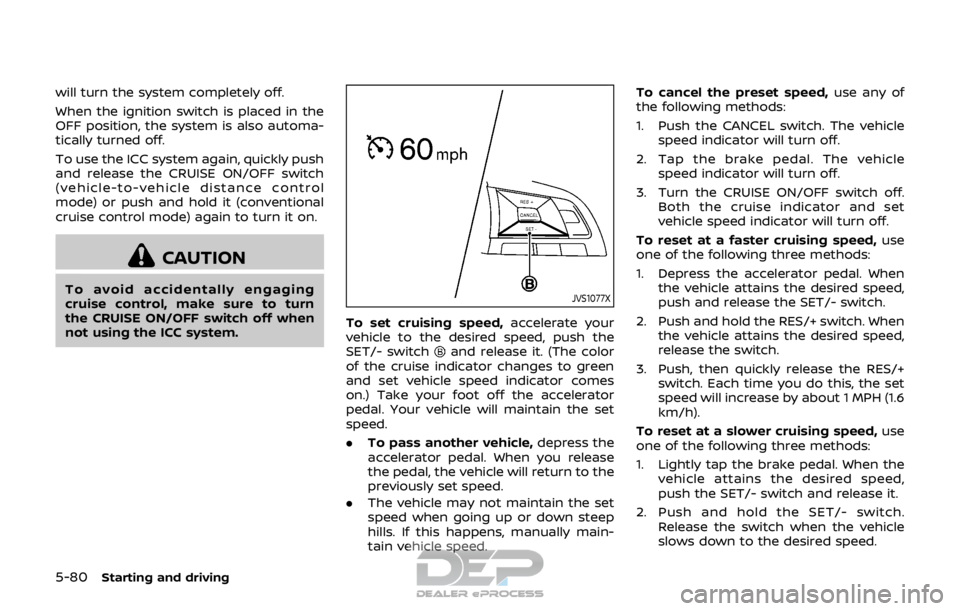
To set cruising speed,accelerate your
vehicle to the desired speed, push the
SET/- switch
and release it. (The color
of the cruise indicator changes to green
and set vehicle speed indicator comes
on.) Take your foot off the accelerator
pedal. Your vehicle will maintain the set
speed.
. To pass another vehicle, depress the
accelerator pedal. When you release
the pedal, the vehicle will return to the
previously set speed.
. The vehicle may not maintain the set
speed when going up or down steep
hills. If this happens, manually main-
tain vehicle speed. To cancel the preset speed,
use any of
the following methods:
1. Push the CANCEL switch. The vehicle speed indicator will turn off.
2. Tap the brake pedal. The vehicle speed indicator will turn off.
3. Turn the CRUISE ON/OFF switch off. Both the cruise indicator and set
vehicle speed indicator will turn off.
To reset at a faster cruising speed, use
one of the following three methods:
1. Depress the accelerator pedal. When the vehicle attains the desired speed,
push and release the SET/- switch.
2. Push and hold the RES/+ switch. When the vehicle attains the desired speed,
release the switch.
3. Push, then quickly release the RES/+ switch. Each time you do this, the set
speed will increase by about 1 MPH (1.6
km/h).
To reset at a slower cruising speed, use
one of the following three methods:
1. Lightly tap the brake pedal. When the
vehicle attains the desired speed,
push the SET/- switch and release it.
2. Push and hold the SET/- switch. Release the switch when the vehicle
slows down to the desired speed.
Page 366 of 512

3. Push, then quickly release the SET/-switch. Each time you do this, the set
speed will decrease by about 1 MPH
(1.6 km/h).
To resume the preset speed, push and
release the RES/+ switch. The vehicle will
resume the last set cruising speed when
the vehicle speed is over 25 MPH (40
km/h).
System temporarily unavailable
A chime sounds under the following
conditions and the control is automati-
cally canceled.
. When the vehicle slows down more
than 8 MPH (13 km/h) below the set
speed
. When the shift lever is not in the D
(Drive) or manual shift mode
. When the parking brake is applied.
. When the VDC (including the traction
control system) operates
. When a wheel slips
JVS1003X
Warning
When the system is not operating prop-
erly, the chime sounds and the color of
the cruise indicator will change to yellow.
Action to take:
If the color of the cruise indicator changes
to yellow, park the vehicle in a safe place.
Turn the engine off, restart the engine,
resume driving and then perform the
setting again.
If it is not possible to set or the indicator
stays on, it may indicate that the
system is malfunctioning. Although the
vehicle is still driveable under normal
conditions, have the vehicle checked. It
is recommended that you visit a NISSAN dealer for this service.
Starting and driving5-81
Page 368 of 512

JVS1117X
AEB emergency warning indicatorSteering-wheel-mounted controls (left
side)
AEB system warning light (on the meter
panel)
AEB SYSTEM OPERATION
The AEB system will function when your
vehicle is driven at speeds above approxi-
mately 3 MPH (5 km/h).
If a risk of a forward collision is detected,
the AEB system will firstly provide the
warning to the driver by flashing the
warning (yellow) in the vehicle informa-
tion display and providing an audible
alert.
If the driver applies the brakes quickly and
forcefully after the warning, and the AEB
system detects that there is still the
possibility of a forward collision, the
system will automatically increase the
braking force.
If the driver does not take action, the AEB
system issues the second visual (flashing)
(red) and audible warning. If the driver
releases the accelerator pedal, then the
system applies partial braking.
If the risk of a collision becomes immi-
nent, the AEB system applies harder
braking automatically.
While the AEB system is operating, you
may hear the sound of brake operation.
This is normal and indicates that the AEB
system is operating properly.
Starting and driving5-83
Page 369 of 512

5-84Starting and driving
NOTE:
The vehicle’s stop lights come on when
braking is performed by the AEB sys-
tem.
Depending on vehicle speed and distance
to the vehicle ahead, as well as driving
and roadway conditions, the system may
help the driver avoid a forward collision or
may help mitigate the consequences of a
collision should one be unavoidable.
If the driver is handling the steering
wheel, accelerating or braking, the AEB
system will function later or will not
function.
The automatic braking will cease under
the following conditions:
.When the steering wheel is turned as
far as necessary to avoid a collision.
. When the accelerator pedal is de-
pressed.
. When there is no longer a vehicle
detected ahead.
If the AEB system has stopped the vehicle,
the vehicle will remain at a standstill for
approximately 2 seconds before the
brakes are released.
Page 370 of 512

JVS0971X
AEB system warning light (on the meter
panel)
Vehicle information displaySteering-wheel-mounted controls (left
side)
TURNING THE AEB SYSTEM ON/OFF
Perform the following steps to turn the
AEB system on or off.
1. Press the
button until “Set-
tings” displays in the vehicle informa-
tion display and then press “OK”
button. Use the
button to select
“Driver Assistance.” Then press the
“OK” button.
2. Select “Driving Aids” and press the “OK” button.
3. Use the “OK” button to check/uncheck the box for “Emergency Brake.”
When the AEB system is turned off, the
AEB system warning light (orange)
illuminates.
NOTE:
The AEB system will be automatically
turned ON when the engine is restarted.
Starting and driving5-85
Page 373 of 512

5-88Starting and driving
In the following conditions, the AEB
system warning light (orange) will illumi-
nate and the “Unavailable: Front Radar
Obstruction” warning message will ap-
pear in the vehicle information display.
.The sensor area on the front of the
vehicle is covered with dirt or is
obstructed.
Action to take
If the warning light (orange) comes on,
stop the vehicle in a safe place and turn
the engine off. Clean the radar cover on
the front of the vehicle with a soft cloth,
and restart the engine. If the warning light
continues to illuminate, have the AEB
system checked. It is recommended that
you visit a NISSAN dealer for this service.
. When driving on roads with limited
road structures or buildings (for ex-
ample, long bridges, deserts, snow
fields, driving next to long walls).
Action to take
When the above conditions no longer
exist, the AEB system will resume auto-
matically.
Condition C
When the Vehicle Dynamic Control (VDC)
system is OFF, the AEB brake will not
operate. In this case only visible and
audible warning operates. The AEB sys-
tem warning light (orange) will illuminate. Action to take
When the VDC system is ON, the AEB
system will resume automatically.
SYSTEM MALFUNCTION
If the AEB system malfunctions, it will be
turned off automatically, a chime will
sound, the AEB system warning light
(orange) will illuminate and the “Malfunc-
tion” warning message will appear in the
vehicle information display.
Action to take:
If the AEB system warning light (orange)
comes on, stop the vehicle in a safe
location. Turn the engine off and restart
the engine. If the warning light continues
to illuminate, have the AEB system
checked. It is recommended that you visit
a NISSAN dealer for this service.
JVS1041X
SYSTEM MAINTENANCE
The sensoris located on the front of
the vehicle.
To keep the system operating properly,
be sure to observe the following:
. Always keep the sensor area on the
front of the vehicle clean.
. Do not strike or damage the areas
around the sensor.
. Do not cover or attach stickers or
similar objects on the front of the
vehicle near the sensor area. This
could cause failure or malfunction.
. Do not attach metallic objects near
the sensor area (brush guard, etc.).
This could cause failure or malfunc-