Page 139 of 547
LED DAYTIME RUNNING LIGHTS
(DRL) SYSTEM
The LED portion of the headlights auto-
matically illuminate at 100% intensity when
the engine is started and the parking brake
released. The LED Daytime Running Lights
(DRL) system operates with the headlight
switch in the OFF position. When you turn
the headlight switch to the
position
for full illumination, the LED lights switch
from LED DRL system to the park function.
If the parking brake is applied before the
engine is started, the LED DRL system does
not illuminate. The LED DRL system illumi-
nates when the parking brake is released.
The LED DRL system will remain on until the
ignition switch is placed in the OFF position.
It is necessary at dusk to turn the headlight
switch on for interior controls and switches
to illuminate, as those remain off while the
switch is in the OFF position.
WARNING
When the LED DRL system is active, tail
lights on your vehicle are not on. It is
necessary at dusk to turn on your head-
lights. Failure to do so could cause an
accident injuring yourself and others.
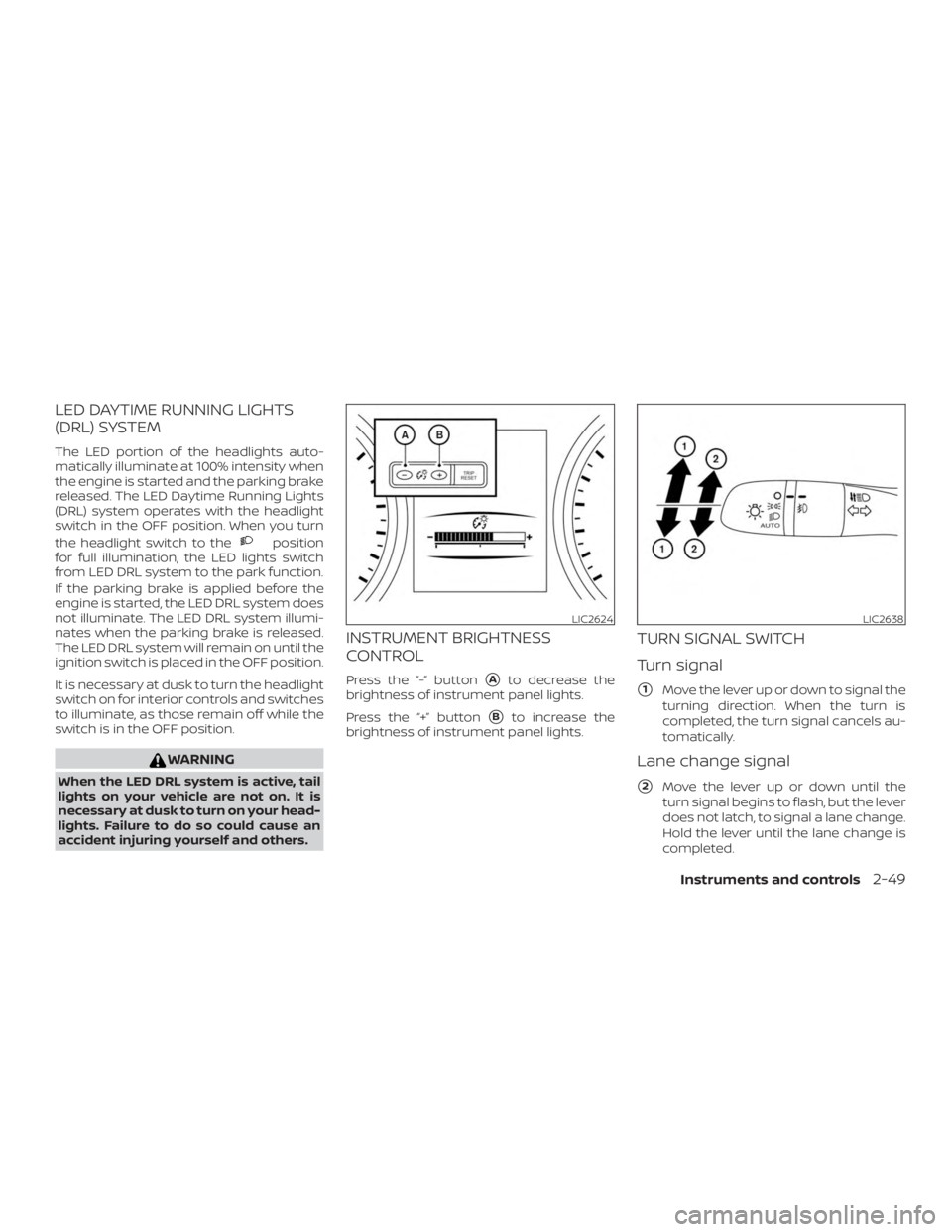
INSTRUMENT BRIGHTNESS
CONTROL
Press the “-” button�Ato decrease the
brightness of instrument panel lights.
Press the “+” button
�Bto increase the
brightness of instrument panel lights.
TURN SIGNAL SWITCH
Turn signal
�1Move the lever up or down to signal the
turning direction. When the turn is
completed, the turn signal cancels au-
tomatically.
Lane change signal
�2Move the lever up or down until the
turn signal begins to flash, but the lever
does not latch, to signal a lane change.
Hold the lever until the lane change is
completed.
LIC2624LIC2638
Instruments and controls2-49
Page 140 of 547
Move the lever up or down until the
turn signal begins to flash, but the lever
does not latch, and release the lever.
The turn signal will automatically flash
three times.
Choose the appropriate method to signal
a lane change based on road and traffic
conditions.
NOTE:
The 3 flash pass feature may be disabled.
For additional information, refer to “Ve-
hicle information display ” in this section.
FOG LIGHT SWITCH (if so
equipped)
To turn the fog lights on, turn the headlight
switch to the
position, then turn the
fog light switch to the
position.
To turn the fog lights on with the headlight
switch in the AUTO position, the headlights
must be on, then turn the fog light switch to
the
position.
To turn the fog lights off, turn the fog light
switch to the OFF position. The headlights must be on and the low
beams selected for the fog lights to oper-
ate. The fog lights automatically turn off
when the high beam headlights are se-
lected.
LIC2639
2-50Instruments and controls
Page 144 of 547

The vehicle should be driven with the VDC
system on for most driving conditions.
If the vehicle is stuck in mud or snow, the
VDC system reduces the engine output to
reduce wheel spin. The engine speed will
be reduced even if the accelerator is de-
pressed to the floor. If maximum engine
power is needed to free a stuck vehicle,
turn the VDC system off.
To turn off the VDC system, push the VDC
OFF switch. The
indicator will come
on. Push the VDC OFF switch again or restart
the engine to turn on the system. For addi-
tional information, refer to “Vehicle Dy-
namic Control (VDC) system” in the “Start-
ing and driving” section of this manual.
The All-Wheel Drive (AWD) LOCK switch is
located on the instrument panel. The AWD
LOCK indicator light will illuminate when
the switch is turned on. For additional infor-
mation, refer to “Warning lights, indicator
lights and audible reminders” in this sec-
tion and “AWD Lock Switch Operations” in
the “Starting and driving” section of this
manual.
Each time you push the switch, the AWD
mode will switch: AUTO→LOCK→AUTO.
LIC3344LIC2645
VEHICLE DYNAMIC CONTROL (VDC)
OFF SWITCH ALL-WHEEL DRIVE (AWD) LOCK
SWITCH (if so equipped)
2-54Instruments and controls
Page 146 of 547
CAUTION
∙ The outlet and plug may be hot duringor immediately af ter use.
∙ Only certain power outlets are de- signed for use with a cigarette lighter
unit. Do not use any other power out-
let for an accessory lighter. It is rec-
ommended that you visit a NISSAN
dealer for additional information.
∙ Do not use with accessories that ex- ceed a 12 volt, 120W (10A) power draw. ∙ Do not use double adapters or more
than one electrical accessory.
∙ Use power outlets with the engine running to avoid discharging the ve-
hicle battery.
∙ Avoid using power outlets when the air conditioner, headlights or rear win-
dow defroster is on.
∙ Before inserting or disconnecting a plug, be sure the electrical accessory
being used is turned OFF. ∙ Push the plug in as far as it will go. If
good contact is not made, the plug
may overheat or the internal tem-
perature fuse may open.
∙ When not in use, be sure to close the cap. Do not allow water or any other
liquid to contact the outlet.
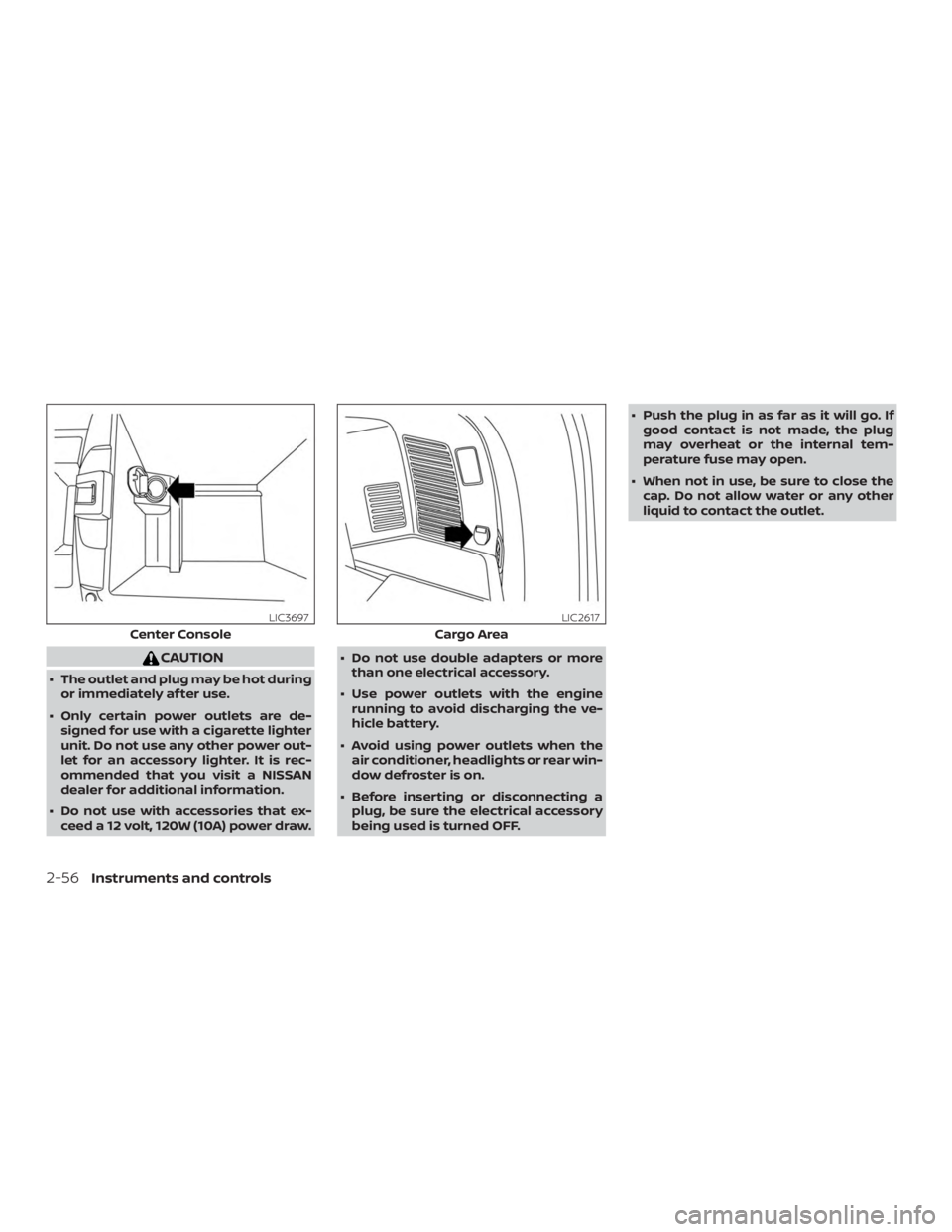
Center Console
LIC3697
Cargo Area
LIC2617
2-56Instruments and controls
Page 161 of 547

CAUTION
∙ Do not place objects (such as newspa-pers, handkerchiefs, etc.) on the sun-
shade inlet port. Doing so may en-
tangle these objects in the sunshade
when it is extending or retracting,
causing improper operation or dam-
age to the sunshade.
∙ Do not push the sunshade arm with your hands, etc., as this may deform it.
Improper operation or damage to the
sunshade may result.
∙ Do not put any object into the sun- shade inlet port as this may result in
improper operation or damage the
sunshade.
∙ Do not hang any object on the arm rail as this may result in improper opera-
tion or damage the sunshade.
∙ Do not forcefully pull the sunshade. Doing so may elongate the sunshade.
Improper operation or damage to the
sunshade may result.
If the moonroof does not close
Have your moonroof checked and re-
paired. It is recommended that you visit a
NISSAN dealer for this service. When the ON switch
�1is pressed, the foot-
well lights (if so equipped), step lights (if so
equipped), map lights and rear personal
lights will automatically turn on and stay on
for a period of time when:
∙ The doors are unlocked by the Intelli- gent Key, a key or the request switch (if
so equipped) while all doors are closed
and the ignition switch is in the OFF
position.
∙ When individually pushed. When the OFF switch
�2is pushed, the in-
terior lights do not illuminate even when
pushed. When the DOOR/OFF switch is
pressed and the ON switch is pressed, all of
the lights will come on.
NOTE:
The footwell lights and step lights illumi-
nate when the driver and passenger
doors are open regardless of the interior
light switch position. These lights will
turn off automatically af ter a period of
time while doors are open to prevent the
battery from becoming discharged.
CAUTION
Do not use for extended periods of time
with the engine stopped. This could re-
sult in a discharged battery.
LIC2302
INTERIOR LIGHTS
Instruments and controls2-71
Page 162 of 547
CONSOLE LIGHT
The console light will turn on whenever the
parking lights or headlights are illuminated.
The console light brightness can be ad-
justed with the illumination brightness
control.
MAP LIGHTS
Press the button to turn the map lights on.
To turn them off, press the button again.
CAUTION
Do not use for extended periods of time
with the engine stopped. This could re-
sult in a discharged battery.
PERSONAL LIGHTS (if so equipped)
To turn the rear personal lights on, push the
switch. To turn them off, push the switch
again.
LIC2303LIC2304Rear personal lights
LIC1083
2-72Instruments and controls
Page 163 of 547

ROOM LIGHT (if so equipped)
The room light on the overhead trim has a
three-position switch. To operate, push the
switch to the desired position.
�1ON: The light is illuminated, regardless
of door position.
�2DOOR: The light illuminates when a
door or the lif tgate is opened. The light
turns off when the door or lif tgate is
closed.
�3OFF: The light does not illuminate. The lights will turn off automatically af ter a
period of time while doors are open to pre-
vent the battery from becoming dis-
charged.
CAUTION
Do not use for extended periods of time
with the engine stopped. This could re-
sult in a discharged battery.
The luggage compartment light on the
overhead trim has a two-position switch.
To operate, push the switch to the desired
position.
�1OFF: The light does not illuminate re-
gardless of door position or lock sta-
tus.
�2ON: The light is illuminated.
CAUTION
Do not use for extended periods of time
with the engine stopped. This could re-
sult in a discharged battery.
SIC2063ALIC3925
LUGGAGE COMPARTMENT LIGHT (if
so equipped)
Instruments and controls2-73
Page 178 of 547

WARNING
∙ Radio waves could adversely affectelectric medical equipment. Those
who use a pacemaker should contact
the electric medical equipment
manufacturer for the possible influ-
ences before use.
∙ The remote keyless entry key fob transmits radio waves when the but-
tons are pressed. The FAA advises ra-
dio waves may affect aircraf t naviga-
tion and communication systems. Do
not operate the remote keyless entry
key fob while on an airplane. Make
sure the buttons are not operated un-
intentionally when the unit is stored
for a flight.
It is possible to lock/unlock all doors, turn
the interior lights on, and activate the panic
alarm by using the key fob from outside the
vehicle.
Be sure to remove the key from the ve-
hicle before locking the doors.
The key fob can operate at a distance of
approximately 33 f t (10 m) from the vehicle.
The effective distance depends on the
conditions around the vehicle. As many as four key fobs can be used with
one vehicle. For information concerning
the purchase and use of additional key
fobs, it is recommended that you visit a
NISSAN dealer.
The key fob will not function when:
∙ The battery is discharged.
∙ The distance between the vehicle and the key fob is over 33 f t (10 m).
The panic alarm will not activate when
the key is in the ignition switch.
CAUTION
Listed below are conditions or occur-
rences which will damage the key fob:
∙ Do not allow the key fob, which con- tains electrical components, to come
into contact with water or salt water.
This could affect the system function.
∙ Do not drop the key fob.
∙ Do not strike the key fob sharply against another object.
∙ Do not change or modif y the key fob.
∙ Wetting may damage the key fob. If the key fob gets wet, immediately
wipe until it is completely dry. ∙ Do not place the key fob for an ex-
tended period in an area where tem-
peratures exceed 140°F (60°C).
∙ Do not attach the key fob with a key holder that contains a magnet.
∙ Do not place the key fob near equip- ment that produces a magnetic field,
such as a TV, audio equipment and
personal computers.
If a key fob is lost or stolen, NISSAN rec-
ommends erasing the ID code of that
key fob. This will prevent the key fob
from unauthorized use to unlock the
vehicle. For information regarding the
erasing procedure, it is recommended
that you visit a NISSAN dealer.
REMOTE KEYLESS ENTRY SYSTEM (if
so equipped)
3-8Pre-driving checks and adjustments

