2018 NISSAN JUKE display
[x] Cancel search: displayPage 210 of 1672
JVH1257X
Rear and front-side views
In the bird’s-eye view, the yellow frame*1is
displayed on each camera image (front, rear,
right, left) depending on where moving objects
are detected.
The yellow frame
*2is displayed on each view
in the front view and rear view modes.
A blue MOD icon
*3is displayed in the view
where the MOD system is operative. A gray
MOD icon
*3is displayed in the view where the
MOD system is not operative.
If the MOD system is turned off, the MOD icon
*3is not displayed.
MOD SYSTEM LIMITATIONS
Page 222 of 1672
—CDs that are not round
— CDs with a paper label
— CDs that are warped, scratched, or
have abnormal edges
. This audio system can only play pre-
recorded CDs. It has no capabilities to
record or burn CDs.
. If the CD cannot be played, error
messages as the following examples
will be displayed.
Check Disc:
—Confirm that the CD is inserted
correctly (the label side is facing
up, etc.) .
— Confirm that the CD is not bent or
warped and it is free of scratches.
Push Eject:
This is an error due to the temperature
inside the player is too high. Remove
the CD by pushing the EJECT button,
and after a short time reinsert the CD.
The CD can be played when the tem-
perature of the player returns to nor-
mal.
Unplayable Track:
The file is unplayable in this audio
system (only MP3 or WMA CD) .USB (Universal Serial Bus) Connection
Port
Page 234 of 1672
CAUTION
.Do not force the USB device into the
USB port. Inserting the USB device
tilted or up-side-down into the port
may damage the port. Make sure
that the USB device is connected
correctly into the USB port.
. Do not grab the USB port cover (if
so equipped) when pulling the USB
device out of the port. This could
damage the port and the cover.
. Do not leave the USB cable in a
place where it can be pulled unin-
tentionally. Pulling the cable may
damage the port.
Refer to your device manufacturer’s owner
information regarding the proper use and care
of the device.
Connecting iPod
Š:
The USB connection port is located on the
lower part of the instrument panel. Connect the
iPod
Šcable to the USB connector. See “USB
(Universal Serial Bus) connection port” (P.4-48) .
When the audio system operates, the system
will switch to the iPod
Šmode automatically. The
battery of the iPodŠis charged while the cable is connected to the vehicle.
Depending on the version of the iPod
Š, the
display on the iPodŠshows a NISSAN or
Accessory Attached screen when the connec-
tion is completed. When the iPod
Šis connected
to the vehicle, the iPodŠmusic library can only
be operated by the vehicle audio controls.
*iPod
Šand iPhoneŠare a trademark of Apple
Inc., registered in the U.S. and other countries.
Compatibility:
The following models are compatible:
. iPod nano
Š1G (Firmware version 1.3.1 -)
. iPod nanoŠ2G (Firmware version 1.1.3 -)
. iPod nanoŠ3G (Firmware version 1.0.0 -)
. iPod nanoŠ4G (Firmware version 1.0.2 -)
. iPod nanoŠ5G (Firmware version 1.0.1 -)
. iPod nanoŠ6G (Firmware version 1.0 -)
. iPod nanoŠ7G (Firmware version 1.0.0 -)
. iPodŠ5G (Firmware version 1.2.1 -)
. iPod classicŠ(Firmware version 1.0.0 -)
. iPod TouchŠ(iOS 1.1 -)
. iPod TouchŠ2G (iOS 2.1.1 -)
. iPod TouchŠ3G (iOS 3.1 -)
. iPod TouchŠ4G (iOS 4.1 -)
. iPod TouchŠ5G (iOS 6.0.0 -) .
iPhone
Š(iOS 1.0.0 - 2.2.1)
. iPhoneŠ3G (iOS 2.1 -)
. iPhoneŠ3GS (iOS 3.0 -)
. iPhoneŠ4/4S (iOS 4.0 -)
. iPhoneŠ5 (iOS 6.0.0 -)
Operations attributable to firmware update by
Apple are not guaranteed.
iPod
Šmain operation:
The system operates when the ignition switch is
in the ON or ACC position. Push the
Page 252 of 1672
JVH0743X
Play information:
Information about the audio files being played is
shown on the display screen of the vehicle’s
audio system. Touch “Browse” to display the list
of categories that can be used to narrow the
search. Touch the name of a song on the screen
to begin playing that song.
Page 253 of 1672
CAUTION
.Do not force the USB device into the
USB port. Inserting the USB device
tilted or up-side-down into the port
may damage the port. Make sure
that the USB device is connected
correctly into the USB port.
. Do not grab the USB port cover (if
so equipped) when pulling the USB
device out of the port. This could
damage the port and the cover.
. Do not leave the USB cable in a
place where it can be pulled unin-
tentionally. Pulling the cable may
damage the port.
Refer to your device manufacturer’s owner
information regarding the proper use and care
of the device.
To connect an iPod
Što the vehicle so that the
iPodŠcan be controlled with the audio system
controls and display screen, use the USB port
located on the lower center of the instrument
panel. Connect the iPod
Š-specific end of the
cable to the iPodŠand the USB end of the cable
to the USB port on the vehicle. If your iPodŠ
supports charging via a USB connection, its battery will be charged while connected to the
vehicle with the ignition switch in the ACC or
ON position.
While connected to the vehicle, the iPod
Šmay
only be able to be operated by the vehicle audio
controls.
To disconnect the iPod
Šfrom the vehicle,
remove the USB end of the cable from the
USB port on the vehicle, then remove the cable
from the iPod
Š.
iPodŠis a trademark of Apple Inc., registered in
the U.S. and other countries.
Compatibility:
The following models are compatible:
. iPod Classic
Š5th generation (firmware
version 1.3.0 or later)
. iPod Classic
Š6th generation (firmware
version 2.0.1 or later)
. iPod Classic
Š6th (6.1) generation (firmware
version 2.0.1 or later)
. iPod Classic
Š6th (6.2) generation (firmware
version 2.0.4 or later)
. iPod Touch
Š2nd generation (firmware ver-
sion 4.2.1 or later)*
. iPod Touch
Š3rd generation (firmware ver-
sion 5.1.1 or later) .
iPod Touch
Š4th generation (firmware ver-
sion 6.1.3 or later)
. iPod Touch
Š5th generation (firmware ver-
sion 6.1.3 or later)
. iPod nano
Š- 2nd generation (firmware
version 1.1.3 or later)
. iPod nano
Š- 3rd generation (firmware
version 1.1.3 or later)
. iPod nano
Š- 4th generation (firmware
version 1.0.4 or later)
. iPod nano
Š- 5th generation (firmware
version 1.0.2 or later)
. iPod nano
Š- 6th generation (firmware
version 1.2 or later)
. iPod nano
Š- 7th generation (firmware
version 1.2 or later)
. iPhone
Š3G (firmware version 4.2.1 or later)
. iPhoneŠ3GS (firmware version 5.1.1or
later)
. iPhone
Š4 (firmware version 6.1.3 or later)
. iPhoneŠ4S (firmware version 6.1.3 or later)
. iPhoneŠ5 (firmware version 6.1.3 or later)
* Some features of this iPodŠmay not be fully
functional.
Make sure that your iPod
Šfirmware is updated
to the version indicated above.
Heater, air conditioner, audio and phone systems4-69
Page 270 of 1672
ber”, then speak the digits. Up to 24
digits can be entered. Available special
characters are “star”, “pound”, “plus” and
“pause”. When finished, say “Dial” to
initiate the call. Say “Correction” at any
time in the process to correct a mis-
spoken or misinterpreted number or
character.
.RedialSpeak this command to dial the number
of the last outgoing call. The system will
display “Redialing (name/number)”. The
name of the phonebook entry will be
displayed if it available, otherwise the
number being redialed will be displayed.
.Call Back
Speak this command to dial the number
of the last incoming call. The system will
display “Calling back (name/number)” .
The name of the phonebook entry will be
displayed if it available, otherwise the
number being called back will be dis-
played.
Receiving a call
When a call is received by the phone connected
to the vehicle’s BluetoothŠHands-Free Phone
System, the call information is displayed on
either the vehicle information display or both the
vehicle information display and the control panel
display.
Push the
Page 273 of 1672
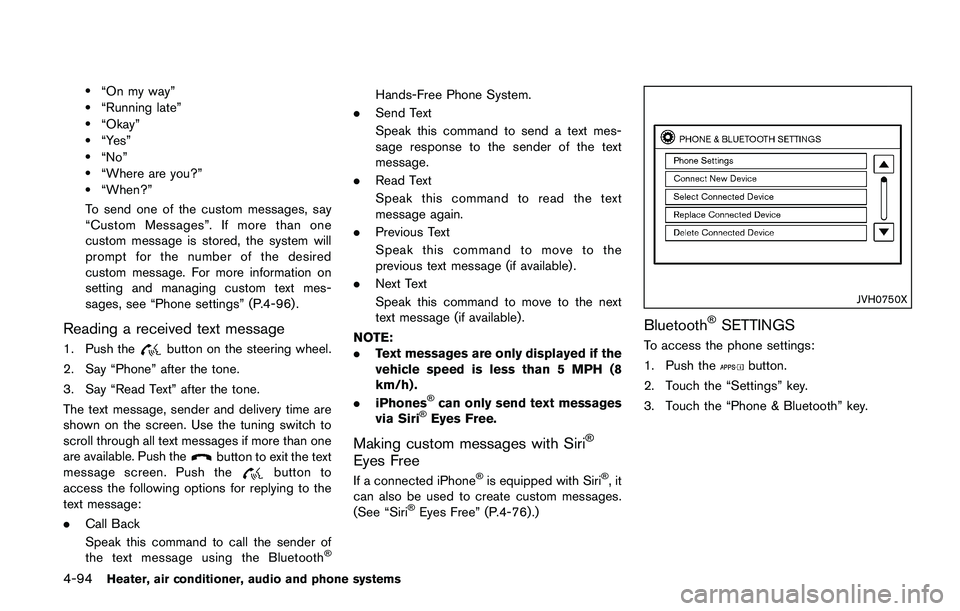
.Text MessageSelect to turn on or off the vehicle’s text
messaging feature.
.New Text SoundSelect to adjust the volume of the sound
that plays when a new text is received by
a phone connected to the Bluetooth
Š
Hands-Free Phone System. The setting
all the way to the left indicates that the
new text sound will be muted.
.Show Incoming TextSelect “Driver Only” to have incoming
text messages displayed only in the
vehicle information display. Select “Both”
to have incoming text messages dis-
played in both the vehicle information
display and the center display screen.
Select “None” to have no display of
incoming text messages.
.Edit Custom MessagesSelect to set a custom message that will
be available with the standard options
when sending a text message. To set a
custom message, send a text message to
your own phone number while the phone
is connected to the system. Three
custom messages can be set. Custom
messages can only be set while the
vehicle is stationary.
.Auto ReplySelect to turn on or off the Auto Reply
function. When enabled, the vehicle will
automatically send a predefined text message to the sender when a text
message is received while driving.
.Auto Reply Message
Select to choose the message that is
sent when the Auto Reply function is
enabled. Choose from “I’m Driving” or
one of the three custom messages
stored in the system.
.Vehicle Signature On/OffSelect to choose whether or not the
vehicle signature is added to outgoing
text messages from the vehicle. This
message cannot be changed or custo-
mized.
Page 290 of 1672
pressure telltale.
Your vehicle has also been equipped with a
TPMS malfunction indicator to indicate when the
system is not operating properly. The TPMS
malfunction indicator is combined with the low
tire pressure telltale. When the system detects a
malfunction, the telltale will flash for approxi-
mately one minute and then remain continuously
illuminated. This sequence will continue upon
subsequent vehicle start-ups as long as the
malfunction exists. When the malfunction indi-
cator is illuminated, the system may not be able
to detect or signal low tire pressure as intended.
TPMS malfunctions may occur for a variety of
reasons, including the installation of replace-
ment or alternate tires or wheels on the vehicle
that prevent the TPMS from functioning properly.
Always check the TPMS malfunction telltale
after replacing one or more tires or wheels on
your vehicle to ensure that the replacement or
alternate tires and wheels allow the TPMS to
continue to function properly.
Additional information
.Since the spare tire is not equipped with the
TPMS, the TPMS does not monitor the tire
pressure of the spare tire.
. The TPMS will activate only when the
vehicle is driven at speeds above 16 MPH
(25 km/h) . Also, this system may not detect a sudden drop in tire pressure (for example a
flat tire while driving) .
. The low tire pressure warning light does not
automatically turn off when the tire pressure
is adjusted. After the tire is inflated to the
recommended pressure, the vehicle must be
driven at speeds above 16 MPH (25 km/h)
to activate the TPMS and turn off the low tire
pressure warning light. Use a tire pressure
gauge to check the tire pressure.
. The CHECK TIRE PRES (pressure) warning
message is displayed in the vehicle informa-
tion display when the low tire pressure
warning light is illuminated and low tire
pressure is detected. The CHECK TIRE
PRES warning message turns off when the
low tire pressure warning light turns off. The
low tire pressure warning light remains
illuminated until the tires are inflated to the
recommended COLD tire pressure. The
CHECK TIRE PRES warning message is
displayed each time the ignition switch is
placed in the ON position as long as the low
tire pressure warning light remains illumi-
nated. “Check tire pressure warning mes-
sage” (P.2-9) .
. The CHECK TIRE PRES warning message
is not displayed if the low tire pressure
warning light illuminates to indicate a TPMS
malfunction. .
Tire pressure rises and falls depending on
the heat caused by the vehicle’s operation
and the outside temperature. Do not reduce
the tire pressure after driving because the
tire pressure rises after driving. Low outside
temperature can lower the temperature of
the air inside the tire which can cause a
lower tire inflation pressure. This may cause
the low tire pressure warning light to
illuminate. If the warning light illuminates in
low ambient temperature, check the tire
pressure for all four tires.
For additional information, see “Low tire pres-
sure warning light” (P.2-18) and “Tire Pressure
Monitoring System (TPMS)” (P.6-3) .