2018 NISSAN 370Z ROADSTER key
[x] Cancel search: keyPage 259 of 453
Spanish) or French (in French). Use the
following chart to select the language.
NOTE:
You must push the
button or thebutton within 5 seconds to
change the language.
Current lan-
guage Push(TALK/PHONE
SEND) to select Push(MODE/
PHONE END) to select
English Spanish French
Spanish English French
French English Spanish
5. If you decide not to change the
language, do not push either button.
After 5 seconds, the VR session will
end, and the language will not be
changed.
Connecting procedure
NOTE:
The connecting procedure must be
performed when the vehicle is station-
ary. If the vehicle starts moving during
the procedure, the procedure will be
cancelled.
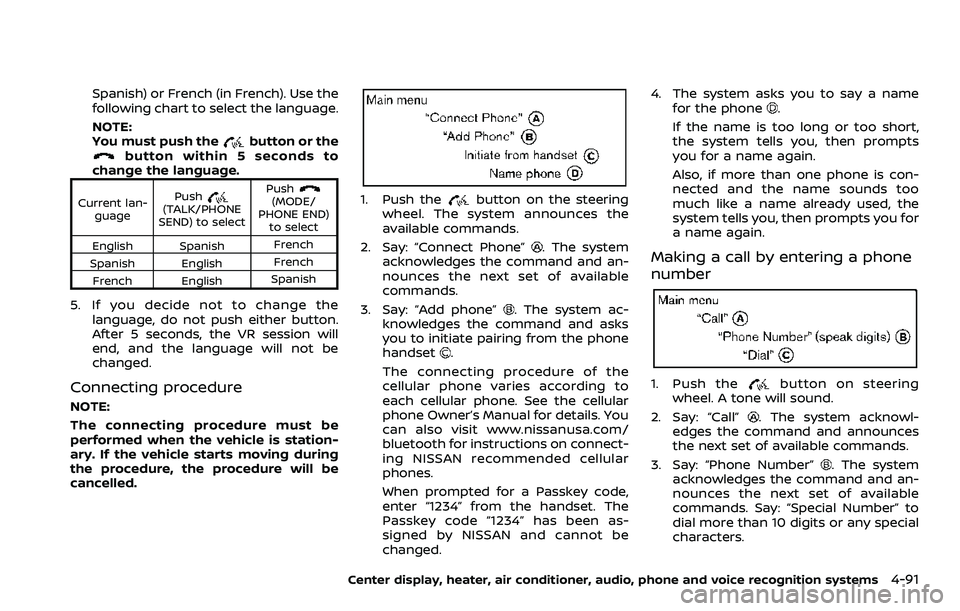
1. Push thebutton on the steering
wheel. The system announces the
available commands.
2. Say: “Connect Phone”
. The system
acknowledges the command and an-
nounces the next set of available
commands.
3. Say: “Add phone”
. The system ac-
knowledges the command and asks
you to initiate pairing from the phone
handset
.
The connecting procedure of the
cellular phone varies according to
each cellular phone. See the cellular
phone Owner’s Manual for details. You
can also visit www.nissanusa.com/
bluetooth for instructions on connect-
ing NISSAN recommended cellular
phones.
When prompted for a Passkey code,
enter “1234” from the handset. The
Passkey code “1234” has been as-
signed by NISSAN and cannot be
changed. 4. The system asks you to say a name
for the phone
.
If the name is too long or too short,
the system tells you, then prompts
you for a name again.
Also, if more than one phone is con-
nected and the name sounds too
much like a name already used, the
system tells you, then prompts you for
a name again.
Making a call by entering a phone
number
1. Push thebutton on steering
wheel. A tone will sound.
2. Say: “Call”
. The system acknowl-
edges the command and announces
the next set of available commands.
3. Say: “Phone Number”
. The system
acknowledges the command and an-
nounces the next set of available
commands. Say: “Special Number” to
dial more than 10 digits or any special
characters.
Center display, heater, air conditioner, audio, phone and voice recognition systems4-91
Page 267 of 453
NISSAN Voice Recognition allows hands-
free operation of the Phone, Navigation,
Information and Audio systems in one of
two modes, Standard Mode or Alternate
Command Mode.
In Standard Mode, commands that are
available are always shown on the display
and announced by the system. You can
complete your desired operation by sim-
ply following the prompts given by the
system. (See “NISSAN voice recognition
Standard Mode” (P.4-99) for details.)
For advanced operation, you can use the
Alternate Command Mode. (See “NISSAN
voice recognition Alternate Command
Mode” (P.4-110) for details.) When this
mode is active, an expanded list of
commands can be spoken after pushing
the TALK
switch, and the voice
command menu prompts are turned off.
Review the expanded command list,
which is available when this mode is
active. Note that in this mode the recog-
nition success rate may be affected as
the number of available commands and
the ways of speaking each command are
increased.
To switch one mode to another, see each
mode description later in this section.
To improve the recognition success rate
when Alternate Command Mode is active,
try using the Speaker Adaptation Func- tion available in that mode. Otherwise, it
is recommended that Alternate Com-
mand Mode be turned off and Standard
Mode be used for the best recognition
performance.
For the voice commands for the naviga-
tion system, refer to the Navigation Sys-
tem Owner’s Manual of your vehicle.
For Roadster models:
The voice recognition system cannot be
operated when the soft top is not closed.
NISSAN VOICE RECOGNITION
STANDARD MODE
The following section is applicable when
the Standard Mode is activated.
The Standard Mode enables you to com-
plete the desired operation by simply
following the prompts that appear on
the display and also are announced by
the system.SAA2529
Activating Standard Mode
When the Alternate Command Mode is
active, perform the following steps to
switch to the Standard Mode.
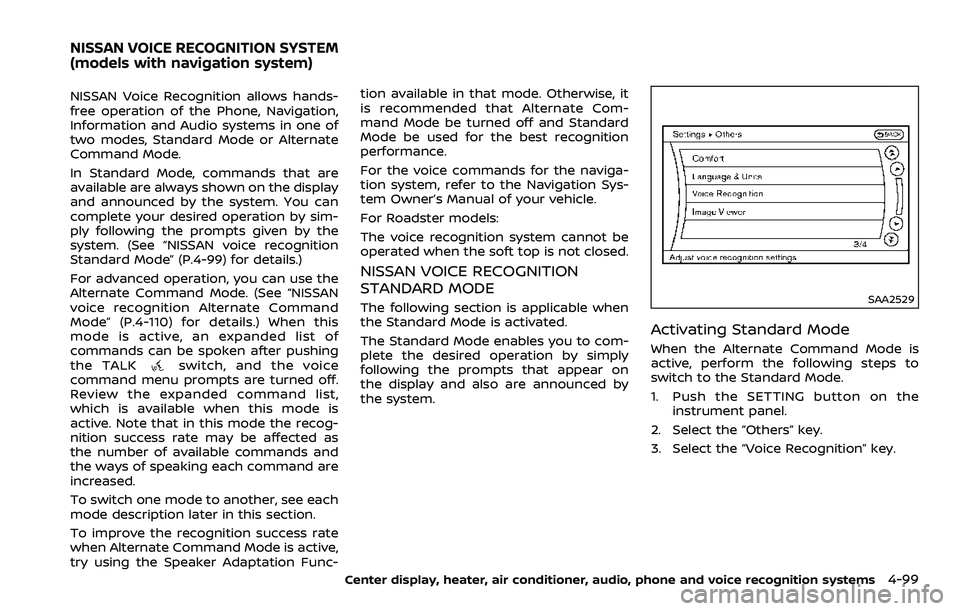
1. Push the SETTING button on the
instrument panel.
2. Select the “Others” key.
3. Select the “Voice Recognition” key.
Center display, heater, air conditioner, audio, phone and voice recognition systems4-99
NISSAN VOICE RECOGNITION SYSTEM
(models with navigation system)
Page 268 of 453
4-100Center display, heater, air conditioner, audio, phone and voice recognition systems
SAA2530
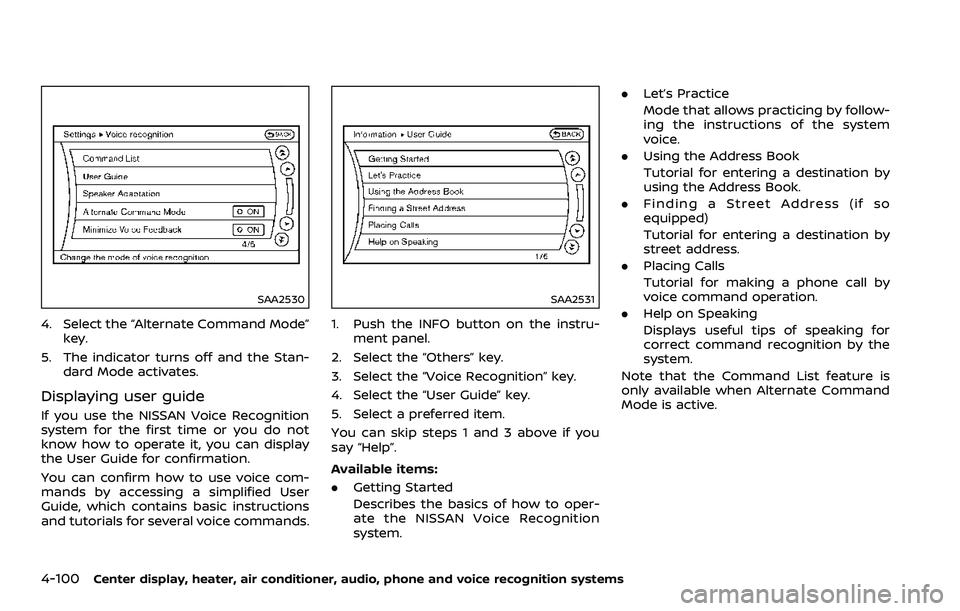
4. Select the “Alternate Command Mode”key.
5. The indicator turns off and the Stan- dard Mode activates.
Displaying user guide
If you use the NISSAN Voice Recognition
system for the first time or you do not
know how to operate it, you can display
the User Guide for confirmation.
You can confirm how to use voice com-
mands by accessing a simplified User
Guide, which contains basic instructions
and tutorials for several voice commands.
SAA2531
1. Push the INFO button on the instru-
ment panel.
2. Select the “Others” key.
3. Select the “Voice Recognition” key.
4. Select the “User Guide” key.
5. Select a preferred item.
You can skip steps 1 and 3 above if you
say “Help”.
Available items:
. Getting Started
Describes the basics of how to oper-
ate the NISSAN Voice Recognition
system. .
Let’s Practice
Mode that allows practicing by follow-
ing the instructions of the system
voice.
. Using the Address Book
Tutorial for entering a destination by
using the Address Book.
. Finding a Street Address (if so
equipped)
Tutorial for entering a destination by
street address.
. Placing Calls
Tutorial for making a phone call by
voice command operation.
. Help on Speaking
Displays useful tips of speaking for
correct command recognition by the
system.
Note that the Command List feature is
only available when Alternate Command
Mode is active.
Page 269 of 453
SAA2532
Getting Started
Before using the NISSAN Voice Recogni-
tion system for the first time, you can
confirm how to use commands by view-
ing the Getting Started section of the
User Guide.
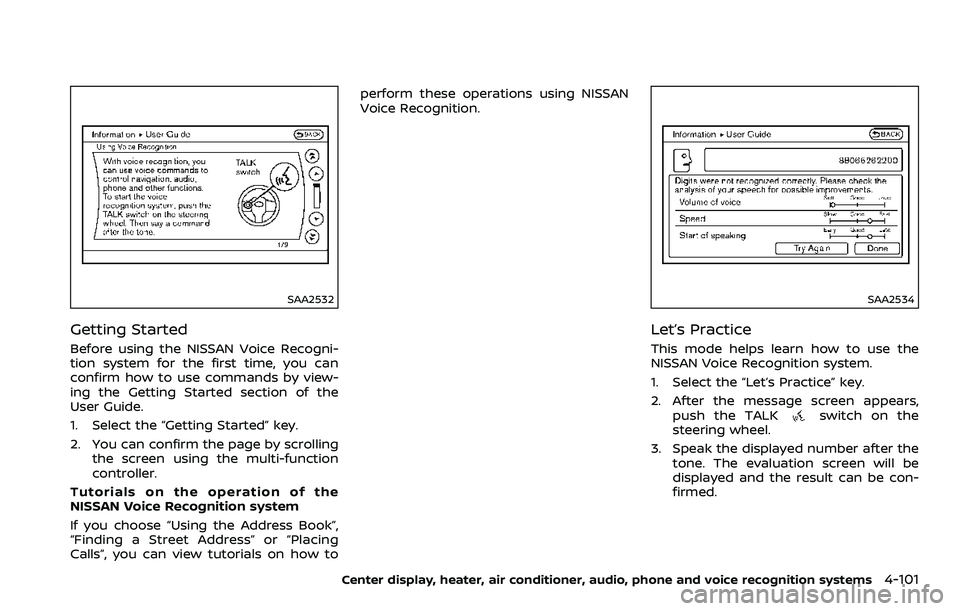
1. Select the “Getting Started” key.
2. You can confirm the page by scrollingthe screen using the multi-function
controller.
Tutorials on the operation of the
NISSAN Voice Recognition system
If you choose “Using the Address Book”,
“Finding a Street Address” or “Placing
Calls”, you can view tutorials on how to perform these operations using NISSAN
Voice Recognition.
SAA2534
Let’s Practice
This mode helps learn how to use the
NISSAN Voice Recognition system.
1. Select the “Let’s Practice” key.
2. After the message screen appears,
push the TALK
switch on the
steering wheel.
3. Speak the displayed number after the tone. The evaluation screen will be
displayed and the result can be con-
firmed.
Center display, heater, air conditioner, audio, phone and voice recognition systems4-101
Page 271 of 453
SAA2167
Giving voice commands
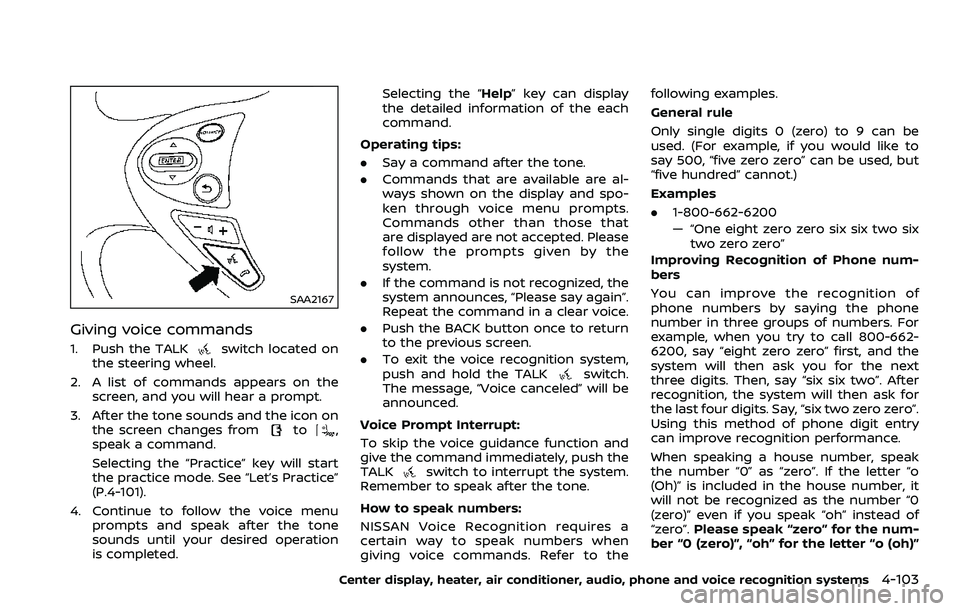
1. Push the TALKswitch located on
the steering wheel.
2. A list of commands appears on the screen, and you will hear a prompt.
3. After the tone sounds and the icon on the screen changes from
to,
speak a command.
Selecting the “Practice” key will start
the practice mode. See “Let’s Practice”
(P.4-101).
4. Continue to follow the voice menu prompts and speak after the tone
sounds until your desired operation
is completed. Selecting the “Help” key can display
the detailed information of the each
command.
Operating tips:
. Say a command after the tone.
. Commands that are available are al-
ways shown on the display and spo-
ken through voice menu prompts.
Commands other than those that
are displayed are not accepted. Please
follow the prompts given by the
system.
. If the command is not recognized, the
system announces, “Please say again”.
Repeat the command in a clear voice.
. Push the BACK button once to return
to the previous screen.
. To exit the voice recognition system,
push and hold the TALK
switch.
The message, “Voice canceled” will be
announced.
Voice Prompt Interrupt:
To skip the voice guidance function and
give the command immediately, push the
TALK
switch to interrupt the system.
Remember to speak after the tone.
How to speak numbers:
NISSAN Voice Recognition requires a
certain way to speak numbers when
giving voice commands. Refer to the following examples.
General rule
Only single digits 0 (zero) to 9 can be
used. (For example, if you would like to
say 500, “five zero zero” can be used, but
“five hundred” cannot.)
Examples
.
1-800-662-6200
— “One eight zero zero six six two six
two zero zero”
Improving Recognition of Phone num-
bers
You can improve the recognition of
phone numbers by saying the phone
number in three groups of numbers. For
example, when you try to call 800-662-
6200, say “eight zero zero” first, and the
system will then ask you for the next
three digits. Then, say “six six two”. After
recognition, the system will then ask for
the last four digits. Say, “six two zero zero”.
Using this method of phone digit entry
can improve recognition performance.
When speaking a house number, speak
the number “0” as “zero”. If the letter “o
(Oh)” is included in the house number, it
will not be recognized as the number “0
(zero)” even if you speak “oh” instead of
“zero”. Please speak “zero” for the num-
ber “0 (zero)”, “oh” for the letter “o (oh)”
Center display, heater, air conditioner, audio, phone and voice recognition systems4-103
Page 276 of 453
4-108Center display, heater, air conditioner, audio, phone and voice recognition systems
SAA2537
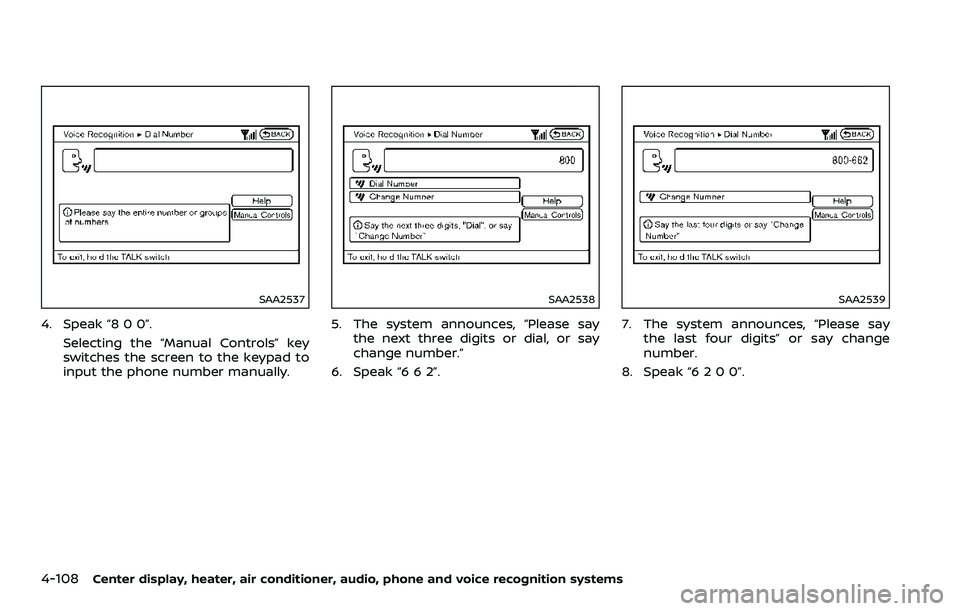
4. Speak “8 0 0”.Selecting the “Manual Controls” key
switches the screen to the keypad to
input the phone number manually.
SAA2538
5. The system announces, “Please saythe next three digits or dial, or say
change number.”
6. Speak “6 6 2”.
SAA2539
7. The system announces, “Please say the last four digits” or say change
number.
8. Speak “6 2 0 0”.
Page 279 of 453
prompted. Review the expanded com-
mand list when this mode is active. See
examples of Alternate Command Mode
screens.
Please note that in this mode the recog-
nition success rate may be affected as
the number of available commands and
ways of speaking each command are
increased. To improve the recognition
success rate, try using the Speaker Adap-
tation Function available in that mode.
(See “Speaker adaptation function (for
Alternate Command Mode)” (P.4-121).)
Otherwise it is recommended that Alter-
nate Command Mode be turned OFF and
Standard Mode be used for the best
recognition performance.
SAA2529
Activating Alternate Command
Mode
When the Standard Mode is active, per-
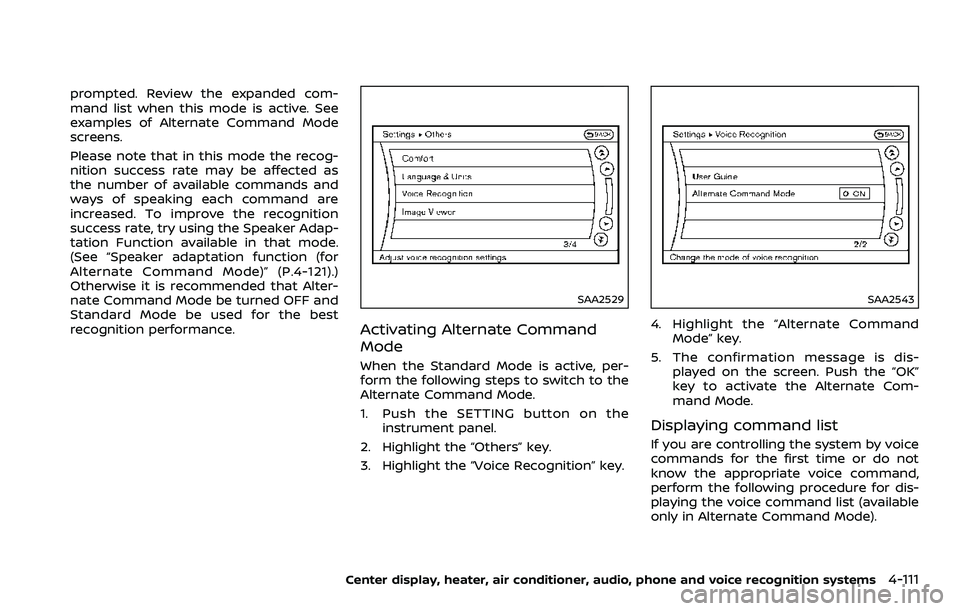
form the following steps to switch to the
Alternate Command Mode.
1. Push the SETTING button on theinstrument panel.
2. Highlight the “Others” key.
3. Highlight the “Voice Recognition” key.
SAA2543
4. Highlight the “Alternate Command Mode” key.
5. The confirmation message is dis- played on the screen. Push the “OK”
key to activate the Alternate Com-
mand Mode.
Displaying command list
If you are controlling the system by voice
commands for the first time or do not
know the appropriate voice command,
perform the following procedure for dis-
playing the voice command list (available
only in Alternate Command Mode).
Center display, heater, air conditioner, audio, phone and voice recognition systems4-111
Page 280 of 453
4-112Center display, heater, air conditioner, audio, phone and voice recognition systems
SAA2544
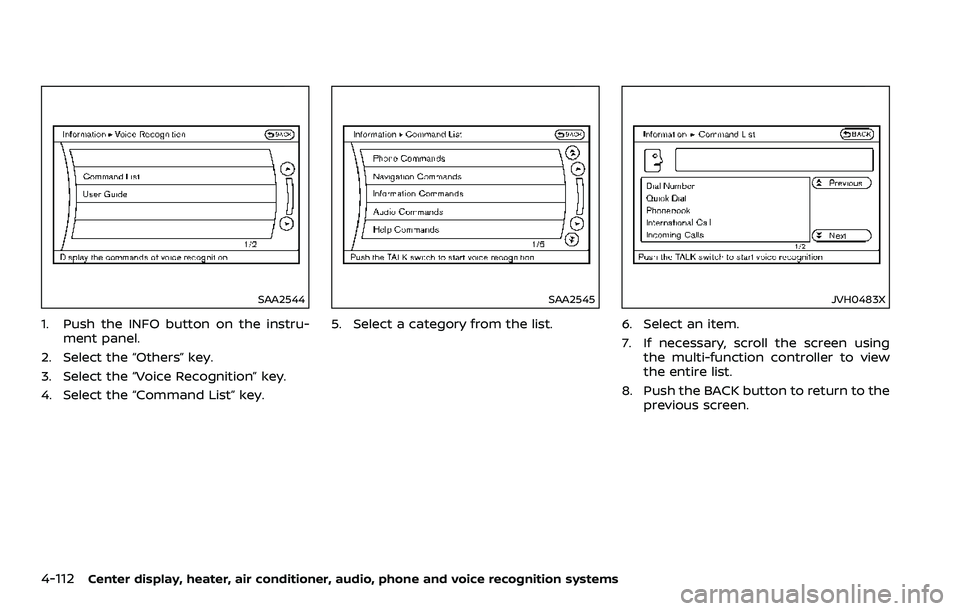
1. Push the INFO button on the instru-ment panel.
2. Select the “Others” key.
3. Select the “Voice Recognition” key.
4. Select the “Command List” key.
SAA2545
5. Select a category from the list.
JVH0483X
6. Select an item.
7. If necessary, scroll the screen using the multi-function controller to view
the entire list.
8. Push the BACK button to return to the previous screen.