2018 NISSAN 370Z bluetooth
[x] Cancel search: bluetoothPage 221 of 453
Turn the VOL control knob to adjust the
volume.
Adjusting tone quality and speaker
balance:
To adjust Bass, Treble, Balance and Fade,
push the Audio control knob. When the
display shows the setting you want to
change (Bass, Treble, Balance and Fade),
rotate the Audio control knob to set the
desired setting. For the other setting
methods, see “How to use SETTING but-
ton” (P.4-11).
This vehicle has some sound effect func-
tions as follows:
.Speed Sensitive Vol.
For more details, see “How to use SETTING
button” (P.4-11).
Switching the display:
Pushing the DISC·AUX button will switch
the displays as follows:
iPod®/USB ?CD/DVD ?Bluetooth®
Audio ?AUX ?iPod®/USBFM-AM-SAT radio operation
radio (FM/AM) band select:
Pushing the radio band select button will
change the band as follows:
AM ?FM1 ?FM2 ?AM
radio (SAT) band select:
Pushing the radio band select button will
change the band as follows:
XM1 ?XM2 ?XM3 ?XM1
When the radio band select button is
pushed while the ignition switch is in the
ACC or ON position, the radio will come
on at the channel last played.
The last channel played will also come on
when the ON·OFF button is pushed to ON.
The satellite radio is not available in
Alaska, Hawaii and Guam.
If another audio source is playing when
the radio band select button is turned to
ON, the audio source will automatically be
turned off and the last radio channel
played will come on.
When the stereo broadcast signal is weak,
the radio will automatically change from
stereo to monaural reception. TUNE (Tuning):
. For AM and FM radio
Turn the radio TUNE knob for manual
tuning.
. For SiriusXM Satellite Radio
Turn the radio TUNE knob to seek
channels from all of the categories
when any category is not selected.
SEEK tuning/CATEGORY
(CAT):
. For AM and FM radio
Push the SEEK button
orto
tune from low to high or high to low
frequencies and to stop at the next
broadcasting station.
. For SiriusXM Satellite Radio
Push the SEEK button
orto
tune to the first channel of the next or
previous category.
During satellite radio reception, the fol-
lowing notices will be displayed under
certain conditions.
. NO SIGNAL (No signal is received while
the SAT tuner is connected.)
. OFF AIR (Broadcasting signed off)
. CHECK ANTENNA (Antenna connec-
tion error)
. LOADING (When the initial setting is
performed)
Center display, heater, air conditioner, audio, phone and voice recognition systems4-53
Page 231 of 453
SAA2504
Example
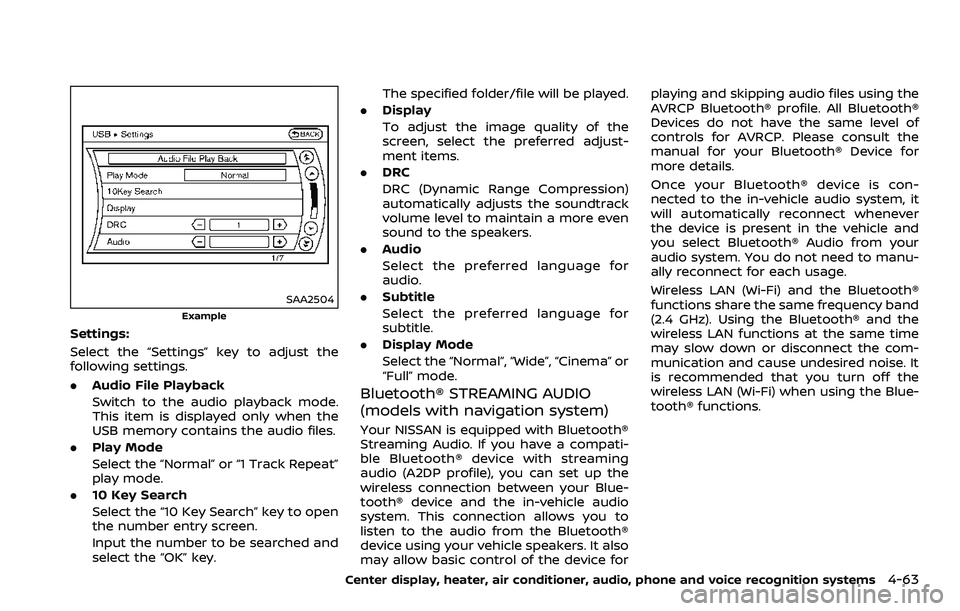
Settings:
Select the “Settings” key to adjust the
following settings.
.Audio File Playback
Switch to the audio playback mode.
This item is displayed only when the
USB memory contains the audio files.
. Play Mode
Select the “Normal” or “1 Track Repeat”
play mode.
. 10 Key Search
Select the “10 Key Search” key to open
the number entry screen.
Input the number to be searched and
select the “OK” key. The specified folder/file will be played.
. Display
To adjust the image quality of the
screen, select the preferred adjust-
ment items.
. DRC
DRC (Dynamic Range Compression)
automatically adjusts the soundtrack
volume level to maintain a more even
sound to the speakers.
. Audio
Select the preferred language for
audio.
. Subtitle
Select the preferred language for
subtitle.
. Display Mode
Select the “Normal”, “Wide”, “Cinema” or
“Full” mode.
Bluetooth® STREAMING AUDIO
(models with navigation system)
Your NISSAN is equipped with Bluetooth®
Streaming Audio. If you have a compati-
ble Bluetooth® device with streaming
audio (A2DP profile), you can set up the
wireless connection between your Blue-
tooth® device and the in-vehicle audio
system. This connection allows you to
listen to the audio from the Bluetooth®
device using your vehicle speakers. It also
may allow basic control of the device for playing and skipping audio files using the
AVRCP Bluetooth® profile. All Bluetooth®
Devices do not have the same level of
controls for AVRCP. Please consult the
manual for your Bluetooth® Device for
more details.
Once your Bluetooth® device is con-
nected to the in-vehicle audio system, it
will automatically reconnect whenever
the device is present in the vehicle and
you select Bluetooth® Audio from your
audio system. You do not need to manu-
ally reconnect for each usage.
Wireless LAN (Wi-Fi) and the Bluetooth®
functions share the same frequency band
(2.4 GHz). Using the Bluetooth® and the
wireless LAN functions at the same time
may slow down or disconnect the com-
munication and cause undesired noise. It
is recommended that you turn off the
wireless LAN (Wi-Fi) when using the Blue-
tooth® functions.
Center display, heater, air conditioner, audio, phone and voice recognition systems4-63
Page 232 of 453
4-64Center display, heater, air conditioner, audio, phone and voice recognition systems
Regulatory information
FCC Regulatory information:
.CAUTION: To maintain compliance
with FCC’s RF exposure guidelines,
use only the supplied antenna. Un-
authorized antenna, modification, or
attachments could damage the trans-
mitter and may violate FCC regula-
tions.
. Operation is subject to the following
two conditions:
1) This device may not cause inter-
ference and
2) This device must accept any inter- ference, including interference
that may cause undesired opera-
tion of the device
IC Regulatory information:
. Operation is subject to the following
two conditions:
1) This device may not cause inter-
ference, and
2) This device must accept any inter- ference, including interference
that may cause undesired opera-
tion of the device.
. This Class B digital apparatus meets
all requirements of the Canadian In-
terference-Causing Equipment Regu-
lations. Bluetooth® trademark:Bluetooth® is a trademark
owned by Bluetooth SIG, Inc.
and licensed to Clarion Co.,
Ltd.
SAA2505
Connecting procedure
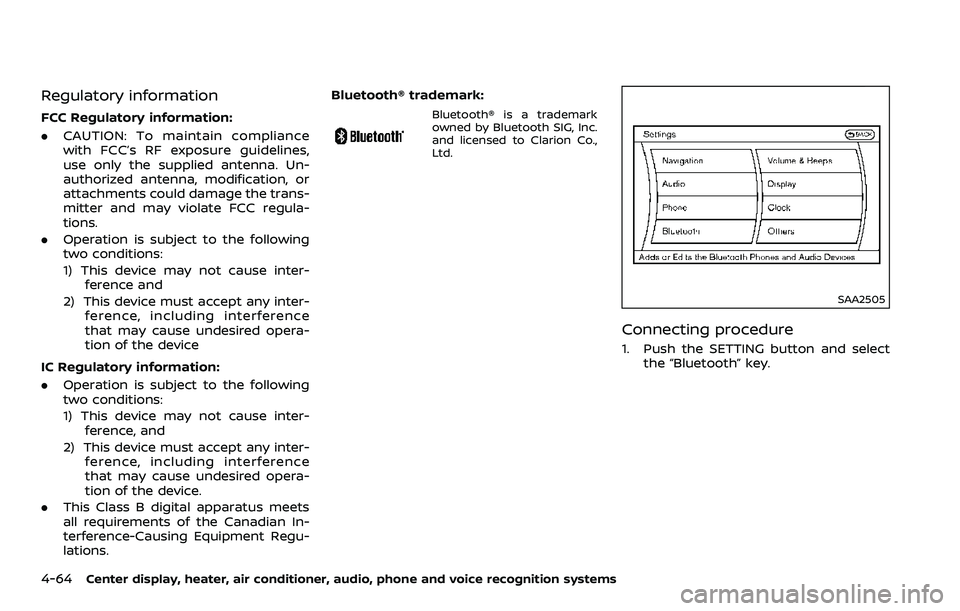
1. Push the SETTING button and select
the “Bluetooth” key.
Page 233 of 453
SAA2506
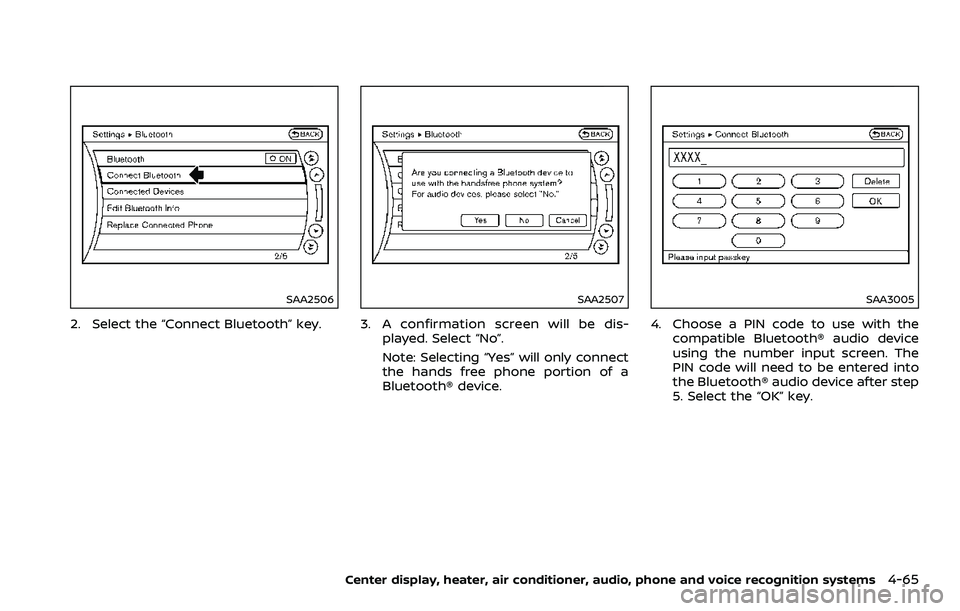
2. Select the “Connect Bluetooth” key.
SAA2507
3. A confirmation screen will be dis-played. Select “No”.
Note: Selecting “Yes” will only connect
the hands free phone portion of a
Bluetooth® device.
SAA3005
4. Choose a PIN code to use with thecompatible Bluetooth® audio device
using the number input screen. The
PIN code will need to be entered into
the Bluetooth® audio device after step
5. Select the “OK” key.
Center display, heater, air conditioner, audio, phone and voice recognition systems4-65
Page 234 of 453
4-66Center display, heater, air conditioner, audio, phone and voice recognition systems
SAA3006
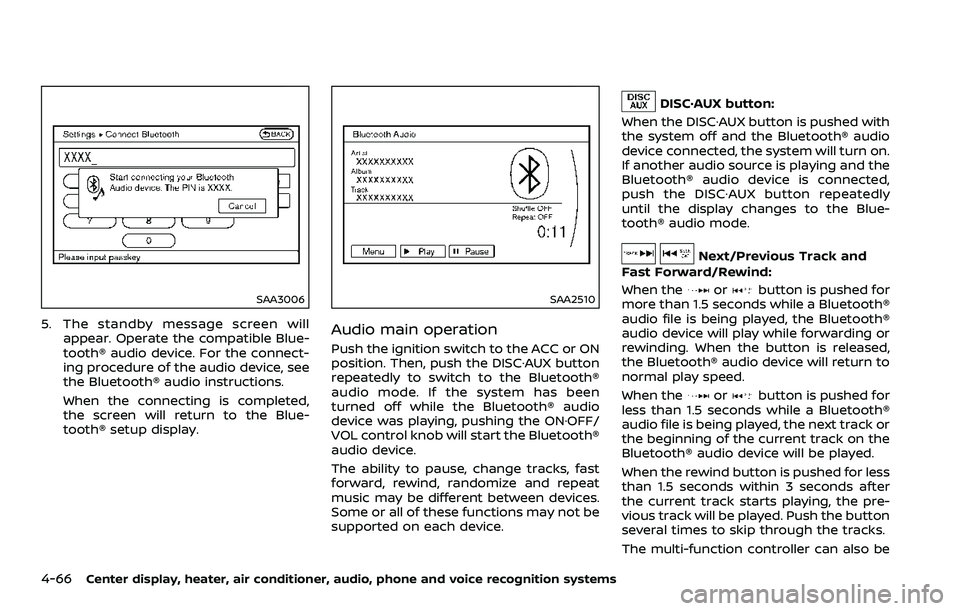
5. The standby message screen willappear. Operate the compatible Blue-
tooth® audio device. For the connect-
ing procedure of the audio device, see
the Bluetooth® audio instructions.
When the connecting is completed,
the screen will return to the Blue-
tooth® setup display.
SAA2510
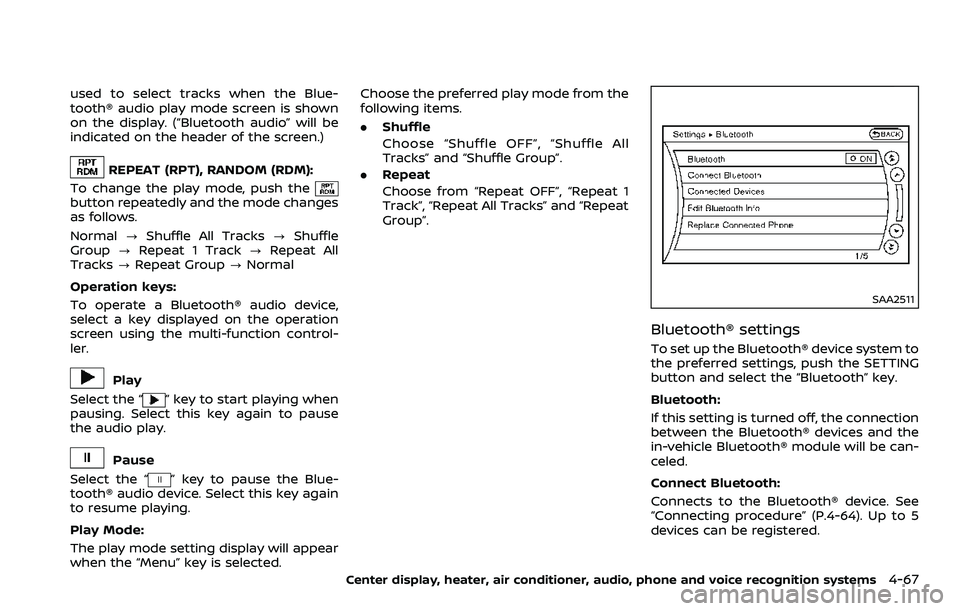
Audio main operation
Push the ignition switch to the ACC or ON
position. Then, push the DISC·AUX button
repeatedly to switch to the Bluetooth®
audio mode. If the system has been
turned off while the Bluetooth® audio
device was playing, pushing the ON·OFF/
VOL control knob will start the Bluetooth®
audio device.
The ability to pause, change tracks, fast
forward, rewind, randomize and repeat
music may be different between devices.
Some or all of these functions may not be
supported on each device.
DISC·AUX button:
When the DISC·AUX button is pushed with
the system off and the Bluetooth® audio
device connected, the system will turn on.
If another audio source is playing and the
Bluetooth® audio device is connected,
push the DISC·AUX button repeatedly
until the display changes to the Blue-
tooth® audio mode.
Next/Previous Track and
Fast Forward/Rewind:
When the
orbutton is pushed for
more than 1.5 seconds while a Bluetooth®
audio file is being played, the Bluetooth®
audio device will play while forwarding or
rewinding. When the button is released,
the Bluetooth® audio device will return to
normal play speed.
When the
orbutton is pushed for
less than 1.5 seconds while a Bluetooth®
audio file is being played, the next track or
the beginning of the current track on the
Bluetooth® audio device will be played.
When the rewind button is pushed for less
than 1.5 seconds within 3 seconds after
the current track starts playing, the pre-
vious track will be played. Push the button
several times to skip through the tracks.
The multi-function controller can also be
Page 235 of 453
used to select tracks when the Blue-
tooth® audio play mode screen is shown
on the display. (“Bluetooth audio” will be
indicated on the header of the screen.)
REPEAT (RPT), RANDOM (RDM):
To change the play mode, push the
button repeatedly and the mode changes
as follows.
Normal ?Shuffle All Tracks ?Shuffle
Group ?Repeat 1 Track ?Repeat All
Tracks ?Repeat Group ?Normal
Operation keys:
To operate a Bluetooth® audio device,
select a key displayed on the operation
screen using the multi-function control-
ler.
Play
Select the “
” key to start playing when
pausing. Select this key again to pause
the audio play.
Pause
Select the “
” key to pause the Blue-
tooth® audio device. Select this key again
to resume playing.
Play Mode:
The play mode setting display will appear
when the “Menu” key is selected. Choose the preferred play mode from the
following items.
.
Shuffle
Choose “Shuffle OFF”, “Shuffle All
Tracks” and “Shuffle Group”.
. Repeat
Choose from “Repeat OFF”, “Repeat 1
Track”, “Repeat All Tracks” and “Repeat
Group”.
SAA2511
Bluetooth® settings
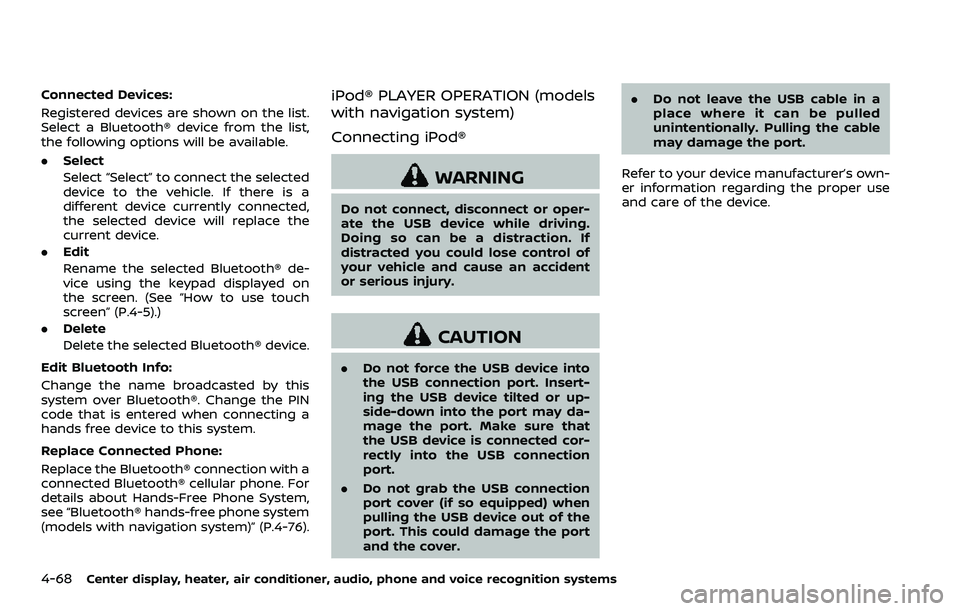
To set up the Bluetooth® device system to
the preferred settings, push the SETTING
button and select the “Bluetooth” key.
Bluetooth:
If this setting is turned off, the connection
between the Bluetooth® devices and the
in-vehicle Bluetooth® module will be can-
celed.
Connect Bluetooth:
Connects to the Bluetooth® device. See
“Connecting procedure” (P.4-64). Up to 5
devices can be registered.
Center display, heater, air conditioner, audio, phone and voice recognition systems4-67
Page 236 of 453
4-68Center display, heater, air conditioner, audio, phone and voice recognition systems
Connected Devices:
Registered devices are shown on the list.
Select a Bluetooth® device from the list,
the following options will be available.
.Select
Select “Select” to connect the selected
device to the vehicle. If there is a
different device currently connected,
the selected device will replace the
current device.
. Edit
Rename the selected Bluetooth® de-
vice using the keypad displayed on
the screen. (See “How to use touch
screen” (P.4-5).)
. Delete
Delete the selected Bluetooth® device.
Edit Bluetooth Info:
Change the name broadcasted by this
system over Bluetooth®. Change the PIN
code that is entered when connecting a
hands free device to this system.
Replace Connected Phone:
Replace the Bluetooth® connection with a
connected Bluetooth® cellular phone. For
details about Hands-Free Phone System,
see “Bluetooth® hands-free phone system
(models with navigation system)” (P.4-76).iPod® PLAYER OPERATION (models
with navigation system)
Connecting iPod®
WARNING
Do not connect, disconnect or oper-
ate the USB device while driving.
Doing so can be a distraction. If
distracted you could lose control of
your vehicle and cause an accident
or serious injury.
CAUTION
. Do not force the USB device into
the USB connection port. Insert-
ing the USB device tilted or up-
side-down into the port may da-
mage the port. Make sure that
the USB device is connected cor-
rectly into the USB connection
port.
. Do not grab the USB connection
port cover (if so equipped) when
pulling the USB device out of the
port. This could damage the port
and the cover. .
Do not leave the USB cable in a
place where it can be pulled
unintentionally. Pulling the cable
may damage the port.
Refer to your device manufacturer’s own-
er information regarding the proper use
and care of the device.
Page 241 of 453
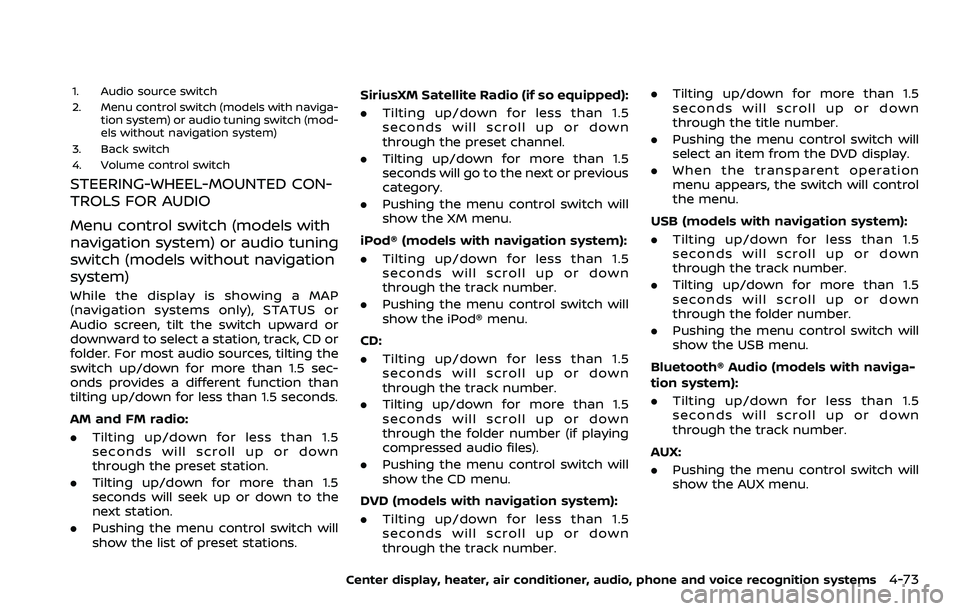
1. Audio source switch
2. Menu control switch (models with naviga-tion system) or audio tuning switch (mod-
els without navigation system)
3. Back switch
4. Volume control switch
STEERING-WHEEL-MOUNTED CON-
TROLS FOR AUDIO
Menu control switch (models with
navigation system) or audio tuning
switch (models without navigation
system)
While the display is showing a MAP
(navigation systems only), STATUS or
Audio screen, tilt the switch upward or
downward to select a station, track, CD or
folder. For most audio sources, tilting the
switch up/down for more than 1.5 sec-
onds provides a different function than
tilting up/down for less than 1.5 seconds.
AM and FM radio:
. Tilting up/down for less than 1.5
seconds will scroll up or down
through the preset station.
. Tilting up/down for more than 1.5
seconds will seek up or down to the
next station.
. Pushing the menu control switch will
show the list of preset stations. SiriusXM Satellite Radio (if so equipped):
. Tilting up/down for less than 1.5
seconds will scroll up or down
through the preset channel.
. Tilting up/down for more than 1.5
seconds will go to the next or previous
category.
. Pushing the menu control switch will
show the XM menu.
iPod® (models with navigation system):
. Tilting up/down for less than 1.5
seconds will scroll up or down
through the track number.
. Pushing the menu control switch will
show the iPod® menu.
CD:
. Tilting up/down for less than 1.5
seconds will scroll up or down
through the track number.
. Tilting up/down for more than 1.5
seconds will scroll up or down
through the folder number (if playing
compressed audio files).
. Pushing the menu control switch will
show the CD menu.
DVD (models with navigation system):
. Tilting up/down for less than 1.5
seconds will scroll up or down
through the track number. .
Tilting up/down for more than 1.5
seconds will scroll up or down
through the title number.
. Pushing the menu control switch will
select an item from the DVD display.
. When the transparent operation
menu appears, the switch will control
the menu.
USB (models with navigation system):
. Tilting up/down for less than 1.5
seconds will scroll up or down
through the track number.
. Tilting up/down for more than 1.5
seconds will scroll up or down
through the folder number.
. Pushing the menu control switch will
show the USB menu.
Bluetooth® Audio (models with naviga-
tion system):
. Tilting up/down for less than 1.5
seconds will scroll up or down
through the track number.
AUX:
. Pushing the menu control switch will
show the AUX menu.
Center display, heater, air conditioner, audio, phone and voice recognition systems4-73