2018 MITSUBISHI OUTLANDER PHEV 4WD
[x] Cancel search: 4WDPage 8 of 538
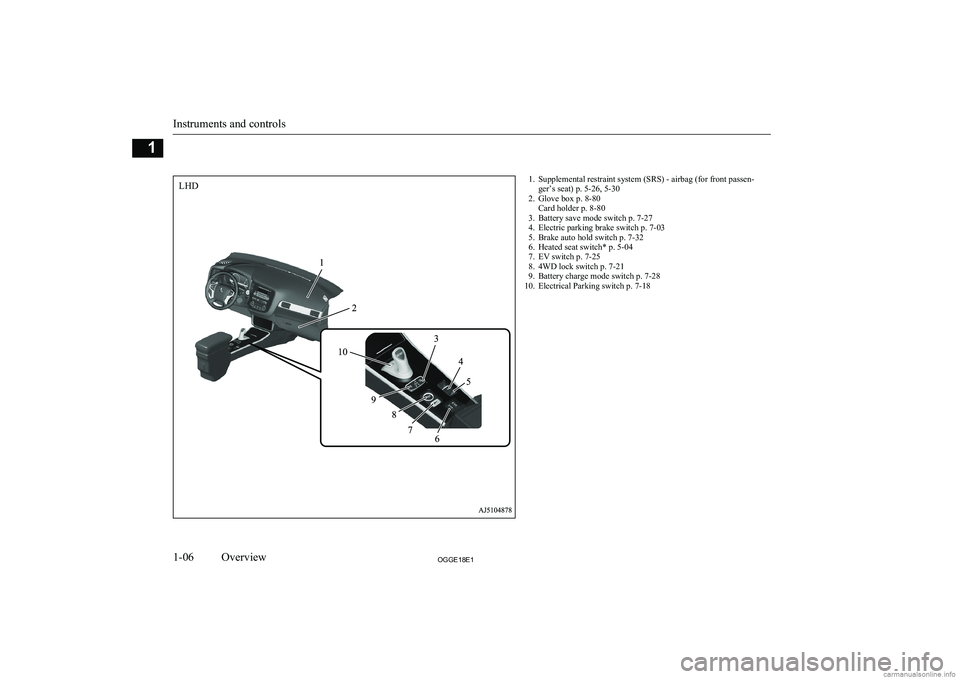
1. Supplemental restraint system (SRS) - airbag (for front passen-ger’s seat) p. 5-26, 5-30
2. Glove box p. 8-80 Card holder p. 8-80
3. Battery save mode switch p. 7-27
4. Electric parking brake switch p. 7-03
5. Brake auto hold switch p. 7-32
6. Heated seat switch* p. 5-04
7. EV switch p. 7-25
8. 4WD lock switch p. 7-21
9. Battery charge mode switch p. 7-28
10. Electrical Parking switch p. 7-18
Instruments and controls
1-06OGGE18E1Overview1LHD
Page 9 of 538
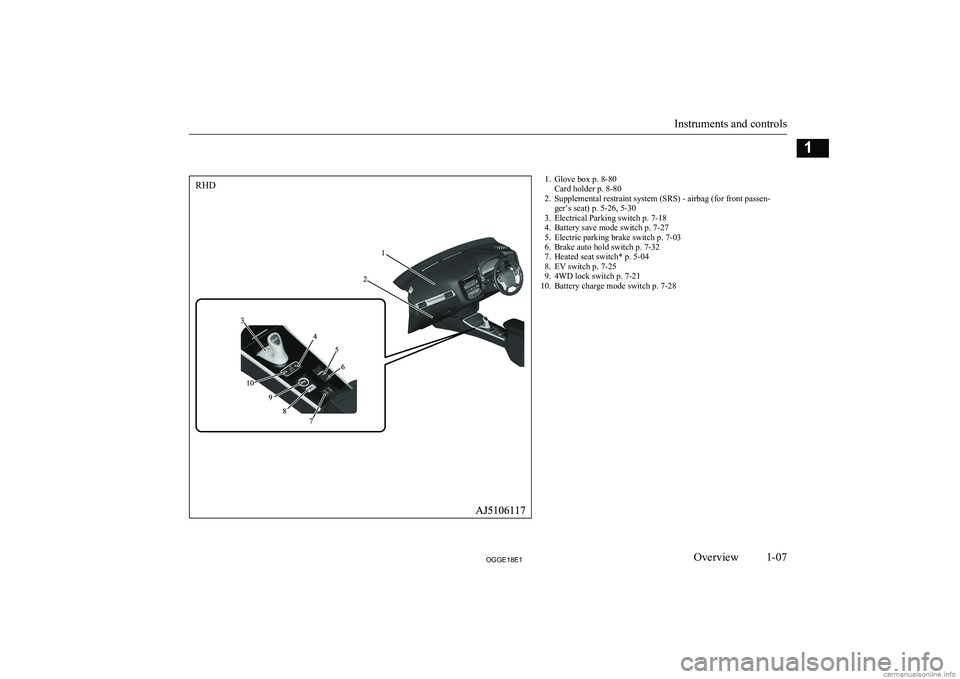
1. Glove box p. 8-80Card holder p. 8-80
2. Supplemental restraint system (SRS) - airbag (for front passen- ger’s seat) p. 5-26, 5-30
3. Electrical Parking switch p. 7-18
4. Battery save mode switch p. 7-27
5. Electric parking brake switch p. 7-03
6. Brake auto hold switch p. 7-32
7. Heated seat switch* p. 5-04
8. EV switch p. 7-25
9. 4WD lock switch p. 7-21
10. Battery charge mode switch p. 7-28
Instruments and controls
1-07OGGE18E1Overview1RHD
Page 23 of 538
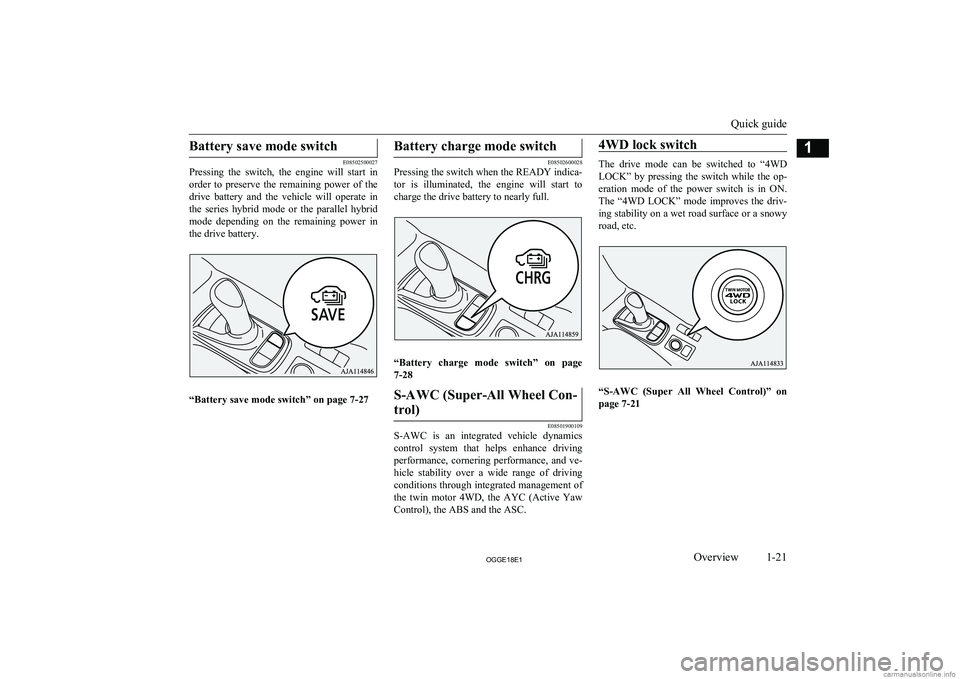
Battery save mode switch
E08502500027
Pressing the switch, the engine will start in
order to preserve the remaining power of the
drive battery and the vehicle will operate in the series hybrid mode or the parallel hybrid mode depending on the remaining power in
the drive battery.
“Battery save mode switch” on page 7-27
Battery charge mode switch
E08502600028
Pressing the switch when the READY indica-
tor is illuminated, the engine will start to
charge the drive battery to nearly full.
“Battery charge mode switch” on page
7-28
S-AWC (Super-All Wheel Con-
trol)
E08501900109
S-AWC is an integrated vehicle dynamics control system that helps enhance driving
performance, cornering performance, and ve-
hicle stability over a wide range of driving
conditions through integrated management of the twin motor 4WD, the AYC (Active Yaw
Control), the ABS and the ASC.
4WD lock switch
The drive mode can be switched to “4WD
LOCK” by pressing the switch while the op-
eration mode of the power switch is in ON. The “4WD LOCK” mode improves the driv-
ing stability on a wet road surface or a snowy road, etc.
“S-AWC (Super All Wheel Control)” on page 7-21
Quick guide
1-21OGGE18E1Overview1
Page 148 of 538

1- NORMAL indicator display screenDisplayed when the ECO mode switchand 4WD lock switch are OFF.
2- ECO mode indicator display screen Displayed when the ECO mode switch isON and the 4WD lock switch is OFF.
3- ECO LOCK indicator display screen Displayed when the ECO mode switchand 4WD lock switch are ON.
4- 4WD LOCK indicator display screen Displayed when the ECO mode switch isOFF and the 4WD lock switch is ON.ECO mode switch ® p. 6-61
4WD lock switch ® p. 7-21
5- Battery charge mode display screen
® p. 7-28
6- Battery save mode display screen
® p. 7-27
7- EV priority mode display screen
® p. 7-25
8-
mark display screen ® p. 6-09
9- Forward Collision Mitigation System
(FCM) OFF display screen* ® p. 7-64
Ultrasonic misacceleration Mitigation System (UMS) OFF display screen*
® p. 7-74
10- Lane Departure Warning (LDW) display
screen* ® p. 7-85
11- Cruise control display screen*
® p. 7-42
12- Adaptive Cruise Control System (ACC)
display screen* ® p. 7-52
13- Speed limiter display screen*
® p. 7-47
14- Drive battery level display screen
® p. 6-09
15- Odometer ® p. 6-10
16- “
” or “ ” mark indicator ® p. 6-08
17- Information screen ® p. 6-07
18- Select position indicator ® p. 7-17
19- Fuel remaining display screen
® p. 6-09
20- Outside temperature display screen
® p. 6-10
Multi information display
switch
E00520001911
Each time the multi information display
switch is operated, the buzzer sounds and the multi information display changes betweeninformation such as warnings, tripmeter,
average fuel consumption, EV cruising range,
total cruising range, EVHV driving rate, en- ergy flow, etc.
It is also possible to change elements such as
the language and units used on the multi in- formation display by operating the multi in- formation display switch.
Multi information display
6-04OGGE18E1Instruments and controls6
Page 187 of 538

ScreenSystem operation statusReferencelThe selector lever has been operated when
the select position is in “P” (PARK) posi-
tion and the brake pedal is not depressed.l Operate the selector lever while depressed
firmly on the brake pedal.
The operation status of each system is displayed on the information screen. Refer to the appropriate page for the system for further details.
ScreenSystem operation statusReferencel When charging of the drive battery is
completed.l Refer to “Charging” on page 3-02.lWhen the mode is changed by the opera-
tion of the 4WD lock switch or ECO mode
switch.l Refer to “ECO mode switch” on page
6-61.
l Refer to “4WD lock switch” on page
7-21.
l Refer to “When the ECO mode switch is
ON” on page 7-22.
Indication lamp, warning lamp, and information screen display list
6-43OGGE18E1Instruments and controls6
Page 235 of 538

To return to the normal regen-erative brake force level of B2
Pull the “+” paddle for approximately 2 sec-
onds or longer. The select lever position indi-
cator displays “D”.
S-AWC (Super All Wheel
Control) E00622601185
S-AWC is an integrated vehicle dynamics
control system that helps enhance driving
performance, cornering performance, and ve-
hicle stability over a wide range of driving conditions through integrated management of the twin motor 4WD, the AYC (Active Yaw
Control), the ABS and the ASC.
CAUTIONl Do not over-rely on the S-AWC. Even the S-
AWC cannot prevent the natural laws of
physics from acting on the vehicle. This sys- tem, like any other system, has limits and
cannot help you to maintain traction and
control of the vehicle in all circumstances. Reckless driving may lead to accidents. It is the driver’s responsibility to drive carefully.
This means taking into account the traffic,
road and environmental conditions.
Twin Motor 4WD
This system improves vehicle stability per-
formance and fuel economy performanceduring acceleration and deceleration by mo-
tors provided at front and rear wheels, re- spectively, controlling the distribution of a
drive force between the front and rear wheels optimal for the operation of the driver.
Active yaw control system
(AYC)
E00622801044
The AYC is a system, with a left-right differ- ential limiting function and yaw control func-
tion, that controls the left-right driving/brak-
ing force by managing the brake.
CAUTIONl Control of the braking force does not en-
hance the stopping performance of the vehi-
cle, therefore, pay careful attention to the safety of your surroundings when driving.
Left-right differential limiting
function
The left-right differential limiting function is
a function that enhances driving performance and vehicle stability by preventing idle spin-
ning of a wheel when driving on a slippery road or when the road surfaces of left andright wheels are different.
Yaw control function
The yaw control function is a function thatenhances vehicle cornering performance and vehicle stability with management of vehicle
turning power (yaw moment) by controlling the brake force when the vehicle does not
turn in response to steering input, such as
when the steering wheel is turned quickly or when driving on a slippery road.
4WD lock switch
E00637000063
If the 4WD lock switch is pressed when the
power mode is “ON”, it will switch to “4WD LOCK.”
S-AWC (Super All Wheel Control)
7-21OGGE18E1Starting and driving7
Page 236 of 538

It can be used from a low-speed to high-speed operation, and the driving stability im-
proves on a wet road surface or a snowy road, etc.
If the 4WD lock switch is pressed once again, it will return to “NORMAL”.
When the 4WD LOCK mode is activated, the
following display appears on the information
screen in the multi-information display for a few seconds.
CAUTIONl Use tyres of the same specified size, same
type, same brand and with no wear differ- ence. If tyres of a different size, type, brandor degree of wear are used, a warning of EVsystem abnormality may be displayed.S-AWC operation display
E00623101217
The S-AWC operation status can be dis-
played on the information screen in the multi-
information display.
To display the status, press the multi-infor-
mation display switch to change the informa- tion screen.
Refer to “Information screen (when the oper- ation mode is ON)” on page 6-07.
Display example
The S-AWC operation status is displayed.
Yaw control function display
The amount of the yaw moment is displayed
as a bar graph.
A,D-Clockwise yaw moment about the vehicle’s center of gravityB,C-Anticlockwise yaw moment about
the vehicle’s center of gravity
Torque distribution function display
The torque distribution between the front and rear wheels is displayed in section E of the
meter as a bar graph.
WARNINGl Always concentrate on your driving first.
Keep your eyes and mind on the road.
Distractions while driving can lead to an accident.When the ECO mode switch is
ON
E00636501026
While the drive mode is in the “4WD
LOCK” position, if the ECO mode switch is switched ON, the drive mode will be changed to “ECO LOCK” mode.
S-AWC (Super All Wheel Control)
7-22OGGE18E1Starting and driving7
Page 237 of 538

If the ECO mode switch is switched OFF, the
drive mode will be returned to “4WD LOCK” mode.
Refer to “ECO mode switch” on page 6-61.
4-wheel drive operation
E00606602083
Your vehicle has been designed primarily foruse on paved roads.
But its unique 4-wheel drive system allows
you to occasionally travel on unpaved roads, to campgrounds, picnic sites, and similar lo-
cations.
Not only does this ensure better handling on
dry, paved roads but also permits better trac-
tion when driving on slippery, wet or snow- covered roads and when moving out of mud.
But it is not suitable for heavy off road use or
towing in rough conditions.
It is particularly important to note that 4-
wheel drive may not give sufficient hill
climbing ability with the regenerative brake on steep slopes. You should try to avoid driv- ing on steep slopes.
Also, you must exercise caution when driving on sand and mud and when driving through
water because sufficient traction may not be
available in certain circumstances.
Please avoid driving the vehicle through
areas where the tyres may get stuck in deep sand or mud.WARNINGl Do not over-rely on the 4-wheel drive ve-
hicles. Even 4-wheel drive vehicles have
limits to the system and ability to main- tain control and traction. Reckless driving may lead to accidents. Always drive care-
fully, taking account of the road condi-
tions.
l Improperly operating this vehicle on or
off-paved roads can cause an accident or
rollover in which you and your passengers
could be seriously injured or killed.
• Follow all instructions and guidelines in
the owner’s manual.
• Keep your speed low and do not drive
faster than conditions allow you to.NOTEl Driving on rough roads can be hard on a ve-
hicle. Before you leave paved roads, be sure all scheduled maintenance and service has
been done, and that you have inspected your vehicle. Pay special attention to the condi- tion of the tyres, and check the tyre pres-
sures.
l MITSUBISHI
MOTORS is not responsible
for any damage or injury caused or liability
incurred by improper and negligent opera- tion of a vehicle by the operator. All techni-
ques of vehicle operation depend on the skill and experience of the operator and other par- ticipating parties. Any deviation from the
recommended operating instructions above is at their own risk.
l Note that the stopping distance required of a
4-wheel drive vehicle differs very little from
that of a 2-wheel drive vehicle. When driv- ing on a snow-covered road or a slippery,muddy surface, make sure that you keep a
sufficient distance between your vehicle and
the one ahead of you.
l The driving posture should be more upright;
adjust the seat to a good position for easy steering and pedal operation. Be sure to wear
the seat belt.
l After driving on rough roads, check each
part of the vehicle and wash it thoroughlywith water. Refer to the “Inspection andmaintenance following rough road opera-
tion” section and “Maintenance” section.
4-wheel drive operation
7-23OGGE18E1Starting and driving7