2018 MITSUBISHI OUTLANDER spray
[x] Cancel search: sprayPage 25 of 441

Filling the fuel tank3-4 General information
3
All-wheel drive vehicles: 15.8 gal (60 L)Front-wheel drive vehi
cles: 16.6 gal (63 L)
1. Before filling with fuel, stop the engine.2. The fuel tank filler is located on the reardriver side of your vehicle.The fuel tank filler door can be openedfrom inside the vehicle with the fuel tankfiller door release lever located at the leftside of the driver’s seat.
3. Open the fuel tank filler pipe by slowlyturning the fuel tank filler cap counter-clockwise.
Before removing the fuel tank filler cap,be sure to get rid of your body’s staticelectricity by touching a metal part of thecar or fuel pump. Any
static electricity on
your body could create a spark thatignites fuel vapor.Perform the whole
refueling process
(opening the fuel tank filler door, remov-ing the fuel cap, etc.) by yourself; do notlet any other
person near the fuel tank
filler. If you allowed
a person to help you
and that person was ca
rrying static elec-
tricity, fuel vapor could be ignited.Do not move away from
the fuel tank filler
until refueling is fi
nished. If you moved
away and did somethin
g else (for example,
sitting on a seat) part-way through therefueling process, you could pick up afresh charge of st
atic electricity.
Be careful not to inhale fuel vapor. Fuelcontains toxic substances.Keep the doors and wi
ndows closed while
refueling the vehicle. If they were open,fuel vapor could ge
t into the cabin.
Fuel tank capacity
WA R N I N G
Refueling
1- Remove2- CloseWA R N I N GSince the fuel system may be under pres-sure, remove the fuel tank filler capslowly. This relieves
any pressure or vac-
uum that might have built up in the fueltank. If the cap is venting vapor or if youhear a hissing sound, wait until the soundstops before removing the cap. Otherwise,fuel may spray out, in
juring you or others.
BK0249100US.book 4 ページ 2017年5月10日 水曜日 午前8時49分
Page 140 of 441
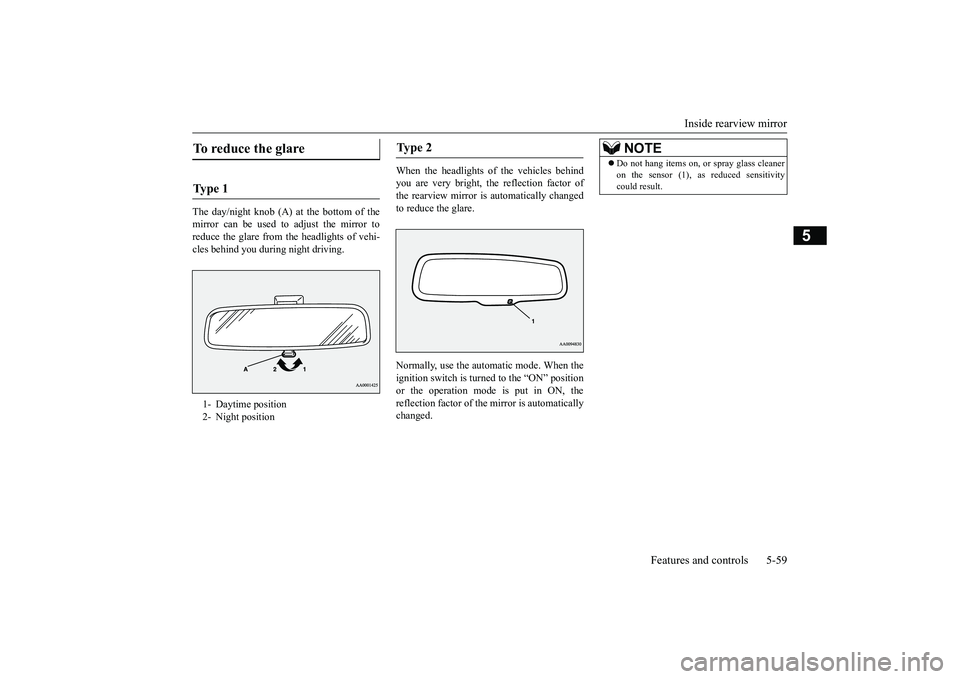
Inside rearview mirror
Features and controls 5-59
5
The day/night knob (A) at
the bottom of the
mirror can be used to adjust the mirror toreduce the glare from the headlights of vehi-cles behind you during night driving.
When the headlights of the vehicles behindyou are very bright, the reflection factor ofthe rearview mirror is automatically changedto reduce the glare.Normally, use the automatic mode. When theignition switch is turned to the “ON” positionor the operation mode is put in ON, thereflection factor of the mirror is automaticallychanged.
To reduce the glare Ty p e 1 1- Daytime position2- Night position
Ty p e 2
NOTE
Do not hang items on,
or spray glass cleaner
on the sensor (1), as reduced sensitivitycould result.
BK0249100US.book 59 ページ 2017年5月17日 水曜日 午後2時31分
Page 141 of 441

Outside rearview mirrors5-60 Features and controls
5
When the headlights of the vehicles behindyou are very bright, the reflection factor ofthe rearview mirror is automatically changedto reduce the glare.Normally, use the automatic mode. When theignition switch is turned to the “ON” positionor the operation mode is put in ON, the greenindicator (1) illuminates and the reflectionfactor of the mirror is automatically changed.
N00512201232
Adjust the outside rearview mirrors only aftermaking any seat adjustme
nts so as to have a
clear view to the rear of the vehicle.
Ty p e 3
NOTE
Do not hang items on,
or spray glass cleaner
on the sensor (2), as
reduced sensitivity
could result.If you want to stop automatic mode, pressthe switch (3) and the indicator will go off.To return to automatic mode, press theswitch again or perfor
m the following opera-
tion.[Except for vehicles e
quipped with the Free-
hand Advanced Secu
rity Transmitter
(F.A.S.T.-key)]Turn the ignition switch to the “ON” positionafter turning to “OFF” or “ACC” position.[For vehicles equipped with the Free-handAdvanced Security Transmitter (F.A.S.T.-key)]Put the operation mode
in ON after putting
the operation mode in OFF.
Outside rearview mirrors
WA R N I N GDo not attempt to adjust the outside rear-view mirrors while driving. This can bedangerous.Be sure to adjust the mirrors before driv-ing.
BK0249100US.book 60 ページ 2017年5月17日 水曜日 午後2時31分
Page 207 of 441

Blind Spot Warning (BSW) (with Lane Change Assist) (if so equipped)
5-126 Features and controls
5
N00592200040
The Blind Spot Warning (BSW) is a driving
aid system that alerts the driver when another
vehicle which may not be visible through the
outside rearview mirror is traveling in the
next lane behind your vehicle.
When a vehicle in the next lane is traveling at
same speed or faster in the detection areas,
the Blind Spot Warning light in the corre-
sponding outside rearview mirror will illumi-
nate. If the turn signal lever is operated to the
side where the Blind Spot Warning light is
illuminated, the Blind Spot Warning light will
blink and the system will beep three times to
alert the driver.
• Do not put anything including a sticker or
film to the outer side of the windshield in
front of or surrounding area of the sensor.
Also, do not put anything including a
sticker or film to the inner side of the wind-
shield under the sensor.• Do not attempt to deta ch or disassemble the
sensor.• If the windshield is misted, remove the mist from the windshield by using the defogger
switch.• Maintain the wiper blades in good condi- tion. Refer to “Wiper blades” on page 9-44.
When replacing the wiper blades, use only
Mitsubishi Motors Genuine parts or equiva-
lent.• Do not dirty or damage the sensor.• Do not spray glass cleaner on the sensor.Also, do not spill liquid, such as a bever-
age, to the sensor.• Do not install an elec tronic device, such as
antenna, or a device that emits strong elec-
tric waves, near the sensor.CAUTION
• Always use tires of the same size, same
type and same brand, and which have no
significant wear differences.• Do not modify the vehicle’s suspensions. If the windshield on the sensor or in the sur-
rounding area of the sensor is cracked or
scratched, the sensor may not detect an
object properly. This could cause a serious
accident. Turn off the FCM and have your
vehicle inspected as soon as possible at an
authorized Mitsubishi Motors dealer.
If you need to replace the windshield, con-
tact an authorized Mitsubishi Motors dealer. The sensor emits infrared rays when the
operation mode is in ON. Do not look into
the sensor by using optical goods such as a
magnifying glass. The infrared ray might
injure your eyes.Laser radar specifications
Laser classificationMax average power 45 mWPulse duration 33 nsWavelength905 nmDivergent angle
(horizon x vertical)28° x 12°
CAUTION
Laser classification labelBlind Spot Warning (BSW)
(with Lane Change Assist)
(if
so equipped)
BK0249100US.book 126 ページ 2017年5月10日 水曜日 午前8時49分
Page 221 of 441

Tire pressure monitoring system5-140 Features and controls
5
allow the TPMS to cont
inue to function prop-
erly.
N00532801511
1. If the tire pressure monitoring systemwarning light illuminates, avoiding hardbraking, sharp steering maneuvers andhigh speeds. You should stop and adjustthe tires to the proper inflation pressure assoon as possible. Adjust the spare tire atthe same time. Refer to “Tires” on page9-15.
2. If the tire pressure monitoring systemwarning light remain
s illuminated after
you have been driving for about 20 min-utes after you adjust the tire inflation pres-sure, one or more of the tires may have apuncture. Inspect the tire and if it has apuncture, have it repaired by an autho-rized Mitsubishi Motors dealer as soon aspossible.
The tire pressure monitoring system may notwork normally in the following circum-stances:A wireless facility
or device using the
same frequency is near the vehicle.Snow or ice is stuck inside the fendersand/or on the wheels.The tire inflation pressure sensor’s batteryis dead.Wheels other than Mitsubishi genuinewheels are being used.Wheels that are not fitted with tire infla-tion pressure sensors are being used.Wheels whose ID codes are not memo-rized by the vehicle are used.Compact spare tire is fitted as a roadwheel.
If the warning light / display illuminates while driving
NOTE
In addition, the warni
ng display is displayed
on the information screen in the multi-infor-mation display.When inspecting or adjusting the tire pres-sure, do not apply excessive force to thevalve stem to
avoid breakage.
After inspecting or adjusting the tire pres-sure, always reinstall the valve cap on thevalve stem.Without the valve cap, di
rt or moisture could
get into the valve, resulting in damage to thetire inflation pressure sensor.Do not use metal valve caps, which maycause a metal reaction,
resulting in corrosion
and damage of the tire
inflation pressure sen-
sors.
Once adjustments have
been made, the warn-
ing light will go off after a few minutes ofdriving.WA R N I N GIf the warning light
/ display illuminates
while you are driving, avoid hard braking,sharp steering maneuvers and highspeeds.Driving with an under-inflated tireadversely affects vehi
cle performance and
can result in an accident.CAUTIONIf a tire has a puncture, replace that tire withthe spare tire. Driving on a punctured tirecould lead to an accident.The warning light / di
splay may not illumi-
nate immediately in the
event of a tire blow-
out or rapid leak.NOTE
NOTE
To avoid the risk of damage to the tire infla-tion pressure sensors, have any puncturedtire repaired by an authorized MitsubishiMotors dealer. If the tire repair is not done byan authorized Mitsubishi Motors dealer, it isnot covered by your warranty.Do not use an aerosol puncture-repair sprayon any tire.Such a spray could dama
ge the tire inflation
pressure sensors.Have any puncture repa
ired by an authorized
Mitsubishi Motors dealer.
BK0249100US.book 140 ページ 2017年5月10日 水曜日 午前8時49分
Page 224 of 441

Rear-view camera (if so equipped)
Features and controls 5-143
5
The rear-view camera (A) is in the liftgate, atthe left side of
the liftgate handle.
Reference lines and uppe
r surface of the rear
bumper (A) are displayed on the screen. Red line (B) indicates approximately 20inches (50 cm) behind the rear bumper.Two Green lines (C) indicate approxi-mately 8 inches (20 cm) outside of thevehicle body.Short transverse lines (1
to 3) indicate dis-
tance from the rear bumper.
Location of rear-view camera
CAUTIONIf the camera lens gets
dirty, a clear image
cannot be obtained. As
necessary, rinse the
lens with clean water a
nd gently wipe with a
clean, soft cloth.To avoid damaging the camera;• Do not rub the cover excessively or polishit by using an abrasive compound. • Do not disassemble the camera.• Do not splash hot wate
r directly on the lens.
• Do not spray the camera and its surround-ings with high-
pressure water.
• Make sure that the liftgate is securelyclosed when backing up.
Reference lines on the screen
1: Approximately at the rear edge of the
rear bumper
2: Approximately 39 inches (100 cm) 3: Approximately 79 inches (200 cm)
CAUTIONThe rear-view camera uses a wide-anglelens. As a result, images and distances shownon the screen are not exact.Actual distance may be different from dis-tance indicated by the
lines on the screen,
depending on the loadi
ng condition of the
vehicle and road surface condition.The reference lines for distance and vehiclewidth are based on a level, flat road surface.In the following cases, objects shown on thescreen will appear to
be farther off than they
actually are.• When the rear of th
e vehicle is weighed
down with the weight of passengers andluggage in the vehicle. (Case 1)• When there is an upward slope at the back.(Case2)
Case 1A- Actual objectsB- Objects shown on the screen
BK0249100US.book 143 ページ 2017年5月10日 水曜日 午前8時49分
Page 226 of 441

Multi Around Monitor (if so equipped)
Features and controls 5-145
5
CAUTIONBefore using the Multi Around Monitor,make sure that all doors and the liftgate areclosed and the outside
mirrors are unfolded.
If an outside mirror is folded and/or if a frontdoor and/or the liftgate
is open, the areas dis-
played on the Multi Around Monitor will notbe appropriate.
Location of each camera
A- Rear-view cameraB- Front-view cameraC- Side-view cameraCAUTIONIf the camera lens gets
dirty, a clear image
cannot be obtained. As
necessary, rinse the
lens with clean water a
nd gently wipe with a
clean, soft cloth.
To avoid damaging the camera;• Do not rub the cover excessively or polishit by using an abrasive compound.• Do not disassemble the camera.• Do not splash hot wate
r directly on the lens.
• Do not spray the camera and its surround-ings with high-pressure water.• Make sure that the liftgate is securelyclosed when backing up.
Do not attach anythi
ng on the camera and/or
surrounding areas. Doing
so will disturb the
camera.CAUTION
BK0249100US.book 145 ページ 2017年5月10日 水曜日 午前8時49分
Page 300 of 441

Wiper and washer switch
Features and controls 5-219
5
N00523001777
The windshield wiper
and washer can be
operated with the ignition switch or the oper-ation mode is in ON or ACC.If the blades are frozen to the windshield, donot operate the wipers
until the ice has melted
and the blades are free
d, otherwise the wiper
motor may be damaged.
NOTE
If the headlights are sw
itched to high beam,
the front fog lights will go out; they will illu-minate again when the headlights areswitched back to low beam.If the light switch is rotated to the “OFF” or“ ” position while the
front fog lights are
illuminated, they will automatically turn off.They can be turned back on again by rotatingthe combination headlights and dimmerswitch back to “ ” position, and turningthe knob in the direction of the “ON” posi-tion.Do not use fog lights ex
cept in conditions of
fog, otherwise excessive light glare maytemporarily blind oncoming vehicle drivers.
Wiper and washer switch
CAUTIONIf the washer is used
in cold weather, the
washer fluid sprayed against the glass mayfreeze, which may hinder visibility. Warmthe glass with the defroster before using thewasher.
Windshield wipers
NOTE
To ensure a clear rearward view, the rearwindow wiper will au
tomatically perform
several continuous opera
tions if the selector
lever is put in the “R” position while thewindshield wipers are operating.Refer to “Rear window wiper and washer”on page 5-223.
Except for vehicle with rain sensor MIST- Misting function
The wipers will operate once.
OFF- OffINT- Intermittent (Speed sensitive)HI- Fast
BK0249100US.book 219 ページ 2017年5月10日 水曜日 午前8時49分