2018 MERCEDES-BENZ SPRINTER ECU
[x] Cancel search: ECUPage 133 of 294

Exceptionally, if the service brake fails, the park-
ing brake can be used to brake the vehicle in an
emergency.
XEmergency braking: press and hold release
button ;and carefully apply brake lever :.
Switching off the engine
GWARNING
The automatic transmission switches to neu-
tral position Nwhen you switch off the engine.
The vehicle may roll away. There is a risk of an
accident.
After switching off the engine, always switch
to parking position P. Prevent the parked vehi-
cle from rolling away by applying the parking
brake.
!If the coolant temperature is very high, e.g.
after driving on hilly roads, leave the engine
running at idle speed for about two minutes
before turning it off.
This allows the coolant temperature to return
to normal.
XStop the vehicle.
XShift the automatic transmission to position
P .
XApply the parking brake.
XTurn the key to position 0in the ignition lock
and remove it.
The immobilizer is activated.
XSecure the vehicle to prevent it from rolling
away (Ypage 129).
Wheel chock
Use the wheel chock or a similar object to pre-
vent the vehicle from rolling away, e.g. when
parking or changing a wheel.
Wheel chock in the load/passenger compartment
XTo remove the wheel chock on Cargo
Vans/Passenger Vans: pull restraining
cable :down a little and remove it from
retainer ;.
XRemove the chock.
iWhen stowing the wheel chock, make sure
that restraining cable :is holding it securely
in retainer ;.
Wheel chock to the rear of the chassis on the left
side of the vehicle (example)
XTo remove the wheel chock on Cab Chas-
sis:pull the locking springs down and remove
the wheel chock.
iWhen stowing the wheel chock, make sure
that it is secured in the retainer with the lock-
ing springs.
Parking the vehicle for a long period
If you park your vehicle for longer than
three weeks:
Rconnect the batteries to a trickle charger or
Rdisconnect the vehicle's starter battery or
Parking131
Driving an d parking
Z
Page 140 of 294

When loading your vehicle for driving off-road or
on a construction site, keep the vehicle's centerof gravity as low as possible.
Checklist before driving off-road
XCheck the fuel and DEF levels (Ypage 161)
and top up (Ypage 128).
XEngine: check the oil level (Ypage 221) and
add oil (Ypage 223).
Before driving up or down steep gradients, fill
the oil to the maximum level.
iIf you drive up or down steep gradients, the
4 symbol may appear in the display. The
engine operating safety is not put at risk if you
have filled the engine oil to the maximum level
before the journey.
XVehicle tool kit: check that the jack is work-
ing (Ypage 241).
XMake sure that a lug wrench (Ypage 241),
wooden underlay for the jack, a robust tow
cable and a folding spade are carried in the
vehicle.
XWheels and tires: check the tire tread depth
(Ypage 249) and tire pressure
(Ypage 251).
Rules for driving off-road
!Always bear the vehicle's ground clearance
in mind and avoid obstacles, e.g. deep ruts.
Obstacles may damage the following parts of
the vehicle:
Rthe chassis
Rthe drive train
Rthe fuel and supply tanks
For this reason, you should always drive
slowly when driving off-road. If you have to
drive over obstacles, have the front
passenger direct you.
iWe recommend that you additionally carry a
shovel and a recovery rope with shackle in the
vehicle.
REnsure that loads and items of luggage are
securely stowed or lashed down
(
Ypage 213).
RBefore driving off-road, stop the vehicle and
shift to a low gear.
RIf the surface demands it, temporarily deacti-
vate ASR when pulling away (Ypage 55).
ROnly drive off-road with the engine running
and a gear engaged.
RDrive slowly and smoothly. Walking pace is
necessary in many situations.
RAvoid spinning the drive wheels.
RMake sure that the wheels always remain in
contact with the ground.
RDrive with extreme care over unknown terrain
where you can only see for a short distance.
As a precaution, get out of the vehicle to take
a look at the route to be taken in advance.
RCheck the water depth before fording.
RWatch out for obstacles (e.g. rocks, holes,
tree stumps and ruts).
RAvoid edges where the surface could crumble
or break away.
Checklist after driving off-road
!If you detect damage to the vehicle after
driving off-road, have the vehicle checked
immediately at a qualified specialist work-
shop.
Off-road driving places a higher demand on your
vehicle than normal road operation. Check your
vehicle after driving on rough terrain. By doing
so you will notice any damage in good time and
reduce the risk of an accident for yourself and
other road users. Clean your vehicle thoroughly
before driving on public roads.
Observe the following points after driving off-
road, on construction sites and before driving on
public roads:
XVehicles with all-wheel drive: deactivate
all-wheel drive (Ypage 147).
XActivate ASR (Ypage 55).
XClean the headlamps and tail lamps and
check them for damage.
XClean the front and rear license plates.
XClean the windshield, windows and exterior
mirrors.
XClean the steps, door sills and grab handles.
This increases safety of footing.
XClean the wheels and tires, wheel arches and
the underbody of the vehicle with a water jet.
This increases road grip, especially on wet
road surfaces.
138Driving tips
Driving and parking
Page 155 of 294

Problems with PARKTRONIC
ProblemPossible causes/consequences andMSolutions
Only the red segments in
the PARKTRONIC warn-
ing displays are lit.
In addition, a warning
tone sounds for approx.
two seconds
PARKTRONIC is deacti-
vated after approx-
imately 20 seconds.
The indicator lamp of the
f button lights up
and the red segments in
the PARKTRONIC warn-
ing display go out.PARKTRONIC has malfunctioned and has switched itself off.
XIf problems persist, have PARKTRONIC checked at a qualified spe- cialist workshop.
The PARKTRONIC warn-
ing displays implausible
distances.
For example, all the seg-
ments may be lit even
though there is no obsta-
cle present.The PARKTRONIC sensors are dirty or iced up.
XClean the PARKTRONIC sensors (Ypage 237).
XTurn the key to position 2in the ignition lock.
The license plate or other parts attached near the sensors may not be
secured correctly.
XCheck the license plate and attachment parts near the sensors for
correct seating.
An external radio or ultrasonic source may be causing interference.
XCheck PARKTRONIC functions in a different location.
Rear view camera
Important safety notes
The rear view camera is only an aid. It cannot
replace your own awareness of the immediate
surroundings. You are responsible for safe
maneuvering, parking and pulling away. When
maneuvering, parking and pulling away, make
sure that there are no persons, animals or
objects in the maneuvering area.
The rear view camera is a visual parking aid.
Information on operation can be found in the
separate Audio 15 supplement.
The camera is in the middle of the roof above the
high-mounted brake lamp (
Ypage 237).
You can find information on cleaning the camera
in the "Maintenance and care" section
(
Ypage 237).
Working mode
ADR (working speed governor)
General notes
When activated, ADR automatically increases
the engine speed to a preset speed or a speed
you have set.
iAfter a cold start, the idling speed of the
engine is increased automatically. If the pre-
set working speed is lower than the increased idling speed, the working speed is only
reached once the engine has completed the
warm-up phase.
It is only possible to activate ADR with the
vehicle stationary and the parking brake
applied.
The selector lever of the automatic transmis-
sion must be in position P.
Working mode153
Driving and parking
Z
Page 156 of 294

Switching ADR on and off
XTo activate:press upper section :of the
E switch while the engine is running.
The indicator lamp in the switch comes on.
The K indicator lamp in the instrument
cluster lights up or the display shows the fol-
lowing message: Operating speed gover‐
nor active.
XTo deactivate:press lower section ;of the
E switch while the engine is running.
The indicator lamp in the switch goes out.
ADR is automatically deactivated if:
Ryou release the parking brake.
Rthe brake pedal is depressed.
Rthe vehicle moves.
Rthe control unit detects a malfunction.
Setting the working speed
XActivate ADR.
XTo increase: press theEbutton.
XTo decrease: press theFbutton.
Towing a trailer
Notes on trailer towing
Important safety notes
GWARNING
Installing an unsuitable ball coupling may
result in overloading of the trailer tow hitch
and the rear axle. This applies especially if the ball coupling in question is longer or angled
differently. This could seriously impair the
driving characteristics and the trailer can
come loose. There is a risk of an accident.
You should only ever install a ball coupling
that has the permissible dimensions and that
is designed to meet your trailer-towing
requirements. Do not modify the ball coupling
or the trailer tow hitch.
GWARNING
If the ball coupling is not correctly installed
and secured, it could come loose while driving and endanger other road users. There is a risk
of an accident and injury.
Install and secure the ball coupling as descri-
bed in the ball coupling manufacturer's instal-
lation instructions. Make sure that the ball
coupling is correctly installed and secured
before every journey.
GWARNING
When the vehicle/trailer combination begins
to lurch, you could lose control of it. The vehi- cle/trailer combination could even rollover.
There is a risk of an accident.
On no account should you attempt to
straighten up the vehicle/trailer combination
by increasing the speed. Reduce vehicle
speed and do not countersteer. Apply the
brake as necessary.
Always observe the operating instructions pro-
vided by the manufacturers of the trailer cou-
pling and the ball coupling.
Couple and decouple the trailer carefully. When backing up the towing vehicle, make sure
154Towing a trailer
Driving and parking
Page 159 of 294

ing to. Information is available from the police
and local authorities.
Observe the following when towing a trailer:
RPractice driving around bends, stopping and
backing up at a place where there is no traffic.This enables you to gain experience and get
used to the new handling characteristics.
RBefore driving, check:
-that the trailer tow hitch and ball coupling
are secure
-that the safety switch for a braked trailer is
functioning properly
-that the safety chains are secure and not
damaged
-that the electrical connections are secure
-that the lights are working
-that the wheels are in good order and the
tire pressure is correct
RAdjust the exterior mirrors to provide an
unobstructed view of the rear section of the
trailer.
RIf the trailer is equipped with an individual
braking system, check before each journey
whether the brakes are functioning correctly.
RIf the trailer has electronically controlled
brakes, pull the vehicle/trailer combination
away carefully. Brake manually using the
brake controller and check that the brakes
are working.
RSecure the load on the trailer according to the
applicable specifications and current stand-
ards on securing loads (
Ypage 215).
RWhen driving with a trailer, check at regular
intervals that the load is secured and that the
brakes and lights are working.
RBear in mind that the handling will be less
stable when towing a trailer than when driving
without one. Avoid sudden steering move-
ments.
RThe vehicle/trailer combination is heavier,
accelerates more slowly and has a decreased
gradient climbing capability and a long er
brak
ing distance.
It is more susceptible to crosswinds and
requires cautious steering.
RIf possible, do not brake suddenly, but rather
moderately at first so that the trailer can acti-
vate its brakes. Then increase the force on the
brake pedal.
RIf the automatic transmission repeatedly
shifts between gears when driving on inclines, restrict the shift range. Select shift range
4,3,
2 or 1.
Driving in a low gear and at a low speed
reduces the risk of damaging the engine.
RWhen driving on a downhill gradient, shift to a
low gear and take advantage of the engine's
braking effect.
Avoid continuous brake application as this
may overheat the vehicle brakes and, if instal-
led, the trailer brakes.
RIf the coolant temperature increases dramat-
ically while the air-conditioning system is
switched on, switch off the air-conditioning
system.
Coolant heat can also be dissipated by
switching the airflow and the temperature of
the heater/air conditioning to the maximum
level. Open the windows if necessary.
RWhen overtaking, pay particular attention to
the extended length of your vehicle/trailer
combination.
Due to the length of your vehicle/trailer com-
bination you need an additional distance
before you can return to your original lane.
Uncoupling a trailer
GWARNING
If you uncouple a trailer with the overrun
brake engaged, you could trap your hand
between the vehicle and the trailer drawbar.
There is a risk of injury.
Do not uncouple a trailer if the overrun brake
is engaged.
!Do not disconnect a trailer with an engaged
overrun brake. Otherwise, your vehicle could
be damaged by the rebounding of the overrun
brake.
XMake sure the selector lever of the automatic
transmission is in position P.
XApply the parking brake of the vehicle.
XClose all doors.
XApply the parking brake of the trailer.
XIn addition, secure the trailer against rolling
away with a wheel chock or similar object.
XRemove the trailer cable and safety chains
and decouple the trailer.
Towing a trailer157
Driving and parking
Z
Page 182 of 294
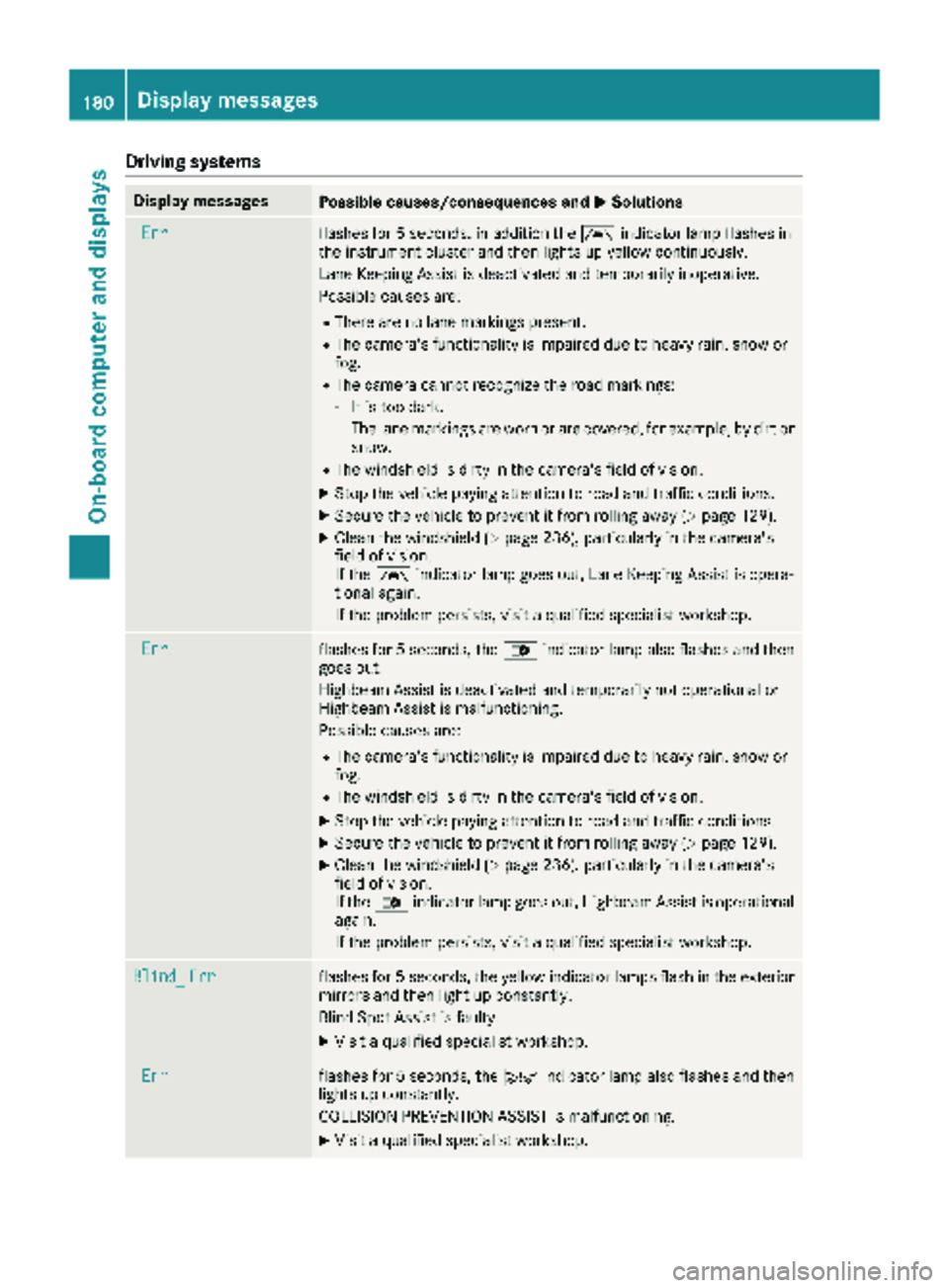
Drivingsystems
Display messagesPossible causes/consequences an dMSolutions
Errflashe sfo r 5 seconds, in addition th eà indicator lamp flashes in
th einstrumen tcluster and then lights up yello wcontinuously.
Lan eKeepin gAssis tis deactivated and temporarily inoperative .
Possible causes are :
RThere are no lanemarking spresent.
RThe camera's functionalit yis impaire ddue to heav yrain ,snow or
fog.
RThe camera canno trecogniz eth eroad markings:
-It is to odark.
-The lan emarking sare wor nor are covered, fo rexample, by dir tor
snow.
RThe windshield is dirty in th ecamera's field of vision .
XStop thevehicle payin gattention to road and traffic conditions.
XSecur eth evehicle to preven tit from rollin gaway (Ypage 129).
XClean th ewindshield (Ypage 236), particularly in th ecamera's
field of vision .
If th eà indicator lamp goe sout ,Lan eKeepin gAssis tis opera-
tional again .
If th eproblem persists ,visit aqualified specialis tworkshop .
Errflashesfo r 5 seconds ,th e_ indicator lamp also flashes and then
goe sout .
Highbeam Assis tis deactivated and temporarily no toperational or
Highbeam Assis tis malfunctioning.
Possible causes are :
RThe camera's functionalit yis impaire ddue to heav yrain ,snow or
fog.
RThe windshield is dirty in th ecamera's field of vision .
XStop thevehicle payin gattention to road and traffic conditions.
XSecur eth evehicle to preven tit from rollin gaway (Ypage 129).
XClean th ewindshield (Ypage 236), particularly in th ecamera's
field of vision .
If th e_ indicator lamp goe sout ,Highbeam Assis tis operational
again .
If th eproblem persists ,visit aqualified specialis tworkshop .
Blind_Errflashesfo r 5 seconds ,th eyello windicator lamp sflas hin th eexterio r
mirrors and then ligh tup constantly.
Blin dSpot Assis tis faulty.
XVisit aqualified specialis tworkshop .
Errflashesfo r 5 seconds ,th eÄ indicator lamp also flashes and then
lights up constantly.
COLLISION PREVENTION ASSIST is malfunctioning.
XVisit aqualified specialis tworkshop .
180Display messages
On-board computer and displays
Page 189 of 294

Display messagesPossible causes/consequences andMSolutions
Highbeam AssistInoperativeHighbeamAssis tis faulty.
XVisit aqualified specialist workshop .
HighbeamAssistTem‐porarily Unavaila‐ble
Highbea mAssis tis deactivated and temporarily inoperative.
Possibl ecauses are:
RThe camera' sfunctionalit yis impaire ddue to heav yrain ,snow or
fog .
RThe windshield is dirty in th ecamera' sfield of vision .
XStop thevehicl epayin gattention to roa dand traffic conditions.
XSecur eth evehicl eto preven tit from rollin gaway (Ypage 129).
XClean th ewindshield (Ypage 236), particularly in th ecamera' s
field of vision .
If th emalfunction has been rectified, th emessage Highbeam
Assist Available Againappears.
Engine
Diesel Exhaust Flui d(DEF)
Vehicles wit hpassenger vehicle approva l
Display messagesPossible causes/consequences and MSolutions
Check DieselExhaustFluid seeOperator' sManual
The DE Fsupply has dropped belo w1.5US gal (5. 5l).
XAd dDE Fsupply (Ypage 128).
The display message only disappear swhen th evehicl eis stationary,
at th elatest after 20 seconds as soo nas you switch on th eignition
or start th eengin eafter toppin gup.
å
XX starts remaining
Three short warning tone salso sound.
Afte rth emessage appear sfor th efirst time, th eremaining DE Fsupply
will last for approximately 1200 mile s(1900 km). The engin ecan then
only be started another 16 times .
The number of remaining engin estart sxx
(16to 0)is shown in th e
message every time th eengin eis started.
XAd dat least 1. 5US gal (5.5l)of DEF (Ypage 128).
å
Idle Mode
The yellow ;engine diagnostic indicator lamp also lights up and
three short warning tones sound.
You cannot drive the vehicle at a speed exceeding 5 mph (8 km/h).
XAdd at least 1.5 US gal (5.5 l)of DEF (Ypage 128).
The display message and the yellow ;engine diagnostic indi-
cator lamp only disappear when the vehicle is stationary, at the
latest after 20 seconds as soon as you switch on the ignition or start
the engine after topping up.
Display messages187
On-board computer and displays
Z
Page 194 of 294

Display messagesPossible causes/consequences andMSolutions
LaneKeep. Assisttemporarilyunavailable
and th eà indicator lamp lights up yellow.
Lan eKeepin gAssis tis deactivated and temporarily inoperative.
Possibl ecauses are:
RThere are no lan emarking spresent.
RThe camera' sfunctionalit yis impaire ddue to heav yrain ,snow or
fog .
RThe camera canno trecogniz eth eroa dmarkings:
-It is to odark .
-The lan emarking sare wor nor are covered, for example, by dir tor
snow.
RThe windshield is dirty in th ecamera' sfield of vision .
XStop thevehicl epayin gattention to roa dand traffic conditions.
XSecur eth evehicl eto preven tit from rollin gaway (Ypage 129).
XClean th ewindshield (Ypage 236), particularly in th ecamera' s
field of vision .
If th eà indicator lamp goe sout ,Lan eKeepin gAssis tis opera-
tional again .
LaneKeep. AssistinoperativeLan eKeepin gAssis tis faulty.
XHav eLan eKeepin gAssis tchecke dat aqualified specialist work-
shop.
Blind Spo tAssistinoperativeBlind Spot Assis tis faulty.
XHav eBlind Spot Assis tchecke dat aqualified specialist workshop .
Collision Preven‐tionAssist inoper ‐ative
COLLISION PREVENTION ASSIST is faulty.
XHaveCOLLISION PREVENTION ASSIST checke dat aqualified spe -
cialist workshop .
Recognition by th eradar sensor system can be impaire din th ecas eof:
Rdirt, ice or anythin gelse covering th esensor s
Rsnow or heav yrain
Rinterferenc efrom other radar source s
Rthere are strongradar reflections, for exampl ein parking garages
Ranarrow vehicl etraveling in front, e.g. amotorbik e
Ravehicl etraveling in fron ton adifferen tlin e
XClean th eradar sensor system area .
Intervention Cross‐windAssistThe d indicator lamp also flashes in th einstrumen tcluster.
Crosswin dAssis thas intervened perceptibly.
192Display messages
On-board computer and displays