2018 MERCEDES-BENZ GLS ESP
[x] Cancel search: ESPPage 64 of 398
All child restraint systems must meet the fol-
lowing standards: R
U.S. Federal Motor Vehicle Safety Standards
213 and 225 R
Canadian Motor Vehicle Safety Standards
213 and 210.2
Confirmation that the child restraint system cor-
responds to the standards can be found on an
instruction label on the child restraint system.
This confirmation can also be found in the instal-
lation instructions that are included with the
child restraint system.
Observe the warning labels in the vehicle inte-
rior and on the child restraint system.
LATCH-type (ISOFIX) child seat secur-
ing system
G WARNING
For LATCH-type (ISOFIX) child restraint sys-
tems in which the child is secured using the
safety belt integrated in the child restraint
system, the maximum permissible weight of
the child and child restraint system together
is 73 lbs (33 kg).
If the child and the child restraint system
together weigh more than 73 lbs (33 kg), the
LATCH-type (ISOFIX) child restraint system
with integrated safety belt no longer offers
sufficient protection. The LATCH-type (ISO-
FIX) child seat securing system may be over-
loaded, and the child may not be restrained in
an accident, for example. This poses an
increased risk of injury or even fatal injury.
If the child and the child restraint system
together weigh more than 73 lb s( 33 kg), use
only a LATCH-type (ISOFIX) child restraint sys-
tem in which the child is also secured with the
vehicle seat belt. Also secure the child
restraint system with the Top Tether belt, if
available.
Regularly check that the permissible gross
weight of the child together with the child
restraint system is still maintained.
Always comply with the manufacturer's instal-
lation and operating instructions for the child
restraint system used. Before every trip, make sure that the LATCH-
type (ISOFIX) child restraint system is engaged
correctly in both LATCH-type (ISOFIX) securing
rings
To ensure that the LATCH-type (ISOFIX) child
restraint system can perform its protective func-
tion as intended, the backrest of the respecti ve
ou
ter seat in the second row must be in the
upright position.
! When installing the child restraint system,
make sure that the seat belt for the middle
seat does not get trapped. The seat belt could
otherwise be damaged.
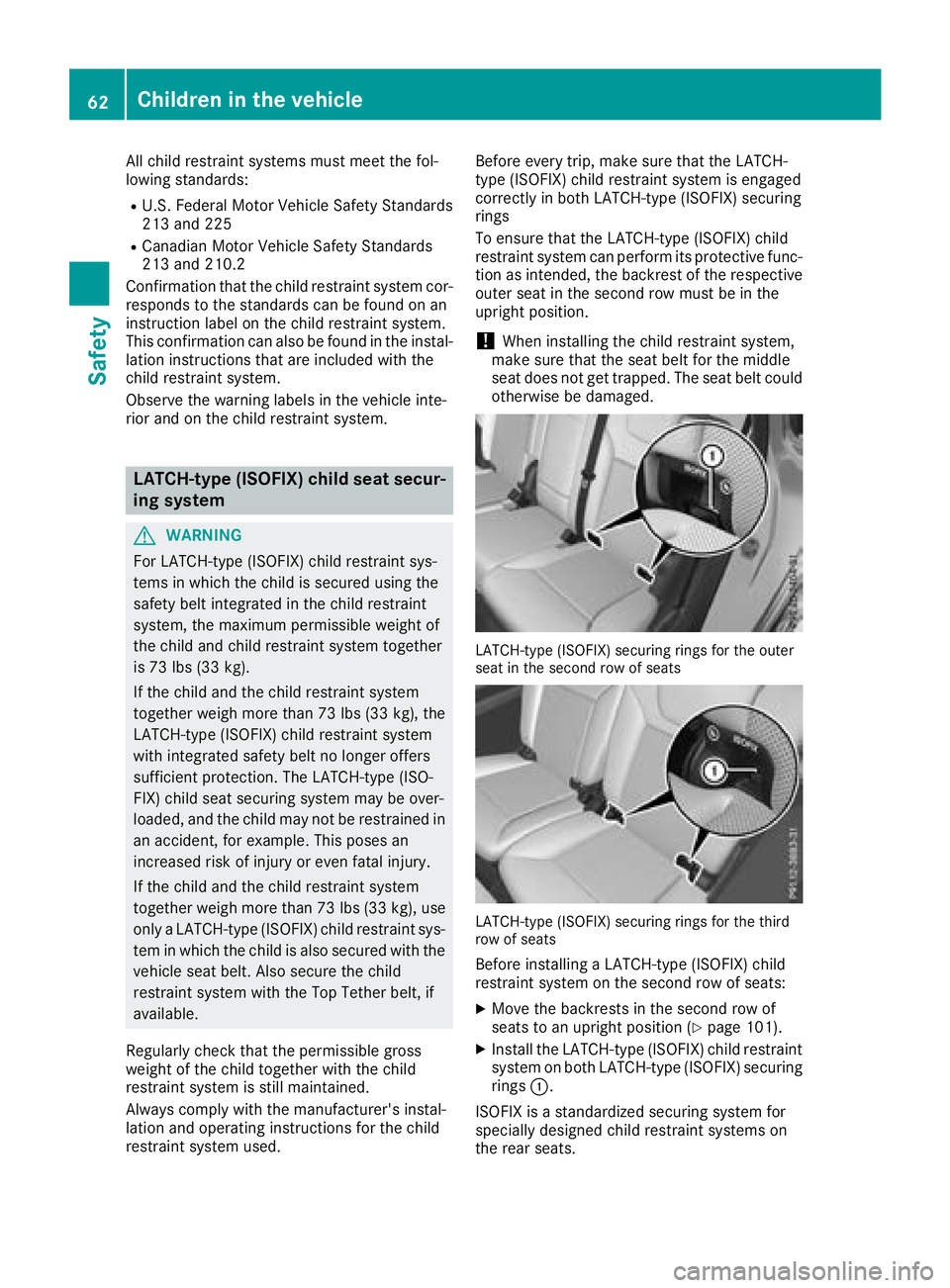
LATCH-type (ISOFIX) securing rings for the outer
seat in the second row of seats
LATCH-type (ISOFIX) securing rings for the third
row of seats
Before installing a LATCH-type (ISOFIX) child
restraint system on the second row of seats: X
Move the backrests in the second row of
seats to an upright position ( Y
page 101).X
Install the LATCH-type (ISOFIX) child restraint
system on both LATCH-type (ISOFIX) securing
rings C .
ISOFIX is a standardized securing system for
specially designed child restraint systems on
the rear seats.62
Children in the vehicle
Safety
Page 68 of 398

Never leave animals unattended in the vehi-
cle. Always secure animals properly during
the journey, e.g. use a suitable animal trans-
port box.
Driving safety systems
Overview of driving safety systems In this section, you will find information about
the following driving safety systems: R
ABS ( A nti-lock B raking S ystem)
( Y
page 66)R
BAS ( B rake A ssist S ystem) ( Y
page 67)R
Active Brake Assist ( Y
page 67)R
ESP ®
( E lectronic S tability P rogram)
( Y
page 70)R
EBD ( E lectronic B rake force D istribution)
( Y
page 72)R
ADAPTIVE BRAKE ( Y
page 72)R
Active Brake Assist with cross-traffic function
( Y
page 72)R
Steering Pilot STEER CONTROL
( Y
page 75)
Important safety notes If you fail to adapt your driving style or if you are
inattentive, the driving safety systems can nei-
ther reduce the risk of an accident nor override
the laws of physics. Driving safety systems are
merely aids designed to assist driving. You are
responsible for maintaining the distance to the
vehicle in front, for vehicle speed, for braking in
good time, and for staying in lane. Always adapt
your driving style to suit the prevailing road and
weather conditions and maintain a safe distance
from the vehicle in front. Drive carefully.
The driving safety systems described only work
as effectively as possible when there is ade-
quate contact between the tires and the road
surface. Pay particular attention to the informa-
tion regarding tires, recommended minimum
tire tread depths etc. in the "Wheels and tires"
section ( Y
page 354).
In wintry driving conditions, always use winter
tires (M+S tires) and if necessary, snow chains.
Only in this way will the driving safety systems
described in this section work as effectively as
possible. ABS (Anti-lock Braking System)
General information ABS regulates brake pressure in such a way that
the wheels do not lock when you brake. This
allows you to continue steering the vehicle when
braking.
The % ABS warning lamp in the instrument
cluster lights up when the ignition is switched
on. It goes out when the engine is running.
ABS works from a speed of about 5 mph
(8 km/h), regardless of road-surface conditions.
ABS works on slippery surfaces, even when you
only brake gently.
Important safety notes
i Observe the "Important safety notes" sec-
tion ( Y
page 66).
G WARNING
If ABS is faulty, the wheels could lock when
braking. The steerability and braking charac-
teristics may be severely impaired. Addition-
ally, further driving safety systems are deac-
tivated. There is an increased danger of skid-
ding and accidents.
Drive on carefully. Have ABS checked imme-
diately at a qualified specialist workshop.
When ABS is malfunctioning, other systems,
including driving safety systems, will also
become inoperative. Observe the information
on the ABS warning lamp ( Y
page 282) and dis-
play messages which may be shown in the
instrument cluster ( Y
page 249).
Braking X
If ABS intervenes: continue to depress the
brake pedal vigorously until the braking sit-
uation is over. X
To make a full brake application: depress
the brake pedal with full force.
If ABS intervenes when braking, you will feel a
pulsing in the brake pedal.
The pulsating brake pedal can be an indication
of hazardous road conditions, and functions as a
reminder to take extra care while driving.66
Driving safety systems
Safety
Page 71 of 398
passenger protection measures (PRE-SAFE ®
)
are activated simultaneously ( Y
page 58).
Situation-dependent braking assis-
tance General information
i Observe the "Important safety notes" sec-
tion ( Y
page 66).
With the help of the radar sensor system, Adap-
tive Brake Assist can detect obstacles that are in
the path of your vehicle for an extended period
of time.
If Adaptive Brake Assist detects a risk of colli-
sion with the vehicle in front, it calculates the
brake pressure necessary to avoid a collision. If
you apply the brakes forcefully, situation-
dependent braking assistance adapts to the sit-
uation and automatically increases the brake
pressure to a degree appropriate to the traffic
situation.
Situation-dependent braking assistance pro-
vides braking assistance in hazardous situations
at speeds above 4 mph (7 km/h). It uses radar
sensor technology to assess the traffic situa-
tion.
Situation-dependent braking assistance is capa-
ble of reacting to moving objects that have
already been detected as such at least once
over the period of observation, up to vehicle
speeds of around 155 mph (250 km/h).
Situation-dependent braking assistance reacts
to stationary obstacles up to a speed of approx-
imately 44 mph (70 km/ h) .
If situation-dependent braking assistance
demands particularly high brake pressure, pre-
ventative passenger protection measures (PRE-
SAFE ®
) are triggered simultaneously
( Y
page 58). X
Keep the brake pedal depressed until the
emergency braking situation is over.
ABS prevents the wheels from locking.
The brakes will work normally again if: R
you release the brake pedal. R
there is no longer any danger of a collision. R
no obstacle is detected in front of your vehi-
cle.
Situation-dependent braking assistance is then
deactivated. Important safety notes
i Observe the "Important safety notes" sec-
tion for driving safety systems ( Y
page 66).
G WARNING
Adaptive Brake Assist cannot always clearly
identify objects and complex traffic situa-
tions.
In such cases, Adaptive Brake Assist might: R
intervene unnecessarily R
not intervene
There is a risk of an accident.
Always pay careful attention to the traffic sit-
uation and be ready to brake. Terminate the
intervention in a non-critical driving situation.
G WARNING
Adaptive Brake Assist does not react: R
to people or animals R
to oncoming vehicles R
to crossing traffic R
when cornering
As a result, Adaptive Brake Assist may not
intervene in all critical conditions. There is a
risk of an accident.
Always pay careful attention to the traffic sit-
uation and be ready to brake.
Due to the nature of the system, complex but
non-critical driving conditions may also cause
Active Brake Assist to intervene.
Even if Active Brake Assist is not available due to
a malfunction in the radar sensor system, the
brake system is still available with full brake
boosting effect and BAS.
ESP ®
(Electronic Stability Program)
General notes
i Observe the "Important safety notes" sec-
tion ( Y
page 66).
ESP ®
monitors driving stability and traction, i.e.
power transmission between the tires and the
road surface.Driving safety systems 69
Safety Z
Page 72 of 398
If ESP ®
detects that the vehicle is deviating from
the direction desired by the driver, one or more
wheels are braked to stabilize the vehicle. The
engine output is also modified to keep the vehi-
cle on the desired course within physical limits.
ESP ®
assists the driver when pulling away on
wet or slippery roads. ESP ®
can also stabilize
the vehicle during braking.
ETS/4ETS (Electronic Traction System) 4ETS traction control is part of ESP ®
.
Traction control brakes the drive wheels indi-
vidually if they spin. This enables you to pull
away and accelerate on slippery surfaces, for
example if the road surface is slippery on one
side. In addition, more drive torque is transfer-
red to the wheel or wheels with traction.
Traction control remains active, even if you
deactivate ESP ®
.
In appropriate driving situations, activate the
offroad program: X
Vehicles without the Offroad Engineering
package ( Y
page 219)X
Vehicles with the Off-Road Engineering pack-
age ( Y
page 220)
Off-road 4ETS (Electronic Traction Sys-
tem) An ETS system specifically suited to off-road
terrain is activated automatically once an off-
road program is activated: R
Vehicles without the Offroad Engineering
package ( Y
page 219)R
Vehicles with the Off-Road Engineering pack-
age ( Y
page 220)
Important safety notes
G WARNING
If ESP ®
is malfunctioning, ESP ®
is unable to
stabilize the vehicle. Additionally, further driv-
ing safety systems are deactivated. This
increases the risk of skidding and an accident.
Drive on carefully. Have ESP ®
checked at a
qualified specialist workshop. ! Only operate the vehicle for a maximum of
ten seconds on a brake test dynamometer.
Switch off the ignition.
Application of the brakes by ESP ®
may oth-
erwise destroy the brake system.
! A function or performance test should only
be carried out on a two-axle dynamometer.
Before you operate the vehicle on such a
dynamometer, please consult a qualified
workshop. You could otherwise damage the
drive train or the brake system.
ESP ®
is only deactivated if the
Page 73 of 398
Deactivating/activating ESP ®
Important safet y notes
i Observ e th e "Important safet y notes" sec -
tion ( Y
page 66).
You can selec t between th e followin g states of
ES P ®
: R
ES P ®
is activated.R
ES P ®
is deactivated.
G WARNING
If you deactivat e ES P ®
, ES P ®
no longer sta-
bilizes th e vehicle. There is an increase d ris k
of skidding and an accident.
Only deactivat e ES P ®
in th e situation s descri-
bed in th e following.
It may be bes t to deactivat e ES P ®
in th e follow -
in g situations: R
when usin g snow chain sR
in dee p snowR
on san d or grave l
Spinning th e wheels result s in a cutting action
whic h provides bette r grip.
i Activat e ES P ®
as soo n as th e situation s
described abov e no longer apply . ES P ®
will
otherwise no t be able to stabilize th e vehicle if
th e vehicle start s to skid or a whee l start s to
spin.
! Avoid spinnin g th e driven wheels fo r an
extended period wit h ES P ®
deactivated. You
could otherwise damage th e drivetrain .
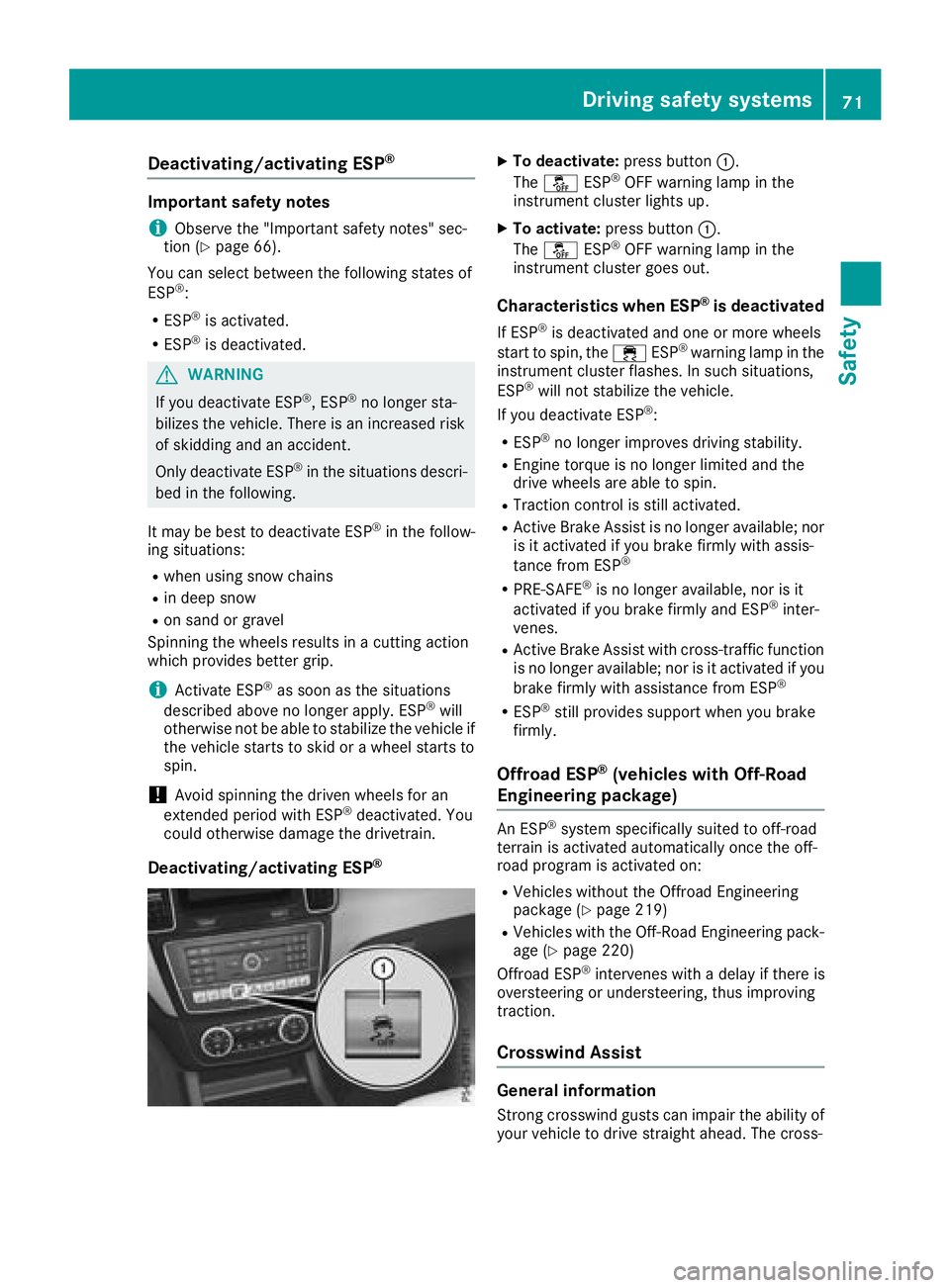
Deactivating/activating ESP ® X
To deactivate : press butto n C .
The
Page 74 of 398
wind driving assistance function integrated in
ESP ®
noticeably reduces these impairments.
ESP ®
intervenes automatically according to the
direction and intensity of the crosswinds affect-
ing your vehicle.
ESP ®
intervenes with stabilizing braking to
assist you in keeping the vehicle in the lane.
Crosswind Assist is active at vehicle speeds
above 50 mph (80 km/ h) when driving straight
ahead or cornering gently.
Important safety notes Crosswind Assist does not work if ESP ®
is
switched off or deactivated because of a mal-
function.
EBD (electronic brake force distribu-
tion)
General information EBD monitors and controls the brake pressure
on the rear wheels to improve driving stability
while braking.
Important safety notes
i Observe the "Important safety notes" sec-
tion for driving safety systems ( Y
page 66).
G WARNING
If EBD is malfunctioning, the rear wheels can
lock, e.g. under full braking. This increases the
risk of skidding and an accident.
You should therefore adapt your driving style
to the different handling characteristics. Have
the brake system checked at a qualified spe-
cialist workshop.
Observe information regarding indicator and
warning lamps ( Y
page 282) as well as display
messages ( Y
page 251).
ADAPTIVE BRAKE
ADAPTIVE BRAKE enhances braking safety and
offers increased braking comfort. In addition to
the braking function, ADAPTIVE BRAKE also has
the HOLD function ( Y
page 187) and hill start
assist ( Y
page 143). Active Brake Assist with cross-traffic
function
General information
i Pay attention to the important safety notes
in the "Driving safety systems" section
( Y
page 66).
Active Brake Assist with cross-traffic function
can help you to minimize the risk of a collision
with a vehicle in front or a pedestrian and reduce
the effects of such a collision. If the Active Brake
Assist with cross-traffic function detects a risk
of collision, you will be warned visually and
acoustically and, if necessary, your brake appli-
cation will be assisted according to the situa-
tion. If you do not react, the system can also
react by braking automatically. In the event of a
detected risk of collision due to crossing traffic,
you will also be visually and acoustically warned
as well as assisted by the brake boosting effect
according to the situation.
Active Brake Assist with cross-traffic function is
only available in vehicles with the Driving Assis-
tance Plus package.
For Active Brake Assist with cross-traffic func-
tion to assist you when driving, the radar sensor
system and the camera system must be opera-
tional.
If the radar sensor system or the camera system
is malfunctioning, Active Brake Assist with
cross-traffic function is restricted or no longer
available. The brake system is still available with
complete brake boosting effect and BAS.
The radar sensor system and camera system
help Active Brake Assist with cross-traffic func-
tion to detect obstacles that are in t he path of
your
vehicle for an extended period of time.
In addition, pedestrians in the path of your vehi-
cle can be detected.
Active Brake Assist with cross-traffic function
detects pedestrians using typical characteris-
tics such as body contours and the posture of a
person standing upright.
i Observe the restrictions described in the
"Important safety notes" section
( Y
page 73).72
Driving safety systems
Safety
Page 75 of 398
Important safety notes
G WARNIN G
Active Brake Assist wit h cross-traffic function
will initially brak e your vehicl e by a partial
application of th e brakes if a danger of colli-
sion is detected. Ther e may be a collision
unless you brak e yourself . Even after subse-
quen t full application of th e brakes a collision
canno t always be avoided, particularly when
approachin g at to o high a speed. Ther e is a
ris k of an accident.
Always apply th e brakes yourself and tr y to
tak e evasive action , provide d it is saf e to do
so.
In th e event of a partial application of th e brakes,
th e vehicl e is braked wit h up to 50 % of th e full
braking pressure.
G WARNIN G
Active Brake Assist wit h cross-traffic function
canno t always clearly identify objects and
comple x traffic situations.
In suc h cases, Active Brake Assist wit h cross -
traffic function might :R
issu e an unnecessary warning or engageR
neither giv e a warning no r interven e
Ther e is a ris k of an accident.
Always pay particular attention to th e traffic
situation and be prepare d to brake, especially
if Active Brake Assist wit h cross-traffic func-
tion alerts you. Terminate th e intervention in a
non-critical driving situation .
G WARNIN G
Active Brake Assist wit h cross-traffic function
canno t always clearly identify people, partic-
ularly if they are moving . Active Brake Assist
wit h cross-traffic function canno t interven e in
these cases. Ther e is a ris k of an accident.
Always pay particular attention to th e traffic
situation and be prepare d to brake, especially
if Active Brake Assist wit h cross-traffic func-
tion alerts you. In order to maintai n th e appropriat e distanc e to
th e vehicl e in fron t and thus preven t a collision ,
you must apply th e brakes yourself .
G WARNIN G
Active Brake Assist wit h cross-traffic function
does no t react: R
to small people, e.g. children R
to animals R
to oncomin g vehicles R
when cornering
As a result , Active Brake Assist wit h cross -
traffic function may no t warn you or engage in
all critical situations. Ther e is a ris k of an acci-
dent.
Always pay careful attention to th e traffic sit -
uation and be read y to brake.
In th e event of snowfall or heav y rain , th e rec -
ognition can be impaired.
Recognition by th e radar sensor system is also
impaire d if: R
there is dirt on th e sensor s or anythin g else
covering th e sensor sR
there is interferenc e by other radar source sR
there are stron g radar reflections, for exam-
ple in parking garages R
a narrow vehicl e is traveling in front, e.g. a
motorbike R
a vehicl e is traveling in fron t on a differen t lin e
relative to th e center of your vehicl eR
vehicles quickly mov e int o th e radar sensor
system detection range
Recognition by th e camera system is also
impaire d in th e event of: R
dirt on th e camera or if th e camera is coveredR
glar e on th e camera system, e.g. from th e sun
bein g low in th e sk yR
darkness R
or if: -
pedestrian s mov e quickly, e.g. int o th e p at h
of th e vehicl e -
th e camera system no longer recognizes a
pedestrian as a person due to special cloth -
ing or other objects -
a pedestrian is concealed by other objects -
th e typical outlin e of a person is no t distin-
guishable from th e backgroun dDriving safety systems 73
Safety Z
Page 77 of 398
The braking application of Active Brake Assist
with cross-traffic function is ended automati-
cally if: R
you maneuver to avoid the obstacle R
there is no longer a risk of collision R
there is no longer an obstacle detected in
front of your vehicle
STEER CONTROL
General information STEER CONTROL helps you by transmitting a
noticeable steering force to the steering wheel
in the direction required for vehicle stabilization.
This steering assistance is provided in particular
if: R
both right wheels or both left wheels are on a
wet or slippery road surface when you brake R
the vehicle starts to skid
Important safety notes
i Observe the "Important safety notes" sec-
tion ( Y
page 66).
No steering assistance is provided from STEER
CONTROL, if: R
ESP ®
is deactivatedR
ESP ®
is malfunctioningR
the steering is malfunctioning
If ESP ®
is malfunctioning, you will be assisted
further by the electrical power steering.
Protection against theft
Immobilizer X
To activate with the SmartKey: remove the
SmartKey from the ignition lock. X
To activate with KEYLESS-GO: switch the
ignition off and open the driver's door. X
To deactivate: switch on the ignition.
The immobilizer prevents your vehicle from
being started without the correct SmartKey.
When leaving the vehicle, always take the
SmartKey with you and lock the vehicle. Anyone
can start the engine if a valid SmartKey has been
left inside the vehicle. i The immobilizer is always deactivated when
you start the engine.
In the event that the engine cannot be started
(yet the vehicle's battery is charged), the sys-
tem is not operational. Contact an authorized
Mercedes-Benz Center or call
1-800 FOR-MERCEDES (in the USA) or
1-800-387-0100 (in Canada).
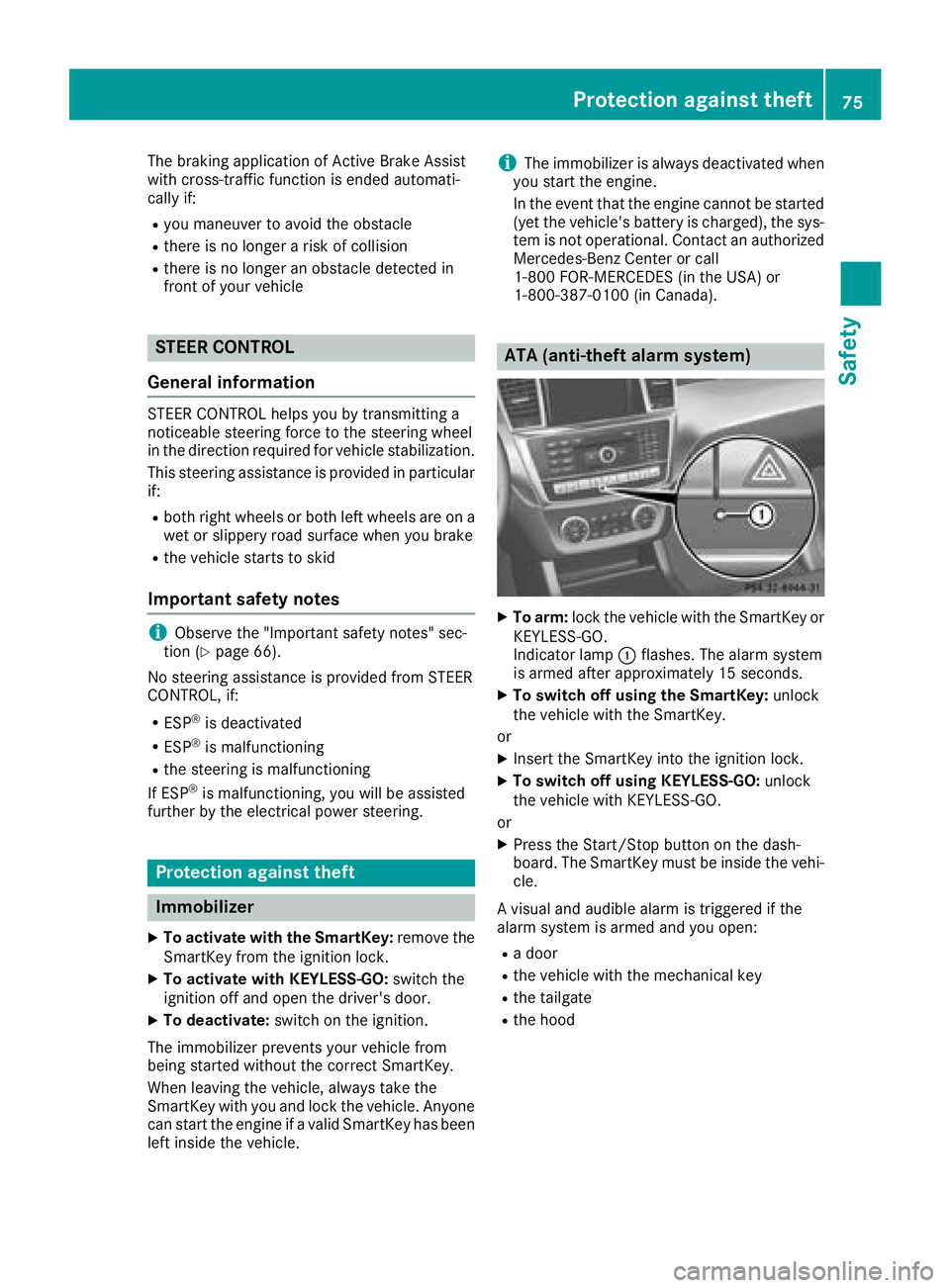
ATA (anti-theft alarm system) X
To arm: lock the vehicle with the SmartKey or
KEYLESS-GO.
Indicator lamp C flashes. The alarm system
is armed after approximately 15 seconds. X
To switch off using the SmartKey: unlock
the vehicle with the SmartKey.
or X
Insert the SmartKey into the ignition lock. X
To switch off using KEYLESS-GO: unlock
the vehicle with KEYLESS-GO.
or X
Press the Start/Stop button on the dash-
board. The SmartKey must be inside the vehi-
cle.
A visual and audible alarm is triggered if the
alarm system is armed and you open: R
a door R
the vehicle with the mechanical key R
the tailgate R
the hoodProtection against theft 75
Safety Z