2018 MERCEDES-BENZ GLC SUV light
[x] Cancel search: lightPage 73 of 170

Change-of-direction phase
The multimedia system announces the immedi-
ate change of direction. The change of directionis announced ahead of time, e.g. with the
announcement "Now turn right".
The display is split in two like in the announce-
ment phase.
The change of direction is performed when the
light-color bar on the right drops down to 0 ft
(0 m) an d the current vehicle position symbol
has reached the white change-of-direction
point.
When the change of direction is completed, the
map will appear in full screen mode again.
Display on highways
The image shows an example of route guidance
at a highway intersection when driving on a
highway.
Lane recommendations
Display on multi-lane roads
:Lanes not recommended (dark gray)
;Possible lane (light gray)
=Recommended lanes (white)
If the digital map contains the relevant data, the
multimedia system can display lane recommen-
dations on multi-lane roads for the next change
of direction.
Lane not recommended :: you will not be able
to complete the next change of direction if you
stay in this lane.
Possible lane ;: you will only be able to com-
plete the next change of direction in this lane.
Recommended lane =: in this lane you will be
able to complete the next change of direction
and the one after that.
The multimedia system shows the lane recom-
mendations for the next two changes of direc-
tion. Lane recommendations are also shown in
the multifunction display of the instrument clus-
ter (see the vehicle Operator's Manual).
Approaching new lanes
:Approaching new lane
During the change of direction, new lanes may
be added. These will be shown in the display of
Route guidance71
Navigation
Z
Page 74 of 170
lane recommendations with a lower boundary
line.
Highway information
Display mode
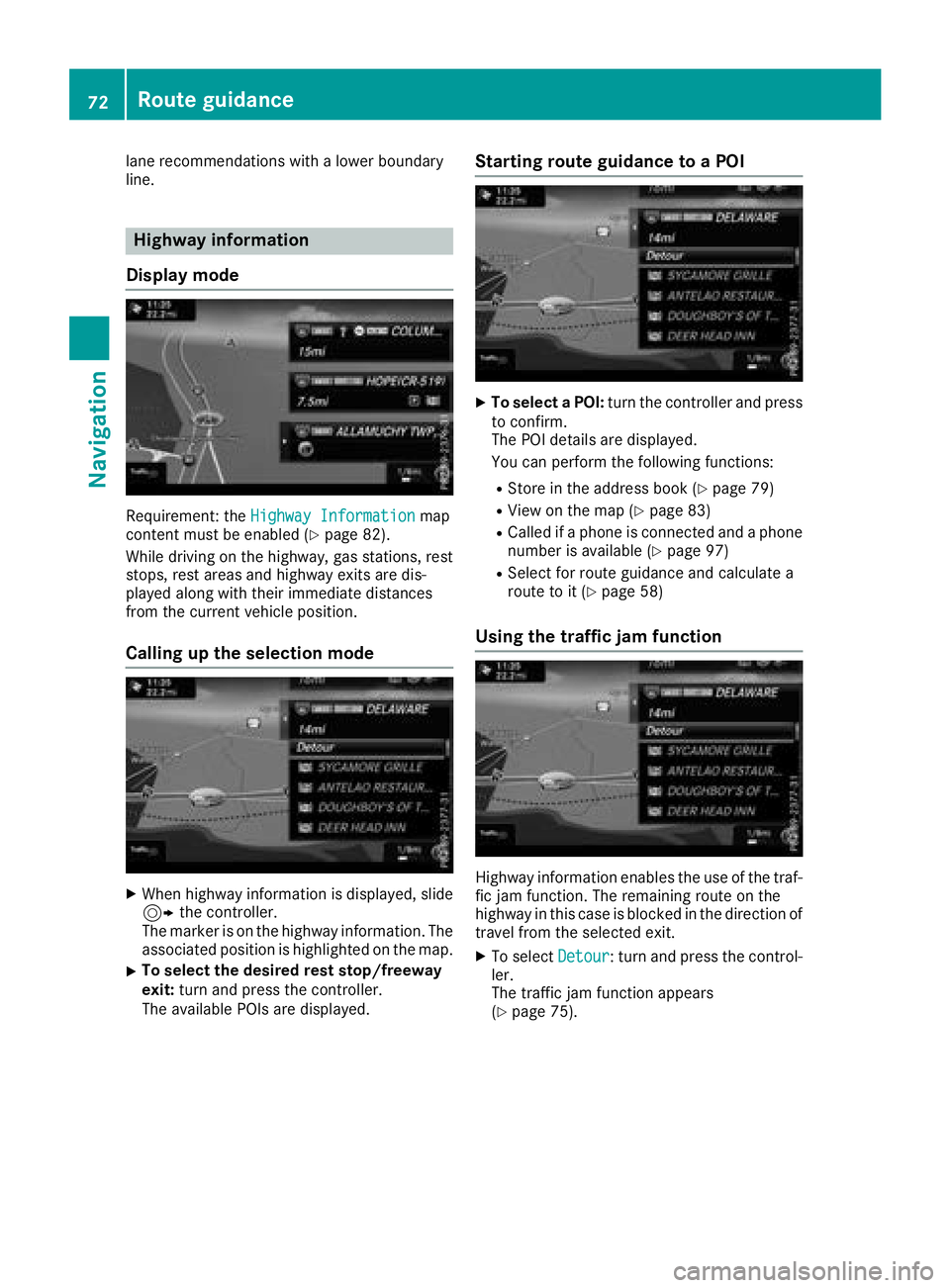
Requirement: the Highway Informationmap
content must be enabled (Ypage 82).
While driving on the highway, gas stations, rest
stops, rest areas and highway exits are dis-
played along with their immediate distances
from the current vehicle position.
Calling up the selection mode
XWhen highway information is displayed, slide 9 the controller.
The marker is on the highway information. The
associated position is highlighted on the map.
XTo select the desired rest stop/freeway
exit: turn and press the controller.
The available POIs are displayed.
Starting route guidance to a POI
XTo select a POI: turn the controller and press
to confirm.
The POI details are displayed.
You can perform the following functions:
RStore in the address book (Ypage 79)
RView on the map (Ypage 83)
RCalled if a phone is connected and a phone
number is available (Ypage 97)
RSelect for route guidance and calculate a
route to it (Ypage 58)
Using the traffic jam function
Highway information enables the use of the traf-
fic jam function. The remaining route on the
highway in this case is blocked in the direction of
travel from the selected exit.
XTo select Detour: turn and press the control-
ler.
The traffic jam function appears
(
Ypage 75).
72Route guidance
Navigation
Page 79 of 170

DSlow-moving traffic (orange line along the
affected route)
ETraffic jam (red line along the affected route)
Displaying real-time traffic reports
Starting a search for traffic reports
XTo switch to navigation mode: press the
Ø button.
XTo show the menu: slide6the controller.
XTo select Traffic: turn and press the con-
troller.
If satellite signals cannot be received or there
are no traffic reports, you will see a message
to this effect.
XTo close the report: press the controller.
Traffic symbol information
:Affected roads with indication of direction
;Symbol for report type, e.g. traffic flow mes-
sage
XTo switch to navigation mode: press the
Ø button.
XTo show the menu: slide6the controller.
XTo select Traffic: turn and press the con-
troller.
XTo select Traffic Symbol Information:
turn and press the controller.
The map appears and shows the available
traffic information as icons. The first traffic
information is highlighted.
XTo highlight additional traffic symbols, select
Nextor Previous.
XTo move the map: selectMap.
You can move the map to enable further traf-
fic information to be displayed.
You can have the traffic report relevant to a traf-
fic icon shown.
XTo select Details: turn and press the con-
troller.
The report shows the following information:
RState/province, road and display of the affec-
ted direction
RSection of the road to which the traffic report applies
RTraffic icon and traffic report
XTo close the detailed display: press the
% button.
Displaying reports on the route
The function is only available while route guid-
ance is active. It shows the available traffic
reports affecting the current route.
Real-time traffic reports77
Navigation
Z
Page 82 of 170

XSelectYesorNo.
If you select Yes, a list showing both destina-
tion addresses appears.
XTo select the destination address: turn and
press the controller.
The destination address is overwritten.
XSelect Save as "My address" As "My
Address".
The destination is saved as your home
address.
Saving a destination to an SD card
XInsert the SD memory card (Ypage 140).
XSelect a POI, for example (Ypage 60).
XTo select Save: turn and press the controller.
A menu appears.
XSelect To Memory Card.
If no destination has been saved yet on the SD
card, an input menu will appear.
or
XSelect NotClassifiedor, if available, select
a category that you have created yourself.
An input menu appears.
XEnter a new name and a new category for the
destination in the input menu if required.
Character entry (
Ypage 30).
XSelect OK.
The Saving Successfulmessage appears.
The destination is saved to the SD card.
Saving the current vehicle position
XTo switch to navigation mode: press the
Ø button.
XTo show the menu: slide6the controller.
XTo select Position: turn and press the con-
troller.
XSelect Save.
The current vehicle position is saved in "Last
destinations".
Saving the crosshair position
XTo switch to navigation mode: press the
Ø button.
XTo display the crosshair: press the control-
ler.
XMove the map to the desired position
(Ypage 53).
XTo show the menu: press the controller.
XTo select Position: turn and press the con-
troller.
XSelect Save.
The crosshair position is saved in the last des-
tinations.
Editing the last destinations
XTo switch to navigation mode: press the
Ø button.
XTo show the menu: slide6the controller.
XTo select Destination: turn and press the
controller.
XSelect From Previous Destinations.
The "Last destinations" memory appears.
XTo save the destination: select the destina-
tion.
The destination address appears.
XStore the destination in the address book
(Ypage 79).
XSave the destination to the SD card
(Ypage 80).
XTo view the details: while in the "Last desti-
nations" memory, turn the controller and
highlight the entry.
XSlide 9the controller.
A menu appears.
XTo select Details: press the controller.
iThe destination address can be changed if
desired. For instance, a different street or
house number can be selected.
XTo delete one or all destinations: while in
the "Last destinations" memory, turn the con-
troller and highlight the entry.
80Storing destinations
Navigation
Page 88 of 170

Carrying out a manual update
You can carry out the update yourself.
The update process may take some time (up to
45 minutes), depending on the size of the digital
map. The update will be completed more quickly if the vehicle is stationary. If you begin the
update while the vehicle is stationary and the
starter battery has insufficient power, the mul-
timedia system may switch off automatically.
This protects the battery. In order to prevent
this, a suitable power supply to the vehicle must
be maintained.
Functions in the Navigation menu
Calling up the navigation system
menu
XTo switch to navigation mode: press the
ß button.
XTo show the menu: slide5the controller.
Navi
is highlighted in the main function bar.
XPress the controller.
The navigation menu appears.
XTurn the controller.
The functions are displayed one after another.
XTo switch to the map, turn the controller until
Navigationappears and press the control-
ler.
Calling up the online map display
Requirement for online map display (USA):
mbrace must be activated for Internet access
(
Ypage 119).
Requirement for the online map display (Can-
ada): a mobile phone is connected to the multi-
media system via Bluetooth
®(Ypage 91) or
USB (Ypage 152).
XCall up the navigation menu (Ypage 86).
XTurn the controller until Online Map Dis‐playis brought to the front.
XPress the controller.
The online connection is established. Once
the connection is established, the Google
Maps™ map shows the vicinity of the current
vehicle position.
iAlternatively you can call up this function
using the touchpad (Ypage 23).
XTo exit the online map display: press the %
button.
Calling up the compass display
XCall up the navigation menu (Ypage 86).
XTurn the controller until Compassis brought to
the front.
XPress the controller.
The compass display provides the following
information:
RThe current direction of travel with bearing
(360 degree format) and compass direction
RLongitude and latitude coordinates in
degrees, minutes and seconds
RHeight (rounded off) above sea level
RNumber of GPS satellites from which a sig- nal can be received
iAlternatively you can call up this function
using the touchpad (Ypage 23).
XTo exit the compass display: press the %
button.
Drive information
86Functions in the Navigation menu
Navigation
Page 89 of 170

XCallup the navigation menu (Ypage 86).
XTurn the controller unt ilDriveInformationis brought to the front.
XPress the controller.
The Starting Drive Information.
Please Wait...message appears.
You willthen see maps with the current veh i-
cle position and the vicinity of the destination
in diff erent scales, these are automatically
displ ayed one after another.
If mbrace isactivated for Internet access
(
Ypage 119), additional information can be
displ ayed, e.g. weather at the destination.
iAlternatively you can call up th isfunction
using the touchpad (Ypage 23).
XTo exit DriveInformation: press the controller.
XPress the %button.
Route flight
XCallup the navigation menu (Ypage 86).
XTurn the controller unt ilRoute Flightis
brought to the front.
XPress the controller.
iAlternatively you can call up this function
using the touchpad (Ypage 23 ).
XSelectÌ.
The route will beflown along from a helicopter
perspective.
XTo stop route flight:selectË.
XTo exit theroute flight: press the controller.
XPress the %button.
Info on navigation
XCall up the navigation menu (Ypage 86).
XTurn the controller until Info on Naviga‐tionisbrought to the front.
XPress the controller.
The Digital Operator's Manual is opened at
the section on navigation.
iAlternatively you can call up this function
using the touchpad (Ypage 23 ).
Problems with the navigation system
ProblemPossible causes/consequences and MSolutions
The multimedia system
does not resume route
guidance after the jour-
ney has been interrup-
te d.Route guidance iscanceled if you interrupt the journey for more than
two hours.
"In terrupting the journey" refers to stopping the vehicle.
"Con tinuing route guidance" refers to switching the multimedia sys-
tem back on and driving on.
XContinue route guidance (Ypage 73).
Problems with the navigation system87
Navigation
Z
Page 97 of 170

Reconnecting automatically
The multimedia system always searches for the
last connected mobile phone.
If no connection can be made to the most
recently connected mobile phone, the system
searches for the mobile phone that was con-
nected before that one.
Switching between mobile phones
If you have authorized more than one mobile
phone, you can switch between the individual
phones.
XTo call up the telephone menu: press the
%button.
XTo show the menu bar: slide 6the control-
ler.
XTo select Connect Device: turn and press
the controller.
The device list is displayed.
XTo select the desired mobile phone: turn and press the controller.
The selected mobile phone is searched for
and connected if it is within Bluetooth
®range
and if Bluetooth®is activated.
Only one mobile phone can be connected at any one time. The currently connected mobile
phone is indicated by the #dot in the device list.
iYou can only switch to another authorized
mobile phone if you are not currently making
a call.
De-authorizing (disconnecting) a
mobile phone
Mercedes-Benz USA, LLC recommends de-
authorization in the multimedia system as well
as on the mobile phone. Subsequent authoriza-
tion may otherwise fail.
XTo call up the telephone menu: press the
% button.
XTo show the menu bar: slide 6the control-
ler.
XTo select Connect Device: turn and press
the controller.
XTo highlight the desired mobile phone in the
device list: turn the controller.
XTo select G: slide 9the controller.
XTo select Deauthorize: turn and press the
controller.
A prompt appears, asking whether you really
wish to de-authorize this device.
XTo select Yes: turn and press the controller.
The mobile phone is de-authorized.
iBefore re-authorizing the mobile phone, you
should also delete the device name MBBlue‐
toothfrom your mobile phone's Bluetooth®
list.
Displaying connection details
XTo call up the telephone menu: press the
%button.
XTo switch to the menu bar in the telephone
menu: slide 6the controller.
XTo select Connect Device: turn and press
the controller.
XTo highlight the desired mobile phone in the
device list: turn the controller.
XTo select G: slide 9the controller.
XTo select Details: turn and press the con-
troller.
The following information concerning the
selected mobile phone is shown:
RBluetooth®device name
RBluetooth®address
RAvailability status (shown after a new
search)
RAuthorization status
XTo close the detailed display: slide8 the
controller.
Reception and transmission volume
Once the mobile phone has been authorized,
you can optimize the transmission and recep-
tion volume settings. To find out about the best
possible settings for your mobile phone, visit
http://www.mercedes-benz.com/connect .
Or call the Mercedes-Benz Customer Assistance
Center at 1-800-FOR-MERCedes
(1-800-367-6372) (USA) or Customer Relations at 1-800-387-0100 (Canada).
Reception and transmission volume95
Telephone
Z
Page 98 of 170

XTo call up the telephone menu: press the
%button.
XTo switch to the menu bar: slide 6the con-
troller.
XTo select Connect Device: turn and press
the controller.
The device list appears.
XTo highlight the desired mobile phone in the
device list: turn the controller.
XTo select G: slide 9the controller.
XTo select Reception VolumeorTransmis‐sion Volume: turn and press the controller.
XTo select a volume setting: turn the controller.
XTo accept changes: press the controller.
iIncorrect settings may have an impact on
the quality of calls.
Using the telephone
Accepting a call
XTo select wAccept: press the controller.
or
XPress 6on the multifunction steering
wheel.
The call is accepted.
Additional functions available during a call
(
Ypage 97).
Adjusting the call volume (
Ypage 95).
Further information about ending a call
(
Ypage 99).
iIf the phone number of the caller is trans-
ferred, it appears in the display. If the phone
number is saved in the phone book, the con-
tact's name is also displayed. If the phone
number is not transferred, Unknown
is shown
in the display.
Rejecting a call
XTo select =Reject: turn and press the
controller.
or
XPress ~on the multifunction steering
wheel.
Making a call
Using the telephone menu
XTo call up the telephone menu: press the
% button.
XTo select the sequence of numbers: turn and
press the controller for each number.
XTo select win the telephone menu: turn
and press the controller.
The call is made.
Further information about ending a call
(
Ypage 99).
Using the touchpad
XTo call up the telephone menu: press the
% button.
XTo select n: turn and press the controller.
XDraw the sequence of numbers on the touch-
sensitive surface.
XTo select win the telephone menu: turn
and press the controller.
The call is made.
Further information about the touchpad
(
Ypage 25).
Using favorites
This function can be used when a telephone
number has been added as a favorite. Further
information about adding favorites (
Ypage 32).
XPress the favorites button on the controller.
The favorites are displayed.
XTo select a telephone number: turn the con-
troller.
XTo make a call: press the controller.
96Using the telephone
Telephone