2018 MERCEDES-BENZ GLC ignition
[x] Cancel search: ignitionPage 95 of 390
Vehicles with KEYLESS-GO or KEYLESS-GO
start function: if the SmartKey is in close prox-
imity to the vehicle, the convenience closing
function is available.
When you lock the vehicle, you can simultane-
ously: R
close the side windows R
close the panorama roof with power tilt/slid-
ing panel
On vehicles with a panorama roof with power
tilt/sliding panel, you can then close the roller
sunblinds.
Notes on the automatic reversing feature for: R
the side windows ( Y
page 91)R
the panorama roof with power tilt/sliding
panel ( Y
page 95)
Using the SmartKey X
Press and hold the 7 button until the side
windows and the panorama roof with power
tilt/sliding panel are fully closed. X
Make sure that all the side windows and the
panorama roof with power tilt/sliding panel
are closed. X
Press and hold the 7 button again until the
roller sunblinds of the panorama roof with
power tilt/sliding panel are closed. X
To interrupt convenience closing: release
the 7 button.
Using KEYLESS-GO The driver's door and the door at which the han-
dle is used, must both be closed. The SmartKey
must be outside the vehicle. The gap between
the SmartKey and the corresponding door han-
dle should not be greater than 3 ft (1 m). X
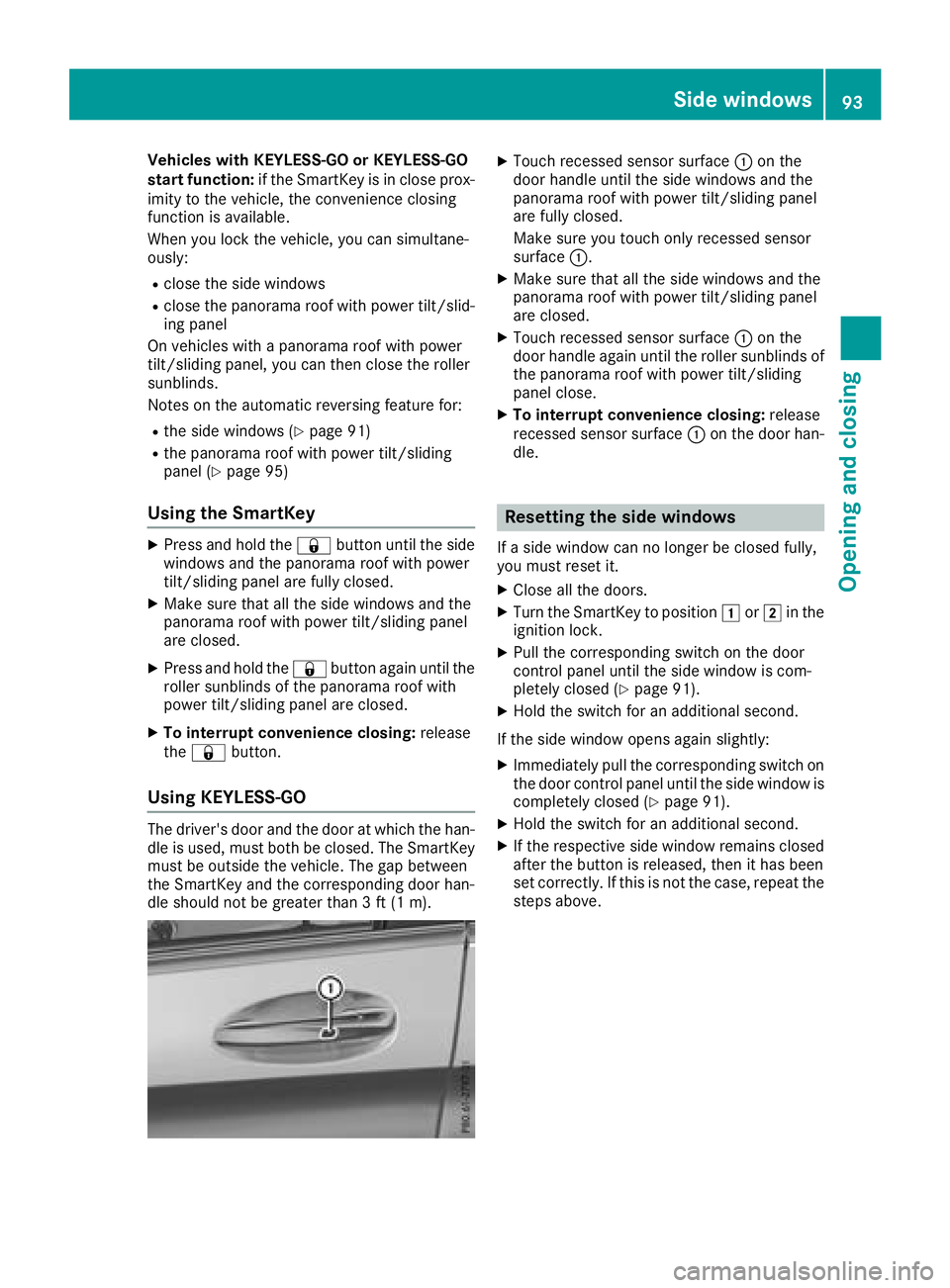
Touch recessed sensor surface C on the
door handle until the side windows and the
panorama roof with power tilt/sliding panel
are fully closed.
Make sure you touch only recessed sensor
surface C . X
Make sure that all the side windows and the
panorama roof with power tilt/sliding panel
are closed. X
Touch recessed sensor surface C on the
door handle again until the roller sunblinds of
the panorama roof with power tilt/sliding
panel close. X
To interrupt convenience closing: release
recessed sensor surface C on the door han-
dle.
Resetting the side windows If a side window can no longer be closed fully,
you must reset it. X
Close all the doors. X
Turn the SmartKey to position G or H in the
ignition lock. X
Pull the corresponding switch on the door
control panel until the side window is com-
pletely closed ( Y
page 91). X
Hold the switch for an additional second.
If the side window opens again slightly: X
Immediately pull the corresponding switch on
the door control panel until the side window is
completely closed ( Y
page 91).X
Hold the switch for an additional second. X
If the respective side window remains closed
after the button is released, then it has been
set correctly. If this is not the case, repeat the
steps above.Side windows 93
Opening and closing Z
Page 98 of 390
the vehicle interior is reduced as a result. At low
speeds it raises again automatically.
You can also temporarily deactivate automatic
lowering. To do so, press the W switch. The
panorama roof with power tilt/sliding panel rai-
ses again automatically.
You can continue to operate the panorama roof
with power tilt/sliding panel after you switch off
the engine or remove the SmartKey. This func-
tion remains active for five minutes or until you
open a front door.
When a roof carrier is mounted the panorama
roof with power tilt/sliding panel cannot be
opened. The panorama roof with power tilt/slid-
ing panel can still be raised to allow ventilation
of the vehicle interior. If the panorama roof with
power tilt/sliding panel makes contact with a
roof carrier approved by Mercedes-Benz, the
sunroof will lower slightly but remain raised at
the rear.
Rain-closing feature The raised panorama roof with power tilt/sliding
panel automatically lowers when driving if it
starts to rain. The sliding sunroof is lowered
depending on: R
the road speed R
the intensity of the rain
You can manually cancel the automatic closing
procedure. Press or pull the W switch in any
direction.
To raise the panorama roof with power tilt/slid-
ing panel again, press the W switch in direc-
tion C .
The rain-closing feature is then deactivated until
you: R
press or pull the W switch in any direction
or R
turn the SmartKey to another position in the
ignition lock ( Y
page 136) Operating the roller sunblinds for the
panorama roof with power tilt/sliding
panel
Important safety notes
G WARNING
Parts of the body could become trapped
between the roller sunblind and frame or slid-
ing sunroof during automatic opening or clos-
ing. There is a risk of injury.
When opening or closing, make sure that no
body parts are in the sweep of the roller sun-
blind.
If somebody becomes trapped: R
release the switch immediately, or R
during automatic operation, push the
switch briefly in any direction
The opening or closing procedure will be stop-
ped.
The roller sunblinds shield the vehicle interior
from sunlight. The roller sunblinds can only be
opened and closed when the panorama roof
with power tilt/sliding panel is closed.
Roller sunblind reversing feature The roller sunblinds are equipped with an auto-
matic reversing feature. If a solid object blocks
or restricts a roller sunblind during the closing
process, the roller sunblind opens again auto-
matically. However, the automatic reversing
feature is only an aid and is not a substitute of
your attentiveness when closing the roller sun-
blind.
G WARNING
The reversing feature does not react in par-
ticular to soft, light and thin objects, e.g. small
fingers. This means that the reversing feature
cannot prevent someone being trapped in
these situations. There is a risk of injury.
When closing the roller sunblind, make sure
that no body parts are in the sweep area.96
Panorama roof wit h power tilt/sliding panel
Opening and closing
Page 106 of 390
X
Turn the SmartKey to position G or H in the
ignition lock ( Y
page 136).X
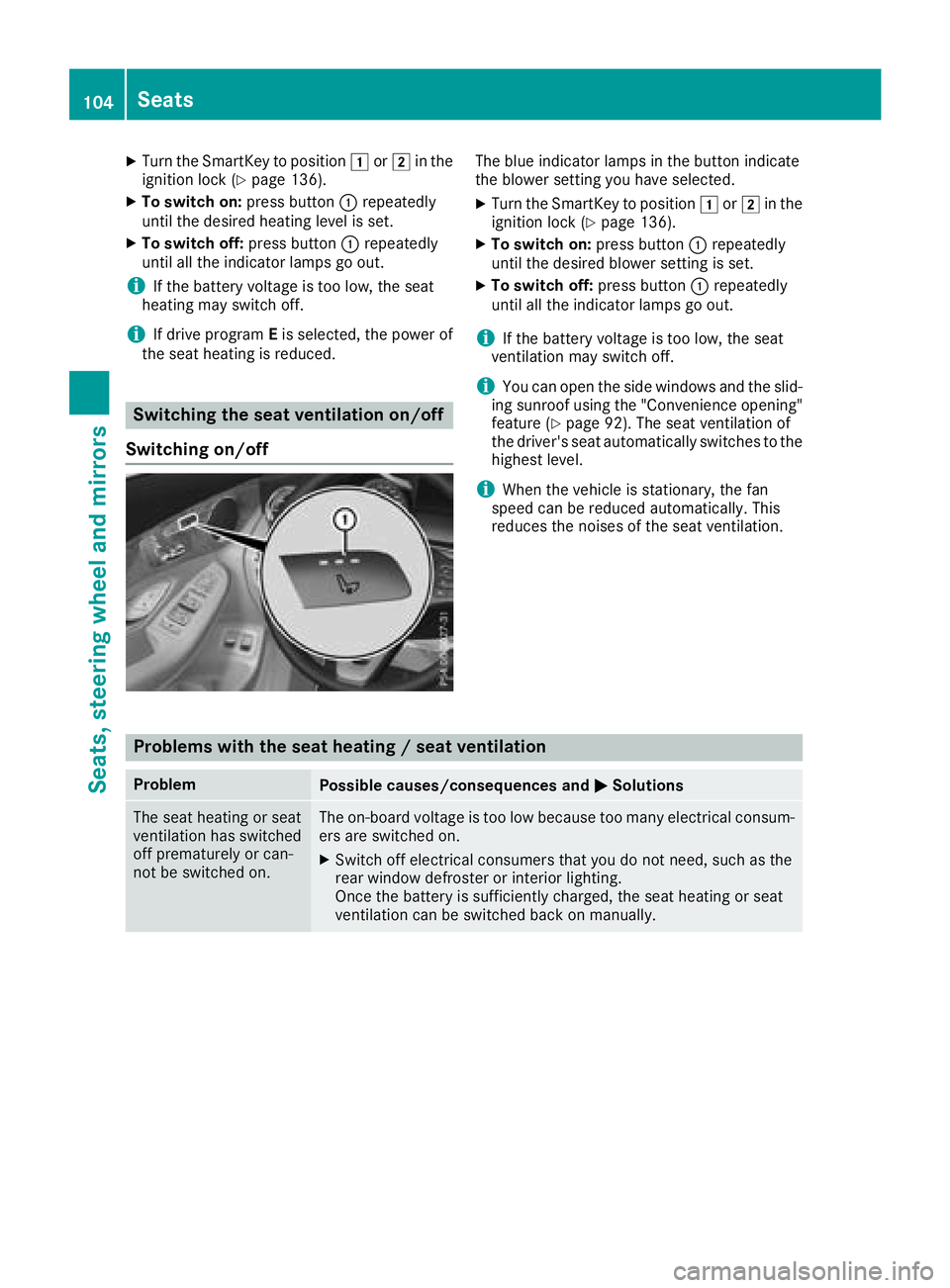
To switch on: press button C repeatedly
until the desired heating level is set. X
To switch off: press button C repeatedly
until all the indicator lamps go out.
i If the battery voltage is too low, the seat
heating may switch off.
i If drive program E is selected, the power of
the seat heating is reduced.
Switching the seat ventilation on/off
Switching on/off The blue indicator lamps in the button indicate
the blower setting you have selected. X
Turn the SmartKey to position G or H in the
ignition lock ( Y
page 136). X
To switch on: press button C repeatedly
until the desired blower setting is set. X
To switch off: press button C repeatedly
until all the indicator lamps go out.
i If the battery voltage is too low, the seat
ventilation may switch off.
i You can open the side windows and the slid-
ing sunroof using the "Convenience opening"
feature ( Y
page 92). The seat ventilation of
the driver's seat automatically switches to the
highest level.
i When the vehicle is stationary, the fan
speed can be reduced automatically. This
reduces the noises of the seat ventilation.
Problems with the seat heating / seat ventilation Problem
Possible causes/consequences and P Solutions
The seat heating or seat
ventilation has switched
off prematurely or can-
not be switched on. The on-board voltage is too low because too many electrical consum-
ers are switched on. X
Switch off electrical consumers that you do not need, such as the
rear window defroster or interior lighting.
Once the battery is sufficiently charged, the seat heating or seat
ventilation can be switched back on manually.104
Seats
Seats, steering wheel and mirrors
Page 109 of 390
i The steering wheel only moves up if it has
not already reached the upper steering lim-
iter.
Position of the steering wheel for driv-
ing The steering wheel is moved to the last selected
position when: R
the driver's door is closed and you insert the
SmartKey into the ignition lock R
you close the driver's door when the ignition
is switched on R
you press the Start/Stop button once in vehi-
cles with KEYLESS-GO or the KEYLESS-GO
start function
i The steering wheel only returns to the last
set position if the driving position is stored
after the seat or steering column has been
adjusted ( Y
page 110).
The most recent driving position of the steering
wheel is stored if: R
the ignition is switched off R
the setting is stored using the memory func-
tion ( Y
page 110)
Crash-responsive EASY-EXIT feature If the crash-responsive EASY-EXIT feature is trig-
gered in an accident, the steering column will
move up when the driver's door is opened or the
SmartKey is removed from the ignition lock. This
makes it easier to exit the vehicle and rescue the
occupants.
The crash-responsive EASY-EXIT feature is
operational only if the EASY-EXIT/ENTRY fea-
ture is activated in the multimedia system (see
Digital Operator's Manual). Mirrors
Exterior mirrors
Important safety notes
G WARNING
You could lose control of your vehicle if you do
the following while driving: R
adjust the driver's seat, head restraint,
steering wheel or mirrors R
fasten the seat belt
There is a risk of an accident.
Adjust the driver's seat, head restraint, steer-
ing wheel and mirror and fasten your seat belt
before starting the engine.
G WARNING
The exterior mirror on the front-passenger
side reduces the size of the image. Visible
objects are actually closer than they appear.
This means that you could misjudge the dis-
tance from road users traveling behind, e.g.
when changing lane. There is a risk of an acci-
dent.
For this reason, always make sure of the
actual distance from the road users traveling
behind by glancing over your shoulder.
Adjusting the exterior mirrors
X
Turn the SmartKey to position G or H in the
ignition lock ( Y
page 136). X
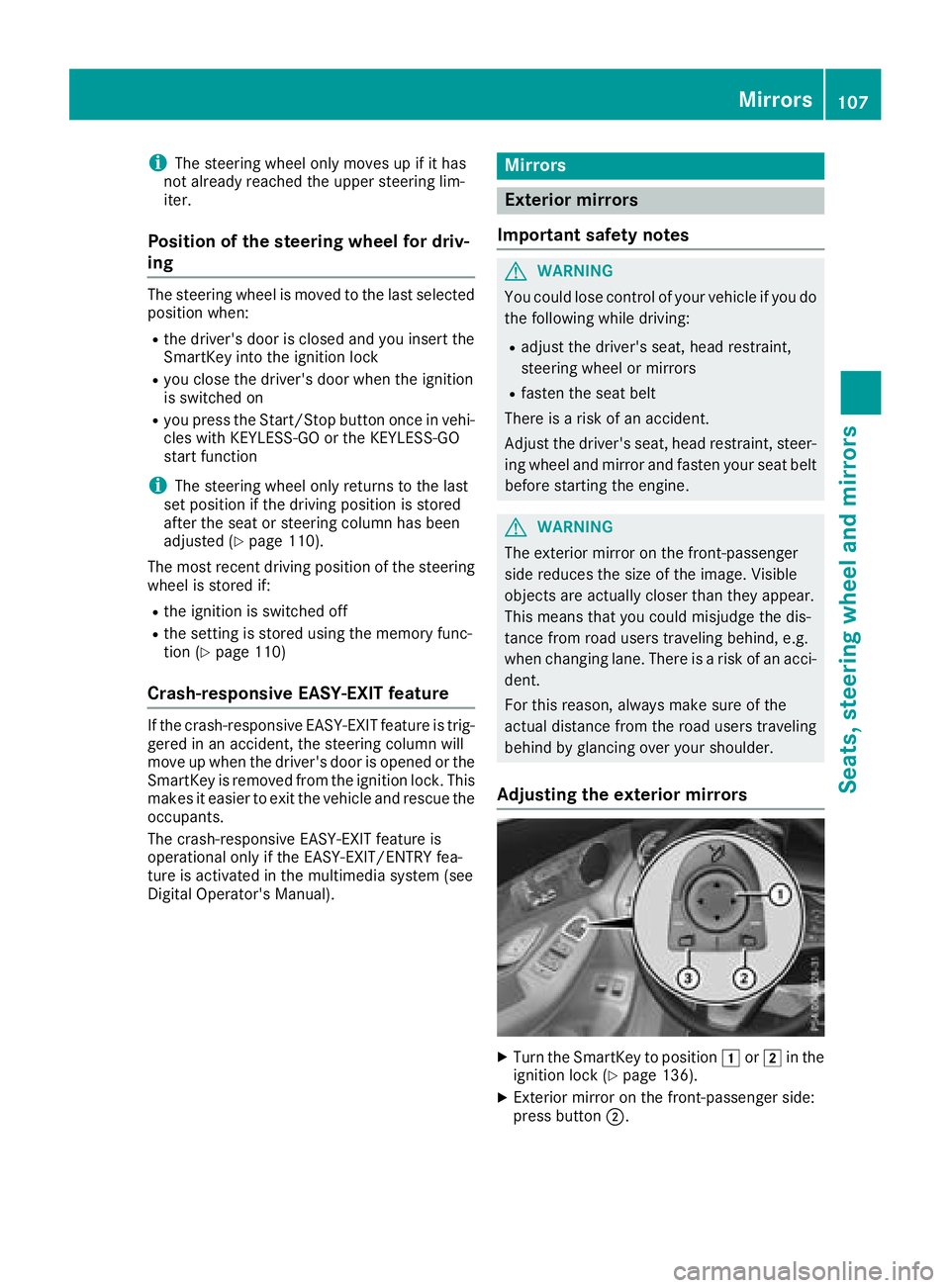
Exterior mirror on the front-passenger side:
press button D .Mirrors 107
Seats, steering wheel and mirrors Z
Page 111 of 390
piratory organs or clothing or be swallowed.
There is a risk of injury.
If you come into contact with the electrolyte,
observe the following: R
Rinse off the electrolyte from your skin
immediately with water. R
Immediately rinse the electrolyte out of
your eyes thoroughly with clean water. R
If the electrolyte is swallowed, immediately
rinse your mouth out thoroughly. Do not
induce vomiting. R
If electrolyte comes into contact with your
skin or hair or is swallowed, seek medical
attention immediately. R
Immediately change out of clothing which
has come into contact with electrolyte. R
If an allergic reaction occurs, seek medical
attention immediately.
The exterior mirror on the driver's side and the
rear-view mirror automatically go into anti-glare
mode if: R
the ignition is switched on R
incident light from headlamps strikes the sen-
sor in the rear-view mirror
The mirrors do not go into anti-glare mode if
reverse gear is engaged or if the interior lighting
is switched on.
Parking position for the exterior mir-
ror on the front-passenger side
Storing the parking position You can set the front-passenger side exterior
mirror such that you can see the rear wheel on
that side as soon as you engage reverse gear.
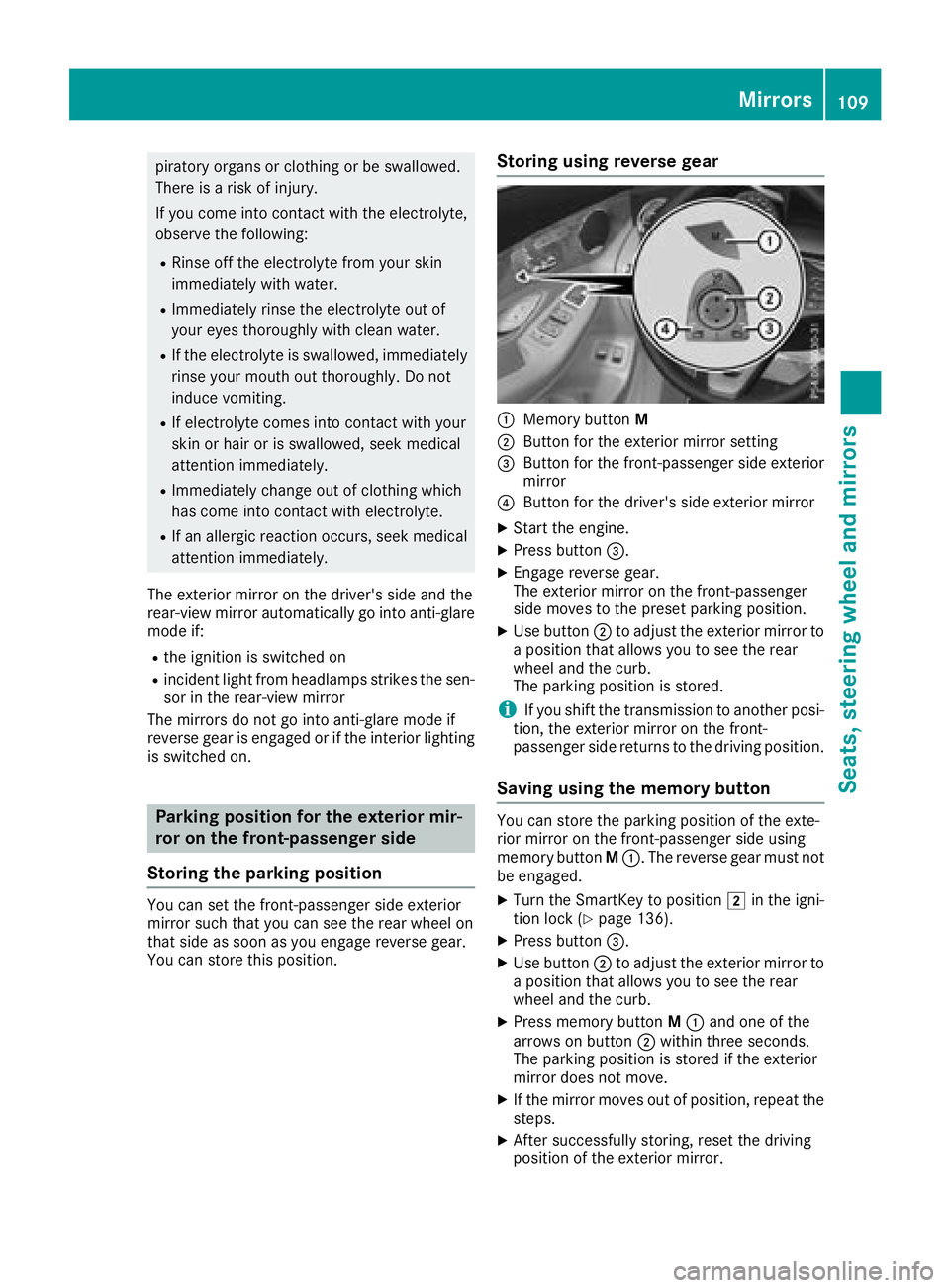
You can store this position. Storing using reverse gear
C
Memory button MD
Button for the exterior mirror setting
Page 115 of 390
![MERCEDES-BENZ GLC 2018 Owners Manual When the engine is running and the vehicle is
stationary: if you move the selector lever from a
driving position to ] , the daytime driving lights
and low-beam headlamps go out after three
minutes.
W](/manual-img/4/59087/w960_59087-114.png "MERCEDES-BENZ GLC 2018 Owners Manual When the engine is running and the vehicle is
stationary: if you move the selector lever from a
driving position to ] , the daytime driving lights
and low-beam headlamps go out after three
minutes.
W")
When the engine is running and the vehicle is
stationary: if you move the selector lever from a
driving position to ] , the daytime driving lights
and low-beam headlamps go out after three
minutes.
When the engine is running, the vehicle is sta-
tionary and in bright ambient light: if you turn the
light switch to the ` position, the daytime
running lamps and parking lamps switch on.
If the engine is running and you turn the light
switch to the X position, the manual settings
take precedence over the daytime running
lamps.
Low-beam headlamps
G WARNING
When the light switch is set to X , the low-
beam headlamps may not be switched on
automatically if there is fog, snow or other
causes of poor visibility due to the weather
conditions such as spray. There is a risk of an
accident.
In such situations, turn the light switch to
X .
Even if the light sensor does not detect that it is
dark, the parking lamps and low-beam head-
lamps switch on when the ignition is switched on
and the light switch is set to the X position.
This is a particularly useful function in the event
of rain and fog. X
To switch on the low-beam headlamps:
turn the SmartKey to position H in the igni-
tion lock or start the engine. X
Turn the light switch to the X position.
The green X indicator lamp in the instru-
ment cluster lights up.
Rear fog lamp
The rear fog lamp improves visibility of your
vehicle for the traffic behind in the event of thick
fog. You must observe the legal requirements
for the country in which you are currently driving
when operating the rear fog lamp. X
To switch on the rear fog lamp: turn the
SmartKey in the ignition lock to position H or
start the engine. X
Turn the light switch to the X or X
position. X
Press the ^ button.
The yellow ^ indicator lamp on the instru-
ment cluster lights up.
Parking lamps
! If the battery charge is very low, the parking
lamps or standing lamps are automatically
switched off to enable the next engine start.
Always park your vehicle safely and in a well lit
area, in accordance with the relevant legal
stipulations. Avoid using the ` parking
lamps over a period of several hours. If pos-
sible, switch on the right-hand d or left-
hand c standing lamps. X
To switch on the parking lamps: turn the
light switch to the ` position.
The green ` indicator lamp on the instru-
ment cluster lights up.
Standing lamps Switching on the standing lamps ensures the
corresponding side of the vehicle is illuminated. X
To switch on the parking lamp: turn the
SmartKey t o position Z in
the ignition lock or
remove the SmartKey. X
Turn the light switch to the c (left-hand
side of the vehicle) or d (right-hand side of
the vehicle) position.
Combination switch
C
High-beam headlamps
D
Turn signal, rightExterior lighting 113
Lights and windshield wipers Z
Page 129 of 390
i Only use air-recirculation mode briefly, e.g.
if there are unpleasant outside odors or when
in a tunnel. The windows could otherwise fog
up, since no fresh air is drawn into the vehicle
in air-recirculation mode.
Vehicles with 3-zone automatic climate control:
use the "Residual heat" function if you want to
heat or ventilate the vehicle interior when the
ignition is switched off. The residual heat func-
tion can only be activated or deactivated with
the ignition switched off. The residual heat func-
tion is deactivated when the ignition is switched
on.
DYNAMIC SELECT switch (except
Mercedes-AMG GLC 63 4MATIC/
GLC 63 S 4MATIC) You can choose between various drive programs
with the DYNAMIC SELECT switch
( Y
page 144).
If you have selected drive program E :R
when heating, the electrical heater booster is
deactivated and heat output is reduced as a
result R
the rear window defroster running time is
reduced
If you have selected drive program C , S or S+ ,
the current climate settings are maintained.
ECO start/stop function During automatic engine switch-off, the climate
control system only operates at a reduced capa- city. If you require the full climate control output,
you can switch off the ECO start/stop function
by pressing the ECO button ( Y
page 142).
Operating the climate control sys-
tems
Activates/deactivates climate con-
trol
General notes When the climate control is switched off, the air
supply and air circulation are also switched off.
The windows could fog up. Therefore, switch off
climate control only briefly
Switch on climate control primarily using the
X rocker switch ( Y
page 128).
Activating/deactivating X
Turn the SmartKey to position H in the igni-
tion lock ( Y
page 136). X
To switch on: set the airflow to level 1 or
higher using the H rocker switch.X
To switch off: set the airflow to level 0 using
the H rocker switch.
i 3-zone automatic climate control: when cli-
mate control is switched off, "OFF" appears in
the rear-compartment display.
Switching cooling with air dehumidification on/off
General notes If you deactivate the "Cooling with air-dehumidification" function, the air inside the vehicle will not
be cooled. The air inside the vehicle will also not be dehumidified. The windows can fog up more
quickly. Therefore, only deactivate the "Cooling with air-dehumidification" function briefly.
The "Cooling with air dehumidification" function is only available when the engine is running. The air
inside the vehicle is cooled and dehumidified according to the temperature selected.
Condensation may drip from the underside of the vehicle when it is in cooling mode. This is normal
and not a sign that there is a malfunction. Operating the climate control systems 127
Climate control
Page 134 of 390
X
To deactivate: press the ! rocker switch
up or down.
The indicator lamp above the ! rocker
switch goes out.
Residual heat is deactivated automatically: R
after approximately 30 minutes R
when the ignition is switched on R
if the battery voltage drops
Perfume atomizer
Operating the perfume atomizer
G WARNING
If children open the vial, they could drink the
perfume or it could come into contact with
their eyes. There is a risk of injury. Therefore,
do not leave children unsupervised in the vehi-
cle.
If the perfume liquid has been drunk, consult
a doctor. If perfume comes into contact with
your eyes or skin, rinse the eyes with clean
water. If you continue to experience difficul-
ties, consult a doctor.
H Environmental note
Full vials must not be dis-
posed of with household
waste. They must be collec-
ted separately and recycled
to protect the environment.
Dispose of full vials in an
environmentally responsible
manner and take them to a
harmful substance collec-
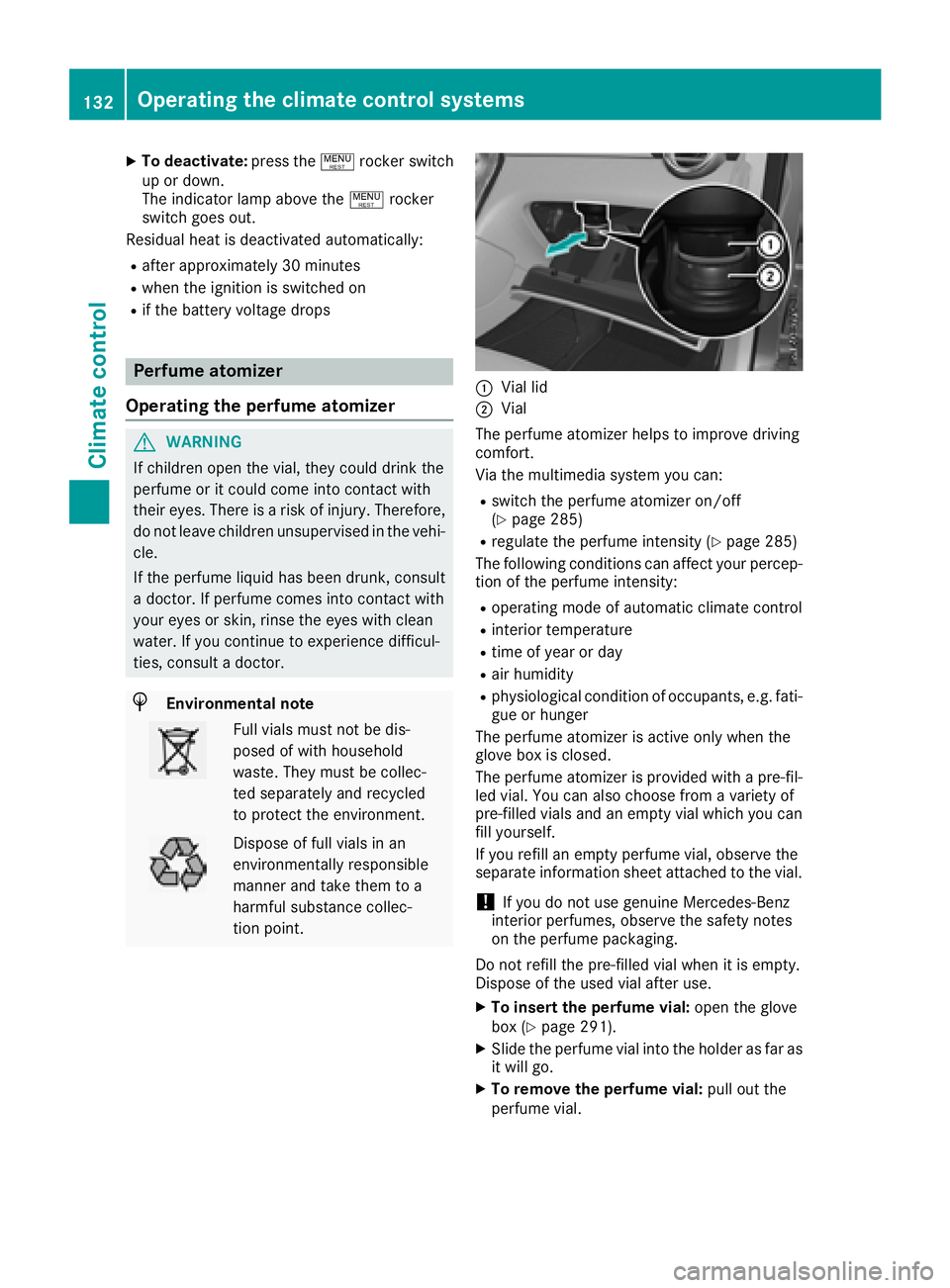
tion point. C
Vial lid D
Vial
The perfume atomizer helps to improve driving
comfort.
Via the multimedia system you can: R
switch the perfume atomizer on/off
( Y
page 285) R
regulate the perfume intensity ( Y
page 285)
The following conditions can affect your percep-
tion of the perfume intensity: R
operating mode of automatic climate control R
interior temperature R
time of year or day R
air humidity R
physiological condition of occupants, e.g. fati-
gue or hunger
The perfume atomizer is active only when the
glove box is closed.
The perfume atomizer is provided with a pre-fil-
led vial. You can also choose from a variety of
pre-filled vials and an empty vial which you can
fill yourself.
If you refill an empty perfume vial, observe the
separate information sheet attached to the vial.
! If you do not use genuine Mercedes-Benz
interior perfumes, observe the safety notes
on the perfume packaging.
Do not refill the pre-filled vial when it is empty.
Dispose of the used vial after use. X
To insert the perfume vial: open the glove
box ( Y
page 291). X
Slide the perfume vial into the holder as far as
it will go. X
To remove the perfume vial: pull out the
perfume vial.132
Operating the climate control systems
Climate control