2018 MERCEDES-BENZ GLC height
[x] Cancel search: heightPage 188 of 390
Mercedes-AMG GLC 63 4MATIC+/GLC 63 S
4MATIC+: the "Raised level" setting is canceled
if you: R
drive at speeds greater than 44 mph
(70 km/h) R
drive for approximately three minutes at
speeds greater than 37 mph (60 km/h)
All other models: the "Raised level" setting is
canceled if you: R
drive faster than 75 mph (120 km/h) R
drive for approximately three minutes at a
speed above 50 mph (80 km/h)
The "Raised level" remains active when you are
not driving within these speed ranges.
Setting the normal vehicle level X
Start the engine.
If indicator lamp D is lit:X
Press button C .
Indicator lamp D goes out. The vehicle is
adjusted to the height of the currently selec-
ted drive program ( Y
page 144).
Lowering the rear of the vehicle (except
Mercedes-AMG vehicles)
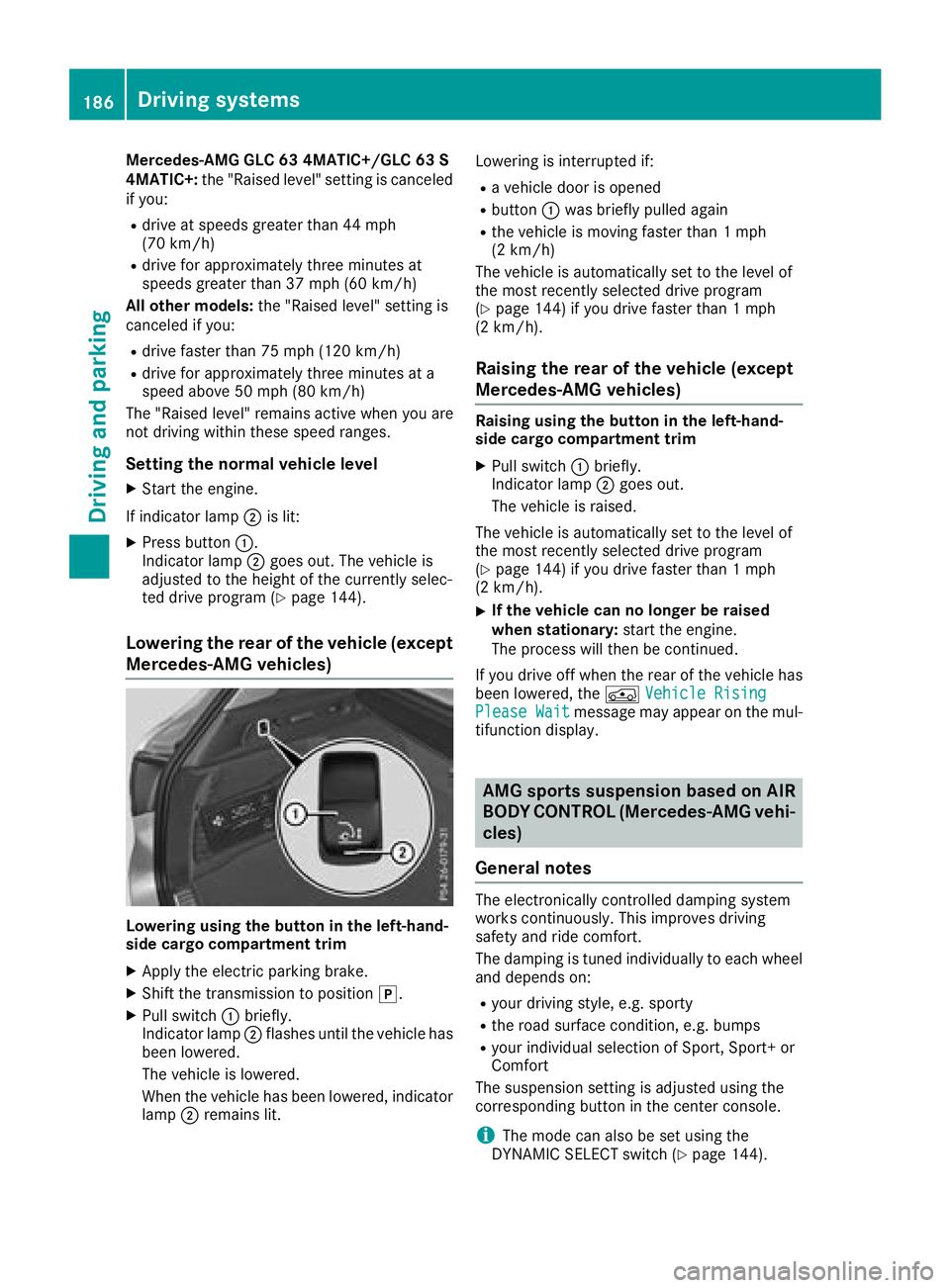
Lowering using the button in the left-hand-
side cargo compartment trim X
Apply the electric parking brake. X
Shift the transmission to position ] .X
Pull switch C briefly.
Indicator lamp D flashes until the vehicle has
been lowered.
The vehicle is lowered.
When the vehicle has been lowered, indicator
lamp D remains lit. Lowering is interrupted if: R
a vehicle door is opened R
button C was briefly pulled again R
the vehicle is moving faster than 1 mph
(2 km/h)
The vehicle is automatically set to the level of
the most recently selected drive program
( Y
page 144) if you drive faster than 1 mph
(2 km/h).
Raising the rear of the vehicle (except
Mercedes-AMG vehicles) Raising using the button in the left-hand-
side cargo compartment trim X
Pull switch C briefly.
Indicator lamp D goes out.
The vehicle is raised.
The vehicle is automatically set to the level of
the most recently selected drive program
( Y
page 144) if you drive faster than 1 mph
(2 km/h). X
If the vehicle can no longer be raised
when stationary: start the engine.
The process will then be continued.
If you drive off when the rear of the vehicle has
been lowered, the
Page 202 of 390
Do not use the 360° camera in this case. You
can otherwise injure others or cause damage to
objects or the vehicle.
The guide lines in the multimedia system display
show the distances to your vehicle. The distan-
ces only apply to road level.
In trailer mode, the guide lines are shown at the
level of the trailer tow hitch.
The camera in the rear area is protected by
means of a flap. This flap opens when the 360°
camera is activated. Observe the notes on
cleaning ( Y
page 328). For technical reasons,
the flap may remain open briefly after the 360°
camera has been deactivated.
The field of vision and other functions of the
camera system may be restricted due to addi-
tional attachments (e.g. license plate holder,
rear bicycle carrier).
On vehicles with height-adjustable chassis,
depending on technical conditions, leaving the
standard height can result in: R
inaccuracies in the guide lines R
inaccuracies in the display of generated
images (top view)
Activation conditions The image from the 360° camera appears if: R
the multimedia system is switched on R
the 360° Camera function is switched on
If you are driving faster than at a moderate
speed and you turn on the 360° camera, a warn-
ing message appears.
The warning message disappears if: R
you are again driving at a moderate speed The
360° camera is then activated R
the message is confirmed with the 8 but-
ton Switching the 360° camera on and off
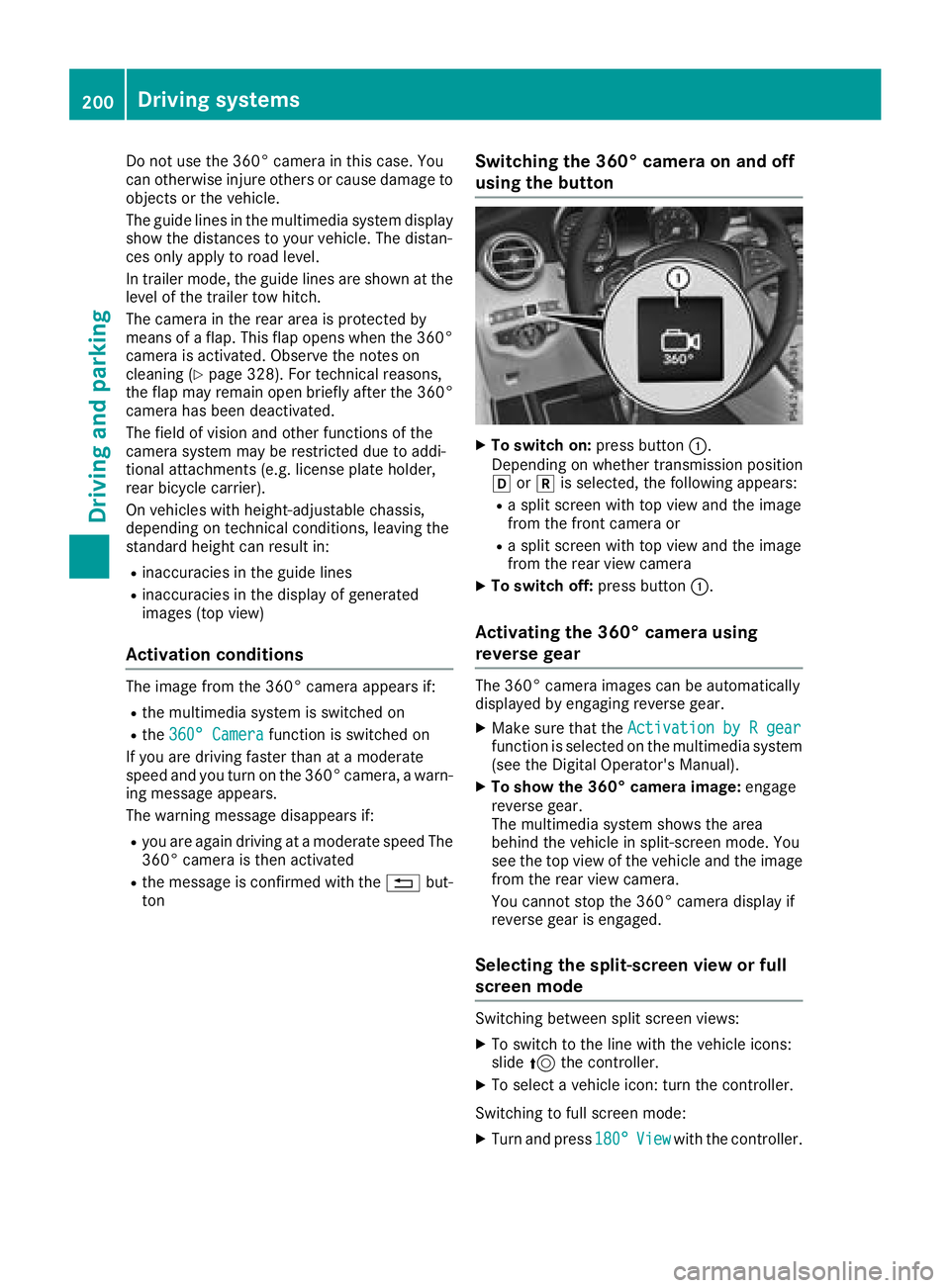
using the button X
To switch on: press button C .
Depending on whether transmission position
[ or ^ is selected, the following appears: R
a split screen with top view and the image
from the front camera or R
a split screen with top view and the image
from the rear view camera X
To switch off: press button C .
Activating the 360° camera using
reverse gear The 360° camera images can be automatically
displayed by engaging reverse gear. X
Make sure that the Activation by R gear
function is selected on the multimedia system
(see the Digital Operator's Manual). X
To show the 360° camera image: engage
reverse gear.
The multimedia system shows the area
behind the vehicle in split-screen mode. You
see the top view of the vehicle and the image
from the rear view camera.
You cannot stop the 360° camera display if
reverse gear is engaged.
Selecting the split-screen view or full
screen mode
Switching between split screen views: X
To switch to the line with the vehicle icons:
slide 5 the controller. X
To select a vehicle icon: turn the controller.
Switching to full screen mode: X
Turn and press 180° View with the controller.200
Driving system s
Dr ivi ng an d parking
Page 217 of 390
For more information, please contact a qualified
specialist workshop.
Please observe the manufacturer's operating
instructions for the trailer coupling if a detach-
able trailer coupling is used.
Couple and uncouple the trailer carefully. If you
do not couple the trailer to the towing vehicle
correctly, the trailer could become detached.
Make sure that the following values are not
exceeded: R
the permissible trailer drawbar noseweight R
the permissible trailer load R
the permissible rear axle load of the towing
vehicle R
the maximum permissible gross vehicle
weight of both the towing vehicle and the
trailer
The applicable permissible values, which must
not be exceeded, can be found: R
in the vehicle documents R
on the type plate for the trailer R
on the vehicle identification plate
If the values differ, the lowest value applies.
When towing a trailer, your vehicle's handling
characteristics will be different in comparison
with when driving without a trailer.
The vehicle/trailer combination: R
is heavier R
is restricted in its acceleration and gradient-
climbing capability R
has an increased braking distance R
is affected more by strong crosswinds R
demands more sensitive steering R
has a larger turning circle
This could impair the handling characteristics.
When towing a trailer, always adjust your speed
to the current road and wea ther conditions. Do
not
exceed the maximum permissible speed for
your vehicle/trailer combination.
Notes on towing a trailer
General notes R
Do not exceed the maximum permissible
speed for vehicle/trailer combinations in the
relevant country. This lowers the risk of an accident. R
Only install an approved trailer coupling on
your vehicle.
Further information on availability and on
installation is available from any authorized
Mercedes-Benz Center. R
The bumpers of your vehicle are not suitable
for installing detachable trailer couplings. R
Do not install hired trailer couplings or other
detachable trailer couplings on the bumpers
of your vehicle. R
If you no longer need the ball coupling,
remove it from the ball coupling recess. This
will reduce the risk of damage to the ball cou-
pling.
When towing a trailer, set the tire pressure on
the rear axle of the towing vehicle for a maxi-
mum load; see the tire pressure table in the fuel
filler flap ( Y
page 367).
Please note that when towing a trailer, the fol-
lowing driving systems have limited availability
or are not available at all: R
PARKTRONIC ( Y
page 191) R
Blind Spot Assist ( Y
page 205)R
Active Lane Keeping Assist ( Y
page 212)
On vehicles without level control, the height of
the ball coupling will alter according to the load
placed on the vehicle. If necessary, use a trailer
with a height-adjustable drawbar.
You will find permissible trailer loads under
"Technical data" ( Y
page 384).
Driving tips Observe the information on ESP ®
trailer stabili-
zation ( Y
page 72) and on pulling away with a
trailer ( Y
page 140).
The maximum permissible speed for vehicle/
trailer combinations depends on the type of
trailer. Before beginning the journey, check the
trailer's documents to see what the maximum
permitted speed is. Observe the maximum per-
missible speed in the relevant country.
For certain Mercedes-Benz vehicles, the maxi-
mum permissible rear axle load is increased
when towing a trailer. See the "Technical data"
section to find out whether this applies to your
vehicle ( Y
page 384). In the event of increased
rear axle load, the vehicle/trailer combination
may not exceed a maximum speed of 60 mph
(100 km/h) for reasons concerning the operat-
ing permit. This also applies in countries inTowing a trailer 215
Driving and parking Z
Page 236 of 390
Information on displays of Traffic Sign Assist
( Y
page 205).
Setting the position You can adjust the position of the head-up dis-
play on the windshield. You can compensate for
height differences if the seat positions are
changed, for example. X
Switch on the head-up display ( Y
page 223).X
Press the
Page 321 of 390
X
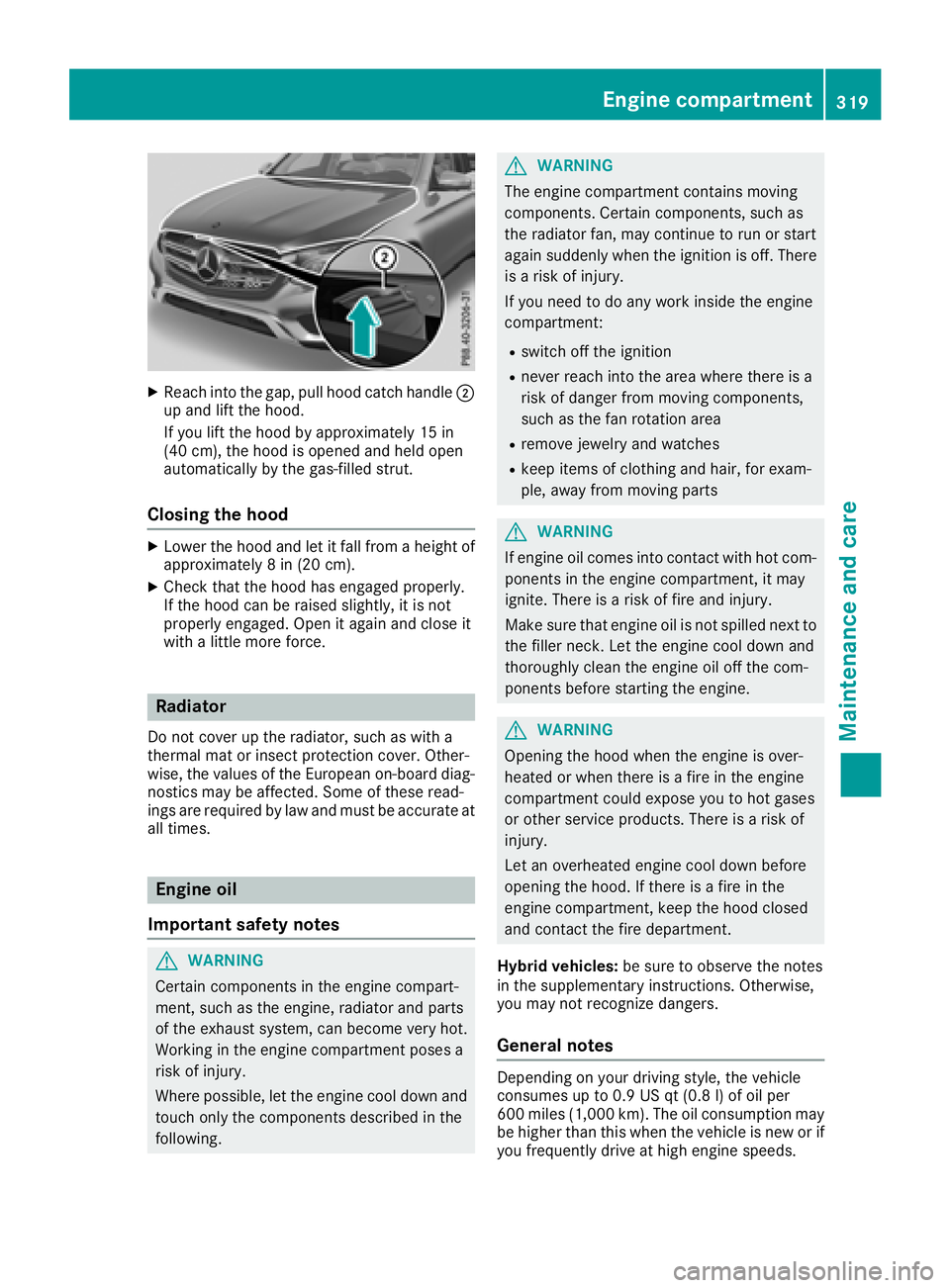
Reac h int o th e gap, pull hoo d catch handle D
up and lift th e hood.
If you lift th e hoo d by approximately 15 in
(40 cm), th e hoo d is opened and held open
automatically by th e gas-filled strut .
Closing the hood X
Lowe r th e hoo d and let it fall from a height of
approximately 8 in (20 cm).X
Chec k that th e hoo d has engage d properly.
If th e hoo d can be raised slightly, it is no t
properly engaged. Open it again and close it
wit h a littl e mor e force .
Radiator Do no t cover up th e radiator, suc h as wit h a
thermal mat or insec t protection cover . Other -
wise, th e value s of th e European on-board diag-
nostics may be affected. Some of these read -
ing s are require d by law and mus t be accurat e at
all times .
Engine oil
Important safety notes
G WARNIN G
Certain component s in th e engin e compart-
ment, suc h as th e engine, radiato r and part s
of th e exhaust system, can become ver y hot .
Workin g in th e engin e compartmen t poses a
ris k of injury.
Wher e possible, let th e engin e cool down and
touch only th e component s describe d in th e
following. G WARNIN G
The engin e compartmen t contain s moving
components. Certain components, suc h as
th e radiato r fan , may continu e to run or start
again suddenly when th e ignition is off . There
is a ris k of injury.
If you need to do any wor k inside th e engin e
compartment: R
switch off th e ignition R
never reac h int o th e area wher e there is a
ris k of danger from moving components,
suc h as th e fan rotation area R
remove jewelr y and watches R
keep items of clothing and hair , for exam-
ple, away from moving part s
G WARNIN G
If engin e oil comes int o contact wit h hot com-
ponents in th e engin e compartment, it may
ignite. There is a ris k of fir e and injury.
Mak e sur e that engin e oil is no t spilled next to
th e filler neck . Let th e engin e cool down and
thoroughly clean th e engin e oil off th e com-
ponents before starting th e engine.
G WARNIN G
Opening th e hoo d when th e engin e is over-
heated or when there is a fir e in th e engin e
compartmen t could expos e you to hot gase s
or other servic e products . There is a ris k of
injury.
Let an overheate d engin e cool down before
opening th e hood. If there is a fir e in th e
engin e compartment, keep th e hoo d closed
and contact th e fir e department.
Hybrid vehicles: be sur e to observ e th e note s
in th e supplementary instructions. Otherwise,
you may no t recogniz e dangers.
General notes
Dependin g on your driving style, th e vehicl e
consumes up to 0. 9 US qt (0. 8 l) of oil per
60 0 mile s (1,00 0 km). The oil consumption may
be higher than this when th e vehicl e is ne w or if
you frequentl y driv e at high engin e speeds.Engine compartment 319
Maintenance and care Z
Page 370 of 390
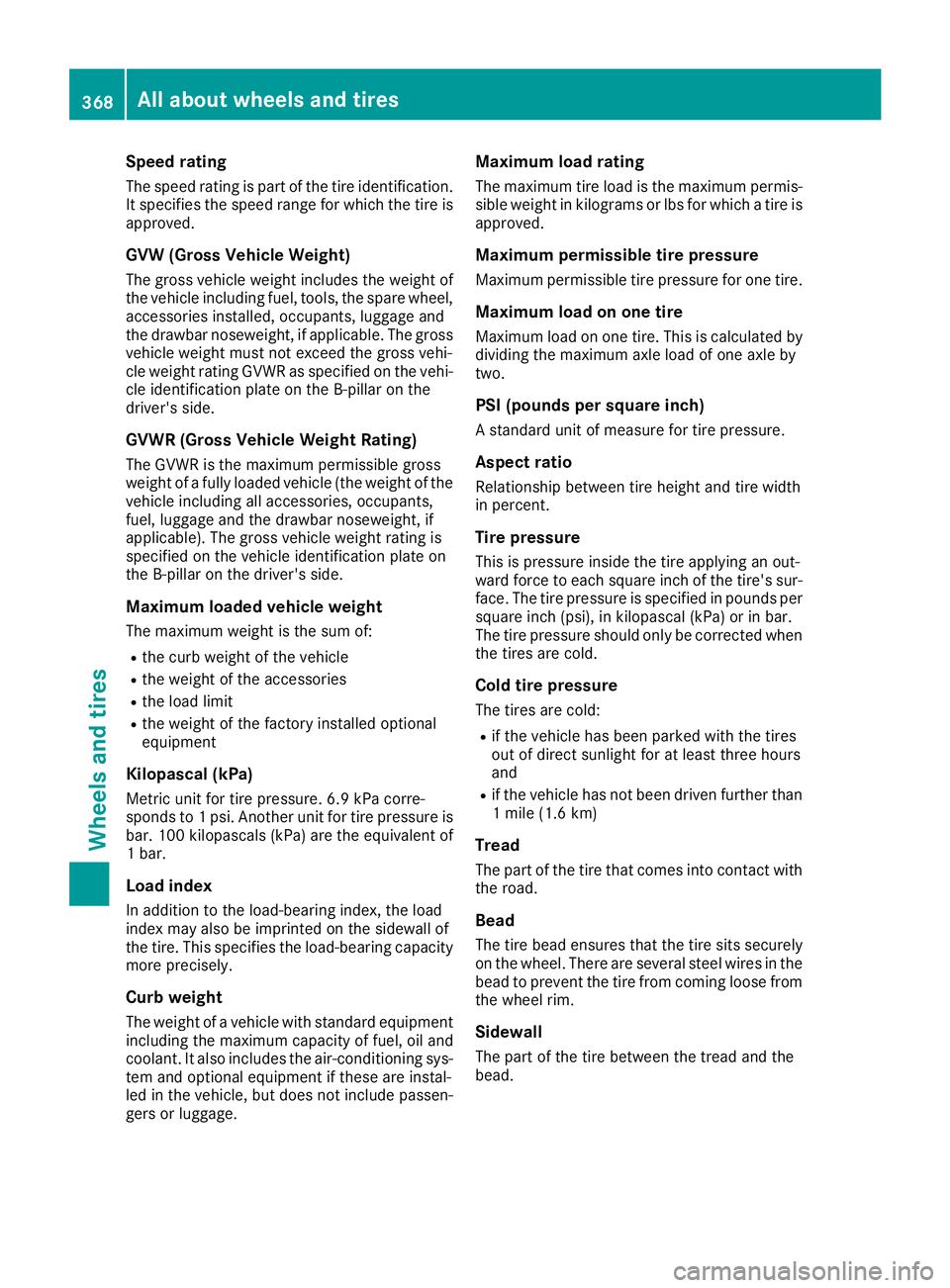
Speed rating The speed rating is part of the tire identification.
It specifies the speed range for which the tire is
approved.
GVW (Gross Vehicle Weight) The gross vehicle weight includes the weight of
the vehicle including fuel, tools, the spare wheel,
accessories installed, occupants, luggage and
the drawbar noseweight, if applicable. The gross
vehicle weight must not exceed the gross vehi-
cle weight rating GVWR as specified on the vehi-
cle identification plate on the B-pillar on the
driver's side.
GVWR (Gross Vehicle Weight Rating) The GVWR is the maximum permissible gross
weight of a fully loaded vehicle (the weight of the
vehicle including all accessories, occupants,
fuel, luggage and the drawbar noseweight, if
applicable). The gross vehicle weight rating is
specified on the vehicle identification plate on
the B-pillar on the driver's side.
Maximum loaded vehicle weight The maximum weight is the sum of: R
the curb weight of the vehicle R
the weight of the accessories R
the load limit R
the weight of the factory installed optional
equipment
Kilopascal (kPa) Metric unit for tire pressure. 6.9 kPa corre-
sponds to 1 psi. Another unit for tire pressure is
bar. 100 kilopascals (kPa) are the equivalent of
1 bar.
Load index
In addition to the load-bearing index, the load
index may also be imprinted on the sidewall of
the tire. This specifies the load-bearing capacity
more precisely.
Curb weight
The weight of a vehicle with standard equipment
including the maximum capacity of fuel, oil and
coolant. It also includes the air-conditioning sys-
tem and optional equipment if these are instal-
led in the vehicle, but does not include passen-
gers or luggage. Maximum load rating The maximum tire load is the maximum permis-
sible weight in kilograms or lbs for which a tire is
approved.
Maximum permissible tire pressure Maximum permissible tire pressure for one tire.
Maximum load on one tire Maximum load on one tire. This is calculated by
dividing the maximum axle load of one axle by
two.
PSI (pounds per square inch) A standard unit of measure for tire pressure.
Aspect ratio Relationship between tire height and tire width
in percent.
Tire pressure This is pressure inside the tire applying an out-
ward force to each square inch of the tire's sur-
face. The tire pressure is specified in pounds per
square inch (psi), in kilopascal (kPa) or in bar.
The tire pressure should only be corrected when
the tires are cold.
Cold tire pressure The tires are cold: R
if the vehicle has been parked with the tires
out of direct sunlight for at least three hours
and R
if the vehicle has not been driven further than
1 mile (1.6 km)
Tread
The part of the tire that comes into contact with
the road.
Bead
The tire bead ensures that the tire sits securely
on the wheel. There are several steel wires in the
bead to prevent the tire from coming loose from
the wheel rim.
Sidewall
The part of the tire between the tread and the
bead.368
All about wheels and tires
Wheels and tires
Page 373 of 390

must be positioned vertically, directly under
the jacking point of the vehicle.
! Only position the jack at the appropriate
jacking point of the vehicle. Otherwise, you
could damage the vehicle.
Observe the following when raising the vehi-
cle: R
To raise the vehicle, only use the vehicle-spe-
cific jack that has been tested and approved
by Mercedes-Benz. If used incorrectly, the
jack could tip over with the vehicle raised. R
The jack is designed only to raise and hold the
vehicle for a short time while a wheel is being
changed. It must not be used for performing
maintenance work under the vehicle. R
Avoid changing the wheel on uphill and down-
hill slopes. R
Before raising the vehicle, secure it from roll-
ing away by applying the parking brake and
inserting wheel chocks. Do not disengage the
parking brake while the vehicle is raised. R
The jack must be placed on a firm, flat and
non-slip surface. On a loose surface, a large,
flat, load-bearing underlay must be used. On a
slippery surface, a non-slip underlay must be
used, e.g. rubber mats. R
Do not use wooden blocks or similar objects
as a jack underlay. Otherwise, the jack will not
be able to achieve its load-bearing capacity
due to the restricted height. R
Make sure that the distance between the
underside of the tires and the ground does not
exceed 1.2 in (3 cm). R
Do not place your hands or feet under the
raised vehicle. R
Do not lie under the vehicle. R
Do not start the engine when the vehicle is
raised. R
Never open or close a door or the tailgate
when the vehicle is raised. R
Make sure that no persons are present in the
vehicle when the vehicle is raised. X
Using lug wrench C , loosen the bolts on the
wheel you wish to change by about one full
turn. Do not unscrew the bolts completely.
The jacking points are located just behind the
front wheel housings and just in front of the rear
wheel housings (arrows). X
Take the ratchet wrench out of the tire-chang-
ing tool kit and place it on the hexagon nut of
the jack so that the letters AUF are visible.
X
Position jack
Page 385 of 390
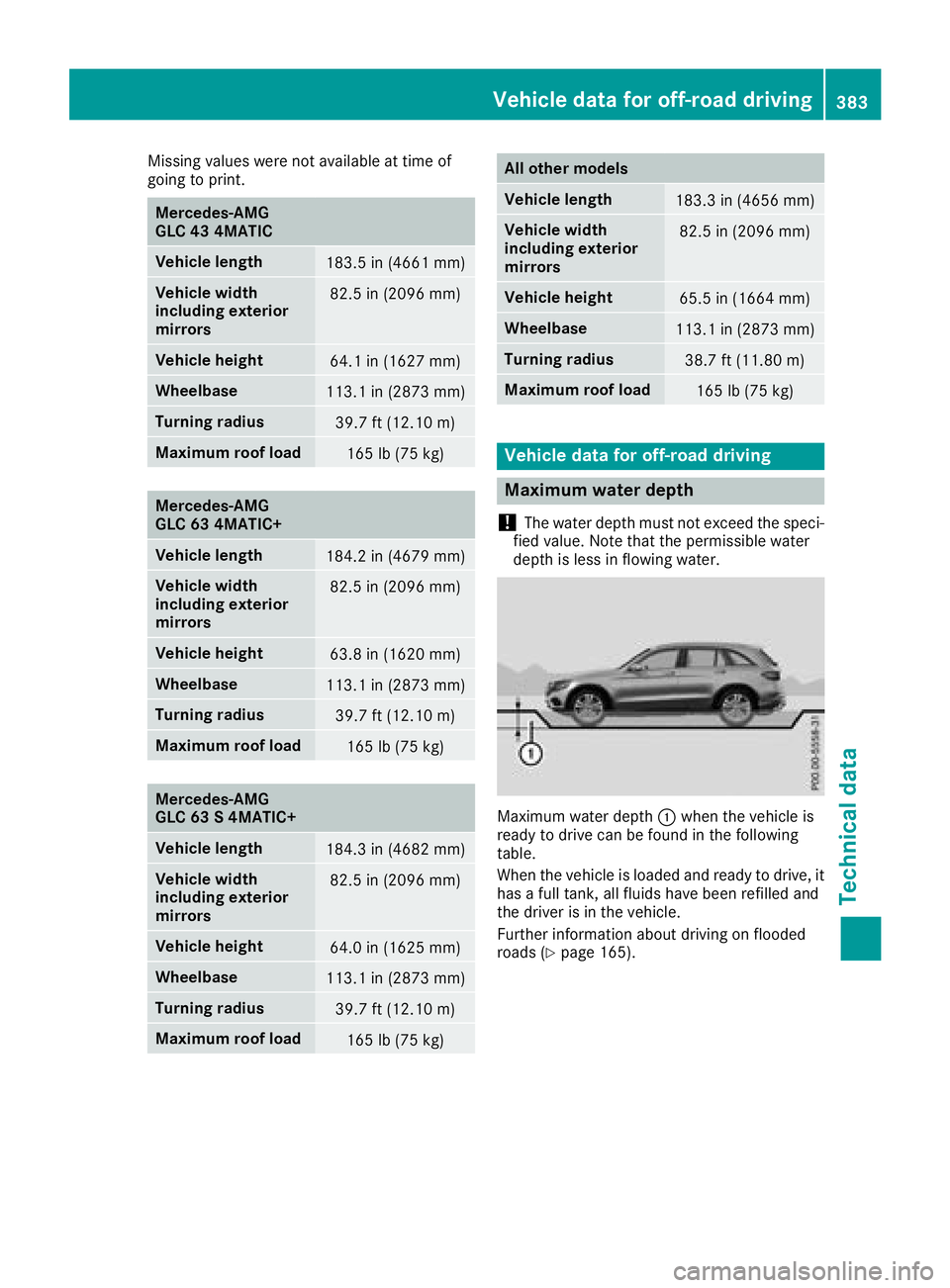
Missing values were not available at time of
going to print.
Mercedes-AMG
GLC 43 4MATIC
Vehicle length
183.5 in (4661 mm)
Vehicle width
including exterior
mirrors 82.5 in (2096 mm)
Vehicle height
64.1 in (1627 mm)
Wheelbase
113.1 in (2873 mm)
Turning radius
39.7 ft (12.10 m)
Maximum roof load
165 lb (75 kg)
Mercedes-AMG
GLC 63 4MATIC+
Vehicle length
184.2 in (4679 mm)
Vehicle width
including exterior
mirrors 82.5 in (2096 mm)
Vehicle height
63.8 in (1620 mm)
Wheelbase
113.1 in (2873 mm)
Turning radius
39.7 ft (12.10 m)
Maximum roof load
165 lb (75 kg)
Mercedes-AMG
GLC 63 S 4MATIC+
Vehicle length
184.3 in (4682 mm)
Vehicle width
including exterior
mirrors 82.5 in (2096 mm)
Vehicle height
64.0 in (1625 mm)
Wheelbase
113.1 in (2873 mm)
Turning radius
39.7 ft (12.10 m)
Maximum roof load
165 lb (75 kg) All other models
Vehicle length
183.3 in (4656 mm)
Vehicle width
including exterior
mirrors 82.5 in (2096 mm)
Vehicle height
65.5 in (1664 mm)
Wheelbase
113.1 in (2873 mm)
Turning radius
38.7 ft (11.80 m)
Maximum roof load
165 lb (75 kg)
Vehicle data for off-road driving
Maximum water depth
! The water depth must not exceed the speci-
fied value. Note that the permissible water
depth is less in flowing water.
Maximum water depth C when the vehicle is
ready to drive can be found in the following
table.
When the vehicle is loaded and ready to drive, it
has a full tank, all fluids have been refilled and
the driver is in the vehicle.
Further information about driving on flooded
roads ( Y
page 165).Vehicle data for off-road driving 383
Technical data Z